battery OPEL ZAFIRA C 2018 Manual user
[x] Cancel search | Manufacturer: OPEL, Model Year: 2018, Model line: ZAFIRA C, Model: OPEL ZAFIRA C 2018Pages: 341, PDF Size: 9.99 MB
Page 268 of 341
266Vehicle care
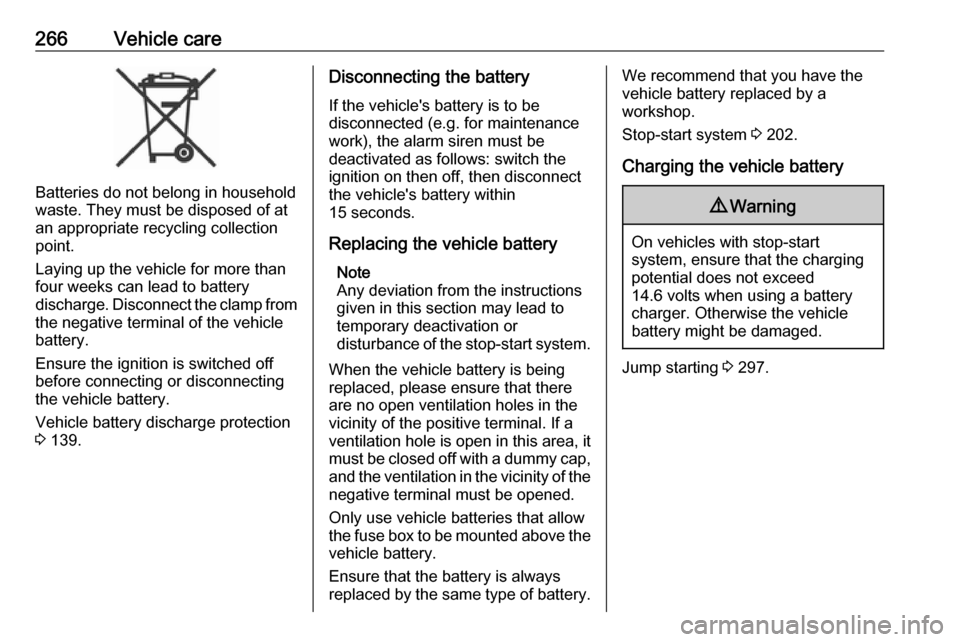
Batteries do not belong in household
waste. They must be disposed of at
an appropriate recycling collection
point.
Laying up the vehicle for more than
four weeks can lead to battery
discharge. Disconnect the clamp from the negative terminal of the vehicle
battery.
Ensure the ignition is switched off
before connecting or disconnecting
the vehicle battery.
Vehicle battery discharge protection
3 139.
Disconnecting the battery
If the vehicle's battery is to be
disconnected (e.g. for maintenance
work), the alarm siren must be
deactivated as follows: switch the
ignition on then off, then disconnect
the vehicle's battery within
15 seconds.
Replacing the vehicle battery Note
Any deviation from the instructions
given in this section may lead to
temporary deactivation or
disturbance of the stop-start system.
When the vehicle battery is being
replaced, please ensure that there
are no open ventilation holes in the
vicinity of the positive terminal. If a
ventilation hole is open in this area, it
must be closed off with a dummy cap, and the ventilation in the vicinity of the
negative terminal must be opened.
Only use vehicle batteries that allow the fuse box to be mounted above the
vehicle battery.
Ensure that the battery is always replaced by the same type of battery.We recommend that you have the
vehicle battery replaced by a
workshop.
Stop-start system 3 202.
Charging the vehicle battery9 Warning
On vehicles with stop-start
system, ensure that the charging potential does not exceed
14.6 volts when using a battery
charger. Otherwise the vehicle
battery might be damaged.
Jump starting 3 297.
Page 269 of 341

Vehicle care267Warning label
Meaning of symbols:● No sparks, naked flames or smoking.
● Always shield eyes. Explosive gases can cause blindness or
injury.
● Keep the vehicle battery out of reach of children.
● The vehicle battery contains sulphuric acid which could cause
blindness or serious burn
injuries.
● See the Owner's Manual for further information.
● Explosive gas may be present in the vicinity of the vehicle battery.
Diesel fuel system bleeding If the tank has been run dry, the diesel
fuel system must be bled. Switch on
the ignition three times for
15 seconds at a time. Then crank the
engine for a maximum of 40 seconds. Repeat this process after
no less than five seconds. If the
engine fails to start, seek the
assistance of a workshop.Wiper blade replacement
Lift the wiper arm until it stays in the
raised position, press button to
disengage the wiper blade and
remove.
Attach the wiper blade slightly angled
to the wiper arm and push until it
engages.
Lower wiper arm carefully.
Page 279 of 341
Vehicle care277Engine compartment fusebox
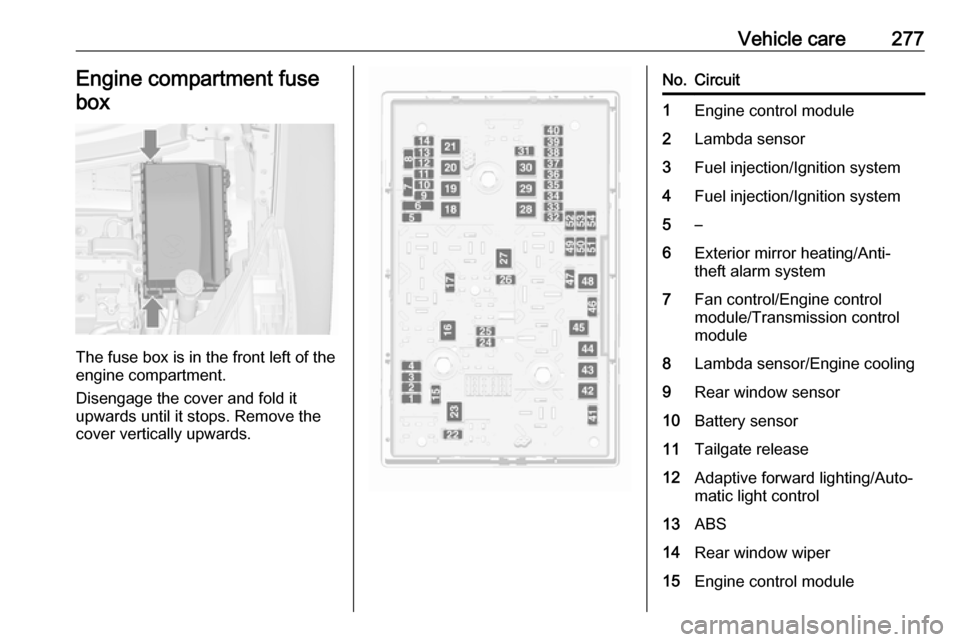
The fuse box is in the front left of the
engine compartment.
Disengage the cover and fold it
upwards until it stops. Remove the
cover vertically upwards.
No.Circuit1Engine control module2Lambda sensor3Fuel injection/Ignition system4Fuel injection/Ignition system5–6Exterior mirror heating/Anti-
theft alarm system7Fan control/Engine control
module/Transmission control
module8Lambda sensor/Engine cooling9Rear window sensor10Battery sensor11Tailgate release12Adaptive forward lighting/Auto‐
matic light control13ABS14Rear window wiper15Engine control module
Page 292 of 341
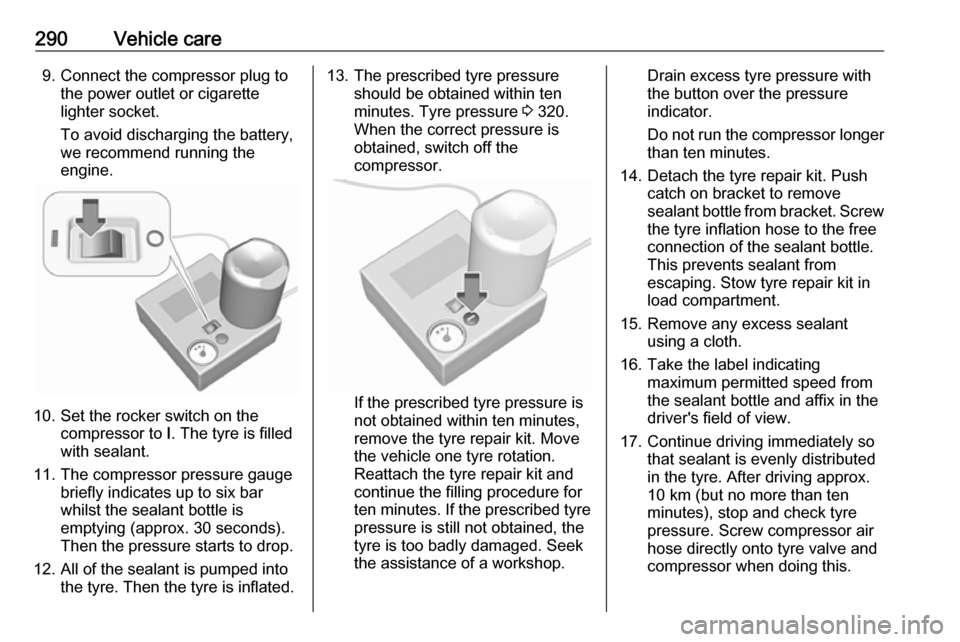
290Vehicle care9. Connect the compressor plug tothe power outlet or cigarette
lighter socket.
To avoid discharging the battery,
we recommend running the
engine.
10. Set the rocker switch on the compressor to I. The tyre is filled
with sealant.
11. The compressor pressure gauge briefly indicates up to six bar
whilst the sealant bottle is
emptying (approx. 30 seconds).
Then the pressure starts to drop.
12. All of the sealant is pumped into the tyre. Then the tyre is inflated.
13. The prescribed tyre pressureshould be obtained within ten
minutes. Tyre pressure 3 320.
When the correct pressure is
obtained, switch off the
compressor.
If the prescribed tyre pressure is
not obtained within ten minutes,
remove the tyre repair kit. Move
the vehicle one tyre rotation.
Reattach the tyre repair kit and
continue the filling procedure for
ten minutes. If the prescribed tyre
pressure is still not obtained, the
tyre is too badly damaged. Seek
the assistance of a workshop.
Drain excess tyre pressure with
the button over the pressure indicator.
Do not run the compressor longer
than ten minutes.
14. Detach the tyre repair kit. Push catch on bracket to remove
sealant bottle from bracket. Screw the tyre inflation hose to the free
connection of the sealant bottle.
This prevents sealant from
escaping. Stow tyre repair kit in
load compartment.
15. Remove any excess sealant using a cloth.
16. Take the label indicating maximum permitted speed from
the sealant bottle and affix in the
driver's field of view.
17. Continue driving immediately so that sealant is evenly distributed
in the tyre. After driving approx.
10 km (but no more than ten
minutes), stop and check tyre
pressure. Screw compressor air
hose directly onto tyre valve and
compressor when doing this.
Page 299 of 341
Vehicle care297Jump starting
Do not start with quick charger.
A vehicle with a discharged battery
can be started using jump leads and
the battery of another vehicle.
Do not start with quick charger.9 Warning
Be extremely careful when starting
with jump leads. Any deviation
from the following instructions can
lead to injuries or damage caused
by battery explosion or damage to the electrical systems of both
vehicles.
9 Warning
Avoid contact of the battery with
eyes, skin, fabrics and painted
surfaces. The fluid contains
sulphuric acid which can cause
injuries and damage in the event
of direct contact.
● Never expose the vehicle battery
to naked flames or sparks.
● A discharged vehicle battery can already freeze at a temperature
of 0 °C. Defrost the frozen vehicle
battery before connecting jump leads.
● Wear eye protection and protective clothing when
handling a battery.
● Use a booster vehicle battery with the same voltage (12 Volt).
Its capacity (Ah) must not be
much less than that of the
discharged vehicle battery.
● Use jump leads with insulated terminals and a cross section of
at least 16 mm 2
(25 mm 2
for
diesel engines).
● Do not disconnect the discharged
vehicle battery from the vehicle.
● Switch off all unnecessary electrical consumers.
● Do not lean over the battery during jump starting.
● Do not allow the terminals of one
lead to touch those of the other
lead.● The vehicles must not come into contact with each other during
the jump starting process.
● Apply the parking brake, transmission in neutral,
automatic transmission in P.
● Open the positive terminal protection cap of your vehicle in
the engine compartment and of
the booster vehicle battery.
Page 300 of 341

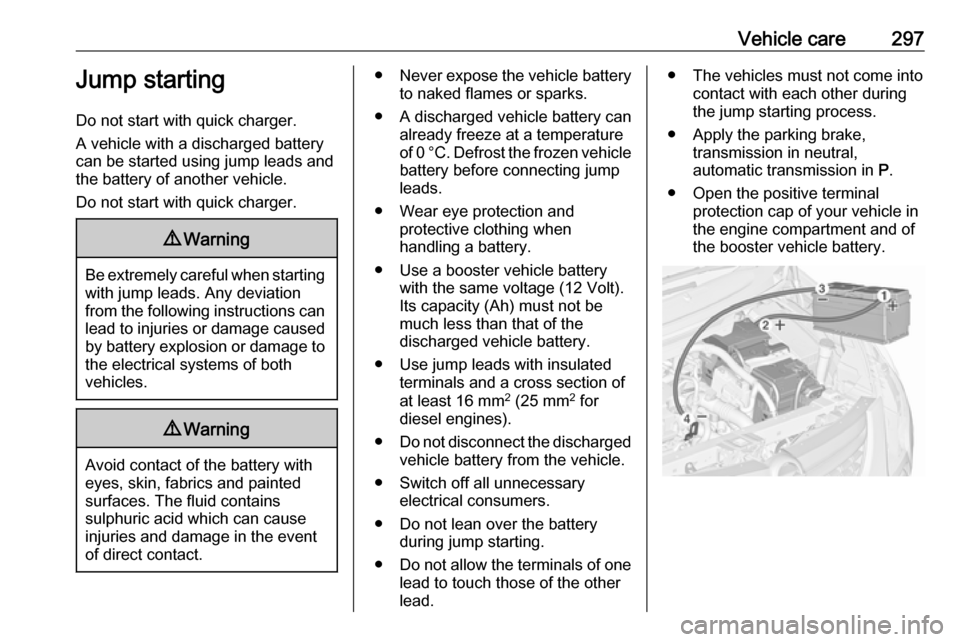
298Vehicle careLead connection order:1. Connect the red lead to the positive terminal of the booster
battery.
2. Connect the other end of the red lead to the positive terminal of the
discharged battery.
3. Connect the black lead to the negative terminal of the boosterbattery.
4. Connect the other end of the black
lead to a vehicle grounding point
of your vehicle in the engine
compartment.
Route the leads so that they cannot
catch on rotating parts in the engine
compartment.
To start the engine: 1. Start the engine of the vehicle providing the jump.
2. After five minutes, start the other engine. Start attempts should be
made for no longer than
15 seconds at an interval of one
minute.3. Allow both engines to idle for approx. three minutes with the
leads connected.
4. Switch on electrical consumers (e.g. headlights, heated rear
window) of the vehicle receiving
the jump start.
5. Reverse above sequence exactly when removing leads.Towing
Towing the vehicle
Disengage cap at bottom and removedownwards.
The towing eye is stowed with the
vehicle tools 3 282.
Page 334 of 341

332IndexAAccessories and vehicle modifications .......................... 260
Activating Bluetooth music .........161
Activating phone .........................184
Activating radio ........................... 154
Activating the navigation system 167
Activating USB audio ..................161
Activating USB movie .................163
Activating USB picture ................162
Active Emergency Braking .........234
Active head restraints ...................37
Adaptive cruise control .......117, 223
AdBlue ........................ 115, 207, 305
Adjustable air vents ...................196
Airbag and belt tensioners .........111
Airbag deactivation ..............59, 112
Airbag label................................... 54 Airbag system .............................. 54
Air conditioning regular operation ................................ 197
Air conditioning system .............. 191
Air intake .................................... 197
Air vents...................................... 196
Antilock brake system ................ 214
Antilock brake system (ABS) .....113
Anti-theft alarm system ................26
Anti-theft locking system .............. 26
Appearance care ........................300
Armrest ......................................... 42Armrest storage ........................... 69
Ashtrays ..................................... 102
Audio files ................................... 159
Automatic anti-dazzle ..................30
Automatic light control ...............131
Automatic locking ........................24
Automatic transmission .............210
Autostop ..................................... 202
Auto volume................................ 151
Auxiliary heater ........................... 196
B Basic operation ........................... 148
Battery discharge protection ......139
Battery voltage ........................... 123
Bicycle rack .................................. 70
BlueInjection ............................... 207
Bluetooth Bluetooth connection ..............181
Bluetooth music menu ............161
Connecting device ..................159
General information ................159
Pairing ..................................... 181
Phone ...................................... 184
Bluetooth connection ..................181
Bonnet ....................................... 261
Brake and clutch fluid .................305
Brake and clutch system ...........112
Brake assist ............................... 216
Brake fluid .................................. 265
Page 340 of 341

338Radio....................................... 154
USB ......................................... 159
USB Connecting device ..................159
General information ................159
USB audio menu .....................161
USB movie menu ....................163
USB picture menu ...................162
Using smartphone applications ..164
Using this manual ..........................3
V Vehicle battery ........................... 265
Vehicle checks............................ 261
Vehicle data ................................ 310
Vehicle data recording and privacy ..................................... 331
Vehicle detected ahead ..............117
Vehicle dimensions .................... 317
Vehicle Identification Number ....308
Vehicle jack ................................ 282
Vehicle messages .....................122
Vehicle personalisation .............124
Vehicle security ............................ 26
Vehicle specific data ......................3
Vehicle storage ........................... 260
Vehicle tools ............................... 282
Vehicle unlocking ........................... 6
Vehicle weight ........................... 316
Ventilation ................................... 190Voice guidance........................... 167
Voice recognition ........................180
Volume Auto volume ............................ 151
Maximum startup volume ........151
Mute function........................... 145
Ring tone volume ....................151
Setting the volume ..................145
Speed compensated volume ..151
Touch beep volume ................151
TP volume ............................... 151
Volume limitation at high
temperatures ........................... 145
Volume settings .......................... 151
W
Warning chimes .........................123
Warning lights ............................. 103
Warning triangle .......................... 92
Washer and wiper systems .........14
Washer fluid ............................... 265
Waveband selection ...................154
Wheel changing .........................291
Wheel covers ............................. 288
Wheels and tyres .......................282
Windows ....................................... 31
Windscreen................................... 31
Windscreen wiper/washer ...........98
Winter tyres ............................... 282
Wiper blade replacement ..........267