wheel OPEL ZAFIRA C 2018 Manual user
[x] Cancel search | Manufacturer: OPEL, Model Year: 2018, Model line: ZAFIRA C, Model: OPEL ZAFIRA C 2018Pages: 341, PDF Size: 9.99 MB
Page 124 of 341
122Instruments and controlsThe vehicle has a 7'' R 4.0 IntelliLink
display with touch-screen
functionality.
The Info displays can indicate: ● time 3 100
● outside temperature 3 100
● date 3 100
● Infotainment system, see description in the Infotainment
manual
● indication of rear view camera 3 240
● parking assist indication 3 235
● navigation, see description in the
Infotainment manual
● system messages
● settings for vehicle personalisation 3 124
R 4.0 IntelliLink
Selecting menus and settings
Menus and settings are accessed via the display.
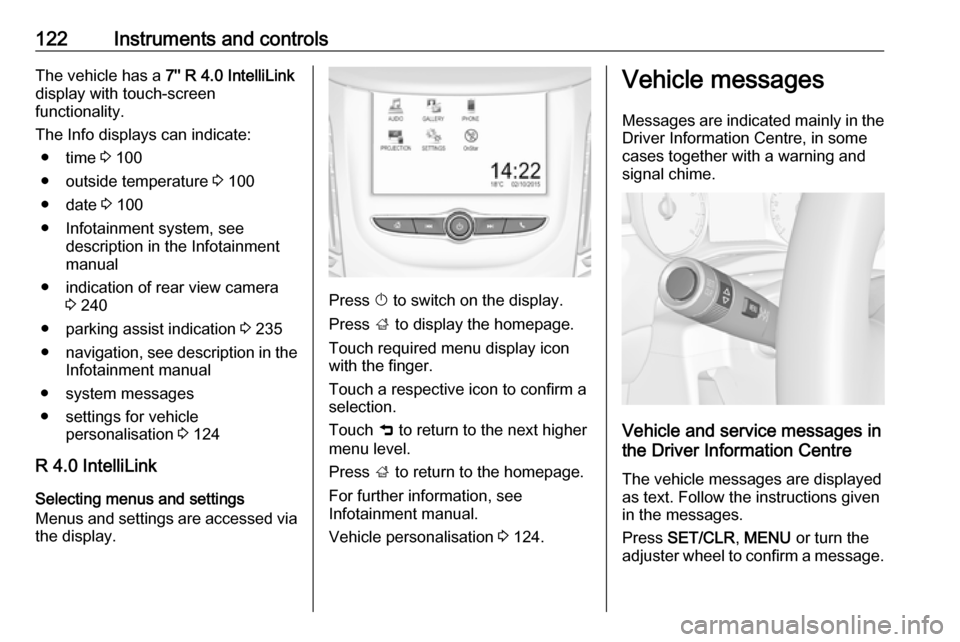
Press X to switch on the display.
Press ; to display the homepage.
Touch required menu display icon
with the finger.
Touch a respective icon to confirm a
selection.
Touch 9 to return to the next higher
menu level.
Press ; to return to the homepage.
For further information, see
Infotainment manual.
Vehicle personalisation 3 124.
Vehicle messages
Messages are indicated mainly in the Driver Information Centre, in some
cases together with a warning and
signal chime.
Vehicle and service messages in
the Driver Information Centre
The vehicle messages are displayed
as text. Follow the instructions given
in the messages.
Press SET/CLR , MENU or turn the
adjuster wheel to confirm a message.
Page 134 of 341
132LightingIt switches automatically to low beam
when:
● The camera or a sensor in the windscreen detects the lights of
oncoming or preceding vehicles.
● The vehicle speed drops below 20 km/h.
● It is foggy or snowy.
● Driving in urban areas.
If there are no restrictions detected,
the system switches back to high
beam.
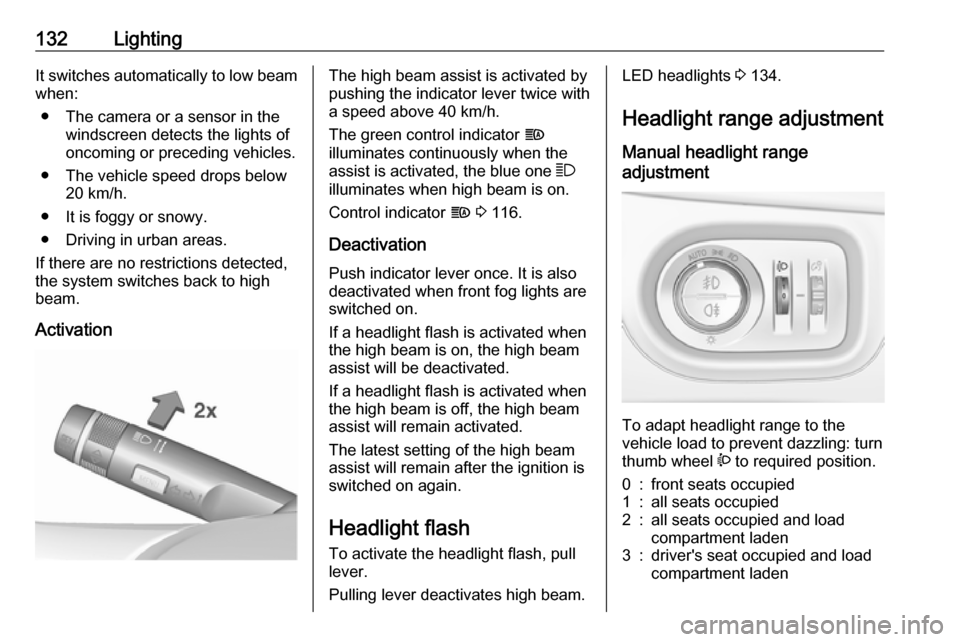
ActivationThe high beam assist is activated by
pushing the indicator lever twice with
a speed above 40 km/h.
The green control indicator f
illuminates continuously when the
assist is activated, the blue one 7
illuminates when high beam is on.
Control indicator f 3 116.
Deactivation
Push indicator lever once. It is also
deactivated when front fog lights are
switched on.
If a headlight flash is activated when the high beam is on, the high beam
assist will be deactivated.
If a headlight flash is activated when
the high beam is off, the high beam
assist will remain activated.
The latest setting of the high beam
assist will remain after the ignition is
switched on again.
Headlight flash
To activate the headlight flash, pull
lever.
Pulling lever deactivates high beam.LED headlights 3 134.
Headlight range adjustment Manual headlight range
adjustment
To adapt headlight range to the
vehicle load to prevent dazzling: turn
thumb wheel ? to required position.
0:front seats occupied1:all seats occupied2:all seats occupied and load
compartment laden3:driver's seat occupied and load
compartment laden
Page 137 of 341
Lighting135Fault in LED headlight system
When the system detects a failure in
the LED headlight system, f
illuminates and a warning is displayed in the Driver Information Centre.
Hazard warning flashers
Operated by pressing ¨.
In the event of an accident with airbag
deployment the hazard warning
flashers are activated automatically.
Turn and lane-change
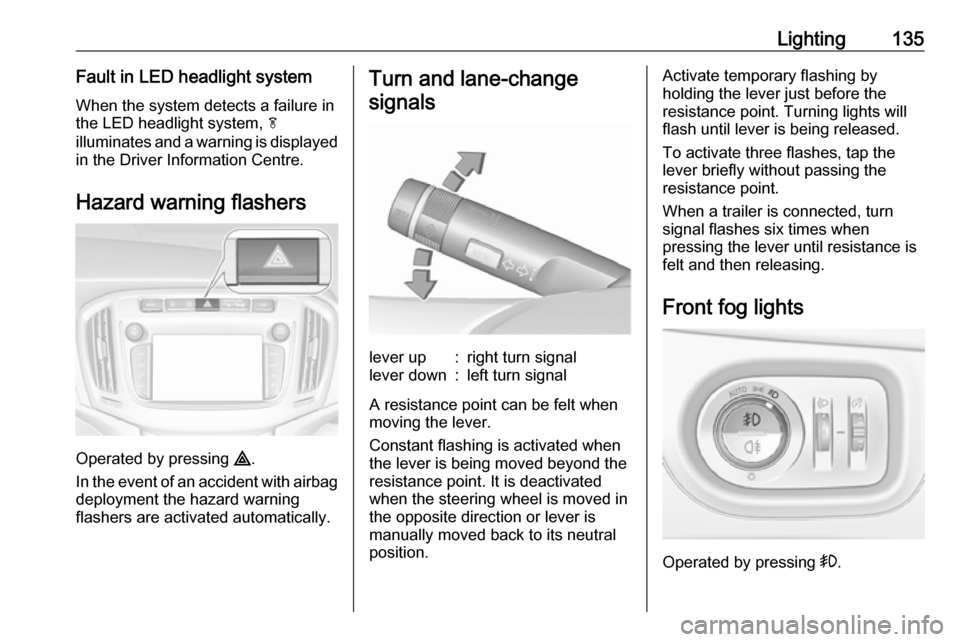
signalslever up:right turn signallever down:left turn signal
A resistance point can be felt when
moving the lever.
Constant flashing is activated when
the lever is being moved beyond the
resistance point. It is deactivated
when the steering wheel is moved in
the opposite direction or lever is
manually moved back to its neutral
position.
Activate temporary flashing by
holding the lever just before the
resistance point. Turning lights will
flash until lever is being released.
To activate three flashes, tap the
lever briefly without passing the
resistance point.
When a trailer is connected, turn
signal flashes six times when
pressing the lever until resistance is
felt and then releasing.
Front fog lights
Operated by pressing >.
Page 139 of 341
Lighting137Interior lighting
Instrument panel
illumination control
Brightness of the following lights can
be adjusted when the exterior lights
are on:
● instrument panel illumination
● Info-Display
● illuminated switches and operation elements
Turn thumb wheel A and hold until
the desired brightness is obtained.
Interior lights
During entry and exit of the vehicle,
the front and rear courtesy lights
automatically switch on and then off
after a delay.
Note
In the event of an accident with
airbag deployment the courtesy
lights are turned on automatically.
Front courtesy light
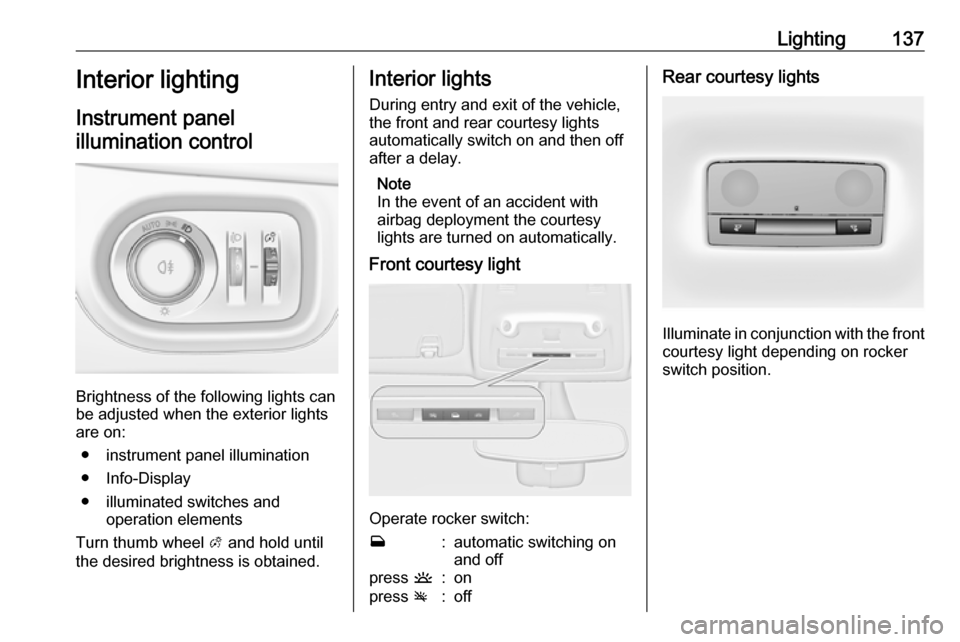
Operate rocker switch:
w:automatic switching on
and offpress u:onpress v:offRear courtesy lights
Illuminate in conjunction with the front
courtesy light depending on rocker
switch position.
Page 143 of 341
Infotainment system141Optionally, the Infotainment system
can be operated using the touch
screen and buttons on the control
panel, the controls on the steering wheel, or - if provided by your mobile
phone - via speech recognition.
The well-thought-out design of the
control elements, the touch screen
and the clear displays enable you to
control the system easily and
intuitively.
Note
This manual describes all options
and features available for the
various Infotainment systems.
Certain descriptions, including those
for display and menu functions, may
not apply to your vehicle due to
model variant, country
specifications, special equipment or
accessories.Important information on
operation and traffic safety9 Warning
The Infotainment system must be
used so that the vehicle can be
driven safely at all times. If in
doubt, stop the vehicle and
operate the Infotainment system
while the vehicle is stationary.
9 Warning
In some areas one-way streets
and other roads and entrances
(e.g. pedestrian zones) that you
are not allowed to turn into are not marked on the map. In such areas
the Infotainment system may
issue a warning that must be
accepted. Here you must pay
particular attention to one-way
streets, roads and entrances that
you are not allowed to drive into.
Radio reception
Radio reception may be disrupted by
static, noise, distortion or loss of
reception due to:
● changes in distance from the transmitter
● multipath reception due to reflection
● shadowing
Theft-deterrent feature
The Infotainment system is equipped
with an electronic security system for
the purpose of theft deterrence.
The Infotainment system therefore
functions only in your vehicle and is
worthless to a thief.
Page 146 of 341
144Infotainment systemSteering wheel controls
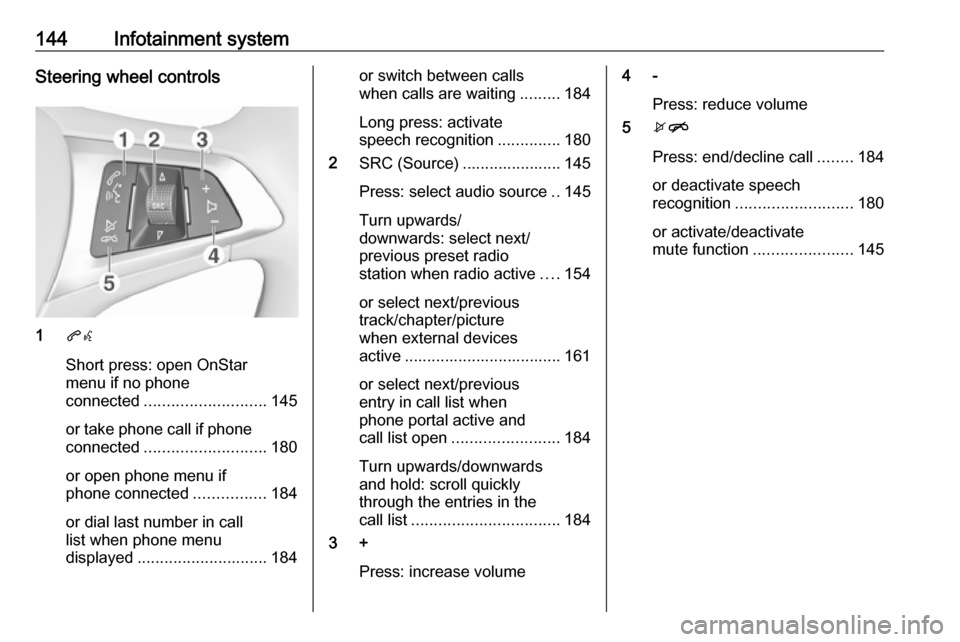
1qw
Short press: open OnStar
menu if no phone
connected ........................... 145
or take phone call if phone connected ........................... 180
or open phone menu if
phone connected ................184
or dial last number in call
list when phone menu
displayed ............................. 184
or switch between calls
when calls are waiting .........184
Long press: activate
speech recognition ..............180
2 SRC (Source) ...................... 145
Press: select audio source ..145
Turn upwards/
downwards: select next/
previous preset radio
station when radio active ....154
or select next/previous
track/chapter/picture
when external devices
active ................................... 161
or select next/previous
entry in call list when
phone portal active and
call list open ........................ 184
Turn upwards/downwards
and hold: scroll quickly
through the entries in the
call list ................................. 184
3 +
Press: increase volume4 -Press: reduce volume
5 xn
Press: end/decline call ........184
or deactivate speech
recognition .......................... 180
or activate/deactivate
mute function ...................... 145
Page 147 of 341

Infotainment system145Usage
Control elements
The Infotainment system is operated
via function buttons, a touch screen
and menus that are shown on the
display.
Inputs are made optionally via: ● the central control unit in the control panel 3 142
● the touch screen 3 148
● audio controls on the steering wheel 3 142
● the speech recognition 3 180
Switching the Infotainment
system on or off
Press X. After switching on, the last
selected Infotainment source
becomes active.
Automatic switch-off
If the Infotainment system has been
switched on pressing X while the
ignition is switched off, it will switch off
again automatically 10 minutes after
the last user input.Setting the volume
Turn X. The current setting is shown
on the display.
When the Infotainment system is
switched on, the last selected volume is set, provided that it is lower than themaximum start-up volume. For a
detailed description 3 151.
Speed compensated volume
When the speed compensated
volume is activated 3 151, the
volume is adapted automatically to
make up for the road and wind noise
as you drive.
Mute
Press X to mute the Infotainment
system.
To cancel the mute function: press
X again. The last selected volume is
set again.
Modes of operationPress ; to display the home menu.
Note
For a detailed description of menu
operation via touch screen 3 148.
Audio
Select Audio to open the main menu
of the last selected audio mode.
Select Source on the screen to
display the interaction selector bar.
Page 182 of 341

180Infotainment systemSpeech recognitionGeneral information
The voice pass-thru application of the
Infotainment system allows access to the speech recognition commands on your smartphone. See your
smartphone manufacturer's
operating instructions to find out
whether your smartphone supports this feature.
In order to use the voice pass-thru
application, the smartphone must be
connected to the Infotainment system
via USB cable 3 159 or via Bluetooth
3 181.
Usage
Activating speech recognition
Press and hold g on the control panel
or 7w on the steering wheel to start a
speech recognition session. A voice
command message is displayed on
the screen.As soon as a beep is heard, you can
say a command. For information on
the commands supported, see the
operating instructions for your
smartphone.
Adjusting the volume of voice
prompts
Turn m on the control panel or press
+ / - on the right side of the steering
wheel to increase or decrease the
volume of voice prompts.
Deactivating speech recognition
Press xn on the steering wheel.
The voice command message
disappears and the speech
recognition session is ended.Phone
General information
The Phone portal provides you with
the possibility of having mobile phone
conversations via a vehicle
microphone and the vehicle
loudspeakers as well as operating the most important mobile phone
functions via the Infotainment system
in the vehicle. To be able to use the
Phone portal, the mobile phone must
be connected to the Infotainment
system via Bluetooth.
Not all Phone functions are supported by every mobile phone. The usable
phone functions depend on the
relevant mobile phone and network
provider. You can find further
information on this in the operating
instructions for your mobile phone, or you can enquire about them with yournetwork provider.
Page 186 of 341
184Infotainment systemon all mobile phone networks; it ispossible that they cannot be made
when certain network services
and/or telephone functions are
active. You can enquire about this
with the local network operators.
The emergency call number can
differ depending on the region and country. Please enquire
beforehand about the correct
emergency call number for the
relevant region.
Making an emergency call
Dial the emergency call number (e.g.
112 ).
The telephone connection to the
emergency call centre is set up.
Answer when the service personnel
questions you about the emergency.
9 Warning
Do not end the call until you are
requested to do so by the
emergency call centre.
Operation
As soon as a connection via
Bluetooth has been set up between
your mobile phone and the
Infotainment system, you can operate many functions of your mobile phone
via the Infotainment system.
Note
In the hands-free mode, mobile
phone operation is still possible, e.g.
taking a call or adjusting the volume.
After setup of a connection between
the mobile phone and the
Infotainment system, mobile phone data is transmitted to the Infotainment
system. This can take some time
depending on the mobile phone and
the amount of data to be transferred.
During this period, operation of the
mobile phone via the Infotainment
system is possible only to a limited extent.
Note
Not every mobile phone supports all functions of the phone portal.
Therefore, deviations from the range
of functions described below are
possible.Phone main menu
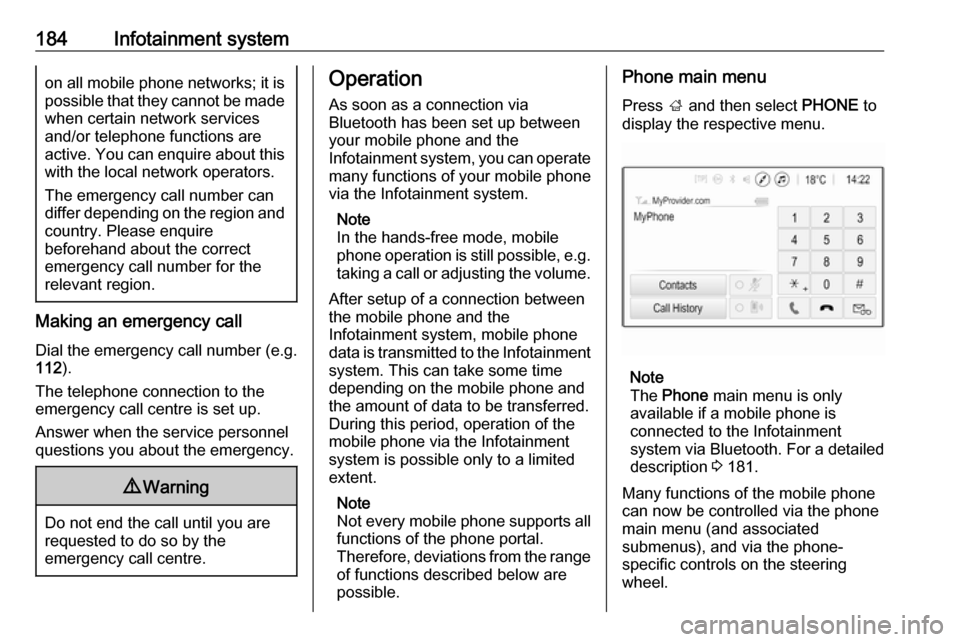
Press ; and then select PHONE to
display the respective menu.
Note
The Phone main menu is only
available if a mobile phone is connected to the Infotainment
system via Bluetooth. For a detailed
description 3 181.
Many functions of the mobile phone can now be controlled via the phone
main menu (and associated
submenus), and via the phone-
specific controls on the steering
wheel.
Page 187 of 341
Infotainment system185Initiating a phone callEntering a phone number
Press ; and then select Phone.
Enter a telephone number using the
keypad in the phone main menu.
To delete one or more entered
characters, touch or touch and hold
⇦.
Touch v on the screen or press qw
on the steering wheel to start dialling.
Using the phone book Note
When pairing a mobile phone with
the Infotainment system via
Bluetooth, the phone book of the
mobile phone is downloaded
automatically 3 181.
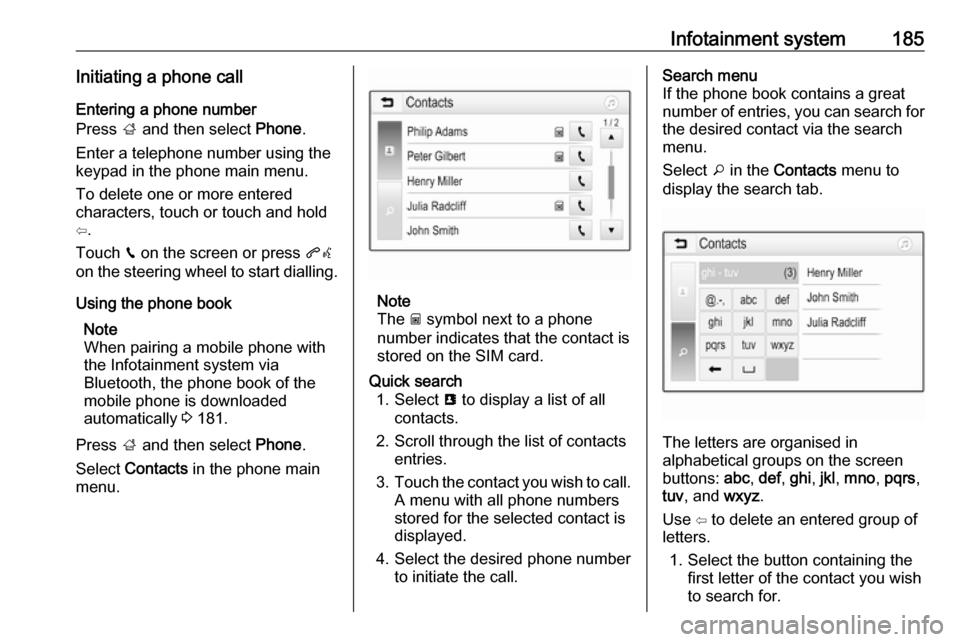
Press ; and then select Phone.
Select Contacts in the phone main
menu.
Note
The g symbol next to a phone
number indicates that the contact is
stored on the SIM card.
Quick search 1. Select u to display a list of all
contacts.
2. Scroll through the list of contacts entries.
3. Touch the contact you wish to call.
A menu with all phone numbers
stored for the selected contact is
displayed.
4. Select the desired phone number to initiate the call.Search menu
If the phone book contains a great
number of entries, you can search for
the desired contact via the search
menu.
Select o in the Contacts menu to
display the search tab.
The letters are organised in
alphabetical groups on the screen
buttons: abc, def , ghi , jkl , mno , pqrs ,
tuv , and wxyz.
Use ⇦ to delete an entered group of
letters.
1. Select the button containing the first letter of the contact you wish
to search for.