park assist OPEL ZAFIRA C 2018 User Guide
[x] Cancel search | Manufacturer: OPEL, Model Year: 2018, Model line: ZAFIRA C, Model: OPEL ZAFIRA C 2018Pages: 341, PDF Size: 9.99 MB
Page 132 of 341

130LightingLightingExterior lighting.......................... 130
Light switch .............................. 130
Automatic light control .............131
High beam ............................... 131
High beam assist .....................131
Headlight flash ......................... 132
Headlight range adjustment ....132
Headlights when driving abroad .................................... 133
Daytime running lights .............133
LED headlights ........................ 134
Hazard warning flashers ..........135
Turn and lane-change signals . 135
Front fog lights ......................... 135
Rear fog light ........................... 136
Parking lights ........................... 136
Reversing lights .......................136
Misted light covers ...................136
Interior lighting ........................... 137
Instrument panel illumination control ..................................... 137
Interior lights ............................ 137
Reading lights .......................... 138
Sunvisor lights ......................... 138Lighting features ........................138
Centre console lighting ............138
Entry lighting ............................ 138
Exit lighting .............................. 138
Battery discharge protection ....139Exterior lighting
Light switch
Turn light switch:
AUTO:automatic light control
switches automatically
between daytime running
light and headlight8:sidelights9:headlights
When switching on the ignition,
automatic light control is active.
Control indicator 8 3 116.
Page 136 of 341

134LightingLED headlights
LED lighting system includes: ● LED headlights for low and high beam
● cornering lights
● town light
● high beam assist
● reverse parking function
● eco mode
● dynamic automatic headlight levelling
LED headlights for low and
highbeam
LED headlights for low and high beam
ensure better visibility under all
conditions.
Operation is the same as for halogen headlights.
Light switch 3 130 , high beam 3 131,
headlight flash 3 132, headlights
when driving abroad 3 133.
Automatic light control 3 131.Cornering lights
On tight bends or when turning off,
depending on the steering angle or
the indicator light signal, an additional left or right reflector is switched on
which illuminates the road in the
direction of travel. It is activated up to
a speed of 70 km/h.
Town light
Activated automatically at a speed upto approx. 55 km/h. In situations with
exterior ambient light both cornering lights are switched on with reduced
intensity. The light is wide and
symmetrical.
High beam assist
3 131
Reverse parking function
To assist driver's orientation when
parking, both corner lights and
reversing light illuminate when
headlights are on and reverse gear is
engaged. They remain illuminated for a short time after disengaging reverse
gear or until driving faster than
7 km/h in a forward gear.
Eco mode If the vehicle stops, e. g. due to traffic lights, an energy saving mode forheadlights is activated.
Dynamic automatic headlight
levelling
To prevent oncoming traffic frombeing dazzled, headlight levelling is
automatically adjusted based on
vehicle inclination information.
Headlights when driving abroad 3 133.
Page 200 of 341

198Driving and operatingDriving and
operatingDriving hints ............................... 199
Control of the vehicle ...............199
Steering ................................... 199
Starting and operating ...............199
New vehicle running-in ............199
Ignition switch positions ...........199
Retained power off ..................200
Starting the engine ..................200
Overrun cut-off ........................ 201
Stop-start system ....................202
Parking .................................... 204
Engine exhaust .......................... 205
Diesel particle filter ..................205
Catalytic converter ...................206
AdBlue ..................................... 207
Automatic transmission ..............210
Transmission display ...............210
Selector lever .......................... 210
Manual mode ........................... 211
Electronic driving programmes 211
Fault ........................................ 212
Interruption of power supply ....212
Manual transmission ..................213Brakes........................................ 214
Antilock brake system .............214
Parking brake .......................... 214
Brake assist ............................. 216
Hill start assist ......................... 216
Ride control systems .................217
Traction Control system ..........217
Electronic Stability Control ......218
Interactive driving system ........219
Driver assistance systems .........220
Cruise control .......................... 220
Speed limiter ........................... 222
Adaptive cruise control ............223
Forward collision alert .............230
Following distance indication ...233
Active Emergency Braking ......234
Parking assist .......................... 235
Side blind spot alert .................238
Rear view camera ...................240
Traffic sign assistant ................241
Lane departure warning ..........245
Fuel ............................................ 246
Fuel for petrol engines .............246
Fuel for diesel engines ............247
Fuel for natural gas operation . 248
Fuel for liquid gas operation ....248
Refuelling ................................ 248
Fuel consumption - CO 2-
Emissions ............................... 253Trailer hitch................................ 254
General information .................254
Driving characteristics and towing tips .............................. 255
Trailer towing ........................... 255
Towing equipment ...................256
Trailer stability assist ...............258
Page 201 of 341

Driving and operating199Driving hints
Control of the vehicle
Never coast with engine not
running
Many systems will not function in this
situation ( e.g. brake servo unit, power
steering). Driving in this manner is a danger to yourself and others. All
systems function during an Autostop.
Stop-start system 3 202.
Idle boost
If charging of the vehicle battery is
required due to battery condition, the
power output of the generator must
be increased. This will be achieved by an idle boost which may be audible.
A message appears in the Driver
Information Centre.
Pedals
To ensure the pedal travel is
uninhibited, there must be no mats in the area of the pedals.Use only floor mats which fit properly
and are fixed by the retainers on the
driver's side.
Steering If power steering assist is lost
because the engine stops or due to a
system malfunction, the vehicle can
be steered but may require increased
effort.
Control indicator c 3 114.Starting and operating
New vehicle running-in
Do not brake unnecessarily hard for
the first few journeys.
During the first drive, smoke may
occur because of wax and oil
evaporating off the exhaust system.
Park the vehicle in the open for a
while after the first drive and avoid
inhaling the fumes.
During the running-in period, fuel and engine oil consumption may be
higher and the cleaning process of
the diesel particle filter may take
place more often. Autostop may be
inhibited to allow for charging of the vehicle battery.
Diesel particle filter 3 205.
Ignition switch positions Turn key:
Page 211 of 341

Driving and operating2091. Continuously drive the vehiclefor 10 minutes making sure that
vehicle speed is always higher
than 20 km/h.
2. If AdBlue refill is detected successfully, AdBlue supply-
driven limitations will disappear.
If AdBlue refill is still not detected,
seek the assistance of a workshop.
If AdBlue must be refilled at
temperatures below -11 °C, the
refilling of AdBlue may not be
detected by the system. In this
event, park the vehicle in a space
with a higher ambient temperature
until AdBlue is liquefied.
Note
When unscrewing the protective cap
from the filler neck, ammonia fumes
may emerge. Do not inhale as the fumes have a pungent smell. The
fumes are not harmful by inhalation.
The AdBlue tank should be filled
completely. This must be done if the
warning message regarding
prevention of an engine restart is
already displayed.The vehicle must be parked on a level surface.
The filler neck for AdBlue is located
behind the fuel filler flap, which is located at right rear side of the
vehicle.
The fuel filler flap can only be opened
if the vehicle is unlocked.
1. Remove key from ignition switch.
2. Close all doors to avoid ammonia fumes entering the interior of the
vehicle.
3. Release the fuel filler flap by pushing the flap 3 248.
4. Unscrew protective cap from the
filler neck.
5. Open AdBlue canister.
6. Mount one end of the hose on the
canister and screw the other end
on the filler neck.
7. Lift the canister until it is empty, or
until the flow from the canister has stopped. This can take up to five
minutes.
8. Place the canister on the ground to empty the hose, wait 15
seconds.
9. Unscrew the hose from the filler neck.
10. Mount the protective cap and turn
clockwise until it engages.
Note
Dispose of AdBlue canister
according to environmental
requirements. Hose can be reused
after flushing with clear water before
AdBlue dries out.
Page 216 of 341
214Driving and operatingBrakes
The brake system comprises two
independent brake circuits.
If a brake circuit fails, the vehicle can
still be braked using the other brake
circuit. However, braking effect is
achieved only when the brake pedal
is depressed firmly. Considerably
more force is needed for this. The
braking distance is extended. Seek the assistance of a workshop before
continuing your journey.
When the engine is not running, the
support of the brake servo unit
disappears once the brake pedal has been depressed once or twice.
Braking effect is not reduced, but
braking requires significantly greater
force. It is especially important to bear this in mind when being towed.
Control indicator R 3 112.
Antilock brake system
Antilock brake system (ABS)
prevents the wheels from locking.ABS starts to regulate brake pressure as soon as a wheel shows a tendency to lock. The vehicle remains
steerable, even during hard braking.
ABS control is made apparent
through a pulse in the brake pedal
and the noise of the regulation
process.
For optimum braking, keep the brake
pedal fully depressed throughout the
braking process, despite the fact that the pedal is pulsating. Do not reduce
the pressure on the pedal.
After starting off the system performs
a self-test which may be audible.
Control indicator u 3 113.
Adaptive brake light During full braking, all three brake
lights flash for the duration of ABS
control.
Fault9 Warning
If there is a fault in the ABS, the
wheels may be liable to lock due
to braking that is heavier than
normal. The advantages of ABS are no longer available. During
hard braking, the vehicle can no longer be steered and may
swerve.
Have the cause of the fault remedied
by a workshop.
Parking brake
9 Warning
Before leaving the vehicle, check
parking brake status. Control
indicator R (manual parking
brake) or m (electrical parking
brake) must illuminate constantly.
Page 218 of 341

216Driving and operatingVehicles with automatic transmission:Engaging D and then depressing the
accelerator pedal releases the
electric parking brake automatically.
This is not possible when the switch
m is pulled at the same time.
Dynamic braking when vehicle is
moving
When the vehicle is moving and the
switch m is kept pulled, the electric
parking brake system will decelerate the vehicle, but will not apply
statically.
As soon as the switch m is released,
dynamic braking will be stopped.
Functionality check
When the vehicle is not moving, the
electric parking brake might be
applied automatically. This is done to
check the system.
Fault
Failure mode of electric parking brake
is indicated by a control indicator j
and by a vehicle message which is
displayed in the Driver Information
Centre. Vehicle messages 3 122.Apply electric parking brake: pull and
hold switch m for more than five
seconds. If control indicator m
illuminates, electric parking brake is
applied.
Release electric parking brake: push
and hold the switch m for more than
two seconds. If control indicator m
extinguishes, electric parking brake is
released.
Control indicator m flashes: electric
parking brake is not fully applied or
released. When continuously
flashing, release electric parking
brake and retry applying.
Brake assist If brake pedal is depressed quickly
and forcefully, maximum brake force
is automatically applied.
Operation of brake assist might
become apparent by a pulse in the
brake pedal and a greater resistance
when depressing the brake pedal.Maintain steady pressure on the
brake pedal as long as full braking is
required. Maximum brake force is
automatically reduced when brake
pedal is released.
Hill start assist The system helps prevent unintendedmovement when driving away on
inclines.
When releasing the brake pedal after
stopping on an incline, the brakes
remain on for a further two seconds.
The brakes release automatically as
soon as the vehicle begins to
accelerate or the two seconds holding
time is over.
The hill start assist is not active during
an Autostop.
Page 237 of 341

Driving and operating2359Warning
Active emergency braking is not
designed to apply strong
autonomous braking or to avoid automatically a collision. It is
designed to reduce the vehicle
speed before collision. It may not
react on stopped vehicles,
pedestrians or animals. After a
sudden lane change, the system
needs a certain time to detect the
next preceding vehicle.
The complete attention of the
driver is always required while
driving. The driver shall always be ready to take action and apply the brakes and steer to avoid
collisions. The system is designed
to work with all occupants wearing their seat belts.
System limitations
The active emergency braking has
limited or no function during rain,
snow or heavy dirt, as the radar
sensor can be covered by a water
film, dust, ice or snow. In case of
sensor blockage, clean the sensor
cover.
In some seldom cases the active
emergency braking system may
provide a short automatic braking in
situations that seem to be
unnecessary, for instance due to
traffic signs in a curve or due to
vehicles in another lane. This is
acceptable operation, the vehicle
does not need service. Firmly apply
the accelerator pedal to override the
automatic braking.
Settings
Settings can be changed in the
vehicle personalisation menu in the
Info-Display.
Select the relevant setting in
Settings in the Info-Display.
Vehicle personalisation 3 124.
Fault
In the event of a system service
requirement, a message is displayed
in the Driver Information Centre.If the system does not work as it
should, vehicle messages are
displayed in the Driver Information
Centre.
Vehicle messages 3 122.
Parking assist
Front-rear parking assist9 Warning
The driver bears full responsibility
for the parking manoeuvre.
Always check the surrounding
area when driving backwards or
forwards while using parking
assist system.
The front-rear parking assist
measures the distance between the vehicle and obstacles in front of and
behind the vehicle. It informs and
warns the driver by giving acoustic
signals and display indication.
It uses two different acoustic warning
signals for the front and rear
monitoring areas, each with a
different tone frequency. The signal
Page 238 of 341
236Driving and operatingfor front obstacles sounds via the
front speakers, for rear obstacles it
sounds via the rear speakers.
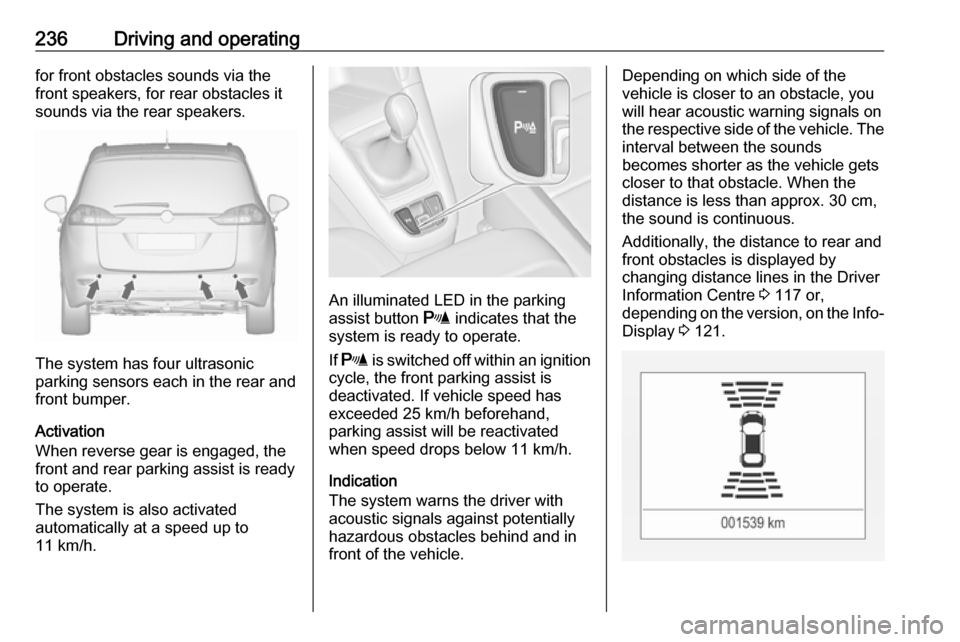
The system has four ultrasonic
parking sensors each in the rear and
front bumper.
Activation
When reverse gear is engaged, the
front and rear parking assist is ready
to operate.
The system is also activated
automatically at a speed up to
11 km/h.
An illuminated LED in the parking
assist button r indicates that the
system is ready to operate.
If r is switched off within an ignition
cycle, the front parking assist is
deactivated. If vehicle speed has exceeded 25 km/h beforehand,
parking assist will be reactivated when speed drops below 11 km/h.
Indication
The system warns the driver with
acoustic signals against potentially
hazardous obstacles behind and in
front of the vehicle.
Depending on which side of the
vehicle is closer to an obstacle, you
will hear acoustic warning signals on
the respective side of the vehicle. The
interval between the sounds
becomes shorter as the vehicle gets
closer to that obstacle. When the
distance is less than approx. 30 cm,
the sound is continuous.
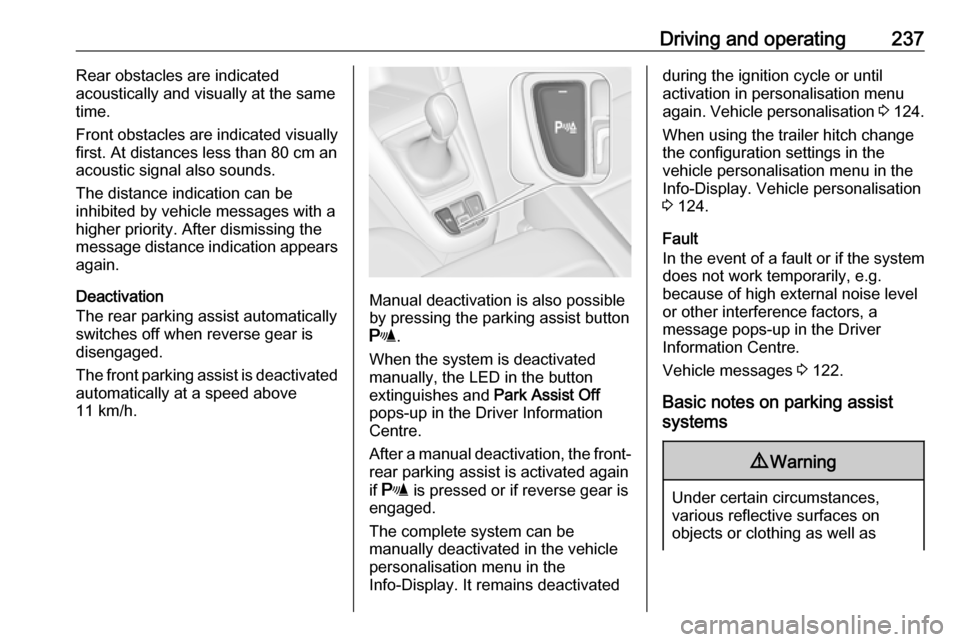
Additionally, the distance to rear and
front obstacles is displayed by
changing distance lines in the Driver
Information Centre 3 117 or,
depending on the version, on the Info- Display 3 121.
Page 239 of 341
Driving and operating237Rear obstacles are indicated
acoustically and visually at the same time.
Front obstacles are indicated visually
first. At distances less than 80 cm an
acoustic signal also sounds.
The distance indication can be
inhibited by vehicle messages with a higher priority. After dismissing themessage distance indication appears
again.
Deactivation
The rear parking assist automatically
switches off when reverse gear is
disengaged.
The front parking assist is deactivated
automatically at a speed above
11 km/h.
Manual deactivation is also possible
by pressing the parking assist button
r .
When the system is deactivated
manually, the LED in the button
extinguishes and Park Assist Off
pops-up in the Driver Information
Centre.
After a manual deactivation, the front- rear parking assist is activated again
if r is pressed or if reverse gear is
engaged.
The complete system can be
manually deactivated in the vehicle
personalisation menu in the
Info-Display. It remains deactivated
during the ignition cycle or until
activation in personalisation menu
again. Vehicle personalisation 3 124.
When using the trailer hitch change
the configuration settings in the
vehicle personalisation menu in the
Info-Display. Vehicle personalisation
3 124.
Fault
In the event of a fault or if the system
does not work temporarily, e.g.
because of high external noise level
or other interference factors, a
message pops-up in the Driver
Information Centre.
Vehicle messages 3 122.
Basic notes on parking assist systems9 Warning
Under certain circumstances,
various reflective surfaces on
objects or clothing as well as