tailgate OPEL ZAFIRA TOURER 2016 User Guide
[x] Cancel search | Manufacturer: OPEL, Model Year: 2016, Model line: ZAFIRA TOURER, Model: OPEL ZAFIRA TOURER 2016Pages: 301, PDF Size: 9.16 MB
Page 88 of 301
86Storage
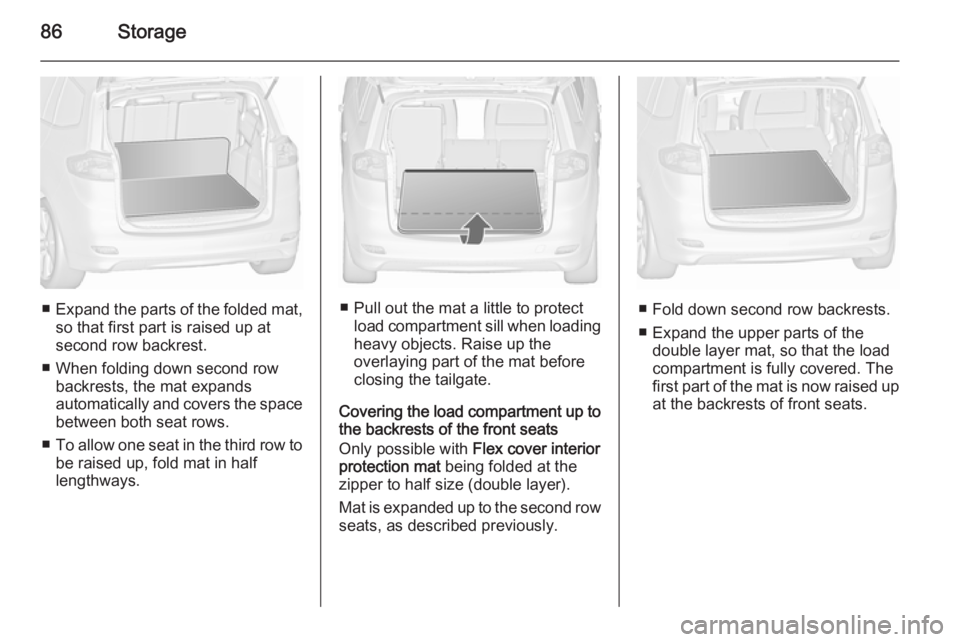
■Expand the parts of the folded mat,
so that first part is raised up at
second row backrest.
■ When folding down second row backrests, the mat expands
automatically and covers the space between both seat rows.
■ To allow one seat in the third row to
be raised up, fold mat in half
lengthways.■ Pull out the mat a little to protect load compartment sill when loadingheavy objects. Raise up the
overlaying part of the mat before
closing the tailgate.
Covering the load compartment up to
the backrests of the front seats
Only possible with Flex cover interior
protection mat being folded at the
zipper to half size (double layer).
Mat is expanded up to the second row seats, as described previously.■ Fold down second row backrests.
■ Expand the upper parts of the double layer mat, so that the load
compartment is fully covered. The
first part of the mat is now raised up
at the backrests of front seats.
Page 89 of 301
Storage87
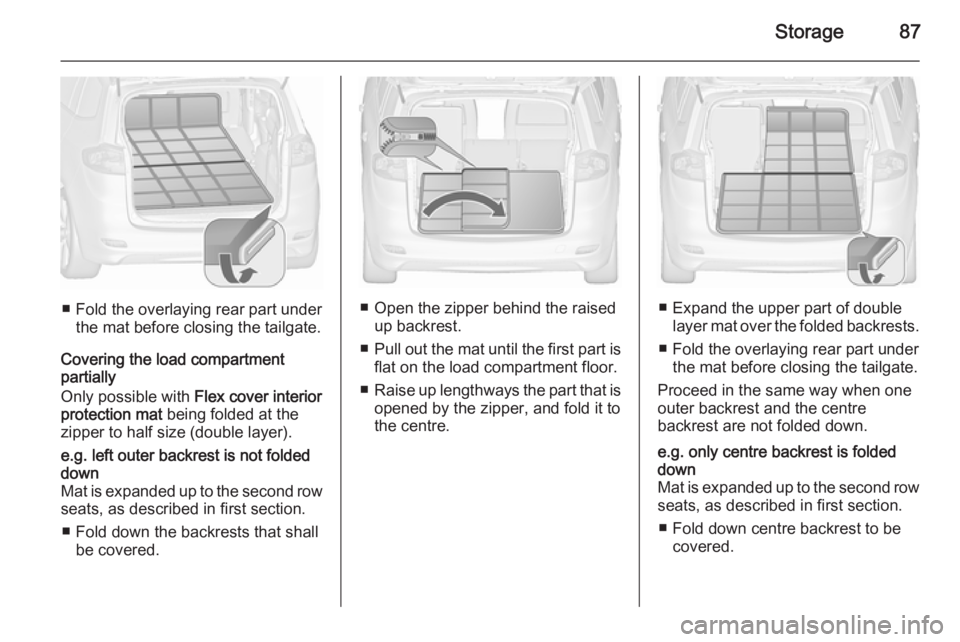
■ Fold the overlaying rear part underthe mat before closing the tailgate.
Covering the load compartment
partially
Only possible with Flex cover interior
protection mat being folded at the
zipper to half size (double layer).
e.g. left outer backrest is not folded
down
Mat is expanded up to the second row
seats, as described in first section.
■ Fold down the backrests that shall be covered.
■ Open the zipper behind the raised up backrest.
■ Pull out the mat until the first part is
flat on the load compartment floor.
■ Raise up lengthways the part that is
opened by the zipper, and fold it to
the centre.■ Expand the upper part of double layer mat over the folded backrests.
■ Fold the overlaying rear part under the mat before closing the tailgate.
Proceed in the same way when one
outer backrest and the centre
backrest are not folded down.
e.g. only centre backrest is folded
down
Mat is expanded up to the second row seats, as described in first section.
■ Fold down centre backrest to be covered.
Page 90 of 301
88Storage
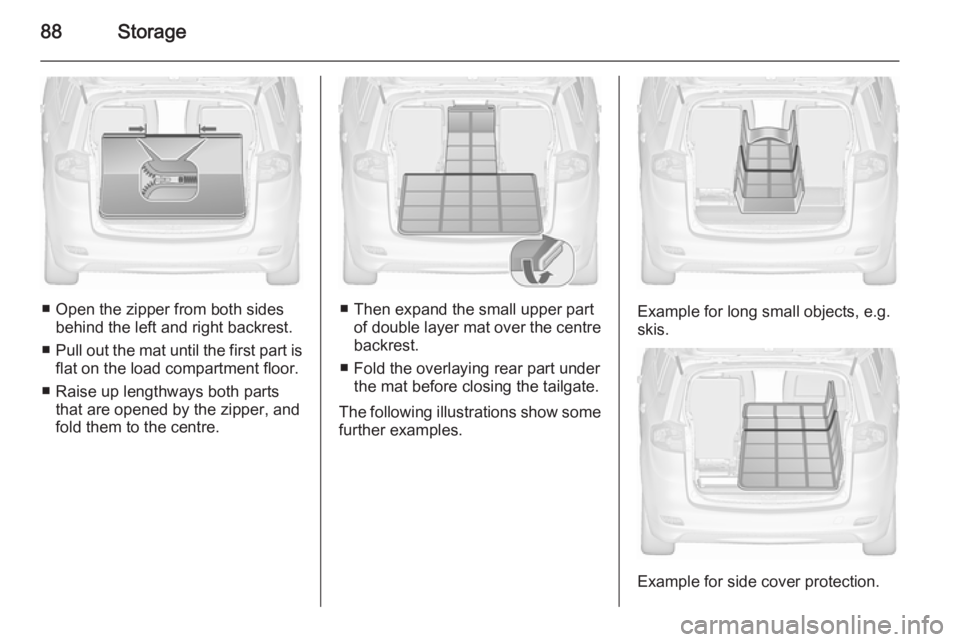
■ Open the zipper from both sidesbehind the left and right backrest.
■ Pull out the mat until the first part is
flat on the load compartment floor.
■ Raise up lengthways both parts that are opened by the zipper, and
fold them to the centre.■ Then expand the small upper part of double layer mat over the centre
backrest.
■ Fold the overlaying rear part under the mat before closing the tailgate.
The following illustrations show some further examples.Example for long small objects, e.g.
skis.
Example for side cover protection.
Page 93 of 301
Storage91
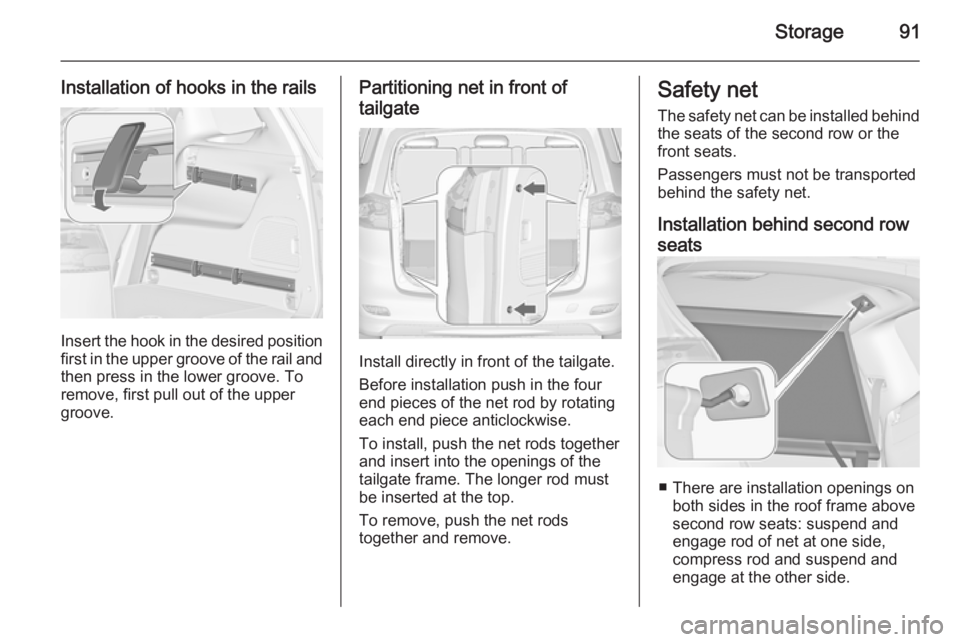
Installation of hooks in the rails
Insert the hook in the desired positionfirst in the upper groove of the rail and
then press in the lower groove. To
remove, first pull out of the upper
groove.
Partitioning net in front of
tailgate
Install directly in front of the tailgate.
Before installation push in the four
end pieces of the net rod by rotating
each end piece anticlockwise.
To install, push the net rods together
and insert into the openings of the
tailgate frame. The longer rod must
be inserted at the top.
To remove, push the net rods
together and remove.
Safety net
The safety net can be installed behind the seats of the second row or the
front seats.
Passengers must not be transported
behind the safety net.
Installation behind second row
seats
■ There are installation openings on both sides in the roof frame above
second row seats: suspend and
engage rod of net at one side,
compress rod and suspend and
engage at the other side.
Page 95 of 301
Storage93
Removal
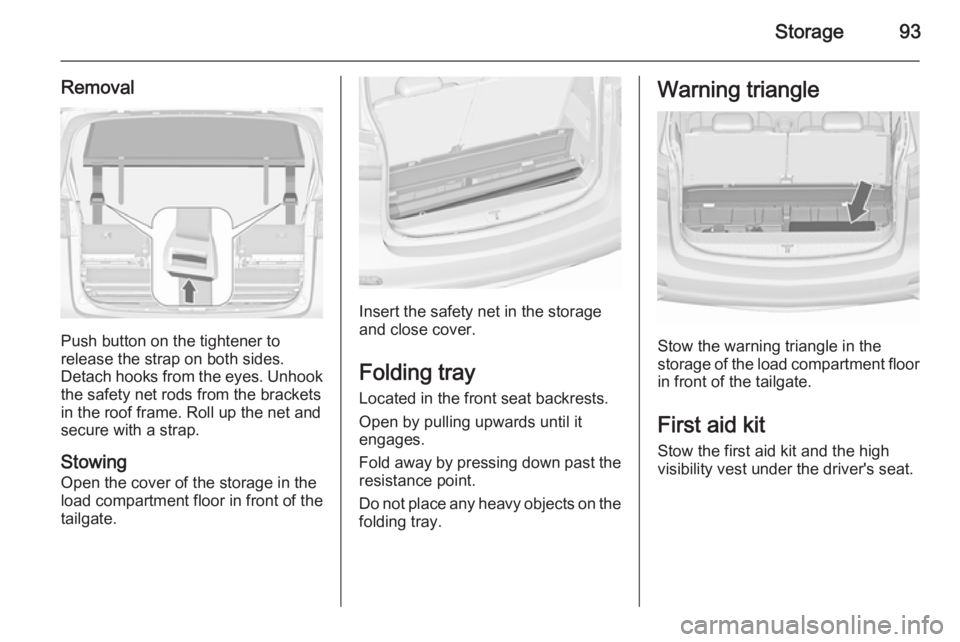
Push button on the tightener to
release the strap on both sides.
Detach hooks from the eyes. Unhook
the safety net rods from the brackets in the roof frame. Roll up the net and
secure with a strap.
Stowing
Open the cover of the storage in the
load compartment floor in front of the
tailgate.
Insert the safety net in the storage
and close cover.
Folding tray
Located in the front seat backrests. Open by pulling upwards until it
engages.
Fold away by pressing down past the resistance point.
Do not place any heavy objects on the
folding tray.
Warning triangle
Stow the warning triangle in the
storage of the load compartment floor
in front of the tailgate.
First aid kit
Stow the first aid kit and the high
visibility vest under the driver's seat.
Page 119 of 301
Instruments and controls117
Illuminates when high beam is on,
during headlight flash 3 137 , or when
high beam is on with high beam assist
or intelligent light range 3 139.
High beam assist
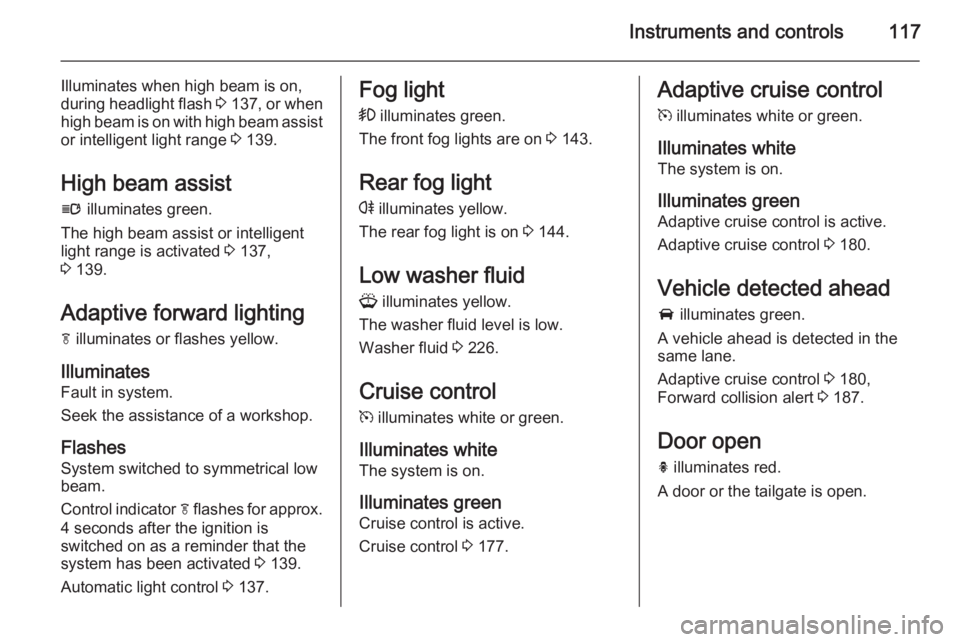
l illuminates green.
The high beam assist or intelligent light range is activated 3 137,
3 139.
Adaptive forward lighting
f illuminates or flashes yellow.
Illuminates Fault in system.
Seek the assistance of a workshop.
Flashes
System switched to symmetrical low
beam.
Control indicator f flashes for approx.
4 seconds after the ignition is switched on as a reminder that the
system has been activated 3 139.
Automatic light control 3 137.Fog light
> illuminates green.
The front fog lights are on 3 143.
Rear fog light
r illuminates yellow.
The rear fog light is on 3 144.
Low washer fluid G illuminates yellow.
The washer fluid level is low.
Washer fluid 3 226.
Cruise control
m illuminates white or green.
Illuminates white
The system is on.
Illuminates green
Cruise control is active.
Cruise control 3 177.Adaptive cruise control
m illuminates white or green.
Illuminates white
The system is on.
Illuminates green
Adaptive cruise control is active.
Adaptive cruise control 3 180.
Vehicle detected ahead A illuminates green.
A vehicle ahead is detected in the
same lane.
Adaptive cruise control 3 180,
Forward collision alert 3 187.
Door open
h illuminates red.
A door or the tailgate is open.
Page 129 of 301
Instruments and controls127
■ If seat belt is not fastened.
■ If a door or the tailgate is not fully closed when starting-off.
■ If a certain speed is exceeded with parking brake applied.
■ If adaptive cruise control deactivates automatically.
■ If approaching a vehicle ahead too closely.
■ If a programmed speed or speed limit is exceeded.
■ If a warning message or a warning code appears in the Driver
Information Centre (DIC).
■ If the parking assist detects an object.
■ If an unintended lane change occurs.
■ If reverse gear is engaged and the rear end carrier is extended.
■ If the diesel particle filter has reached the maximum filling level.
■ If AdBlue needs to be refilled.When the vehicle is parked and/ or the driver's door is opened ■ When the key is in the ignition switch.
■ With exterior lights on.
During an Autostop ■ If the driver's door is opened.
Battery voltage
When the vehicle battery voltage is
running low, a warning message or
warning code 174 will appear in the
Driver Information Centre.
1. Switch off immediately any electrical consumers which are
not required for a safe ride, e.g.
seat heating, heated rear window
or other main consumers.
2. Charge the vehicle battery by driving continuously for a while or
by using a charging device.
The warning message or warning
code will disappear after the engine
has been started two times
consecutively without a voltage drop.If the vehicle battery cannot be
recharged, have the cause of the fault
remedied by a workshop.
Page 203 of 301
Driving and operating201Rear view cameraThe rear view camera assists the
driver when reversing by displaying a
view of the area behind the vehicle.
The view of the camera is displayed
in the Colour-Info-Display.9 Warning
The rear view camera does not
replace driver vision. Note that
objects that are outside the
camera's field of view and the
advanced parking assist sensors,
e.g. below the bumper or
underneath the vehicle, are not
displayed.
Do not reverse the vehicle by only looking at the Info-Display and
check the surrounding area
behind and around the vehicle
before reversing.
Activation
Rear view camera is automatically
activated when reverse gear is
engaged.
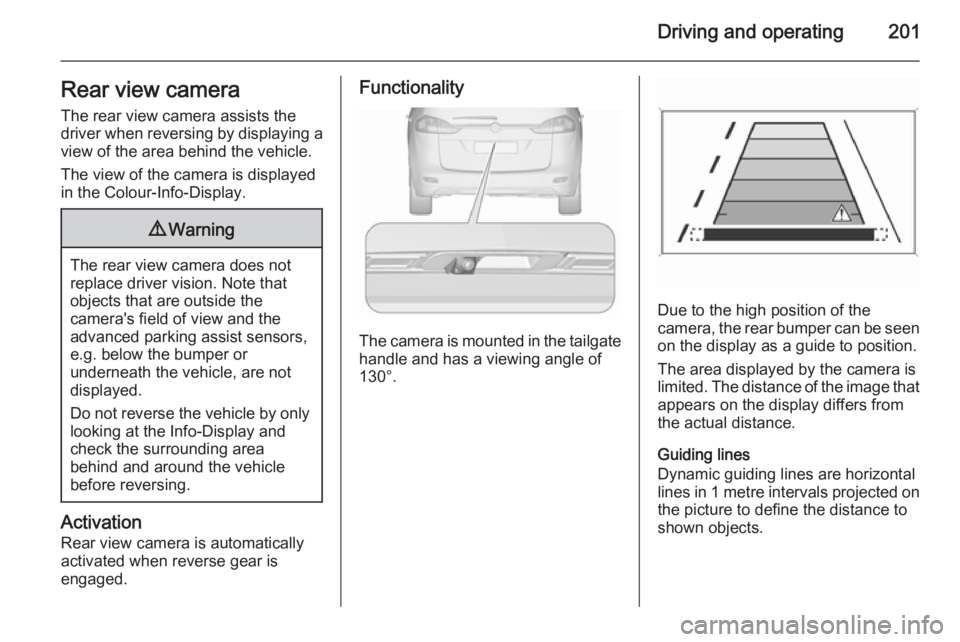
Functionality
The camera is mounted in the tailgate handle and has a viewing angle of
130°.
Due to the high position of the
camera, the rear bumper can be seen
on the display as a guide to position.
The area displayed by the camera is
limited. The distance of the image that
appears on the display differs from
the actual distance.
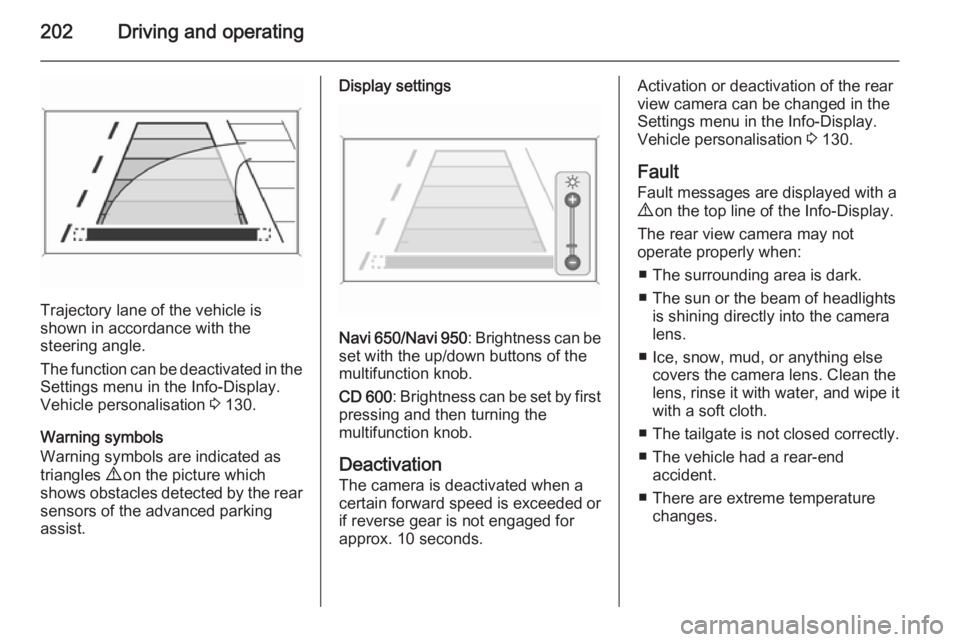
Guiding lines
Dynamic guiding lines are horizontal
lines in 1 metre intervals projected on
the picture to define the distance to
shown objects.
Page 204 of 301
202Driving and operating
Trajectory lane of the vehicle is
shown in accordance with the
steering angle.
The function can be deactivated in the
Settings menu in the Info-Display.
Vehicle personalisation 3 130.
Warning symbols
Warning symbols are indicated as
triangles 9 on the picture which
shows obstacles detected by the rear sensors of the advanced parking
assist.
Display settings
Navi 650 /Navi 950 : Brightness can be
set with the up/down buttons of the
multifunction knob.
CD 600 : Brightness can be set by first
pressing and then turning the
multifunction knob.
Deactivation
The camera is deactivated when a
certain forward speed is exceeded or
if reverse gear is not engaged for
approx. 10 seconds.
Activation or deactivation of the rear
view camera can be changed in the
Settings menu in the Info-Display.
Vehicle personalisation 3 130.
Fault
Fault messages are displayed with a
9 on the top line of the Info-Display.
The rear view camera may not
operate properly when:
■ The surrounding area is dark.
■ The sun or the beam of headlights is shining directly into the camera
lens.
■ Ice, snow, mud, or anything else covers the camera lens. Clean the
lens, rinse it with water, and wipe it
with a soft cloth.
■ The tailgate is not closed correctly.
■ The vehicle had a rear-end accident.
■ There are extreme temperature changes.
Page 238 of 301
236Vehicle care
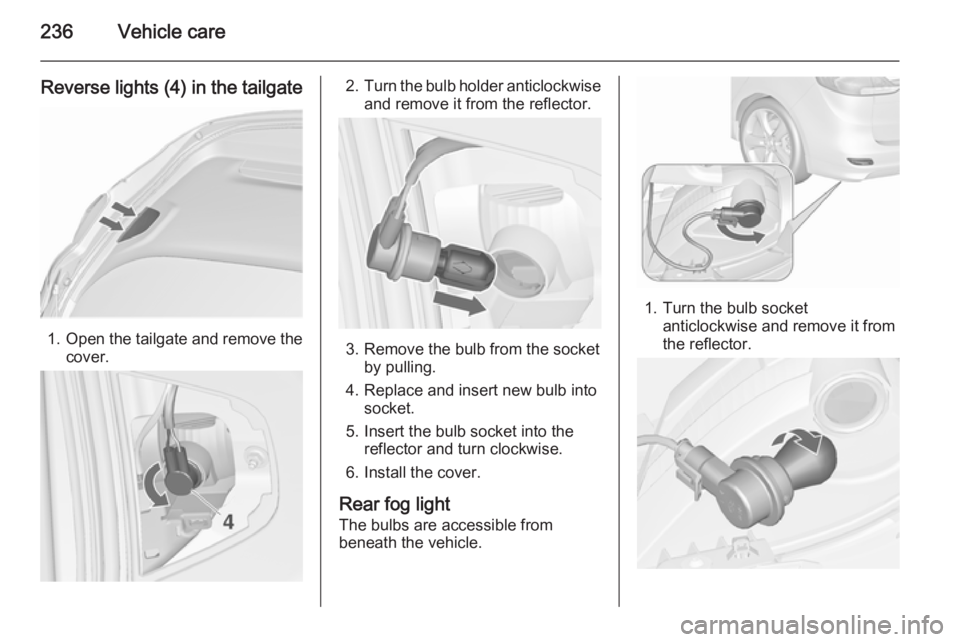
Reverse lights (4) in the tailgate
1.Open the tailgate and remove the
cover.
2. Turn the bulb holder anticlockwise
and remove it from the reflector.
3. Remove the bulb from the socket by pulling.
4. Replace and insert new bulb into socket.
5. Insert the bulb socket into the reflector and turn clockwise.
6. Install the cover.
Rear fog light The bulbs are accessible from
beneath the vehicle.
1. Turn the bulb socket anticlockwise and remove it from
the reflector.