warning light OPEL ZAFIRA TOURER 2017 Owner's Manual
[x] Cancel search | Manufacturer: OPEL, Model Year: 2017, Model line: ZAFIRA TOURER, Model: OPEL ZAFIRA TOURER 2017Pages: 307, PDF Size: 9.35 MB
Page 133 of 307
Instruments and controls131●Exterior ambient lighting
Duration upon exit of vehicle :
Activates or deactivates and
changes the duration of exit
lighting.
Exterior lighting by unlocking :
Activates or deactivates the
welcome lighting.
● Power door locks
Auto door lock : Activates or
deactivates the automatic door
unlocking function after switching off ignition. Activates or
deactivates the automatic door
locking function after driving-off.
Stop door lock if door open :
Activates or deactivates the
automatic door locking function
while a door is open.
Delayed door lock : Activates or
deactivates the delayed door
locking function.
● Remote locking, unlocking,
starting
Remote unlock feedback :
Activates or deactivates the
hazard warning flasher feedback whilst unlocking.Remote door unlock : Changes
the configuration to unlock only
the driver's door or the entire
vehicle whilst unlocking.
Auto relock doors : Activates or
deactivates the automatic relock
function after unlocking without
opening the vehicle.
● Restore factory settings
Restore factory settings : Resets
all settings to the default settings.
Personalised settings in the
Colour-Info-Display
Navi 950/Navi 650/CD 600
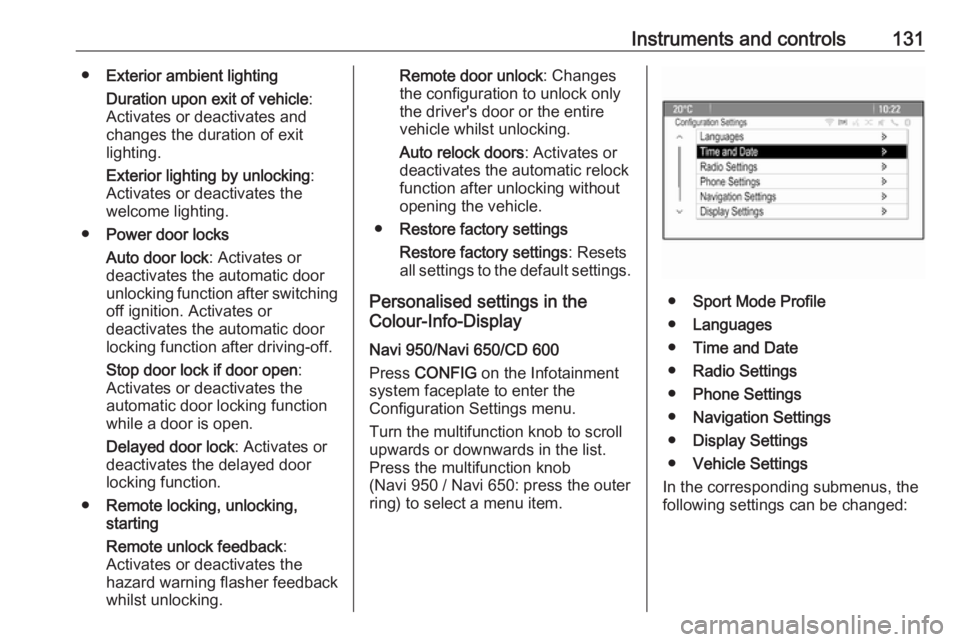
Press CONFIG on the Infotainment
system faceplate to enter the
Configuration Settings menu.
Turn the multifunction knob to scroll
upwards or downwards in the list.
Press the multifunction knob
(Navi 950 / Navi 650: press the outer
ring) to select a menu item.
● Sport Mode Profile
● Languages
● Time and Date
● Radio Settings
● Phone Settings
● Navigation Settings
● Display Settings
● Vehicle Settings
In the corresponding submenus, the
following settings can be changed:
Page 134 of 307
132Instruments and controlsSport Mode Profile● Engine Sport Performance :
Accelerator pedal and gear
change characteristics become
more responsive.
● Sport Mode Back Lighting :
Changes the instrument illumination colour.
● Sport Suspension : Damping
becomes harder.
● Sport Steering : Steering support
is reduced.
Languages
Selection of the desired language.
Time and Date
See Infotainment manual for further
information.
Radio Settings
See Infotainment manual for further information.
Phone Settings
See Infotainment manual for further
information.Navigation Settings
See Infotainment manual for further
information.
Display Settings ● Home Page Menu :
See Infotainment manual for
further information.
● Rear Camera Options :
Press to adjust the rear camera
options 3 202.
● Display Off :
See Infotainment manual for
further information.
● Map Settings :
See Infotainment manual for further information.
Vehicle Settings ● Climate and Air Quality
Auto Fan Speed : Modifies the fan
regulation. Changed setting will
be active after switching the
ignition off and on again.
Air Conditioning Mode : Activates
or deactivates cooling when
switching on the ignition or uses the last chosen setting.Auto Demist : Activates or
deactivates auto demist.
Auto Rear Demist : Activates the
heated rear window
automatically.
● Comfort and Convenience
Chime Volume : Changes the
volume of warning chimes.
Personalisation by Driver :
Activates or deactivates the
personalisation function.
Auto Reverse Gear Wiper :
Activates or deactivates
automatic switching on of the
rear window wiper when reverse gear is engaged.
● Collision Detection Systems
Park Assist : Activates or
deactivates the ultrasonic
sensors. Activation is selectable
with or without attached trailer
coupling.
Automatic Collision Preparation :
Activates or deactivates the
automatic brake functionality of
the vehicle in the event of
imminent collision danger. The
following is selectable: the
Page 135 of 307
Instruments and controls133system will take over brake
control, warn by chimes only or is
deactivated completely.
Side Blind Zone Alert : Activates
or deactivates the side blind spot alert system.
● Lighting
Vehicle Locator Lights : Activates
or deactivates the entry lighting.
Exit Lighting : Activates or
deactivates and changes the duration of exit lighting.
● Power Door Locks
Open Door Anti Lock Out :
Activates or deactivates the
automatic door locking function
while a door is open.
Auto Door Lock : Activates or
deactivates the automatic door
unlocking function after switching
off ignition. Activates or
deactivates the automatic door
locking function after driving-off.
Delay Door Lock : Activates or
deactivates the delayed door
locking function.● Remote Lock/Unlock/Start
Remote Lock Feedback :
Activates or deactivates the
hazard warning flasher feedback
whilst locking.
Remote Unlock Feedback :
Activates or deactivates the
hazard warning flasher feedback whilst unlocking.
Remote Door Unlock : Changes
the configuration to unlock only
the driver's door or the entire
vehicle whilst unlocking.
Relock Remotely Unlocked
Doors : Activates or deactivates
the automatic relock function
after unlocking without opening
the vehicle.
● Return to Factory Settings? :
Resets all settings to the default settings.OnStar
OnStar is a personal connectivity and
service assistant with integrated
Wi-Fi hotspot. The OnStar service is
available 24 hours a day, seven days
a week.
Note
OnStar is not available for all
markets. For further information,
contact your workshop.
Note
In order to be available and
operational, OnStar needs a valid
OnStar subscription, functioning
vehicle electrics, mobile service and
GPS satellite link.
To activate the OnStar services and
set up an account, press Z and speak
with an advisor.
Depending on the equipment of the
vehicle, the following services are available:
● Emergency services and support
in the case of a vehicle
breakdown
● Wi-Fi hotspot
Page 140 of 307
138LightingLightingExterior lighting.......................... 138
Light switch .............................. 138
Automatic light control .............139
High beam ............................... 140
High beam assist .....................140
Headlight flash ......................... 140
Headlight range adjustment ....141
Headlights when driving abroad .................................... 141
Daytime running lights .............142
Adaptive forward lighting .........142
Hazard warning flashers ..........145
Turn and lane-change signals . 145
Front fog lights ......................... 146
Rear fog light ........................... 146
Parking lights ........................... 146
Reversing lights .......................147
Misted light covers ...................147
Interior lighting ........................... 147
Instrument panel illumination control ..................................... 147
Interior lights ............................ 147
Reading lights .......................... 148
Sunvisor lights ......................... 148Lighting features ........................148
Centre console lighting ............148
Entry lighting ............................ 148
Exit lighting .............................. 149
Battery discharge protection ....149Exterior lighting
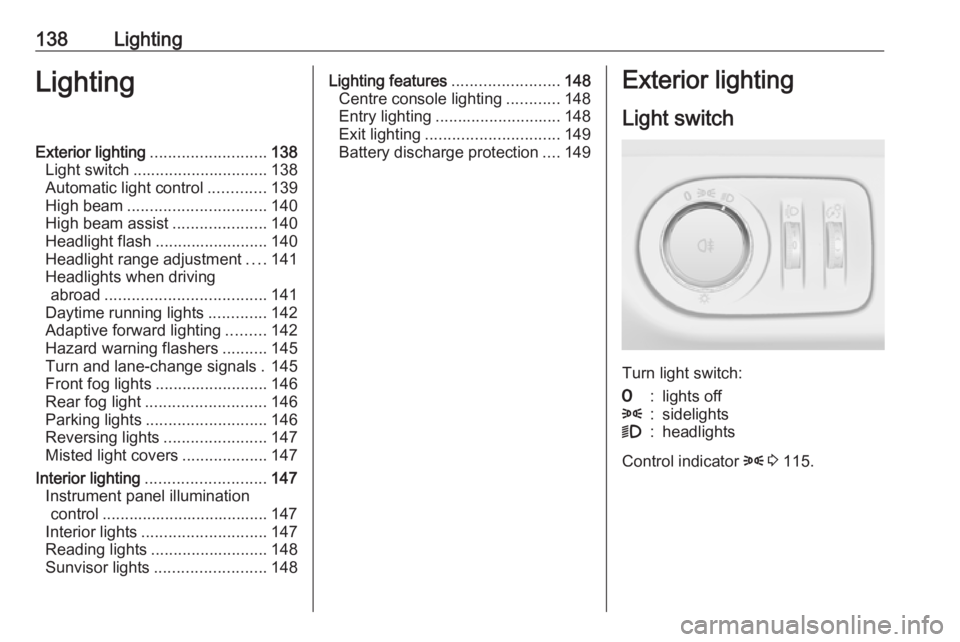
Light switch
Turn light switch:
7:lights off8:sidelights9:headlights
Control indicator 8 3 115.
Page 147 of 307
Lighting145Automatic high beam activation
operates at a speed above 40 km/h
and deactivates below 20 km/h.
Intelligent light ranging operates
above 55 km/h.
The green control indicator l
illuminates continuously when the
function is activated, the blue one 7
illuminates when high beam switches
on automatically.
Deactivation
Push indicator lever once. It is also deactivated when front fog lights are
switched on.
Dynamic automatic headlightlevelling
To prevent oncoming traffic from
dazzle, headlight levelling is
automatically adjusted based on
inclination information measured by
front and rear axle, acceleration or
deceleration and vehicle speed.Fault in Adaptive forward lighting
system
When the system detects a failure in
the Adaptive forward lighting system,
the system moves to a preset position to avoid dazzling of oncoming traffic.
If this is not possible, the affected
headlight will be automatically
switched off. In any case, one
headlight will stay on. A warning is
displayed in the Driver Information
Centre.
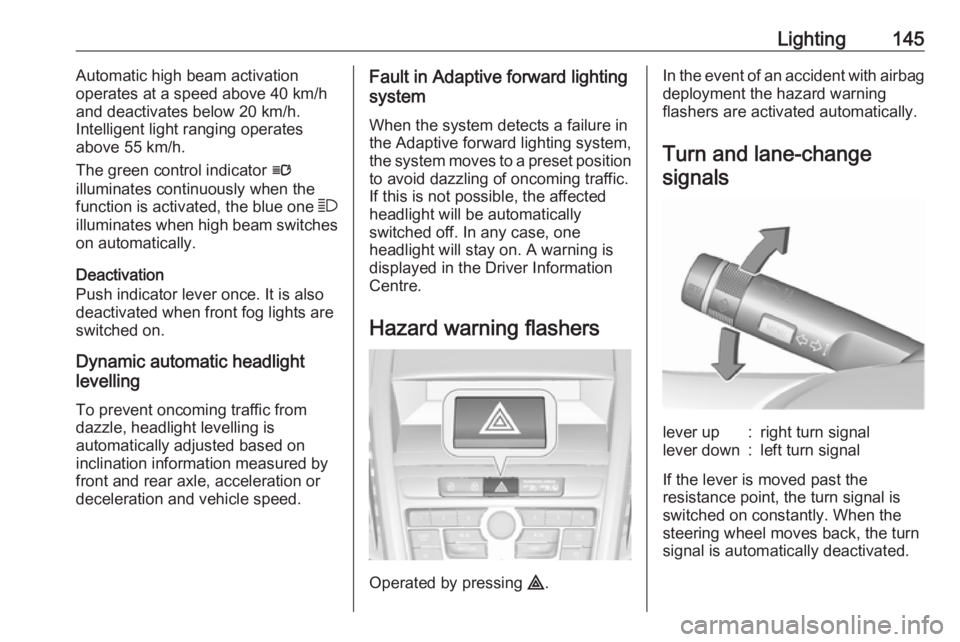
Hazard warning flashers
Operated by pressing ¨.
In the event of an accident with airbag
deployment the hazard warning
flashers are activated automatically.
Turn and lane-changesignalslever up:right turn signallever down:left turn signal
If the lever is moved past the
resistance point, the turn signal is
switched on constantly. When the
steering wheel moves back, the turn
signal is automatically deactivated.
Page 153 of 307
Climate control151Air conditioning system
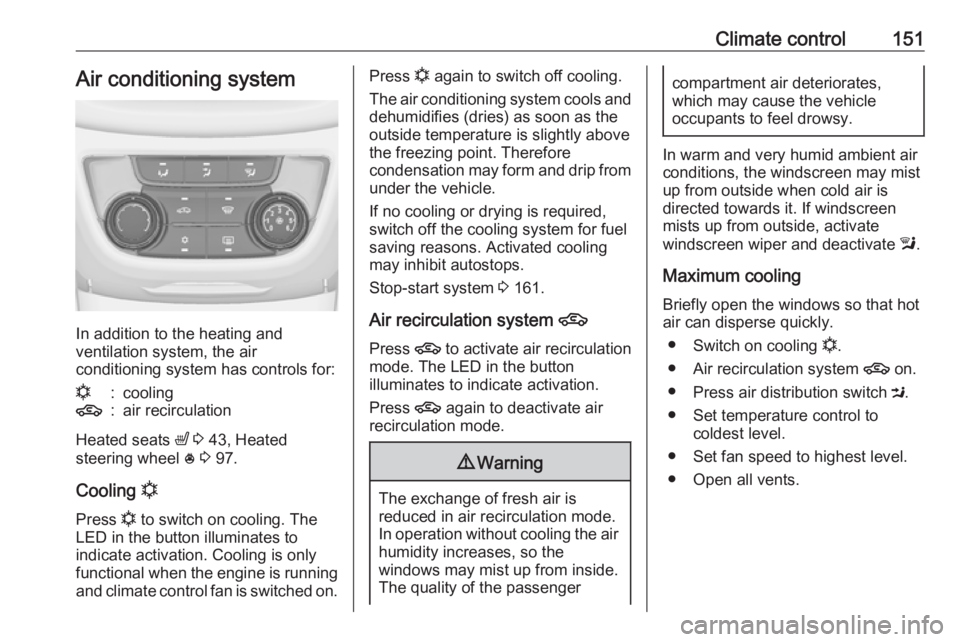
In addition to the heating and
ventilation system, the air
conditioning system has controls for:
n:cooling4:air recirculation
Heated seats ß 3 43, Heated
steering wheel * 3 97.
Cooling n
Press n to switch on cooling. The
LED in the button illuminates to
indicate activation. Cooling is only
functional when the engine is running and climate control fan is switched on.
Press n again to switch off cooling.
The air conditioning system cools and
dehumidifies (dries) as soon as the
outside temperature is slightly above
the freezing point. Therefore
condensation may form and drip from under the vehicle.
If no cooling or drying is required,
switch off the cooling system for fuel
saving reasons. Activated cooling
may inhibit autostops.
Stop-start system 3 161.
Air recirculation system 4
Press 4 to activate air recirculation
mode. The LED in the button
illuminates to indicate activation.
Press 4 again to deactivate air
recirculation mode.9 Warning
The exchange of fresh air is
reduced in air recirculation mode.
In operation without cooling the air humidity increases, so the
windows may mist up from inside.
The quality of the passenger
compartment air deteriorates,
which may cause the vehicle
occupants to feel drowsy.
In warm and very humid ambient air conditions, the windscreen may mist
up from outside when cold air is
directed towards it. If windscreen
mists up from outside, activate
windscreen wiper and deactivate l.
Maximum cooling
Briefly open the windows so that hot
air can disperse quickly.
● Switch on cooling n.
● Air recirculation system 4 on.
● Press air distribution switch M.
● Set temperature control to coldest level.
● Set fan speed to highest level.
● Open all vents.
Page 175 of 307
Driving and operating173Brakes
The brake system comprises two
independent brake circuits.
If a brake circuit fails, the vehicle can
still be braked using the other brake
circuit. However, braking effect is
achieved only when the brake pedal
is depressed firmly. Considerably
more force is needed for this. The
braking distance is extended. Seek the assistance of a workshop before
continuing your journey.
When the engine is not running, the
support of the brake servo unit
disappears once the brake pedal has
been depressed once or twice.
Braking effect is not reduced, but
braking requires significantly greater
force. It is especially important to bear this in mind when being towed.
Control indicator R 3 111.
Antilock brake system
Antilock brake system (ABS)
prevents the wheels from locking.ABS starts to regulate brake pressure as soon as a wheel shows a tendency to lock. The vehicle remains
steerable, even during hard braking.
ABS control is made apparent
through a pulse in the brake pedal
and the noise of the regulation
process.
For optimum braking, keep the brake
pedal fully depressed throughout the
braking process, despite the fact that
the pedal is pulsating. Do not reduce
the pressure on the pedal.
After starting off the system performs
a self-test which may be audible.
Control indicator u 3 112.
Adaptive brake light
During full braking, all three brake
lights flash for the duration of ABS
control.Fault9 Warning
If there is a fault in the ABS, the
wheels may be liable to lock due
to braking that is heavier than
normal. The advantages of ABS are no longer available. During
hard braking, the vehicle can no longer be steered and may
swerve.
Have the cause of the fault remedied
by a workshop.
Page 176 of 307
174Driving and operatingParking brake
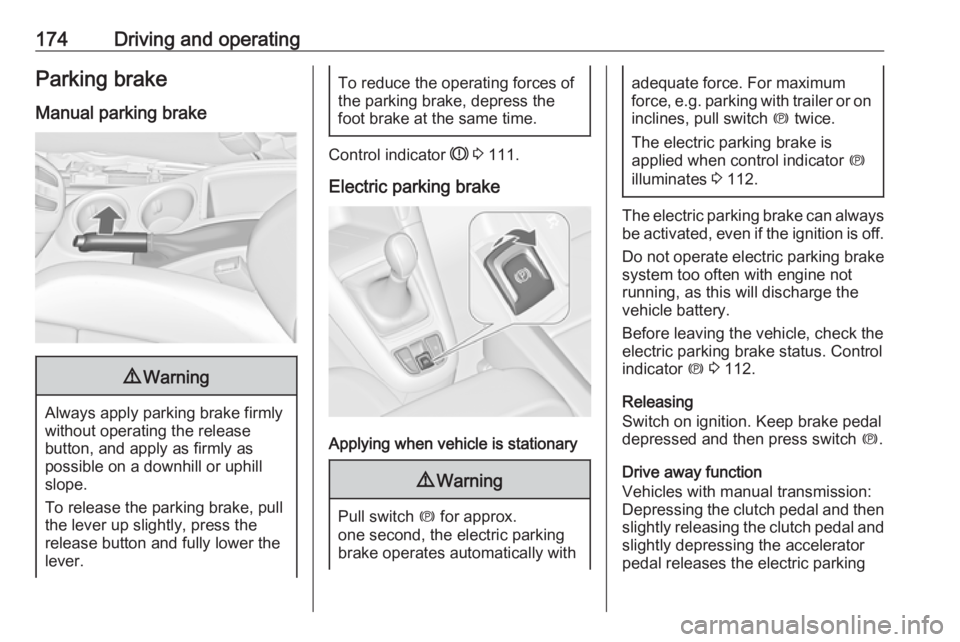
Manual parking brake9 Warning
Always apply parking brake firmly
without operating the release
button, and apply as firmly as
possible on a downhill or uphill
slope.
To release the parking brake, pull
the lever up slightly, press the
release button and fully lower the
lever.
To reduce the operating forces of
the parking brake, depress the
foot brake at the same time.
Control indicator R 3 111.
Electric parking brake
Applying when vehicle is stationary
9 Warning
Pull switch m for approx.
one second, the electric parking
brake operates automatically with
adequate force. For maximum
force, e.g. parking with trailer or on
inclines, pull switch m twice.
The electric parking brake is
applied when control indicator m
illuminates 3 112.
The electric parking brake can always
be activated, even if the ignition is off.
Do not operate electric parking brake
system too often with engine not
running, as this will discharge the
vehicle battery.
Before leaving the vehicle, check the electric parking brake status. Control
indicator m 3 112.
Releasing
Switch on ignition. Keep brake pedal
depressed and then press switch m.
Drive away function
Vehicles with manual transmission:
Depressing the clutch pedal and then
slightly releasing the clutch pedal and
slightly depressing the accelerator
pedal releases the electric parking
Page 184 of 307
182Driving and operatingBy pressing m to activate cruise
control or adaptive cruise control or
by switching off the ignition, speed
limiter is also deactivated and the
stored speed is deleted.
Adaptive cruise control Adaptive cruise control is an
enhancement to traditional cruise
control with the additional feature of
maintaining a certain distance behind
the vehicle ahead.
Adaptive cruise control automatically
decelerates the vehicle when
approaching a slower moving vehicle. It then adjusts the vehicle speed to
follow the vehicle ahead at the
selected following distance. The
vehicle speed increases or decreases to follow the vehicle in front, but willnot exceed the set speed. It may
apply limited braking with activated
brake lights.
The adaptive cruise control can store
and maintain speeds over approx.
50 km/h and brakes automatically to
follow a slower vehicle driving ahead
down to a minimum speed of
30 km/h.
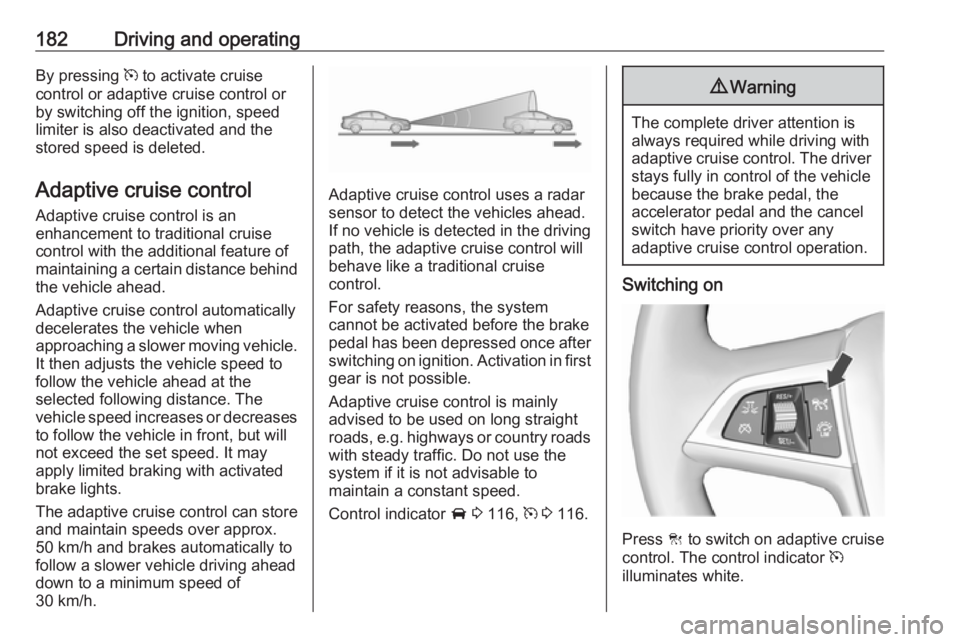
Adaptive cruise control uses a radar sensor to detect the vehicles ahead.
If no vehicle is detected in the driving path, the adaptive cruise control will
behave like a traditional cruise
control.
For safety reasons, the system
cannot be activated before the brake
pedal has been depressed once after
switching on ignition. Activation in first gear is not possible.
Adaptive cruise control is mainly
advised to be used on long straight
roads, e.g. highways or country roads
with steady traffic. Do not use the
system if it is not advisable to
maintain a constant speed.
Control indicator A 3 116, m 3 116.
9 Warning
The complete driver attention is
always required while driving with adaptive cruise control. The driver stays fully in control of the vehicle
because the brake pedal, the
accelerator pedal and the cancel
switch have priority over any
adaptive cruise control operation.
Switching on
Press C to switch on adaptive cruise
control. The control indicator m
illuminates white.
Page 195 of 307
Driving and operating193The feature uses various inputs (e.g.
radar sensor, brake pressure, vehicle
speed) to calculate the probability of
a frontal collision.
Active emergency braking operates
automatically above walking speed,
provided that Auto collision
preparation setting is not deactivated
in the vehicle personalisation menu
3 129.
The system includes: ● brake preparation system
● emergency automatic braking
● forward looking brake assist9Warning
This system is not intended to
replace the driver responsibility of driving the vehicle and looking
ahead. Its function is limited to
supplemental use only. The driver shall continue to apply the brake
pedal as the driving situation
dictates.
Brake preparation system
When approaching a vehicle ahead
so quickly that a collision is likely, the
brake preparation system slightly
pressurises the brakes. This reduces
the response time, when a manual or automatic braking is requested.
The brake system is prepared so that braking can occur more rapidly.
Emergency automatic braking
After the brake preparation and just
before the imminent collision, this
function automatically applies limited
braking to reduce the impact speed of the collision.
Forward looking brake assist
In addition to brake preparation
system and emergency automatic
braking, the forward looking brake
assist function makes the brake assist more sensitive. In this way,
depressing the brake pedal slightly
results immediately in a strong
braking. This function helps the driver
brake quicker and stronger before the imminent collision.9 Warning
Active emergency braking is not
designed to apply strong
autonomous braking or to avoid automatically a collision. It is
designed to reduce the vehicle
speed before collision. It may not
react on stopped vehicles,
pedestrians or animals. After a
sudden lane change, the system
needs a certain time to detect the
next preceding vehicle.
The complete attention of the
driver is always required while
driving. The driver shall always be ready to take action and apply the brakes and steer to avoid
collisions. The system is designed
to work with all occupants wearing their seat belts.
System limitations
The active emergency braking has
limited or no function during rain,
snow or heavy dirt, as the radar
sensor can be covered by a water