radio PEUGEOT 1007 2008 User Guide
[x] Cancel search | Manufacturer: PEUGEOT, Model Year: 2008, Model line: 1007, Model: PEUGEOT 1007 2008Pages: 189, PDF Size: 10.54 MB
Page 180 of 189
01
11
22
10101111
131314141515
33445566778899
1212
170
FIRST STEPS
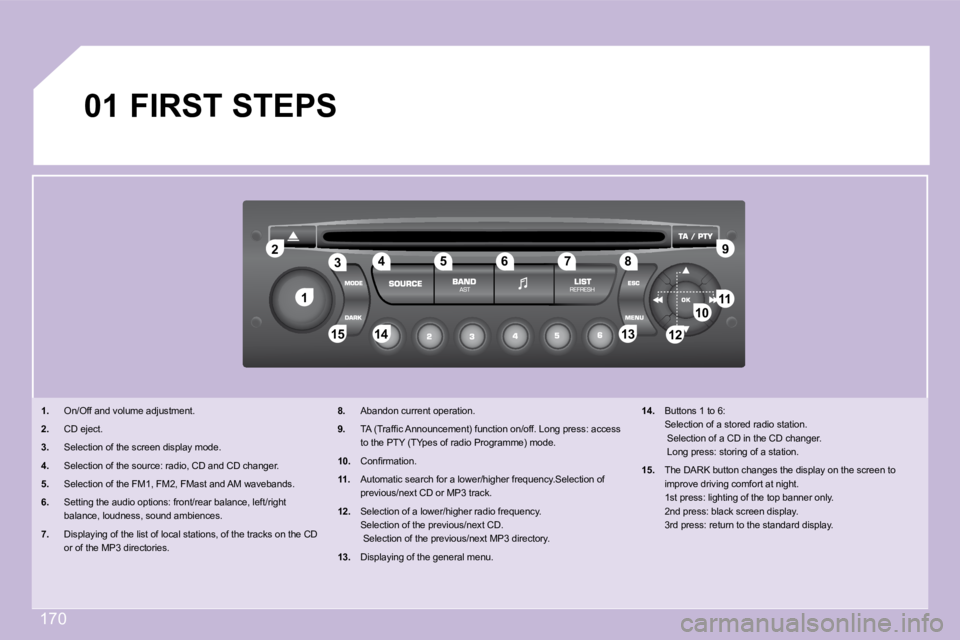
1. On/Off and volume adjustment.
2. CD eject.
3. Selection of the screen display mode.
4. Selection of the source: radio, CD and CD changer .
5. Selection of the FM1, FM2, FMast and AM wavebands .
6. Setting the audio options: front/rear balance, l eft/right
balance, loudness, sound ambiences.
7. Displaying of the list of local stations, of the tracks on the CD
or of the MP3 directories.
8. Abandon current operation.
9. TA (Traffi c Announcement) function on/off. Long press: access
to the PTY (TYpes of radio Programme) mode.
10. Confi rmation.
11. Automatic search for a lower/higher frequency.Se lection of
previous/next CD or MP3 track.
12. Selection of a lower/higher radio frequency.
Selection of the previous/next CD.
Selection of the previous/next MP3 directory.
13. Displaying of the general menu.
14. Buttons 1 to 6:
Selection of a stored radio station.
Selection of a CD in the CD changer.
Long press: storing of a station.
15. The DARK button changes the display on the scree n to
improve driving comfort at night.
1st press: lighting of the top banner only.
2nd press: black screen display.
3rd press: return to the standard display.
Page 181 of 189
02
171
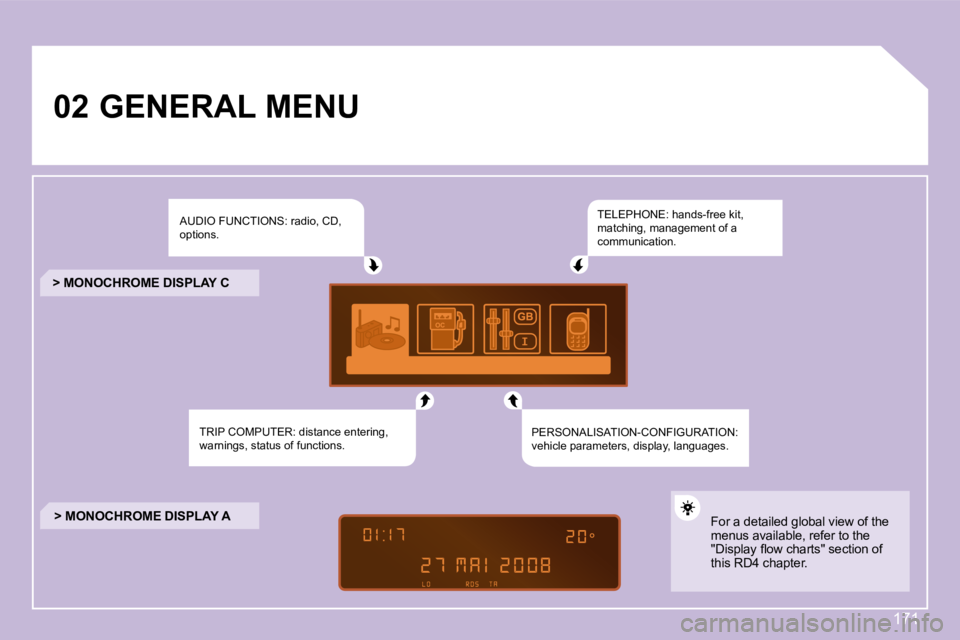
GENERAL MENU AUDIO FUNCTIONS: radio, CD,
options.
TRIP COMPUTER: distance entering,
warnings, status of functions. TELEPHONE: hands-free kit,
matching, management of a
communication.
PERSONALISATION-CONFIGURATION:
vehicle parameters, display, languages.
> MONOCHROME DISPLAY C
> MONOCHROME DISPLAY A For a detailed global view of the
menus available, refer to the
"Display fl ow charts" section of
this RD4 chapter.
Page 182 of 189
11
22
33
44
22
44
33
11
03
172
AUDIO
RADIO
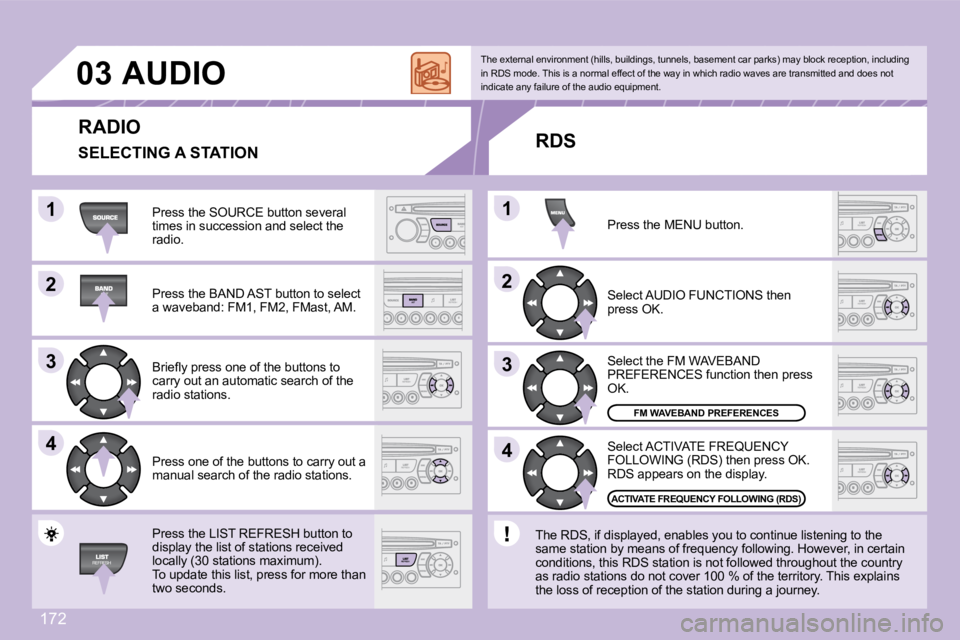
Press the SOURCE button several
times in succession and select the
radio.
Press the BAND AST button to select
a waveband: FM1, FM2, FMast, AM.
Briefl y press one of the buttons to
carry out an automatic search of the
radio stations.
Press one of the buttons to carry out a
manual search of the radio stations.
Press the LIST REFRESH button to
display the list of stations received
locally (30 stations maximum).
To update this list, press for more than
two seconds. Select ACTIVATE FREQUENCY
FOLLOWING (RDS) then press OK.
RDS appears on the display.
Select the FM WAVEBAND
PREFERENCES function then press
OK.
Select AUDIO FUNCTIONS then
press OK.
Press the MENU button.
FM WAVEBAND PREFERENCES
ACTIVATE FREQUENCY FOLLOWING (RDS)
The external environment (hills, buildings, tunnel
s, basement car parks) may block reception, includi ng
in RDS mode. This is a normal effect of the way in which radio waves are transmitted and does not
indicate any failure of the audio equipment.
RDS
The RDS, if displayed, enables you to continue l istening to the
same station by means of frequency following. Howev er, in certain
conditions, this RDS station is not followed throug hout the country
as radio stations do not cover 100 % of the territo ry. This explains
the loss of reception of the station during a journ ey.
SELECTING A STATION
Page 186 of 189
05
176
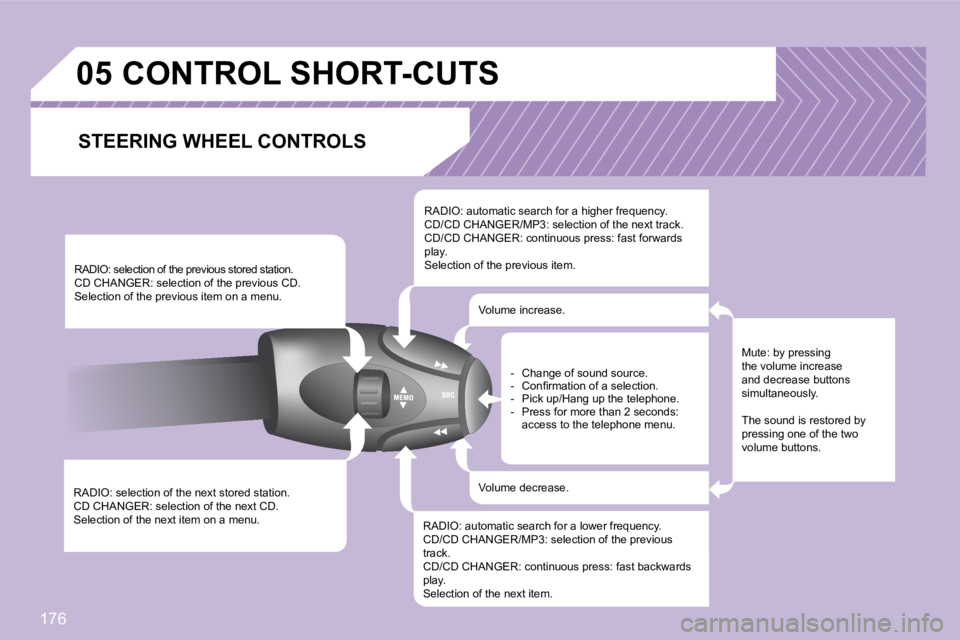
RADIO: selection of the next stored station.
CD CHANGER: selection of the next CD.
Selection of the next item on a menu. RADIO: selection of the previous stored station.
CD CHANGER: selection of the previous CD.
Selection of the previous item on a menu.
RADIO: automatic search for a higher frequency.
CD/CD CHANGER/MP3: selection of the next track.
CD/CD CHANGER: continuous press: fast forwards
play.
Selection of the previous item.
RADIO: automatic search for a lower frequency.
CD/CD CHANGER/MP3: selection of the previous
track.
CD/CD CHANGER: continuous press: fast backwards
play.
Selection of the next item. Volume increase.
Volume decrease.
CONTROL SHORT-CUTS
Mute: by pressing
the volume increase
and decrease buttons
simultaneously.
The sound is restored by
pressing one of the two
volume buttons.
- Change of sound source.
- Confi rmation of a selection.
- Pick up/Hang up the telephone.
- Press for more than 2 seconds:
access to the telephone menu.
STEERING WHEEL CONTROLS