ignition Peugeot 107 Dag 2008 User Guide
[x] Cancel search | Manufacturer: PEUGEOT, Model Year: 2008, Model line: 107 Dag, Model: Peugeot 107 Dag 2008Pages: 97, PDF Size: 3.1 MB
Page 47 of 97
4
47
ACCESS
ELECTRONIC ENGINE
IMMOBILISER
This locks the engine control sys-
tem as soon as the ignition has been
switched off and therefore prevents
starting of the vehicle by anyone who
does not have the key.
The ignition key has an electronic
chip which has a special code. When
the ignition is switched on, the code
must be recognised for starting to be
possible.
In the event of a malfunction, your
vehicle will not start.
Consult a PEUGEOT dealer.
Changing the remote control
battery
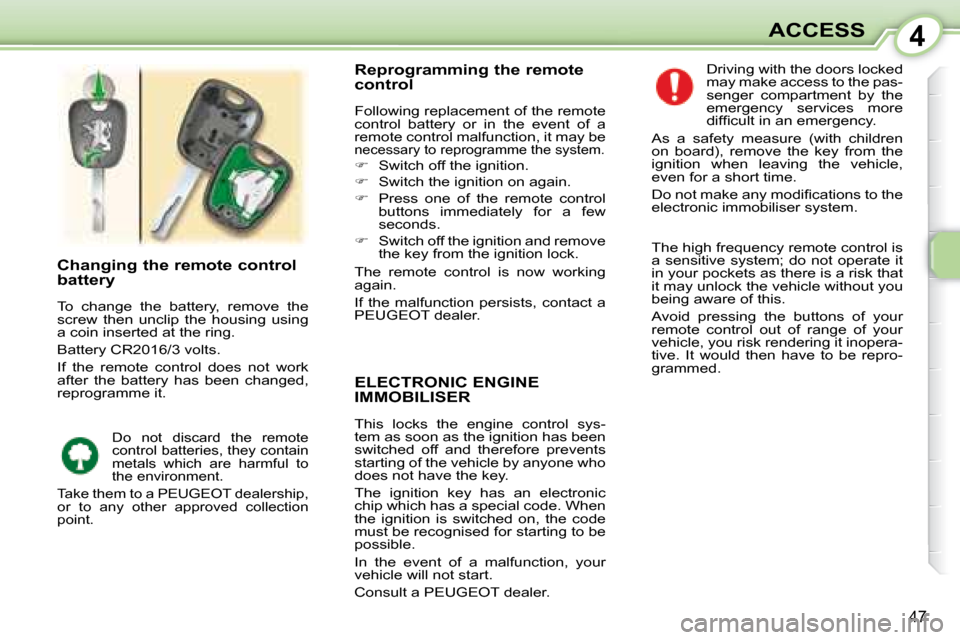
To change the battery, remove the
screw then unclip the housing using
a coin inserted at the ring.
Battery CR2016/3 volts.
If the remote control does not work
after the battery has been changed,
reprogramme it.
Reprogramming the remote
control
Following replacement of the remote
control battery or in the event of a
remote control malfunction, it may be
necessary to reprogramme the system.
Switch off the ignition.
Switch the ignition on again.
Press one of the remote control
buttons immediately for a few
seconds.
Switch off the ignition and remove
the key from the ignition lock.
The remote control is now working
again.
If the malfunction persists, contact a
PEUGEOT dealer. Driving with the doors locked
may make access to the pas-
senger compartment by the
emergency services more
diffi cult in an emergency.
As a safety measure (with children
on board), remove the key from the
ignition when leaving the vehicle,
even for a short time.
Do not make any modifi cations to the
electronic immobiliser system.
Do not discard the remote
control batteries, they contain
metals which are harmful to
the environment.
Take them to a PEUGEOT dealership,
or to any other approved collection
point.
The high frequency remote control is
a sensitive system; do not operate it
in your pockets as there is a risk that
it may unlock the vehicle without you
being aware of this.
Avoid pressing the buttons of your
remote control out of range of your
vehicle, you risk rendering it inopera-
tive. It would then have to be repro-
grammed.
Page 48 of 97
4
47
ACCESS
ELECTRONIC ENGINE
IMMOBILISER
This locks the engine control sys-
tem as soon as the ignition has been
switched off and therefore prevents
starting of the vehicle by anyone who
does not have the key.
The ignition key has an electronic
chip which has a special code. When
the ignition is switched on, the code
must be recognised for starting to be
possible.
In the event of a malfunction, your
vehicle will not start.
Consult a PEUGEOT dealer.
Changing the remote control
battery
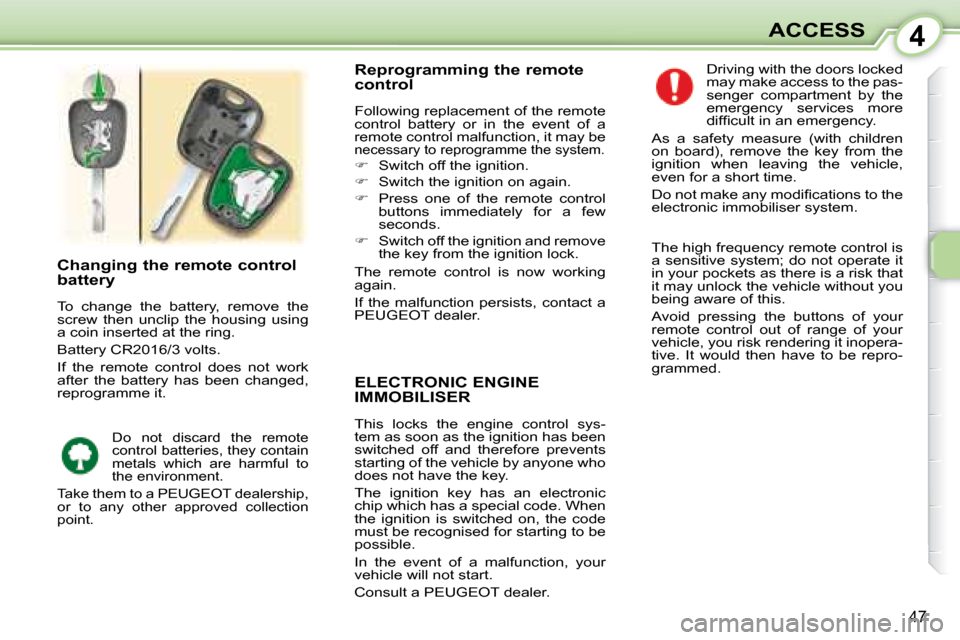
To change the battery, remove the
screw then unclip the housing using
a coin inserted at the ring.
Battery CR2016/3 volts.
If the remote control does not work
after the battery has been changed,
reprogramme it.
Reprogramming the remote
control
Following replacement of the remote
control battery or in the event of a
remote control malfunction, it may be
necessary to reprogramme the system.
Switch off the ignition.
Switch the ignition on again.
Press one of the remote control
buttons immediately for a few
seconds.
Switch off the ignition and remove
the key from the ignition lock.
The remote control is now working
again.
If the malfunction persists, contact a
PEUGEOT dealer. Driving with the doors locked
may make access to the pas-
senger compartment by the
emergency services more
diffi cult in an emergency.
As a safety measure (with children
on board), remove the key from the
ignition when leaving the vehicle,
even for a short time.
Do not make any modifi cations to the
electronic immobiliser system.
Do not discard the remote
control batteries, they contain
metals which are harmful to
the environment.
Take them to a PEUGEOT dealership,
or to any other approved collection
point.
The high frequency remote control is
a sensitive system; do not operate it
in your pockets as there is a risk that
it may unlock the vehicle without you
being aware of this.
Avoid pressing the buttons of your
remote control out of range of your
vehicle, you risk rendering it inopera-
tive. It would then have to be repro-
grammed.
Page 49 of 97
4
48
ACCESS ELECTRIC WINDOWS
The driver and front passenger each
have an electric window.
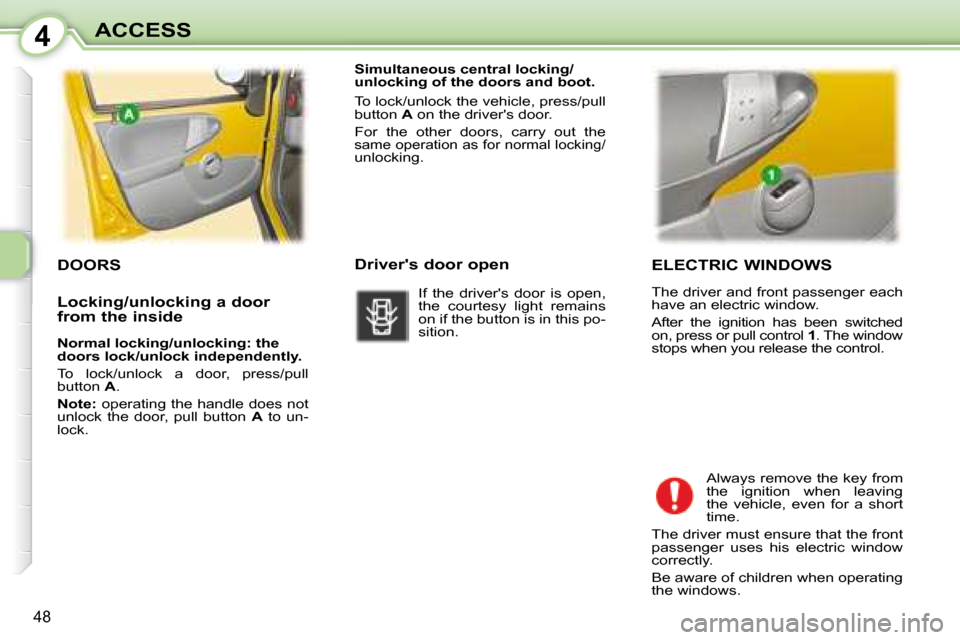
After the ignition has been switched
on, press or pull control 1 . The window
stops when you release the control.
Always remove the key from
the ignition when leaving
the vehicle, even for a short
time.
The driver must ensure that the front
passenger uses his electric window
correctly.
Be aware of children when operating
the windows.
DOORS
Simultaneous central locking/
unlocking of the doors and boot.
To lock/unlock the vehicle, press/pull
button A on the driver's door.
For the other doors, carry out the
same operation as for normal locking/unlocking.
Driver's door open
If the driver's door is open,
the courtesy light remains
on if the button is in this po-
sition.
Locking/unlocking a door
from the inside
Normal locking/unlocking: the
doors lock/unlock independently.
To lock/unlock a door, press/pull
button A .
Note: operating the handle does not
unlock the door, pull button A to un-
lock.
Page 50 of 97
4
49
ACCESS
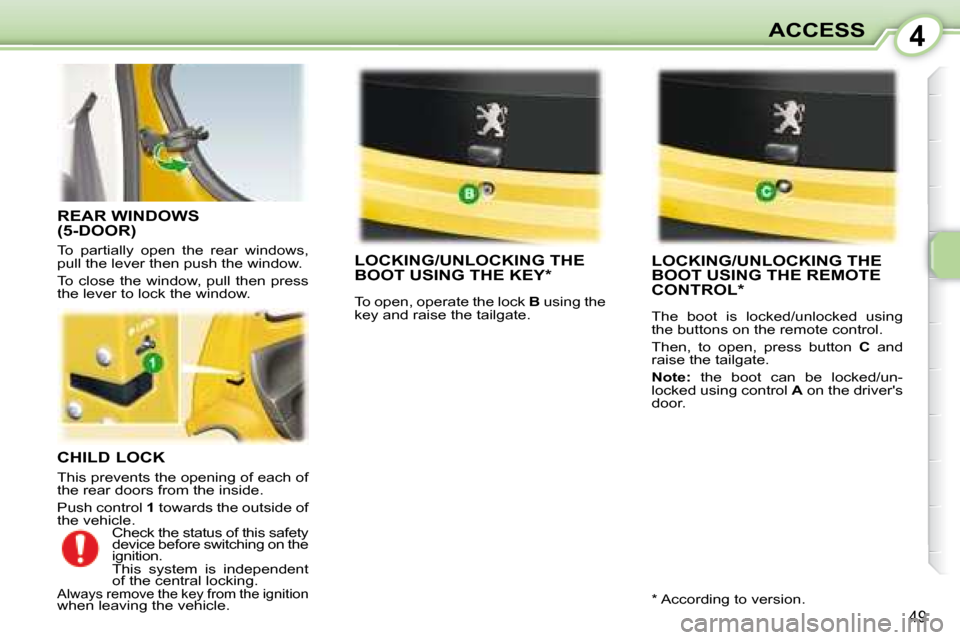
CHILD LOCK
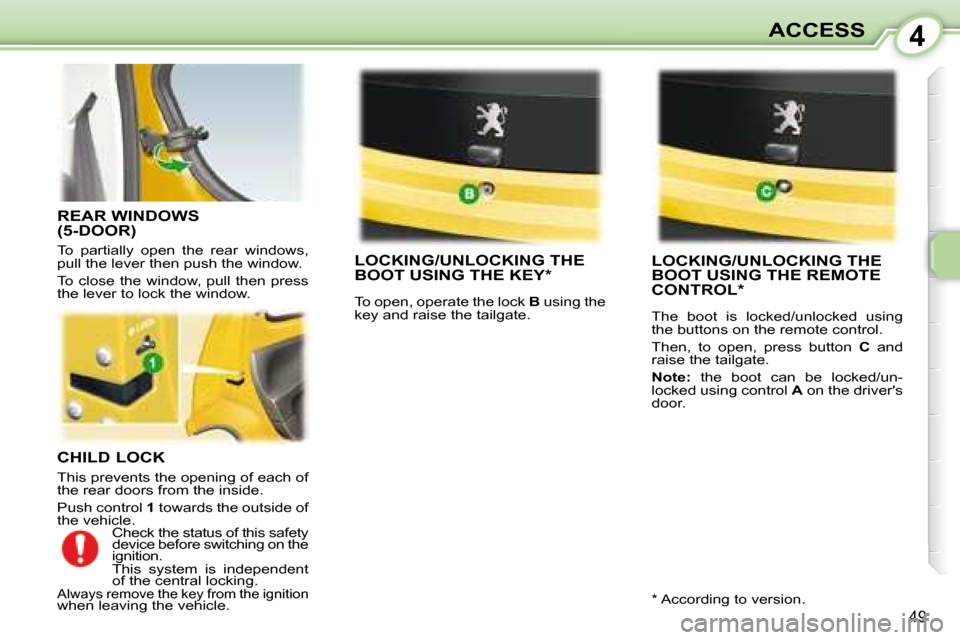
This prevents the opening of each of
the rear doors from the inside.
Push control 1 towards the outside of
the vehicle.
LOCKING/UNLOCKING THE
BOOT USING THE KEY*
To open, operate the lock B using the
key and raise the tailgate.
LOCKING/UNLOCKING THE
BOOT USING THE REMOTE
CONTROL *
The boot is locked/unlocked using
the buttons on the remote control.
Then, to open, press button C and
raise the tailgate.
Note: the boot can be locked/un-
locked using control A on the driver's
door.
REAR WINDOWS
(5-DOOR)
To partially open the rear windows,
pull the lever then push the window.
To close the window, pull then press
the lever to lock the window.
Check the status of this safety
device before switching on the
ignition.
This system is independent
of the central locking.
Always remove the key from the ignition
when leaving the vehicle. * According to version.
Page 51 of 97
4
49
ACCESS
CHILD LOCK
This prevents the opening of each of
the rear doors from the inside.
Push control 1 towards the outside of
the vehicle.
LOCKING/UNLOCKING THE
BOOT USING THE KEY*
To open, operate the lock B using the
key and raise the tailgate.
LOCKING/UNLOCKING THE
BOOT USING THE REMOTE
CONTROL *
The boot is locked/unlocked using
the buttons on the remote control.
Then, to open, press button C and
raise the tailgate.
Note: the boot can be locked/un-
locked using control A on the driver's
door.
REAR WINDOWS
(5-DOOR)
To partially open the rear windows,
pull the lever then push the window.
To close the window, pull then press
the lever to lock the window.
Check the status of this safety
device before switching on the
ignition.
This system is independent
of the central locking.
Always remove the key from the ignition
when leaving the vehicle. * According to version.
Page 54 of 97
5
52
VISIBILITY
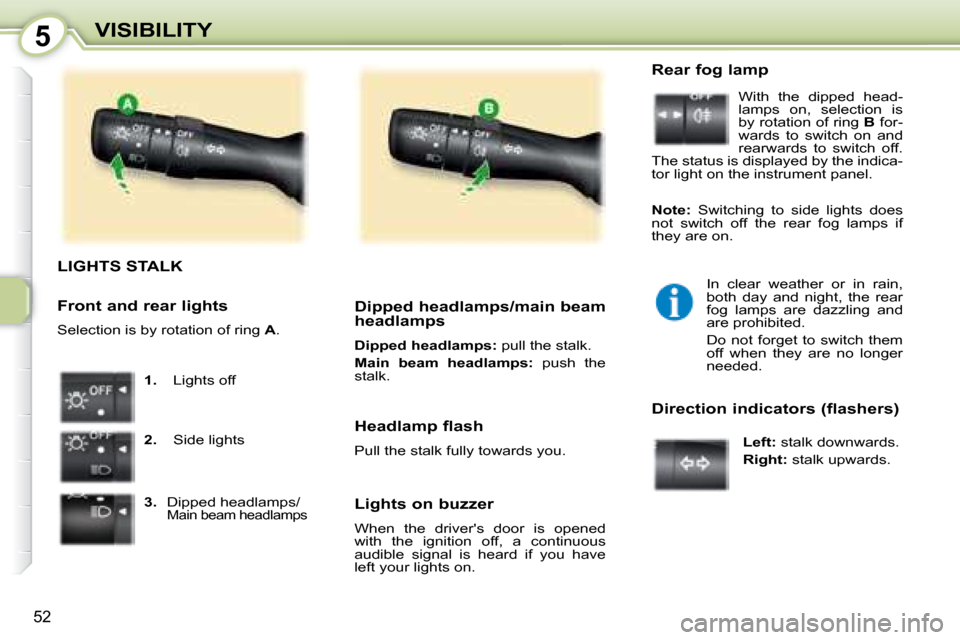
LIGHTS STALK
1. Lights off
2. Side lights
3. Dipped headlamps/
Main beam headlamps
Dipped headlamps/main beam
headlamps
Dipped headlamps: pull the stalk.
Main beam headlamps: push the
stalk.
Lights on buzzer
When the driver's door is opened
with the ignition off, a continuous
audible signal is heard if you have
left your lights on. Rear fog lamp
With the dipped head-
lamps on, selection is
by rotation of ring B for-
wards to switch on and
rearwards to switch off.
The status is displayed by the indica-
tor light on the instrument panel.
In clear weather or in rain,
both day and night, the rear
fog lamps are dazzling and
are prohibited.
Do not forget to switch them
off when they are no longer
needed.
Direction indicators (flashers)
Left: stalk downwards.
Right: stalk upwards.
Headlamp flash
Pull the stalk fully towards you.
Front and rear lights
Selection is by rotation of ring
A .
Note: Switching to side lights does
not switch off the rear fog lamps if
they are on.
Page 55 of 97
5
53
VISIBILITY
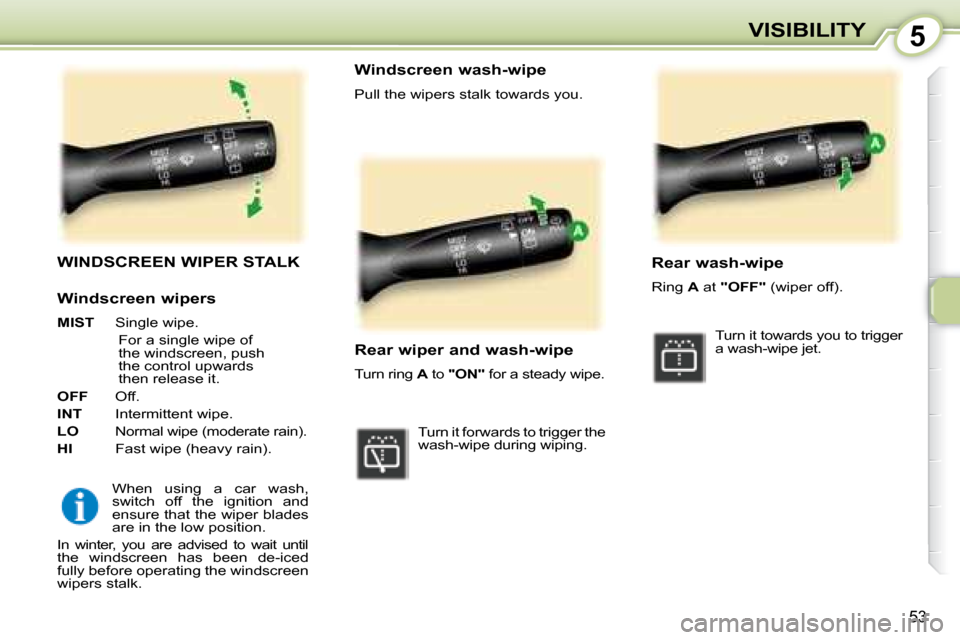
WINDSCREEN WIPER STALK
When using a car wash,
switch off the ignition and
ensure that the wiper blades
are in the low position.
In winter, you are advised to wait until
the windscreen has been de-iced
fully before operating the windscreen
wipers stalk. Windscreen wash-wipe
Pull the wipers stalk towards you.
Rear wiper and wash-wipe
Turn ring
A to "ON" for a steady wipe.
Turn it forwards to trigger the
wash-wipe during wiping. Rear wash-wipe
Ring
A at "OFF" (wiper off).
Turn it towards you to trigger
a wash-wipe jet.
Windscreen wipers
MIST Single wipe.
For a single wipe of
the windscreen, push
the control upwards
then release it.
OFF Off.
INT Intermittent wipe.
LO Normal wipe (moderate rain).
HI Fast wipe (heavy rain).
Page 57 of 97
6
55
SAFETY
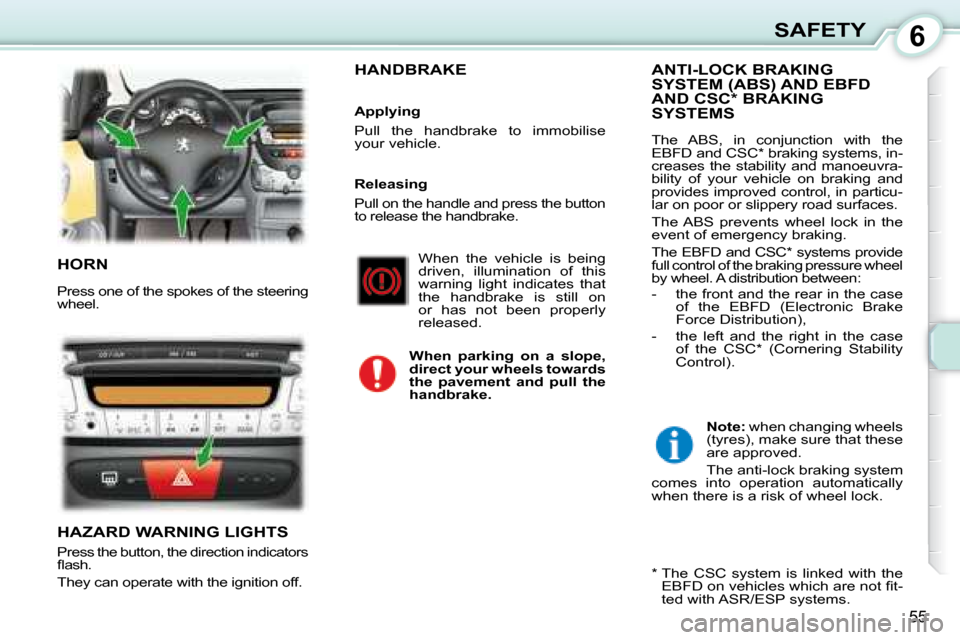
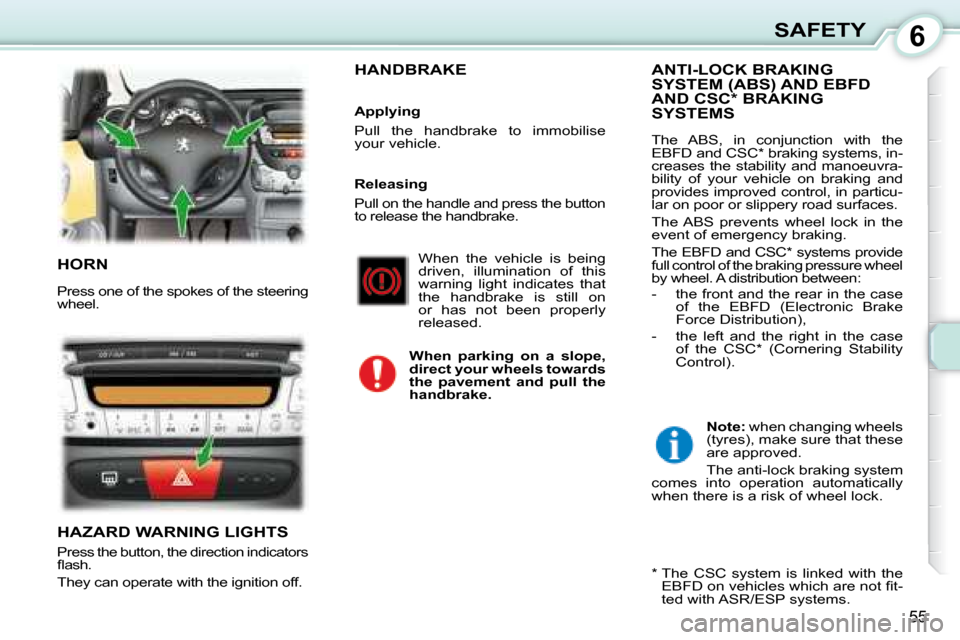
HORN
Press one of the spokes of the steering
wheel.
HAZARD WARNING LIGHTS
Press the button, the direction indicators
fl ash.
They can operate with the ignition off.
ANTI-LOCK BRAKING
SYSTEM (ABS) AND EBFD
AND CSC * BRAKING
SYSTEMS
The ABS, in conjunction with the
EBFD and CSC * braking systems, in-
creases the stability and manoeuvra-
bility of your vehicle on braking and
provides improved control, in particu-
lar on poor or slippery road surfaces.
The ABS prevents wheel lock in the
event of emergency braking.
The EBFD and CSC * systems provide
full control of the braking pressure wheel
by wheel. A distribution between:
- the front and the rear in the case of the EBFD (Electronic Brake
Force Distribution),
- the left and the right in the case of the CSC * (Cornering Stability
Control).
When the vehicle is being
driven, illumination of this
warning light indicates that
the handbrake is still on
or has not been properly
released.
When parking on a slope,
direct your wheels towards
the pavement and pull the
handbrake.
HANDBRAKE
Applying
Pull the handbrake to immobilise
your vehicle.
Note: when changing wheels
(tyres), make sure that these
are approved.
The anti-lock braking system
comes into operation automatically
when there is a risk of wheel lock.
* The CSC system is linked with the EBFD on vehicles which are not fi t-
ted with ASR/ESP systems.
Releasing
Pull on the handle and press the button
to release the handbrake.
Page 58 of 97
6
55
SAFETY
HORN
Press one of the spokes of the steering
wheel.
HAZARD WARNING LIGHTS
Press the button, the direction indicators
fl ash.
They can operate with the ignition off.
ANTI-LOCK BRAKING
SYSTEM (ABS) AND EBFD
AND CSC * BRAKING
SYSTEMS
The ABS, in conjunction with the
EBFD and CSC * braking systems, in-
creases the stability and manoeuvra-
bility of your vehicle on braking and
provides improved control, in particu-
lar on poor or slippery road surfaces.
The ABS prevents wheel lock in the
event of emergency braking.
The EBFD and CSC * systems provide
full control of the braking pressure wheel
by wheel. A distribution between:
- the front and the rear in the case of the EBFD (Electronic Brake
Force Distribution),
- the left and the right in the case of the CSC * (Cornering Stability
Control).
When the vehicle is being
driven, illumination of this
warning light indicates that
the handbrake is still on
or has not been properly
released.
When parking on a slope,
direct your wheels towards
the pavement and pull the
handbrake.
HANDBRAKE
Applying
Pull the handbrake to immobilise
your vehicle.
Note: when changing wheels
(tyres), make sure that these
are approved.
The anti-lock braking system
comes into operation automatically
when there is a risk of wheel lock.
* The CSC system is linked with the EBFD on vehicles which are not fi t-
ted with ASR/ESP systems.
Releasing
Pull on the handle and press the button
to release the handbrake.
Page 61 of 97
6
57
SAFETY
SEAT BELTS Pretensioning front seat
belts with force limiter
Safety in the event of front
impacts has been improved
by means of the introduction of pre-
tensioning seat belts with force limiter
for the front seats. Depending on the
force of the impact, the pretension-
ing system instantly tightens the seat
belts and pulls them against the body
of the occupants.
The pretensioning seat belts are
active when the ignition is on.
The force limiter reduces the pressure
of the seat belt on the chest of the oc-
cupant, increasing his protection. 3-door
5-door
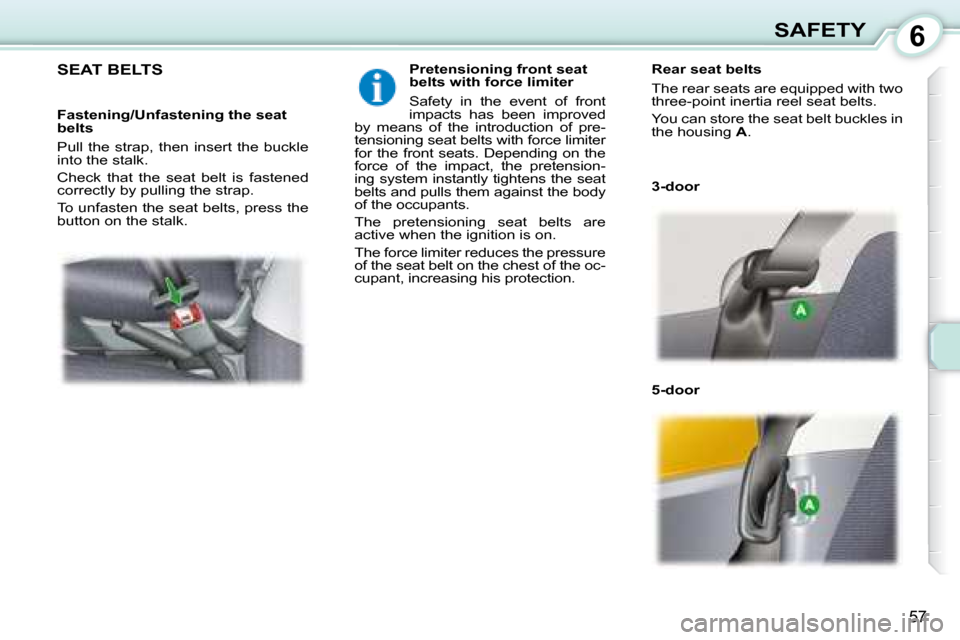
Rear seat belts
The rear seats are equipped with two
three-point inertia reel seat belts.
You can store the seat belt buckles in
the housing
A .
Fastening/Unfastening the seat
belts
Pull the strap, then insert the buckle
into the stalk.
Check that the seat belt is fastened
correctly by pulling the strap.
To unfasten the seat belts, press the
button on the stalk.