phone PEUGEOT 2008 2013.5 User Guide
[x] Cancel search | Manufacturer: PEUGEOT, Model Year: 2013.5, Model line: 2008, Model: PEUGEOT 2008 2013.5Pages: 336, PDF Size: 9.23 MB
Page 260 of 336
07
258
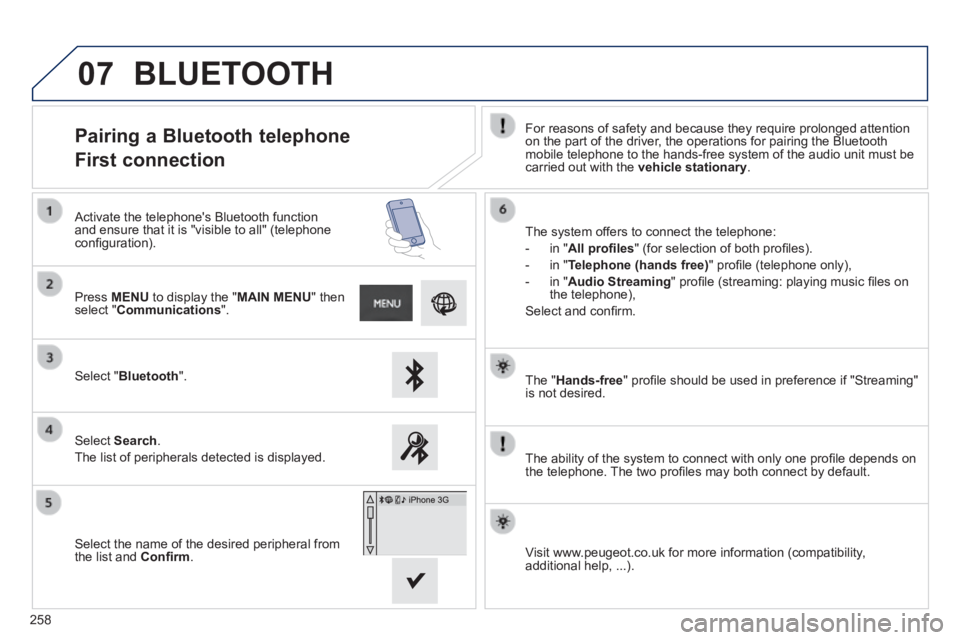
The " Hands-free " profi le should be used in preference if "Streaming" is not desired.
The ability of the system to connect with only one profi le depends on the telephone. The two profi les may both connect by default.
Pairing a Bluetooth telephone
First connection For reasons of safety and because they require prolonged attention on the part of the driver, the operations for pairing the Bluetooth mobile telephone to the hands-free system of the audio unit must be carried out with the vehicle stationary .
Select " Bluetooth ".
Press MENU to display the " MAIN MENU " then select " Communications ".
Select Search .
The list of peripherals detected is displayed.
Activate the telephone's Bluetooth function and ensure that it is "visible to all" (telephone confi guration). The system offers to connect the telephone:
- in " All profi les " (for selection of both profi les).
- in " Telephone (hands free) " profi le (telephone only),
- in " Audio Streaming " profi le (streaming: playing music fi les on the telephone),
Select and confi rm.
Select the name of the desired peripheral from the list and Confi rm . Visit www.peugeot.co.uk for more information (compatibility, additional help, ...).
BLUETOOTH
Page 261 of 336
07
259
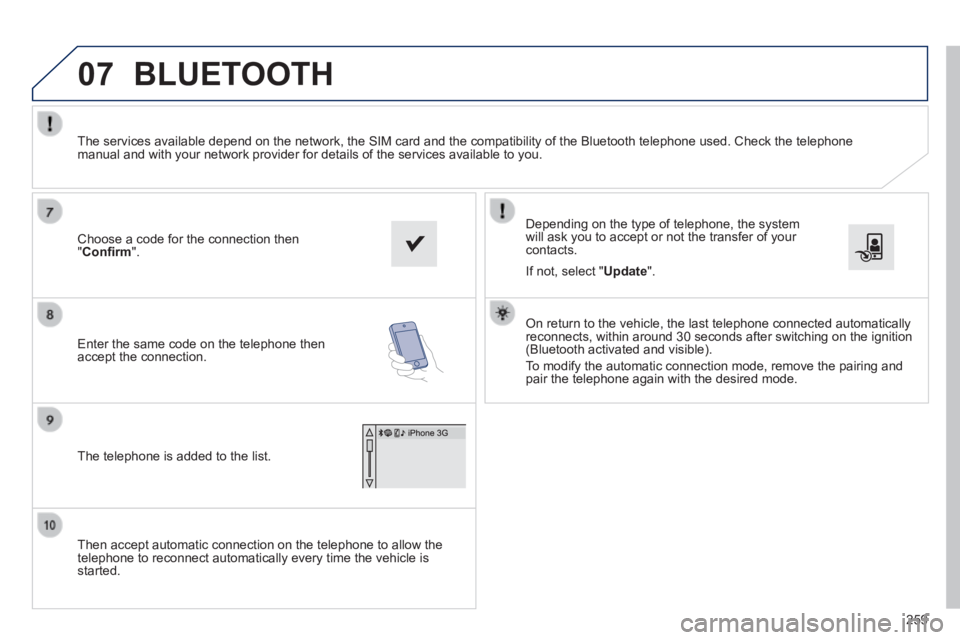
Then accept automatic connection on the telephone to allow the telephone to reconnect automatically every time the vehicle is started.
Depending on the type of telephone, the system will ask you to accept or not the transfer of your contacts.
The services available depend on the network, the SIM card and the compa\
tibility of the Bluetooth telephone used. Check the telephone manual and with your network provider for details of the services availa\
ble to you.
On return to the vehicle, the last telephone connected automatically reconnects, within around 30 seconds after switching on the ignition (Bluetooth activated and visible).
To modify the automatic connection mode, remove the pairing and pair the telephone again with the desired mode.
Choose a code for the connection then " Confi rm ".
Enter the same code on the telephone then accept the connection.
The telephone is added to the list.
BLUETOOTH
If not, select " Update ".
Page 262 of 336
07
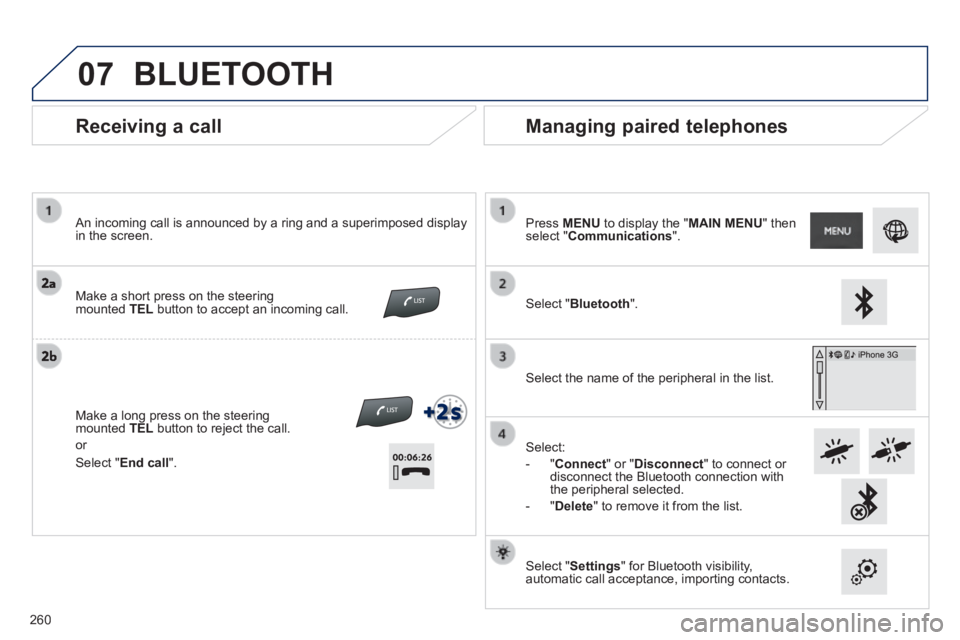
Receiving a call
An incoming call is announced by a ring and a superimposed display in the screen.
Make a short press on the steering mounted TEL button to accept an incoming call.
Make a long press on the steering mounted TEL button to reject the call.
or
Managing paired telephones
Press MENU to display the " MAIN MENU " then select " Communications ".
Select " Bluetooth ".
Select the name of the peripheral in the list.
Select:
- " Connect " or " Disconnect " to connect or disconnect the Bluetooth connection with the peripheral selected.
- " Delete " to remove it from the list.
Select " Settings " for Bluetooth visibility, automatic call acceptance, importing contacts.
BLUETOOTH
Select " End call ".
260
Page 263 of 336
07
261
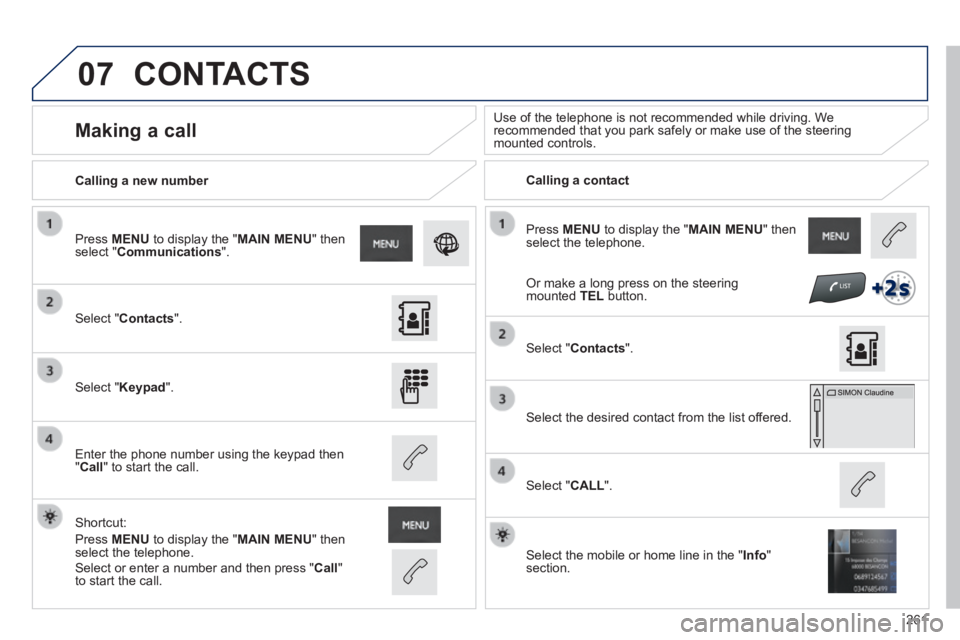
Press MENU to display the " MAIN MENU " then select the telephone.
Calling a new number Calling a contact
Making a call Use of the telephone is not recommended while driving. We recommended that you park safely or make use of the steering mounted controls.
Select " Contacts ".
Press MENU to display the " MAIN MENU " then select " Communications ".
Select " Keypad ".
Enter the phone number using the keypad then " Call " to start the call.
Shortcut:
Press MENU to display the " MAIN MENU " then select the telephone.
Select " Contacts ".
Select the desired contact from the list offered.
Select the mobile or home line in the " Info " section.
Select " CALL ".
CONTACTS
Select or enter a number and then press " Call " to start the call.
Or make a long press on the steering mounted TEL button.
Page 264 of 336
07
262
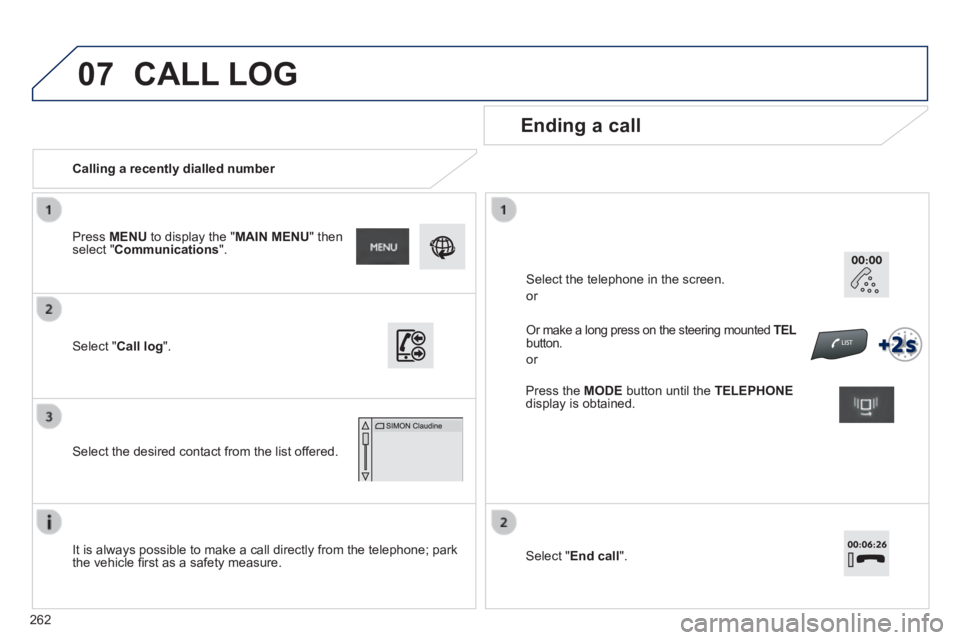
Calling a recently dialled number
Ending a call
It is always possible to make a call directly from the telephone; park the vehicle fi rst as a safety measure.
Select " Call log ".
Press MENU to display the " MAIN MENU " then select " Communications ".
Select the desired contact from the list offered.
Or make a long press on the steering mounted TEL TEL TELbutton.
or
Select the telephone in the screen.
or
CALL LOG
Press the MODE button until the TELEPHONEdisplay is obtained.
Select " End call ".
Page 269 of 336
267
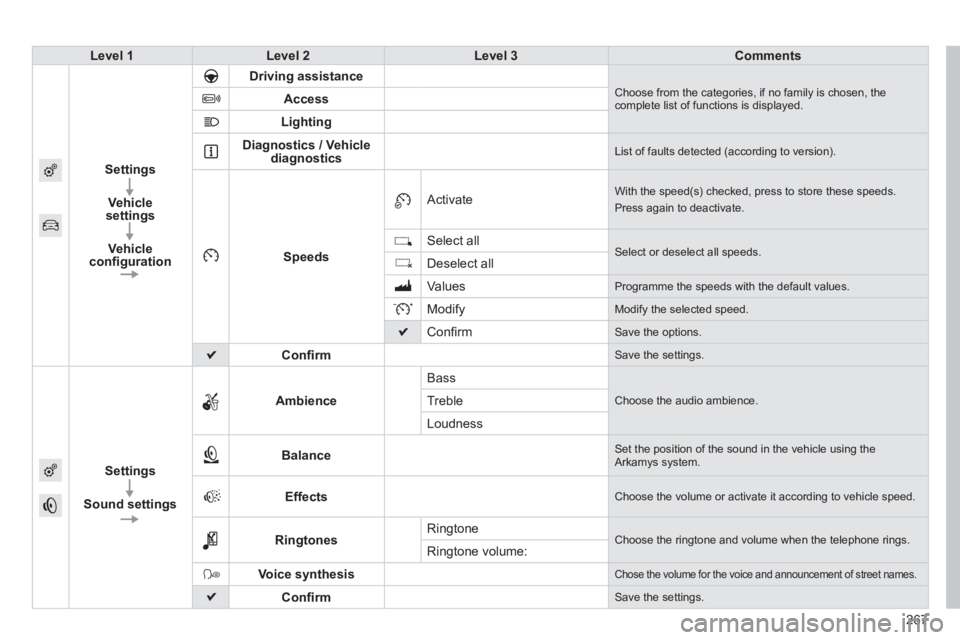
Level 1Level 2Level 3Comments
Settings
Vehicle settings
Vehicle confi guration
Driving assistance Choose from the categories, if no family is chosen, the complete list of functions is displayed. Access
Lighting
Diagnostics / Vehicle diagnostics List of faults detected (according to version).
Speeds
Activate With the speed(s) checked, press to store these speeds.
Press again to deactivate.
Select all Select or deselect all speeds. Deselect all
Values Programme the speeds with the default values.
Modify Modify the selected speed.
Confi rm Save the options.
Confi rm Save the settings.
Settings
Sound settings
Ambience
Bass
Choose the audio ambience. Treble
Loudness
Balance Set the position of the sound in the vehicle using the Arkamys system.
Effects Choose the volume or activate it according to vehicle speed.
Ringtones Ringtone Choose the ringtone and volume when the telephone rings. Ringtone volume:
Voice synthesis Chose the volume for the voice and announcement of street names.
Confi rm Save the settings.
Page 273 of 336
FREQUENTLY ASKED QUESTIONS
271
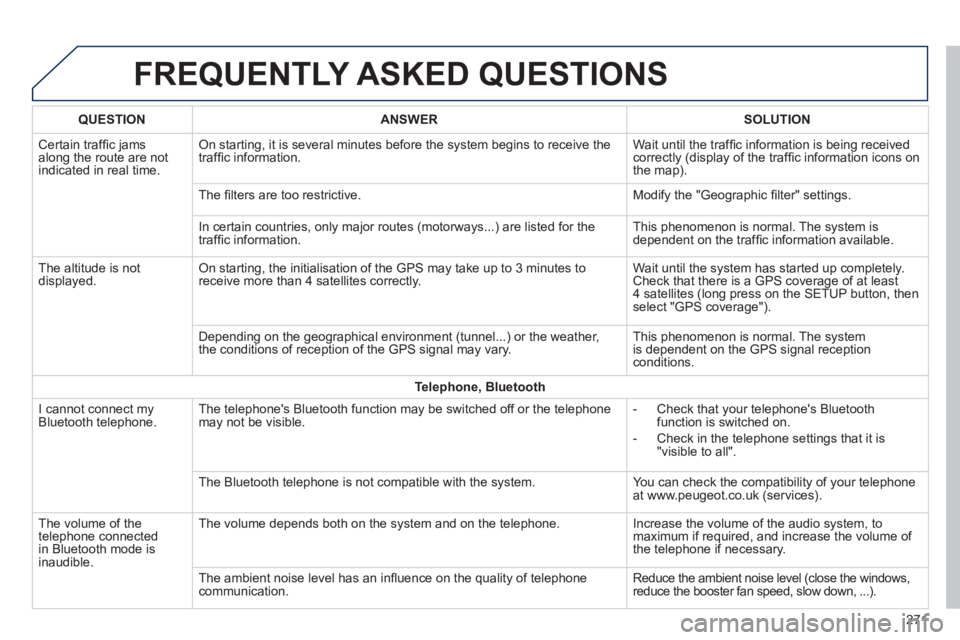
QUESTIONANSWERSOLUTION
Certain traffi c jams along the route are not indicated in real time.
On starting, it is several minutes before the system begins to receive t\
he traffi c information. Wait until the traffi c information is being received correctly (display of the traffi c information icons on the map).
The fi lters are too restrictive. Modify the "Geographic fi lter" settings.
In certain countries, only major routes (motorways...) are listed for \
the traffi c information. This phenomenon is normal. The system is dependent on the traffi c information available.
The altitude is not displayed. On starting, the initialisation of the GPS may take up to 3 minutes to receive more than 4 satellites correctly. Wait until the system has started up completely. Check that there is a GPS coverage of at least 4 satellites (long press on the SETUP button, then select "GPS coverage").
Depending on the geographical environment (tunnel...) or the weather, the conditions of reception of the GPS signal may vary. This phenomenon is normal. The system is dependent on the GPS signal reception conditions.
Telephone, Bluetooth
I cannot connect my Bluetooth telephone. The telephone's Bluetooth function may be switched off or the telephone may not be visible. - Check that your telephone's Bluetooth function is switched on.
- Check in the telephone settings that it is "visible to all".
The Bluetooth telephone is not compatible with the system. You can check the compatibility of your telephone at www.peugeot.co.uk (services).
The volume of the telephone connected in Bluetooth mode is inaudible.
The volume depends both on the system and on the telephone. Increase the volume of the audio system, to maximum if required, and increase the volume of the telephone if necessary.
The ambient noise level has an infl uence on the quality of telephone communication. Reduce the ambient noise level (close the windows, reduce the booster fan speed, slow down, ...).
Page 274 of 336
FREQUENTLY ASKED QUESTIONS
272
QUESTIONANSWERSOLUTION
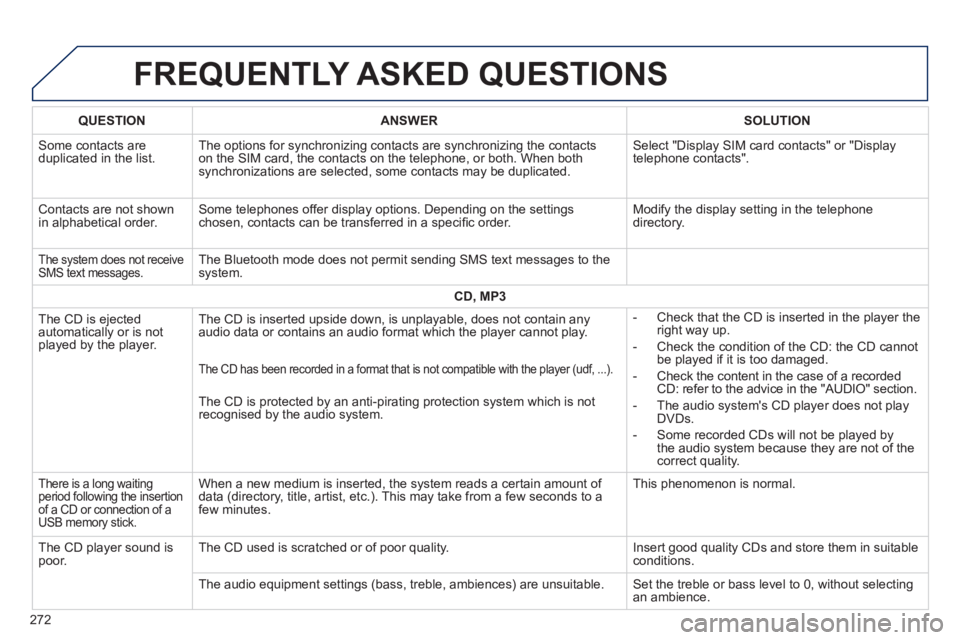
Some contacts are duplicated in the list. The options for synchronizing contacts are synchronizing the contacts on the SIM card, the contacts on the telephone, or both. When both synchronizations are selected, some contacts may be duplicated.
Select "Display SIM card contacts" or "Display telephone contacts".
Contacts are not shown in alphabetical order. Some telephones offer display options. Depending on the settings chosen, contacts can be transferred in a specifi c order. Modify the display setting in the telephone directory.
The system does not receive SMS text messages. The Bluetooth mode does not permit sending SMS text messages to the system.
CD, MP3
The CD is ejected automatically or is not played by the player.
The CD is inserted upside down, is unplayable, does not contain any audio data or contains an audio format which the player cannot play. - Check that the CD is inserted in the player the right way up.
- Check the condition of the CD: the CD cannot be played if it is too damaged.
- Check the content in the case of a recorded CD: refer to the advice in the "AUDIO" section.
- The audio system's CD player does not play DVDs.
- Some recorded CDs will not be played by the audio system because they are not of the correct quality.
The CD has been recorded in a format that is not compatible with the pla\
yer (udf, ...).
The CD is protected by an anti-pirating protection system which is not recognised by the audio system.
There is a long waiting period following the insertion of a CD or connection of a USB memory stick.
When a new medium is inserted, the system reads a certain amount of data (directory, title, artist, etc.). This may take from a few seconds to a few minutes.
This phenomenon is normal.
The CD player sound is poor. The CD used is scratched or of poor quality. Insert good quality CDs and store them in suitable conditions.
The audio equipment settings (bass, treble, ambiences) are unsuitable.\
Set the treble or bass level to 0, without selecting an ambience.
Page 277 of 336
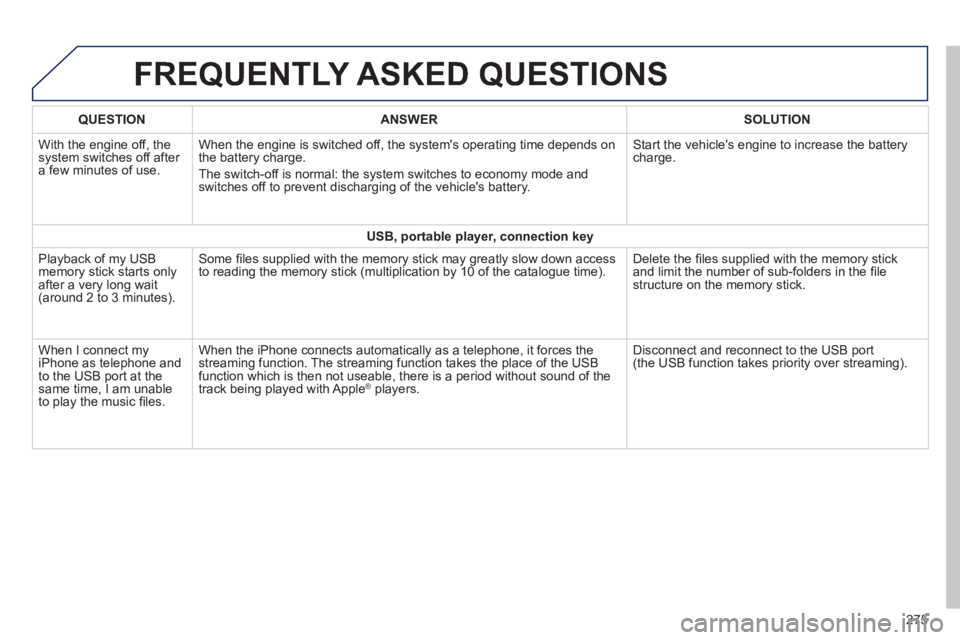
FREQUENTLY ASKED QUESTIONS
275
QUESTIONANSWERSOLUTION
With the engine off, the system switches off after a few minutes of use.
When the engine is switched off, the system's operating time depends on the battery charge.
The switch-off is normal: the system switches to economy mode and switches off to prevent discharging of the vehicle's battery.
Start the vehicle's engine to increase the battery charge.
USB, portable player, connection key
Playback of my USB memory stick starts only after a very long wait (around 2 to 3 minutes).
Some fi les supplied with the memory stick may greatly slow down access to reading the memory stick (multiplication by 10 of the catalogue time\
). Delete the fi les supplied with the memory stick and limit the number of sub-folders in the fi le structure on the memory stick.
When I connect my iPhone as telephone and to the USB port at the same time, I am unable to play the music fi les.
When the iPhone connects automatically as a telephone, it forces the streaming function. The streaming function takes the place of the USB function which is then not useable, there is a period without sound of t\
he track being played with Apple ® players. ® players. ®
Disconnect and reconnect to the USB port (the USB function takes priority over streaming).
Page 279 of 336
277
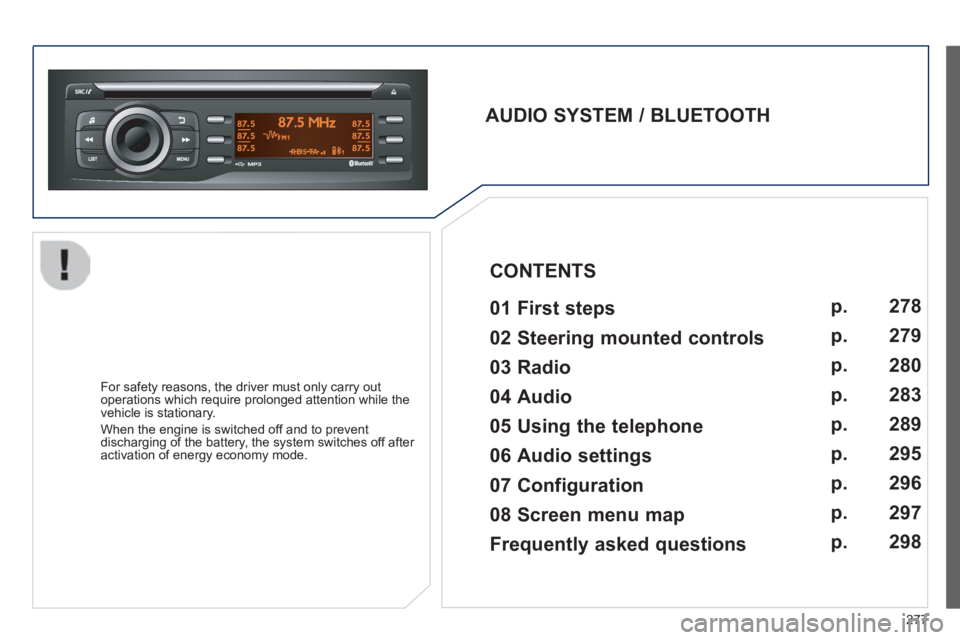
AUDIO SYSTEM / BLUETOOTH 01 First steps
For safety reasons, the driver must only carry out operations which require prolonged attention while the vehicle is stationary.
When the engine is switched off and to prevent discharging of the battery, the system switches off after activation of energy economy mode.
CONTENTS
02 Steering mounted controls
03 Radio
04 Audio
05 Using the telephone
06 Audio settings
07 Configuration
08 Screen menu map p.
p.
p.
p.
p.
p.
p.
p.
278
279
280
283
289
295
296
297
Frequently asked questions p.
298