radio PEUGEOT 2008 2013.5 User Guide
[x] Cancel search | Manufacturer: PEUGEOT, Model Year: 2013.5, Model line: 2008, Model: PEUGEOT 2008 2013.5Pages: 336, PDF Size: 9.23 MB
Page 246 of 336
06
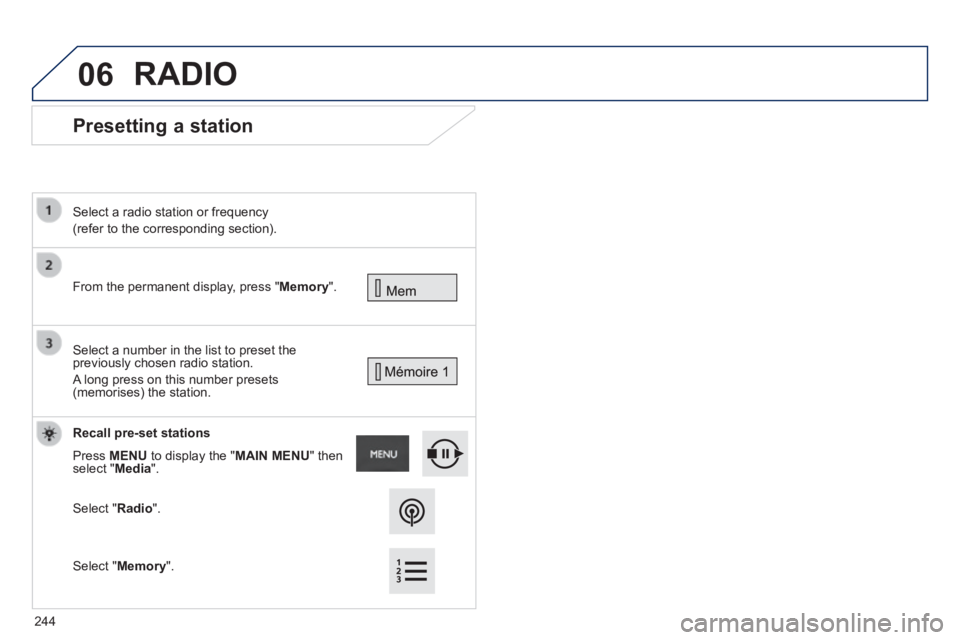
Presetting a station
From the permanent display, press " Memory ".
Select a radio station or frequency
(refer to the corresponding section).
Select a number in the list to preset the previously chosen radio station.
A long press on this number presets (memorises) the station.
Recall pre-set stations
Press MENU to display the " MAIN MENU " then select " Media ".
Select " Radio ".
RADIO
Select " Memory ".
244
Page 247 of 336
06
245
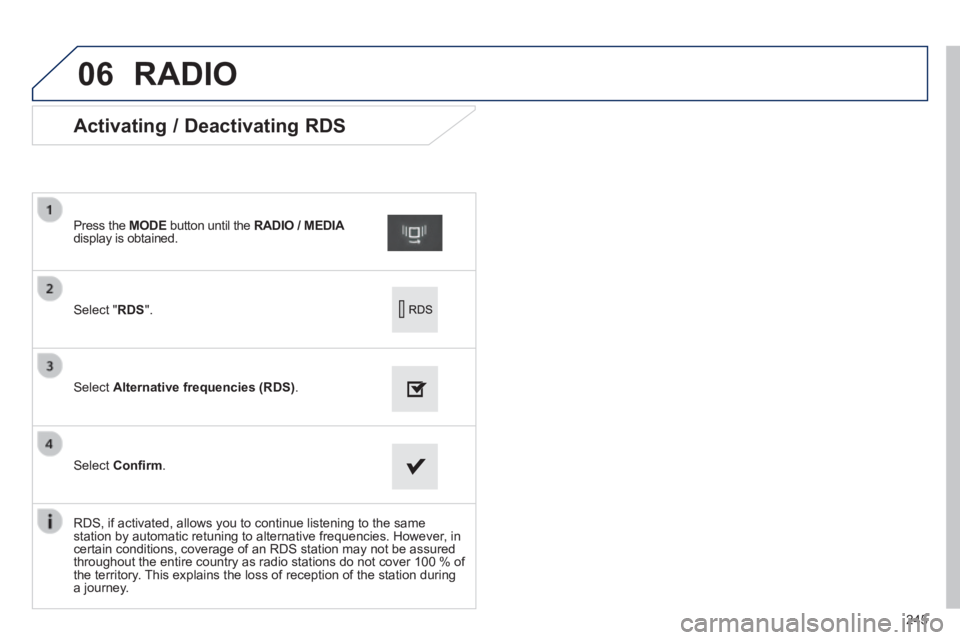
Activating / Deactivating RDS
Select " RDS ".
Press the MODE button until the RADIO / MEDIA RADIO / MEDIA RADIO / MEDIAdisplay is obtained.
Select Alternative frequencies (RDS) .
Select Confi rm .
RDS, if activated, allows you to continue listening to the same station by automatic retuning to alternative frequencies. However, in certain conditions, coverage of an RDS station may not be assured throughout the entire country as radio stations do not cover 100 % of the territory. This explains the loss of reception of the station during a journey.
RADIO
Page 248 of 336
06
246
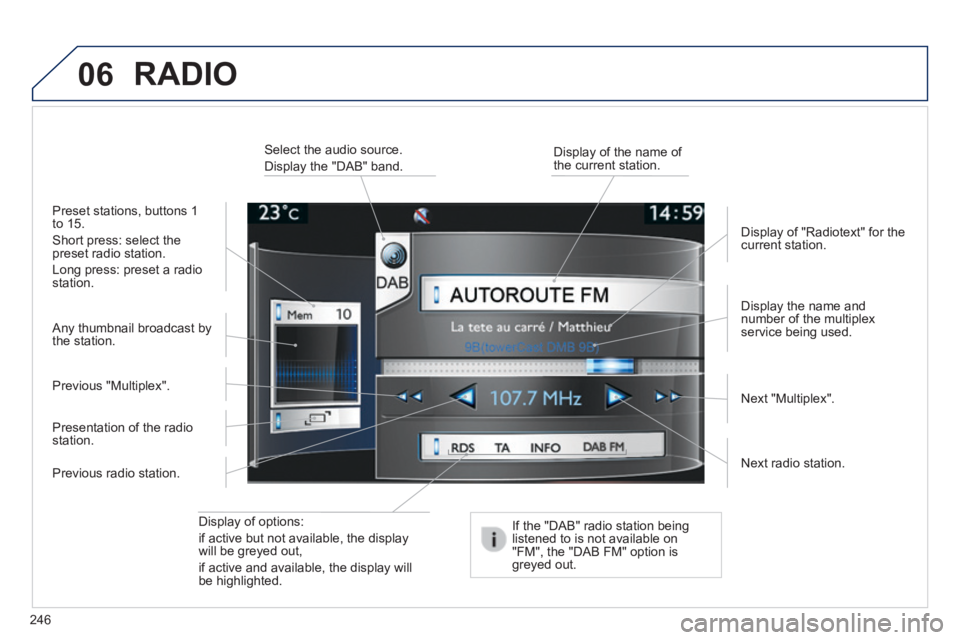
Display of options:
if active but not available, the display will be greyed out,
if active and available, the display will be highlighted.
Display the name and number of the multiplex service being used.
Preset stations, buttons 1 to 15.
Short press: select the preset radio station.
Long press: preset a radio station.
Display of "Radiotext" for the current station.
Select the audio source.
Display the "DAB" band. Display of the name of the current station.
If the "DAB" radio station being listened to is not available on "FM", the "DAB FM" option is greyed out.
Any thumbnail broadcast by the station.
Next radio station.
Next "Multiplex". Previous "Multiplex".
Previous radio station.
Presentation of the radio station.
RADIO
Page 249 of 336
06
247
If "DAB / FM auto tracking" is activated, there is a difference of a few seconds when the system switches to "FM" analogue radio with sometimes a variation in volume.
When the digital signal is restored, the system automatically changes back to "DAB".
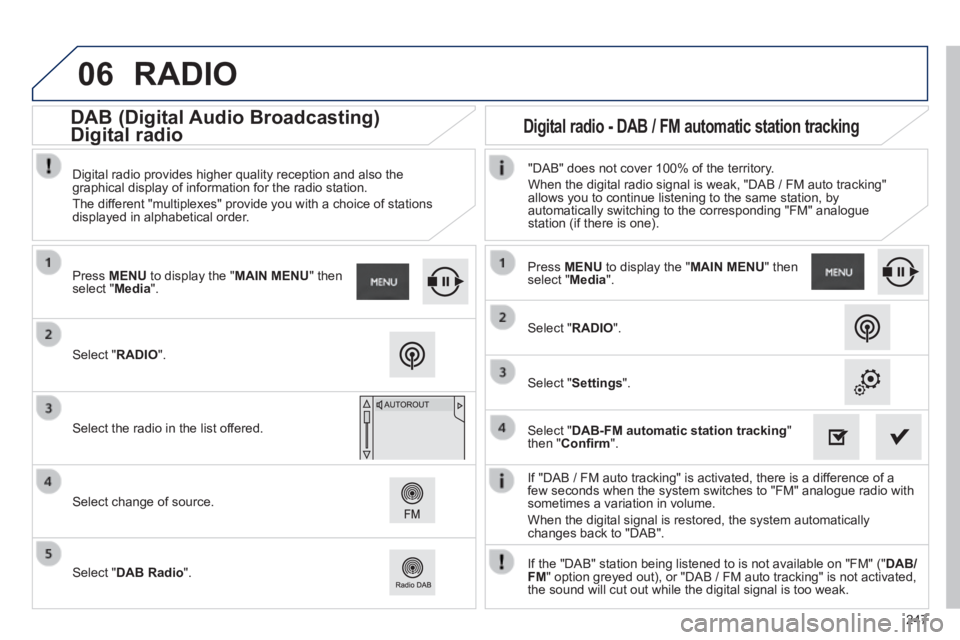
Select " RADIO ".
Press MENU to display the " MAIN MENU " then select " Media ".
Select the radio in the list offered.
Select change of source.
Select " DAB Radio ".
Digital radio provides higher quality reception and also the graphical display of information for the radio station.
The different "multiplexes" provide you with a choice of stations displayed in alphabetical order.
Press MENU to display the " MAIN MENU " then select " Media ".
Select " RADIO ".
Select " Settings ".
Select " DAB-FM automatic station tracking " then " Confi rm ".
"DAB" does not cover 100% of the territory.
When the digital radio signal is weak, "DAB / FM auto tracking" allows you to continue listening to the same station, by automatically switching to the corresponding "FM" analogue station (if there is one).
If the "DAB" station being listened to is not available on "FM" (" DAB/FM " option greyed out), or "DAB / FM auto tracking" is not activated, the sound will cut out while the digital signal is too weak.
RADIO
Digital radio - DAB / FM automatic station tracking DAB (Digital Audio Broadcasting)
Digital radio
Page 250 of 336
06
248
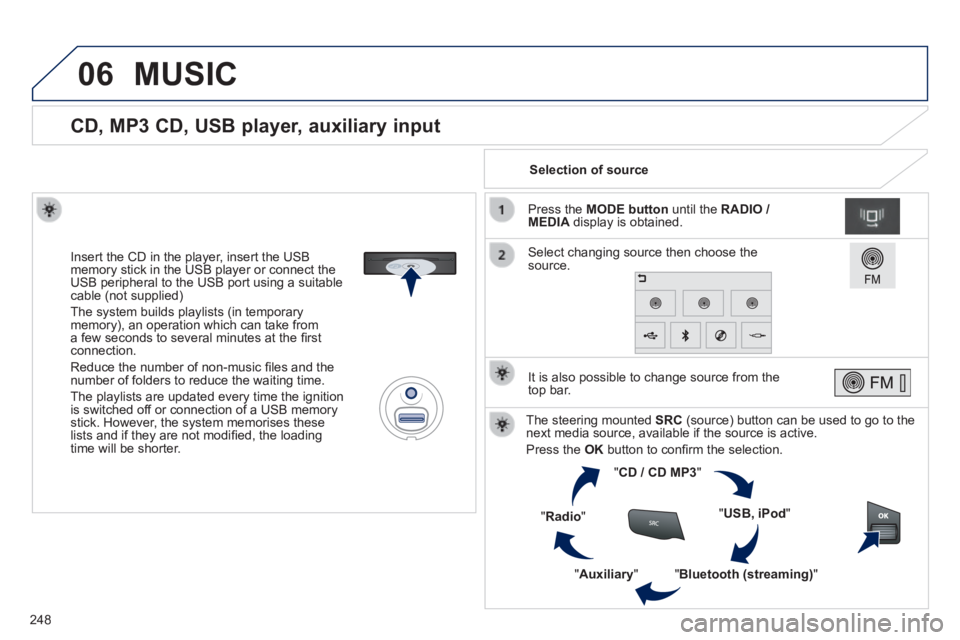
CD, MP3 CD, USB player, auxiliary input
Insert the CD in the player, insert the USB memory stick in the USB player or connect the USB peripheral to the USB port using a suitable cable (not supplied)
The system builds playlists (in temporary memory), an operation which can take from a few seconds to several minutes at the fi rst connection.
Reduce the number of non-music fi les and the number of folders to reduce the waiting time.
The playlists are updated every time the ignition is switched off or connection of a USB memory stick. However, the system memorises these lists and if they are not modifi ed, the loading time will be shorter.
Selection of source
The steering mounted SRC (source) button can be used to go to the next media source, available if the source is active.
Press the OK button to confi rm the selection.
" CD / CD MP3 "
" USB, iPod "
" Bluetooth (streaming) " " Auxiliary "
" Radio "
Select changing source then choose the source.
Press the MODE button until the RADIO / MEDIA display is obtained.
It is also possible to change source from the top bar.
MUSIC
Page 254 of 336
06
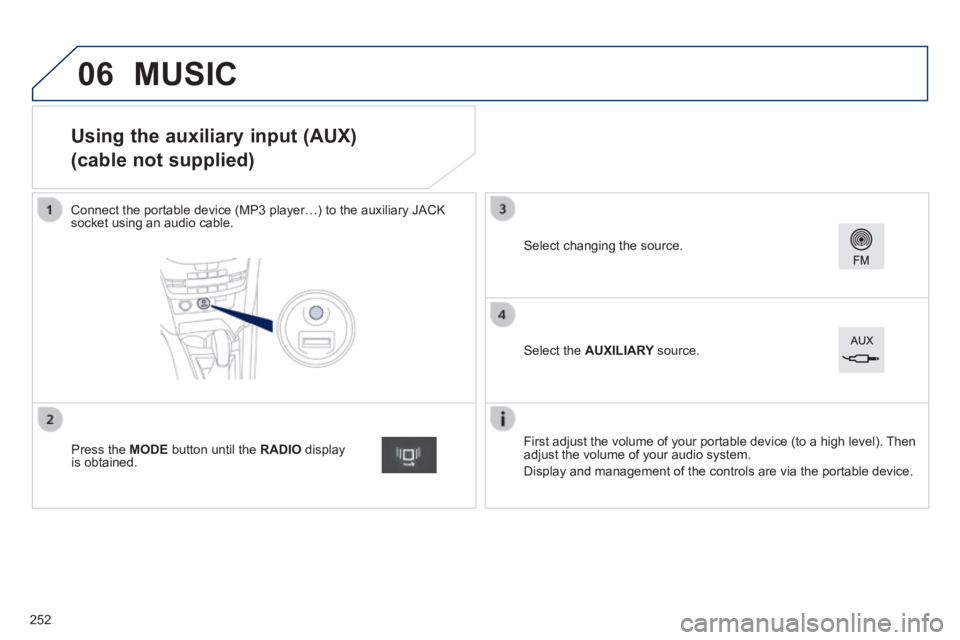
Using the auxiliary input (AUX)
(cable not supplied)
Connect the portable device (MP3 player…) to the auxiliary JACK socket using an audio cable.
First adjust the volume of your portable device (to a high level). Then adjust the volume of your audio system.
Display and management of the controls are via the portable device.
Select changing the source.
Press the MODE button until the RADIO display is obtained.
Select the AUXILIARY source. AUXILIARY source. AUXILIARY
MUSIC
252
Page 255 of 336
06
253
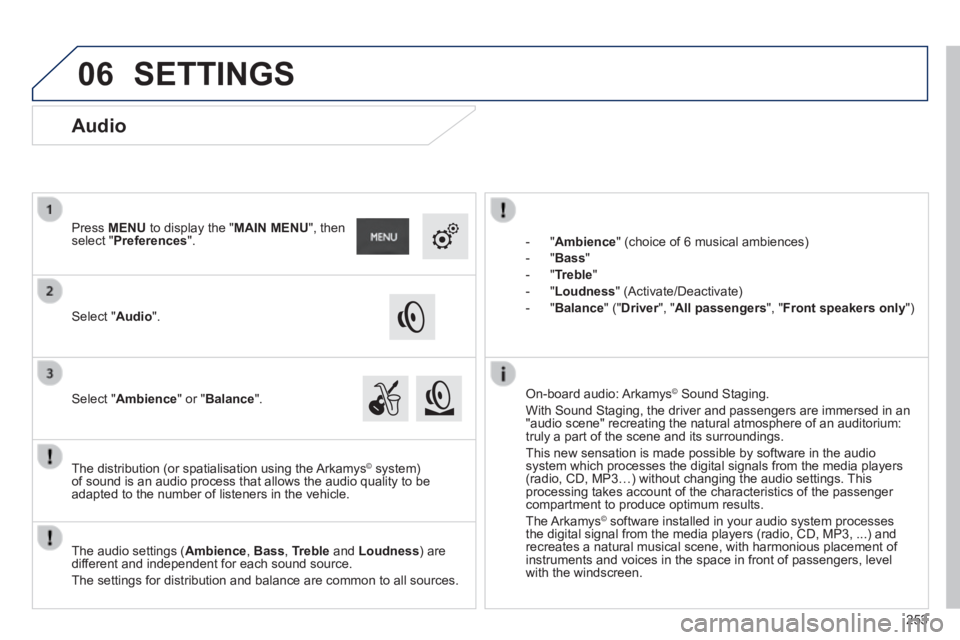
- " Ambience " (choice of 6 musical ambiences)
- " Bass "
- " Treble "
- " Loudness " (Activate/Deactivate)
- " Balance " (" Driver ", " Driver ", " DriverAll passengers ", " Front speakers only ")
The audio settings ( Ambience , Bass , Treble and Loudness ) are different and independent for each sound source.
The settings for distribution and balance are common to all sources.
The distribution (or spatialisation using the Arkamys© system) © system) ©
of sound is an audio process that allows the audio quality to be adapted to the number of listeners in the vehicle.
On-board audio: Arkamys © Sound Staging. © Sound Staging. ©
With Sound Staging, the driver and passengers are immersed in an "audio scene" recreating the natural atmosphere of an auditorium: truly a part of the scene and its surroundings.
This new sensation is made possible by software in the audio system which processes the digital signals from the media players (radio, CD, MP3…) without changing the audio settings. This processing takes account of the characteristics of the passenger compartment to produce optimum results.
The Arkamys© software installed in your audio system processes © software installed in your audio system processes ©
the digital signal from the media players (radio, CD, MP3, ...) and recreates a natural musical scene, with harmonious placement of instruments and voices in the space in front of passengers, level with the windscreen.
Audio
Select " Audio ".
Press MENU to display the " MAIN MENU ", then select " Preferences ".
Select " Ambience " or " Balance ".
SETTINGS
Page 275 of 336
FREQUENTLY ASKED QUESTIONS
273
QUESTIONANSWERSOLUTION
Some characters in the media information are not displayed correctly while playing.
The audio system does not display some types of characters. Use standard characters to name tracks and folders.
Playing of streaming fi les does not start. The peripheral device connected does not support automatic play. Start the playback from the device.
The names of tracks and the track length are not displayed on the screen when streaming audio.
The Bluetooth profi le does not allow the transfer of this information.
Radio
The quality of reception of the radio station listened to gradually deteriorates or the stored stations do not function (no sound, 87.5 Mhz is displayed...).
The vehicle is too far from the transmitter used by the station listened\
to or there is no transmitter in the geographical area through which the\
vehicle is travelling.
Activate the "RDS" function by means of the short-cut menu to enable the system to check whether there is a more powerful transmitter in the geographical area.
The environment (hills, buildings, tunnels, basement car parks...) blo\
ck reception, including in RDS mode. This phenomenon is normal and does not indicate a fault with the audio system.
The aerial is absent or has been damaged (for example when going through a car wash or into an underground car park). Have the aerial checked by a PEUGEOT dealer.
I cannot fi nd some radio stations in the list of stations received.
The station is not received or its name has changed in the list.
Some radio stations send other information in place of their name (the title of the song for example).
The system interprets this information as the name of the station. The name of the radio station changes.
Page 276 of 336
FREQUENTLY ASKED QUESTIONS
274
QUESTIONANSWERSOLUTION
Settings, confi guration
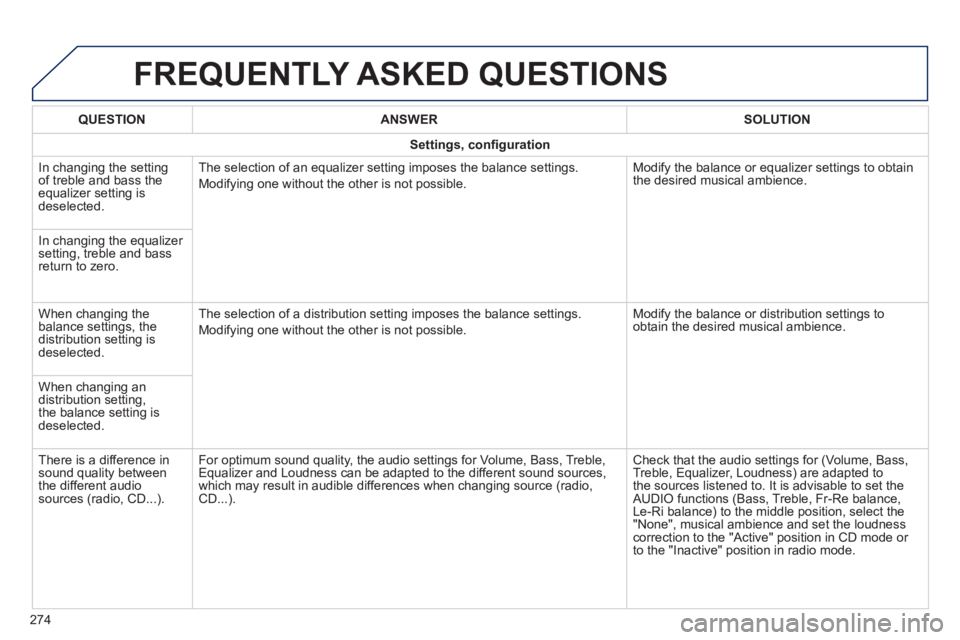
In changing the setting of treble and bass the equalizer setting is deselected.
The selection of an equalizer setting imposes the balance settings.
Modifying one without the other is not possible.
Modify the balance or equalizer settings to obtain the desired musical ambience.
In changing the equalizer setting, treble and bass return to zero.
When changing the balance settings, the distribution setting is deselected.
The selection of a distribution setting imposes the balance settings.
Modifying one without the other is not possible.
Modify the balance or distribution settings to obtain the desired musical ambience.
When changing an distribution setting, the balance setting is deselected.
There is a difference in sound quality between the different audio sources (radio, CD...).
For optimum sound quality, the audio settings for Volume, Bass, Treble, Equalizer and Loudness can be adapted to the different sound sources, which may result in audible differences when changing source (radio, CD...).
Check that the audio settings for (Volume, Bass, Treble, Equalizer, Loudness) are adapted to the sources listened to. It is advisable to set the AUDIO functions (Bass, Treble, Fr-Re balance, Le-Ri balance) to the middle position, select the "None", musical ambience and set the loudness correction to the "Active" position in CD mode or to the "Inactive" position in radio mode.
Page 279 of 336
277
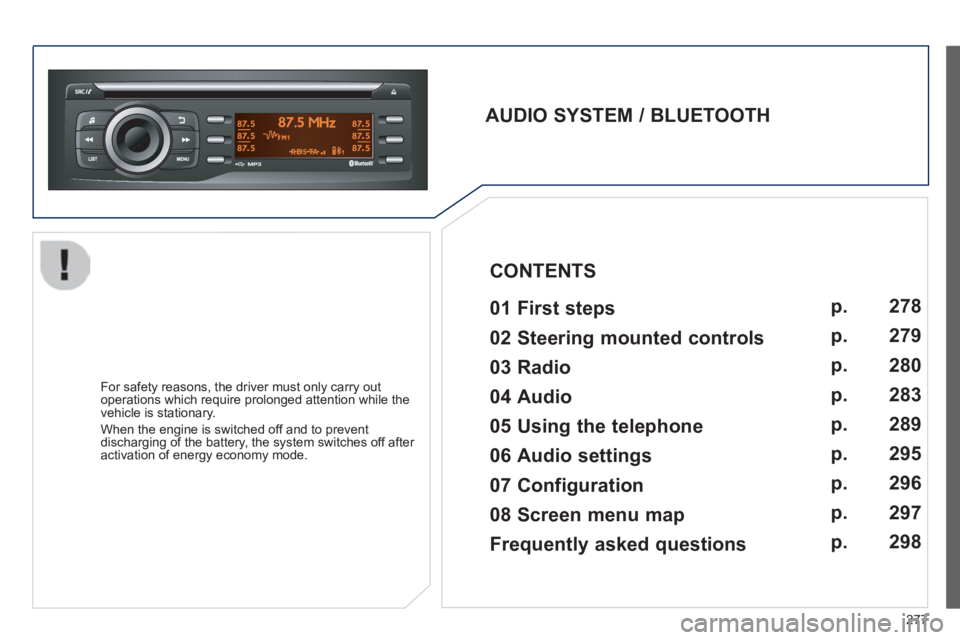
AUDIO SYSTEM / BLUETOOTH 01 First steps
For safety reasons, the driver must only carry out operations which require prolonged attention while the vehicle is stationary.
When the engine is switched off and to prevent discharging of the battery, the system switches off after activation of energy economy mode.
CONTENTS
02 Steering mounted controls
03 Radio
04 Audio
05 Using the telephone
06 Audio settings
07 Configuration
08 Screen menu map p.
p.
p.
p.
p.
p.
p.
p.
278
279
280
283
289
295
296
297
Frequently asked questions p.
298