ad blue PEUGEOT 2008 2013 User Guide
[x] Cancel search | Manufacturer: PEUGEOT, Model Year: 2013, Model line: 2008, Model: PEUGEOT 2008 2013Pages: 324, PDF Size: 8.39 MB
Page 229 of 324
05
227
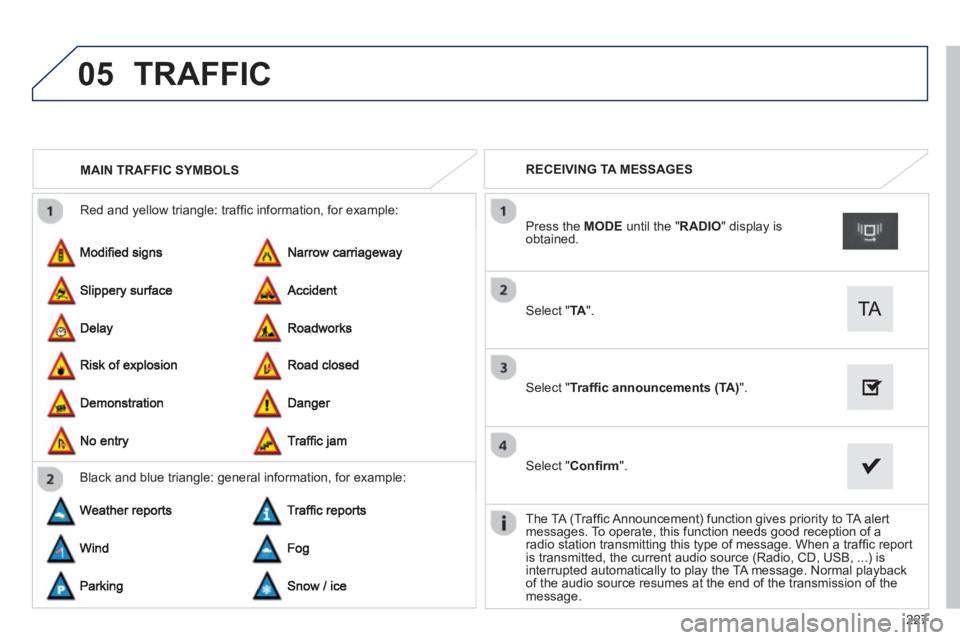
Red and yellow triangle: traffi c information, for example:
MAIN TRAFFIC SYMBOLS
Black and blue trian
gle: general information, for example:
RECEIVING TA MESSAGES
Select "TA".
Press the MODEuntil the " RADIO" display isobtained.
Select "Traffi c announcements (TA)".
Select "Confi rm".
The TA
(Traffi c Announcement) function gives priority to TA alert
messages. To operate, this function needs good reception of a
radio station transmitting this type of message. When a traffi c report
is transmitted, the current audio source (Radio, CD, USB, ...) isinterrupted automatically to play the TA message. Normal playbackof the audio source resumes at the end of the transmission of the message.
TRAFFIC
Page 242 of 324
06
240
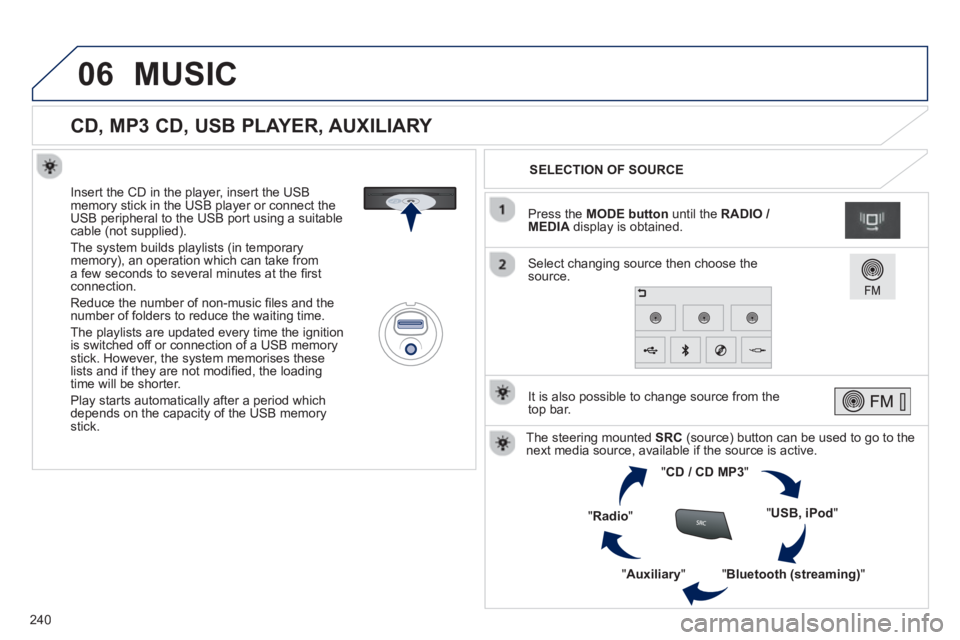
CD, MP3 CD, USB PLAYER, AUXILIARY
Insert the CD in the player, insert the USBmemory stick in the USB player or connect theUSB peripheral to the USB port using a suitablecable (not supplied).
The s
ystem builds playlists (in temporarymemory), an operation which can take froma few seconds to several minutes at the fi rstconnection.
R
educe the number of non-music fi les and the number of folders to reduce the waiting time.
The pla
ylists are updated every time the ignition
is switched off or connection of a USB memory stick. However, the system memorises these
lists and if they are not modifi ed, the loadingtime will be shorter.
Pla
y starts automatically after a period which
depends on the capacity of the USB memory stick.SELECTION OF SOURCE
The steering mounted SRC(source) button can be used to go to thenext media source, available if the source is active.
"CD / CD MP
3"
"
USB, iPod
"
"
Bluetooth (streaming)
"
"Auxiliary
"
"Radio"
Select changing source then choose thesource. Pr
ess the MODE button
until the RADIO / MEDIA
display is obtained.
It is also possible to chan
ge source from the
top bar.
MUSIC
Page 245 of 324
06
243
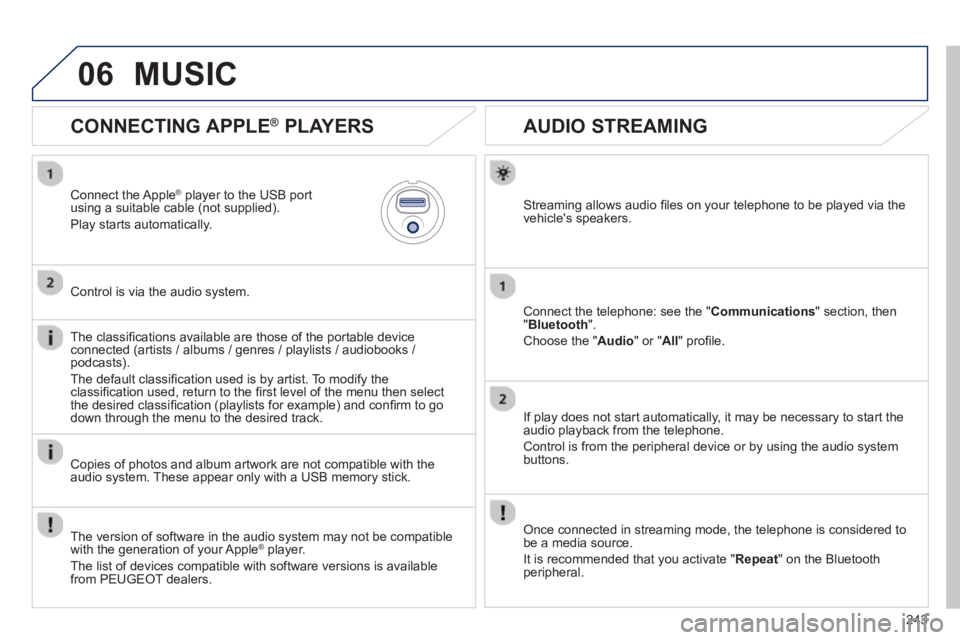
AUDIO STREAMING
Streaming allows audio fi les on your telephone to be played via the
vehicle's speakers.
Connect the telephone: see the "Communications" section, then "Bluetooth
".
Choose the " Audio
" or " All" profi le.
I
f play does not start automatically, it may be necessary to start the audio playback from the telephone.
Control is from the peripheral device or b
y using the audio system buttons.
Once connected in streaming mode, the telephone is considered tobe a media source.
It is recommended that you activate "
Repeat" on the Bluetooth
peripheral.
CONNECTING APPLE ®
PLAYERS
Connect the Apple ®player to the USB port using a suitable cable (not supplied).
Play starts automatically.
Control is via the audio system.
The classifi cations available are those of the
portable deviceconnected (artists / albums / genres / playlists / audiobooks / podcasts).
The de
fault classifi cation used is by artist. To modify theclassifi cation used, return to the fi rst level of the menu then select
the desired classifi cation (playlists for example) and confi rm to go
down through the menu to the desired track.
Copies of photos and album artwork are not compatible with the
audio system. These appear only with a USB memory stick.
MUSIC
The version of software in the audio system may not be compatible
with the generation of your Apple ®player.
The list of devices com
patible with software versions is available
from PEUGEOT dealers.
Page 249 of 324
247
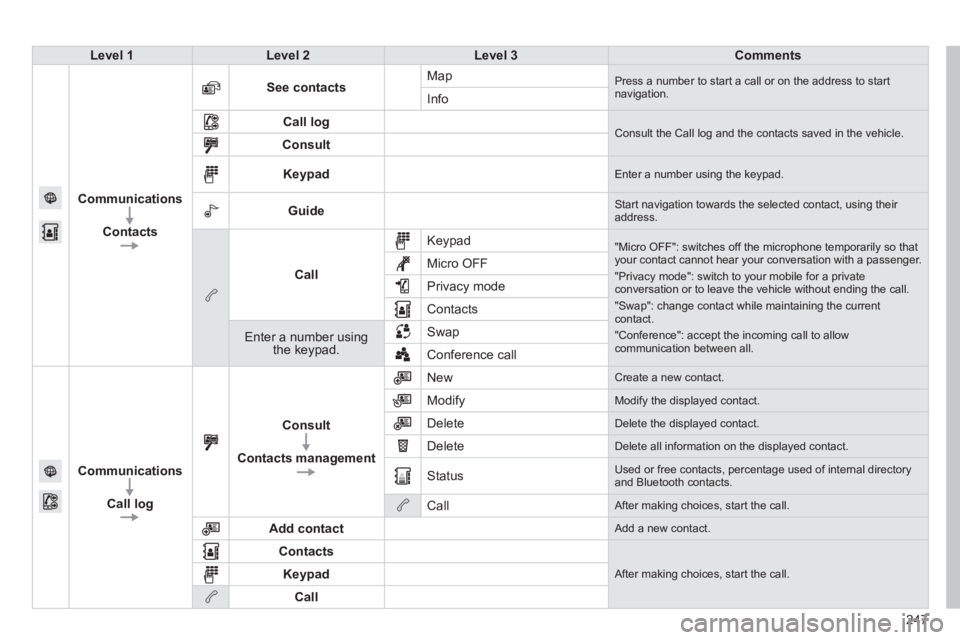
Level 1Level 2Level 3Comments
Communications
Contacts
See contactsMap Press a number to start a call or on the address to startnavigation.Info
Call log Consult the Call log and the contacts saved in the vehicle. Consult
Keypad Enter a number using the keypad.
Guide Start navigation towards the selected contact, using their address.
Call
Keypad
"Micro OFF": switches off the microphone temporarily so thatyour contact cannot hear your conversation with a passenger.
"Privacy mode": switch to your mobile for a privateconversation or to leave the vehicle without ending the call.
"Swap": change contact while maintaining the currentcontact.
"Conference": accept the incoming call to allow communication between all.
Micro OFF
Privac
y mode
Contacts
Enter a number using the keypad.SwapConference call
Communications
Call lo
g
Consult
Contacts management
New Create a new contact.
Modify
Modify the displayed contact.
Delete
Delete the displayed contact.
Delete
Delete all information on the displayed contact.
Status
Used or free contacts, percentage used of internal directory and Bluetooth contacts.
Call
After making choices, start the call.
Add contact
Add a new contact.
Contacts
After making choices, start the call. Keypad
Call
Page 250 of 324
07
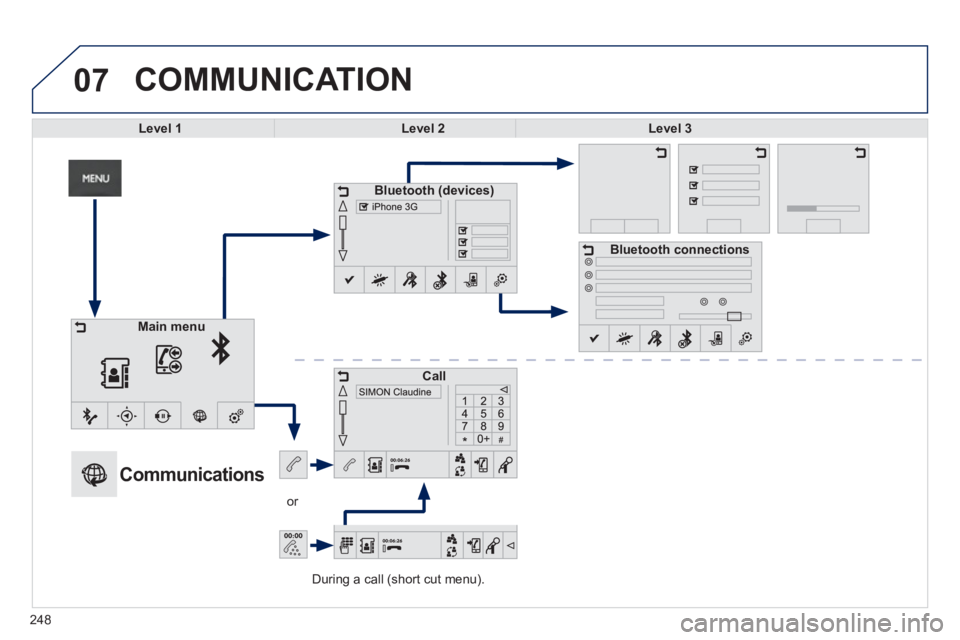
During a call (short cut menu).
or
COMMUNICATION
Level 1Level 2Level 3
Bluetooth (devices)
Call
Bluetooth connections
Main menu
Communications
248
Page 251 of 324
249
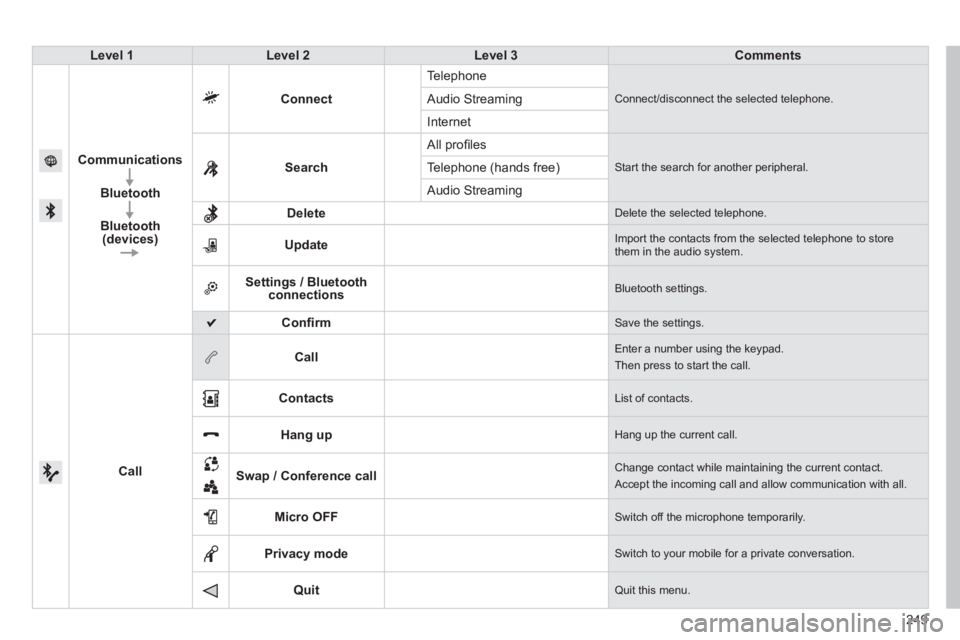
Level 1Level 2Level 3Comments
Communications
Bluetooth
Bluetooth (devices)
Connect
Te l ephone
Connect/disconnect the selected telephone. Audio Streaming
Internet
Search All pro
fi les
Start the search for another peripheral .Telephone (hands free)
Audio Streamin
g
Delete
Delete the selected telephone.
Update
Import the contacts from the selected telephone to storethem in the audio system.
Settings / Bluetooth connections Bluetooth settings.
Confi rm Save the settings.
Call
Call Enter a number using the keypad.
Then press to start the call.
Contacts
List of contacts.
Hang up Hang up the current call.
Swap / Conference call
Change contact while maintaining the current contact.
Accept the incoming call and allow communication with all.
Micro OFF
Switch off the microphone temporarily.
Privacy mode
Switch to your mobile for a private conversation.
Quit Quit this menu.
Page 252 of 324
07
250
The " Hands-free" profi le should be used in preference if "Streaming"
is not desired.
The abilit
y of the system to connect with only one profi le depends on
the telephone. The two profi les may both connect by default.
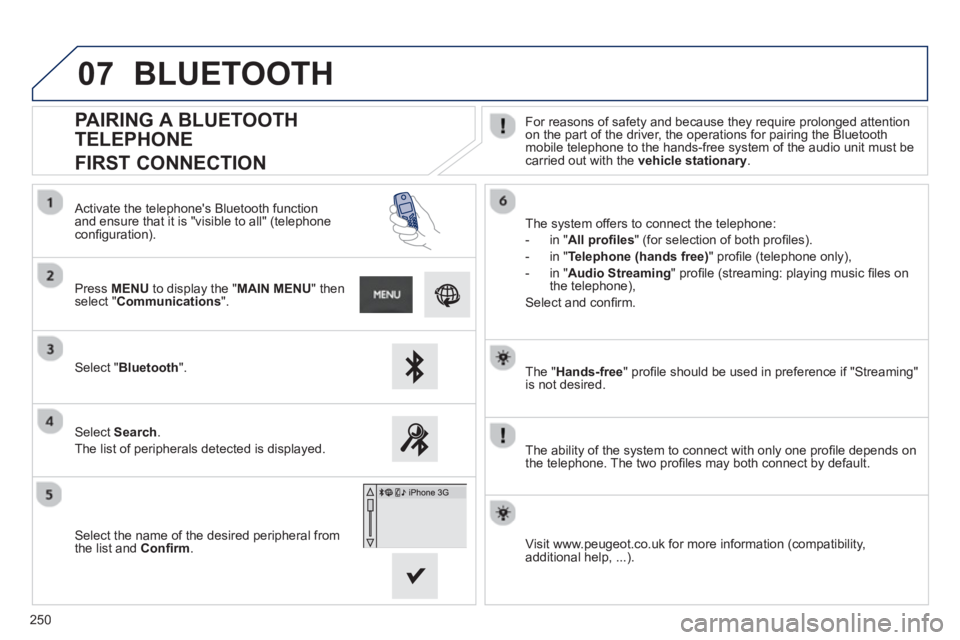
PAIRING A BLUETOOTH
TELEPHONE
FIRST CONNECTION
For reasons of safety and because they require prolonged attention on the part of the driver, the operations for pairing the Bluetooth
mobile telephone to the hands-free system of the audio unit must becarried out with the vehicle stationary
.
Select " Bluetooth".
Press MENU
to display the "MAIN MENU" thenselect "Communications".
Select Search.
The list of peripherals detected is displayed.
Activate the telephone's Bluetooth
function and ensure that it is "visible to all" (telephoneconfi guration).
The system offers to connect the telephone:
-
in"All profi les" (for selection of both profi les).
-
in "Telephone (hands free)" profi le (telephone only),
-
in "Audio Streaming
" profi le (streaming: playing music fi les on
the telephone),
Select and confi rm.
Select the name of the desired peripheral from
t
he list and Confi rm.
Visit www.peugeot.co.uk for more information (compatibility,
additional help, ...).
BLUETOOTH
Page 253 of 324
07
251
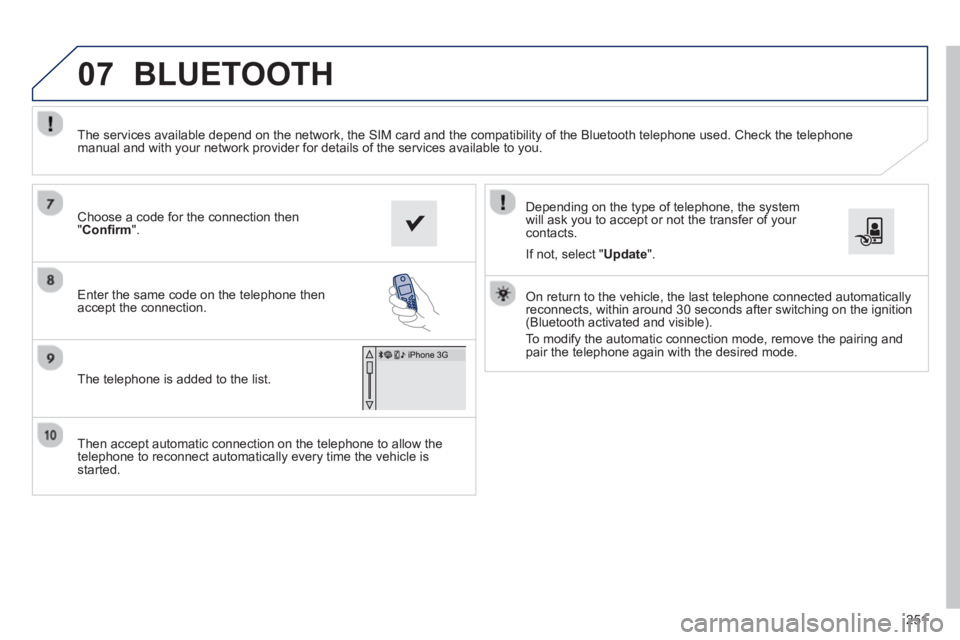
Then accept automatic connection on the telephone to allow the
telephone to reconnect automatically every time the vehicle is started.
Dependin
g on the type of telephone, the system
will ask you to accept or not the transfer of your contacts.
The services available depend on the network, the
SIM card and the compatibility of the Bluetooth telephone used. Check the telephone
manual and with your network provider for details of the services available to you.
On return to the vehicle, the last telephone connected automaticallyreconnects, within around 30 seconds after switching on the ignition (Bluetooth activated and visible).
To modif
y the automatic connection mode, remove the pairing and
pair the telephone again with the desired mode.
Choose a code for the connection then
"Confi rm".
Enter the same code on the telephone then
accept the connection.
The telephone is added to the list.
BLUETOOTH
If not, select " Update".
Page 254 of 324
07
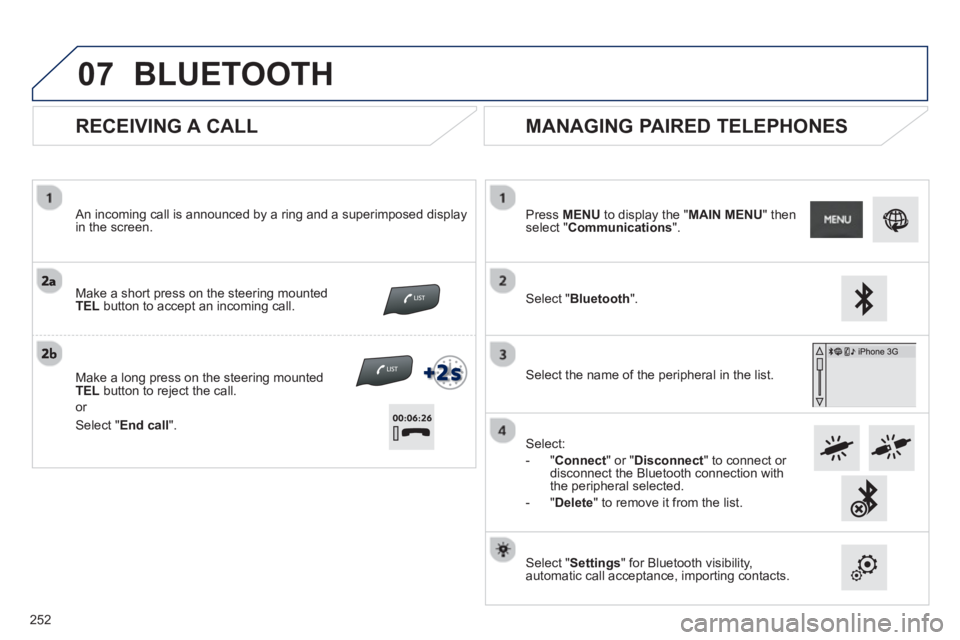
RECEIVING A CALL
An incoming call is announced by a ring and a superimposed displayin the screen.
Make a short press on the steering mounted
TELbutton to accept an incoming call.
Make a lon
g press on the steering mounted TELbutton to reject the call.
or
MANAGING PAIRED TELEPHONES
Press MENUto display the "MAIN MENU" thenselect "Communications".
Select " Bluetooth".
Select the name of the
peripheral in the list.
Select:
- "
Connect
" or " Disconnect
" to connect or disconnect the Bluetooth connection with
the peripheral selected.
- "
Delete" to remove it from the list.
Select " Settings
" for Bluetooth visibility,automatic call acceptance, importing contacts.
BLUETOOTH
Select " End call
".
2
52
Page 265 of 324
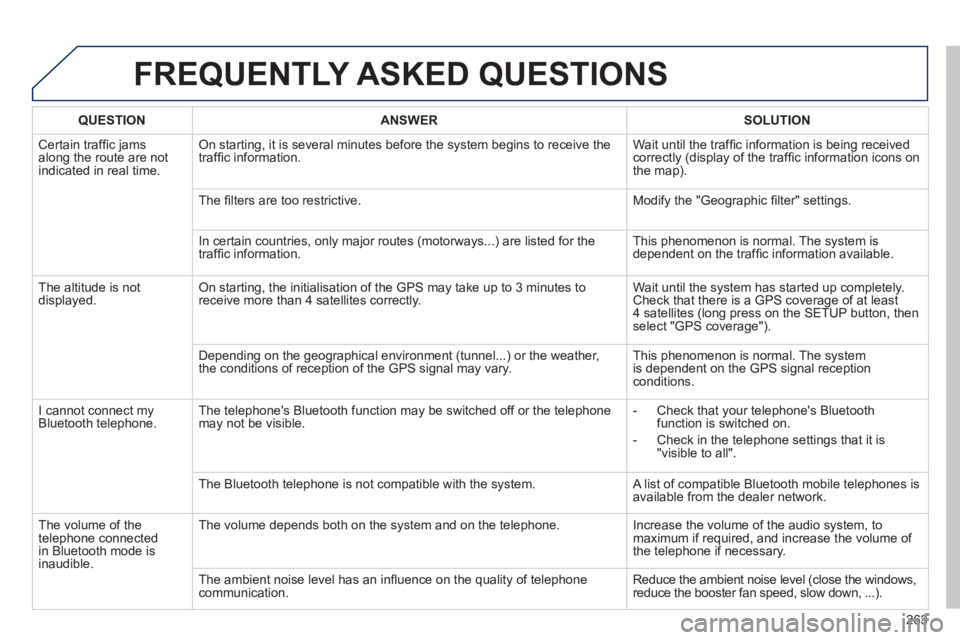
FREQUENTLY ASKED QUESTIONS
263
QUESTIONANSWER SOLUTION
Certain traffi c jams
along the route are notindicated in real time.
On starting, it is several minutes before the system begins to receive the
traffi c information. Wait until the traffi c information is being received correctly (display of the traffi c information icons on
the map).
Th
e fi lters are too restrictive. Modify the "Geographic fi lter" settings.
In certain countries, onl
y major routes (motorways...) are listed for the
traffi c information. This phenomenon is normal. The system is
dependent on the traffi c information available.
Th
e altitude is not
displayed. On starting, the initialisation of the GPS may take up to 3 minutes toreceive more than 4 satellites correctly. Wait until the system has started up completely.
Check that there is a GPS coverage of at least
4 satellites (long press on the SETUP button, then select "GPS coverage").
Dependin
g on the geographical environment (tunnel...) or the weather,
the conditions of reception of the GPS signal may vary. This phenomenon is normal. The system
is dependent on the GPS signal receptionconditions.
I cannot connect m
yBluetooth telephone.The telephone's Bluetooth function may be switched off or the telephone
may not be visible.
- Check that your telephone's Bluetoothfunction is switched on.
- Check in the telephone settin
gs that it is "visible to all".
The Bluetooth telephone is not compatible with the s
ystem. A list of compatible Bluetooth mobile telephones is available from the dealer network.
Th
e volume of thetelephone connected
in Bluetooth mode isinaudible. The volume depends both on the s
ystem and on the telephone. Increase the volume of the audio system, tomaximum if required, and increase the volume of
the telephone if necessary.
The ambient noise level has an infl uence on the qualit
y of telephone communication. Reduce the ambient noise level (close the windows,reduce the booster fan speed, slow down, ...).