instrument panel PEUGEOT 2008 2013 User Guide
[x] Cancel search | Manufacturer: PEUGEOT, Model Year: 2013, Model line: 2008, Model: PEUGEOT 2008 2013Pages: 324, PDF Size: 8.39 MB
Page 26 of 324
24
Instruments and controls
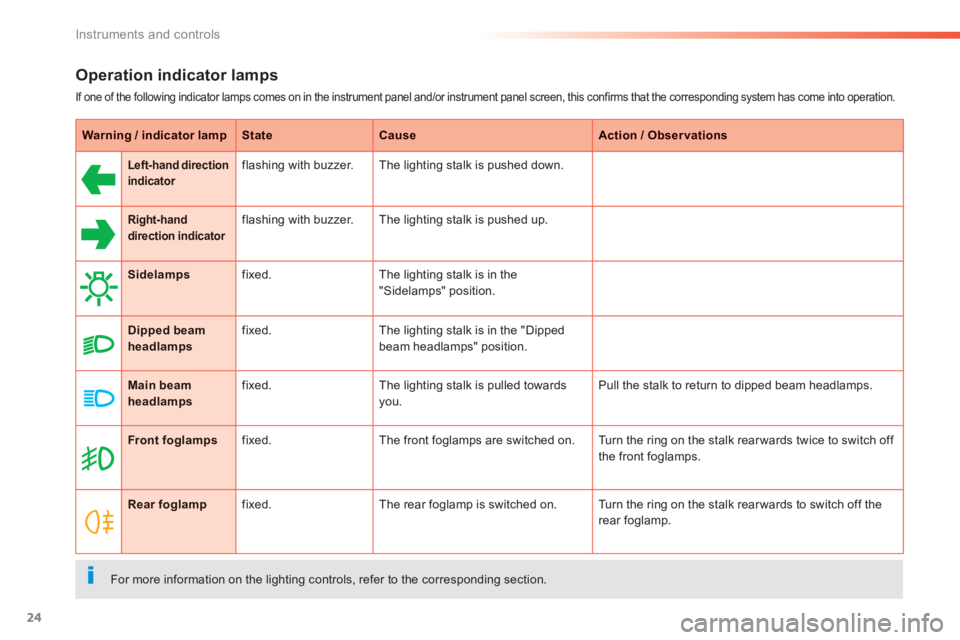
Operation indicator lamps
If one of the following indicator lamps comes on in the instrument panel and/or instrument panel screen, this confirms that the corresponding system has come into operation.
Warning / indicator lampStateCauseAction / Observations
Left-hand directionindicatorflashing with buzzer. The lighting stalk is pushed down.
Right-hand direction indicatorrflashing with buzzer. The lighting stalk is pushed up.
Sidelampsfixed.The lighting stalk is in the
"Sidelamps" position.
Dipped beamheadlampsfixed.The lighting stalk is in the "Dipped
beam headlamps" position.
Main beam headlampsfixed.The lighting stalk is pulled towards
you. Pull the stalk to return to dipped beam headlamps.
Front foglampsfixed.The front foglamps are switched on. Turn the ring on the stalk rear wards twice to switch off
the front foglamps.
Rear foglampfixed.The rear foglamp is switched on. Turn the ring on the stalk rear wards to switch off the
rear foglamp.
For more information on the lighting controls, refer to the corresponding section.
Page 28 of 324
26
Instruments and controls
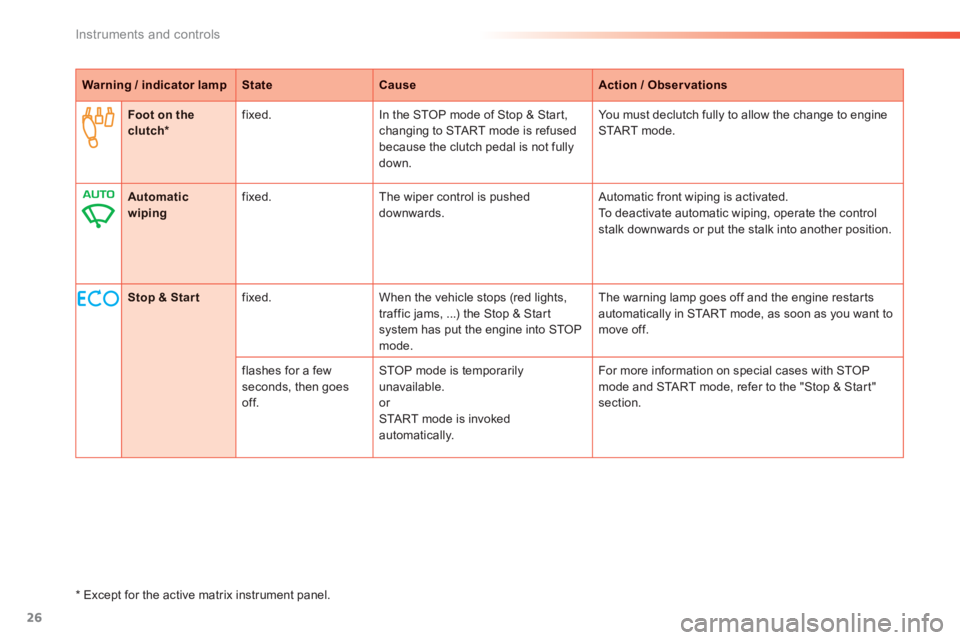
Warning / indicator lampStateCauseAction / Observations
Foot on theclutch *fixed.In the STOP mode of Stop & Star t,changing to START mode is refused
because the clutch pedal is not fully
down.You must declutch full
y to allow the change to engineSTA R T m o d e .
Stop & Startfixed. When the vehicle stops (red lights,
traffic jams, ...) the Stop & Start system has put the engine into STOPmode.The warnin
g lamp goes off and the engine restarts
automatically in START mode, as soon as you want tomove off.
flashes for a few seconds, then goesoff.
STOP mode is temporarily unavailable. or STA R T m o d e i s i n v o ke dautomatically. For more in
formation on special cases with STOP mode and START mode, refer to the "Stop & Start"section.
Automatic wipingfixed. The wiper control is pushed downwards. Automatic front wiping is activated.
To deactivate automatic wiping, operate the controlstalk downwards or put the stalk into another position.
*
Except for the active matrix instrument panel.
Page 36 of 324
34
Instruments and controls
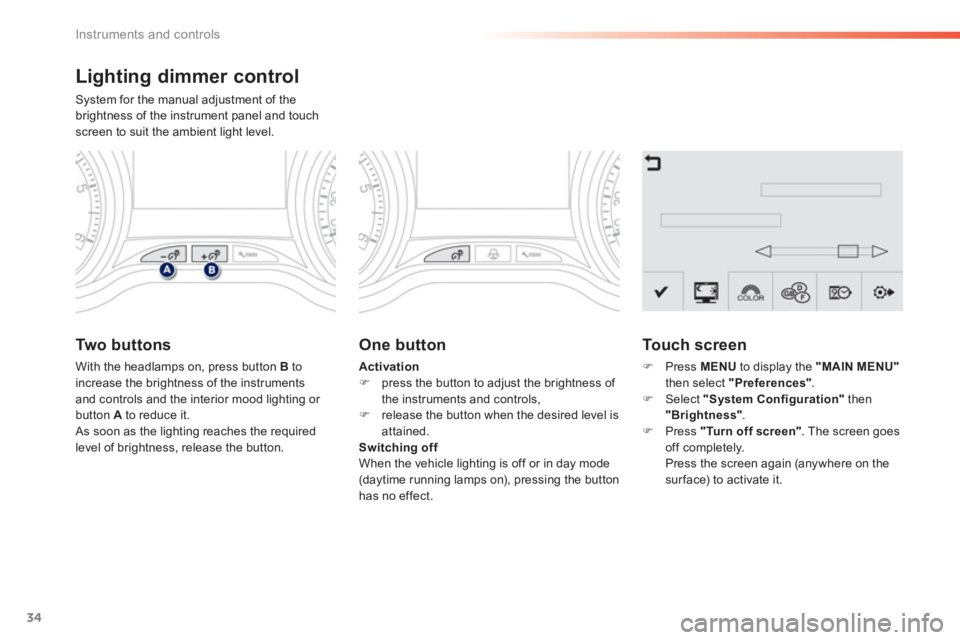
Lighting dimmer control
System for the manual adjustment of the
brightness of the instrument panel and touch screen to suit the ambient light level.
Two buttons
With the headlamps on, press button Bto
increase the brightness of the instruments and controls and the interior mood lighting or button A to reduce it.
As soon as the lighting reaches the requiredlevel of brightness, release the button.
One button
Activation)
press the button to adjust the brightness of
the instruments and controls, ) release the button when the desired level isattained.
Switching off
When the vehicle lighting is off or in day mode(daytime running lamps on), pressing the button
has no effect.
Touch screen
)Press MENU
to display the "MAIN MENU"
then select "Preferences".)Select "System Configuration"
then "Brightness".)Press "Turn off screen". The screen goes
off completely.
Press the screen again (anywhere on the surface) to activate it.
Page 39 of 324
1
37
Instruments and controls
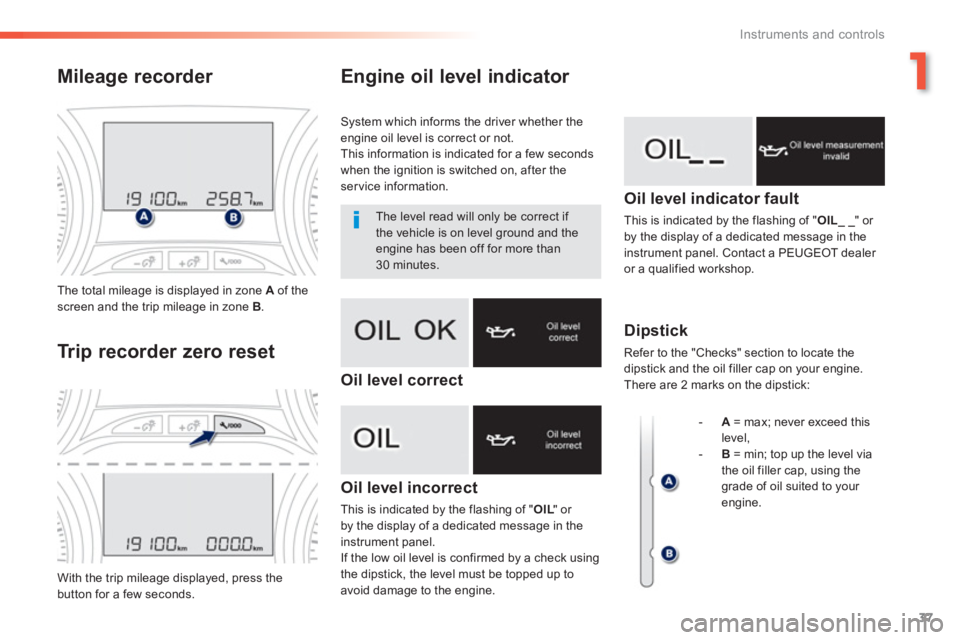
Engine oil level indicator
Oil level incorrect
This is indicated by the flashing of " OIL" or LLby the display of a dedicated message in theinstrument panel.
If the low oil level is confirmed by a check using
the dipstick, the level must be topped up to
avoid damage to the engine.
Oil level indicator fault
This is indicated by the flashing of "OIL_ _" or
by the display of a dedicated message in the
instrument panel. Contact a PEUGEOT dealer or a qualified workshop.
Dipstick
Refer to the "Checks" section to locate the
dipstick and the oil filler cap on your engine.
There are 2 marks on the dipstick: The total milea
ge is displayed in zone A
of the screen and the trip mileage in zone B.
With the trip mileage displayed, press the button for a few seconds.
Mileage recorder
Tr i
p recorder zero reset
System which informs the driver whether the
engine oil level is correct or not.
This information is indicated for a few seconds when the ignition is switched on, after the service information.
The level read will only be correct if
the vehicle is on level ground and theengine has been off for more than 30 minutes.
-
A= max; never exceed this
level,
-B= min; top up the level via
the oil filler cap, using the grade of oil suited to your engine.
Oil level correct
Page 40 of 324
38
Instruments and controls
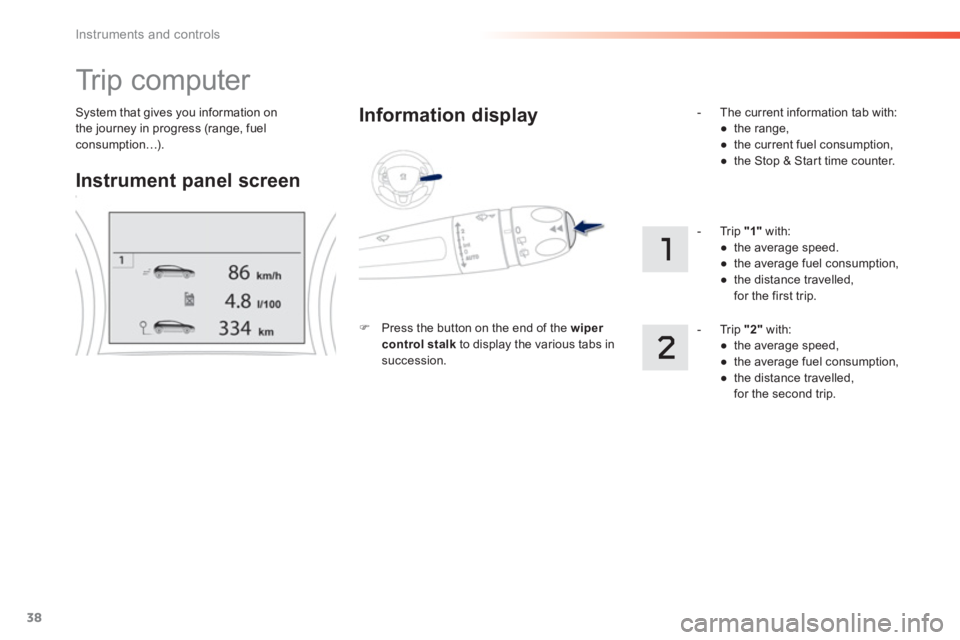
System that gives you information on
the journey in progress (range, fuelconsumption…).
Tr i p c o m p u t e r
Instrument panel screen
Information displa
y
)
Press the button on the end of the wiper control stalkto display the various tabs insuccession.
- Th
e current information tab with:
●
the range,
●
the current fuel consumption,
●
the Stop & Start time counter.
-
Trip "1"with:
●
the average speed.
●
the average fuel consumption,
●
the distance travelled,
for the first trip.
- Tr i p
"2"
with:
●
the average speed,
●
the average fuel consumption,
●
the distance travelled,
for the second trip.
Page 42 of 324
40
Instruments and controls
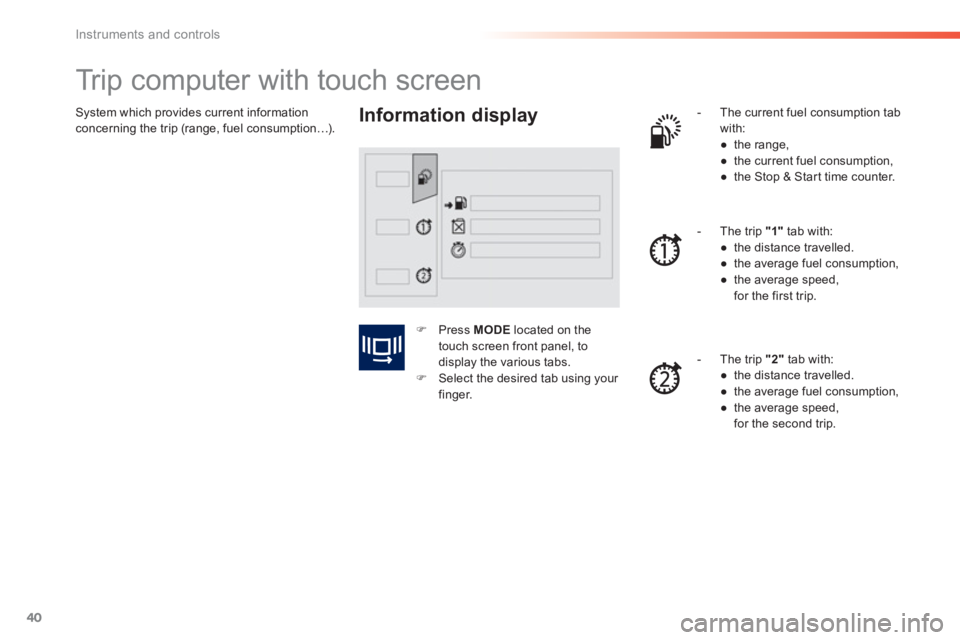
System which provides current information concerning the trip (range, fuel consumption…).
Trip computer with touch screen
Information display
- The current fuel consumption tab
with:
●
the range,
●
the current
fuel consumption,
●
the Stop & Star t time counter.
-
The trip "1"tab with:
●
the distance travelled.
●
the average fuel consumption,
●
the average speed,
for the first trip.
- The trip
"2"
tab with:
●
the distance travelled.
●
the average fuel consumption,
●
the average speed,
for the second trip.
)Press MODElocated on the
touch screen front panel, to
displa
y the various tabs.)Select the desired tab using your finger.
Page 45 of 324
1
43
Instruments and controls
LCD instrument panel
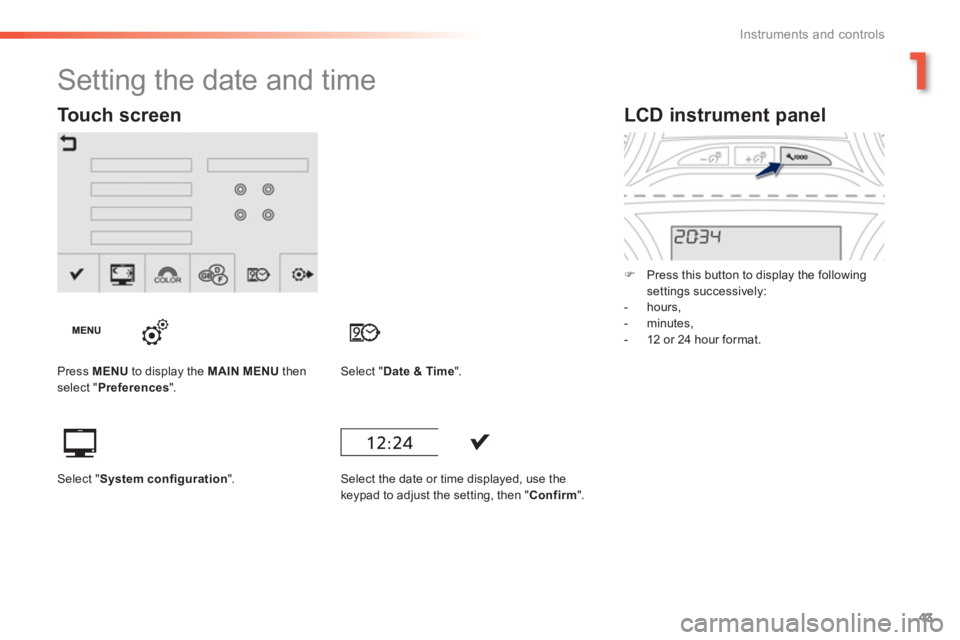
) Press this button to display the following settings successively:
- hours,
- minutes,
- 12 or 24 hour format.
Setting the date and time
Press MENU
to display the MAIN MENUthen select " Preferences".Select "Date & Time".
Select the date or time displa
yed, use the keypad to adjust the setting, then "Confirm".
Touch screen
Select "System configuration".
Page 51 of 324
49
2
Access
Secondary control
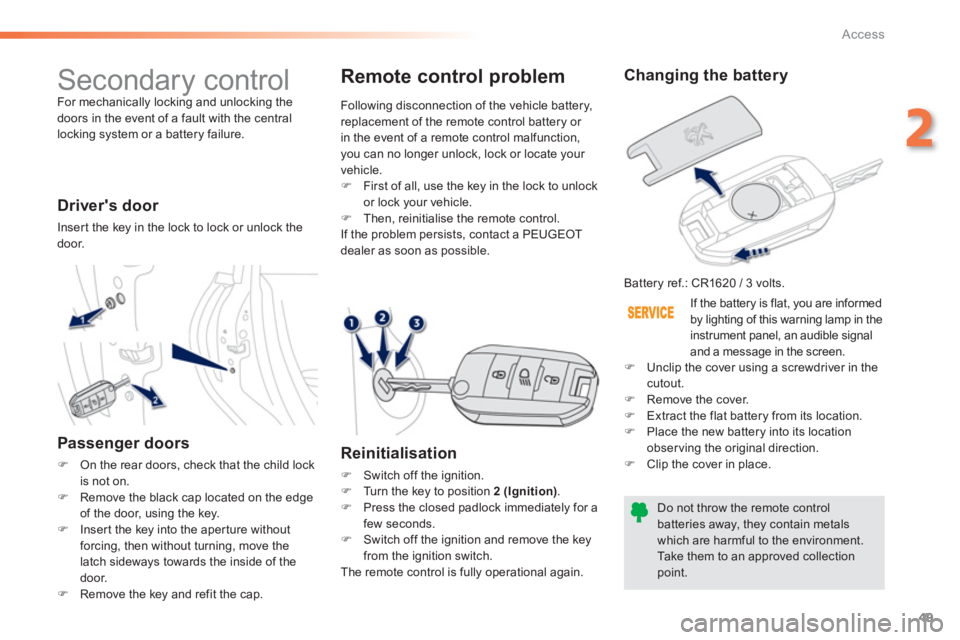
For mechanically locking and unlocking the doors in the event of a fault with the central
locking system or a battery failure.
Driver's door
Inser t the key in the lock to lock or unlock the door.
Passenger doors
)On the rear doors, check that the child lock
is not on.)Remove the black cap located on the edge
of the door, using the key. )Inser t the key into the aper ture without forcing, then without turning, move the
latch sideways towards the inside of thedoor.
)Remove the key and refit the cap.
Changing the battery
Battery ref.: CR1620 / 3 volts.
Do not throw the remote control batteries away, they contain metalswhich are harmful to the environment.
Take them to an approved collectionpoint.
Remote control problem
Reinitialisation
)
Switch off the ignition.)
Turn the key to position 2 (Ignition).)
Press the closed padlock immediately for a
few seconds.) Switch off the ignition and remove the key
from the ignition switch.
The remote control is fully operational again. Followin
g disconnection of the vehicle battery,replacement of the remote control battery or in the event of a remote control malfunction, you can no longer unlock, lock or locate your
vehicle.) First of all, use the key in the lock to unlock
or lock your vehicle.) Then, reinitialise the remote control.
I
f the problem persists, contact a PEUGEOT
dealer as soon as possible.
If the batter
y is flat, you are informed
by lighting of this warning lamp in the
instrument panel, an audible signal
and a message in the screen.) Unclip the cover using a screwdriver in thecutout.)
Remove the cover.)
Extract the flat battery from its location.
)
Place the new battery into its location
observing the original direction. ) Clip the cover in place.
Page 62 of 324
60
Comfort
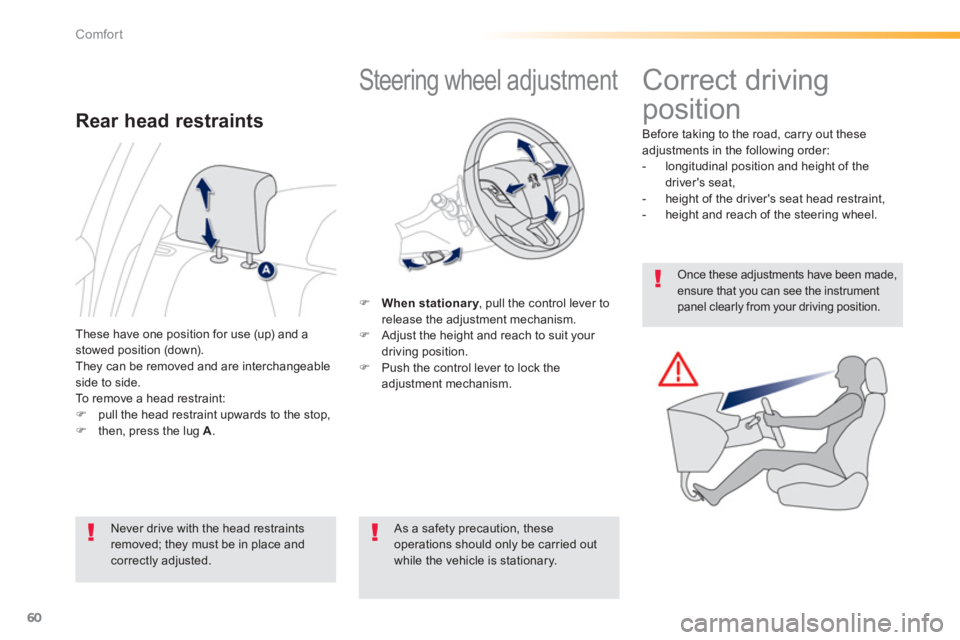
Steering wheel adjustment
)When stationary, pull the control lever toyrelease the adjustment mechanism.)
Adjust the height and reach to suit your
driving position.) Push the control lever to lock the
adjustment mechanism.
As a safety precaution, these operations should only be carried outwhile the vehicle is stationary. These have one position for use
(up) and a stowed position (down).
They can be removed and are interchangeableside to side.To remove a head restraint:)pull the head restraint upwards to the stop, )then, press the lug A .
Rear head restraints
Never drive with the head restraints removed; they must be in place and correctly adjusted.
Correct driving
position
Before taking to the road, carry out these
adjustments in the following order:
- longitudinal position and height of the
driver's seat,
- hei
ght of the driver's seat head restraint,
- height and reach of the steering wheel.
Once these adjustments have been made,ensure that you can see the instrument panel clearly from your driving position.
Page 75 of 324
73
3
Comfort
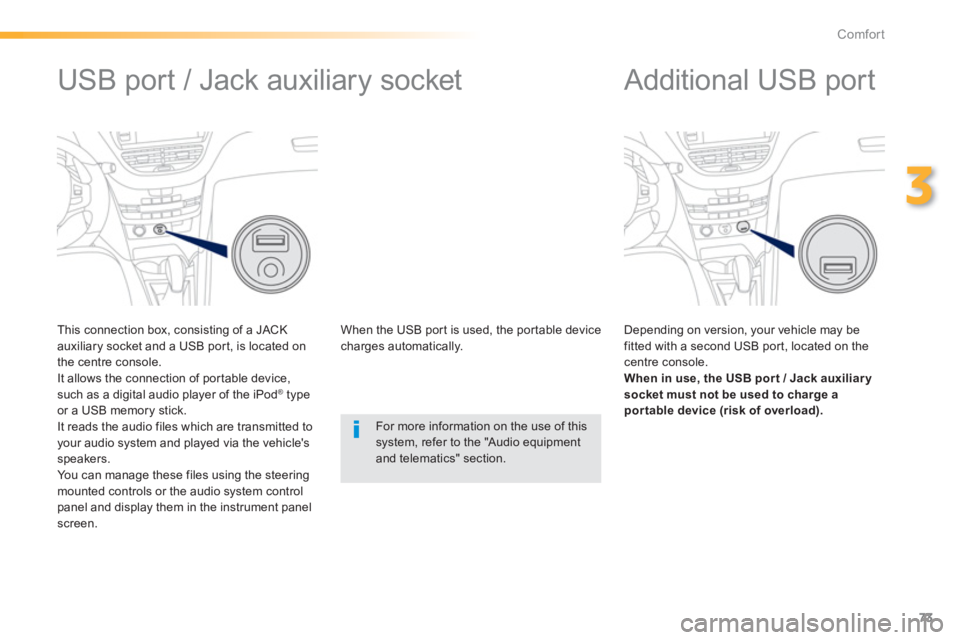
Additional USB port
Depending on version, your vehicle may be fitted with a second USB por t, located on the centre console. When in use, the USB por t / Jack auxiliar y
socket must not be used to charge apor table device (risk of overload).
USB port / Jack auxiliary socket
This connection box, consisting of a JACK
auxiliary socket and a USB por t, is located on
the centre console.
It allows the connection of por table device,such as a digital audio player of the iPod ®type
or a USB memory stick.
It reads the audio files which are transmitted to your audio system and played via the vehicle's speakers.
You can manage these files using the steeringmounted controls or the audio system control panel and display them in the instrument panelscreen. When the U
SB por t is used, the por table devicecharges automatically.
For more information on the use of this system, refer to the "Audio equipmentand telematics" section.