key PEUGEOT 2008 2013 Owner's Guide
[x] Cancel search | Manufacturer: PEUGEOT, Model Year: 2013, Model line: 2008, Model: PEUGEOT 2008 2013Pages: 324, PDF Size: 8.39 MB
Page 249 of 324
247
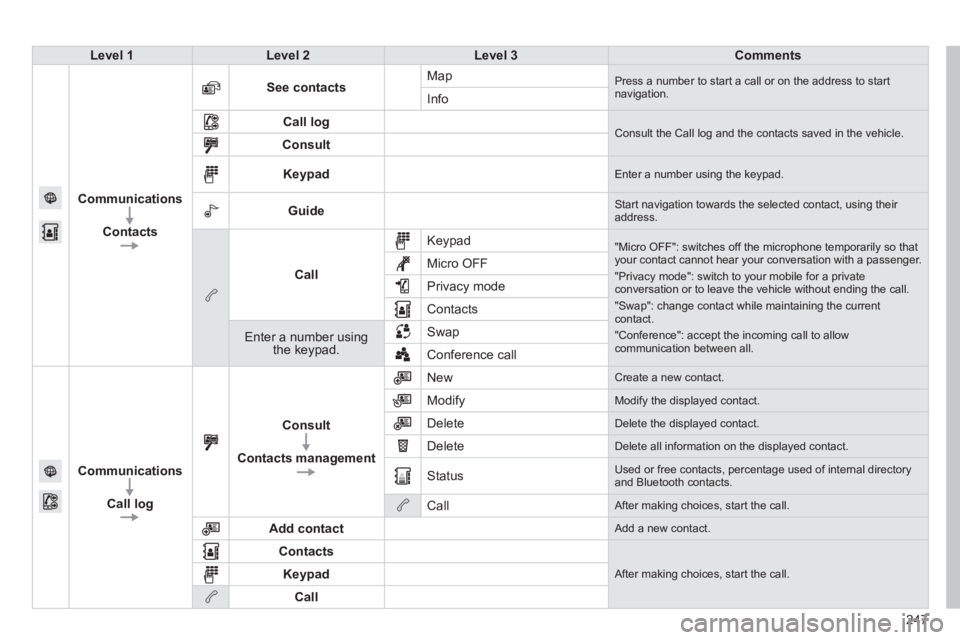
Level 1Level 2Level 3Comments
Communications
Contacts
See contactsMap Press a number to start a call or on the address to startnavigation.Info
Call log Consult the Call log and the contacts saved in the vehicle. Consult
Keypad Enter a number using the keypad.
Guide Start navigation towards the selected contact, using their address.
Call
Keypad
"Micro OFF": switches off the microphone temporarily so thatyour contact cannot hear your conversation with a passenger.
"Privacy mode": switch to your mobile for a privateconversation or to leave the vehicle without ending the call.
"Swap": change contact while maintaining the currentcontact.
"Conference": accept the incoming call to allow communication between all.
Micro OFF
Privac
y mode
Contacts
Enter a number using the keypad.SwapConference call
Communications
Call lo
g
Consult
Contacts management
New Create a new contact.
Modify
Modify the displayed contact.
Delete
Delete the displayed contact.
Delete
Delete all information on the displayed contact.
Status
Used or free contacts, percentage used of internal directory and Bluetooth contacts.
Call
After making choices, start the call.
Add contact
Add a new contact.
Contacts
After making choices, start the call. Keypad
Call
Page 251 of 324
249
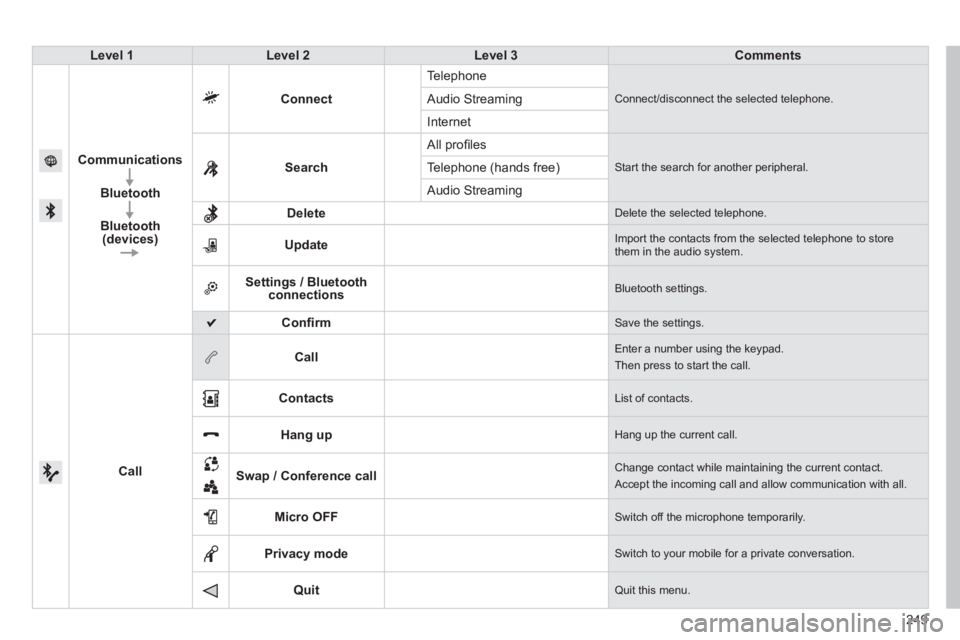
Level 1Level 2Level 3Comments
Communications
Bluetooth
Bluetooth (devices)
Connect
Te l ephone
Connect/disconnect the selected telephone. Audio Streaming
Internet
Search All pro
fi les
Start the search for another peripheral .Telephone (hands free)
Audio Streamin
g
Delete
Delete the selected telephone.
Update
Import the contacts from the selected telephone to storethem in the audio system.
Settings / Bluetooth connections Bluetooth settings.
Confi rm Save the settings.
Call
Call Enter a number using the keypad.
Then press to start the call.
Contacts
List of contacts.
Hang up Hang up the current call.
Swap / Conference call
Change contact while maintaining the current contact.
Accept the incoming call and allow communication with all.
Micro OFF
Switch off the microphone temporarily.
Privacy mode
Switch to your mobile for a private conversation.
Quit Quit this menu.
Page 255 of 324
07
253
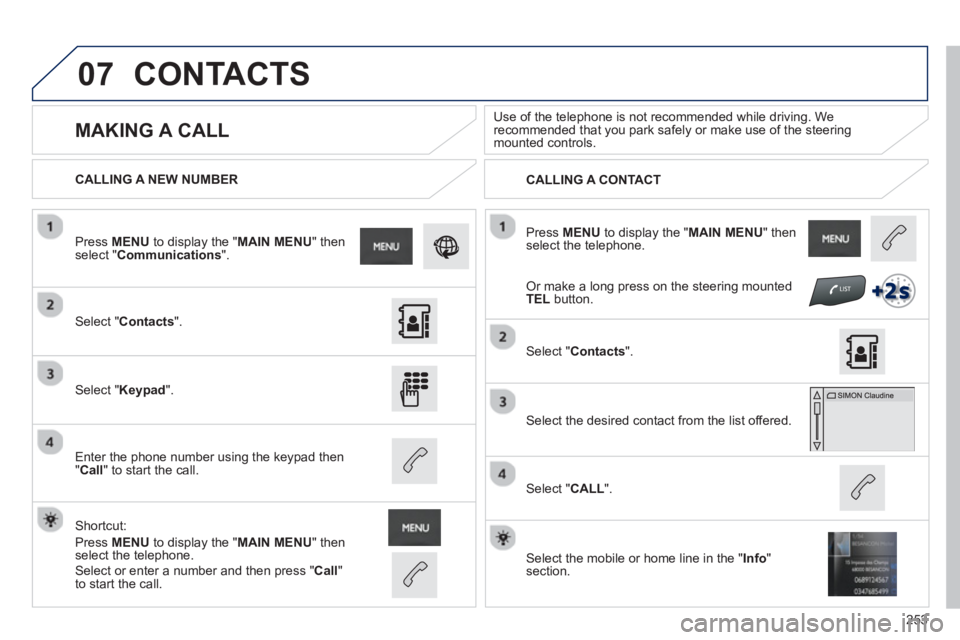
Press MENUto display the " MAIN MENU " then select the telephone.
CALLING A NEW NUMBER
CALLING A CONTACT
MAKING A CALL
Use of the telephone is not recommended while driving. Werecommended that you park safely or make use of the steering mounted controls.
Select "Contacts".
Press MENUto display the " MAIN MENU
" then select " Communications".
Select "Keypad ".
Enter the phone number using the keypad then"Call " to start the call.
Shortcut:
Press MENUto display the " MAIN MENU " then select the telephone.
Select "Contacts
".
Select the desired contact from the list offered.
Select the mobile or home line in the "Info " section.
Select "CALL
".
CONTACTS
Select or enter a number and then press "Call"
to start the call.
Or make a long press on the steering mountedTEL button.
Page 284 of 324
05
282
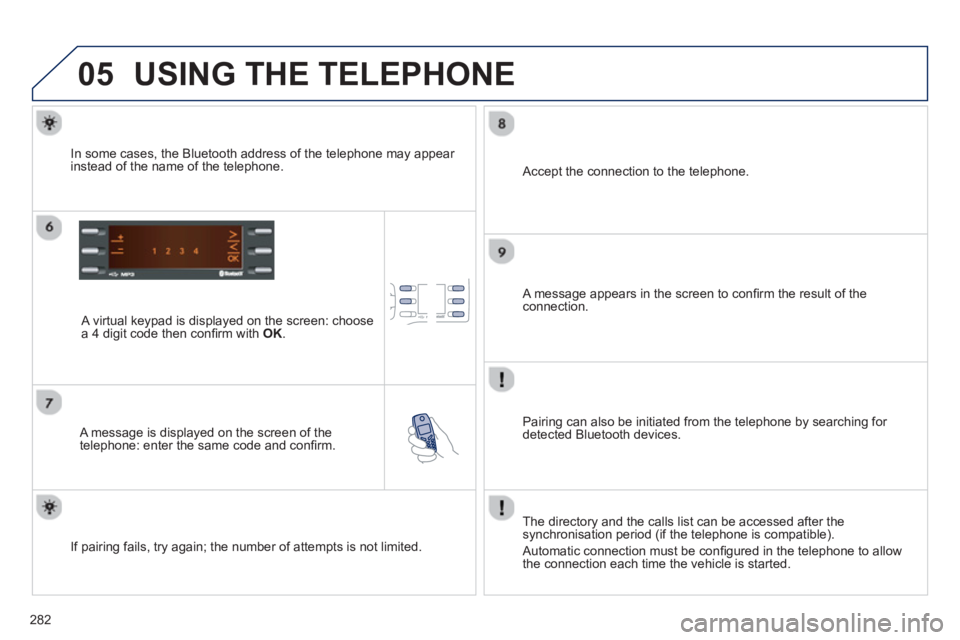
USING THE TELEPHONE
A virtual keypad is displayed on the screen: choose
a 4 digit code then confi rm with OK .
A message is displayed on the screen of the
telephone: enter the same code and confi rm.
A message appears in the screen to confi rm the result of the connection.
Pairin
g can also be initiated from the telephone by searching for detected Bluetooth devices.
Accept the connection to the telephone.
I
f pairing fails, try again; the number of attempts is not limited. The director
y and the calls list can be accessed after thesynchronisation period (if the telephone is compatible).
Automatic connection must be confi gured in the telephone to allow
the connection each time the vehicle is started.
In some cases, the Bluetooth address of the telephone ma
y appear
instead of the name of the telephone.
Page 314 of 324
312
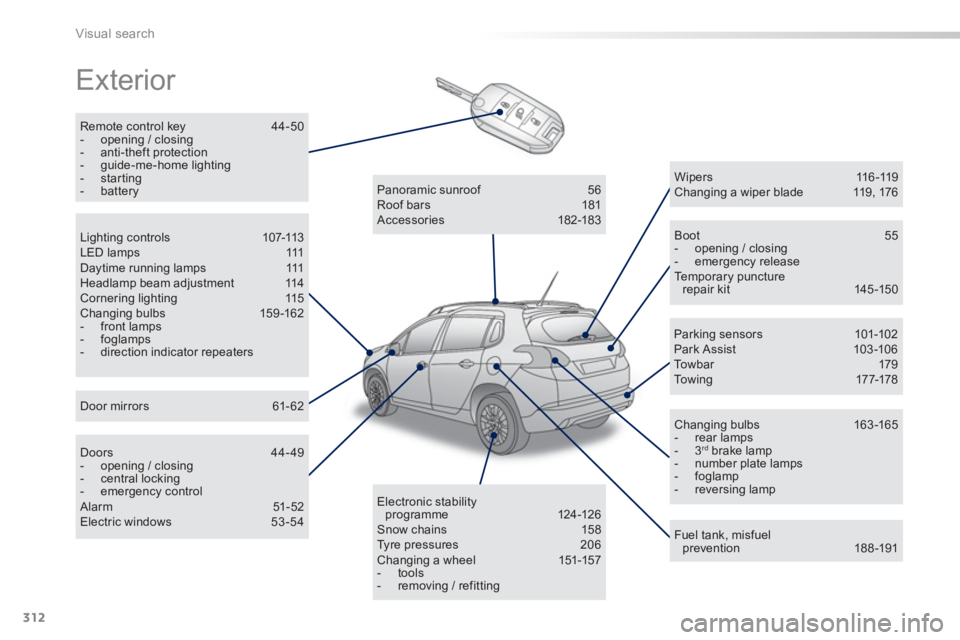
Visual search
Exterior
Remote control key 44-50 - opening / closing - anti-theft protection - guide-me-home lighting- starting - battery
Boot 55 - opening / closing- emergency release Temporary puncture repair kit 145 -150
Wipe r s 11 6 -11 9 Changing a wiper blade 119, 176
Changing bulbs 163 -165 - rear lamps- 3 rd
brake lamp - number plate lamps - foglamp- reversing lamp
Fuel tank, misfuelprevention 188-191
Panoramic sunroof 56
Roof bars 181
Accessories 182-183
Electronic stabilityprogramme 124-126 Snow chains 158
Tyre pressures 206 Changing a wheel 151-157
- tools
- removing / refitting
Lighting controls 107-113 LED lamps 111 Daytime running lamps 111 Headlamp beam adjustment 114 Cornering lighting 115 Changing bulbs 159 -162 - front lamps - foglamps- direction indicator repeaters
Door mirrors 61-62
Doors 44-49 - opening / closing - central locking- emergency control Alarm 51-52 Electric windows 53-54
Parking sensors 101-102
Park Assist 103-10 6
To w b a r 179
To w i ng 17 7-178
Page 320 of 324
318
Alphabetical index
Jack...............................................151, 152,244Jack cable.....................................................244JACK socket ............................................73,244
Keepin
g children safe ....................131, 13 6-144
Key............................................................44-50Key in ignition warning....................................78Key with remote control .............................47-50
Labels, identification.....................................206Lamps, warning and indicator...................r23-32
LED daytime running lamps...........111, 159,161Level, brake fluid...........................................193Levels and checks..................................185 -197Lighting, guide-me home .................47, 112,113Lighting, interior....................................r120, 121Lighting bulbs (replacement) .................159-165Lighting control stalk..............................107,112Lighting on reminder.....................................r110Loading....................................................19,181Load reduction mode....................................175
L
Emergency starting ....................................... 173Emergency warning lamps .....................77,122Energy economy mode.................................175Engine, Diesel ............... 187,191, 192, 200, 201Engine, petrol ................................186,191, 198Engine compartment.............................186, 187Engine compar tment fusebox....................... 171Engine oil level indicator.........................r37, 193Environment..................19,49, 64, 70, 174, 195Equipment settings .......................................260
Filling with fuel..............................188, 190, 191Fitting a wheel...............................................156Fitting roof bars ............................................. 181Fittings, boot ...................................................75Flashing indicators................112, 122, 160, 16 4Foglamp, rear................................r109,163, 165Foglamps, front .....................109, 115,159,162Frequency (radio)..................................237, 239Front seats ......................................................57Fuel..........................................................19, 191Fuel consumption............................................19Fuel filler flap.........................................188, 190Fuel gauge ..............................................15, 188Fuel tank................................................188, 190Fusebox, dashboard..................................... 168Fuses .............................................................166
Halogen headlamps......................................159Hands-free kit........................................250,281Hazard warning lamps ............................77, 122Head restraints, front......................................58Head restraints, rear.......................................r60Heated seats...................................................58Heating................................................14, 19, 65Height and reach adjustment,steering wheel..............................................60Hill start assist.................................................95
Identification plates.......................................206Ignition .............................................................78Indicators, direction..............................122,160Inflating accessories (using the kit)..............................................145Inflating tyres..................................................19Inputs for audio system.................................305Instrument panels ...........................................21Instrument panel screen.................................91
Gearbox, manual..............................80, 92,197Gear lever, automatic gearbox .......................88Gear lever, electronic gear control gearbox...................................................81,84Gear lever, manual gearbox...........................80Gear shift indicator..........................................91Glove box........................................................72Grip control ...................................................127Guidance .......................................................214Guide-me-home...............................47, 112,113
Interior fittings...........................................71,72Interior mood lighting....................................121ISOFIX child seats.................................141-143ISOFIX mountings.........................................141
H
I
F
J
K
Gearbox, automatic........................88,174,197Gearbox, electronicgear control.......................81, 84, 92,174,197
G