ESP PEUGEOT 2008 2014 User Guide
[x] Cancel search | Manufacturer: PEUGEOT, Model Year: 2014, Model line: 2008, Model: PEUGEOT 2008 2014Pages: 336, PDF Size: 9.35 MB
Page 79 of 336
77
3
Comfort
Never use the ISOFIX ring intended for fixing the upper strap of child seat to the Top Tether.
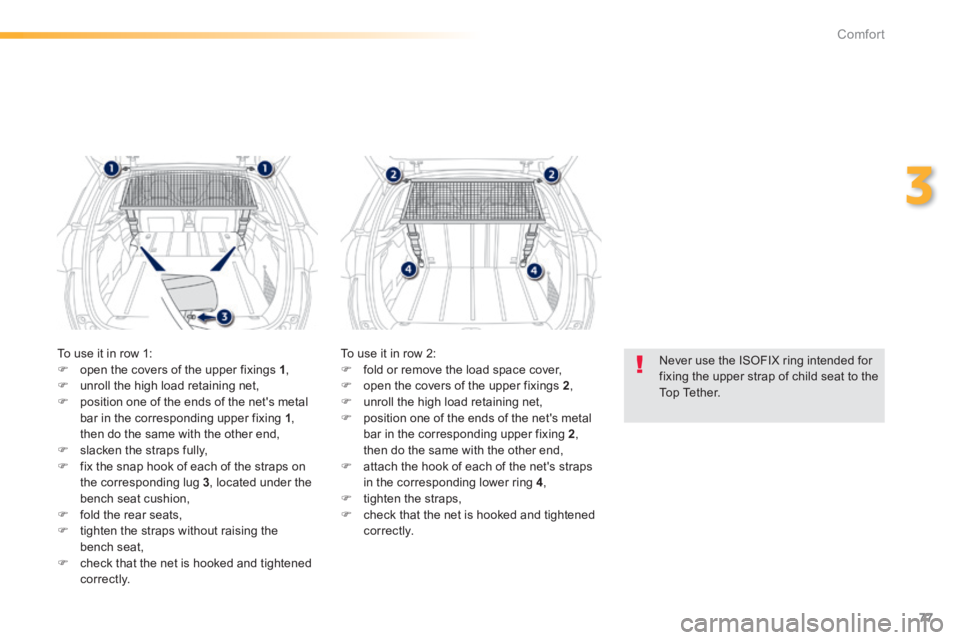
To use it in row 1: open the covers of the upper fixings 1 , unroll the high load retaining net, position one of the ends of the net's metal bar in the corresponding upper fixing 1 , then do the same with the other end, slacken the straps fully, fix the snap hook of each of the straps on the corresponding lug 3 , located under the bench seat cushion, fold the rear seats, tighten the straps without raising the
bench seat, check that the net is hooked and tightened c o r r e c t l y.
To use it in row 2: fold or remove the load space cover, open the covers of the upper fixings 2 , unroll the high load retaining net, position one of the ends of the net's metal bar in the corresponding upper fixing 2 , then do the same with the other end, attach the hook of each of the net's straps in the corresponding lower ring 4 , tighten the straps, check that the net is hooked and tightened c o r r e c t l y.
Page 91 of 336
89
4
Driving
Four-speed automatic gearbox which offers a choice between the comfort of fully automatic operation, enhanced by sport and snow programmes, or manual gear changing. There are therefore four driving modes: - automatic operation for electronic management of the gears by the gearbox, - sport programme for a more dynamic style of driving, - snow programme to improve driving when traction is poor, - sequential operation for manual changing of the gears by the driver.
Automatic gearbox
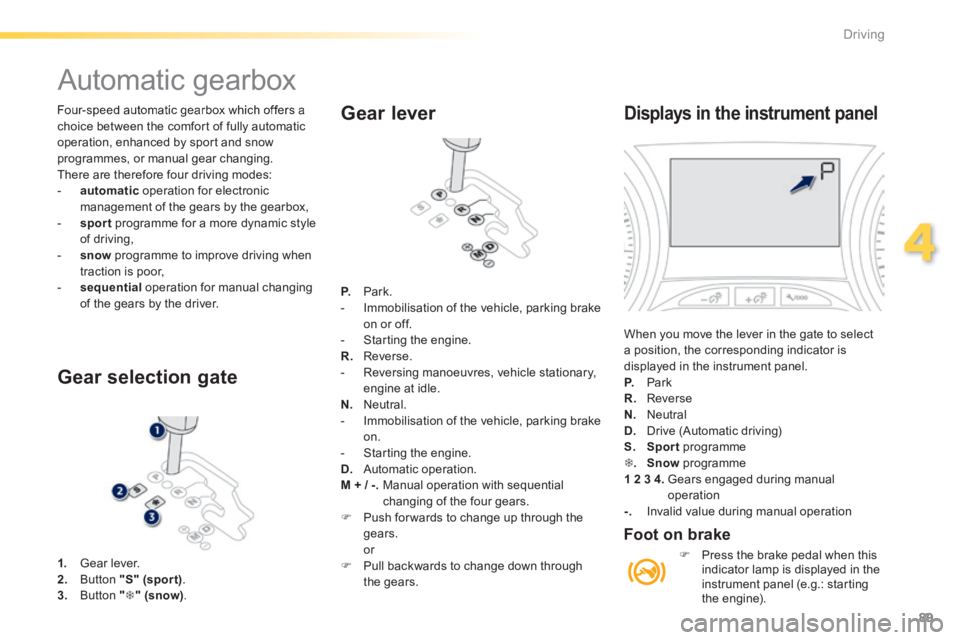
1. Gear lever. 2. Button "S" (spor t) . 3. Button "" (snow).
Gear selection gate
Gear lever
P. Park. - Immobilisation of the vehicle, parking brake on or off. - Starting the engine. R. Reverse. - Reversing manoeuvres, vehicle stationary, engine at idle. N. Neutral. - Immobilisation of the vehicle, parking brake on. - Starting the engine. D. Automatic operation. M + / -. Manual operation with sequential changing of the four gears. Push for wards to change up through the gears. or Pull backwards to change down through the gears.
Displays in the instrument panel
When you move the lever in the gate to select a position, the corresponding indicator is displayed in the instrument panel. P. Park R. Reverse N. Neutral
D. Drive (Automatic driving) S. Sport programme . Snow programme 1 2 3 4. Gears engaged during manual operation -. Invalid value during manual operation
Foot on brake
Press the brake pedal when this indicator lamp is displayed in the instrument panel (e.g.: starting the engine).
Page 94 of 336
92
Driving
Gear shift indicator
Operation
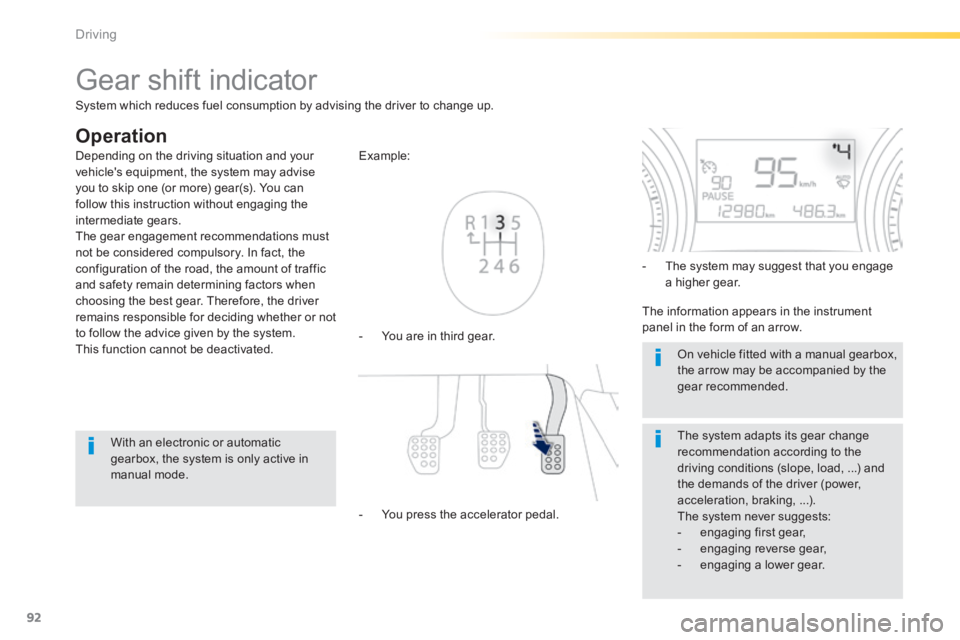
- You are in third gear.
Example:
- You press the accelerator pedal.
- The system may suggest that you engage a higher gear.
The information appears in the instrument panel in the form of an arrow.
The system adapts its gear change recommendation according to the driving conditions (slope, load, ...) and the demands of the driver (power, acceleration, braking, ...). The system never suggests: - engaging first gear, - engaging reverse gear, - engaging a lower gear.
Depending on the driving situation and your vehicle's equipment, the system may advise you to skip one (or more) gear(s). You can follow this instruction without engaging the intermediate gears. The gear engagement recommendations must not be considered compulsory. In fact, the configuration of the road, the amount of traffic and safety remain determining factors when choosing the best gear. Therefore, the driver remains responsible for deciding whether or not to follow the advice given by the system. This function cannot be deactivated.
With an electronic or automatic gearbox, the system is only active in manual mode.
On vehicle fitted with a manual gearbox, the arrow may be accompanied by the gear recommended.
System which reduces fuel consumption by advising the driver to change up.
Page 99 of 336
97
4
Driving
Speed limiter
System which prevents the vehicle from exceeding the speed programmed by the driver. When the programmed speed limit is reached, pressing the accelerator pedal in the normal manner no longer has any effect.
The speed limiter is switched on manually: the programmed speed must be at least 20 mph (30 km/h).
The speed limiter is switched off by manual switched off by manual switched offoperation of the control.
The programmed speed can be exceeded temporarily by pressing the accelerator firmly. To return to the programmed speed, simply slow down to a speed below the programmed speed.
The speed limiter cannot, in any circumstances, replace the need to respect speed limits, nor can it replace the need for vigilance and responsibility on the part of the driver.
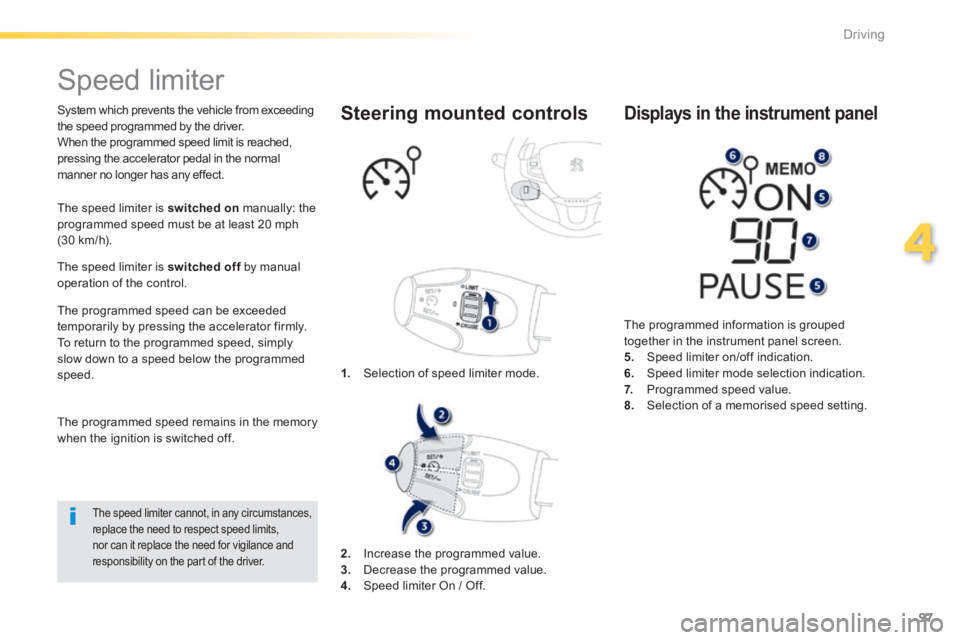
1. Selection of speed limiter mode.
Steering mounted controls
The programmed information is grouped together in the instrument panel screen. 5. Speed limiter on/off indication. 6. Speed limiter mode selection indication. 7. Programmed speed value. 8. Selection of a memorised speed setting.
Displays in the instrument panel
The programmed speed remains in the memory when the ignition is switched off.
2. Increase the programmed value. 3. Decrease the programmed value. 4. Speed limiter On / Off.
Page 101 of 336

99
4
Driving
Cruise control
System which automatically maintains the speed of the vehicle at the value programmed by the driver, without any action on the accelerator pedal.
The cruise control is switched off manually switched off manually switched offor by pressing the brake or clutch pedal or on triggering of the electronic stability system for safety reasons. It is possible to exceed the programmed speed temporarily by pressing the accelerator pedal. To return to the programmed speed, simply release the accelerator pedal. Switching off the ignition cancels any programmed speed value.
1. Selection of cruise control mode.
Steering mounted controls
The cruise control cannot, in any circumstances, replace the need to observe speed limits, nor can it replace the need for vigilance and responsibility on the part of the driver.
The programmed information is grouped together in the instrument panel screen. 5. Cruise control stopped/resumed indication. 6. Cruise control mode selection indication. 7. Programmed speed value. 8. Selecting a memorised speed setting.
Displays in the instrument panel
2. Increase the programmed value. 3. Decrease the programmed value. 4. Cruise control Off / Resume.
The cruise control is switched on manually: it requires a minimum vehicle speed of 25 mph (40 km/h), as well as the engagement of: - fourth gear on a manual gearbox, - second gear on an electronic or automatic gearbox, in manual sequential mode, - position A on an electronic gearbox or position D on an automatic gearbox.
Page 104 of 336

102
Driving
This system indicates the proximity of an obstacle (person, vehicle, tree, gate, etc.) which comes within the field of detection of sensors located in the bumper. Certain types of obstacle (stake, roadworks cone, etc.) detected initially will no longer be detected at the end of the manoeuvre due to the presence of blind spots.
Parking sensors
This function cannot, in any circumstances, take the place of the vigilance and responsibility of the driver.
The system is switched on by engaging reverse gear. This is accompanied by an audible signal. The system is switched off when you come out of reverse gear.
Rear parking sensors
Audible assistance
The proximity information is given by an intermittent audible signal, the frequency of which increases as the vehicle approaches the obstacle. The sound emitted by the speaker (right or left) indicates the side on which the obstacle is located. When the distance between the vehicle and the obstacle becomes less than approximately thirty centimetres, the audible signal becomes continuous.
Visual assistance
This supplements the audible signal by displaying bars in the multifunction screen which move progressively nearer to the vehicle. When the obstacle is near, the "Danger" symbol is displayed in the screen.
Page 106 of 336

104
Driving
Park Assist
This system provides active assistance with parking, detecting a parking space then controlling the steering to park in the space. It controls the steering while the driver manages the accelerator, brakes, gears and clutch (manual gearbox). During phases of entry into and exit from a parking space, the system provides visual and audible information to the driver in order to make the manoeuvre safe. It may be necessary to move forwards and backwards more than once.
The Park Assist system cannot in any
circumstances replace the care and responsibility of the driver. The driver must remain in control of their vehicle ensuring that the space remains clear during the manoeuvre. In some circumstances, the sensors may not detect small obstacles located in their blind spots.
Changing tyre sizes (out-size tyres, winter tyres, ...) can inter fere with the correct operation of the parking assistance system.
During a manoeuvre the steering wheel turns quickly: do not hold the steering wheel, do not place your hand between the spokes of the steering wheel and take care with loose and bulky clothing, scarves, handbags... There is a risk of injury.
For entry into a parking space (parallel
parking) the system does not detect spaces which are clearly much smaller or larger than the size of the vehicle. This "parking assistance" system is activated automatically during manoeuvres; it is therefore possible that a symbol comes on in the screen, accompanied by an audible signal, without affecting the manoeuvre.
The system provides assistance in entering and exiting a parking space when parallel parking.
The driver can take control at any time by gripping the steering wheel.
When Park Assist is activated, it
prevents a change to STOP mode of Stop & Start. In STOP mode, activation of Park Assist restarts the engine.
Page 111 of 336
109
5
Visibility
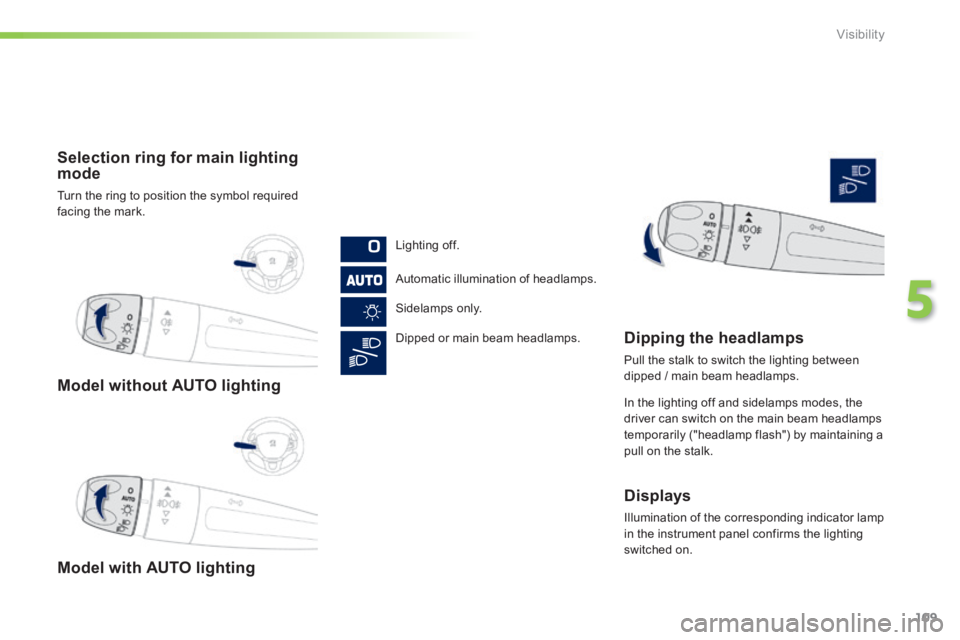
Model without AUTO lighting
Model with AUTO lighting
Selection ring for main lighting mode
Turn the ring to position the symbol required facing the mark.
Lighting off.
Automatic illumination of headlamps.
Sidelamps only.
Dipped or main beam headlamps. Dipping the headlamps
Pull the stalk to switch the lighting between dipped / main beam headlamps.
In the lighting off and sidelamps modes, the driver can switch on the main beam headlamps
temporarily ("headlamp flash") by maintaining a pull on the stalk.
Displays
Illumination of the corresponding indicator lamp in the instrument panel confirms the lighting switched on.
Page 113 of 336

111
5
Visibility
In good or rainy weather, both day and night, the front foglamps and the rear foglamp are prohibited. In these situations, the power of their beams may dazzle other drivers. They should only be used in fog or snow. In these weather conditions, it is your responsibility to switch on the foglamps and dipped beam headlamps manually as the sunshine sensor may detect sufficient light. Do not forget to switch off the front foglamps and the rear foglamp when they are no longer necessary.
Switching on the lamps after the ignition is switched off
To reactivate the lighting control, rotate the ring to the "0" position - lamps off, then to the desired position. On opening the driver's door a temporary audible signal warns the driver that the lighting is on. The lamps, with the exception of the sidelamps, switch off automatically after a maximum duration of thirty minutes to prevent discharging of the battery.
Switching off the lamps when the ignition is switched off
On switching off the ignition, all of the lamps turn off immediately, except for dipped beam if guide-me-home lighting is activated.
Page 115 of 336
113
5
Visibility
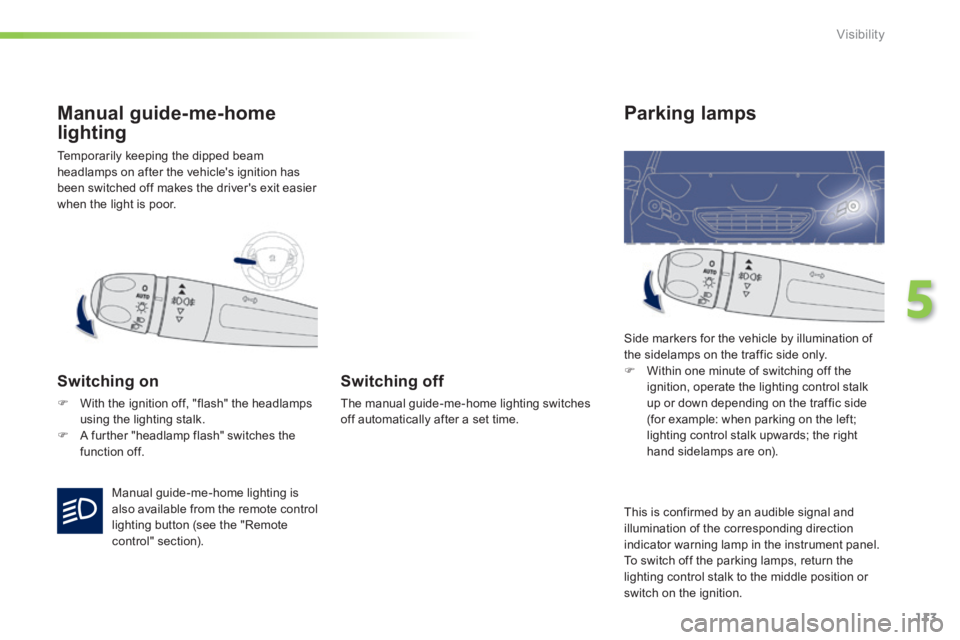
Temporarily keeping the dipped beam headlamps on after the vehicle's ignition has been switched off makes the driver's exit easier when the light is poor.
Manual guide-me-home
lighting
Switching on
With the ignition off, "flash" the headlamps using the lighting stalk. A further "headlamp flash" switches the function off.
Switching off
The manual guide-me-home lighting switches off automatically after a set time.
Parking lamps
Side markers for the vehicle by illumination of the sidelamps on the traffic side only. Within one minute of switching off the ignition, operate the lighting control stalk up or down depending on the traffic side (for example: when parking on the left; lighting control stalk upwards; the right hand sidelamps are on).
Manual guide-me-home lighting is also available from the remote control lighting button (see the "Remote control" section).
This is confirmed by an audible signal and illumination of the corresponding direction indicator warning lamp in the instrument panel. To switch off the parking lamps, return the lighting control stalk to the middle position or
switch on the ignition.