reset PEUGEOT 2008 2014 User Guide
[x] Cancel search | Manufacturer: PEUGEOT, Model Year: 2014, Model line: 2008, Model: PEUGEOT 2008 2014Pages: 336, PDF Size: 9.35 MB
Page 248 of 336
06
246
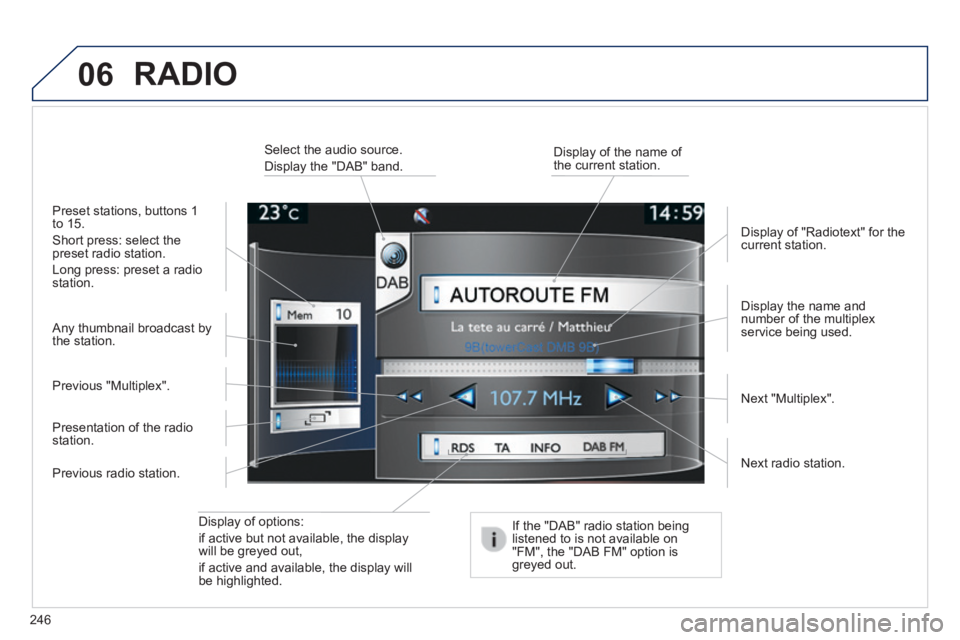
Display of options:
if active but not available, the display will be greyed out,
if active and available, the display will be highlighted.
Display the name and number of the multiplex service being used.
Preset stations, buttons 1 to 15.
Short press: select the preset radio station.
Long press: preset a radio station.
Display of "Radiotext" for the current station.
Select the audio source.
Display the "DAB" band. Display of the name of the current station.
If the "DAB" radio station being listened to is not available on "FM", the "DAB FM" option is greyed out.
Any thumbnail broadcast by the station.
Next radio station.
Next "Multiplex". Previous "Multiplex".
Previous radio station.
Presentation of the radio station.
RADIO
Page 280 of 336
01
278
FIRST STEPS
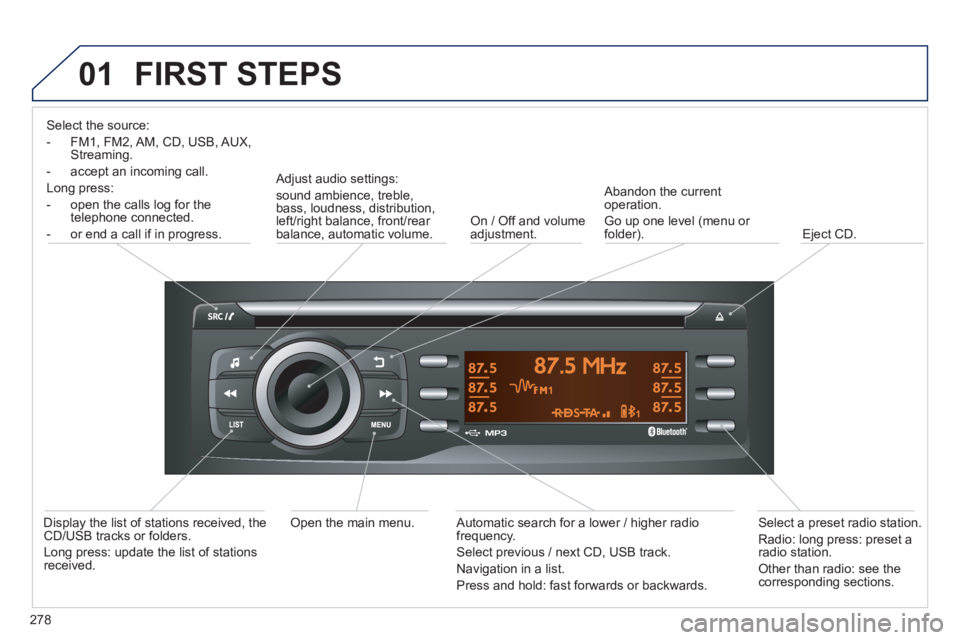
Select the source:
- FM1, FM2, AM, CD, USB, AUX, Streaming.
- accept an incoming call.
Long press:
- open the calls log for the telephone connected.
- or end a call if in progress.
Adjust audio settings:
sound ambience, treble, bass, loudness, distribution, left/right balance, front/rear balance, automatic volume. On / Off and volume adjustment.
Abandon the current operation.
Go up one level (menu or folder). Eject CD.
Select a preset radio station.
Radio: long press: preset a radio station.
Other than radio: see the corresponding sections.
Automatic search for a lower / higher radio frequency.
Select previous / next CD, USB track.
Navigation in a list.
Press and hold: fast forwards or backwards.
Open the main menu. Display the list of stations received, the CD/USB tracks or folders.
Long press: update the list of stations received.
Page 281 of 336
02 STEERING MOUNTED CONTROLS
279
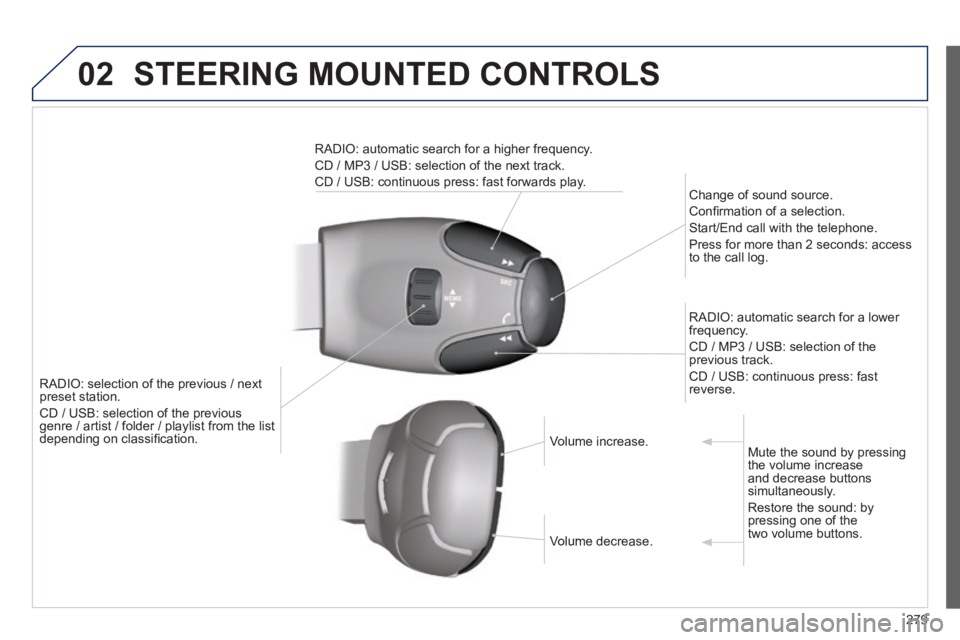
RADIO: selection of the previous / next preset station.
CD / USB: selection of the previous genre / artist / folder / playlist from the list genre / artist / folder / playlist from the list depending on classifi cation.
Change of sound source.
Confi rmation of a selection.
Start/End call with the telephone.
Press for more than 2 seconds: access to the call log.
RADIO: automatic search for a lower frequency.
CD / MP3 / USB: selection of the previous track.
CD / USB: continuous press: fast reverse.
RADIO: automatic search for a higher frequency.
CD / MP3 / USB: selection of the next track.
CD / USB: continuous press: fast forwards play.
Volume increase. Volume increase.
Volume decrease. Volume decrease.
Mute the sound by pressing the volume increase and decrease buttons simultaneously.
Restore the sound: by pressing one of the two volume buttons.
Page 282 of 336
03
280
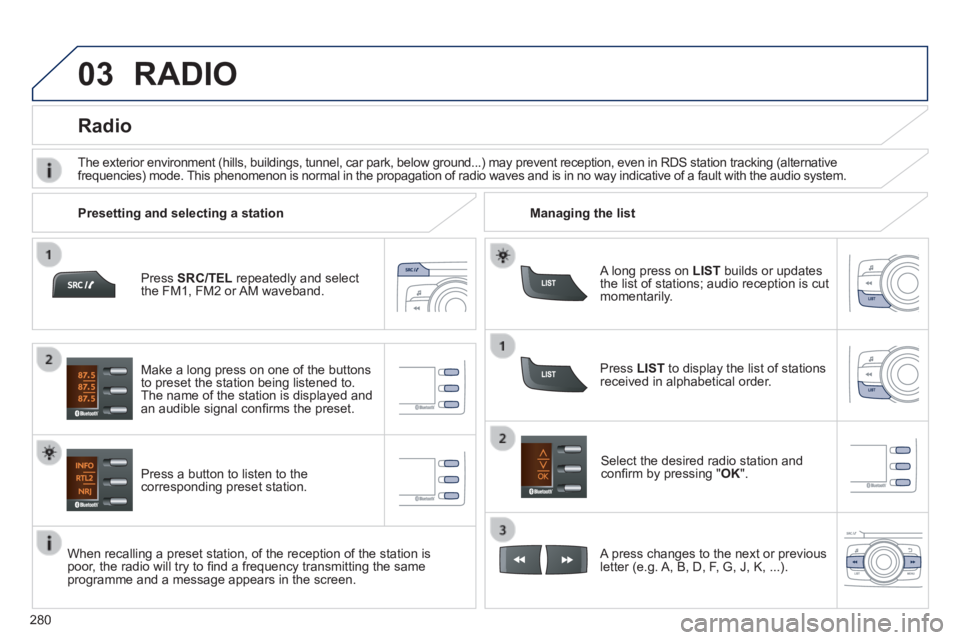
Press SRC/TEL repeatedly and select the FM1, FM2 or AM waveband.
Press a button to listen to the corresponding preset station.
Select the desired radio station and confi rm by pressing " OK ".
Radio
Press LIST to display the list of stations received in alphabetical order.
The exterior environment (hills, buildings, tunnel, car park, below gro\
und...) may prevent reception, even in RDS station tracking (alternative frequencies) mode. This phenomenon is normal in the propagation of radio waves and is in no\
way indicative of a fault with the audio system.
A long press on LIST builds or updates the list of stations; audio reception is cut momentarily.
Make a long press on one of the buttons to preset the station being listened to. The name of the station is displayed and an audible signal confi rms the preset.
A press changes to the next or previous letter (e.g. A, B, D, F, G, J, K, ...).
Managing the list Presetting and selecting a station
When recalling a preset station, of the reception of the station is poor, the radio will try to fi nd a frequency transmitting the same programme and a message appears in the screen.
RADIO
Page 300 of 336
298
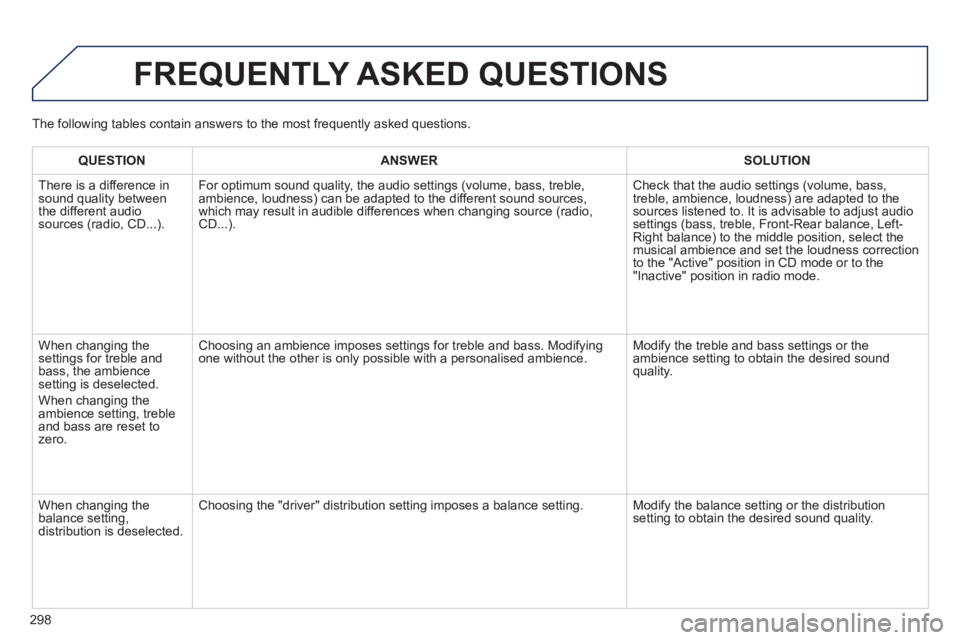
FREQUENTLY ASKED QUESTIONS
QUESTIONANSWERSOLUTION
There is a difference in sound quality between the different audio sources (radio, CD...).
For optimum sound quality, the audio settings (volume, bass, treble, ambience, loudness) can be adapted to the different sound sources, which may result in audible differences when changing source (radio, CD...).
Check that the audio settings (volume, bass, treble, ambience, loudness) are adapted to the sources listened to. It is advisable to adjust audio settings (bass, treble, Front-Rear balance, Left-Right balance) to the middle position, select the musical ambience and set the loudness correction to the "Active" position in CD mode or to the "Inactive" position in radio mode.
When changing the settings for treble and bass, the ambience setting is deselected.
When changing the ambience setting, treble and bass are reset to zero.
Choosing an ambience imposes settings for treble and bass. Modifying one without the other is only possible with a personalised ambience. Modify the treble and bass settings or the ambience setting to obtain the desired sound quality.
When changing the balance setting, distribution is deselected.
Choosing the "driver" distribution setting imposes a balance setting. Modify the balance setting or the distribution setting to obtain the desired sound quality.
The following tables contain answers to the most frequently asked questi\
ons.
Page 306 of 336
01 FIRST STEPS
304
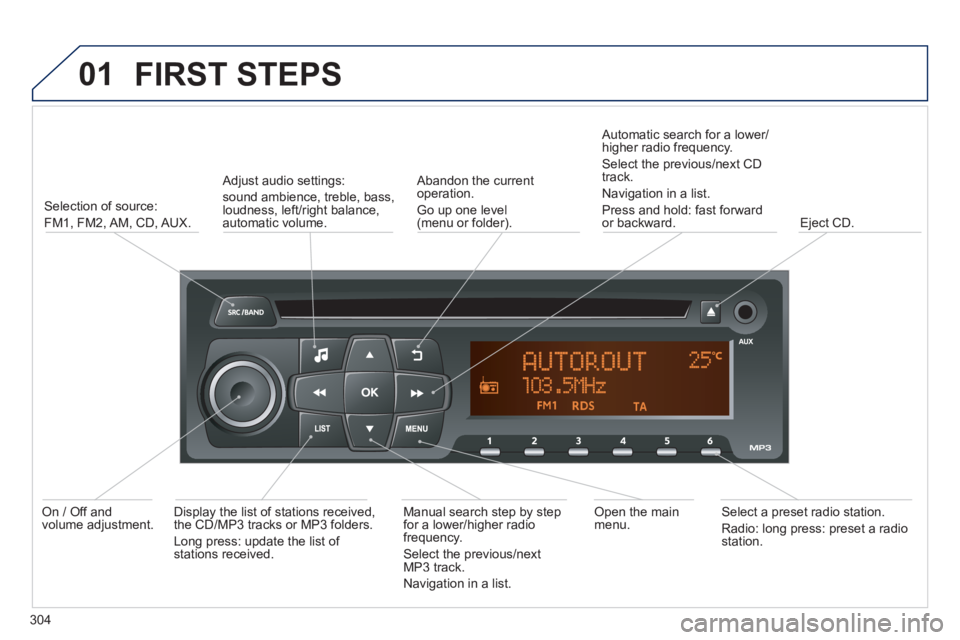
Selection of source:
FM1, FM2, AM, CD, AUX.
Adjust audio settings:
sound ambience, treble, bass, loudness, left/right balance, automatic volume.
Abandon the current operation.
Go up one level(menu or folder).
Automatic search for a lower/higher radio frequency.
Select the previous/next CD track.
Navigation in a list.
Press and hold: fast forward or backward. Eject CD.
Manual search step by step for a lower/higher radio frequency.
Select the previous/next MP3 track.
Navigation in a list.
Open the main menu. Select a preset radio station.
Radio: long press: preset a radio station.
Display the list of stations received, the CD/MP3 tracks or MP3 folders.
Long press: update the list of stations received.
On / Off and volume adjustment.
Page 307 of 336
02 STEERING MOUNTED CONTROLS
305
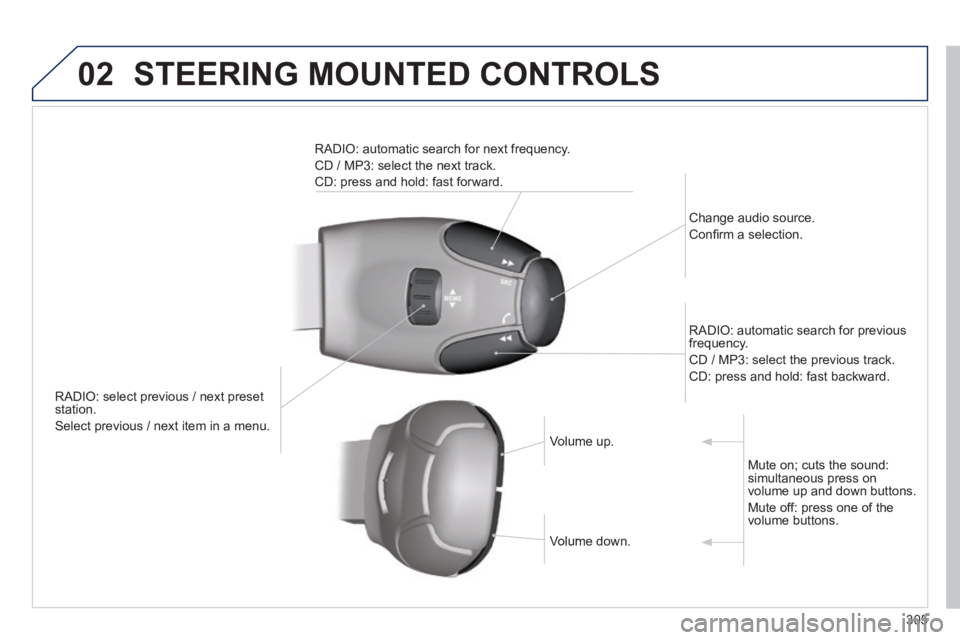
RADIO: select previous / next preset station.
Select previous / next item in a menu.
Change audio source.
Confi rm a selection.
RADIO: automatic search for previous frequency.
CD / MP3: select the previous track.
CD: press and hold: fast backward.
RADIO: automatic search for next frequency.
CD / MP3: select the next track.
CD: press and hold: fast forward.
Volume up. Volume up.
Volume down. Volume down.
Mute on; cuts the sound: simultaneous press on volume up and down buttons.
Mute off: press one of the volume buttons.
Page 308 of 336
03 AUDIO
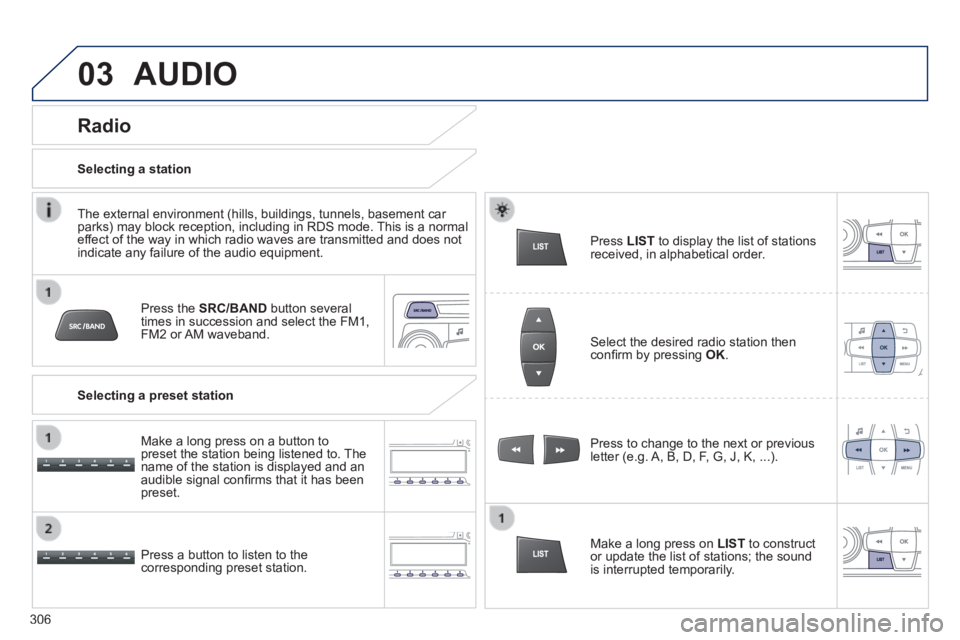
Press the SRC/BAND button several times in succession and select the FM1, FM2 or AM waveband.
Press a button to listen to the corresponding preset station.
Press to change to the next or previous letter (e.g. A, B, D, F, G, J, K, ...).
Radio
Select the desired radio station then confi rm by pressing OK .
Selecting a station
Make a long press on LIST to construct or update the list of stations; the sound is interrupted temporarily.
The external environment (hills, buildings, tunnels, basement car parks) may block reception, including in RDS mode. This is a normal effect of the way in which radio waves are transmitted and does not indicate any failure of the audio equipment.
Selecting a preset station
Make a long press on a button to preset the station being listened to. The name of the station is displayed and an audible signal confi rms that it has been preset.
Press LIST to display the list of stations received, in alphabetical order.
306
Page 318 of 336
316
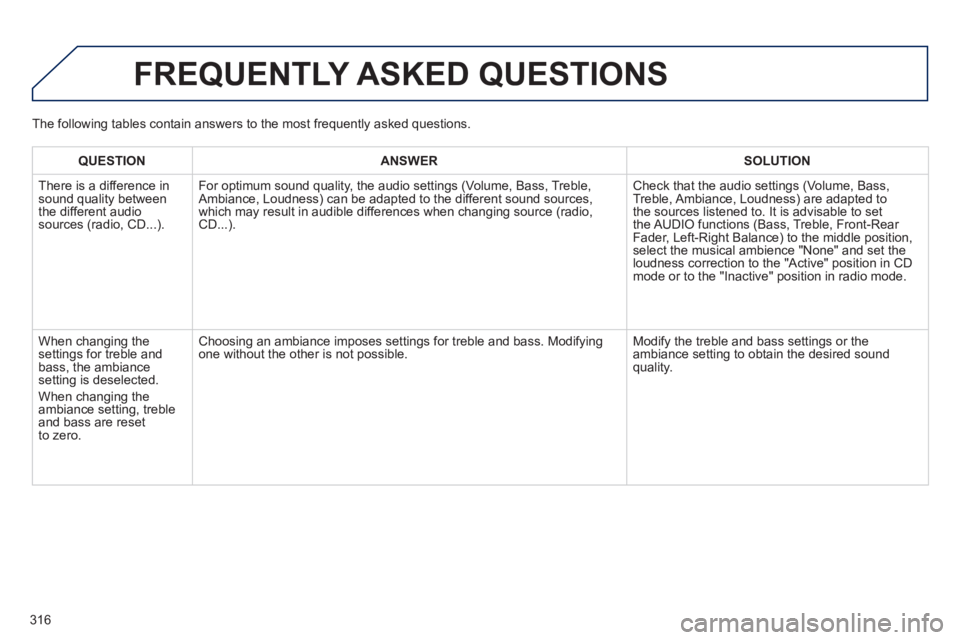
FREQUENTLY ASKED QUESTIONS
QUESTIONANSWERSOLUTION
There is a difference in sound quality between the different audio sources (radio, CD...).
For optimum sound quality, the audio settings (Volume, Bass, Treble, Ambiance, Loudness) can be adapted to the different sound sources, which may result in audible differences when changing source (radio, CD...).
Check that the audio settings (Volume, Bass, Treble, Ambiance, Loudness) are adapted to the sources listened to. It is advisable to set the AUDIO functions (Bass, Treble, Front-Rear Fader, Left-Right Balance) to the middle position, select the musical ambience "None" and set the loudness correction to the "Active" position in CD mode or to the "Inactive" position in radio mode.
When changing the settings for treble and bass, the ambiance setting is deselected.
When changing the ambiance setting, treble and bass are reset to zero.
Choosing an ambiance imposes settings for treble and bass. Modifying one without the other is not possible. Modify the treble and bass settings or the ambiance setting to obtain the desired sound quality.
The following tables contain answers to the most frequently asked questi\
ons.
Page 328 of 336
326
Alphabetical index
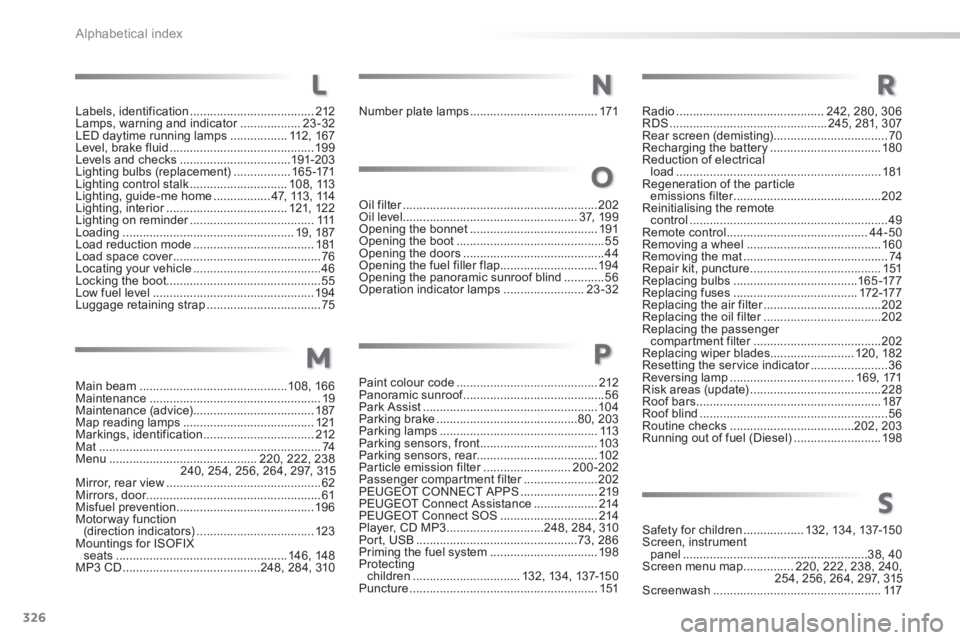
Main beam ............................................108, 166Maintenance ...................................................19Maintenance (advice) ....................................187Map reading lamps .......................................121Markings, identification .................................212Mat ..................................................................74Menu ............................................220, 222, 238240, 254, 256, 264, 297, 315Mirror, rear view ..............................................62Mirrors, door....................................................61Misfuel prevention .........................................19 6Motorway function (direction indicators) ...................................123Mountings for ISOFIX seats ...................................................146, 148MP3 CD .........................................248, 284, 310
Oil filter ..........................................................Oil filter ..........................................................Oil filter202Oil level....................................................3 7, 1 9 9Opening the bonnet ......................................191Opening the boot ............................................55Opening the doors ..........................................44Opening the fuel filler flap .............................19 4Opening the panoramic sunroof blind ............56Operation indicator lamps ........................23-32
Paint colour code ..........................................212Panoramic sunroof ..........................................Panoramic sunroof ..........................................Panoramic sunroof56Park Assist ....................................................104Parking brake ..........................................80, 203Parking lamps ...............................................113Parking sensors, front ...................................103Parking sensors, rear....................................102Particle emission filter ..........................Particle emission filter ..........................Particle emission filter200-202Passenger compartment filter ......................Passenger compartment filter ......................Passenger compartment filter202PEUGEOT CONNECT APPS .......................219PEUGEOT Connect Assistance ...................214PEUGEOT Connect SOS .............................214Player, CD MP3 .............................248, 284, 310Port, USB ................................................73, 286Priming the fuel system ................................198Protecting children ................................132, 13 4, 137-15 0Puncture ........................................................151
Radio ............................................242, 280, 306RDS ...............................................245, 281, 307Rear screen (demisting) ..................................70Recharging the battery .................................180Reduction of electrical load .............................................................181Regeneration of the particle emissions filter ............................................emissions filter ............................................emissions filter202Reinitialising the remote control ...........................................................49Remote control ..........................................44-50Removing a wheel ........................................160Removing the mat ...........................................74Repair kit, puncture .......................................151Replacing bulbs .....................................16 5 -17 7Replacing fuses .....................................172-17 7Replacing the air filter ...................................Replacing the air filter ...................................Replacing the air filter202Replacing the oil filter ...................................Replacing the oil filter ...................................Replacing the oil filter202Replacing the passenger compartment filter ......................................compartment filter ......................................compartment filter202Replacing wiper blades.........................120, 182Resetting the service indicator .......................Resetting the service indicator .......................Resetting the service indicator36Reversing lamp .....................................16 9, 171Risk areas (update) .......................................228Roof bars .......................................................187Roof blind ........................................................56Routine checks .....................................202, 203Running out of fuel (Diesel) ..........................198
M
N
O
P
Safety for children ..................132, 13 4, 137-15 0Screen, instrument panel .......................................................38, 40Screen menu map ...............220, 222, 238, 240, 254, 256, 264, 297, 315Screenwash ..................................................117
R
S
Labels, identification .....................................212Lamps, warning and indicator ..................Lamps, warning and indicator ..................Lamps, warning and indicator23-32LED daytime running lamps .................112 , 1 6 7Level, brake fluid ...........................................19 9Levels and checks .................................191-203Lighting bulbs (replacement) .................16 5 -171Lighting control stalk .............................1 0 8 , 113Lighting, guide-me home .................47, 113 , 114Lighting, interior ....................................Lighting, interior ....................................Lighting, interior121, 12 2Lighting on reminder .....................................Lighting on reminder .....................................Lighting on reminder111Loading ...................................................19, 187Load reduction mode ....................................181Load space cover ............................................Load space cover ............................................Load space cover76Locating your vehicle ......................................46Locking the boot..............................................55Low fuel level ................................................19 4Luggage retaining strap ..................................75
L
Number plate lamps ......................................171