battery PEUGEOT 2008 2014 Owner's Manual
[x] Cancel search | Manufacturer: PEUGEOT, Model Year: 2014, Model line: 2008, Model: PEUGEOT 2008 2014Pages: 336, PDF Size: 9.35 MB
Page 216 of 336
214
EMERGENCY OR ASSISTANCE CALL
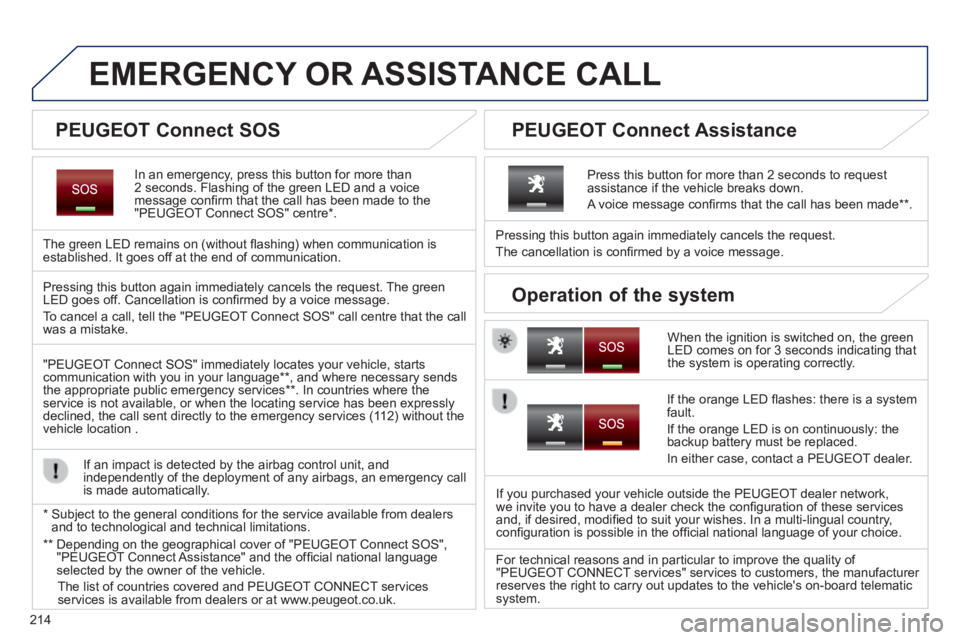
In an emergency, press this button for more than 2 seconds. Flashing of the green LED and a voice message confi rm that the call has been made to the "PEUGEOT Connect SOS" centre * .
The green LED remains on (without fl ashing) when communication is established. It goes off at the end of communication.
When the ignition is switched on, the green LED comes on for 3 seconds indicating that the system is operating correctly.
Pressing this button again immediately cancels the request.
The cancellation is confi rmed by a voice message.
Press this button for more than 2 seconds to request assistance if the vehicle breaks down.
A voice message confi rms that the call has been made ** .
Pressing this button again immediately cancels the request. The green LED goes off. Cancellation is confi rmed by a voice message .
To cancel a call, tell the "PEUGEOT Connect SOS" call centre that the call was a mistake.
"PEUGEOT Connect SOS" immediately locates your vehicle, starts communication with you in your language ** , and where necessary sends the appropriate public emergency services ** . In countries where the service is not available, or when the locating service has been expressl\
y declined, the call sent directly to the emergency services (112) without the vehicle location .
If an impact is detected by the airbag control unit, and independently of the deployment of any airbags, an emergency call is made automatically.
If the orange LED fl ashes: there is a system fault.
If the orange LED is on continuously: the backup battery must be replaced.
In either case, contact a PEUGEOT dealer.
If you purchased your vehicle outside the PEUGEOT dealer network, we invite you to have a dealer check the confi guration of these services and, if desired, modifi ed to suit your wishes. In a multi-lingual country, confi guration is possible in the offi cial national language of your choice.
For technical reasons and in particular to improve the quality of "PEUGEOT CONNECT services" services to customers, the manufacturer reserves the right to carry out updates to the vehicle's on-board telema\
tic system.
* Subject to the general conditions for the service available from dealers\
and to technological and technical limitations.
** Depending on the geographical cover of "PEUGEOT Connect SOS", "PEUGEOT Connect Assistance" and the offi cial national language selected by the owner of the vehicle.
The list of countries covered and PEUGEOT CONNECT services services is available from dealers or at www.peugeot.co.uk.
PEUGEOT Connect SOS PEUGEOT Connect Assistance
Operation of the system
Page 217 of 336
215
The system is protected in such a way that it will only operate in your vehicle.
Touch screen Touch screen T
01 General operation
For safety reasons, the driver must carry out operations which require prolonged attention while the vehicle is stationary.
When the engine is switched off and to prevent discharging of the battery, the system switches off following the activation of the energy economy mode.
CONTENTS
02 First steps - Control panel
04 PEUGEOT CONNECT APPS
05 Navigation:
navigation guidance, traffic, map, settings
06 Media:
photos, radio, music, settings
07 Communication:
bluetooth, contacts, call log, settings
08 Settings:
system, vehicle, sound p.
p.
p.
p.
p.
p.
p.
Frequently asked questions p.
SATELLITE NAVIGATION SYSTEM
MULTIMEDIA AUDIO SYSTEM
BLUETOOTH TELEPHONE
216
217
220
219
238
254
264
270
03 Steering mounted controls
p. 218
Page 277 of 336
FREQUENTLY ASKED QUESTIONS
275
QUESTIONANSWERSOLUTION
With the engine off, the system switches off after a few minutes of use.
When the engine is switched off, the system's operating time depends on the battery charge.
The switch-off is normal: the system switches to economy mode and switches off to prevent discharging of the vehicle's battery.
Start the vehicle's engine to increase the battery charge.
USB, portable player, connection key
Playback of my USB memory stick starts only after a very long wait (around 2 to 3 minutes).
Some fi les supplied with the memory stick may greatly slow down access to reading the memory stick (multiplication by 10 of the catalogue time\
). Delete the fi les supplied with the memory stick and limit the number of sub-folders in the fi le structure on the memory stick.
When I connect my iPhone as telephone and to the USB port at the same time, I am unable to play the music fi les.
When the iPhone connects automatically as a telephone, it forces the streaming function. The streaming function takes the place of the USB function which is then not useable, there is a period without sound of t\
he track being played with Apple ® players. ® players. ®
Disconnect and reconnect to the USB port (the USB function takes priority over streaming).
Page 279 of 336
277
AUDIO SYSTEM / BLUETOOTH 01 First steps
For safety reasons, the driver must only carry out operations which require prolonged attention while the vehicle is stationary.
When the engine is switched off and to prevent discharging of the battery, the system switches off after activation of energy economy mode.
CONTENTS
02 Steering mounted controls
03 Radio
04 Audio
05 Using the telephone
06 Audio settings
07 Configuration
08 Screen menu map p.
p.
p.
p.
p.
p.
p.
p.
278
279
280
283
289
295
296
297
Frequently asked questions p.
298
Page 302 of 336
300
FREQUENTLY ASKED QUESTIONS
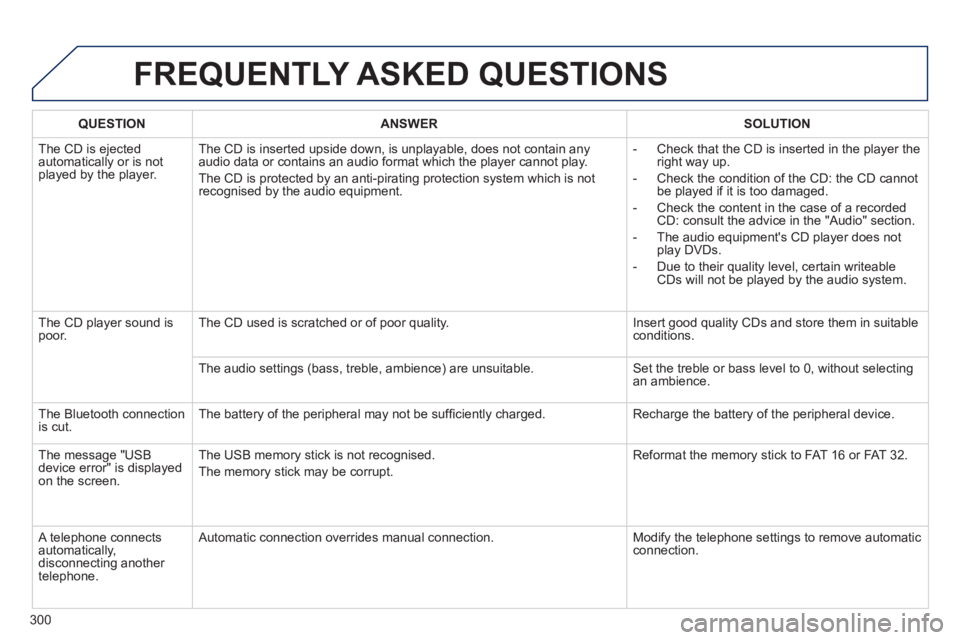
QUESTIONANSWERSOLUTION
The CD is ejected automatically or is not played by the player.
The CD is inserted upside down, is unplayable, does not contain any audio data or contains an audio format which the player cannot play.
The CD is protected by an anti-pirating protection system which is not recognised by the audio equipment.
- Check that the CD is inserted in the player the right way up.
- Check the condition of the CD: the CD cannot be played if it is too damaged.
- Check the content in the case of a recorded CD: consult the advice in the "Audio" section.
- The audio equipment's CD player does not play DVDs.
- Due to their quality level, certain writeable CDs will not be played by the audio system.
The CD player sound is poor. The CD used is scratched or of poor quality. Insert good quality CDs and store them in suitable conditions.
The audio settings (bass, treble, ambience) are unsuitable. Set the treble or bass level to 0, without selecting an ambience.
The Bluetooth connection is cut. The battery of the peripheral may not be suffi ciently charged. Recharge the battery of the peripheral device.
The message "USB device error" is displayed on the screen.
The USB memory stick is not recognised.
The memory stick may be corrupt.
Reformat the memory stick to FAT 16 or FAT 32.
A telephone connects automatically, disconnecting another telephone.
Automatic connection overrides manual connection. Modify the telephone settings to remove automatic connection.
Page 303 of 336
301
FREQUENTLY ASKED QUESTIONS
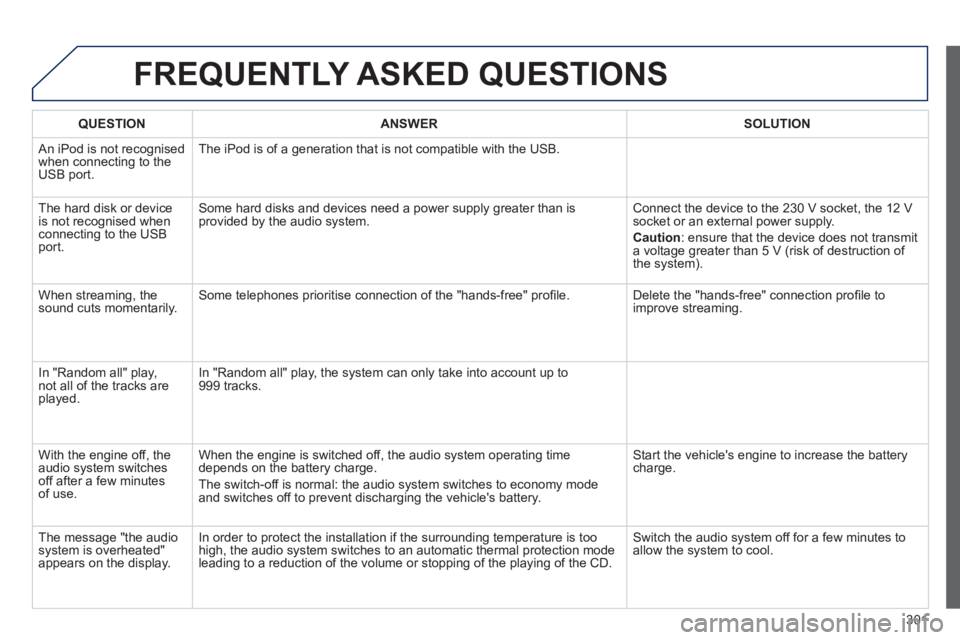
QUESTIONANSWERSOLUTION
An iPod is not recognised when connecting to the USB port.
The iPod is of a generation that is not compatible with the USB.
The hard disk or device is not recognised when connecting to the USB port.
Some hard disks and devices need a power supply greater than is provided by the audio system. Connect the device to the 230 V socket, the 12 V socket or an external power supply.
Caution : ensure that the device does not transmit a voltage greater than 5 V (risk of destruction of the system).
When streaming, the sound cuts momentarily. Some telephones prioritise connection of the "hands-free" profi le. Delete the "hands-free" connection profi le to improve streaming.
In "Random all" play, not all of the tracks are played.
In "Random all" play, the system can only take into account up to 999 tracks.
With the engine off, the audio system switches off after a few minutes of use.
When the engine is switched off, the audio system operating time depends on the battery charge.
The switch-off is normal: the audio system switches to economy mode and switches off to prevent discharging the vehicle's battery.
Start the vehicle's engine to increase the battery charge.
The message "the audio system is overheated" appears on the display.
In order to protect the installation if the surrounding temperature is t\
oo high, the audio system switches to an automatic thermal protection mode \
leading to a reduction of the volume or stopping of the playing of the C\
D.
Switch the audio system off for a few minutes to allow the system to cool.
Page 305 of 336
303
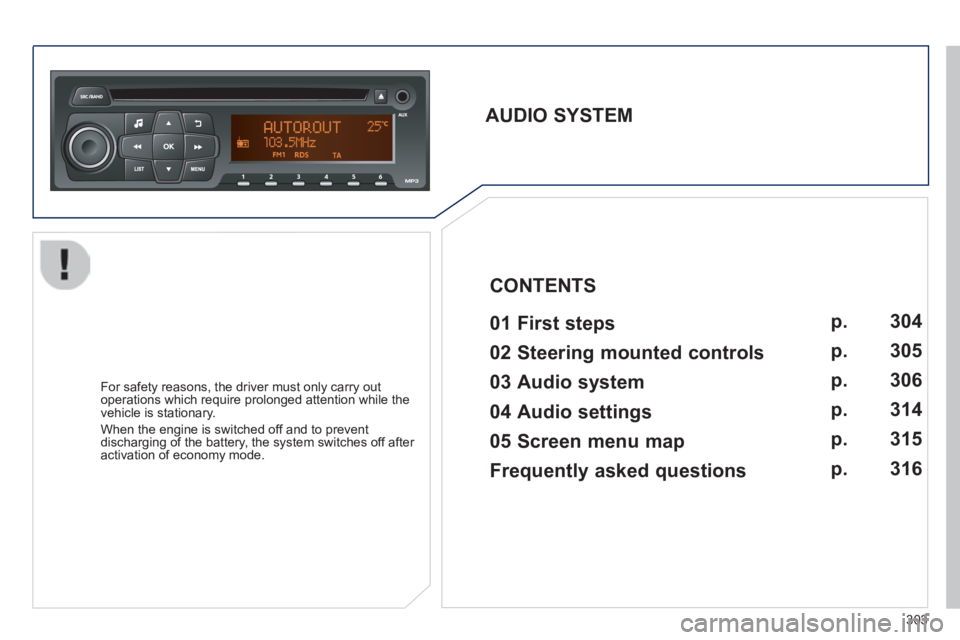
AUDIO SYSTEM 01 First steps
For safety reasons, the driver must only carry out operations which require prolonged attention while the vehicle is stationary.
When the engine is switched off and to prevent discharging of the battery, the system switches off after activation of economy mode.
CONTENTS
02 Steering mounted controls
03 Audio system
04 Audio settings
05 Screen menu map
Frequently asked questions p.
p.
p.
p.
p.
p.
304
305
306
314
315
316
Page 320 of 336
318
FREQUENTLY ASKED QUESTIONS
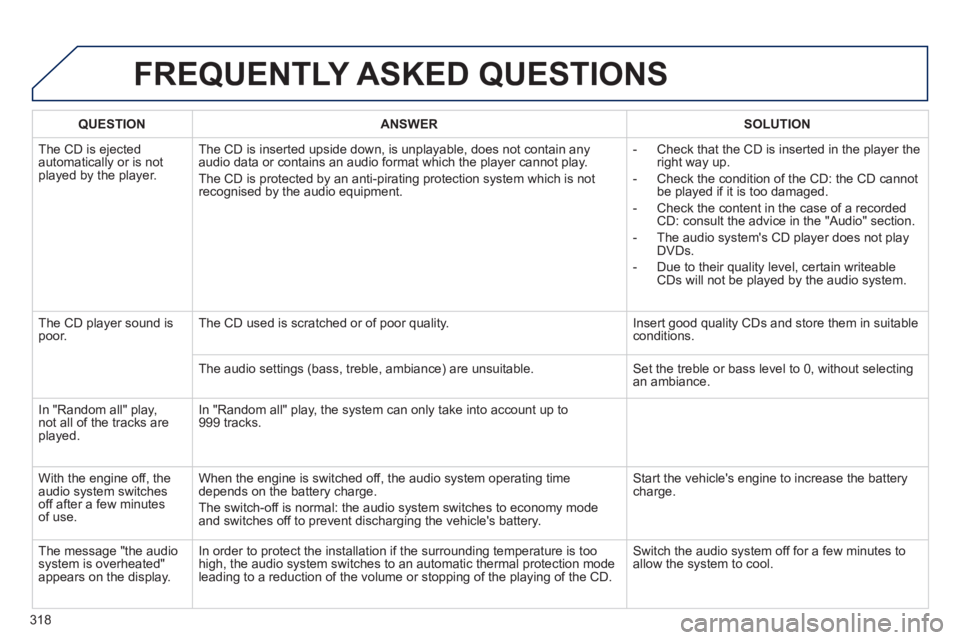
QUESTIONANSWERSOLUTION
The CD is ejected automatically or is not played by the player.
The CD is inserted upside down, is unplayable, does not contain any audio data or contains an audio format which the player cannot play.
The CD is protected by an anti-pirating protection system which is not recognised by the audio equipment.
- Check that the CD is inserted in the player the right way up.
- Check the condition of the CD: the CD cannot be played if it is too damaged.
- Check the content in the case of a recorded CD: consult the advice in the "Audio" section.
- The audio system's CD player does not play DVDs.
- Due to their quality level, certain writeable CDs will not be played by the audio system.
The CD player sound is poor. The CD used is scratched or of poor quality. Insert good quality CDs and store them in suitable conditions.
The audio settings (bass, treble, ambiance) are unsuitable. Set the treble or bass level to 0, without selecting an ambiance.
In "Random all" play, not all of the tracks are played.
In "Random all" play, the system can only take into account up to 999 tracks.
With the engine off, the audio system switches off after a few minutes of use.
When the engine is switched off, the audio system operating time depends on the battery charge.
The switch-off is normal: the audio system switches to economy mode and switches off to prevent discharging the vehicle's battery.
Start the vehicle's engine to increase the battery charge.
The message "the audio system is overheated" appears on the display.
In order to protect the installation if the surrounding temperature is t\
oo high, the audio system switches to an automatic thermal protection mode \
leading to a reduction of the volume or stopping of the playing of the C\
D.
Switch the audio system off for a few minutes to allow the system to cool.
Page 321 of 336

.
319
Visual search
Exterior
Remote control key 44-50 - opening / closing - anti-theft protection - guide-me-home lighting - starting - battery
Boot 55 - opening / closing - emergency release Temporary puncture repair kit 151-156
Wipers 117-120 Changing a wiper blade 120, 182
Changing bulbs 169-171 - rear lamps - 3 rd brake lamp - number plate lamps - foglamp - reversing lamp
Fuel tank, misfuel prevention 19 4 -197
Panoramic sunroof 56 Roof bars 187 Accessories 188-189
Electronic stability programme 125-127 Snow chains 164 Tyre pressures 156, 212 Changing a wheel 157-163 - tools - removing / refitting
Lighting controls 108 -114 LED lamps 112 Daytime running lamps 112 Headlamp beam adjustment 115 Cornering lighting 116 Changing bulbs 165-168 - front lamps - foglamps - direction indicator repeaters
Door mirrors 61- 62
Doors 44- 49 - opening / closing - central locking - emergency control Alarm 51-52 Electric windows 53 -54
Parking sensors 102-103 Park Assist 104-107 Towbar 185 -18 6 Towing 183 -18 4
Page 325 of 336
.
323
Visual search
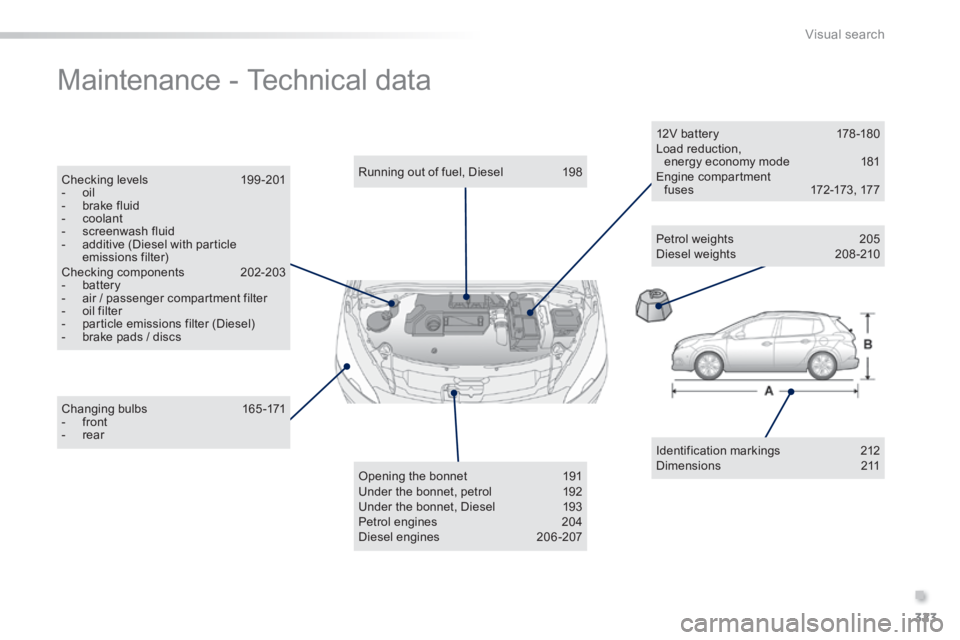
Maintenance - Technical data
Identification markings 212 Dimensions 211
Changing bulbs 165-171 - front - rear
Running out of fuel, Diesel 198
Opening the bonnet 191 Under the bonnet, petrol 192 Under the bonnet, Diesel 193 Petrol engines 204 Diesel engines 206-207
12V battery 178 -180 Load reduction, energy economy mode 181 Engine compartment f u s e s 172-173 , 17 7
Petrol weights 205 Diesel weights 208 -210
Checking levels 199 -201 - oil - brake fluid - coolant - screenwash fluid - additive (Diesel with particle emissions filter) Checking components 202-203 - battery - air / passenger compartment filter - oil filter - particle emissions filter (Diesel) - brake pads / discs