bluetooth PEUGEOT 2008 2014 Owner's Manual
[x] Cancel search | Manufacturer: PEUGEOT, Model Year: 2014, Model line: 2008, Model: PEUGEOT 2008 2014Pages: 336, PDF Size: 9.35 MB
Page 293 of 336
05
291
USING THE TELEPHONE
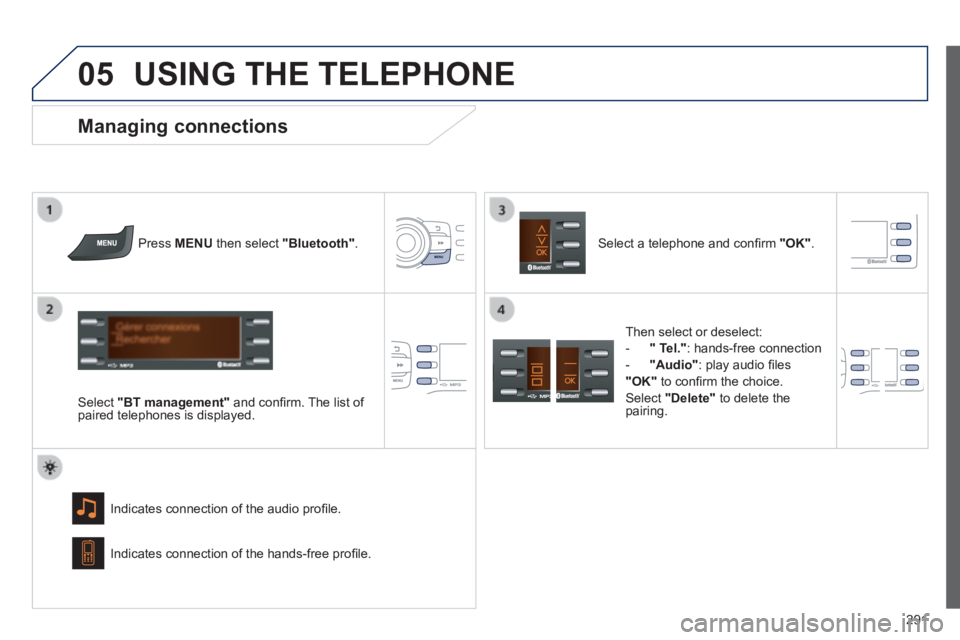
Press MENU then select "Bluetooth" .
Select "BT management" and confi rm. The list of paired telephones is displayed.
Indicates connection of the audio profi le.
Managing connections
Select a telephone and confi rm "OK" .
Indicates connection of the hands-free profi le.
Then select or deselect:
- " Tel." : hands-free connection
- "Audio" : play audio fi les
"OK" to confi rm the choice.
Select "Delete" to delete the pairing.
Page 296 of 336
05
294
USING THE TELEPHONE
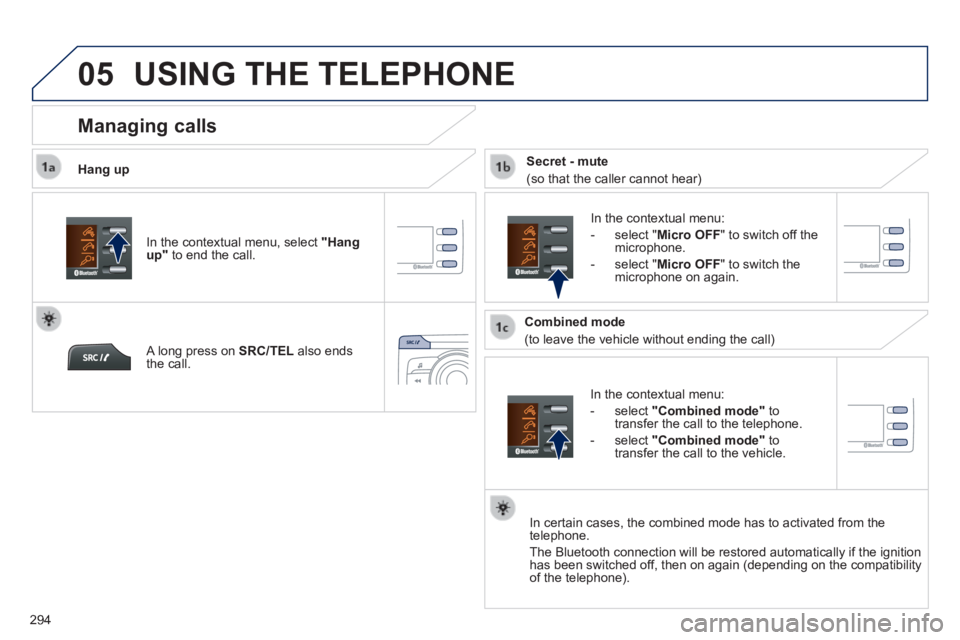
Hang up
In the contextual menu:
- select "Combined mode" to transfer the call to the telephone.
- select "Combined mode" to transfer the call to the vehicle.
In the contextual menu:
- select " Micro OFF " to switch off the microphone.
- select " Micro OFF " to switch the microphone on again.
In certain cases, the combined mode has to activated from the telephone.
The Bluetooth connection will be restored automatically if the ignition \
has been switched off, then on again (depending on the compatibility of the telephone).
Managing calls
A long press on SRC/TEL also ends the call.
In the contextual menu, select "Hang up" to end the call.
Secret - mute
(so that the caller cannot hear)
Combined mode
(to leave the vehicle without ending the call)
Page 299 of 336
08
297
SCREEN MENU MAP(S)
1
2
2
2
2
1
2
2
2
1
2
2
2
2
3
3
1
2
2
4
4
4
1
2
3
2
3
3
3
3
3
3
3
2
2
3
3
3
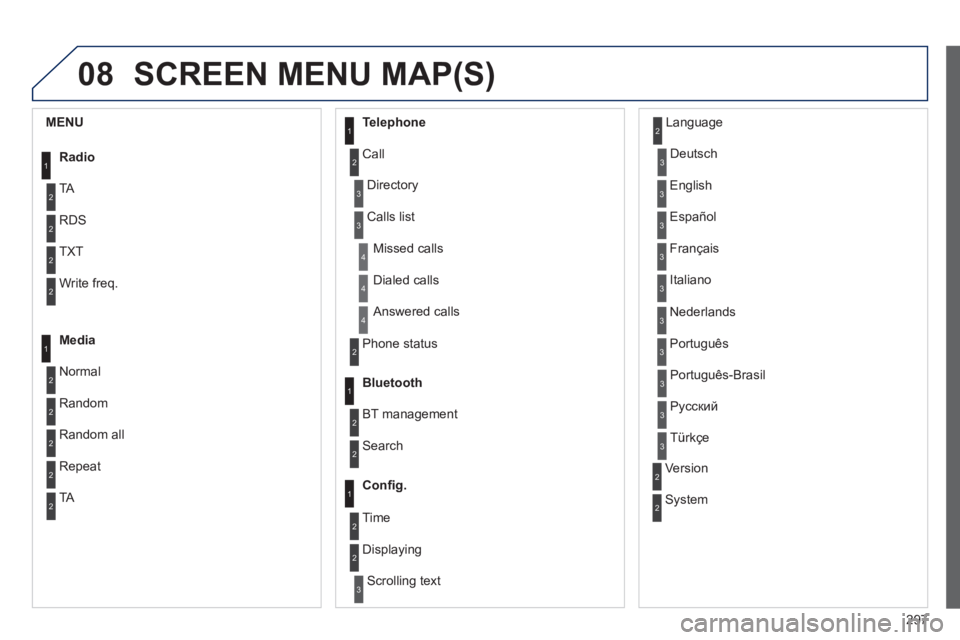
MENU
Radio
TA
RDS
TXT
Write freq.
Media
Normal
Random
Random all
Telephone
Call
Repeat
TA
Phone status
Directory
Calls list
Bluetooth
BT management
Search
Missed calls
Dialed calls
Answered calls
Confi g.
Displaying
Scrolling text
Language
Deutsch
English
Español
Français
Italiano
Nederlands
Português
Version
System
Português-Brasil
Русский
Türkçe
2 Time
Page 302 of 336
300
FREQUENTLY ASKED QUESTIONS
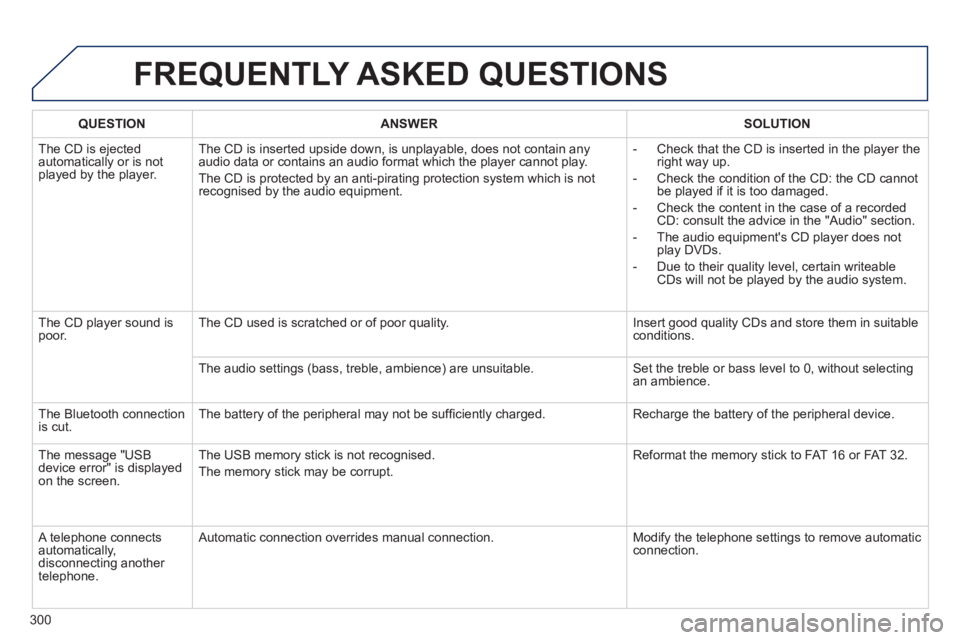
QUESTIONANSWERSOLUTION
The CD is ejected automatically or is not played by the player.
The CD is inserted upside down, is unplayable, does not contain any audio data or contains an audio format which the player cannot play.
The CD is protected by an anti-pirating protection system which is not recognised by the audio equipment.
- Check that the CD is inserted in the player the right way up.
- Check the condition of the CD: the CD cannot be played if it is too damaged.
- Check the content in the case of a recorded CD: consult the advice in the "Audio" section.
- The audio equipment's CD player does not play DVDs.
- Due to their quality level, certain writeable CDs will not be played by the audio system.
The CD player sound is poor. The CD used is scratched or of poor quality. Insert good quality CDs and store them in suitable conditions.
The audio settings (bass, treble, ambience) are unsuitable. Set the treble or bass level to 0, without selecting an ambience.
The Bluetooth connection is cut. The battery of the peripheral may not be suffi ciently charged. Recharge the battery of the peripheral device.
The message "USB device error" is displayed on the screen.
The USB memory stick is not recognised.
The memory stick may be corrupt.
Reformat the memory stick to FAT 16 or FAT 32.
A telephone connects automatically, disconnecting another telephone.
Automatic connection overrides manual connection. Modify the telephone settings to remove automatic connection.
Page 323 of 336
.
321
Visual search
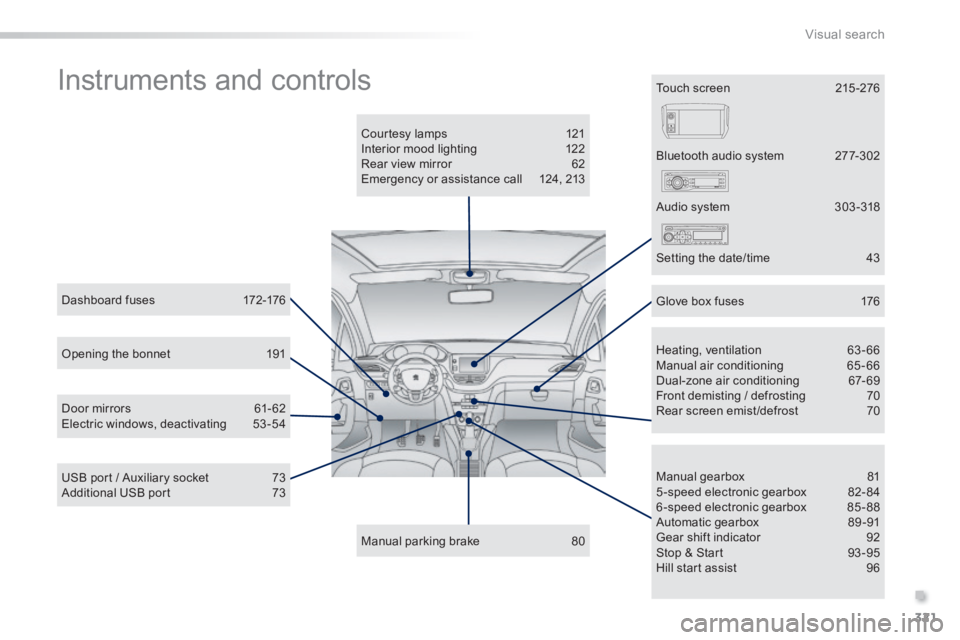
Instruments and controls
Courtesy lamps 121 Interior mood lighting 122 Rear view mirror 62 Emergency or assistance call 124, 213
Manual parking brake 80
Manual gearbox 81 5-speed electronic gearbox 82-84 6-speed electronic gearbox 85-88 Automatic gearbox 89 -91 Gear shift indicator 92 Stop & Start 93 -95 Hill start assist 96
Dashboard fuses 172-176
USB port / Auxiliary socket 73 Additional USB port 73
Heating, ventilation 63-66 Manual air conditioning 65-66 Dual-zone air conditioning 67-69 Front demisting / defrosting 70 Rear screen emist /defrost 70
Bluetooth audio system 277-302
Door mirrors 61- 62 Electric windows, deactivating 53-54
Audio system 303 -318
Setting the date/time 43
Glove box fuses 176
Touch screen 215 -276
Opening the bonnet 191
Page 326 of 336
324
Alphabetical index
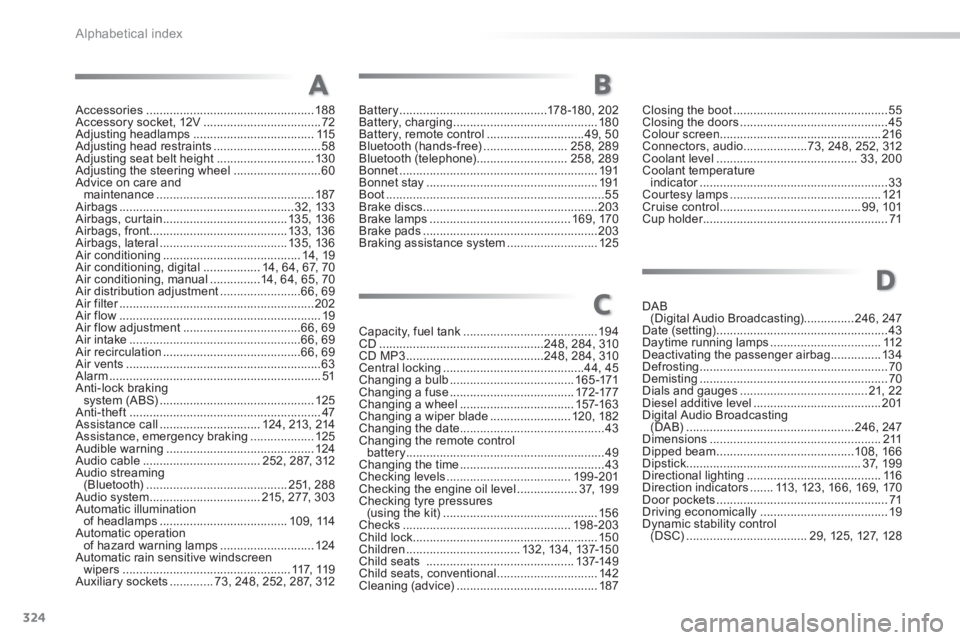
Accessories ..................................................188Accessory socket, 12V ...................................72Adjusting headlamps ....................................115Adjusting head restraints ................................58Adjusting seat belt height .............................13 0Adjusting the steering wheel ..........................60Advice on care and maintenance ...............................................187Airbags ....................................................32, 13 3Airbags, curtain .....................................13 5, 13 6Airbags, front.........................................13 3, 13 6Airbags, lateral ......................................13 5, 13 6Air conditioning .........................................14, 19Air conditioning, digital .................14, 64, 67, 70Air conditioning, manual ...............14, 64, 65, 70Air distribution adjustment ........................66, 69Air filter ..........................................................Air filter ..........................................................Air filter202Air flow ............................................................19Air flow adjustment ...................................66, 69Air intake ...................................................66, 69Air recirculation .........................................66, 69Air vents ..........................................................63Alarm ...............................................................51Anti-lock braking system (ABS) ..............................................125Anti-theft .........................................................47Assistance call ..............................124, 213, 214Assistance, emergency braking ...................125Audible warning ............................................124Audio cable ...................................252, 287, 312Audio streaming (Bluetooth) ..........................................2 51, 2 8 8Audio system .................................215, 277, 303Automatic illumination of headlamps ......................................1 0 9 , 114Automatic operation of hazard warning lamps ............................124Automatic rain sensitive windscreen wipers ..................................................117, 11 9Auxiliary sockets .............73, 248, 252, 287, 312
Capacity, fuel tank ........................................19 4CD .................................................248, 284, 310CD MP3 .........................................248, 284, 310Central locking ..........................................44, 45Changing a bulb .....................................16 5 -171Changing a fuse .....................................172-17 7Changing a wheel ..................................157-16 3Changing a wiper blade ........................120, 182Changing the date ...........................................43Changing the remote control battery ...........................................................49Changing the time ...........................................43Checking levels .....................................19 9 -201Checking the engine oil level ..................3 7, 1 9 9Checking tyre pressures (using the kit) ..............................................15 6Checks ..................................................198 -203Child lock .......................................................150Children ..................................132, 13 4, 137-15 0Child seats ............................................137-14 9Child seats, conventional ..............................142Cleaning (advice) ..........................................187
AB
C
Closing the boot ..............................................55Closing the doors ............................................45Colour screen ................................................216Connectors, audio ...................73, 248, 252, 312Coolant level ..........................................33, 200Coolant temperature indicator ........................................................indicator ........................................................indicator33Courtesy lamps .............................................121Cruise control ..........................................99, 101Cup holder .......................................................Cup holder .......................................................Cup holder71
Battery ............................................178 -18 0, 2 0 2Battery, charging ...........................................180Battery, remote control .............................49, 50Bluetooth (hands-free) .........................258, 289Bluetooth (telephone) ...........................258, 289Bonnet ...........................................................191Bonnet stay ...................................................191Boot .................................................................55Brake discs ....................................................203Brake lamps ..........................................16 9, 170Brake pads ....................................................203Braking assistance system ...........................125
D
DAB (Digital Audio Broadcasting)...............246, 247Date (setting) ...................................................43Daytime running lamps .................................112Deactivating the passenger airbag ...............13 4Defrosting ........................................................70Demisting ........................................................70Dials and gauges ......................................21, 2 2Diesel additive level ......................................201Digital Audio Broadcasting (DA B) ..................................................246, 247Dimensions ...................................................2 11Dipped beam .........................................108, 166Dipstick ....................................................3 7, 1 9 9Directional lighting ........................................11 6Direction indicators .......113, 123, 166, 169, 170Door pockets ...................................................71Driving economically ......................................19Dynamic stability control (DSC) ....................................29, 125, 127, 128