brake PEUGEOT 2008 2014 Owner's Manual
[x] Cancel search | Manufacturer: PEUGEOT, Model Year: 2014, Model line: 2008, Model: PEUGEOT 2008 2014Pages: 336, PDF Size: 9.35 MB
Page 101 of 336

99
4
Driving
Cruise control
System which automatically maintains the speed of the vehicle at the value programmed by the driver, without any action on the accelerator pedal.
The cruise control is switched off manually switched off manually switched offor by pressing the brake or clutch pedal or on triggering of the electronic stability system for safety reasons. It is possible to exceed the programmed speed temporarily by pressing the accelerator pedal. To return to the programmed speed, simply release the accelerator pedal. Switching off the ignition cancels any programmed speed value.
1. Selection of cruise control mode.
Steering mounted controls
The cruise control cannot, in any circumstances, replace the need to observe speed limits, nor can it replace the need for vigilance and responsibility on the part of the driver.
The programmed information is grouped together in the instrument panel screen. 5. Cruise control stopped/resumed indication. 6. Cruise control mode selection indication. 7. Programmed speed value. 8. Selecting a memorised speed setting.
Displays in the instrument panel
2. Increase the programmed value. 3. Decrease the programmed value. 4. Cruise control Off / Resume.
The cruise control is switched on manually: it requires a minimum vehicle speed of 25 mph (40 km/h), as well as the engagement of: - fourth gear on a manual gearbox, - second gear on an electronic or automatic gearbox, in manual sequential mode, - position A on an electronic gearbox or position D on an automatic gearbox.
Page 106 of 336

104
Driving
Park Assist
This system provides active assistance with parking, detecting a parking space then controlling the steering to park in the space. It controls the steering while the driver manages the accelerator, brakes, gears and clutch (manual gearbox). During phases of entry into and exit from a parking space, the system provides visual and audible information to the driver in order to make the manoeuvre safe. It may be necessary to move forwards and backwards more than once.
The Park Assist system cannot in any
circumstances replace the care and responsibility of the driver. The driver must remain in control of their vehicle ensuring that the space remains clear during the manoeuvre. In some circumstances, the sensors may not detect small obstacles located in their blind spots.
Changing tyre sizes (out-size tyres, winter tyres, ...) can inter fere with the correct operation of the parking assistance system.
During a manoeuvre the steering wheel turns quickly: do not hold the steering wheel, do not place your hand between the spokes of the steering wheel and take care with loose and bulky clothing, scarves, handbags... There is a risk of injury.
For entry into a parking space (parallel
parking) the system does not detect spaces which are clearly much smaller or larger than the size of the vehicle. This "parking assistance" system is activated automatically during manoeuvres; it is therefore possible that a symbol comes on in the screen, accompanied by an audible signal, without affecting the manoeuvre.
The system provides assistance in entering and exiting a parking space when parallel parking.
The driver can take control at any time by gripping the steering wheel.
When Park Assist is activated, it
prevents a change to STOP mode of Stop & Start. In STOP mode, activation of Park Assist restarts the engine.
Page 127 of 336
125
6
Safety
A set of the following Electronic Stability systems: - anti-lock braking system (ABS) and electronic brake force distribution (EBFD), - emergency braking assistance, - wheel anti-slip regulation (ASR) or traction control, - dynamic stability control (DSC).
Electronic stability control (ESC)
Definitions
Anti-lock braking system (ABS) and electronic brake force distribution (EBFD)
This system improves the stability and manoeuvrability of your vehicle when braking and provides improved control in corners, in particular on poor or slippery road sur faces. The ABS prevents wheel lock in the event of emergency braking. The electronic brake force distribution system manages the braking pressure wheel by wheel.
Emergency braking assistance
In an emergency, this system enables you to reach the optimum braking pressure more quickly and therefore reduce the stopping distance. It is triggered in relation to the speed at which the brake pedal is pressed. This is felt by a reduction in the resistance of the pedal and an increase in the effectiveness of the braking.
Anti-slip regulation (ASR)
The ASR system (also known as Traction Control) optimises traction in order to avoid wheel slip by acting on the brakes of the driving wheels and on the engine. It also improves the directional stability of the vehicle on acceleration.
Dynamic stability control (DSC)
If there is a difference between the path followed by the vehicle and that required by the driver, the DSC monitors each wheel and automatically acts on the brake of one or more wheels and on the engine to return the vehicle to the required path, within the limits of the laws of physics.
Page 128 of 336
126
Safety
Operation
Anti-lock braking system (ABS) and electronic brake force distribution (EBFD)
In emergency braking, press very firmly without releasing the pressure.
When changing wheels (tyres and rims), make sure that these are approved for your vehicle. Normal operation of the ABS may make itself felt by slight vibrations of the brake pedal.
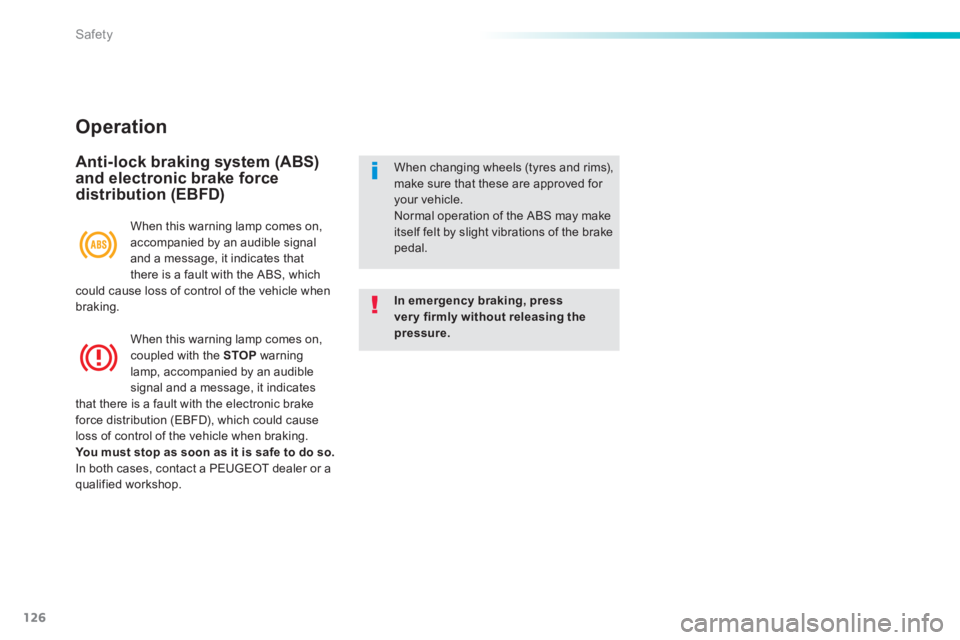
When this warning lamp comes on, accompanied by an audible signal and a message, it indicates that there is a fault with the ABS, which could cause loss of control of the vehicle when braking.
When this warning lamp comes on, coupled with the STOP warning lamp, accompanied by an audible signal and a message, it indicates that there is a fault with the electronic brake force distribution (EBFD), which could cause loss of control of the vehicle when braking. You must stop as soon as it is safe to do so. In both cases, contact a PEUGEOT dealer or a qualified workshop.
Page 129 of 336
127
6
Safety
Dynamic stability control (DSC) and anti-slip regulation (ASR)
Activation
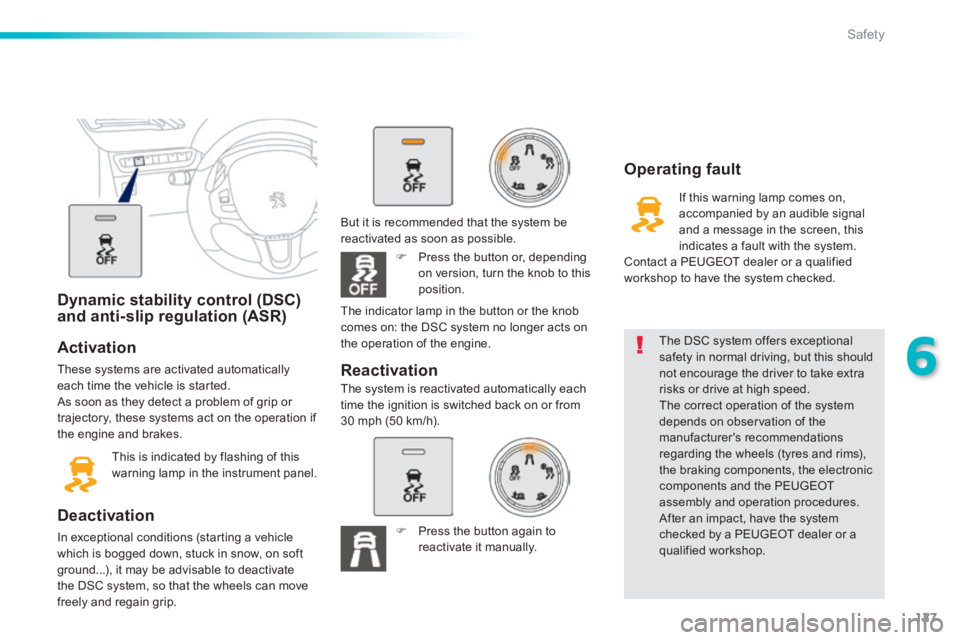
These systems are activated automatically each time the vehicle is started. As soon as they detect a problem of grip or trajectory, these systems act on the operation if the engine and brakes.
This is indicated by flashing of this warning lamp in the instrument panel.
Deactivation
In exceptional conditions (starting a vehicle which is bogged down, stuck in snow, on soft ground...), it may be advisable to deactivate the DSC system, so that the wheels can move freely and regain grip.
The DSC system offers exceptional safety in normal driving, but this should not encourage the driver to take extra risks or drive at high speed. The correct operation of the system depends on observation of the manufacturer's recommendations regarding the wheels (tyres and rims), the braking components, the electronic components and the PEUGEOT assembly and operation procedures. After an impact, have the system checked by a PEUGEOT dealer or a qualified workshop.
Operating fault
If this warning lamp comes on, accompanied by an audible signal and a message in the screen, this indicates a fault with the system. Contact a PEUGEOT dealer or a qualified workshop to have the system checked.
Reactivation
But it is recommended that the system be reactivated as soon as possible.
Press the button or, depending on version, turn the knob to this position.
The system is reactivated automatically each time the ignition is switched back on or from30 mph (50 km/h).
The indicator lamp in the button or the knob comes on: the DSC system no longer acts on the operation of the engine.
Press the button again to reactivate it manually.
Page 162 of 336
160
Practical information
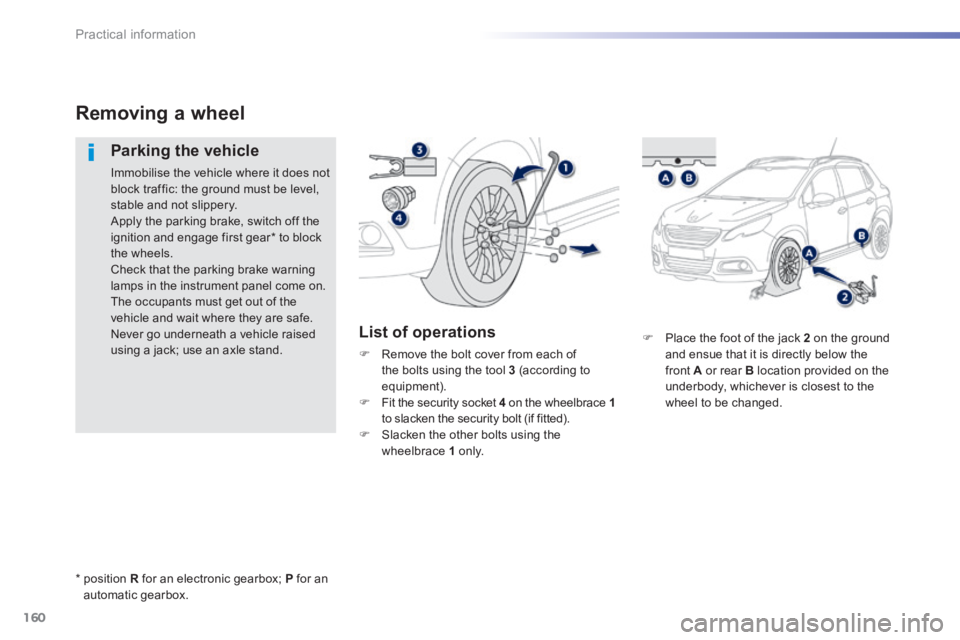
Place the foot of the jack 2 on the ground and ensue that it is directly below the front A or rear B location provided on the underbody, whichever is closest to the wheel to be changed.
Removing a wheel
Parking the vehicle
Immobilise the vehicle where it does not block traffic: the ground must be level, stable and not slippery. Apply the parking brake, switch off the ignition and engage first gear * to block the wheels. Check that the parking brake warning lamps in the instrument panel come on. The occupants must get out of the vehicle and wait where they are safe. Never go underneath a vehicle raised using a jack; use an axle stand.
List of operations
Remove the bolt cover from each of the bolts using the tool 3 (according to equipment). Fit the security socket 4 on the wheelbrace 1 to slacken the security bolt (if fitted). Slacken the other bolts using the wheelbrace 1 o n l y.
* position R for an electronic gearbox; P for an automatic gearbox.
Page 166 of 336
164
Practical information
Snow chains
In wintry conditions, snow chains improve traction as well as the behaviour of the vehicle when braking.
The snow chains must be fitted only to the front wheels. They must never be fitted to "space-saver" type spare wheels.
Take account of the legislation in force in your country on the use of snow chains and the maximum running speed authorised.
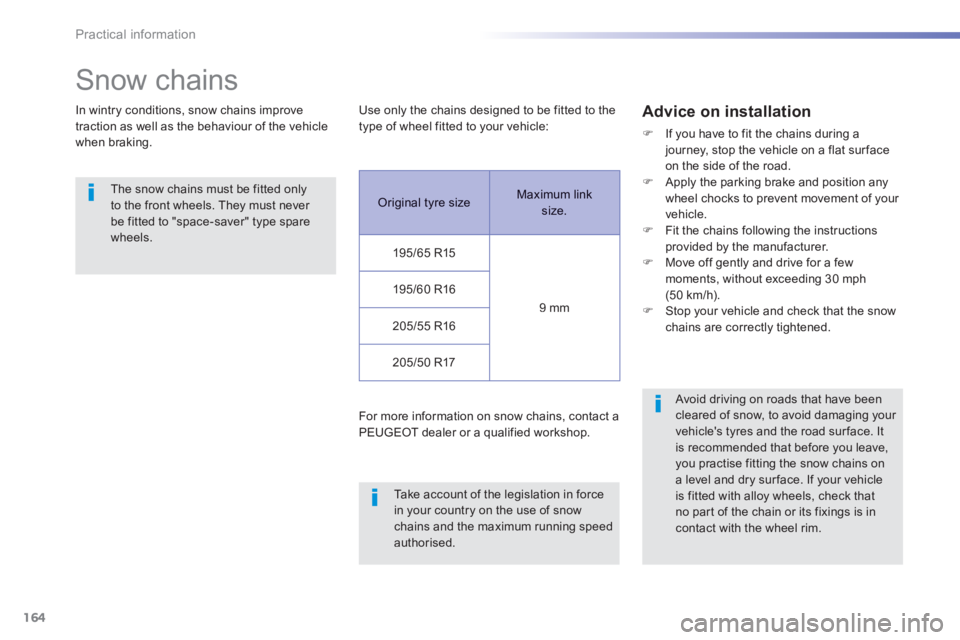
Use only the chains designed to be fitted to the type of wheel fitted to your vehicle:
For more information on snow chains, contact a
PEUGEOT dealer or a qualified workshop.
Advice on installation
If you have to fit the chains during a journey, stop the vehicle on a flat sur face on the side of the road. Apply the parking brake and position any wheel chocks to prevent movement of your vehicle. Fit the chains following the instructions provided by the manufacturer. Move off gently and drive for a few moments, without exceeding 30 mph (50 km/h). Stop your vehicle and check that the snow chains are correctly tightened.
Avoid driving on roads that have been cleared of snow, to avoid damaging your
vehicle's tyres and the road sur face. It is recommended that before you leave, you practise fitting the snow chains on a level and dry sur face. If your vehicle is fitted with alloy wheels, check that no part of the chain or its fixings is in contact with the wheel rim.
Original tyre size Maximum link size.
195/65 R15
9 mm
195/60 R16
205/55 R16
205/50 R17
Page 171 of 336
169
7
Practical information
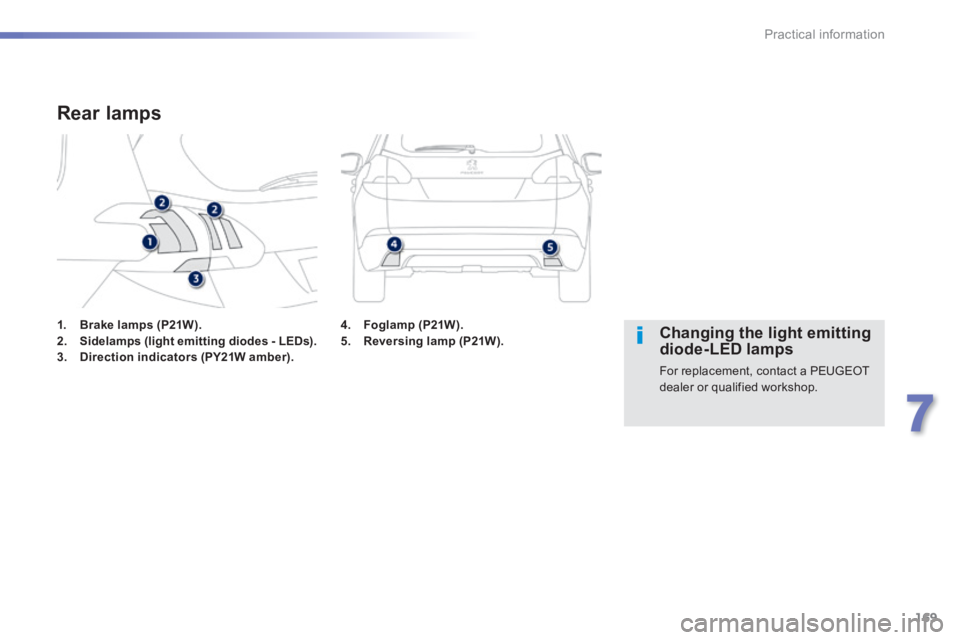
1. Brake lamps (P21W).2. Sidelamps (light emitting diodes - LEDs).3. Direction indicators (PY21W amber).
Rear lamps
Changing the light emitting diode-LED lamps
For replacement, contact a PEUGEOT dealer or qualified workshop.
4. Foglamp (P21W).5. Reversing lamp (P21W).
Page 172 of 336
170
Practical information
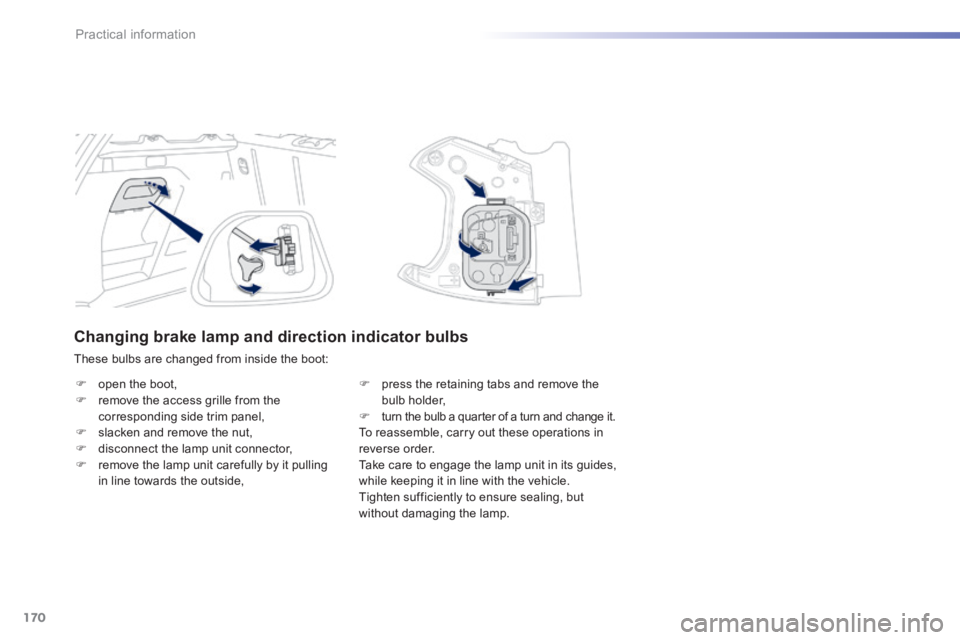
Changing brake lamp and direction indicator bulbs
These bulbs are changed from inside the boot:
open the boot, remove the access grille from the corresponding side trim panel, slacken and remove the nut, disconnect the lamp unit connector, remove the lamp unit carefully by it pulling in line towards the outside,
press the retaining tabs and remove the bulb holder, turn the bulb a quarter of a turn and change it. To reassemble, carry out these operations in reverse order. Take care to engage the lamp unit in its guides, while keeping it in line with the vehicle. Tighten sufficiently to ensure sealing, but without damaging the lamp.
Page 173 of 336
171
7
Practical information
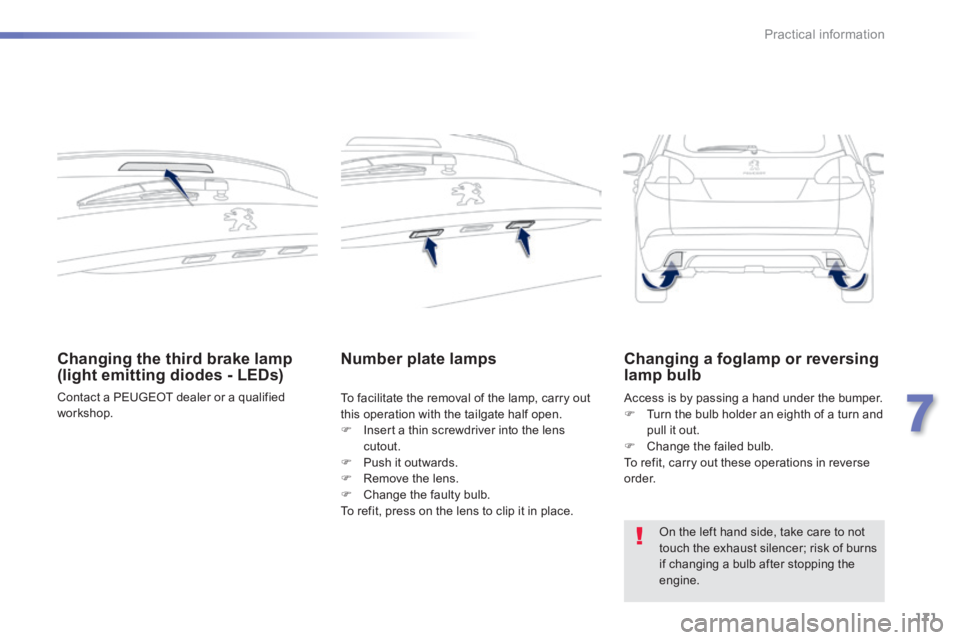
Changing the third brake lamp (light emitting diodes - LEDs)
Contact a PEUGEOT dealer or a qualified workshop.
Number plate lamps
To facilitate the removal of the lamp, carry out this operation with the tailgate half open.
Insert a thin screwdriver into the lens cutout. Push it outwards. Remove the lens. Change the faulty bulb. To refit, press on the lens to clip it in place.
Access is by passing a hand under the bumper. Turn the bulb holder an eighth of a turn and pull it out. Change the failed bulb. To refit, carry out these operations in reverse o r d e r.
Changing a foglamp or reversing lamp bulb
On the left hand side, take care to not touch the exhaust silencer; risk of burns if changing a bulb after stopping the engine.