light PEUGEOT 2008 2014 Owner's Manual
[x] Cancel search | Manufacturer: PEUGEOT, Model Year: 2014, Model line: 2008, Model: PEUGEOT 2008 2014Pages: 336, PDF Size: 9.35 MB
Page 67 of 336
65
3
Comfort
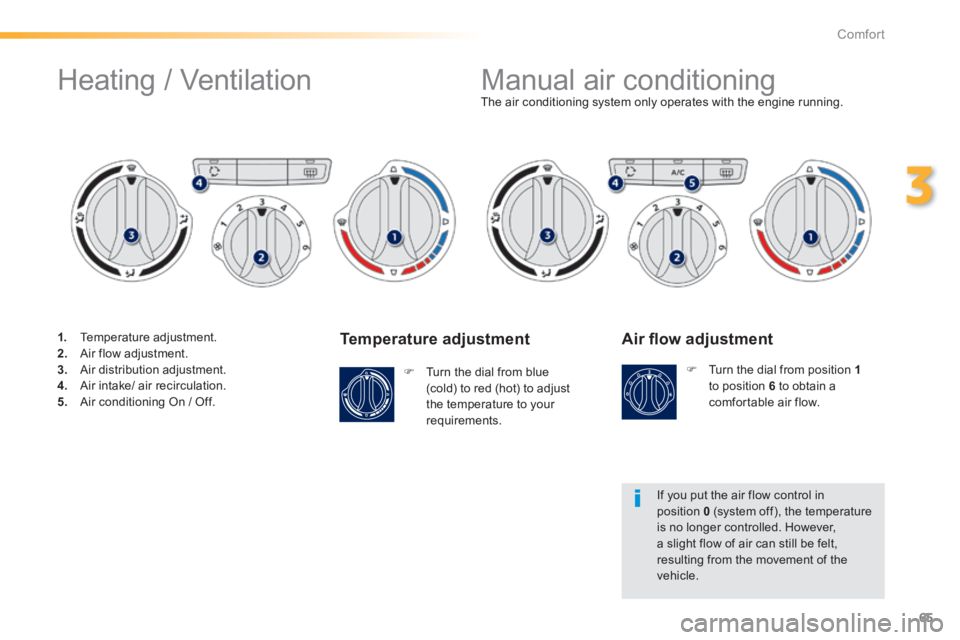
Temperature adjustment
Turn the dial from blue (cold) to red (hot) to adjust the temperature to your requirements.
The air conditioning system only operates with the engine running.
Air fl ow adjustment
Turn the dial from position 1to position 6 to obtain a comfortable air flow.
If you put the air flow control in position 0 (system off), the temperature is no longer controlled. However, a slight flow of air can still be felt, resulting from the movement of the vehicle.
Manual air conditioning
Heating / Ventilation
1. Temperature adjustment. 2. Air flow adjustment. 3. Air distribution adjustment. 4. Air intake/ air recirculation. 5. Air conditioning On / Off.
Page 71 of 336
69
3
Comfort
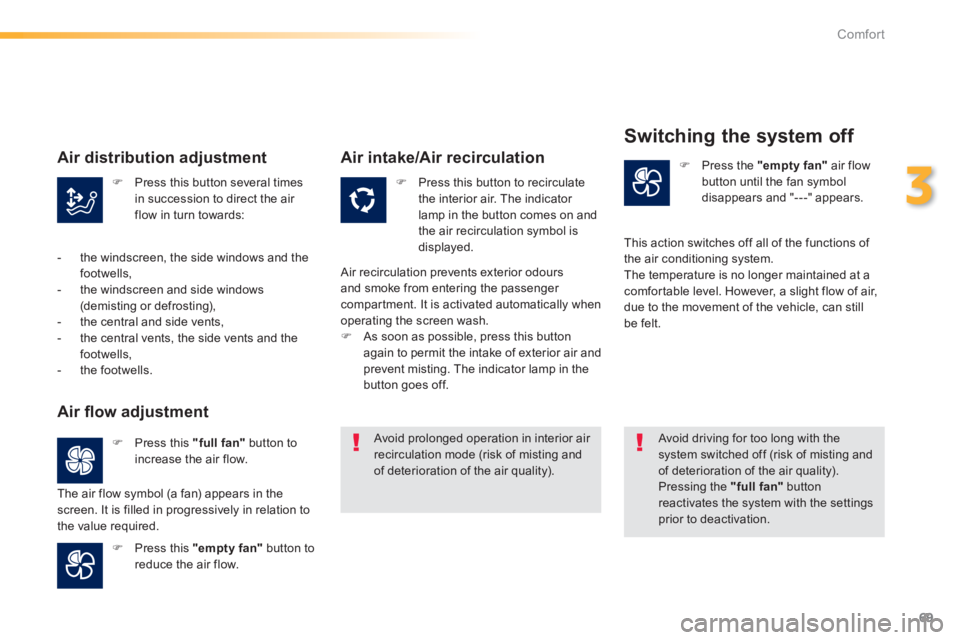
Press this button several times in succession to direct the air flow in turn towards:
Press this button to recirculate the interior air. The indicator lamp in the button comes on and the air recirculation symbol is displayed.
Press the "empty fan" air flow button until the fan symbol disappears and "---" appears.
Press this "full fan" button to increase the air flow.
Press this "empty fan" button to reduce the air flow.
Avoid prolonged operation in interior air recirculation mode (risk of misting and of deterioration of the air quality).
Avoid driving for too long with the system switched off (risk of misting and of deterioration of the air quality). Pressing the "full fan" button reactivates the system with the settings prior to deactivation.
Air distribution adjustment
- the windscreen, the side windows and the footwells, - the windscreen and side windows (demisting or defrosting), - the central and side vents, - the central vents, the side vents and the footwells, - the footwells.
Air fl ow adjustment
The air flow symbol (a fan) appears in the screen. It is filled in progressively in relation to the value required.
Air intake/Air recirculation
Air recirculation prevents exterior odours and smoke from entering the passenger compartment. It is activated automatically when operating the screen wash. As soon as possible, press this button again to permit the intake of exterior air and prevent misting. The indicator lamp in the button goes off.
Switching the system off
This action switches off all of the functions of the air conditioning system. The temperature is no longer maintained at a comfortable level. However, a slight flow of air, due to the movement of the vehicle, can still be felt.
Page 80 of 336
78
Comfort
Warning triangle (stowing)
Before leaving your vehicle to set up and install the triangle, put on your high visibility vest.
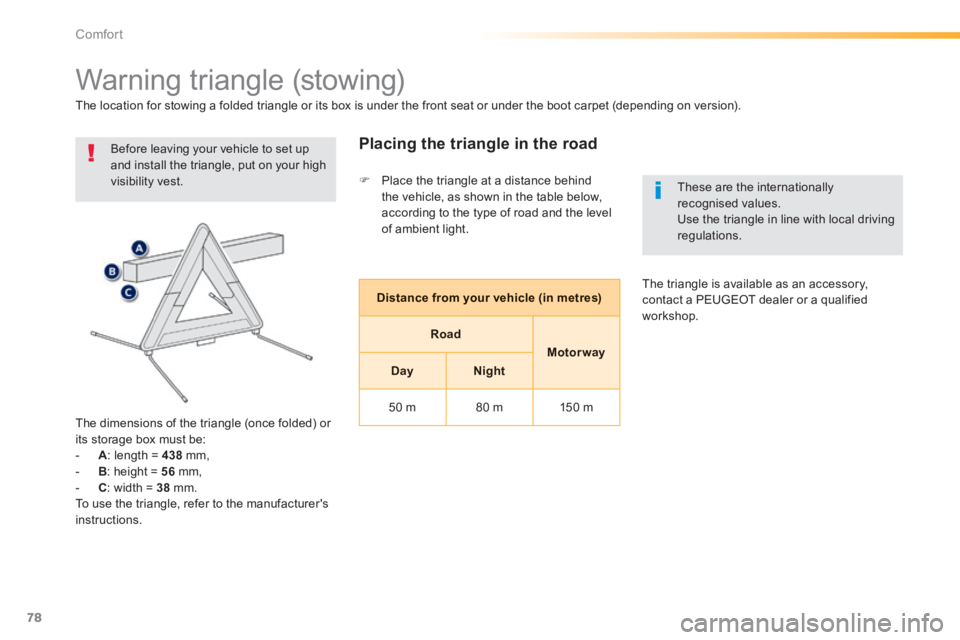
The dimensions of the triangle (once folded) or
its storage box must be: - A : length = 438 mm, - B : height = 56 mm, - C : width = 38 mm. To use the triangle, refer to the manufacturer's instructions.
Placing the triangle in the road
The location for stowing a folded triangle or its box is under the front seat or under the boot carpet (depending on version).
Distance from your vehicle (in metres)
Road
Motor way
DayNight
50 m 80 m 150 m
These are the internationally recognised values. Use the triangle in line with local driving regulations.
The triangle is available as an accessory, contact a PEUGEOT dealer or a qualified workshop.
Place the triangle at a distance behind the vehicle, as shown in the table below, according to the type of road and the level of ambient light.
Page 85 of 336
83
4
Driving
Display in the instrument panel
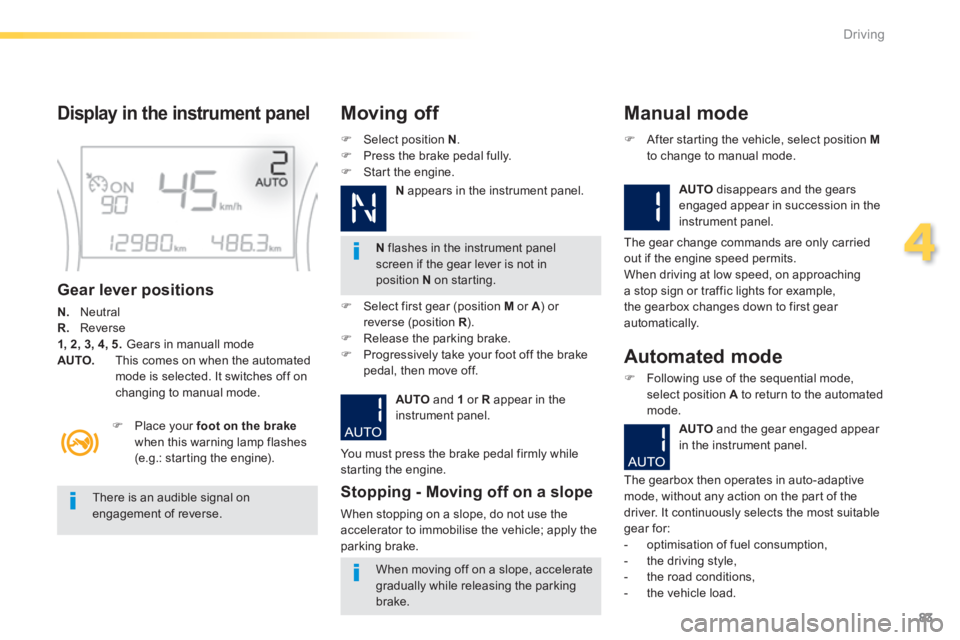
Gear lever positions
N. Neutral R. Reverse 1, 2, 3, 4, 5. Gears in manuall mode AUTO. This comes on when the automated mode is selected. It switches off on changing to manual mode.
Select position N . Press the brake pedal fully. Start the engine.
Moving off
N flashes in the instrument panel screen if the gear lever is not in position N on starting.
Place your foot on the brakewhen this warning lamp flashes (e.g.: starting the engine).
There is an audible signal on engagement of reverse.
When moving off on a slope, accelerate
gradually while releasing the parking brake.
Select first gear (position M or A ) or A ) or Areverse (position R ) .R ) .R Release the parking brake. Progressively take your foot off the brake pedal, then move off.
AUTO and 1 or R appear in the instrument panel.
Stopping - Moving off on a slope
When stopping on a slope, do not use the accelerator to immobilise the vehicle; apply the parking brake.
Manual mode
AUTO disappears and the gears engaged appear in succession in the instrument panel.
After starting the vehicle, select position Mto change to manual mode.
The gear change commands are only carried out if the engine speed permits. When driving at low speed, on approaching a stop sign or traffic lights for example, the gearbox changes down to first gear automatically.
You must press the brake pedal firmly while starting the engine.
Automated mode
Following use of the sequential mode, select position A to return to the automated mode.
AUTO and the gear engaged appear
in the instrument panel.
The gearbox then operates in auto-adaptive mode, without any action on the part of the driver. It continuously selects the most suitable gear for: - optimisation of fuel consumption, - the driving style, - the road conditions,
- the vehicle load.
N appears in the instrument panel.
Page 93 of 336
91
4
Driving
Manual operation
Select position M for sequential changing of the four gears. Push the lever towards the + sign to change up a gear. Pull the lever towards the - sign to change
down a gear. It is only possible to change from one gear to another if the vehicle speed and engine speed permit; otherwise, the gearbox will operate temporarily in automatic mode.
D disappears and the gears engaged appear in succession in the instrument panel.
Invalid value during manual operation
This symbol is displayed if a gear is not engaged correctly (selector between two positions).
Stopping the vehicle
Before switching off the engine, you can engage position P or N to place the gearbox in neutral. In both cases, apply the parking brake to immobilise the vehicle.
Operating fault
When the ignition is on, the lighting of this warning lamp, accompanied by an audible signal and a message in the multifunction screen, indicates a gearbox fault. In this case, the gearbox switches to back-up mode and is locked in 3rd gear. You may feel a substantial knock when changing from Pto R and from N to R . This will not cause any damage to the gearbox. Do not exceed 60 mph (100 km/h), local speed restrictions permitting. Contact a PEUGEOT dealer or a qualified workshop as soon as possible.
If the engine speed is too low or too high, the gear selected flashes for a few seconds, then the actual gear engaged is displayed. It is possible to change from position D(automatic) to position M (manual) at any time. When the vehicle is stationary or moving very slowly, the gearbox selects gear M1automatically. The sport and snow programmes do not
operate in manual mode.
There is a risk of damage to the gearbox: - if you press the accelerator and
brake pedals at the same time, - if you force the movement of the gear lever from the P position to another position when the battery is flat. To reduce fuel consumption when at a prolonged standstill with the engine running (traffic jam...), put the gear lever in the N position and apply the parking
brake.
If the lever is not in position P , when the P , when the Pdriver's door is opened or approximately 45 seconds after the ignition is switched off, a warning message appears in the screen. Return the lever to position P ; the message disappears.
Page 95 of 336
93
4
Driving
Stop & Start
Operation
Going into engine STOP mode
The "ECO" warning lamp comes on in the instrument panel and the engine goes into standby:
- with a manual gearbox , at speeds below 12 mph (20 km/h), when you place the gear lever into neutral, and you release the clutch pedal.
- with an electronic gearbox , at speeds below 4 mph (6 km/h), when you press the brake pedal or placethe gear lever into position N . Never refuel with the engine in STOP mode; you must switch off the ignition with the key.
For your comfort, during parking manoeuvres, STOP mode is not available for a few seconds after coming out of reverse gear. STOP mode does not affect the functionality of the vehicle, such as for example, braking, power steering...
Special cases: STOP mode not available
STOP mode is not invoked when: - the driver's door is open, - the driver's seat belt is not fastened, - the vehicle has not exceeded 6 mph (10 km/h) since the last engine start using the key, - the engine is needed to maintain a comfortable temperature in the passenger compartment, - demisting is active, - some special conditions (battery charge, engine temperature, braking assistance, ambient temperature...) where the engine is needed to assure control of a system.
A time counter calculates the sum of the periods in STOP mode during a journey. It rests itself to zero every time the ignition is switched on with the key.
The "ECO" warning lamp flashes for a few seconds then goes off.
This operation is perfectly normal.
The Stop & Start system puts the engine temporarily into standby - STOP mode - during stops in the traffic (red lights, traffic jams, or other...). The engine restarts automatically - START mode - as soon as you want to move off. The restart takes place instantly, quickly and silently. Per fect for urban use, the Stop & Start system reduces fuel consumption and exhaust emissions as well as the noise level when stationary.
Page 110 of 336
108
Visibility
Lighting controls
Main lighting
The vehicle has various lamps: - sidelamps, to be seen, - dipped beam headlamps to see without dazzling other drivers, - main beam headlamps to see clearly when the road is clear, - directional headlamps for improved visibility when cornering.
Additional lighting
Other lamps are installed to fulfil the requirements of particular driving conditions: - a rear foglamp to better signal the presence of the vehicle in foggy conditions,
- front foglamps with cornering lighting, - daytime running lamps to be seen during the day, - guide-me-home and welcome lighting for leaving and entering to the vehicle.
Automatic lighting
functions
Various automatic lighting functions are also available depending on options: - guide-me-home lighting, - cornering lighting, - welcome lighting, - daytime running lamps, - automatic illumination of headlamps.
In some weather conditions (e.g. low temperature or humidity), the presence of misting on the internal sur face of the glass of the headlamps and rear lamps is normal; it disappears after the lamps have been on for a few minutes.
System for selection and control of the various front and rear lamps providing the vehicle's lighting and signalling.
Page 111 of 336
109
5
Visibility
Model without AUTO lighting
Model with AUTO lighting
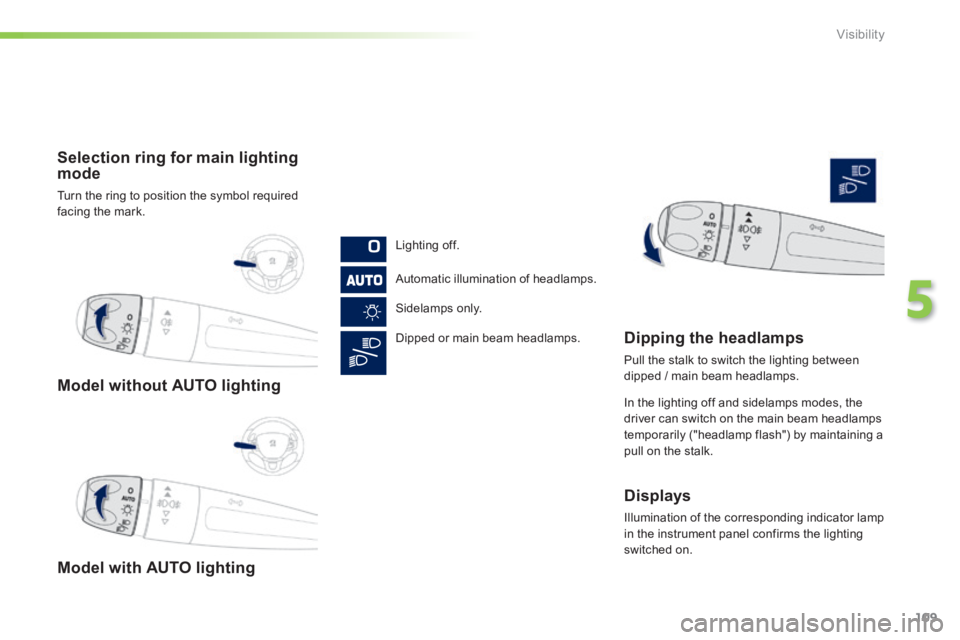
Selection ring for main lighting mode
Turn the ring to position the symbol required facing the mark.
Lighting off.
Automatic illumination of headlamps.
Sidelamps only.
Dipped or main beam headlamps. Dipping the headlamps
Pull the stalk to switch the lighting between dipped / main beam headlamps.
In the lighting off and sidelamps modes, the driver can switch on the main beam headlamps
temporarily ("headlamp flash") by maintaining a pull on the stalk.
Displays
Illumination of the corresponding indicator lamp in the instrument panel confirms the lighting switched on.
Page 112 of 336
110
Visibility
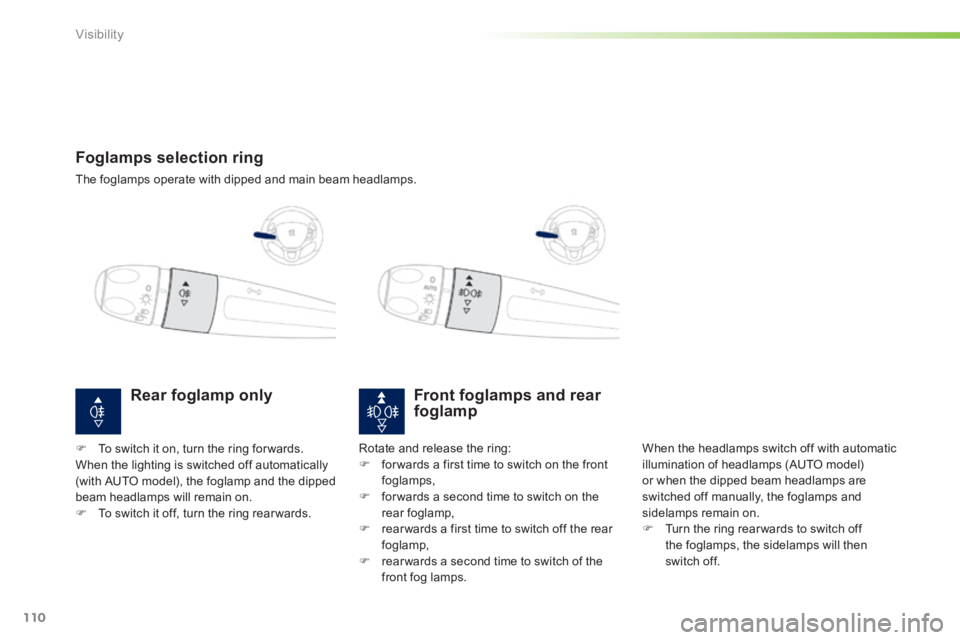
Foglamps selection ring
The foglamps operate with dipped and main beam headlamps.
Front foglamps and rear foglamp
When the headlamps switch off with automatic illumination of headlamps (AUTO model) or when the dipped beam headlamps are switched off manually, the foglamps and sidelamps remain on. Turn the ring rear wards to switch off the foglamps, the sidelamps will then switch off.
Rotate and release the ring: for wards a first time to switch on the front foglamps, for wards a second time to switch on the rear foglamp, rear wards a first time to switch off the rear foglamp, rear wards a second time to switch of the front fog lamps.
Rear foglamp only
To switch it on, turn the ring for wards. When the lighting is switched off automatically (with AUTO model), the foglamp and the dipped beam headlamps will remain on. To switch it off, turn the ring rear wards.
Page 113 of 336

111
5
Visibility
In good or rainy weather, both day and night, the front foglamps and the rear foglamp are prohibited. In these situations, the power of their beams may dazzle other drivers. They should only be used in fog or snow. In these weather conditions, it is your responsibility to switch on the foglamps and dipped beam headlamps manually as the sunshine sensor may detect sufficient light. Do not forget to switch off the front foglamps and the rear foglamp when they are no longer necessary.
Switching on the lamps after the ignition is switched off
To reactivate the lighting control, rotate the ring to the "0" position - lamps off, then to the desired position. On opening the driver's door a temporary audible signal warns the driver that the lighting is on. The lamps, with the exception of the sidelamps, switch off automatically after a maximum duration of thirty minutes to prevent discharging of the battery.
Switching off the lamps when the ignition is switched off
On switching off the ignition, all of the lamps turn off immediately, except for dipped beam if guide-me-home lighting is activated.