glove box PEUGEOT 2008 2014 Owners Manual
[x] Cancel search | Manufacturer: PEUGEOT, Model Year: 2014, Model line: 2008, Model: PEUGEOT 2008 2014Pages: 336, PDF Size: 9.35 MB
Page 10 of 336
8Familiarisation
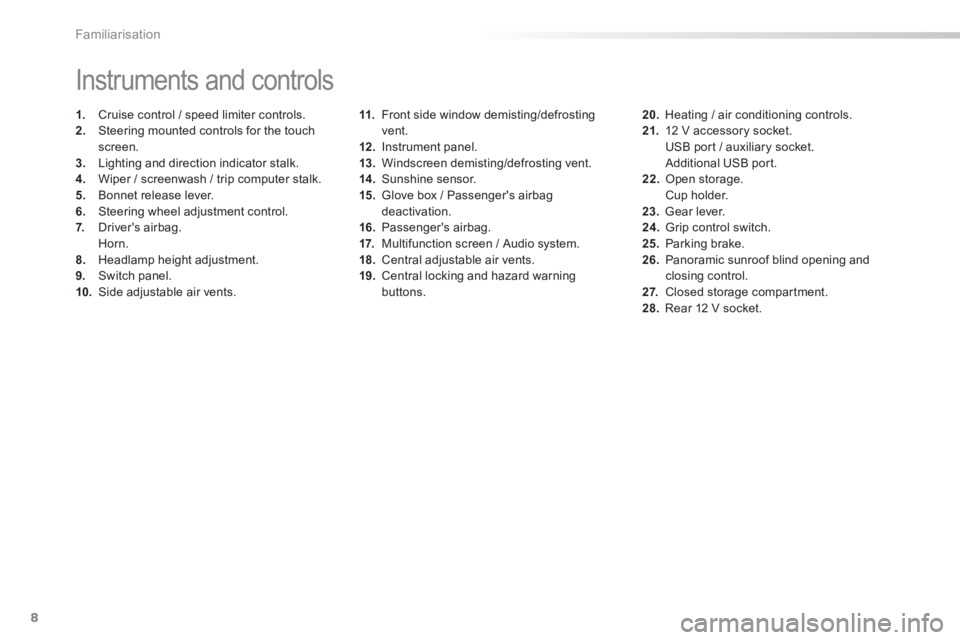
11. Front side window demisting/defrosting vent. 12 . Instrument panel. 13. Windscreen demisting/defrosting vent. 14 . Sunshine sensor. 15. Glove box / Passenger's airbag deactivation. 16. Passenger's airbag. 17. Multifunction screen / Audio system. 18. Central adjustable air vents. 19. Central locking and hazard warning buttons.
Instruments and controls
1. Cruise control / speed limiter controls. 2. Steering mounted controls for the touch screen. 3. Lighting and direction indicator stalk .4. Wiper / screenwash / trip computer stalk. 5. Bonnet release lever. 6. Steering wheel adjustment control. 7. Driver's airbag. Horn. 8. Headlamp height adjustment. 9. Switch panel. 10. Side adjustable air vents.
20. Heating / air conditioning controls. 21. 12 V accessory socket. USB port / auxiliary socket. Additional USB port. 22. Open storage. Cup holder. 23. Gear lever. 24. Grip control switch. 25. Parking brake. 26. Panoramic sunroof blind opening and closing control. 2 7. Closed storage compartment. 28. Rear 12 V socket.
Page 18 of 336
16
103, 105/106
127
94
52
13 4
15 0
27
32
Familiarisation
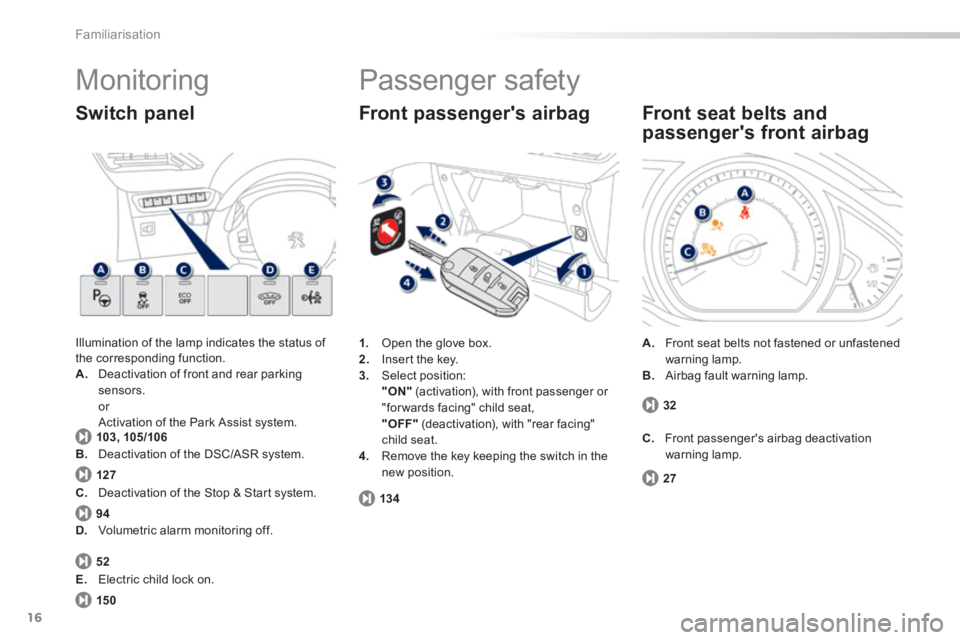
Monitoring
Illumination of the lamp indicates the status of the corresponding function. A. Deactivation of front and rear parking sensors. or Activation of the Park Assist system. Activation of the Park Assist system.
Switch panel
1. Open the glove box. 2. Insert the key. 3. Select position: "ON" (activation), with front passenger or "for wards facing" child seat, "OFF" (deactivation), with "rear facing" child seat. 4. Remove the key keeping the switch in the new position.
Front passenger's airbag
C. Deactivation of the Stop & Start system.
D. Volumetric alarm monitoring off.
E. Electric child lock on.
Passenger safety
A. Front seat belts not fastened or unfastened warning lamp. B. Airbag fault warning lamp.
Front seat belts and
passenger's front airbag
C. Front passenger's airbag deactivation warning lamp. B. Deactivation of the DSC/ASR system.
Page 29 of 336
1
27
Monitoring
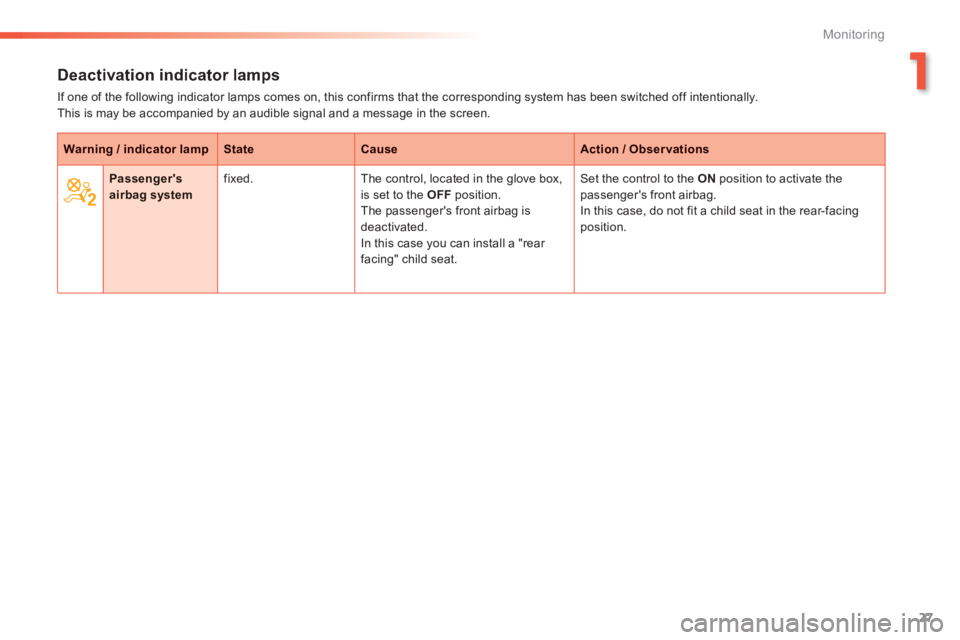
Deactivation indicator lamps
If one of the following indicator lamps comes on, this confirms that the corresponding system has been switched off intentionally. This is may be accompanied by an audible signal and a message in the screen.
Warning / indicator lampStateCauseAction / Observations
Passenger's airbag system fixed. The control, located in the glove box, is set to the OFF position. The passenger's front airbag is
deactivated. In this case you can install a "rear facing" child seat.
Set the control to the ON position to activate the passenger's front airbag. In this case, do not fit a child seat in the rear-facing
position.
Page 73 of 336
71
3
Comfort
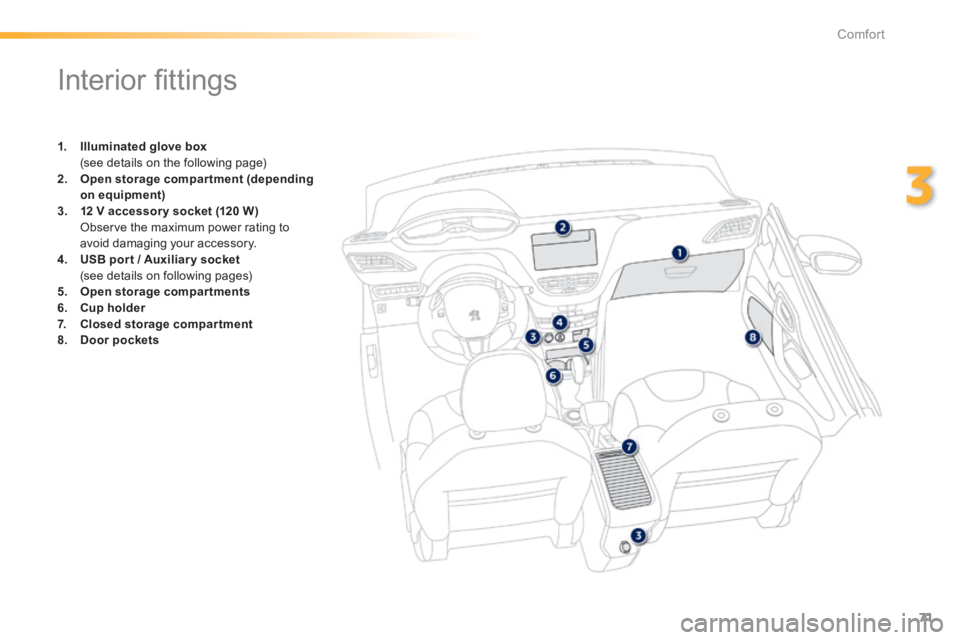
Interior fi ttings
1. Illuminated glove box (see details on the following page) 2. Open storage compartment (depending on equipment)3. 12 V accessory socket (120 W )
Observe the maximum power rating to avoid damaging your accessory. 4. USB por t / Auxiliar y socket / Auxiliar y socket (see details on following pages) 5. Open storage compartments6. Cup holder7. Closed storage compartment8. Door pockets
Page 74 of 336
72
Comfort
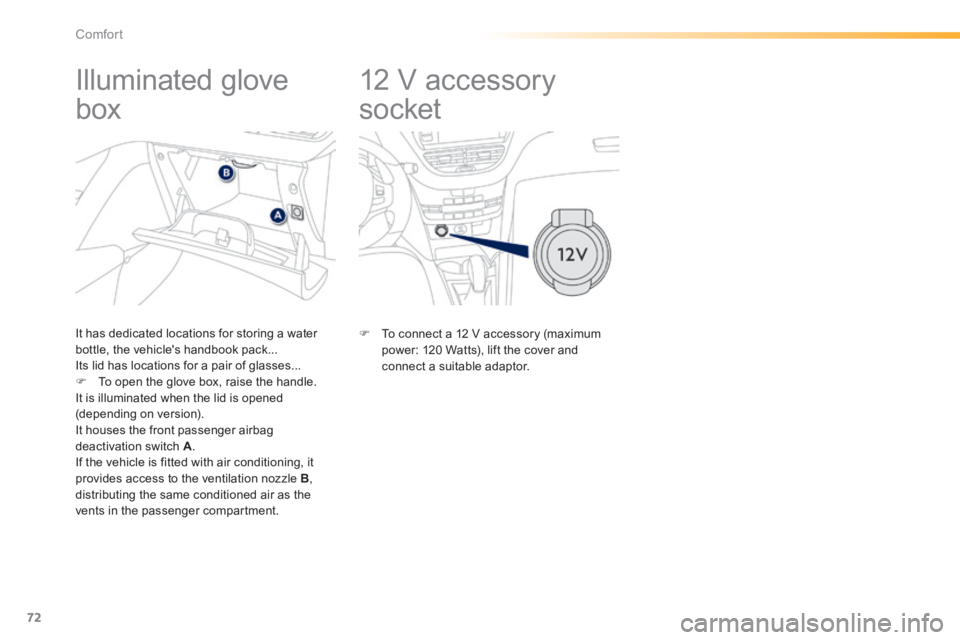
12 V accessory
socket
Illuminated glove
box
It has dedicated locations for storing a water bottle, the vehicle's handbook pack... Its lid has locations for a pair of glasses... To open the glove box, raise the handle. It is illuminated when the lid is opened (depending on version). It houses the front passenger airbag deactivation switch A . If the vehicle is fitted with air conditioning, it provides access to the ventilation nozzle B , distributing the same conditioned air as the vents in the passenger compartment.
To connect a 12 V accessory (maximum power: 120 Watts), lift the cover and connect a suitable adaptor.
Page 135 of 336
133
6
Safety
Airbags
System designed to maximise the safety of the occupants (with the exception of the rear centre passenger) in the event of violent collisions. The airbags supplement the action of the force-limiting seat belts (with the exception of the centre rear passenger). If a collision occurs, the electronic detectors record and analyse the front and side impacts sustained in the impact detection zones: - in the case of a serious impact, the airbags are deployed instantly and contribute towards better protection of the occupants of the vehicle (with the exception of the rear centre passenger); immediately after the impact, the airbags deflate rapidly so that they do not hinder visibility or the exit of the occupants, - in the case of a minor or rear impact or in certain roll-over conditions, the airbags will not be deployed; the seat belt alone contributes towards ensuring your protection in these situations.
The airbags do not operate when the ignition is switched off. This equipment will only deploy once.
If a second impact occurs (during the same or a subsequent accident), the airbag will not be deployed again.
Deployment of the airbag(s) is
accompanied by a slight emission of smoke and a noise, due to the activation of the pyrotechnic cartridge incorporated in the system. This smoke is not harmful, but sensitive individuals may experience slight irritation. The noise of the detonation may result in a slight loss of hearing for a short time.
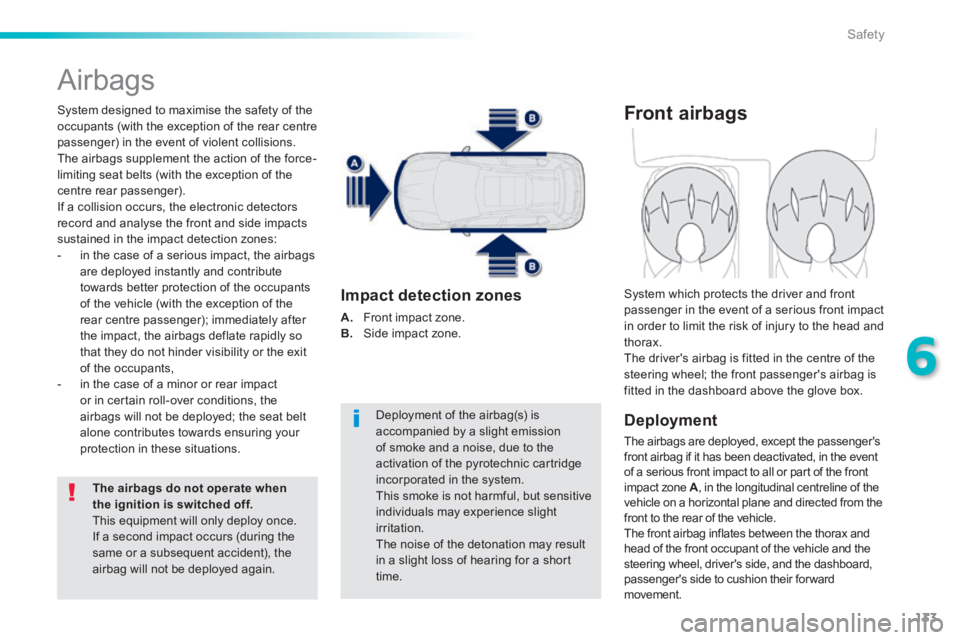
Impact detection zones
A. Front impact zone. B. Side impact zone.
Front airbags
Deployment
The airbags are deployed, except the passenger's front airbag if it has been deactivated, in the event of a serious front impact to all or part of the front impact zone A , in the longitudinal centreline of the vehicle on a horizontal plane and directed from the front to the rear of the vehicle. The front airbag inflates between the thorax and head of the front occupant of the vehicle and the steering wheel, driver's side, and the dashboard, passenger's side to cushion their forward movement.
System which protects the driver and front passenger in the event of a serious front impact in order to limit the risk of injury to the head and thorax. The driver's airbag is fitted in the centre of the steering wheel; the front passenger's airbag is fitted in the dashboard above the glove box.
Page 159 of 336
157
7
Practical information
Changing a wheel
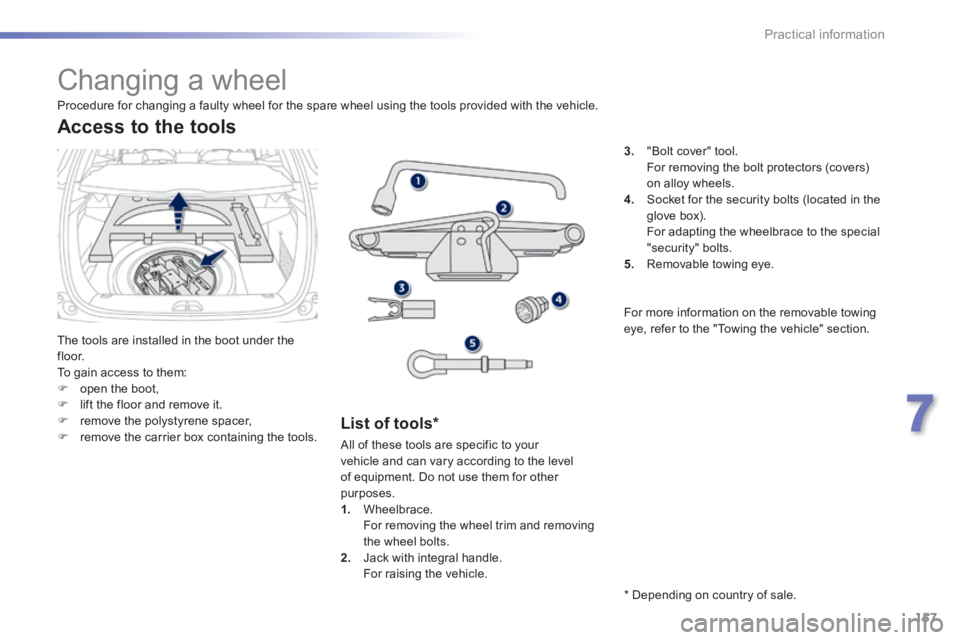
The tools are installed in the boot under the f l o o r. To gain access to them: open the boot, lift the floor and remove it. remove the polystyrene spacer, remove the carrier box containing the tools.
Access to the tools
List of tools *
3. "Bolt cover" tool. For removing the bolt protectors (covers) on alloy wheels. 4. Socket for the security bolts (located in the glove box).
For adapting the wheelbrace to the special "security" bolts. 5. Removable towing eye.
Procedure for changing a faulty wheel for the spare wheel using the tools provided with the vehicle.
All of these tools are specific to your vehicle and can vary according to the level of equipment. Do not use them for other purposes. 1. Wheelbrace. For removing the wheel trim and removing the wheel bolts. 2. Jack with integral handle. For raising the vehicle.
* Depending on country of sale.
For more information on the removable towing eye, refer to the "Towing the vehicle" section.
Page 177 of 336
175
7
Practical information
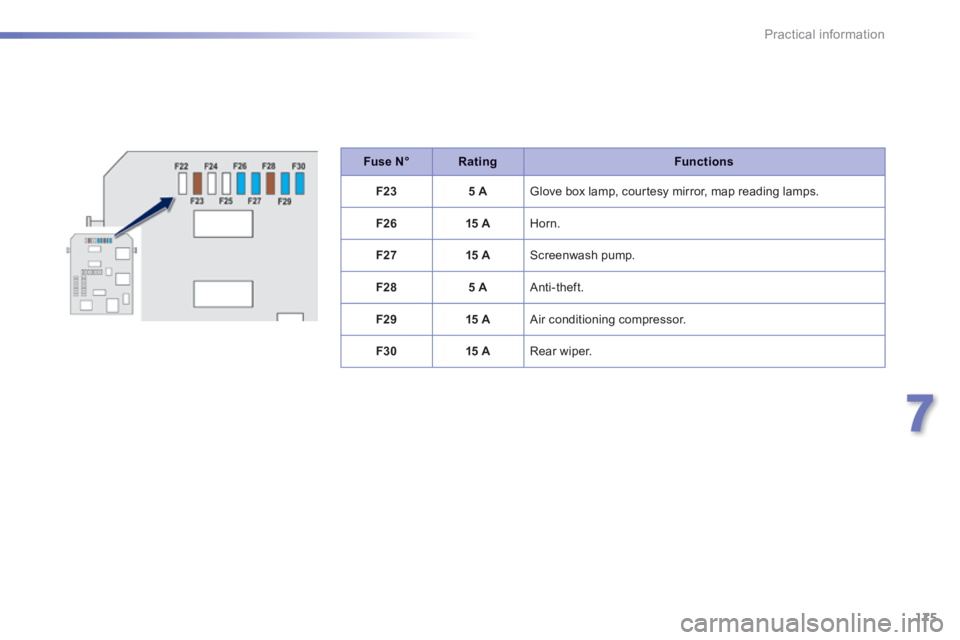
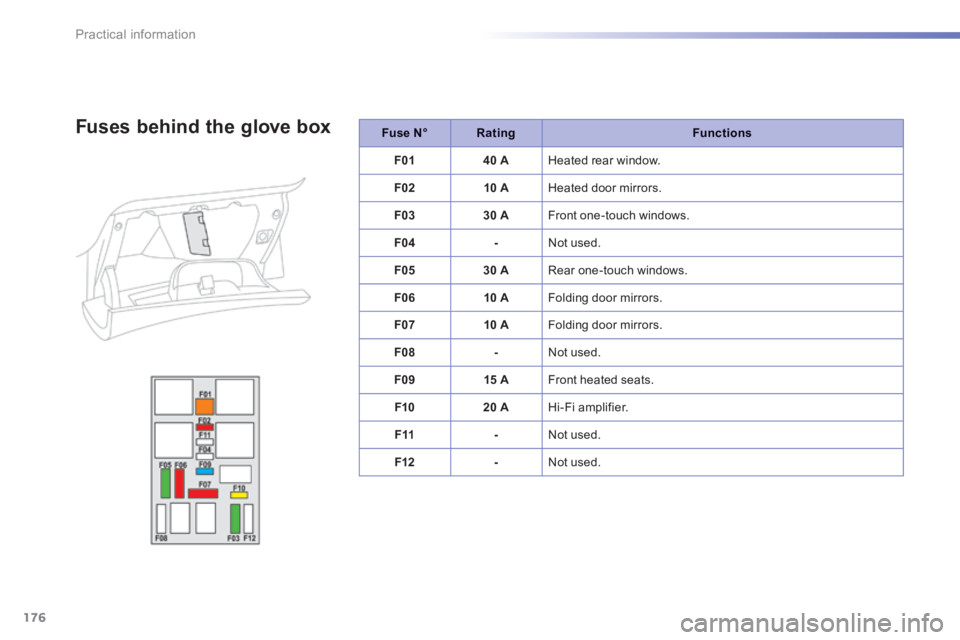
Fuse N°RatingFunctions
F235 A Glove box lamp, courtesy mirror, map reading lamps.
F2615 A Horn.
F2715 A Screenwash pump.
F285 A Anti-theft.
F2915 A Air conditioning compressor.
F3015 A Rear wiper.
Page 178 of 336
176
Practical information
Fuse N°RatingFunctions
F0140 A Heated rear window.
F0210 A Heated door mirrors.
F0330 A Front one-touch windows.
F04- Not used.
F0530 A Rear one-touch windows.
F0610 A Folding door mirrors.
F0710 A Folding door mirrors.
F08- Not used.
F0915 A Front heated seats.
F1020 A Hi-Fi amplifier.
F11- Not used.
F12- Not used.
Fuses behind the glove box
Page 219 of 336
02
217
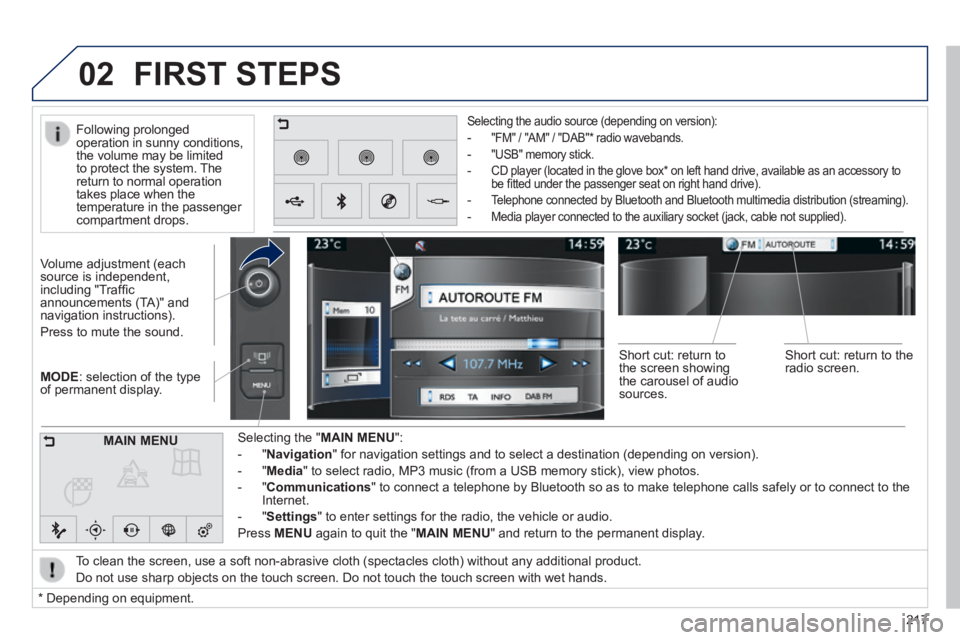
MODE : selection of the type of permanent display.
Volume adjustment (each source is independent, including "Traffi c announcements (TA)" and navigation instructions).
Press to mute the sound.
Selecting the " MAIN MENU ":
- " Navigation " for navigation settings and to select a destination (depending on ver\
sion).
- " Media " to select radio, MP3 music (from a USB memory stick), view photos.
- " Communications " to connect a telephone by Bluetooth so as to make telephone calls safe\
ly or to connect to the Internet.
- " Settings " to enter settings for the radio, the vehicle or audio.
Press MENU again to quit the " MAIN MENU " and return to the permanent display.
Selecting the audio source (depending on version):
- "FM" / "AM" / "DAB" * radio wavebands.
- "USB" memory stick.
- CD player (located in the glove box * on left hand drive, available as an accessory to be fi tted under the passenger seat on right hand drive).
- Telephone connected by Bluetooth and Bluetooth multimedia distribution (streaming).
- Media player connected to the auxiliary socket (jack, cable not supplie\
d).
To clean the screen, use a soft non-abrasive cloth (spectacles cloth) w\
ithout any additional product.
Do not use sharp objects on the touch screen. Do not touch the touch scr\
een with wet hands.
FIRST STEPS
* Depending on equipment.
MAIN MENU
Following prolonged operation in sunny conditions, the volume may be limited to protect the system. The return to normal operation takes place when the temperature in the passenger compartment drops.
Short cut: return to the screen showing the carousel of audio sources.
Short cut: return to the radio screen.