phone PEUGEOT 2008 2014 Owners Manual
[x] Cancel search | Manufacturer: PEUGEOT, Model Year: 2014, Model line: 2008, Model: PEUGEOT 2008 2014Pages: 336, PDF Size: 9.35 MB
Page 183 of 336
181
7
Practical information
System which manages the duration of use of certain functions to retain a sufficient level of charge in the battery. After the engine has stopped, you can still use functions such as the audio and telematics system, windscreen wipers, dipped beam headlamps, courtesy lamps, etc. for a maximum combined duration of about thirty minutes.
Electrical energy economy mode
Switching to economy mode
Once this time has elapsed, a message appears in the screen indicating that the vehicle has switched to economy mode and the active functions are put on standby. If a telephone call is being made at this time, it
will be maintained for around 10 minutes with the Bluetooth hands-free system of your audio system.
Exiting economy mode
These functions are reactivated automatically next time the vehicle is driven. To restore these functions immediately, start the engine and let it run for at least five minutes.
A flat battery prevents the engine from starting (refer to the corresponding section).
Load reduction mode
System which manages the use of certain functions according to the level of charge remaining in the battery. When the vehicle is being driven, the load reduction function temporarily deactivates certain functions, such as the air conditioning, the heated rear screen... The deactivated functions are reactivated automatically as soon as conditions permit.
Page 217 of 336
215
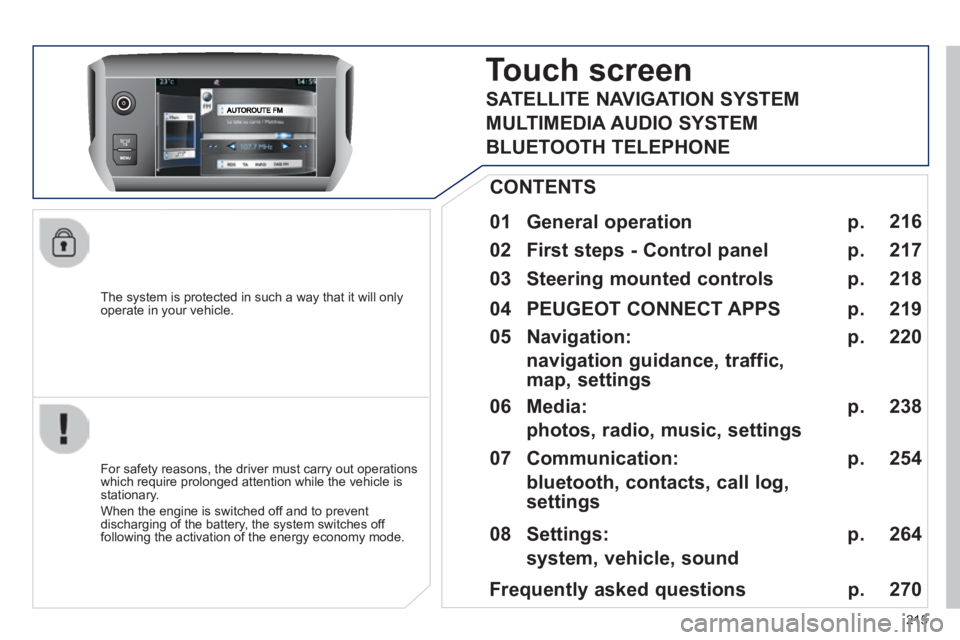
The system is protected in such a way that it will only operate in your vehicle.
Touch screen Touch screen T
01 General operation
For safety reasons, the driver must carry out operations which require prolonged attention while the vehicle is stationary.
When the engine is switched off and to prevent discharging of the battery, the system switches off following the activation of the energy economy mode.
CONTENTS
02 First steps - Control panel
04 PEUGEOT CONNECT APPS
05 Navigation:
navigation guidance, traffic, map, settings
06 Media:
photos, radio, music, settings
07 Communication:
bluetooth, contacts, call log, settings
08 Settings:
system, vehicle, sound p.
p.
p.
p.
p.
p.
p.
Frequently asked questions p.
SATELLITE NAVIGATION SYSTEM
MULTIMEDIA AUDIO SYSTEM
BLUETOOTH TELEPHONE
216
217
220
219
238
254
264
270
03 Steering mounted controls
p. 218
Page 218 of 336
01
216
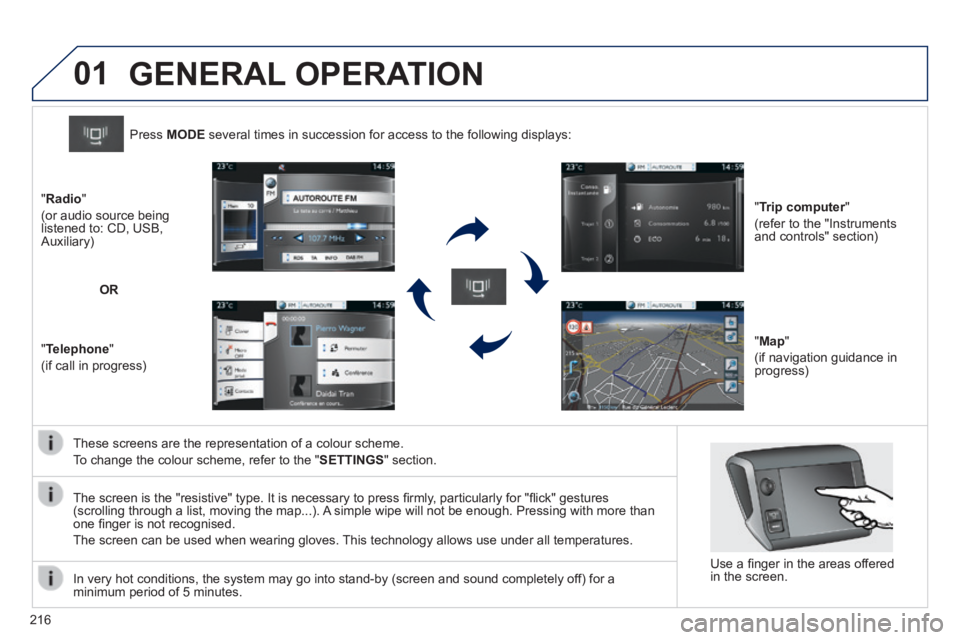
These screens are the representation of a colour scheme.
To change the colour scheme, refer to the " SETTINGS " section.
Press MODE several times in succession for access to the following displays:
" Trip computer " Trip computer " Trip computer
(refer to the "Instruments and controls" section)
" Map "
(if navigation guidance in progress)
" Radio "
(or audio source being listened to: CD, USB, Auxiliary)
" Telephone "
(if call in progress)
OR
GENERAL OPERATION
In very hot conditions, the system may go into stand-by (screen and sou\
nd completely off) for a minimum period of 5 minutes.
Use a fi nger in the areas offered in the screen.
The screen is the "resistive" type. It is necessary to press fi rmly, particularly for "fl ick" gestures (scrolling through a list, moving the map...). A simple wipe will not be enough. Pressing with more than one fi nger is not recognised.
The screen can be used when wearing gloves. This technology allows use under all temperatures.
Page 219 of 336
02
217
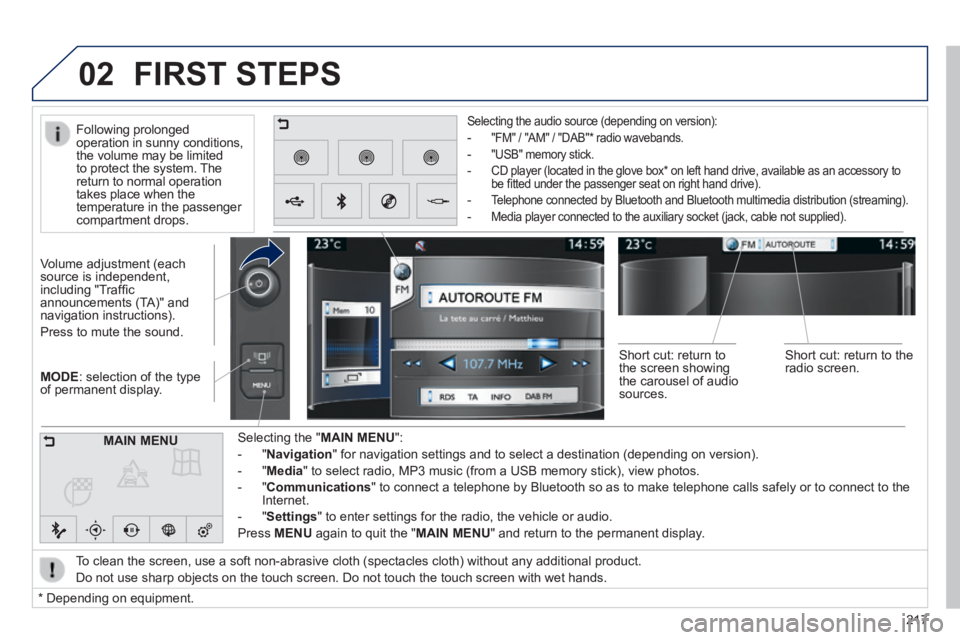
MODE : selection of the type of permanent display.
Volume adjustment (each source is independent, including "Traffi c announcements (TA)" and navigation instructions).
Press to mute the sound.
Selecting the " MAIN MENU ":
- " Navigation " for navigation settings and to select a destination (depending on ver\
sion).
- " Media " to select radio, MP3 music (from a USB memory stick), view photos.
- " Communications " to connect a telephone by Bluetooth so as to make telephone calls safe\
ly or to connect to the Internet.
- " Settings " to enter settings for the radio, the vehicle or audio.
Press MENU again to quit the " MAIN MENU " and return to the permanent display.
Selecting the audio source (depending on version):
- "FM" / "AM" / "DAB" * radio wavebands.
- "USB" memory stick.
- CD player (located in the glove box * on left hand drive, available as an accessory to be fi tted under the passenger seat on right hand drive).
- Telephone connected by Bluetooth and Bluetooth multimedia distribution (streaming).
- Media player connected to the auxiliary socket (jack, cable not supplie\
d).
To clean the screen, use a soft non-abrasive cloth (spectacles cloth) w\
ithout any additional product.
Do not use sharp objects on the touch screen. Do not touch the touch scr\
een with wet hands.
FIRST STEPS
* Depending on equipment.
MAIN MENU
Following prolonged operation in sunny conditions, the volume may be limited to protect the system. The return to normal operation takes place when the temperature in the passenger compartment drops.
Short cut: return to the screen showing the carousel of audio sources.
Short cut: return to the radio screen.
Page 220 of 336
03
218
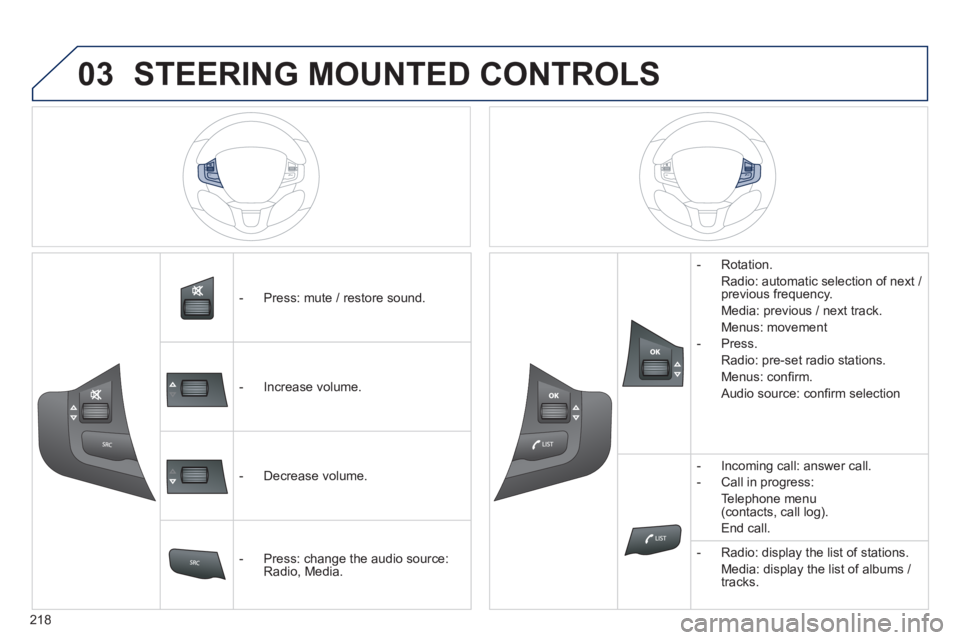
- Press: mute / restore sound.
- Increase volume.
- Decrease volume.
- Press: change the audio source: Radio, Media.
- Rotation.
Radio: automatic selection of next / previous frequency.
Media: previous / next track.
Menus: movement
- Press.
Radio: pre-set radio stations.
Menus: confi rm.
Audio source: confi rm selection
- Incoming call: answer call.
- Call in progress:
Telephone menu (contacts, call log).
End call.
- Radio: display the list of stations.
Media: display the list of albums / tracks.
STEERING MOUNTED CONTROLS
Page 222 of 336
05
220
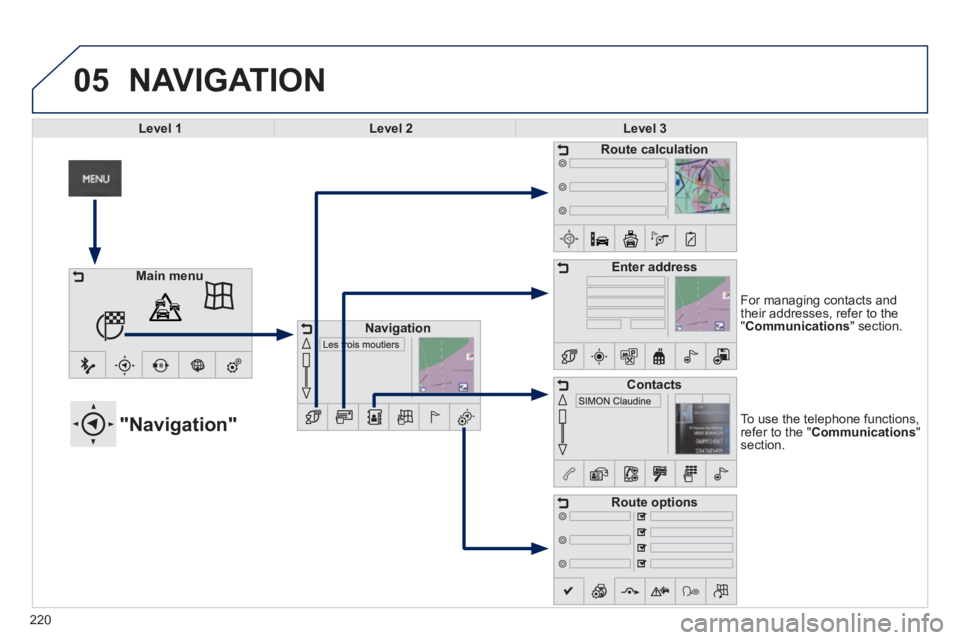
To use the telephone functions, refer to the " Communications " section.
"Navigation"
For managing contacts and their addresses, refer to the " Communications " section.
NAVIGATION
Main menu
Navigation
Route calculation
Enter address
Contacts
Route options
Level 1Level 2Level 3
Page 227 of 336
05
225
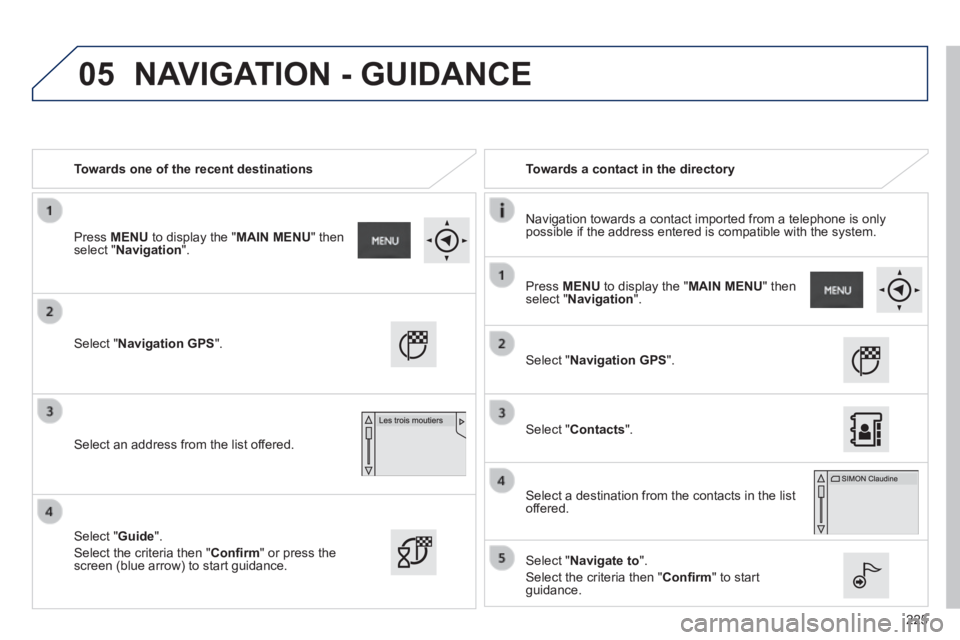
Towards one of the recent destinations Towards a contact in the directory
Navigation towards a contact imported from a telephone is only possible if the address entered is compatible with the system.
Select " Navigation GPS ".
Select an address from the list offered.
Select " Navigation GPS ".
Select " Contacts ".
Select a destination from the contacts in the list offered.
Select " Navigate to ".
Select the criteria then " Confi rm " to start guidance.
Select " Guide ".
Select the criteria then " Confi rm " or press the screen (blue arrow) to start guidance.
Press MENU to display the " MAIN MENU " then select " Navigation ".
Press MENU to display the " MAIN MENU " then select " Navigation ".
NAVIGATION - GUIDANCE
Page 253 of 336
06
251
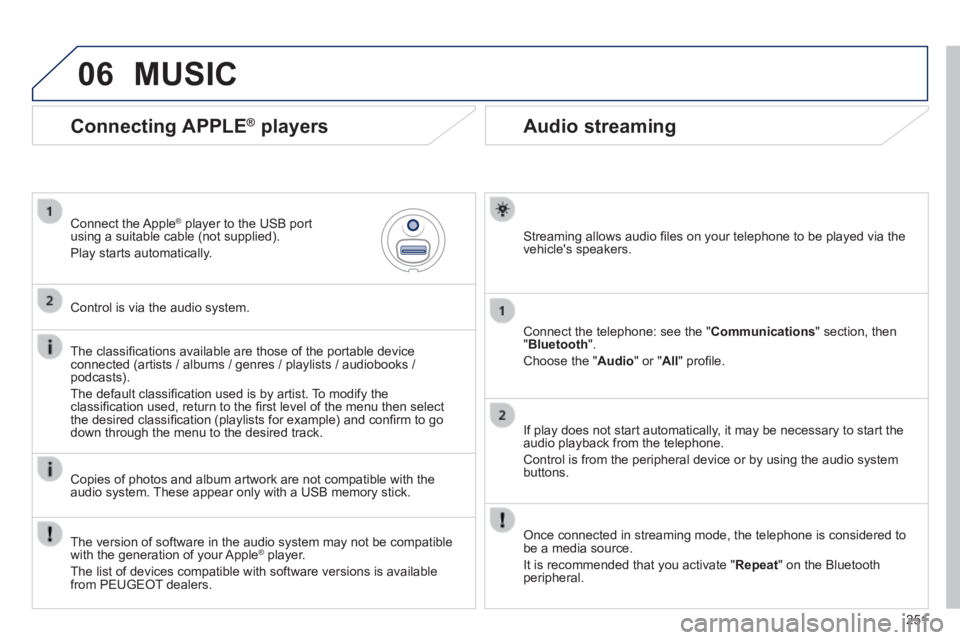
Audio streaming
Streaming allows audio fi les on your telephone to be played via the vehicle's speakers.
Connect the telephone: see the " Communications " section, then " Bluetooth ".
Choose the " Audio " or " All " profi le.
If play does not start automatically, it may be necessary to start the audio playback from the telephone.
Control is from the peripheral device or by using the audio system buttons.
Once connected in streaming mode, the telephone is considered to be a media source.
It is recommended that you activate " Repeat " on the Bluetooth peripheral.
Connecting APPLE ® players
Connect the Apple ® player to the USB port ® player to the USB port ®
using a suitable cable (not supplied).
Play starts automatically.
Control is via the audio system.
The classifi cations available are those of the portable device connected (artists / albums / genres / playlists / audiobooks / podcasts).
The default classifi cation used is by artist. To modify the classifi cation used, return to the fi rst level of the menu then select the desired classifi cation (playlists for example) and confi rm to go down through the menu to the desired track.
Copies of photos and album artwork are not compatible with the audio system. These appear only with a USB memory stick.
MUSIC
The version of software in the audio system may not be compatible with the generation of your Apple ® player. ® player. ®
The list of devices compatible with software versions is available from PEUGEOT dealers.
Page 257 of 336
255
Level 1Level 2Level 3Comments
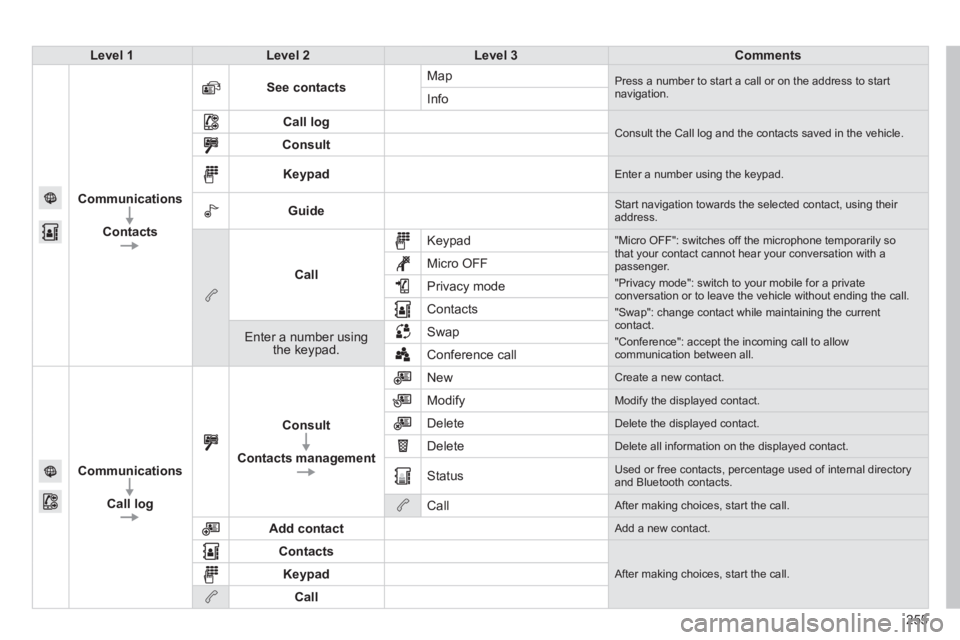
Communications
Contacts
See contacts Map Press a number to start a call or on the address to start navigation. Info
Call log Consult the Call log and the contacts saved in the vehicle. Consult
Keypad Enter a number using the keypad.
Guide Start navigation towards the selected contact, using their address.
Call
Keypad "Micro OFF": switches off the microphone temporarily so that your contact cannot hear your conversation with a passenger.
"Privacy mode": switch to your mobile for a private conversation or to leave the vehicle without ending the call.
"Swap": change contact while maintaining the current contact.
"Conference": accept the incoming call to allow communication between all.
Micro OFF
Privacy mode
Contacts
Enter a number using the keypad.
Swap
Conference call
Communications
Call log
Consult
Contacts management
New Create a new contact.
Modify Modify the displayed contact.
Delete Delete the displayed contact.
Delete Delete all information on the displayed contact.
Status Used or free contacts, percentage used of internal directory and Bluetooth contacts.
Call After making choices, start the call.
Add contact Add a new contact.
Contacts
After making choices, start the call. Keypad
Call
Page 259 of 336
257
Level 1Level 2Level 3Comments
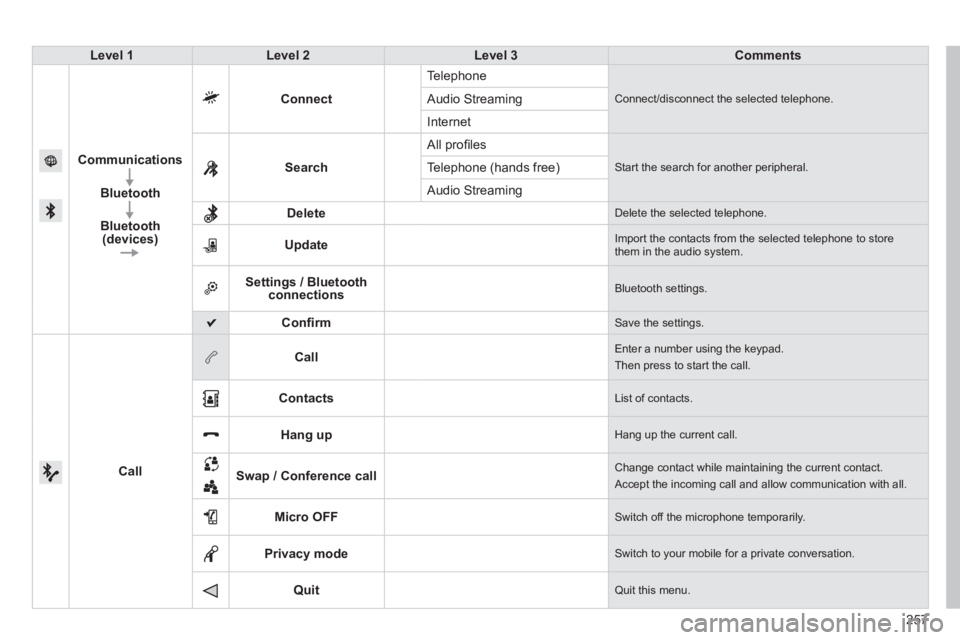
Communications
Bluetooth
Bluetooth (devices)
Connect
Telephone
Connect/disconnect the selected telephone. Audio Streaming
Internet
Search
All profi les
Start the search for another peripheral . Telephone (hands free)
Audio Streaming
Delete Delete the selected telephone.
Update Import the contacts from the selected telephone to store them in the audio system.
Settings / Bluetooth connections Bluetooth settings.
Confi rm Save the settings.
Call
Call Enter a number using the keypad.
Then press to start the call.
Contacts List of contacts.
Hang up Hang up the current call.
Swap / Conference call Change contact while maintaining the current contact.
Accept the incoming call and allow communication with all.
Micro OFF Switch off the microphone temporarily.
Privacy mode Switch to your mobile for a private conversation.
Quit Quit this menu.