service PEUGEOT 2008 2015 Owner's Guide
[x] Cancel search | Manufacturer: PEUGEOT, Model Year: 2015, Model line: 2008, Model: PEUGEOT 2008 2015Pages: 340, PDF Size: 8.4 MB
Page 234 of 340
232
2008_en_Chap12a_BTA_ed01-2015
Emergency call
PEUGEOT Connect SOS
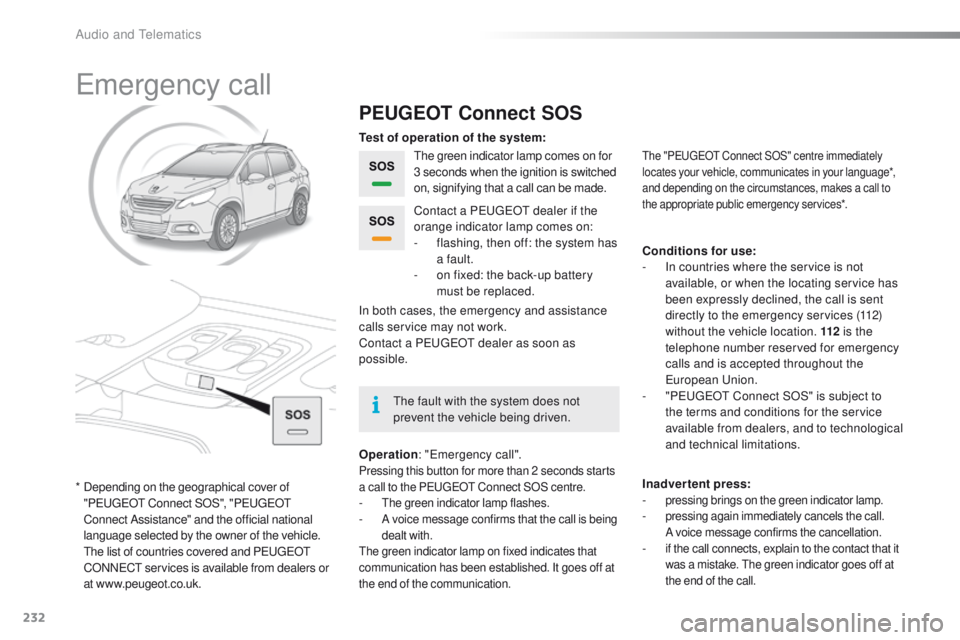
The green indicator lamp comes on for
3 seconds when the ignition is switched
on, signifying that a call can be made.
Operation : "Emergency call".
Pressing this button for more than 2 seconds starts
a call to the PEUGEOT Connect SOS centre.
- The green indicator lamp flashes.- A voice message confirms that the call is being
dealt with.
The green indicator lamp on fixed indicates that
communication has been established. It goes off at
the end of the communication.
In both cases, the emergency and assistance
calls service may not work.
Contact a PEUGEOT
dealer as soon as
possible. Contact a PEUGEOT dealer if the
orange indicator lamp comes on:
-
f
lashing, then off: the system has
a fault.
-
o
n fixed: the back-up battery
must be replaced.
The "PEUGEOT Connect SOS" centre immediately
locates your vehicle, communicates in your language*,
and depending on the circumstances, makes a call to
the appropriate public emergency services*.
Test of operation of the system:
Conditions for use:
-
I
n countries where the service is not
available, or when the locating service has
been expressly declined, the call is sent
directly to the emergency services (112)
without the vehicle location. 112 is the
telephone number reserved for emergency
calls and is accepted throughout the
European Union.
-
"
PEUGEOT Connect SOS" is subject to
the terms and conditions for the service
available from dealers, and to technological
and technical limitations.
Inadvertent press:
-
pressing brings on the green indicator lamp.- pressing again immediately cancels the call.
A voice message confirms the cancellation.
- if the call connects, explain to the contact that it was a mistake. The green indicator goes off at
the end of the call.
* Depending on the geographical cover of "PEUGEOT Connect SOS", "PEUGEOT
Connect Assistance" and the official national
language selected by the owner of the vehicle.
T
he list of countries covered and PEUGEOT
CONNECT services is available from dealers or
at www.peugeot.co.uk. The fault with the system does not
prevent the vehicle being driven.
Audio and Telematics
Page 235 of 340
233
2008_en_Chap12a_BTA_ed01-2015
PEUGEOT Connect Assistance
If an impact is detected by the airbag
control unit, and independently of
the deployment of any airbags, an
emergency call is made automatically.
If you purchased your vehicle outside
the PEUGEOT dealer network, we
invite you to have a dealer check the
configuration of these services and, if
desired, modified to suit your wishes.
In a multi-lingual country, configuration
is possible in the official national
language of your choice.
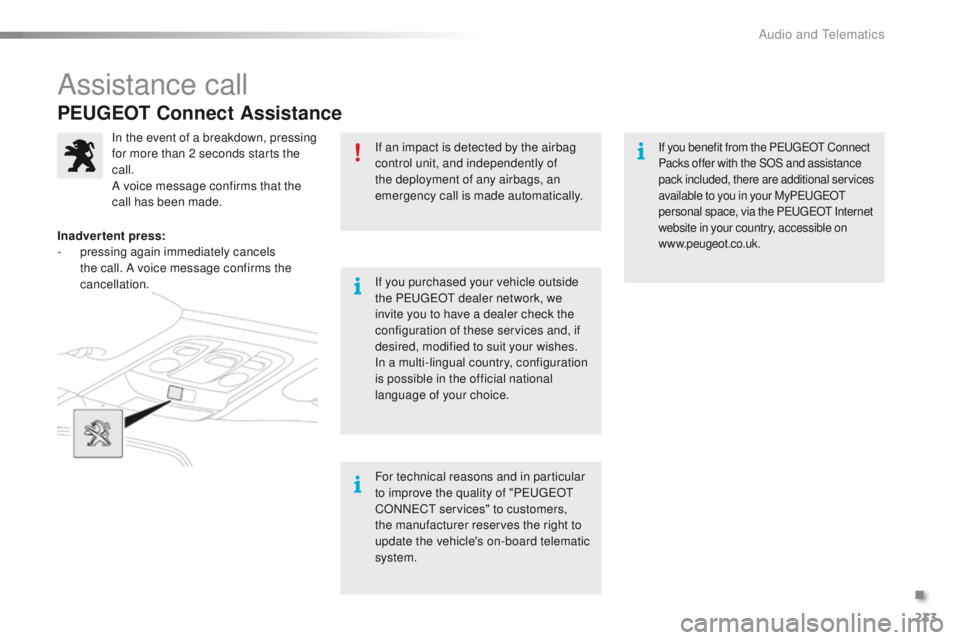
In the event of a breakdown, pressing
for more than 2 seconds starts the
call.
A voice message confirms that the
call has been made.
Inadvertent press:
-
p
ressing again immediately cancels
the call. A voice message confirms the
cancellation.
For technical reasons and in particular
to improve the quality of "PEUGEOT
CONNECT services" to customers,
the manufacturer reserves the right to
update the vehicle's on-board telematic
system.If you benefit from the PEUGEOT Connect
Packs offer with the SOS and assistance
pack included, there are additional services
available to you in your MyPEUGEOT
personal space, via the PEUGEOT Internet
website in your country, accessible on
www.peugeot.co.uk.
Assistance call
.
Audio and Telematics
Page 264 of 340
262
2008_en_Chap12b_SMEGplus_ed01-2015
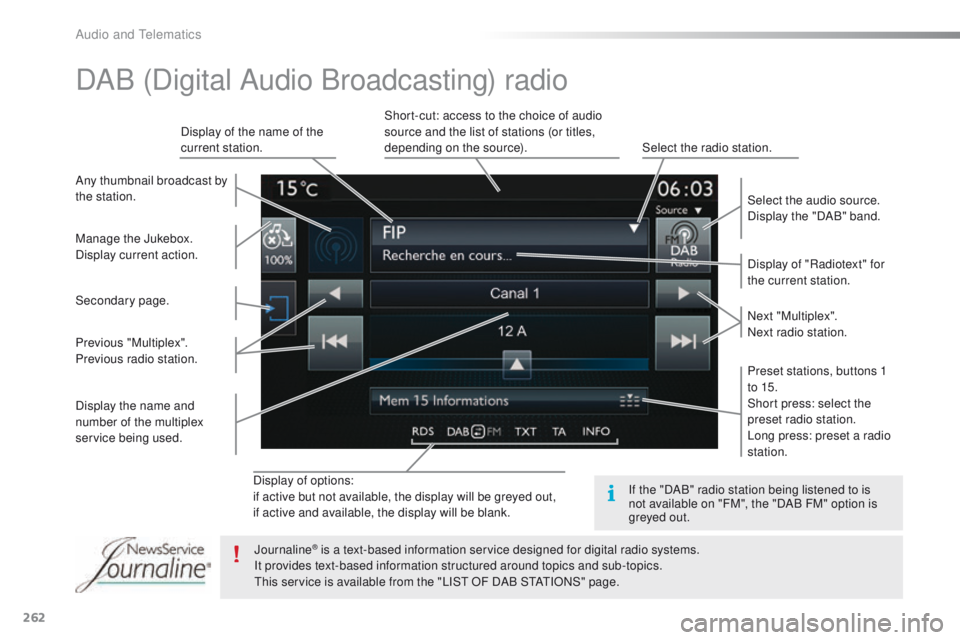
Display of options:
if active but not available, the display will be greyed out,
if active and available, the display will be blank.Display of "Radiotext" for
the current station.
Manage the Jukebox.
Display current action. Select the audio source.
Display the "DAB" band.
Display of the name of the
current station.
Short-cut: access to the choice of audio
source and the list of stations (or titles,
depending on the source).
Select the radio station.
Any thumbnail broadcast by
the station.
Preset stations, buttons 1
to 15.
Short press: select the
preset radio station.
Long press: preset a radio
station. Next "Multiplex".
Next radio station.
Secondary page.
Display the name and
number of the multiplex
service being used. Previous "Multiplex".
Previous radio station.
DAB (Digital Audio Broadcasting) radio
If the "DAB" radio station being listened to is
not available on "FM", the "DAB FM" option is
greyed out.
Journaline
® is a text-based information service designed for digital radio systems.
I
t provides text-based information structured around topics and sub-topics.
This service is available from the "LIST OF DAB STATIONS" page.
Audio and Telematics
Page 281 of 340
279
2008_en_Chap12b_SMEGplus_ed01-2015
PEUGEOT Connect Apps
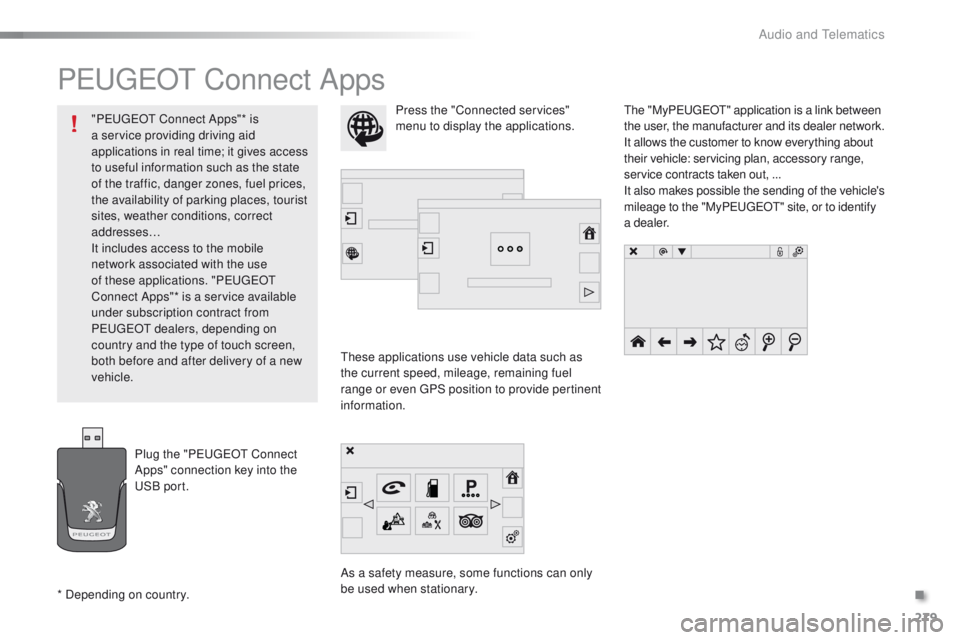
These applications use vehicle data such as
the current speed, mileage, remaining fuel
range or even GPS position to provide pertinent
information.
As a safety measure, some functions can only
be used when stationary.The "My
P
E
UGEOT
" a
pplication is a link between
the user, the manufacturer and its dealer network.
It allows the customer to know everything about
their vehicle: servicing plan, accessory range,
service contracts taken out, ...
It also makes possible the sending of the vehicle's
mileage to the "MyP
E
UGEOT
" s
ite, or to identify
a dealer.
Press the "Connected services"
menu to display the applications.
Plug the "PEUGEOT Connect
Apps" connection key into the
USB port.
* Depending on country. "PEUGEOT Connect Apps"* is
a service providing driving aid
applications in real time; it gives access
to useful information such as the state
of the traffic, danger zones, fuel prices,
the availability of parking places, tourist
sites, weather conditions, correct
addresses…
It includes access to the mobile
network associated with the use
of these applications. "PEUGEOT
Connect Apps"* is a service available
under subscription contract from
PEUGEOT dealers, depending on
country and the type of touch screen,
both before and after delivery of a new
vehicle.
.
Audio and Telematics
Page 287 of 340
285
2008_en_Chap12b_SMEGplus_ed01-2015
The services available depend on
the network, the SIM card and the
compatibility of the Bluetooth telephone
used. Check the telephone manual and
with your network provider for details of
the services available to you.
The ability of the system to connect
with only one profile depends on the
telephone. The three profiles may all
connect by default.
Visit www.peugeot.co.uk for more information
(compatibility, additional help, ...).
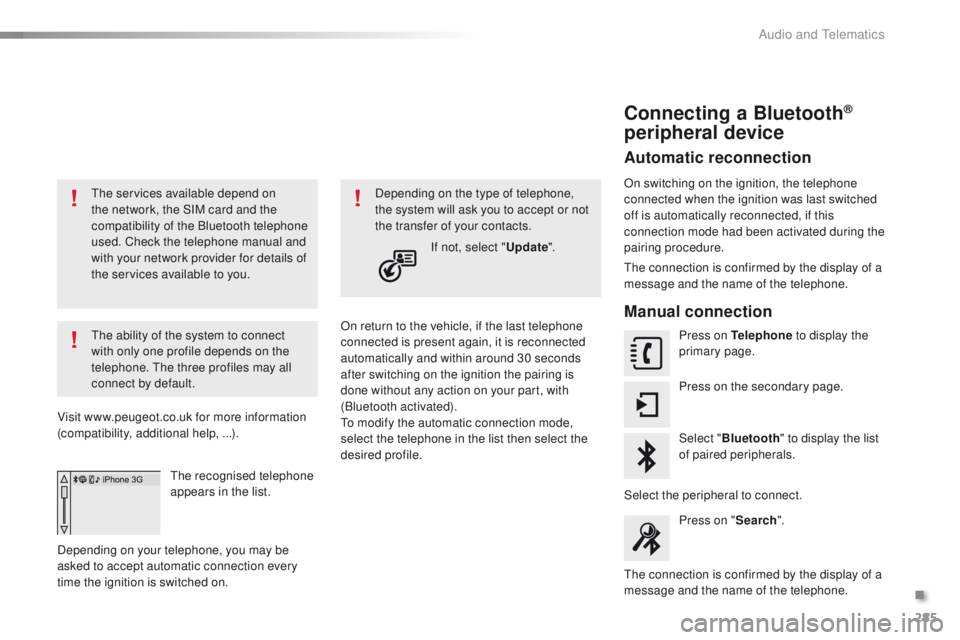
The recognised telephone
appears in the list.
Depending on your telephone, you may be
asked to accept automatic connection every
time the ignition is switched on. On return to the vehicle, if the last telephone
connected is present again, it is reconnected
automatically and within around 30 seconds
after switching on the ignition the pairing is
done without any action on your part, with
(Bluetooth activated).
To modify the automatic connection mode,
select the telephone in the list then select the
desired profile.Depending on the type of telephone,
the system will ask you to accept or not
the transfer of your contacts.
If not, select " Update".
Connecting a Bluetooth®
peripheral device
Automatic reconnection
On switching on the ignition, the telephone
connected when the ignition was last switched
off is automatically reconnected, if this
connection mode had been activated during the
pairing procedure.
The connection is confirmed by the display of a
message and the name of the telephone.
Manual connection
Press on Telephone to display the
primary page.
Press on the secondary page.
Select " Bluetooth " to display the list
of paired peripherals.
Select the peripheral to connect. Press on " Search".
The connection is confirmed by the display of a
message and the name of the telephone.
.
Audio and Telematics
Page 297 of 340
295
2008_en_Chap12b_SMEGplus_ed01-2015
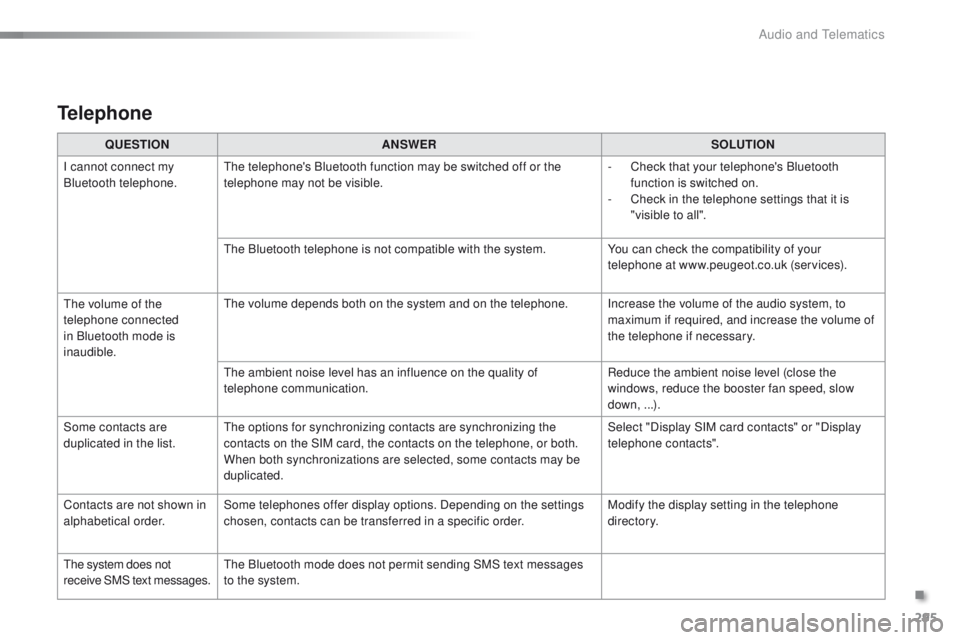
QUESTIONANSWER SOLUTION
I cannot connect my
Bluetooth telephone. The telephone's Bluetooth function may be switched off or the
telephone may not be visible. -
C
heck that your telephone's Bluetooth
function is switched on.
-
C
heck in the telephone settings that it is
"visible to all".
The Bluetooth telephone is not compatible with the system. You can check the compatibility of your
telephone at www.peugeot.co.uk (services).
The volume of the
telephone connected
in Bluetooth mode is
inaudible. The volume depends both on the system and on the telephone. Increase the volume of the audio system, to
maximum if required, and increase the volume of
the telephone if necessary.
The ambient noise level has an influence on the quality of
telephone communication. Reduce the ambient noise level (close the
windows, reduce the booster fan speed, slow
down, ...).
Some contacts are
duplicated in the list. The options for synchronizing contacts are synchronizing the
contacts on the SIM card, the contacts on the telephone, or both.
When both synchronizations are selected, some contacts may be
duplicated. Select "Display SIM card contacts" or "Display
telephone contacts".
Contacts are not shown in
alphabetical order. Some telephones offer display options. Depending on the settings
chosen, contacts can be transferred in a specific order. Modify the display setting in the telephone
di r e c to r y.
The system does not
receive SMS text messages. The Bluetooth mode does not permit sending SMS text messages
to the system.
Telephone
.
Audio and Telematics
Page 308 of 340
306
2008_en_Chap12c_RDE2_ed01-2015
Telephone
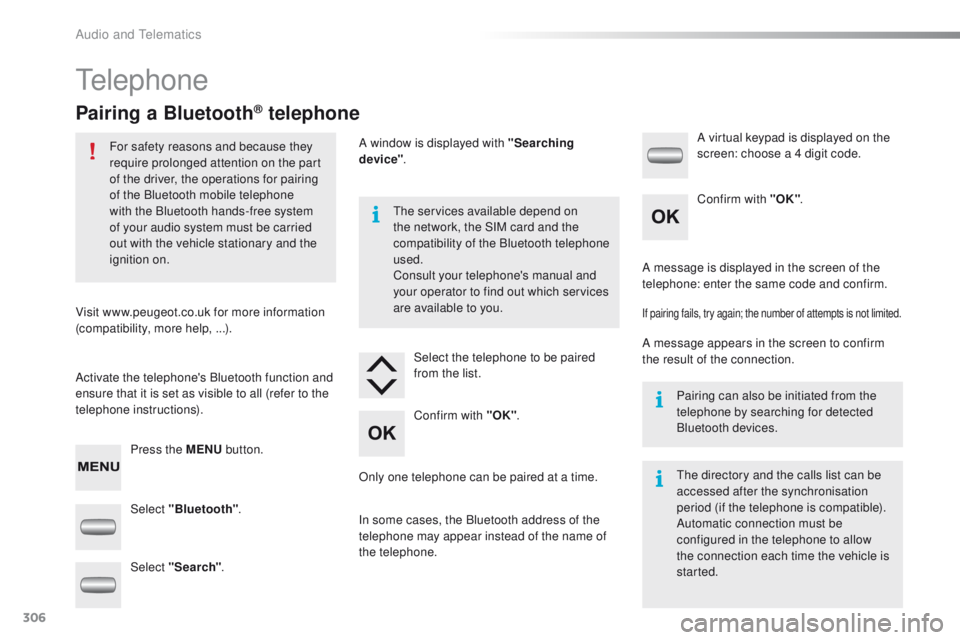
Pairing a Bluetooth® telephone
For safety reasons and because they
require prolonged attention on the part
of the driver, the operations for pairing
of the Bluetooth mobile telephone
with the Bluetooth hands-free system
of your audio system must be carried
out with the vehicle stationary and the
ignition on.
Visit www.peugeot.co.uk for more information
(compatibility, more help, ...).
Activate the telephone's Bluetooth function and
ensure that it is set as visible to all (refer to the
telephone instructions). Press the MENU button. The services available depend on
the network, the SIM card and the
compatibility of the Bluetooth telephone
used.
Consult your telephone's manual and
your operator to find out which services
are available to you.
Only one telephone can be paired at a time. A message is displayed in the screen of the
telephone: enter the same code and confirm.
If pairing fails, try again; the number of attempts is not limited.
A message appears in the screen to confirm
the result of the connection.
Pairing can also be initiated from the
telephone by searching for detected
Bluetooth devices.
The directory and the calls list can be
accessed after the synchronisation
period (if the telephone is compatible).
Automatic connection must be
configured in the telephone to allow
the connection each time the vehicle is
started.
Select "Bluetooth"
. Select the telephone to be paired
from the list. A virtual keypad is displayed on the
screen: choose a 4 digit code.
Select "Search" . A window is displayed with "Searching
device"
.
In some cases, the Bluetooth address of the
telephone may appear instead of the name of
the telephone. Confirm with "OK"
. Confirm with "OK"
.
Audio and Telematics
Page 334 of 340
332
2008_en_Chap13_index-alpha_ed01-2015
Seats, front ......................................................55
Seats, heated .................................................. 56
Seats, rear
....................................................... 57
Selector lever, electronic gearbox system
.............................. 83, 86, 218
Serial number, vehicle
.................................. 23
0
Service indicator
............................................. 28
Servicing
...............................
..........................12
Settings (Menus)
........................................... 268
Settings, system
............................................ 276
Sidelamps
...................... 111, 115, 116, 187, 189
Side repeater
..............................
..................188
Snow chains
.................................................. 18
4
Socket, 12 V accessory
..................................71
S
ocket, auxiliary
............................................ 264
Socket, JACK
..........................................72, 264
Sockets, audio
........................................ 72, 322
Sockets, auxiliary
.......................................... 322
Speed limiter
........................................... 99, 103
Starting the engine
......................................... 79
Starting the vehicle
............................83, 86, 90
Starting using another battery
......................................................... 19
9
Station, radio
......................................... 26
0, 261
Stay, bonnet
.................................................. 2 11
Steering mounted controls, audio
........................................................... 238
Steering wheel, adjustment
.................................................... 58
S
topping the vehicle
..........................83, 86, 90
Stop & Start
................................ 39, 69, 95, 107,
159, 198, 211, 217
Storage
...................................................... 70, 71
Stowing rings
.................................................. 74
Switching off the engine
..................................................... 79
Synchronising the remote control
........................................................... 45
R
emote control ....................................
4
2, 43, 46
Removing a wheel
........................................ 180
Removing the mat
........................................... 73
Replacing bulbs
............................ 185, 189, 19 0
Replacing fuses
..............................
.............. 192
Replacing the air filter
................................... 217
Replacing the oil filter
................................... 2
17
Replacing the passenger compartment filter
...................................... 217
Replacing wiper blades .................................123
Resetting the service indicator
....................... 30
Resetting the trip recorder
.............................. 40
Reversing lamp
..................................... 18
9, 191
Risk areas (update)
....................................... 2 51
Roof bars
....................................................... 2
07
Routine checks
..................................... 217, 218
Running out of fuel (Diesel)
.......................... 16
3
Radio
.................................... 260, 261, 264, 300
Radio, digital (Digital Audio Broadcasting - DAB)
........................... 262, 263
RDS
............................................................... 261
Rear foglamp ................................................. 113
Rear screen, demisting
................................... 69
Recharging the battery
................................. 20
0
Recirculation, air
............................................. 66
Reduction of electrical load
.......................... 201
Regeneration of the particle emissions filter
............................................ 217
Reinitialising the remote control
..................... 45
R
Park Assist .................................................... 10 7
Parking brake .......................................... 81, 218
Parking lamps
............................................... 11 6
Parking sensors, front
...................................10 6
Parking sensors, rear .................................... 105
Particle emission filter
..........................216, 217
Passenger compartment filter
......................217
PEUGEOT Connect Apps
.............................279
P
E
UGEOT
C
onnect Assistance
...................233
P
E
UGEOT
C
onnect Packs
...........................233
P
E
UGEOT
C
onnect SOS
............................. 2
32
Player, Apple
® .............................. .................266
Player, MP3 CD ............................. 264, 302-304
Player, USB
................................................... 264
Port, USB
....................................... 7
2, 264, 303
Pressures, tyres
............................................ 176
Priming the fuel system
................................ 163
Protecting children
................ 141, 145, 146, 151, 154-157
Puncture
........................................................ 172
Safety, children
............................................. 15
6
Safety for children
.........................................15 8
Screen, instrument panel
..........................3 7, 3 8
Screen menu
........................240, 242, 246, 254,
256, 258, 268, 280, 282
Screen menu map
.......240, 242, 246, 254, 256,
258, 268, 280, 282, 311, 325
Screenwash
..................................................120
Screenwash fluid level
..................................215
Screenwash, rear
..........................................121
Screen-wash reservoir
.................................215
SCR (Selective Catalytic Reduction)
.................................................. 16
4
SCR system
..................................................16 4
Seat belts
....................................... 1
3 8 -14 0, 15 0
S
Alphabetical index