radio PEUGEOT 2008 2015 Owners Manual
[x] Cancel search | Manufacturer: PEUGEOT, Model Year: 2015, Model line: 2008, Model: PEUGEOT 2008 2015Pages: 340, PDF Size: 8.4 MB
Page 36 of 340
34
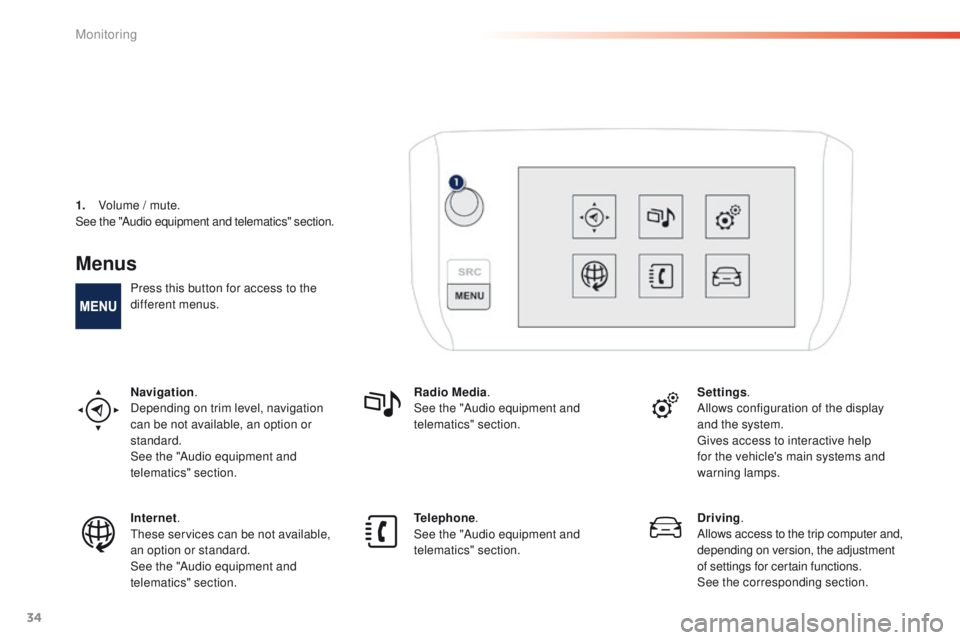
Menus
Press this button for access to the
different menus.
Navigation.
Depending on trim level, navigation
can be not available, an option or
standard.
See the "Audio equipment and
telematics" section. Radio Media
.
See the "Audio equipment and
telematics" section. Settings
.
Allows configuration of the display
and the system.
Gives access to interactive help
for the vehicle's main systems and
warning lamps.
Internet.
These services can be not available,
an option or standard.
See the "Audio equipment and
telematics" section. Telephone
.
See the "Audio equipment and
telematics" section. Driving
.
Allows access to the trip computer and,
depending on version, the adjustment
of settings for certain functions.
See the corresponding section.
1.
V
olume / mute.
See the "Audio equipment and telematics" section.
Monitoring
Page 211 of 340
209
2008_en_Chap09_info-pratiques_ed01-2015
The fitting of electrical equipment or
accessories which are not recommended
by PEUGEOT may result in a failure of
your vehicle's electronic system and
excessive electrical consumption.
Contact a PEUGEOT dealer
for information on the range of
recommended equipment and
accessories.Installation of radio
communication
transmitters
Before installing any after-market radio
communication transmitter, you can
contact a PEUGEOT dealer for the
specification of transmitters which can
be fitted (frequency, maximum power,
aerial position, specific installation
requirements), in line with the Vehicle
Electromagnetic Compatibility
Directive
(2004/104/EC). Depending on the legislation in force in
the country, certain safety equipment
may be compulsory: high visibility
safety vests, warning triangles,
breathalyzers, spare bulbs, spare fuses,
fire extinguisher, first aid kit, mud flaps
at the rear of the vehicle.
By visiting a PEUGEOT dealer, you can also
obtain products for cleaning and maintenance
(exterior and interior) - including ecological
products in the "TECHNATURE" range, topping
up products (screenwash...), touch-up pens
and paint aerosols for the exact colour of your
vehicle, refills (cartridge for the temporary
puncture repair kit...), ...
"Multimedia":
audio systems, portable satellite navigation
systems, semi-integral support for portable
satellite navigation system, hands-free kit,
speakers, DVD player, connection kit for MP3
or CD player, CD player for touch screen...
9
Practical information
Page 237 of 340
235
2008_en_Chap12b_SMEGplus_ed01-2015
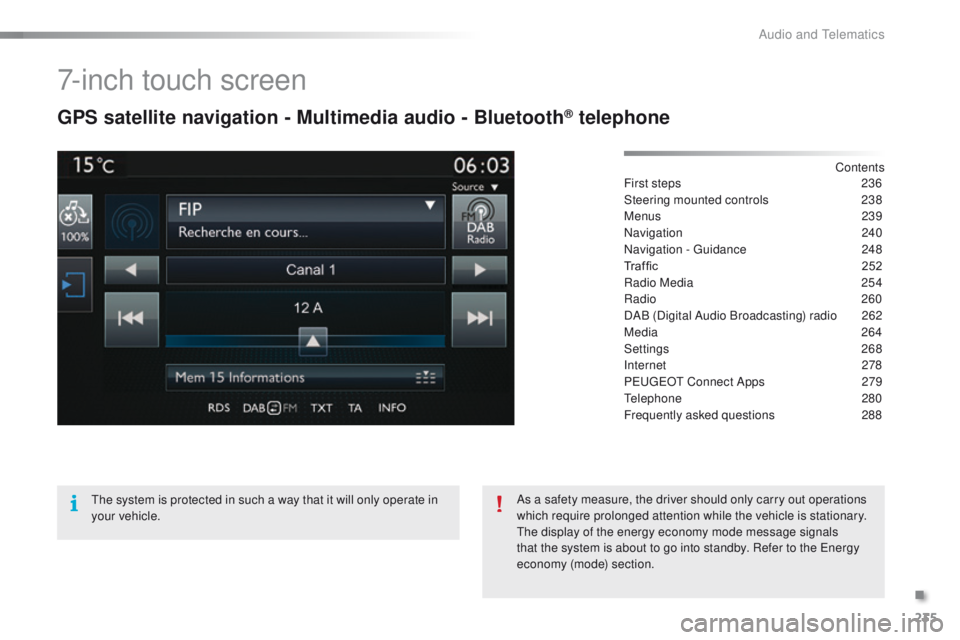
7-inch touch screen
GPS satellite navigation - Multimedia audio - Bluetooth® telephone
Contents
First steps
2 36
Steering mounted controls
23
8
Menus
239
Navigation
240
Navigation - Guidance
2
48
Traffic
25
2
Radio Media
25
4
Radio
260
DAB (Digital Audio Broadcasting) radio
2
62
Media
264
Settings
268
Internet
278
PEUGEOT Connect Apps
2
79
Telephone
2
80
Frequently asked questions
2
88
The system is protected in such a way that it will only operate in
your vehicle. As a safety measure, the driver should only carry out operations
which require prolonged attention while the vehicle is stationary.
The display of the energy economy mode message signals
that the system is about to go into standby. Refer to the Energy
economy (mode) section.
.
Audio and Telematics
Page 240 of 340
238
2008_en_Chap12b_SMEGplus_ed01-2015
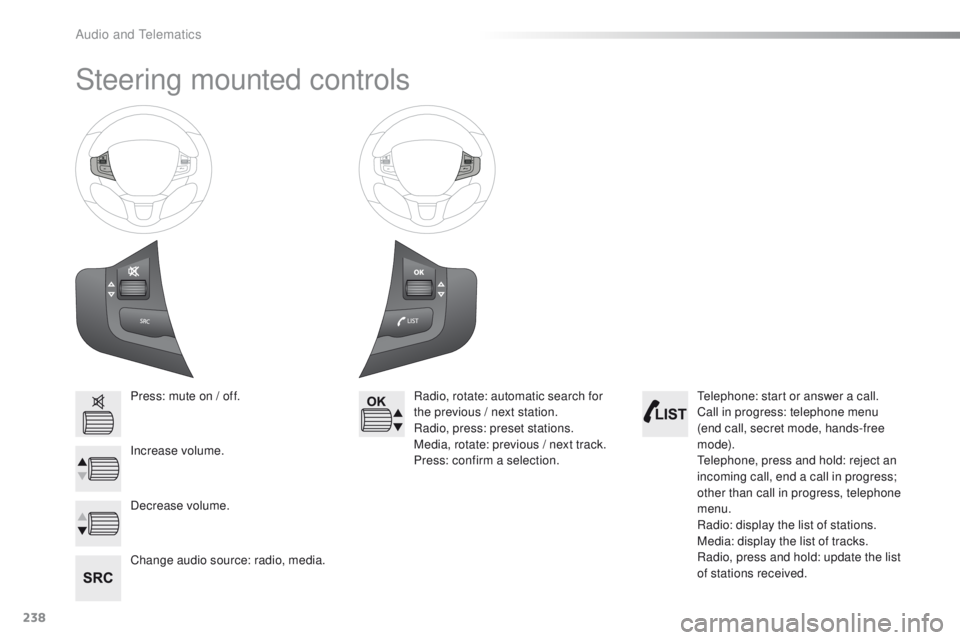
Steering mounted controls
Press: mute on / off.
Increase volume.
Change audio source: radio, media.Radio, rotate: automatic search for
the previous / next station.
Radio, press: preset stations.
Media, rotate: previous / next track.
Press: confirm a selection.
Decrease volume. Telephone: start or answer a call.
Call in progress: telephone menu
(end call, secret mode, hands-free
m o d e).
Telephone, press and hold: reject an
incoming call, end a call in progress;
other than call in progress, telephone
menu.
Radio: display the list of stations.
Media: display the list of tracks.
Radio, press and hold: update the list
of stations received.
Audio and Telematics
Page 241 of 340
239
2008_en_Chap12b_SMEGplus_ed01-2015
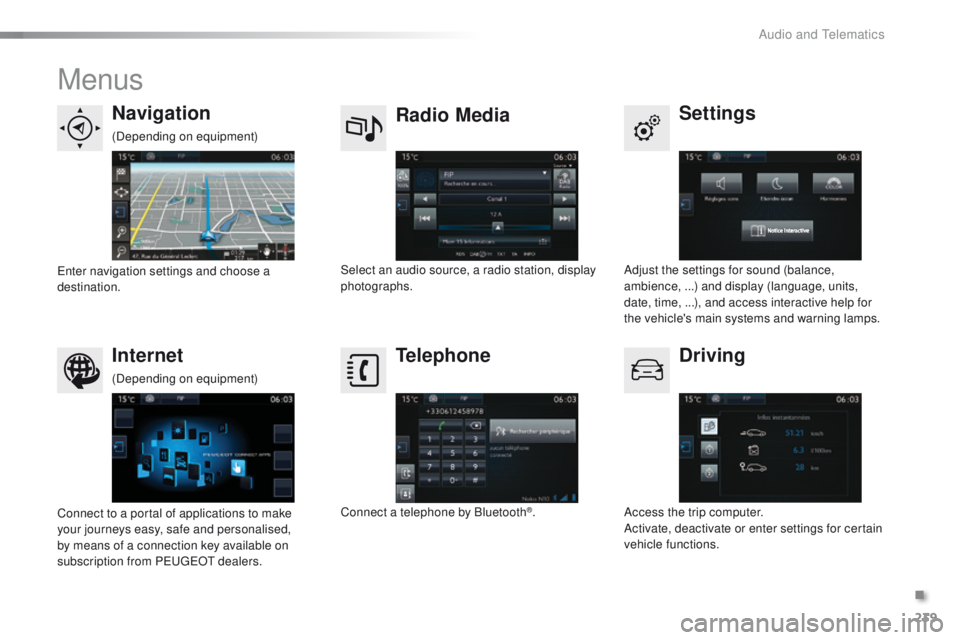
Menus
Settings
Radio Media
Navigation
Driving
Internet Telephone
Adjust the settings for sound (balance,
ambience, ...) and display (language, units,
date, time, ...), and access interactive help for
the vehicle's main systems and warning lamps.
Select an audio source, a radio station, display
photographs.
Enter navigation settings and choose a
destination.
Access the trip computer.
Activate, deactivate or enter settings for certain
vehicle functions.
Connect to a portal of applications to make
your journeys easy, safe and personalised,
by means of a connection key available on
subscription from PEUGEOT dealers. Connect a telephone by Bluetooth
®.
(Depending on equipment)
(Depending on equipment)
.
Audio and Telematics
Page 255 of 340
253
2008_en_Chap12b_SMEGplus_ed01-2015
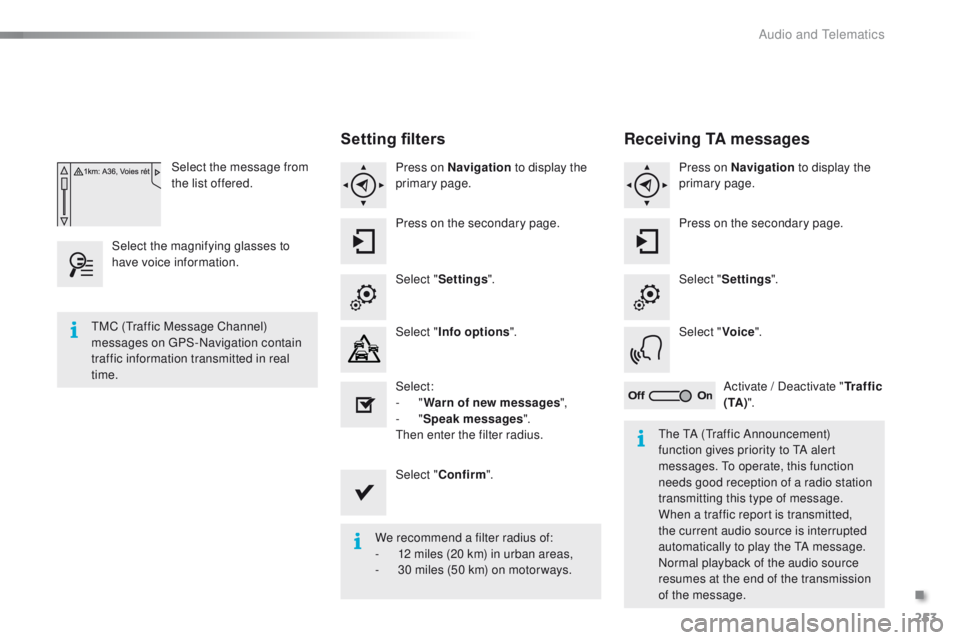
Select the message from
the list offered.
Select the magnifying glasses to
have voice information.
Setting filters
Press on Navigation to display the
primary page.
Press on the secondary page.
Select " Settings ".
Select " Info options ".
Select:
-
"Warn of new messages ",
-
"Speak messages ".
Then enter the filter radius.
Select " Confirm ".
We recommend a filter radius of:
-
1
2 miles (20 km) in urban areas,
-
3
0 miles (50 km) on motor ways.
TMC (Traffic Message Channel)
messages on GPS-Navigation contain
traffic information transmitted in real
time.
The TA (Traffic Announcement)
function gives priority to TA alert
messages. To operate, this function
needs good reception of a radio station
transmitting this type of message.
When a traffic report is transmitted,
the current audio source is interrupted
automatically to play the TA message.
Normal playback of the audio source
resumes at the end of the transmission
of the message.
Receiving TA messages
Press on Navigation to display the
primary page.
Press on the secondary page.
Select " Settings ".
Select " Voice".
Activate / Deactivate " Tr a f f i c
( TA ) ".
.
Audio and Telematics
Page 256 of 340
254
2008_en_Chap12b_SMEGplus_ed01-2015
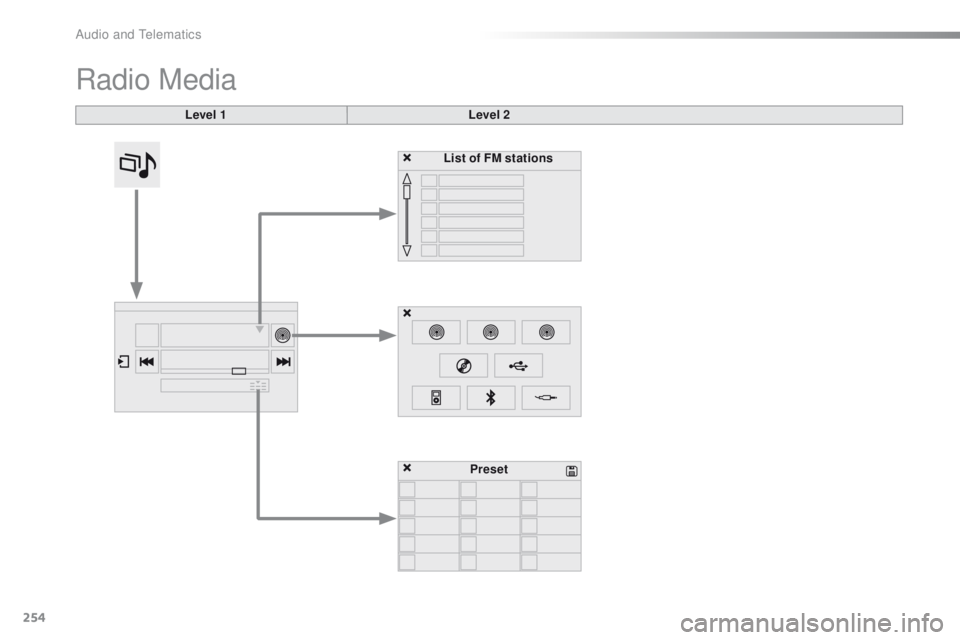
Radio Media
Level 1Level 2
List of FM stations
Preset
Audio and Telematics
Page 257 of 340
255
2008_en_Chap12b_SMEGplus_ed01-2015
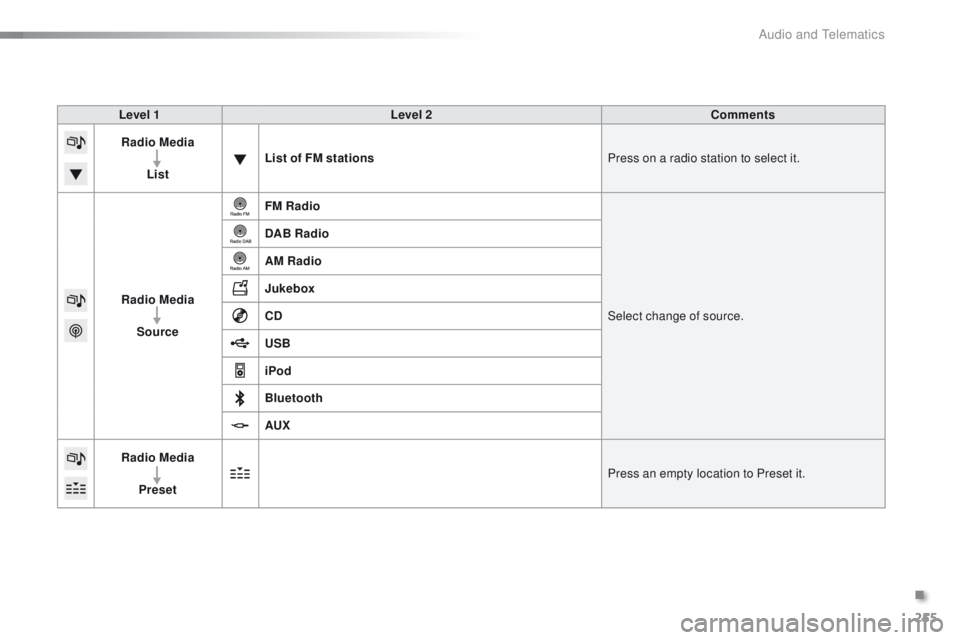
Level 1Level 2 Comments
Radio Media
List List of FM stations
Press on a radio station to select it.
Radio Media Source FM Radio
Select change of source.
DAB Radio
AM Radio
Jukebox
CD
USB
iPod
Bluetooth
AUX
Radio Media
Preset Press an empty location to Preset it.
.
Audio and Telematics
Page 259 of 340
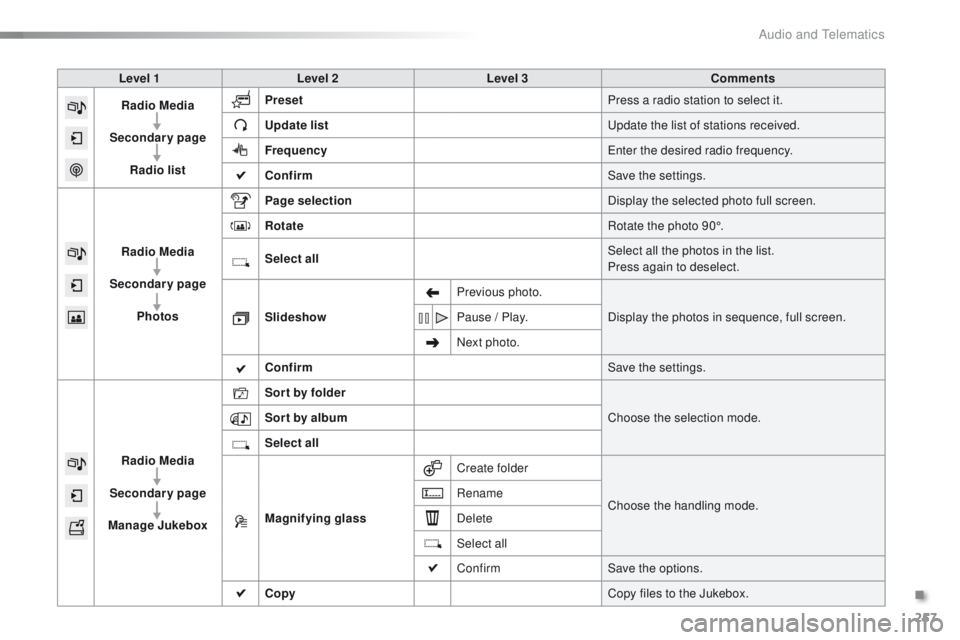
257
2008_en_Chap12b_SMEGplus_ed01-2015
Level 1Level 2 Level 3 Comments
Radio Media
Secondary page Radio list Preset
Press a radio station to select it.
Update list Update the list of stations received.
Frequency Enter the desired radio frequency.
Confirm Save the settings.
Radio Media
Secondary page Photos Page selection
Display the selected photo full screen.
Rotate Rotate the photo 90°.
Select all Select all the photos in the list.
Press again to deselect.
Slideshow Previous photo.
Display the photos in sequence, full screen.
Pause / Play.
Next photo.
Confirm Save the settings.
Radio Media
Secondary page
Manage Jukebox Sor t by folder
Choose the selection mode.
Sor t by album
Select all
Magnifying glass Create folder
Choose the handling mode.
Rename
Delete
Select all
Confirm
Save the options.
Copy Copy files to the Jukebox.
.
Audio and Telematics
Page 261 of 340

259
2008_en_Chap12b_SMEGplus_ed01-2015
Level 1Level 2 Level 3 Comments
Radio Media
Secondary page Media list Presentation of the last media used.
Radio Media
Secondary page Settings Media
Settings Random (all tracks):
Choose the play settings.
Random (current album):
Loop:
Aux. amplification
Radio
Settings RDS options
Activate or deactivate the options.
DAB/FM options
Display Radio Text
DAB radio thumbnails
Announcements Settings
Traffic announcements (TA)
Activate or deactivate the options.
Weather
Varied - Sport
Alert settings
Confirm Save the settings.
.
Audio and Telematics