turn signal PEUGEOT 2008 2015 Owners Manual
[x] Cancel search | Manufacturer: PEUGEOT, Model Year: 2015, Model line: 2008, Model: PEUGEOT 2008 2015Pages: 340, PDF Size: 8.4 MB
Page 27 of 340
25
2008_en_Chap01_controle-de-marche_ed01-2015
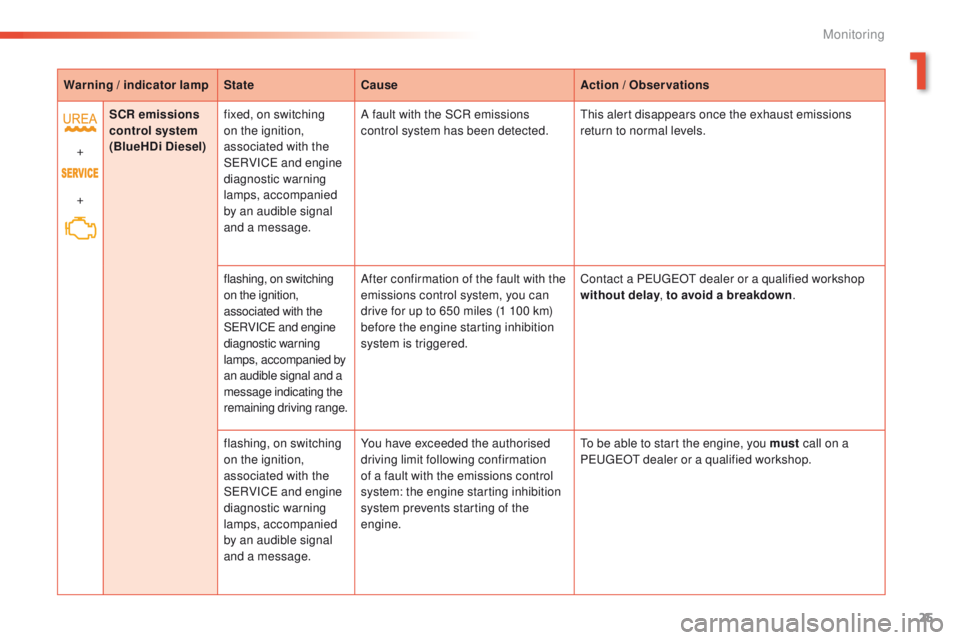
Warning / indicator lampStateCause Action / Observations
+
+ SCR emissions
control system
(BlueHDi Diesel) fixed, on switching
on the ignition,
associated with the
SERVICE and engine
diagnostic warning
lamps, accompanied
by an audible signal
and a message. A fault with the SCR emissions
control system has been detected.
This alert disappears once the exhaust emissions
return to normal levels.
flashing, on switching
on the ignition,
associated with the
SERVICE and engine
diagnostic warning
lamps, accompanied by
an audible signal and a
message indicating the
remaining driving range. After confirmation of the fault with the
emissions control system, you can
drive for up to 650 miles (1 100 km)
before the engine starting inhibition
system is triggered.
Contact a PEUGEOT dealer or a qualified workshop
without delay
, to avoid a breakdown .
flashing, on switching
on the ignition,
associated with the
SERVICE and engine
diagnostic warning
lamps, accompanied
by an audible signal
and a message. You have exceeded the authorised
driving limit following confirmation
of a fault with the emissions control
system: the engine starting inhibition
system prevents starting of the
engine.
To be able to start the engine, you must
call on a
PEUGEOT dealer or a qualified workshop.
1
Monitoring
Page 29 of 340
27
2008_en_Chap01_controle-de-marche_ed01-2015
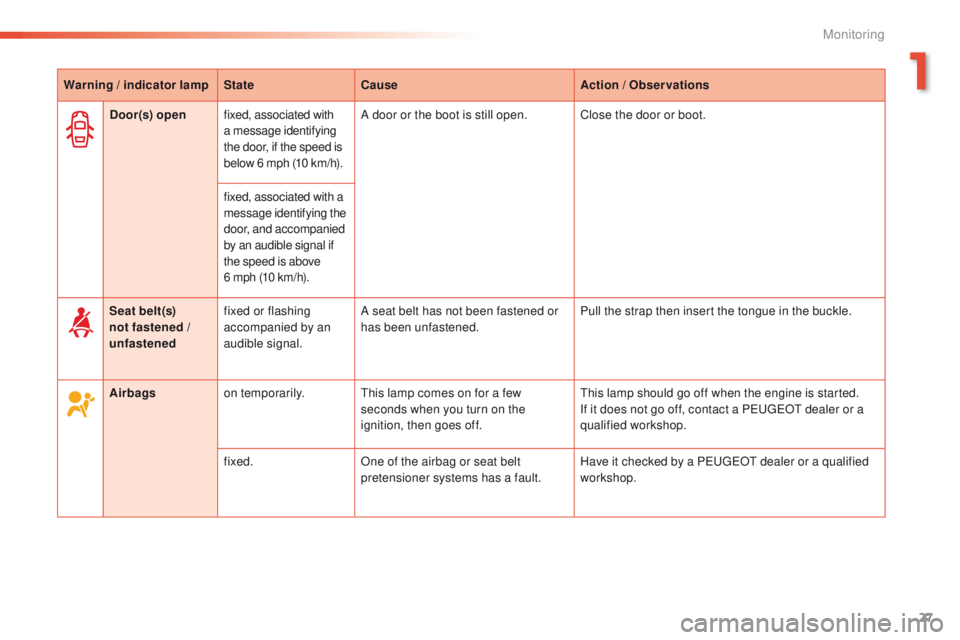
Warning / indicator lampStateCause Action / Observations
Airbags on temporarily. This lamp comes on for a few
seconds when you turn on the
ignition, then goes off. This lamp should go off when the engine is started.
If it does not go off, contact a PEUGEOT dealer or a
qualified workshop.
fixed. One of the airbag or seat belt
pretensioner systems has a fault. Have it checked by a PEUGEOT dealer or a qualified
workshop.
Seat belt(s)
not fastened /
unfastened
fixed or flashing
accompanied by an
audible signal. A seat belt has not been fastened or
has been unfastened.
Pull the strap then insert the tongue in the buckle.
Door(s) open
fixed, associated with
a message identifying
the door, if the speed is
below 6 mph (10 km/h). A door or the boot is still open. Close the door or boot.
fixed, associated with a
message identifying the
door, and accompanied
by an audible signal if
the speed is above
6 mph (10 km/h).
1
Monitoring
Page 52 of 340
50
2008_en_Chap02_ouvertures_ed01-2015
Locking / unlocking from the inside
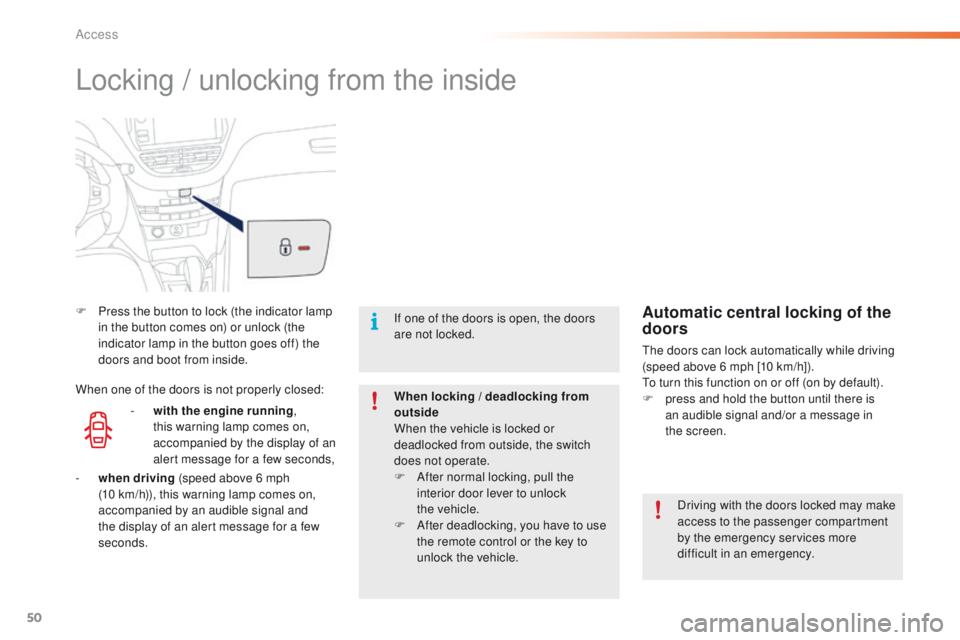
F Press the button to lock (the indicator lamp in the button comes on) or unlock (the
indicator lamp in the button goes off) the
doors and boot from inside.
Driving with the doors locked may make
access to the passenger compartment
by the emergency services more
difficult in an emergency.
If one of the doors is open, the doors
are not locked.
When locking / deadlocking from
outside
When the vehicle is locked or
deadlocked from outside, the switch
does not operate.
F
A
fter normal locking, pull the
interior door lever to unlock
the
vehicle.
F
A
fter deadlocking, you have to use
the remote control or the key to
unlock the vehicle.Automatic central locking of the
doors
The doors can lock automatically while driving
(speed above 6 mph [10 km/h]).
To turn this function on or off (on by default).
F
p
ress and hold the button until there is
an audible signal and/or a message in
the
screen.
-
w
ith the engine running ,
this warning lamp comes on,
accompanied by the display of an
alert message for a few seconds,
When one of the doors is not properly closed:
-
wh
en driving (speed above 6 mph
(10
km/h)), this warning lamp comes on,
accompanied by an audible signal and
the display of an alert message for a few
seconds.
Access
Page 82 of 340

80
2008_en_Chap05_conduite_ed01-2015
Key left in the "Ignition on"
position
On opening the driver's door, an alert
message is displayed, accompanied by an
audible signal, to remind you that the key is
still in the ignition switch at position 1 (Stop).
F Immobilise the vehicle.
F
T urn the key fully towards you to position 1
(Stop) .
F
R
emove the key from the ignition switch.
F
T
o lock the steering column, turn the wheel
until the lock engages.
Switching off
If the key has been left in the ignition
switch at position 2 (Ignition on) ,
the ignition will be switched off
automatically after one hour.
To switch the ignition back on, turn the
key to position 1 (Stop) , then back to
position 2 (Ignition on) .
Free-wheeling
For safety reasons, do not free-wheel.
Other wise, some vehicle functions will
no longer be active.
Switching off the engine leads to a loss
of braking assistance.
To facilitate unlocking of the steering
wheel, it is recommended that you
place the wheels in the straight ahead
position before switching off the engine.
Driving
Page 86 of 340
84
2008_en_Chap05_conduite_ed01-2015
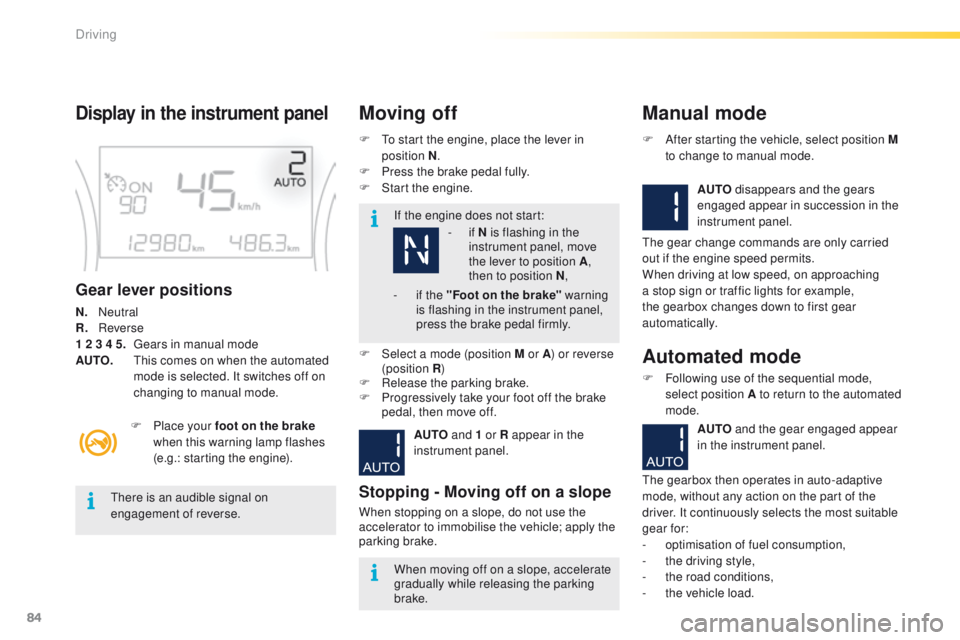
Display in the instrument panel
Gear lever positions
N. Neutral
R.
R everse
1 2 3 4 5.
G
ears in manual mode
AUTO.
T
his comes on when the automated
mode is selected. It switches off on
changing to manual mode. F
T
o start the engine, place the lever in
position N .
F
P
ress the brake pedal fully.
F
S
tart the engine.
Moving off
If the engine does not start:
F
P
lace your foot on the brake
when this warning lamp flashes
(e.g.: starting the engine).
There is an audible signal on
engagement of reverse.
When moving off on a slope, accelerate
gradually while releasing the parking
brake.
F
Sel
ect a mode (position M or A ) or reverse
(position R )
F
R
elease the parking brake.
F
P
rogressively take your foot off the brake
pedal, then move off.
AUTO and 1 or R appear in the
instrument panel.
Stopping - Moving off on a slope
When stopping on a slope, do not use the
accelerator to immobilise the vehicle; apply the
parking brake.
Manual mode
AUTO disappears and the gears
engaged appear in succession in the
instrument panel.
F
A
fter starting the vehicle, select position M
to change to manual mode.
The gear change commands are only carried
out if the engine speed permits.
When driving at low speed, on approaching
a stop sign or traffic lights for example,
the gearbox changes down to first gear
automatically.
Automated mode
F Following use of the sequential mode, select position A to return to the automated
mode.
AUTO and the gear engaged appear
in the instrument panel.
The gearbox then operates in auto-adaptive
mode, without any action on the part of the
driver. It continuously selects the most suitable
gear for:
-
o
ptimisation of fuel consumption,
-
t
he driving style,
-
t
he road conditions,
-
t
he vehicle load.
-
i
f N is flashing in the
instrument panel, move
the lever to position A ,
then to position N ,
-
i
f the "Foot on the brake" warning
is flashing in the instrument panel,
press the brake pedal firmly.
Driving
Page 93 of 340
91
2008_en_Chap05_conduite_ed01-2015
F Apply the parking brake.
F Sel ect position P or N .
F
S
tart the engine.
If this procedure is not followed, there is an
audible signal, accompanied by the display of
an warning message.
F
W
ith the engine running, press the brake
pedal.
F
R
elease the parking brake.
F
Sel
ect position R , D or M.
F
G
radually release the brake pedal.
The vehicle moves off immediately.
Moving off
When the engine is running at idle, with
the brakes released, if position R , D
or M is selected, the vehicle moves
even without the accelerator being
pressed.
When the engine is running, never
leave children in the vehicle without
supervision.
When carrying out maintenance with
the engine running, apply the parking
brake and select position P .
If position N is selected inadvertently
while driving, allow the engine to
return to idle then select position D to
accelerate.
If the ambient temperature is
below
-23°C, the engine should be left
at idle for four minutes, to ensure the
correct operation and life of the engine
and gearbox. Never select position N while the
vehicle is moving.
Never select positions P or R unless the
vehicle is completely stationary.
Automatic operation
F Select position D for automatic
changing
of the four gears.
The gearbox then operates in auto-adaptive
mode, without any intervention on the part
of the driver. It continuously selects the most
suitable gear according to the style of driving,
the profile of the road and the load in the
vehicle.
For maximum acceleration without touching the
gear lever, press the accelerator pedal down
fully (kick down). The gearbox changes down
automatically or maintains the gear selected
until the maximum engine speed is reached.
On braking, the gearbox changes down
automatically to provide efficient engine
braking.
If you release the accelerator sharply, the
gearbox will not change to a higher gear for
safety reasons.
5
Driving
Page 95 of 340
93
2008_en_Chap05_conduite_ed01-2015
There is a risk of damage to the
gearbox:
-
i
f you press the accelerator and
brake pedals at the same time,
-
i
f you force the movement of the
gear lever from the P position to
another position when the battery
is flat.
To reduce fuel consumption when at
a prolonged standstill with the engine
running (traffic jam...), put the gear lever
in the N position and apply the parking
brake.
Operating fault
When the ignition is on, the
lighting of this warning lamp,
accompanied by an audible signal and a
message in the multifunction screen, indicates
a gearbox fault.
In this case, the gearbox switches to back-up
mode and is locked in 3rd gear. You may feel
a substantial knock when changing from P
to R and from N to R . This will not cause any
damage to the gearbox.
Do not exceed 60 mph (100 km/h), local speed
restrictions permitting.
Contact a PEUGEOT dealer or a qualified
workshop as soon as possible.
If the lever is not in position P
, when the
driver's door is opened or approximately
45 seconds after the ignition is switched
off, a warning message appears in the
screen.
F
R
eturn the lever to position P ; the
message disappears.
When driving on flooded roads or when
crossing a ford, proceed at walking
pace.
Stopping the vehicle
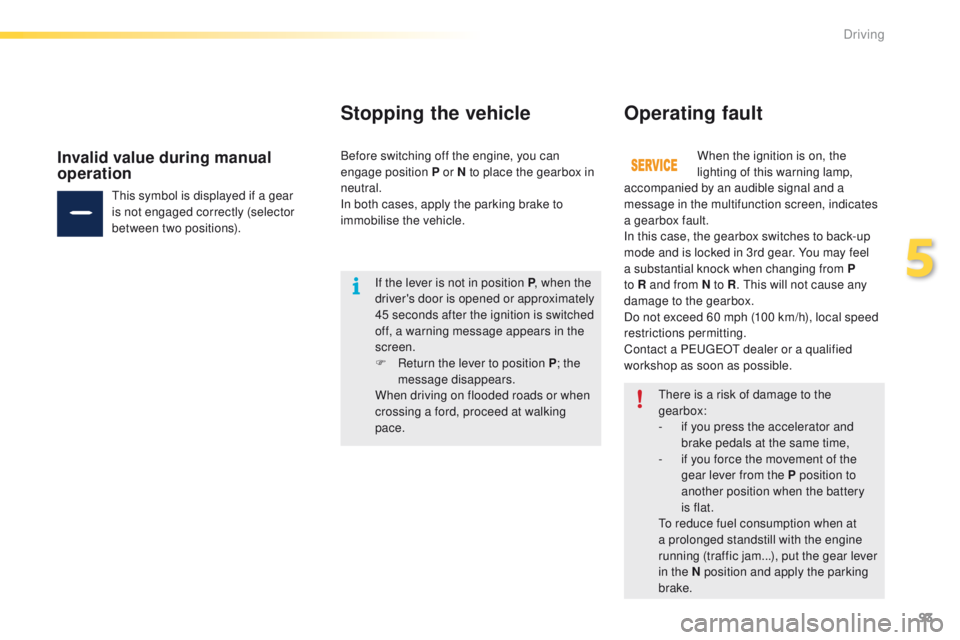
This symbol is displayed if a gear
is not engaged correctly (selector
between two positions).
Invalid value during manual
operationBefore switching off the engine, you can
engage position P or N to place the gearbox in
neutral.
In both cases, apply the parking brake to
immobilise the vehicle.
5
Driving
Page 109 of 340
107
2008_en_Chap05_conduite_ed01-2015
Park Assist
This system provides active assistance with parking, detecting a parking space then controlling the steering to park in the space.
It controls the steering while the driver manages the accelerator, brakes, gears and clutch (manual gearbox). During phases of entry into and exit from
a parking space, the system provides visual and audible information to the driver in order to make the manoeuvre safe. It may be necessary to move
forwards and backwards more than once.The Park Assist system cannot in any
circumstances replace the care and
responsibility of the driver.
The driver must remain in control of
their vehicle ensuring that the space
remains clear during the manoeuvre.
In some circumstances, the sensors
may not detect small obstacles located
in their blind spots.
Changing tyre sizes (out-size tyres,
winter tyres, ...) can inter fere with
the correct operation of the parking
assistance system.
During a manoeuvre the steering wheel
turns quickly: do not hold the steering
wheel, do not place your hand between
the spokes of the steering wheel and
take care with loose and bulky clothing,
scarves, handbags... There is a risk of
injury. For entry into a parking space (parallel
parking) the system does not detect
spaces which are clearly much smaller
or larger than the size of the vehicle.
This "parking assistance" system
is activated automatically during
manoeuvres; it is therefore possible
that a symbol comes on in the screen,
accompanied by an audible signal,
without affecting the manoeuvre.
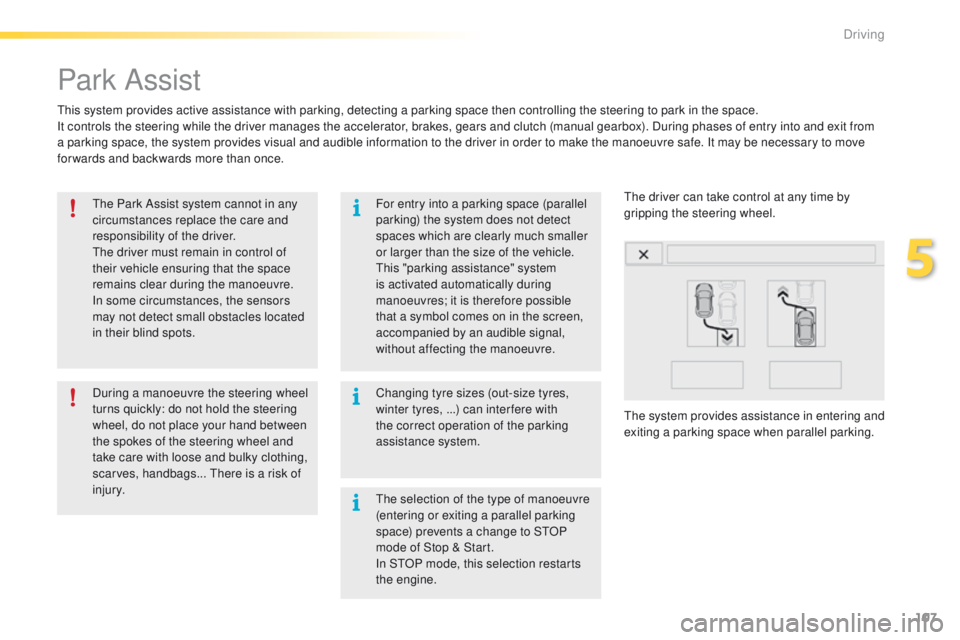
The system provides assistance in entering and
exiting a parking space when parallel parking. The driver can take control at any time by
gripping the steering wheel.
The selection of the type of manoeuvre
(entering or exiting a parallel parking
space) prevents a change to STOP
mode of Stop & Start.
In STOP mode, this selection restarts
the engine.
5
Driving
Page 116 of 340
114
2008_en_Chap06_visibilite_ed01-2015
In good or rainy weather, both day
and night, the front foglamps and the
rear foglamp are prohibited. In these
situations, the power of their beams
may dazzle other drivers. They should
only be used in fog or snow.
In these weather conditions, it is your
responsibility to switch on the foglamps
and dipped beam headlamps manually
as the sunshine sensor may detect
sufficient light.
Do not forget to switch off the front
foglamps and the rear foglamp when
they are no longer necessary.Switching on the lamps
after the ignition is
switched off
To reactivate the lighting control, rotate
the ring to the "0" position - lamps off,
then to the desired position.
On opening the driver's door a
temporary audible signal warns the
driver that the lighting is on.
The lamps, with the exception of the
sidelamps, switch off automatically after
a maximum duration of thirty minutes to
prevent discharging of the battery.
Switching off the lamps when
the ignition is switched off
On switching off the ignition, all of the
lamps turn off immediately, except for
dipped beam if guide-me-home lighting
is activated.
Visibility
Page 118 of 340
116
2008_en_Chap06_visibilite_ed01-2015
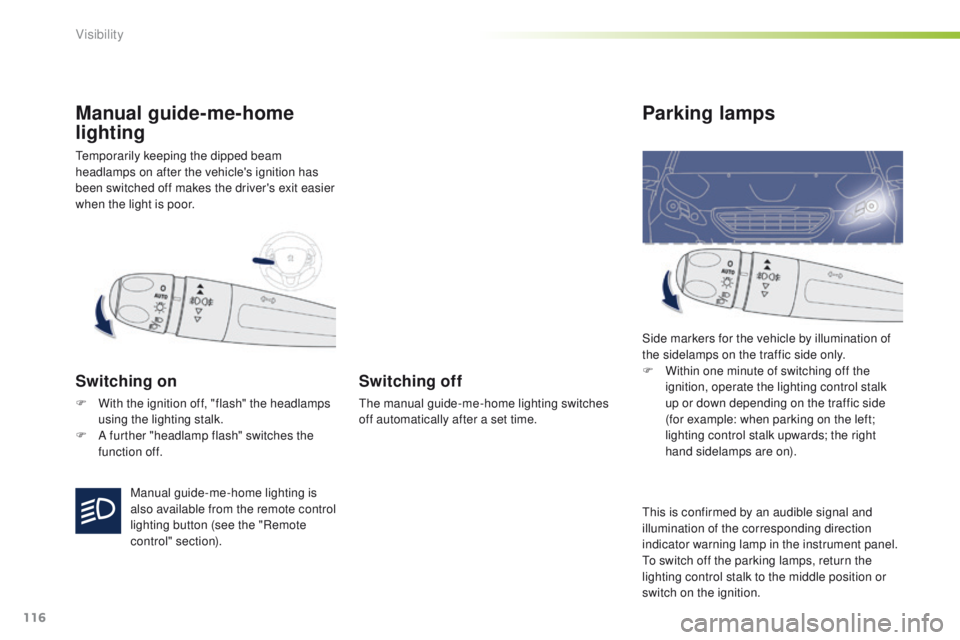
Temporarily keeping the dipped beam
headlamps on after the vehicle's ignition has
been switched off makes the driver's exit easier
when the light is poor.
Manual guide-me-home
lighting
Switching on
F With the ignition off, "flash" the headlamps using the lighting stalk.
F
A f
urther "headlamp flash" switches the
function off.
Switching off
The manual guide-me-home lighting switches
off automatically after a set time.
Parking lamps
Side markers for the vehicle by illumination of
the sidelamps on the traffic side only.
F
W
ithin one minute of switching off the
ignition, operate the lighting control stalk
up or down depending on the traffic side
(for example: when parking on the left;
lighting control stalk upwards; the right
hand sidelamps are on).
Manual guide-me-home lighting is
also available from the remote control
lighting button (see the "Remote
control" section). This is confirmed by an audible signal and
illumination of the corresponding direction
indicator warning lamp in the instrument panel.
To switch off the parking lamps, return the
lighting control stalk to the middle position or
switch on the ignition.
Visibility