radio controls PEUGEOT 2008 2016 User Guide
[x] Cancel search | Manufacturer: PEUGEOT, Model Year: 2016, Model line: 2008, Model: PEUGEOT 2008 2016Pages: 450, PDF Size: 14.16 MB
Page 390 of 450
16
2008-additif_en_Chap12b_SMEGplus_ed01-2016
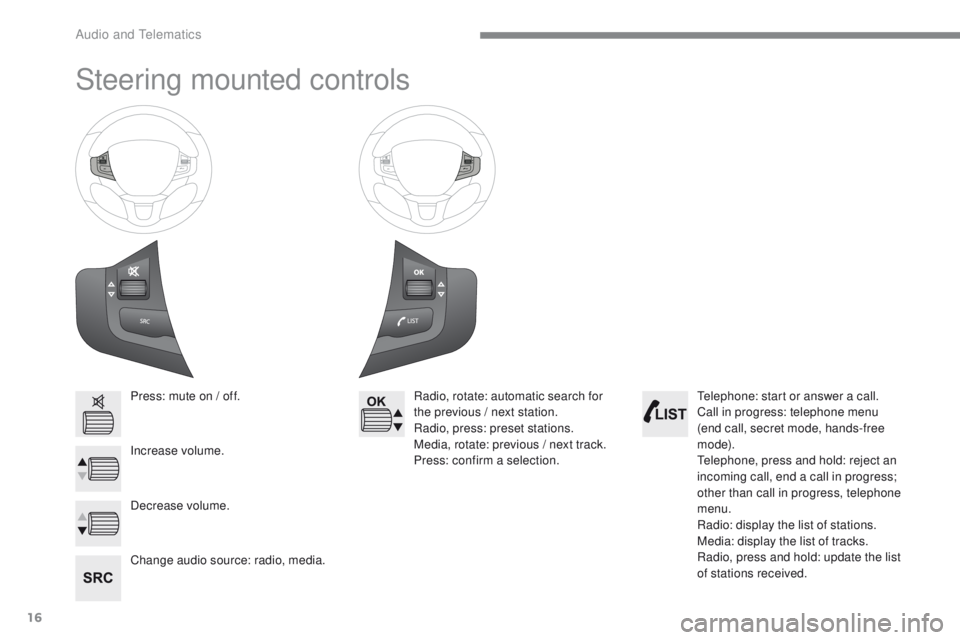
Steering mounted controls
Press: mute on / off.
Increase volume.
Change audio source: radio, media.Radio, rotate: automatic search for
the previous / next station.
Radio, press: preset stations.
Media, rotate: previous / next track.
Press: confirm a selection.
Decrease volume. Telephone: start or answer a call.
Call in progress: telephone menu
(end call, secret mode, hands-free
m o d e).
Telephone, press and hold: reject an
incoming call, end a call in progress;
other than call in progress, telephone
menu.
Radio: display the list of stations.
Media: display the list of tracks.
Radio, press and hold: update the list
of stations received.
Audio and Telematics
Page 416 of 450
42
2008-additif_en_Chap12b_SMEGplus_ed01-2016
Media
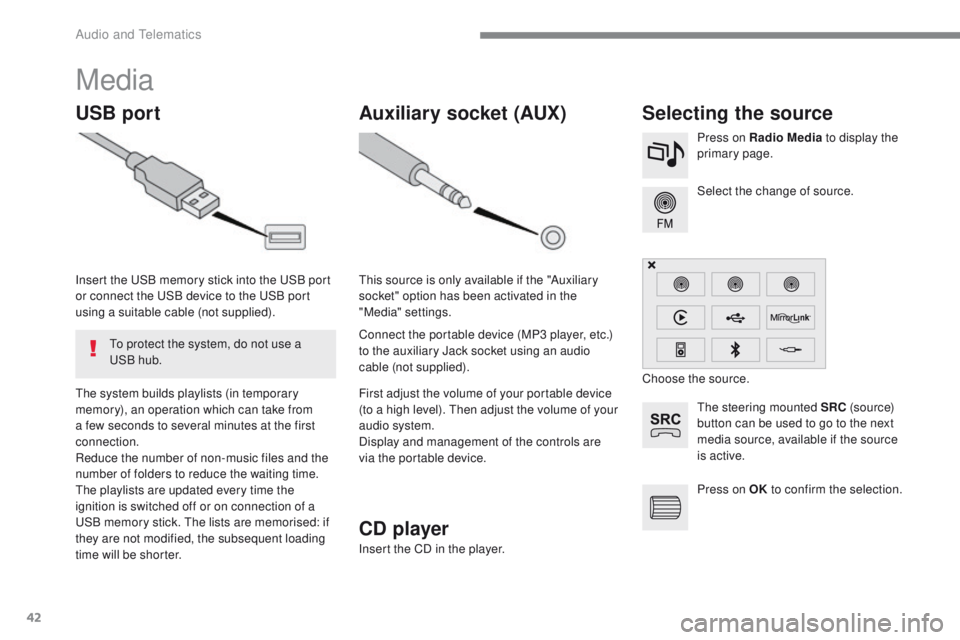
USB portSelecting the source
The steering mounted SRC (s o u r c e)
button can be used to go to the next
media source, available if the source
is active. Select the change of source. Press on Radio Media to display the
primary page.
The system builds playlists (in temporary
memory), an operation which can take from
a few seconds to several minutes at the first
connection.
Reduce the number of non-music files and the
number of folders to reduce the waiting time.
The playlists are updated every time the
ignition is switched off or on connection of a
USB memory stick. The lists are memorised: if
they are not modified, the subsequent loading
time will be shorter. Insert the USB memory stick into the USB port
or connect the USB device to the USB port
using a suitable cable (not supplied).
Auxiliary socket (AUX)
Connect the portable device (MP3 player, etc.)
to the auxiliary Jack socket using an audio
cable (not supplied). This source is only available if the "Auxiliary
socket" option has been activated in the
"Media" settings.
First adjust the volume of your portable device
(to a high level). Then adjust the volume of your
audio system.
Display and management of the controls are
via the portable device. Choose the source.
To protect the system, do not use a
USB hub.
CD player
Insert the CD in the player. Press on OK
to confirm the selection.
Audio and Telematics
Page 444 of 450
70
2008-additif_en_Chap12b_SMEGplus_ed01-2016
Radio
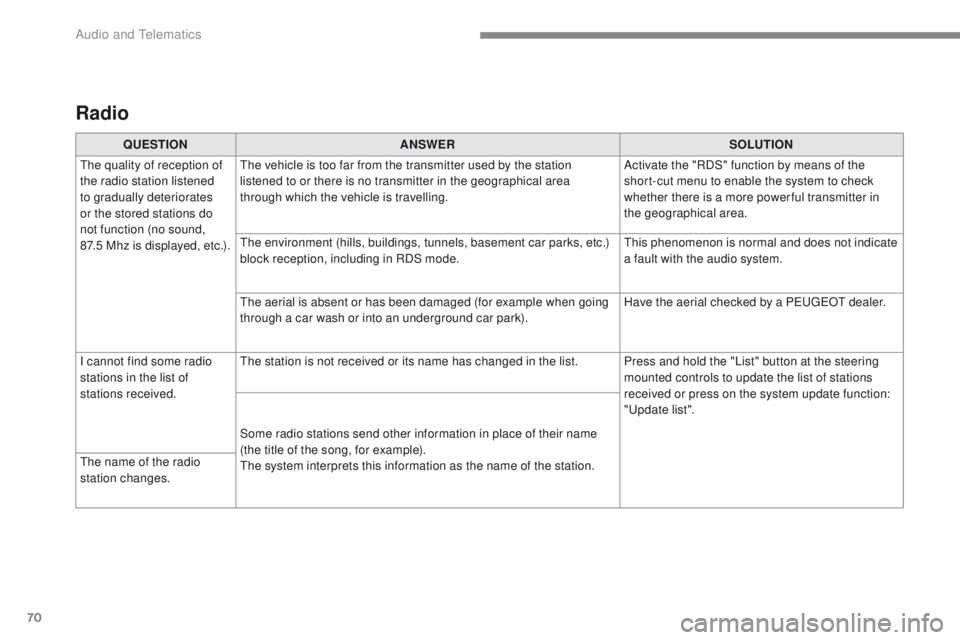
QUESTIONANSWER SOLUTION
The quality of reception of
the radio station listened
to gradually deteriorates
or the stored stations do
not function (no sound,
87.5
M
hz is displayed, etc.). The vehicle is too far from the transmitter used by the station
listened to or there is no transmitter in the geographical area
through which the vehicle is travelling.
Activate the "RDS" function by means of the
short-cut menu to enable the system to check
whether there is a more power ful transmitter in
the geographical area.
The environment (hills, buildings, tunnels, basement car parks, etc.)
block reception, including in RDS mode. This phenomenon is normal and does not indicate
a fault with the audio system.
The aerial is absent or has been damaged (for example when going
through a car wash or into an underground car park). Have the aerial checked by a PEUGEOT dealer.
I cannot find some radio
stations in the list of
stations received. The station is not received or its name has changed in the list. Press and hold the "List" button at the steering
mounted controls to update the list of stations
received or press on the system update function:
"Update list".
Some radio stations send other information in place of their name
(the title of the song, for example).
The system interprets this information as the name of the station.
The name of the radio
station changes.
Audio and Telematics