battery PEUGEOT 2008 2016 Owner's Manual
[x] Cancel search | Manufacturer: PEUGEOT, Model Year: 2016, Model line: 2008, Model: PEUGEOT 2008 2016Pages: 450, PDF Size: 14.16 MB
Page 219 of 450
217
2008_en_Chap09_info-pratiques_ed01-2016
Follow the instructions for use provided
by the manufacturer of the charger.
Never reverse polarities.
It is not necessary to disconnect the
battery.F
S
witch off the ignition.
F
S
witch off all electrical consumers (audio
system, lighting, wipers, ...).
F
S
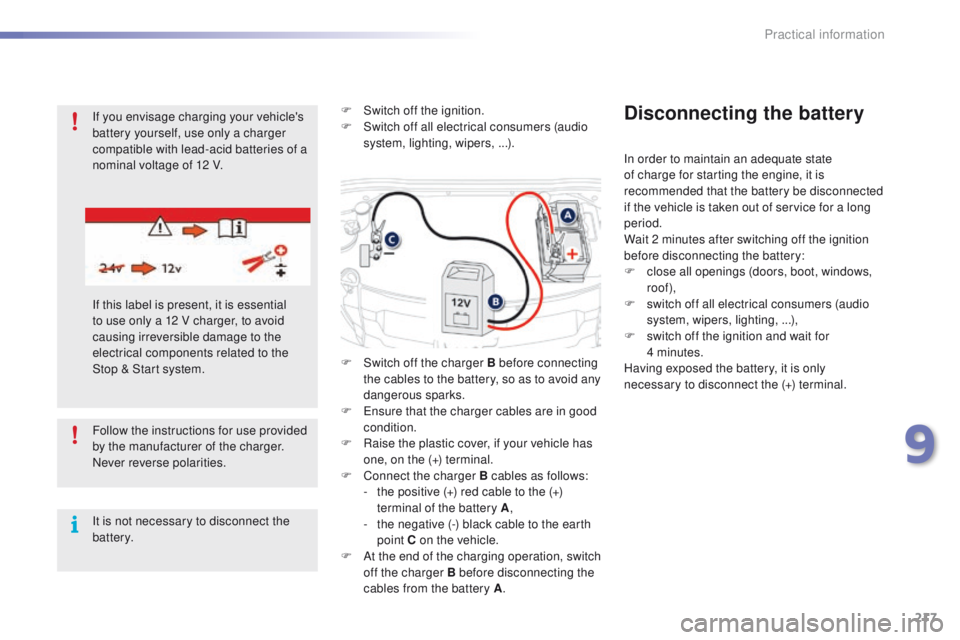
witch off the charger B before connecting
the cables to the battery, so as to avoid any
dangerous sparks.
F
E
nsure that the charger cables are in good
condition.
F R aise the plastic cover, if your vehicle has
one, on the (+) terminal.
F
C
onnect the charger B cables as follows:
-
t
he positive (+) red cable to the (+)
terminal of the battery A ,
-
t
he negative (-) black cable to the earth
point C on the vehicle.
F
A
t the end of the charging operation, switch
off the charger B before disconnecting the
cables from the battery A .
Disconnecting the battery
In order to maintain an adequate state
of charge for starting the engine, it is
recommended that the battery be disconnected
if the vehicle is taken out of service for a long
period.
Wait 2 minutes after switching off the ignition
before disconnecting the battery:
F
c
lose all openings (doors, boot, windows,
roof),
F
s
witch off all electrical consumers (audio
system, wipers, lighting, ...),
F
s
witch off the ignition and wait for
4
minutes.
Having exposed the battery, it is only
necessary to disconnect the (+) terminal.
If you envisage charging your vehicle's
battery yourself, use only a charger
compatible with lead-acid batteries of a
nominal voltage of 12 V.
If this label is present, it is essential
to use only a 12 V charger, to avoid
causing irreversible damage to the
electrical components related to the
Stop & Start system.
9
Practical information
Page 220 of 450
218
2008_en_Chap09_info-pratiques_ed01-2016
Never try to charge a frozen battery.
If the battery has been frozen, have it
checked by a PEUGEOT dealer or a
qualified workshop, who will check that
the internal components have not been
damaged and the casing is not cracked,
which could cause a leak of toxic and
corrosive acid.The Stop & Start system may not be
operational during the trip following the
first engine start.
In this case, the system will only be
available again after a continuous
period of immobilisation of the vehicle,
a period which depends on the ambient
temperature and the state of charge of
the battery (up to about 8 hours).
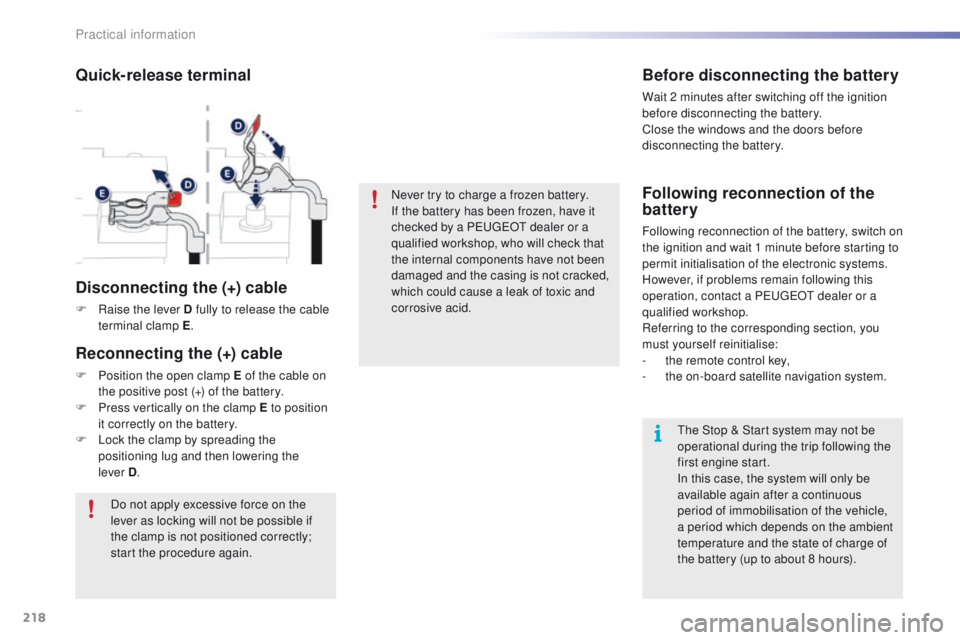
Quick-release terminal
Disconnecting the (+) cable
F Raise the lever D fully to release the cable terminal clamp E .
Do not apply excessive force on the
lever as locking will not be possible if
the clamp is not positioned correctly;
start the procedure again.
Before disconnecting the battery
Wait 2 minutes after switching off the ignition
before disconnecting the battery.
Close the windows and the doors before
disconnecting the battery.
Following reconnection of the
battery
Following reconnection of the battery, switch on
the ignition and wait 1 minute before starting to
permit initialisation of the electronic systems.
However, if problems remain following this
operation, contact a PEUGEOT dealer or a
qualified workshop.
Referring to the corresponding section, you
must yourself reinitialise:
-
t
he remote control key,
-
t
he on-board satellite navigation system.
Reconnecting the (+) cable
F Position the open clamp E of the cable on the positive post (+) of the battery.
F
P
ress vertically on the clamp E to position
it correctly on the battery.
F
L
ock the clamp by spreading the
positioning lug and then lowering the
lever
D.
Practical information
Page 221 of 450
219
2008_en_Chap09_info-pratiques_ed01-2016
System which manages the duration of use of certain functions to retain a sufficient level of charge
in the battery.
After the engine has stopped, you can still use functions such as the audio and telematics
system, windscreen wipers, dipped beam headlamps, courtesy lamps, etc. for a maximum
combined duration of about 30 minutes.
Electrical energy economy mode
Switching to economy
mode
Once this time has elapsed, a message
appears in the screen indicating that the
vehicle has switched to economy mode and the
active functions are put on standby.
If a telephone call is being made at this time, it
will be maintained for around 10 minutes with
the Bluetooth hands-free system of your audio
system.
Exiting economy mode
These functions are reactivated automatically
next time the vehicle is driven.
F
T
o restore these functions immediately,
start the engine and let it run for at least
5
minutes.
A flat battery prevents the engine from
starting (refer to the corresponding
section).
Load reduction mode
System which manages the use of certain
functions according to the level of charge
remaining in the battery.
When the vehicle is being driven, the load
reduction function temporarily deactivates
certain functions, such as the air conditioning,
the heated rear screen...
The deactivated functions are reactivated
automatically as soon as conditions permit.
9
Practical information
Page 242 of 450
240
2008_en_Chap10_verifications_ed01-2016
Checks
12 V battery
The battery does not require any maintenance.
However, check regularly that the terminals
are correctly tightened (versions without quick
release terminals) and that the connections
are clean.
Versions equipped with Stop & Start are
fitted with a 12 V lead-acid battery of specific
technology and specification.
Its replacement should be carried out only by a
PEUGEOT dealer or a qualified workshop.
Diesel
Particle filter
On a new vehicle, the first particle
filter regeneration operations may be
accompanied by a "burnt" smell, which
is normal.
Following prolonged operation of the
vehicle at very low speed or at idle,
you may, in exceptional circumstances,
notice the emission of water vapour at
the exhaust on acceleration. This does
not affect the behaviour of the vehicle
or the environment.
Unless other wise indicated, check these components in accordance with the warranty and maintenance record and according to your engine.
Other wise, have them checked by a PEUGEOT dealer or a qualified workshop.
Air filter and passenger compartment filter
Refer to the warranty and
maintenance record for details of
the replacement intervals for these
components.
Oil filter
Replace the oil filter each time the
engine oil is changed.
Refer to the warranty and
maintenance record for details of
the replacement interval for this
component.
When carrying out any operation on the 12 V
battery, refer to the corresponding section for
details of the precautions to be taken before
starting work.
Depending on the environment (e.g. dusty
atmosphere) and the use of the vehicle
(e.g. city driving), replace them twice as often
if necessary
.
A clogged passenger compartment filter may
have an adverse effect on the per formance
of the air conditioning system and generate
undesirable odours. The start of saturation of the
particle filter is indicated by
the fixed illumination of this warning lamp
accompanied by a warning message in the
screen (if a display screen is fitted).
As soon as the traffic conditions permit,
regenerate the filter by driving at a speed of at
least 40 mph (60 km/h) until the warning lamp
goes off.
If the warning lamp stays on, this indicates a
low additive level.
Checks
Page 256 of 450
254
2008_en_Chap12a_BTA_ed01-2016
Emergency call
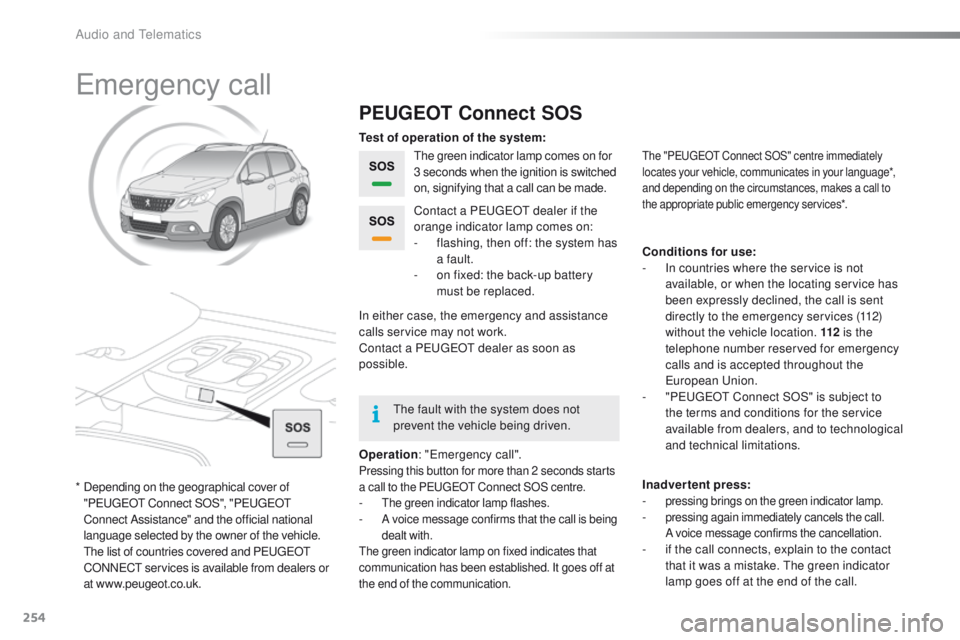
PEUGEOT Connect SOS
The green indicator lamp comes on for
3 seconds when the ignition is switched
on, signifying that a call can be made.
Operation : "Emergency call".
Pressing this button for more than 2 seconds starts
a call to the PEUGEOT Connect SOS centre.
- The green indicator lamp flashes.- A voice message confirms that the call is being
dealt with.
The green indicator lamp on fixed indicates that
communication has been established. It goes off at
the end of the communication.
Contact a PEUGEOT dealer if the
orange indicator lamp comes on:
-
f
lashing, then off: the system has
a fault.
-
o
n fixed: the back-up battery
must be replaced.
In either case, the emergency and assistance
calls service may not work.
Contact a PEUGEOT
dealer as soon as
possible. Test of operation of the system:
Conditions for use:
-
I
n countries where the service is not
available, or when the locating service has
been expressly declined, the call is sent
directly to the emergency services (112)
without the vehicle location. 112 is the
telephone number reserved for emergency
calls and is accepted throughout the
European Union.
-
"
PEUGEOT Connect SOS" is subject to
the terms and conditions for the service
available from dealers, and to technological
and technical limitations.
Inadvertent press:
-
pressing brings on the green indicator lamp.- pressing again immediately cancels the call.
A voice message confirms the cancellation.
- if the call connects, explain to the contact that it was a mistake. The green indicator
lamp goes off at the end of the call.
The "PEUGEOT Connect SOS" centre immediately
locates your vehicle, communicates in your language*,
and depending on the circumstances, makes a call to
the appropriate public emergency services*.
* Depending on the geographical cover of "PEUGEOT Connect SOS", "PEUGEOT
Connect Assistance" and the official national
language selected by the owner of the vehicle.
T
he list of countries covered and PEUGEOT
CONNECT services is available from dealers or
at www.peugeot.co.uk. The fault with the system does not
prevent the vehicle being driven.
Audio and Telematics
Page 326 of 450
324
2008_en_Chap12b_SMEGplus_ed01-2016
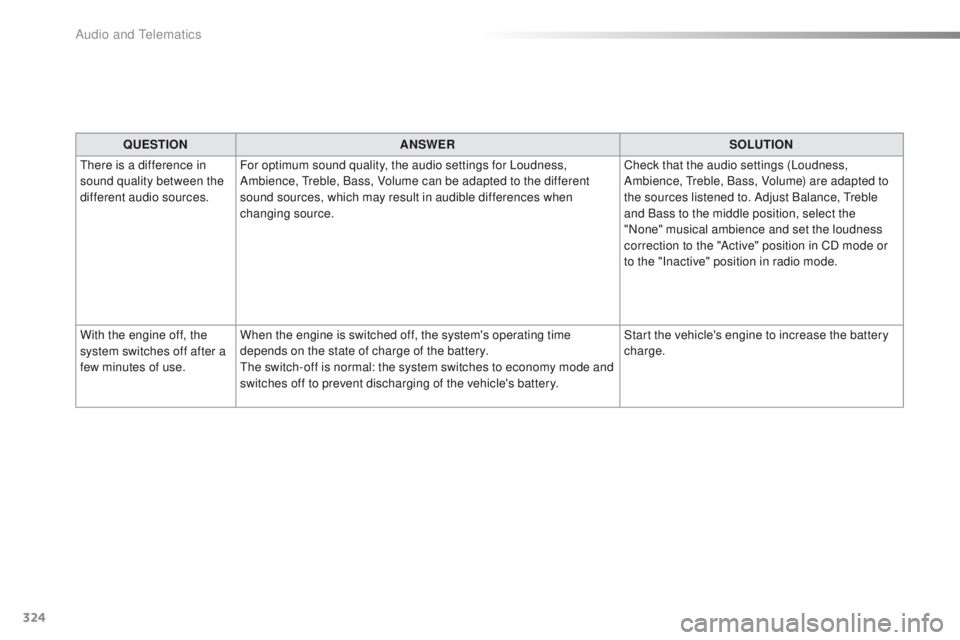
QUESTIONANSWER SOLUTION
There is a difference in
sound quality between the
different audio sources. For optimum sound quality, the audio settings for Loudness,
Ambience, Treble, Bass, Volume can be adapted to the different
sound sources, which may result in audible differences when
changing source. Check that the audio settings (Loudness,
Ambience, Treble, Bass, Volume) are adapted to
the sources listened to. Adjust Balance, Treble
and Bass to the middle position, select the
"None" musical ambience and set the loudness
correction to the "Active" position in CD mode or
to the "Inactive" position in radio mode.
With the engine off, the
system switches off after a
few minutes of use. When the engine is switched off, the system's operating time
depends on the state of charge of the battery.
The switch-off is normal: the system switches to economy mode and
switches off to prevent discharging of the vehicle's battery. Start the vehicle's engine to increase the battery
charge.
Audio and Telematics
Page 329 of 450
327
2008_en_Chap12c_RDE2_ed01-2016
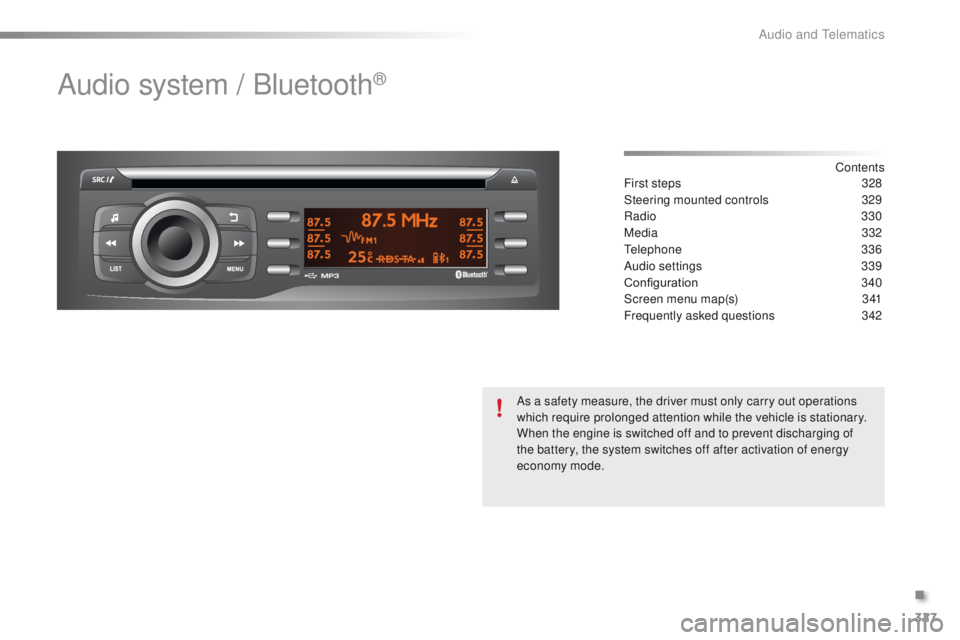
Audio system / Bluetooth®
Contents
First steps 32 8
Steering mounted controls
3
29
Radio
330
Media
3
32
Telephone
336
Audio settings
3
39
Configuration
3
40
Screen menu map(s)
3
41
Frequently asked questions
3
42
As a safety measure, the driver must only carry out operations
which require prolonged attention while the vehicle is stationary.
When the engine is switched off and to prevent discharging of
the battery, the system switches off after activation of energy
economy mode.
.
Audio and Telematics
Page 346 of 450
344
2008_en_Chap12c_RDE2_ed01-2016
QUESTIONANSWER SOLUTION
The CD is ejected
automatically or is not
played by the player. The CD is inserted upside down, is unplayable, does not contain
any audio data or contains an audio format which the player cannot
p l ay.
The CD is protected by an anti-pirating protection system which is
not recognised by the audio equipment. -
C
heck that the CD is inserted in the player
the right way up.
-
C
heck the condition of the CD: the CD
cannot be played if it is too damaged.
-
C
heck the content in the case of a recorded
CD: consult the advice in the "Audio" section.
-
T
he audio equipment's CD player does not
play DVDs.
-
D
ue to their quality level, certain writeable
CDs will not be played by the audio system.
The CD player sound is
p o o r. The CD used is scratched or of poor quality.
Insert good quality CDs and store them in
suitable conditions.
The audio settings (bass, treble, ambience) are unsuitable. Set the treble or bass level to 0, without selecting
an ambience.
The Bluetooth connection
is cut. The battery of the peripheral may not be sufficiently charged. Recharge the battery of the peripheral device.
The message "USB device
error" is displayed on the
screen. The USB memory stick is not recognised.
Use only USB memory sticks formatted to FAT
3
2
(28 -bit file allocation table).
A telephone connects
automatically,
disconnecting another
telephone. Automatic connection overrides manual connection.
Modify the telephone settings to remove
automatic connection.
Audio and Telematics
Page 347 of 450
345
2008_en_Chap12c_RDE2_ed01-2016
QUESTIONANSWER SOLUTION
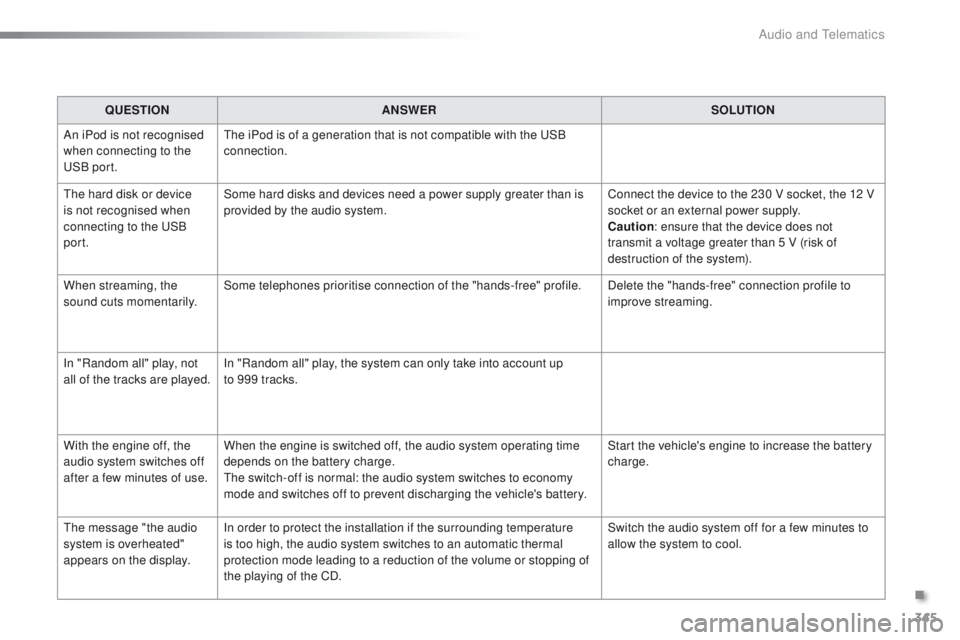
An iPod is not recognised
when connecting to the
USB port. The iPod is of a generation that is not compatible with the USB
connection.
The hard disk or device
is not recognised when
connecting to the USB
port. Some hard disks and devices need a power supply greater than is
provided by the audio system.
Connect the device to the 230 V socket, the 12 V
socket or an external power supply.
Caution
: ensure that the device does not
transmit a voltage greater than 5 V (risk of
destruction of the system).
When streaming, the
sound cuts momentarily. Some telephones prioritise connection of the "hands-free" profile.
Delete the "hands-free" connection profile to
improve streaming.
In "Random all" play, not
all of the tracks are played. In "Random all" play, the system can only take into account up
to 999 tracks.
With the engine off, the
audio system switches off
after a few minutes of use. When the engine is switched off, the audio system operating time
depends on the battery charge.
The switch-off is normal: the audio system switches to economy
mode and switches off to prevent discharging the vehicle's battery. Start the vehicle's engine to increase the battery
charge.
The message "the audio
system is overheated"
appears on the display. In order to protect the installation if the surrounding temperature
is too high, the audio system switches to an automatic thermal
protection mode leading to a reduction of the volume or stopping of
the playing of the CD. Switch the audio system off for a few minutes to
allow the system to cool.
.
Audio and Telematics
Page 349 of 450
347
2008_en_Chap12d_RDE1_ed01-2016
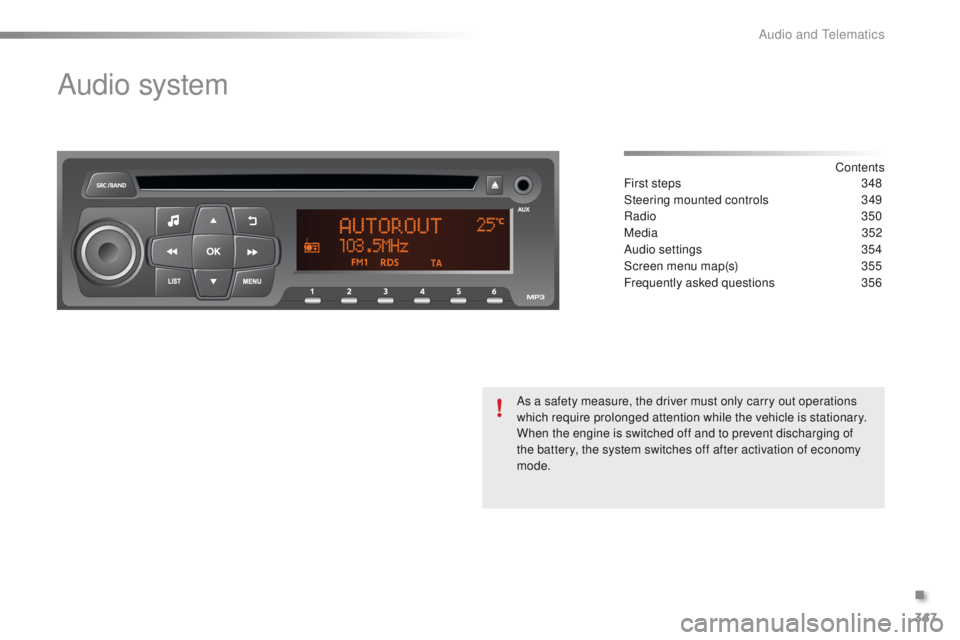
Audio system
Contents
First steps
3 48
Steering mounted controls
3
49
Radio
350
Media
3
52
Audio settings
3
54
Screen menu map(s)
3
55
Frequently asked questions
3
56
As a safety measure, the driver must only carry out operations
which require prolonged attention while the vehicle is stationary.
When the engine is switched off and to prevent discharging of
the battery, the system switches off after activation of economy
mode.
.
Audio and Telematics