bluetooth PEUGEOT 2008 2016 Owner's Manual
[x] Cancel search | Manufacturer: PEUGEOT, Model Year: 2016, Model line: 2008, Model: PEUGEOT 2008 2016Pages: 450, PDF Size: 14.16 MB
Page 338 of 450
336
2008_en_Chap12c_RDE2_ed01-2016
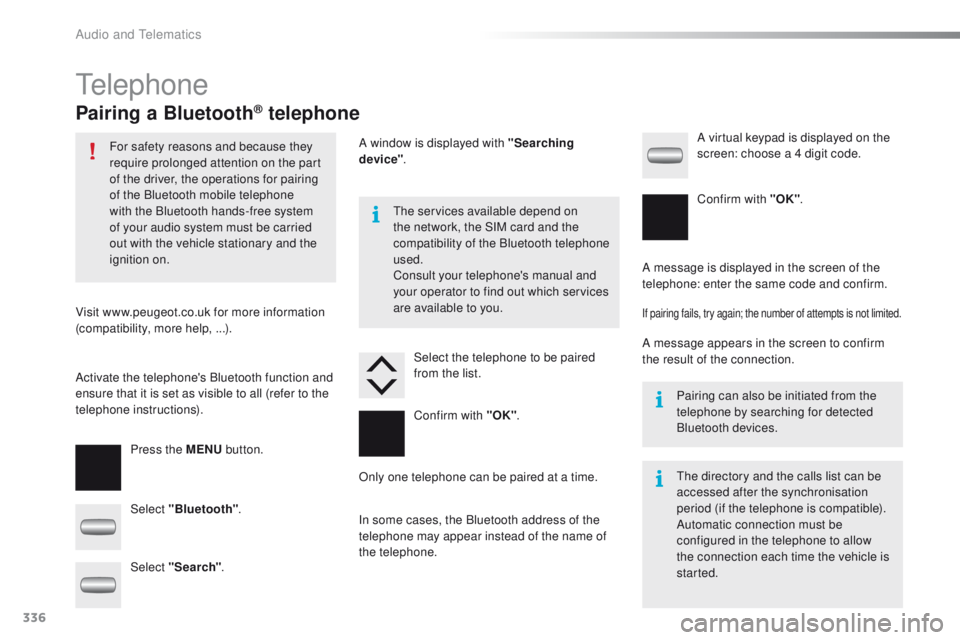
Telephone
Pairing a Bluetooth® telephone
For safety reasons and because they
require prolonged attention on the part
of the driver, the operations for pairing
of the Bluetooth mobile telephone
with the Bluetooth hands-free system
of your audio system must be carried
out with the vehicle stationary and the
ignition on.
Visit www.peugeot.co.uk for more information
(compatibility, more help,
...).
Activate the telephone's Bluetooth function and
ensure that it is set as visible to all (refer to the
telephone instructions). Press the MENU button. The services available depend on
the network, the SIM card and the
compatibility of the Bluetooth telephone
used.
Consult your telephone's manual and
your operator to find out which services
are available to you.
Only one telephone can be paired at a time. A message is displayed in the screen of the
telephone: enter the same code and confirm.
If pairing fails, try again; the number of attempts is not limited.
A message appears in the screen to confirm
the result of the connection.
Pairing can also be initiated from the
telephone by searching for detected
Bluetooth devices.
The directory and the calls list can be
accessed after the synchronisation
period (if the telephone is compatible).
Automatic connection must be
configured in the telephone to allow
the connection each time the vehicle is
started.
Select "Bluetooth"
. Select the telephone to be paired
from the list. A virtual keypad is displayed on the
screen: choose a 4 digit code.
Select "Search" . A window is displayed with "Searching
device"
.
In some cases, the Bluetooth address of the
telephone may appear instead of the name of
the telephone. Confirm with "OK"
. Confirm with "OK"
.
Audio and Telematics
Page 339 of 450
337
2008_en_Chap12c_RDE2_ed01-2016
Press the MENU button.
Press the MENU button.
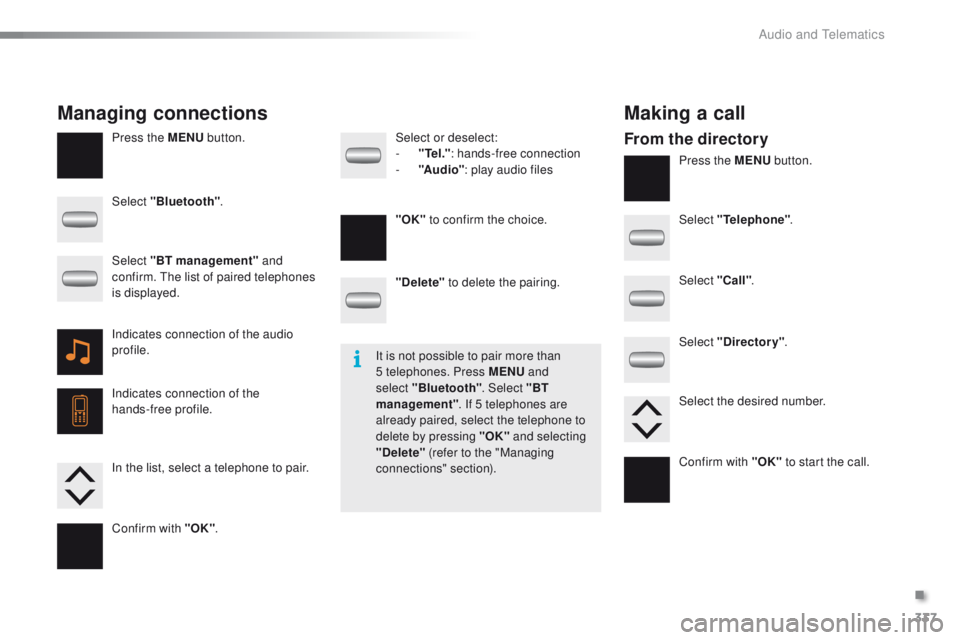
Managing connections Making a call
From the directory
Select "Bluetooth".
Select "Telephone".
Select "Call" .
Select "Directory" .
"Delete"
to delete the pairing.
Select or deselect:
-
"
Te
l ."
: hands-free connection
-
"A
u d i o"
: play audio files
Indicates connection of the audio
profile.
Indicates connection of the
hands-free profile. Select "BT management" and
confirm. The list of paired telephones
is displayed.
In the list, select a telephone to pair.
Confirm with "OK" . "OK"
to confirm the choice.
Select the desired number.
Confirm with "OK" to start the call.
It is not possible to pair more than
5 telephones. Press MENU
and
select "Bluetooth" . Select "BT
management" . If 5 telephones are
already paired, select the telephone to
delete by pressing "OK" and selecting
"Delete" (refer to the "Managing
connections" section).
.
Audio and Telematics
Page 341 of 450
339
2008_en_Chap12c_RDE2_ed01-2016
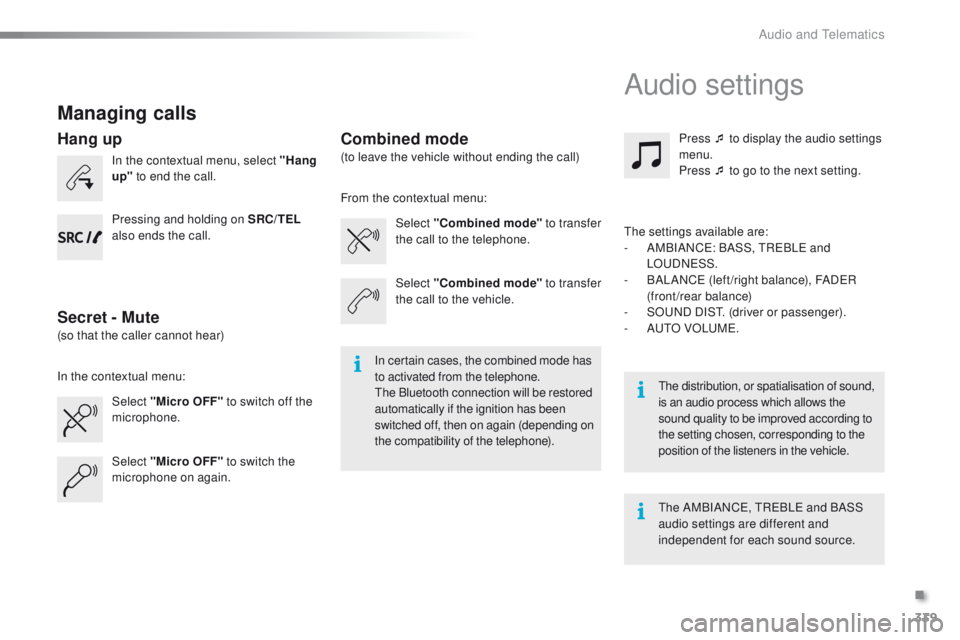
Managing calls
In the contextual menu, select "Hang
up" to end the call.
Select "Micro OFF" to switch off the
microphone. Select
"Combined mode " to transfer
the call to the telephone. Press ¯ to display the audio settings
menu.
Press ¯ to go to the next setting.
Select "Micro OFF" to switch the
microphone on again. Select
"Combined mode"
to transfer
the call to the vehicle.
In the contextual menu: From the contextual menu:
In certain cases, the combined mode has
to activated from the telephone.
The Bluetooth connection will be restored
automatically if the ignition has been
switched off, then on again (depending on
the compatibility of the telephone). The distribution, or spatialisation of sound,
is an audio process which allows the
sound quality to be improved according to
the setting chosen, corresponding to the
position of the listeners in the
vehicle.
Hang up
Secret - MuteCombined mode
Pressing and holding on SRC/TEL
also ends the call.
(so that the caller cannot hear) (to leave the vehicle without ending the call)
The settings available are:
-
A
MBIANCE: BASS, TREBLE and
LOUDNESS.
-
B
ALANCE (left /right balance), FADER
(front/rear balance)
-
S
OUND DIST. (driver or passenger).
-
A
UTO VOLUME.
The AMBIANCE, TREBLE and BASS
audio settings are different and
independent for each sound source.
Audio settings
.
Audio and Telematics
Page 343 of 450
341
2008_en_Chap12c_RDE2_ed01-2016
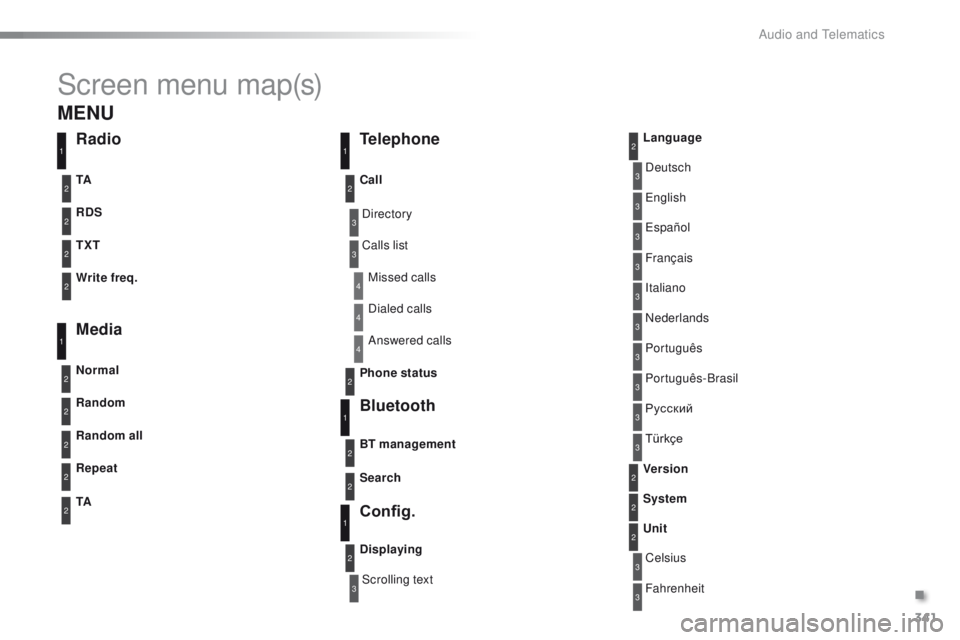
Screen menu map(s)
3
3
3
3
3
3
3
3
3
3
3
3
3
3
3
4
4
4
Directory
Scrolling textDeutsch
Italiano Español
Português
Русский
Celsius English
Nederlands Français
Português-Brasil
Türkçe
Fahrenheit
Calls list
Missed calls
Dialed calls
Answered calls
Radio Telephone
Bluetooth
Config.
RDS
TXT
Write freq.
Media
Normal
Random all TA Call
BT management
Unit
Search
Displaying Language
Version
System
Phone status
11
1
1
22
2
2
2
2
2
2
2
2
2
2
2
1
2
2
MENU
Random
Repeat
TA2
2
2
.
Audio and Telematics
Page 346 of 450
344
2008_en_Chap12c_RDE2_ed01-2016
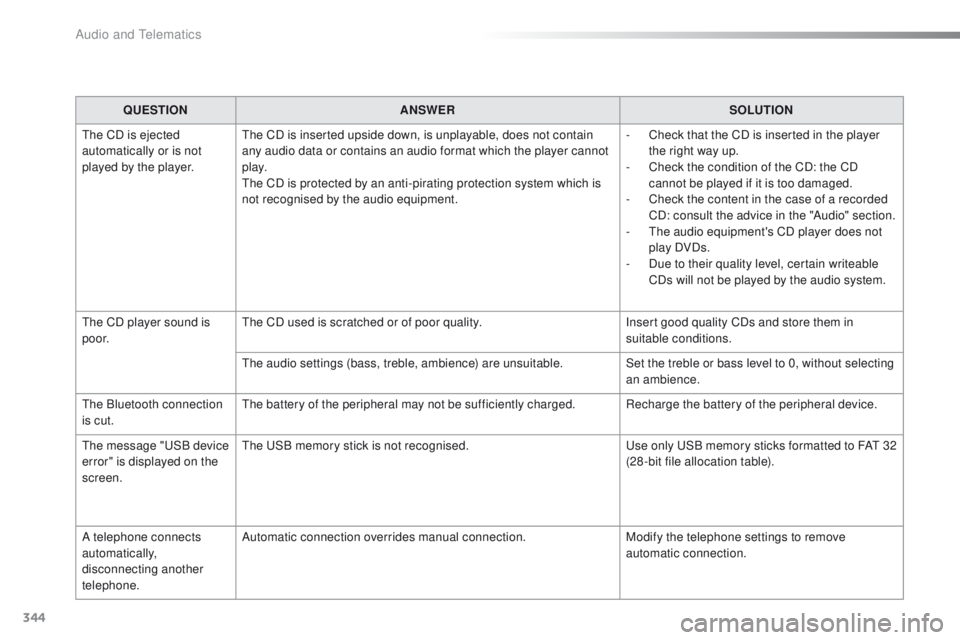
QUESTIONANSWER SOLUTION
The CD is ejected
automatically or is not
played by the player. The CD is inserted upside down, is unplayable, does not contain
any audio data or contains an audio format which the player cannot
p l ay.
The CD is protected by an anti-pirating protection system which is
not recognised by the audio equipment. -
C
heck that the CD is inserted in the player
the right way up.
-
C
heck the condition of the CD: the CD
cannot be played if it is too damaged.
-
C
heck the content in the case of a recorded
CD: consult the advice in the "Audio" section.
-
T
he audio equipment's CD player does not
play DVDs.
-
D
ue to their quality level, certain writeable
CDs will not be played by the audio system.
The CD player sound is
p o o r. The CD used is scratched or of poor quality.
Insert good quality CDs and store them in
suitable conditions.
The audio settings (bass, treble, ambience) are unsuitable. Set the treble or bass level to 0, without selecting
an ambience.
The Bluetooth connection
is cut. The battery of the peripheral may not be sufficiently charged. Recharge the battery of the peripheral device.
The message "USB device
error" is displayed on the
screen. The USB memory stick is not recognised.
Use only USB memory sticks formatted to FAT
3
2
(28 -bit file allocation table).
A telephone connects
automatically,
disconnecting another
telephone. Automatic connection overrides manual connection.
Modify the telephone settings to remove
automatic connection.
Audio and Telematics
Page 361 of 450
359
2008_en_Chap13_index-alpha_ed01-2016
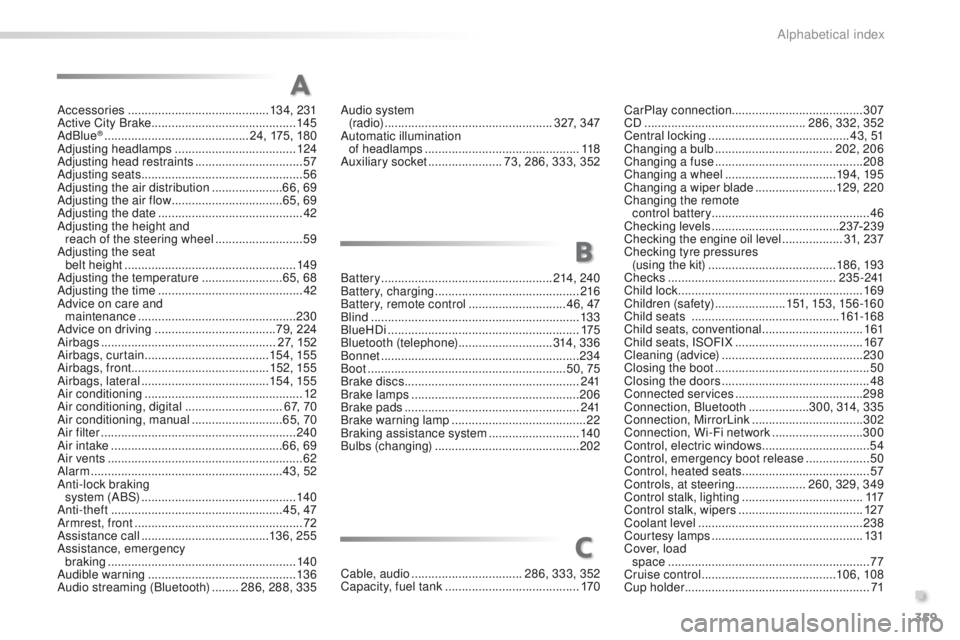
Accessories .......................................... 13 4, 231
Active City Brake ........................................... 14
5
AdBlue
® ............................... ............24, 175, 180
Adjusting headlamps .................................... 124
Adjusting head restraints
................................ 57
Adjusting seats
................................................ 56
Adjusting the air distribution
.....................66, 69
Adjusting the air flow
................................. 65, 69
Adjusting the date
........................................... 42
Adjusting the height and reach of the steering wheel
.......................... 59
A
djusting the seat
belt height
...............................
....................149
Adjusting the temperature
........................ 6
5, 68
Adjusting the time
........................................... 42
Advice on care and maintenance
............................................... 23
0
Advice on driving
.................................... 79, 224
Airbags
.................................................... 27, 152
Airbags, curtain
..................................... 15
4, 155
Airbags, front ......................................... 152, 155
Airbags, lateral
...................................... 15 4, 155
Air conditioning
............................................... 12
Air conditioning, digital
............................. 67, 70
Air conditioning, manual
........................... 65, 70
Air filter
.......................................................... 240
Air intake
................................................... 66, 69
Air vents
.......................................................... 62
Alarm
......................................................... 43, 52
Anti-lock braking system (ABS)
.............................................. 14
0
Anti-theft
................................................... 45, 47
Armrest, front
.................................................. 72
Assistance call
...................................... 13 6, 25 5
Assistance, emergency braking
...............
......................................... 140
Audible warning
............................................ 13 6
Audio streaming (Bluetooth)
........ 2
86, 288, 335Battery
...................................................214, 240
Battery, charging
...........................................216
Battery, remote control
............................. 4
6, 47
Blind
..............................................................13 3
BlueHDi
.........................................................175
Bluetooth (telephone)
............................314, 3 3 6
Bonnet
...........................................................234
Boot
...........................................................50, 75
Brake discs
.................................................... 2
41
Brake lamps
...............................
...................206
Brake pads
....................................................2 41
Brake warning lamp
........................................22
Braking assistance system
...........................14
0
Bulbs (changing)
...............................
............202
A
B
CarPlay connection ....................................... 307
CD ................................................ 286, 332, 352
Central locking
.......................................... 4 3 , 51
Changing a bulb
................................... 202, 206
Changing a fuse
............................................ 208
Changing a wheel
................................. 19 4, 195
Changing a wiper blade
........................129, 2 20
Changing the remote control battery ............................................... 46
Checking levels
...................................... 23
7-239
Checking the engine oil level
..................31, 237
Checking tyre pressures (using the kit)
..............................
........18 6, 193
Checks
...............
................................... 2 3 5 - 2 41
Child lock
...............................
........................169
Children (safety)
..................... 15
1, 153, 15 6 -16 0
Child seats
..............................
..............161-168
Child seats, conventional
..............................161
Child seats, ISOFIX
...................................... 16
7
Cleaning (advice)
.......................................... 23
0
Closing the boot
.............................................. 50
Closing the doors
............................................ 48
Connected services
...................................... 29
8
Connection, Bluetooth
..................300, 314, 335
Connection, MirrorLink
.................................302
Connection, Wi-Fi network
...........................300
Control, electric windows
................................54
Control, emergency boot release
...................50
Control, heated seats
...................................... 57
Controls, at steering..................... 260, 329, 349
Control stalk, lighting
.................................... 11
7
Control stalk, wipers
..................................... 127
Coolant level
................................................. 238
Courtesy lamps
............................................. 131
Cover, load space
............................................................ 77
Cruise control
........................................ 10
6, 108
Cup holder
...............................
........................71
Audio system
(r adi o)
.................................................. 327, 347
Automatic illumination of headlamps
.............................................. 118
Auxiliary socket
...................... 73, 286, 333, 352
Cable, audio
................................. 286, 333, 352
Capacity, fuel tank
..............................
.......... 170
C
.
Alphabetical index
Page 387 of 450
13
2008-additif_en_Chap12b_SMEGplus_ed01-2016
7-inch touch screen
GPS satellite navigation - Multimedia audio - Bluetooth® telephone
Contents
First steps 14
S
teering mounted controls
16
M
e n u s
17
Na
vigation
1
8
Navigation - Guidance
26
Tr
a f fi c
3 0
R
adio Media
32
Ra
dio
3
8
DAB (Digital Audio Broadcasting) radio
40
M
edia
42
S
ettings
4
6
Connected services
54
M
irrorLink
TM 54
Car
Play® 58
Te
lephone
6
0
Frequently asked questions
68
T
he system is protected in such a way that it will only operate in
your vehicle. As a safety measure, the driver should only carry out operations
which require prolonged attention while the vehicle is stationary.
The display of an energy economy mode message signals that
electrical systems operating are going into standby.
Refer to the energy economy mode section.
.
Audio and Telematics
Page 389 of 450
15
2008-additif_en_Chap12b_SMEGplus_ed01-2016
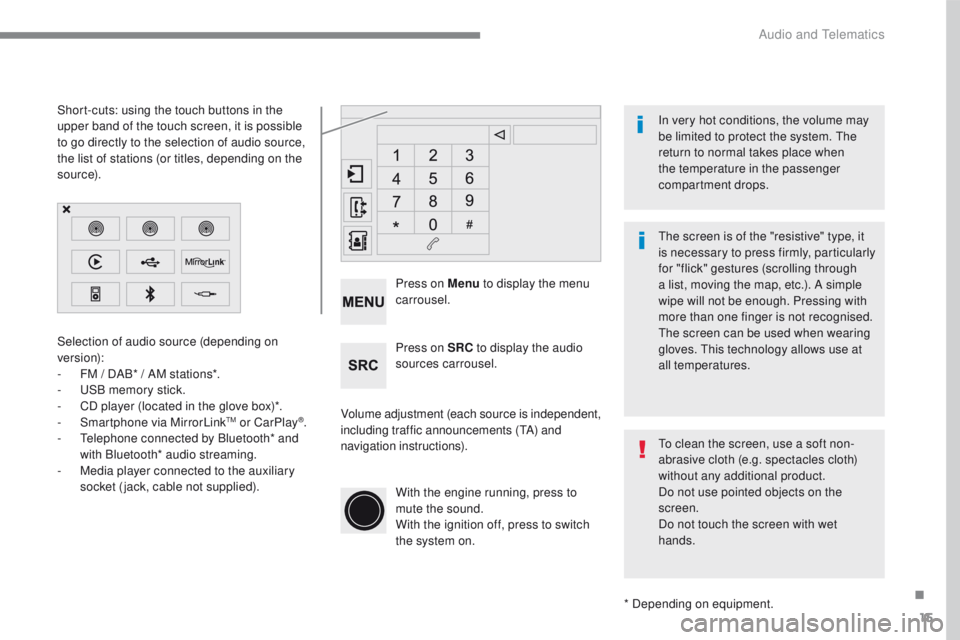
Selection of audio source (depending on
version):
-
FM / D
AB* / AM stations*.
-
US
B memory stick.
-
CD p
layer (located in the glove box)*.
-
Sm
artphone via MirrorLink
TM or CarPlay®.
- Te
lephone connected by Bluetooth* and
with Bluetooth* audio streaming.
-
Me
dia player connected to the auxiliary
socket (jack, cable not supplied).
* Depending on equipment.
Short-cuts: using the touch buttons in the
upper
b
and of the touch screen, it is possible
to go directly to the selection of audio source,
the list of stations (or titles, depending on the
s o u r c e).
The screen is of the "resistive" type, it
is necessary to press firmly, particularly
for "flick" gestures (scrolling through
a list, moving the map, etc.). A simple
wipe will not be enough. Pressing with
more than one finger is not recognised.
The screen can be used when wearing
gloves. This technology allows use at
all temperatures. In very hot conditions, the volume may
be limited to protect the system. The
return to normal takes place when
the temperature in the passenger
compartment drops.
To clean the screen, use a soft non-
abrasive cloth (e.g. spectacles cloth)
without any additional product.
Do not use pointed objects on the
screen.
Do not touch the screen with wet
hands.
Volume adjustment (each source is independent,
including traffic announcements (
TA) and
navigation instructions). Press on Menu
to display the menu
carrousel.
Press on SRC to display the audio
sources carrousel.
With the engine running, press to
mute the sound.
With the ignition off, press to switch
the system on.
.
Audio and Telematics
Page 391 of 450
17
2008-additif_en_Chap12b_SMEGplus_ed01-2016
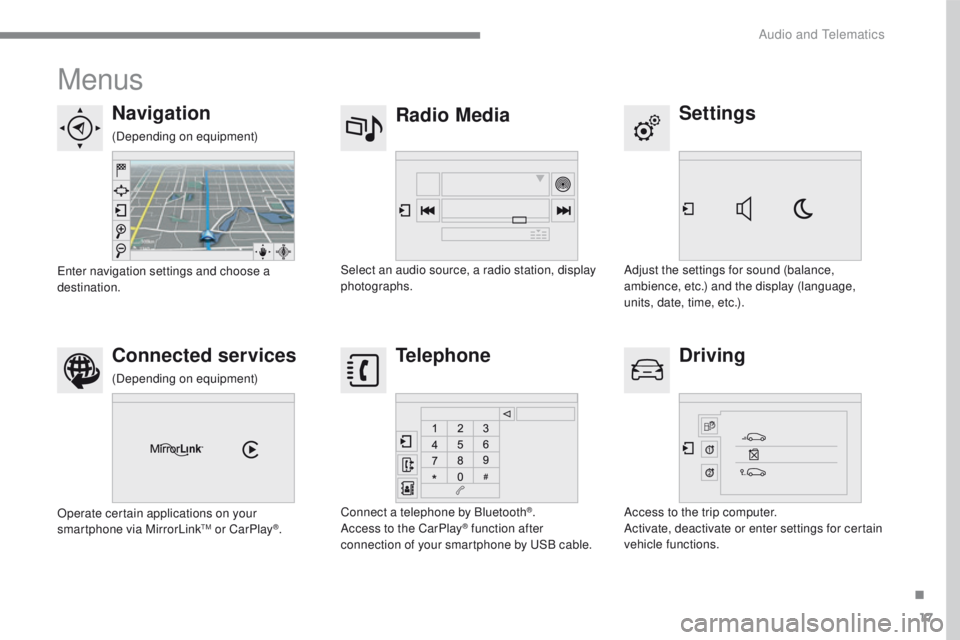
Menus
Settings
Radio Media
Navigation
Driving
Connected services Telephone
Adjust the settings for sound (balance,
ambience, etc.) and the display (language,
units, date, time, etc.).
Select an audio source, a radio station, display
photographs.
Enter navigation settings and choose a
destination.
Access to the trip computer.
Activate, deactivate or enter settings for certain
vehicle functions.
Operate certain applications on your
smartphone via MirrorLink
TM or CarPlay®.
Connect a telephone by Bluetooth
®.
Access to the CarPlay® function after
connection of your smartphone by USB cable.
(Depending on equipment)
(Depending on equipment)
.
Audio and Telematics
Page 407 of 450
33
2008-additif_en_Chap12b_SMEGplus_ed01-2016
Level 1Level 2 Comments
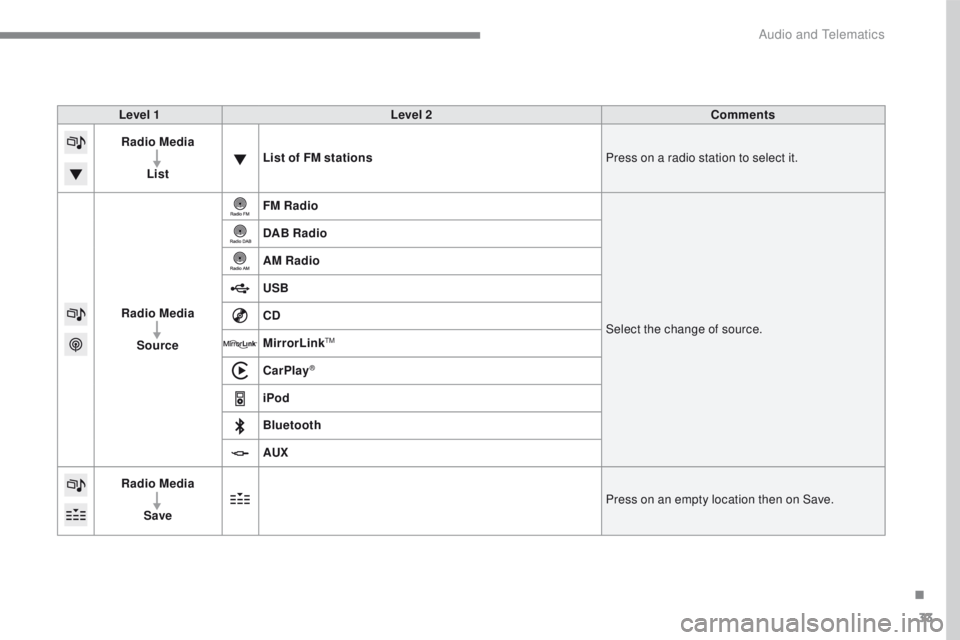
Radio Media
List List of FM stations
Press on a radio station to select it.
Radio Media Source FM Radio
Select the change of source.
DAB Radio
AM Radio
USB
CD
MirrorLink
TM
CarPlay®
iPod
Bluetooth
AUX
Radio Media
Save Press on an empty location then on Save.
.
Audio and Telematics