trip PEUGEOT 2008 2016 Owners Manual
[x] Cancel search | Manufacturer: PEUGEOT, Model Year: 2016, Model line: 2008, Model: PEUGEOT 2008 2016Pages: 450, PDF Size: 14.16 MB
Page 4 of 450
.
.
2008_en_Chap00a_sommaire_ed01-2016
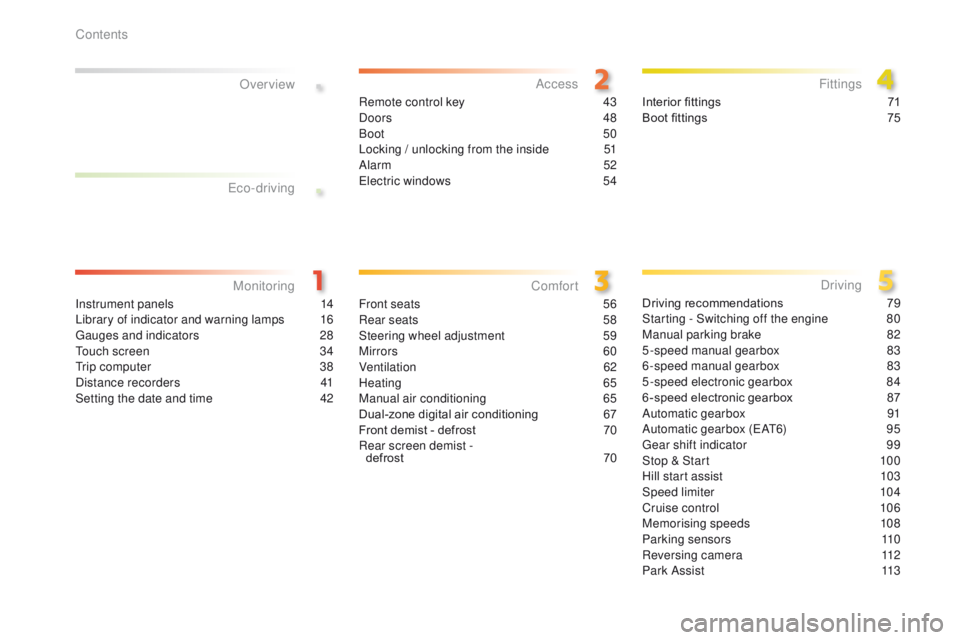
Instrument panels 14
Library of indicator and warning lamps 1 6
Gauges and indicators
2
8
Touch screen
3
4
Trip computer
3
8
Distance recorders
4
1
Setting the date and time
4
2
MonitoringOver view
Remote control key 4
3
Doors 48
Boot
50
Locking / unlocking from the inside
5
1
Alarm
52
Electric windows
5
4Interior fittings
7 1
Boot fittings 7 5
AccessFittings
Front seats 56
Rear seats 5 8
Steering wheel adjustment
5
9
Mirrors
60
Ventilation
62
Heating
6
5
Manual air conditioning
6
5
Dual-zone digital air conditioning
6
7
Front demist - defrost
7
0
Rear screen demist - defrost
70
Comfort
Driving recommendations 7 9
Starting - Switching off the engine 8 0
Manual parking brake
8
2
5-speed manual gearbox
8
3
6-speed manual gearbox
8
3
5-speed electronic gearbox
8
4
6 -speed electronic gearbox
87
A
utomatic gearbox
9
1
Automatic gearbox (EAT6)
9
5
Gear shift indicator
9
9
Stop & Start
1
00
Hill start assist
1
03
Speed limiter
1
04
Cruise control
1
06
Memorising speeds
1
08
Parking sensors
1
10
Reversing camera
1
12
Park Assist
1
13
Driving
Eco-driving
Contents
Page 9 of 450
7
2008_en_Chap00b_vue-ensemble_ed01-2016
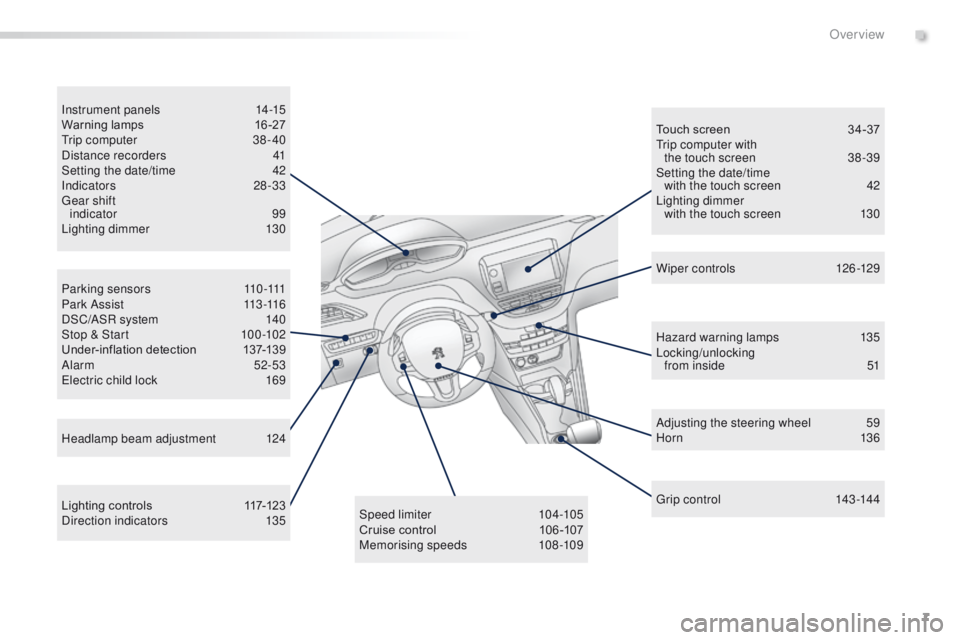
P a r k i n g s e n s o r s 110 -111
P a r k A s s i s t 11 3 -11 6
DSC/ASR system
1
40
Stop & Start
1
00 -102
Under-inflation detection
1
37-139
Alarm
52-53
Electric child lock
1
69
Instrument panels
1
4-15
Warning lamps
1
6-27
Trip computer
3
8 - 40
Distance recorders
4
1
Setting the date/time
4
2
Indicators
28-33
Gear shift indicator 99
Lighting dimmer
1
30
Lighting controls
1
17-123
Direction indicators
1
35Speed limiter
1
04-105
Cruise control
1
06 -107
Memorising speeds
1
08-109Touch screen
3
4-37
Trip computer with the touch screen
3
8 -39
Setting the date/time with the touch screen
4
2
Lighting dimmer with the touch screen
1
30
Headlamp beam adjustment
1
24 Wiper controls
1
26-129
Hazard warning lamps
1
35
Locking/unlocking from inside
5
1
Adjusting the steering wheel
5
9
H or n
13 6
Gr ip c ontrol
14
3 -14 4
.
Over view
Page 11 of 450
9
2008_en_Chap00b_vue-ensemble_ed01-2016
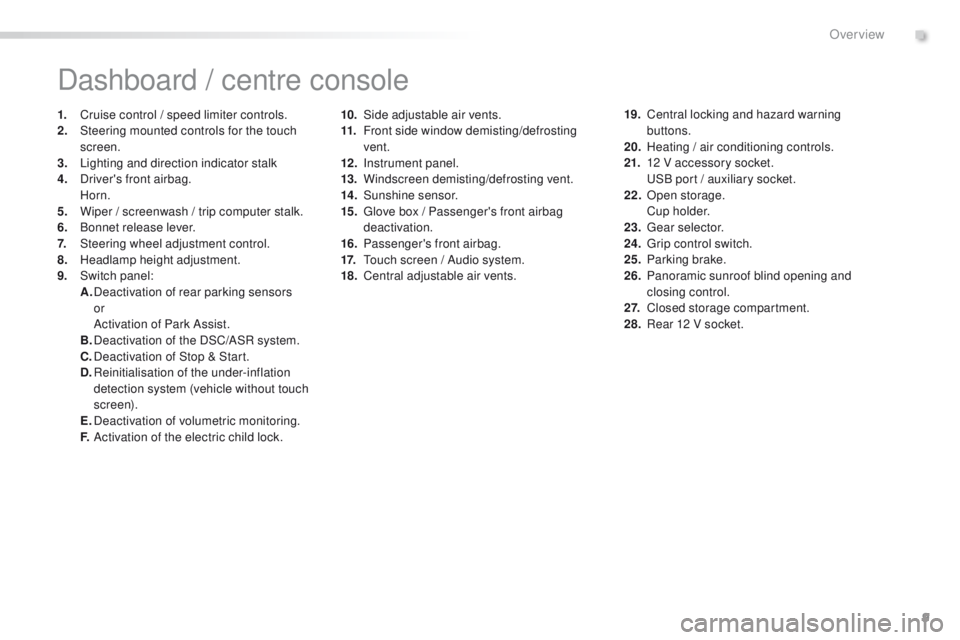
10. Side adjustable air vents.
11. Front side window demisting/defrosting
vent.
12 .
I
nstrument panel.
13.
W
indscreen demisting/defrosting vent.
14 .
S
unshine sensor.
15.
G
love box / Passenger's front airbag
deactivation.
16.
P
assenger's front airbag.
17.
T
ouch screen / Audio system.
18.
C
entral adjustable air vents.
Dashboard / centre console
1. Cruise control / speed limiter controls.
2. Steering mounted controls for the touch
screen.
3.
L
ighting and direction indicator stalk
4.
D
river's front airbag.
Horn.
5.
W
iper / screenwash / trip computer stalk.
6.
B
onnet release lever.
7.
S
teering wheel adjustment control.
8.
H
eadlamp height adjustment.
9.
S
witch panel:
A.
D
eactivation of rear parking sensors
or
A
ctivation of Park Assist.
B.
D
eactivation of the DSC/ASR system.
C.
D
eactivation of Stop & Start.
D.
R
einitialisation of the under-inflation
detection system (vehicle without touch
screen).
E.
D
eactivation of volumetric monitoring.
F.
A
ctivation of the electric child lock. 19. C
entral locking and hazard warning
buttons.
20.
H
eating / air conditioning controls.
21.
1
2 V accessory socket.
U
SB port / auxiliary socket.
22.
O
pen storage.
C
u p h o l d e r.
23.
G
ear selector.
24.
G
rip control switch.
25.
P
arking brake.
26.
P
anoramic sunroof blind opening and
closing control.
2 7.
C
losed storage compartment.
28.
R
ear 12 V socket.
.
Over view
Page 16 of 450
14
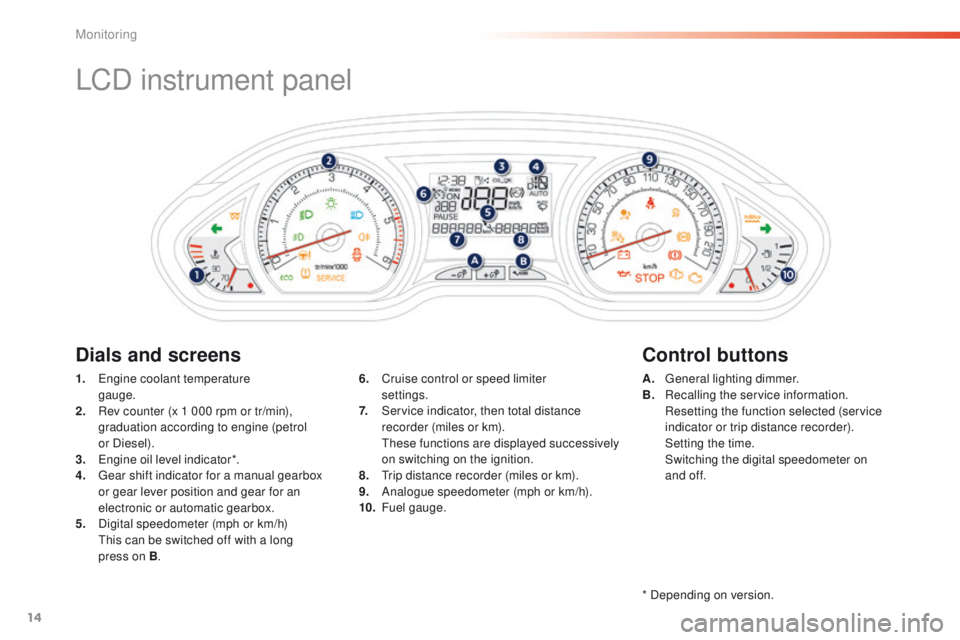
LCD instrument panel
1. Engine coolant temperature gauge.
2.
R
ev counter (x 1 000 rpm or tr/min),
graduation according to engine (petrol
or Diesel).
3.
E
ngine oil level indicator*.
4.
G
ear shift indicator for a manual gearbox
or gear lever position and gear for an
electronic or automatic gearbox.
5.
D
igital speedometer (mph or km/h)
T
his can be switched off with a long
press on B . A. G
eneral lighting dimmer.
B. R ecalling the service information.
R
esetting the function selected (service
indicator or trip distance recorder).
S
etting the time.
S
witching the digital speedometer on
and of f.
6. C
ruise control or speed limiter
settings.
7.
S
ervice indicator, then total distance
recorder (miles or km).
T
hese functions are displayed successively
on switching on the ignition.
8.
T
rip distance recorder (miles or km).
9.
A
nalogue speedometer (mph or km/h).
10.
F
uel gauge.
Dials and screens Control buttons
* Depending on version.
Monitoring
Page 17 of 450
15
2008_en_Chap01_controle-de-marche_ed01-2016
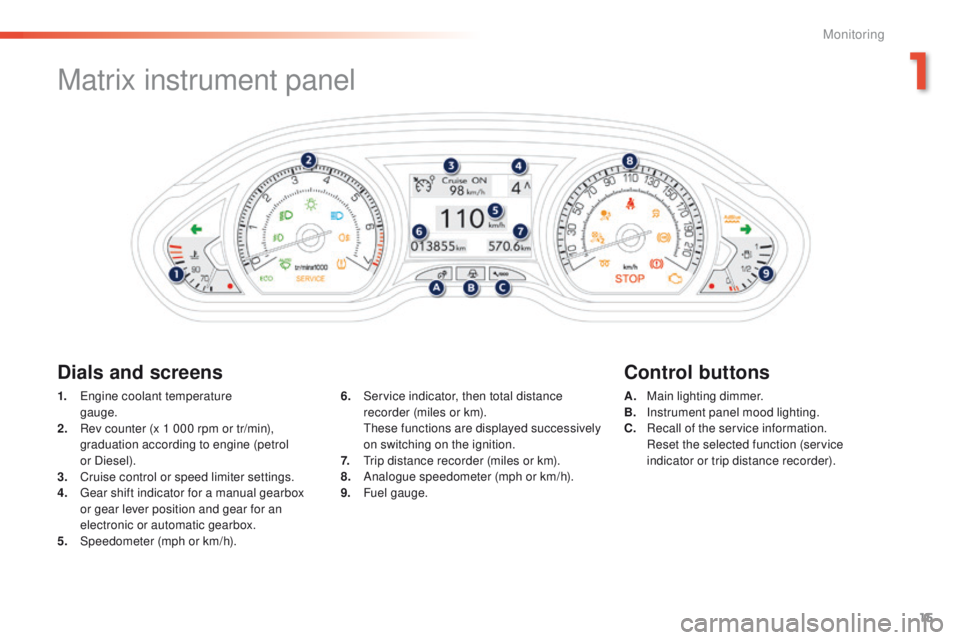
Matrix instrument panel
Dials and screensControl buttons
1. Engine coolant temperature
gauge.
2.
R
ev counter (x 1 000 rpm or tr/min),
graduation according to engine (petrol
or Diesel).
3.
C
ruise control or speed limiter settings.
4.
G
ear shift indicator for a manual gearbox
or gear lever position and gear for an
electronic or automatic gearbox.
5.
Spe
edometer (mph or km/h). A. M
ain lighting dimmer.
B. I nstrument panel mood lighting.
C.
R
ecall of the service information.
R
eset the selected function (service
indicator or trip distance recorder).
6. S
ervice indicator, then total distance
recorder (miles or km).
T
hese functions are displayed successively
on switching on the ignition.
7.
T
rip distance recorder (miles or km).
8.
A
nalogue speedometer (mph or km/h).
9.
F
uel gauge.
1
Monitoring
Page 30 of 450
28
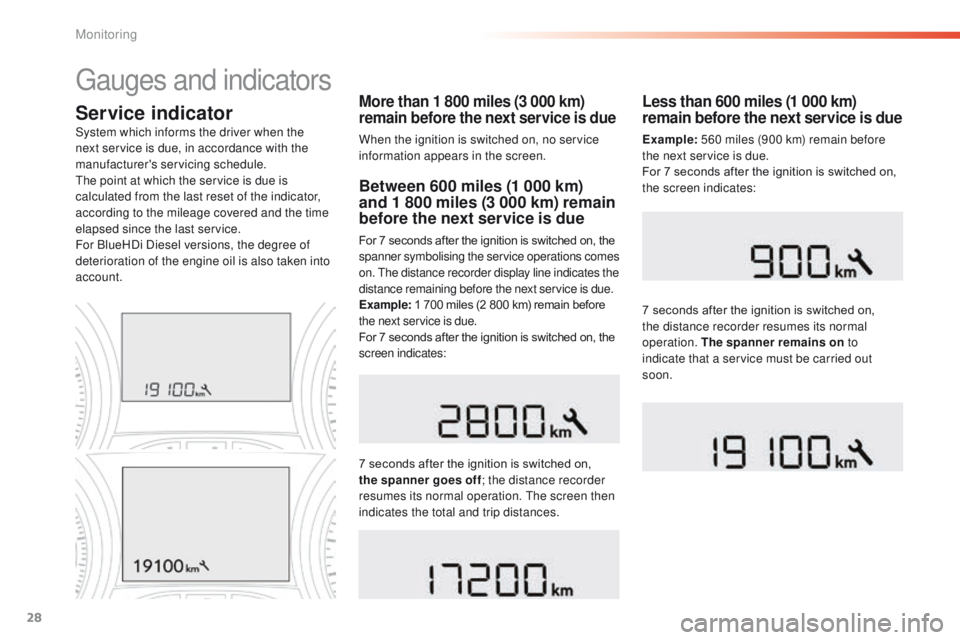
Service indicatorMore than 1 800 miles (3 000 km)
remain before the next service is due
When the ignition is switched on, no service
information appears in the screen.
System which informs the driver when the
next service is due, in accordance with the
manufacturer's servicing schedule.
The point at which the service is due is
calculated from the last reset of the indicator,
according to the mileage covered and the time
elapsed since the last service.
For BlueHDi Diesel versions, the degree of
deterioration of the engine oil is also taken into
account.
Between 600 miles (1 000 km)
and 1 800 miles (3 000 km) remain
before the next service is due
For 7 seconds after the ignition is switched on, the
spanner symbolising the service operations comes
on. The distance recorder display line indicates the
distance remaining before the next service is due.
Example:
1 700 miles (2 800 km) remain before
the next service is due.
For 7 seconds after the ignition is switched on, the
screen indicates:
7 seconds after the ignition is switched on,
the spanner goes off ; the distance recorder
resumes its normal operation. The screen then
indicates the total and trip distances.
Less than 600 miles (1 000 km)
remain before the next service is due
Example: 560 miles (900 km) remain before
the next service is due.
For 7 seconds after the ignition is switched on,
the screen indicates:
7 seconds after the ignition is switched on,
the distance recorder resumes its normal
operation. The spanner remains on to
indicate that a service must be carried out
soon.
Gauges and indicators
Monitoring
Page 32 of 450
30
Retrieving the service
information
You can access the service information at any
time.
F
P
ress the trip distance recorder reset
button.
T
he service information is displayed for a
few seconds, then disappears.
If you have to disconnect the battery
following this operation, lock the vehicle
and wait at least 5 minutes for the reset
to be registered.
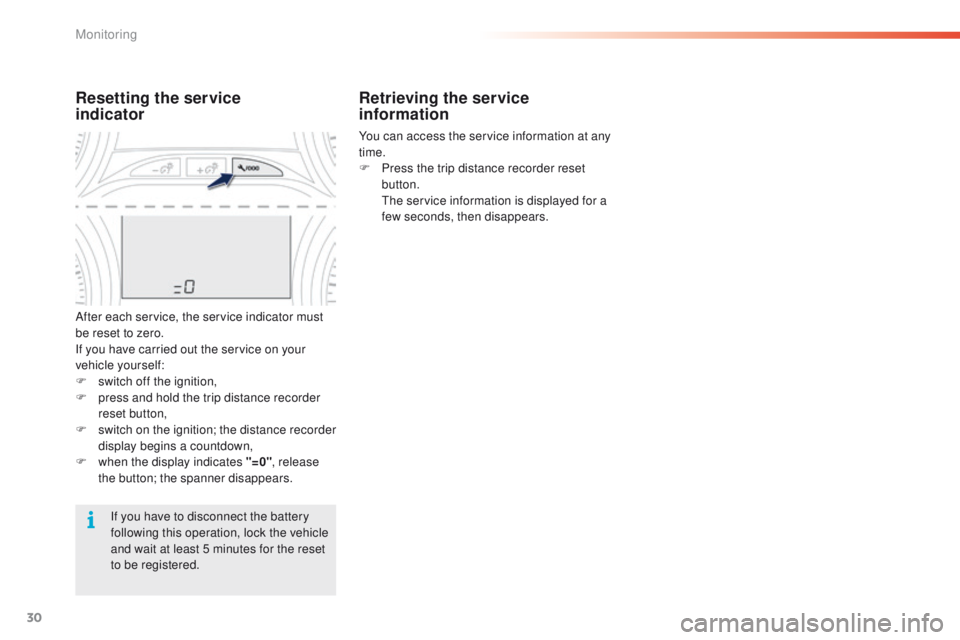
Resetting the service
indicator
After each service, the service indicator must
be reset to zero.
If you have carried out the service on your
vehicle yourself:
F
s
witch off the ignition,
F
p
ress and hold the trip distance recorder
reset button,
F
s
witch on the ignition; the distance recorder
display begins a countdown,
F
w
hen the display indicates "=0" , release
the button; the spanner disappears.
Monitoring
Page 37 of 450
35
2008_en_Chap01_controle-de-marche_ed01-2016
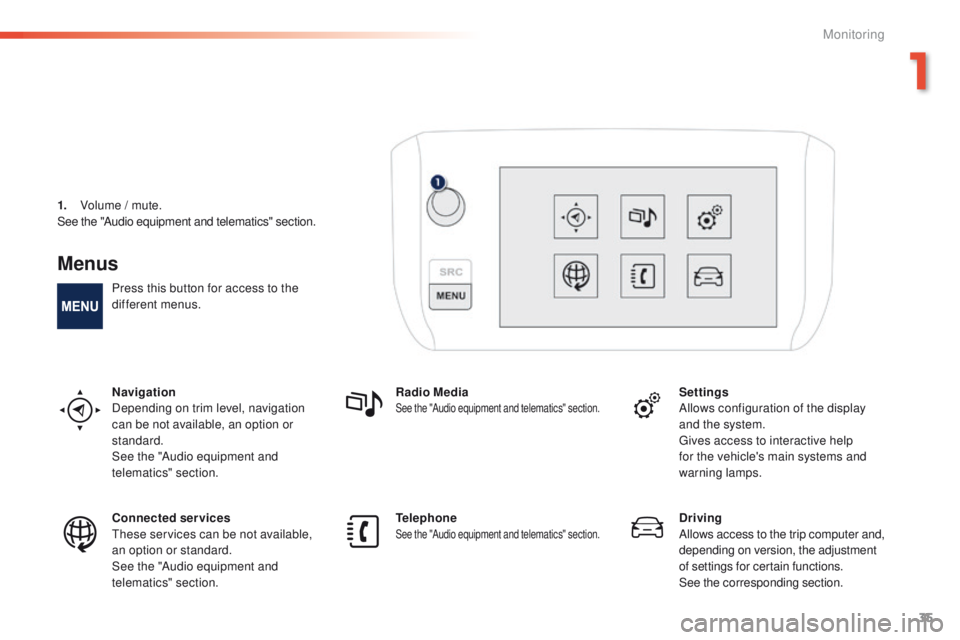
Menus
Press this button for access to the
different menus.
Navigation
Depending on trim level, navigation
can be not available, an option or
standard.
See the "Audio equipment and
telematics" section.Radio Media
See the "Audio equipment and telematics" section.Settings
Allows configuration of the display
and the system.
Gives access to interactive help
for the vehicle's main systems and
warning lamps.
Connected services
These services can be not available,
an option or standard.
See the "Audio equipment and
telematics" section. Telephone
See the "Audio equipment and telematics" section.Driving
Allows access to the trip computer and,
depending on version, the adjustment
of settings for certain functions.
See the corresponding section.
1.
V
olume / mute.
See the "Audio equipment and telematics" section.
1
Monitoring
Page 40 of 450
38
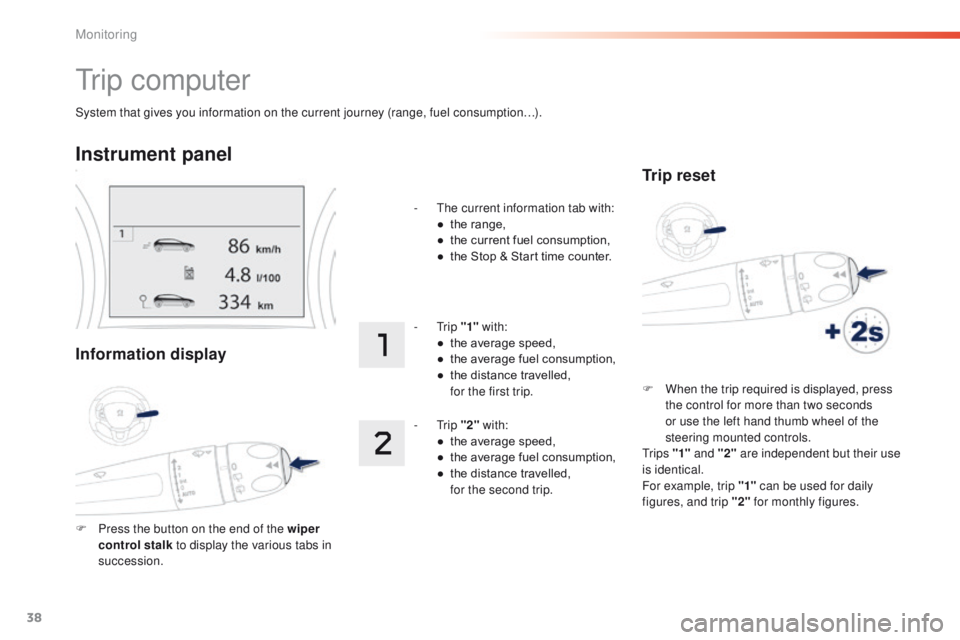
System that gives you information on the current journey (range, fuel consumption…).
Tr i p c o m p u t e r
Instrument panel
Information display
F Press the button on the end of the wiper control stalk to display the various tabs in
succession. -
T
he current information tab with:
●
t
he range,
●
t
he current fuel consumption,
●
t
he Stop & Start time counter.
- Trip
"1" with:
●
t
he average speed,
●
t
he average fuel consumption,
●
t
he distance travelled,
f
or the first trip.
- Trip
"2" with:
●
t
he average speed,
●
t
he average fuel consumption,
●
t
he distance travelled,
f
or the second trip.
Trip reset
F When the trip required is displayed, press
the control for more than two seconds
or use the left hand thumb wheel of the
steering mounted controls.
Tr i p s "1" and "2" are independent but their use
is identical.
For example, trip "1" can be used for daily
figures, and trip "2" for monthly figures.
Monitoring
Page 41 of 450
39
2008_en_Chap01_controle-de-marche_ed01-2016
Touch screen
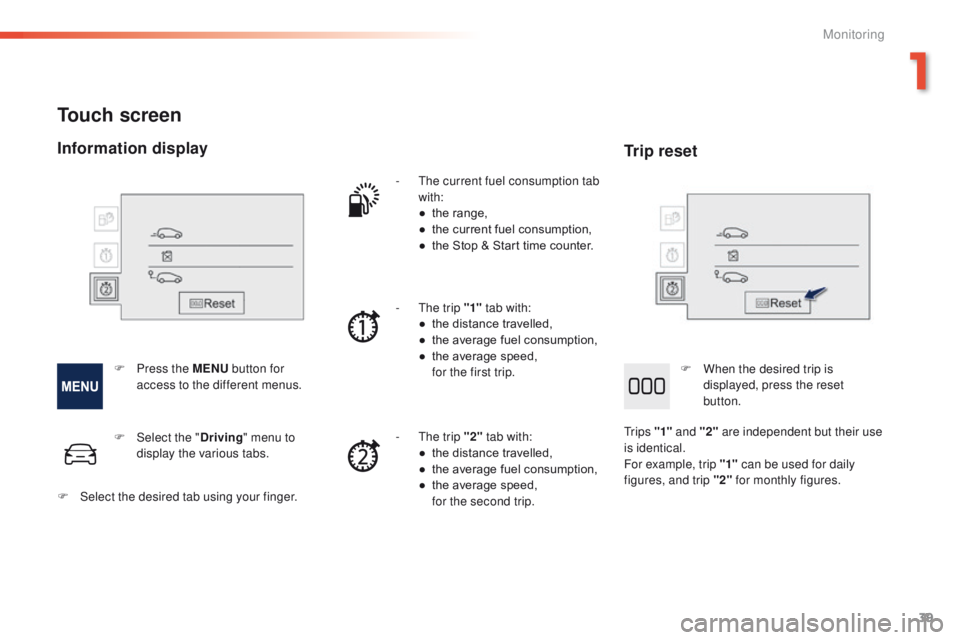
- The current fuel consumption tab with:
●
t
he range,
●
t
he current fuel consumption,
●
t
he Stop & Start time counter.
-
T
he trip "1" tab with:
●
t
he distance travelled,
●
t
he average fuel consumption,
●
t
he average speed,
f
or the first trip.
-
T
he trip "2" tab with:
●
t
he distance travelled,
●
t
he average fuel consumption,
●
t
he average speed,
f
or the second trip.
F
P
ress the MENU button for
access to the different menus.
F
Sel
ect the " Driving" menu to
display the various tabs.
F
S
elect the desired tab using your finger.
Information display Trip reset
F When the desired trip is
displayed, press the reset
button.
Tr i p s "1" and "2" are independent but their use
is identical.
For example, trip "1" can be used for daily
figures, and trip "2" for monthly figures.
1
Monitoring