radio PEUGEOT 206 CC 2001 User Guide
[x] Cancel search | Manufacturer: PEUGEOT, Model Year: 2001, Model line: 206 CC, Model: PEUGEOT 206 CC 2001Pages: 123, PDF Size: 2.88 MB
Page 45 of 123
YOUR 206 CC IN DETAIL47
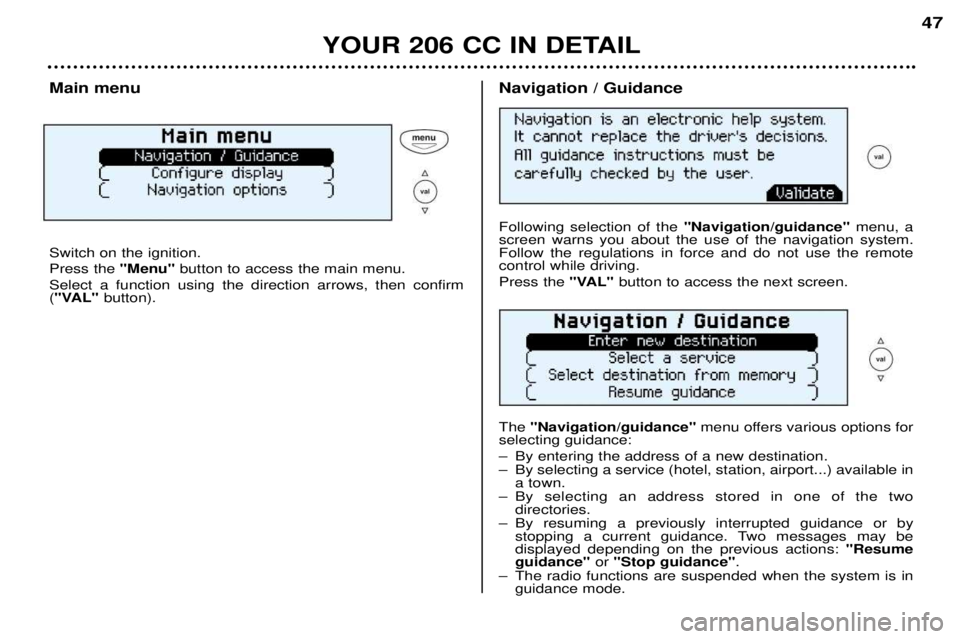
Main menu Switch on the ignition. Press the
"Menu"button to access the main menu.
Select a function using the direction arrows, then confirm ( "VAL" button).Navigation / Guidance Following selection of the "Navigation/guidance"menu, a
screen warns you about the use of the navigation system. Follow the regulations in force and do not use the remotecontrol while driving. Press the "VAL" button to access the next screen.
The "Navigation/guidance" menu offers various options for
selecting guidance:
Ð By entering the address of a new destination.
Ð By selecting a service (hotel, station, airport...) available in a town.
Ð By selecting an address stored in one of the two directories.
Ð By resuming a previously interrupted guidance or by stopping a current guidance. Two messages may be displayed depending on the previous actions: "Resume
guidance" or "Stop guidance" .
Ð The radio functions are suspended when the system is in guidance mode.
Page 46 of 123
YOUR 206 CC IN DETAIL47
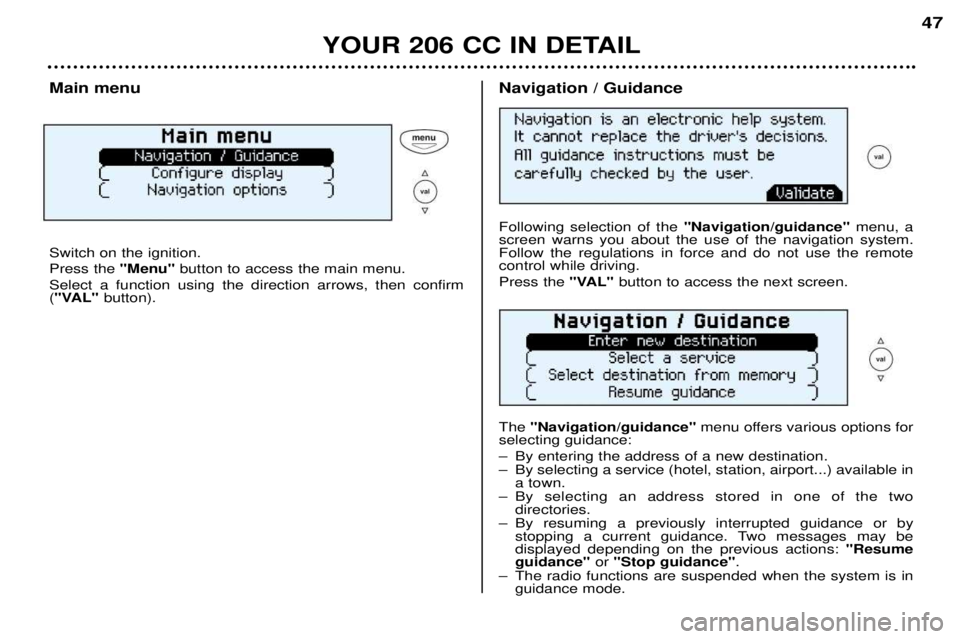
Main menu Switch on the ignition. Press the
"Menu"button to access the main menu.
Select a function using the direction arrows, then confirm ( "VAL" button).Navigation / Guidance Following selection of the "Navigation/guidance"menu, a
screen warns you about the use of the navigation system. Follow the regulations in force and do not use the remotecontrol while driving. Press the "VAL" button to access the next screen.
The "Navigation/guidance" menu offers various options for
selecting guidance:
Ð By entering the address of a new destination.
Ð By selecting a service (hotel, station, airport...) available in a town.
Ð By selecting an address stored in one of the two directories.
Ð By resuming a previously interrupted guidance or by stopping a current guidance. Two messages may be displayed depending on the previous actions: "Resume
guidance" or "Stop guidance" .
Ð The radio functions are suspended when the system is in guidance mode.
Page 106 of 123
PRACTICAL ASPECTS OF YOUR VEHICLE103
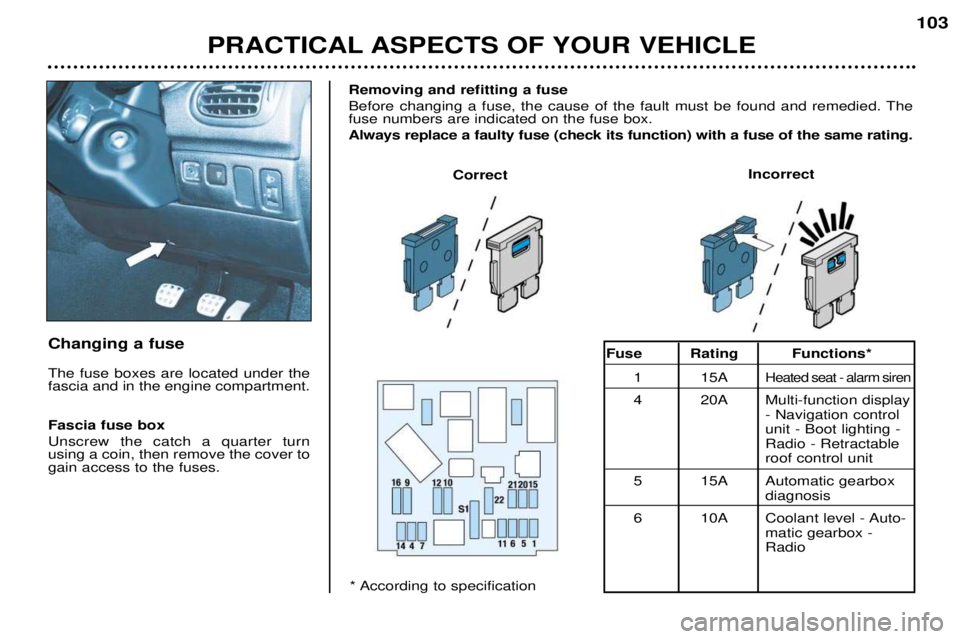
Changing a fuse The fuse boxes are located under the fascia and in the engine compartment. Fascia fuse box Unscrew the catch a quarter turn using a coin, then remove the cover togain access to the fuses.Removing and refitting a fuse
Before changing a fuse, the cause of the fault must be found and remedied. The fuse numbers are indicated on the fuse box. Always replace a faulty fuse (check its function) with a fuse of the same rating.
Correct
Incorrect
* According to specificationFuse Rating Functions*
1 15A
Heated seat - alarm siren
4 20A Multi-function display - Navigation control unit - Boot lighting -Radio - Retractableroof control unit
5 15A Automatic gearbox diagnosis
6 10A Coolant level - Auto- matic gearbox -Radio
Page 107 of 123
PRACTICAL ASPECTS OF YOUR VEHICLE103
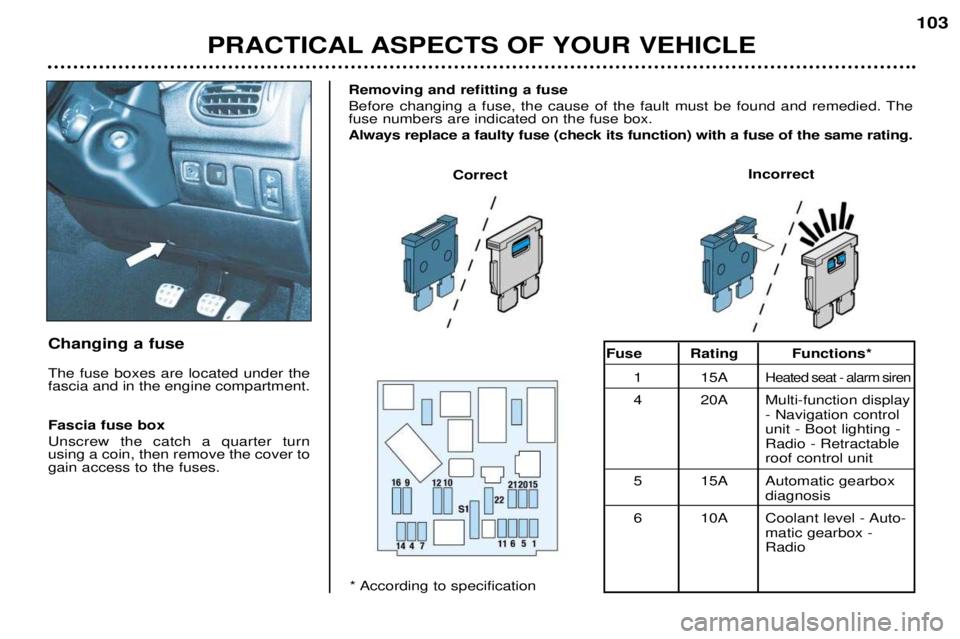
Changing a fuse The fuse boxes are located under the fascia and in the engine compartment. Fascia fuse box Unscrew the catch a quarter turn using a coin, then remove the cover togain access to the fuses.Removing and refitting a fuse
Before changing a fuse, the cause of the fault must be found and remedied. The fuse numbers are indicated on the fuse box. Always replace a faulty fuse (check its function) with a fuse of the same rating.
Correct
Incorrect
* According to specificationFuse Rating Functions*
1 15A
Heated seat - alarm siren
4 20A Multi-function display - Navigation control unit - Boot lighting -Radio - Retractableroof control unit
5 15A Automatic gearbox diagnosis
6 10A Coolant level - Auto- matic gearbox -Radio
Page 108 of 123
PRACTICAL ASPECTS OF YOUR VEHICLE
104
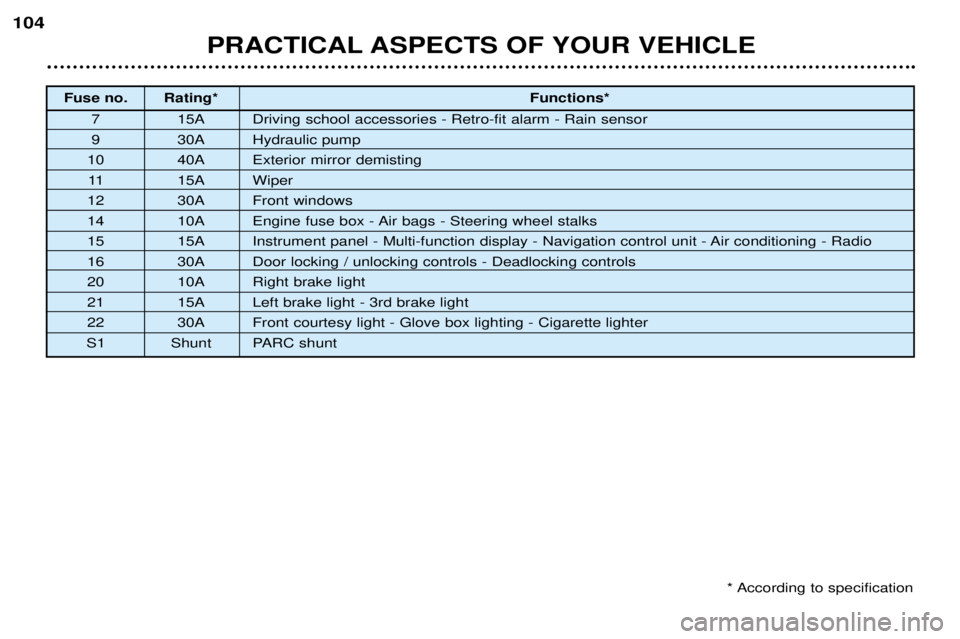
Fuse no. Rating*
Functions*
7 15A Driving school accessories - Retro-fit alarm - Rain sensor
9 30A Hydraulic pump
10 40A Exterior mirror demisting 11 15A Wiper
12 30A Front windows
14 10A Engine fuse box - Air bags - Steering wheel stalks
15 15A Instrument panel - Multi-function display - Navigation control unit - Air conditioning - Radio
16 30A Door locking / unlocking controls - Deadlocking controls
20 10A Right brake light
21 15A Left brake light - 3rd brake light
22 30A Front courtesy light - Glove box lighting - Cigarette lighter
S1 Shunt PARC shunt
* According to specification
Page 109 of 123
PRACTICAL ASPECTS OF YOUR VEHICLE105
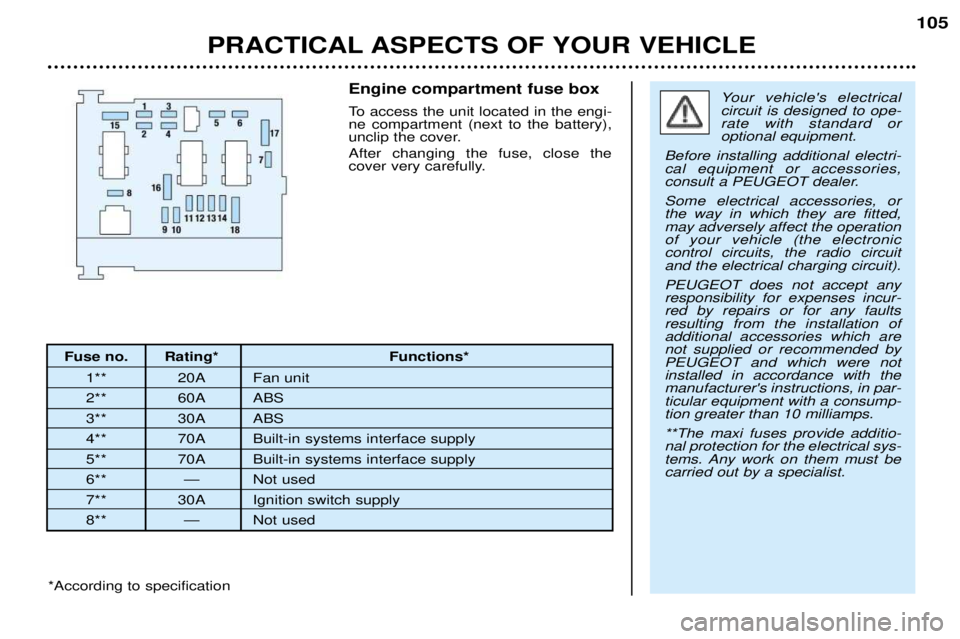
Fuse no. Rating* Functions*
1** 20A Fan unit
2** 60A ABS
3** 30A ABS
4** 70A Built-in systems interface supply
5** 70A Built-in systems interface supply
6** Ñ Not used
7** 30A Ignition switch supply
8** Ñ Not used Engine compartment fuse box
To access the unit located in the engi- ne compartment (next to the battery),
unclip the cover. After changing the fuse, close the
cover very carefully.
Your vehicle's electrical circuit is designed to ope-rate with standard oroptional equipment.
Before installing additional electri-cal equipment or accessories,
consult a PEUGEOT dealer. Some electrical accessories, or the way in which they are fitted,may adversely affect the operationof your vehicle (the electroniccontrol circuits, the radio circuitand the electrical charging circuit). PEUGEOT does not accept any responsibility for expenses incur-red by repairs or for any faultsresulting from the installation ofadditional accessories which arenot supplied or recommended byPEUGEOT and which were notinstalled in accordance with themanufacturer's instructions, in par-ticular equipment with a consump-tion greater than 10 milliamps. **The maxi fuses provide additio- nal protection for the electrical sys-
tems. Any work on them must becarried out by a specialist.
*According to specification