service PEUGEOT 206 CC 2001 User Guide
[x] Cancel search | Manufacturer: PEUGEOT, Model Year: 2001, Model line: 206 CC, Model: PEUGEOT 206 CC 2001Pages: 123, PDF Size: 2.88 MB
Page 27 of 123
INSTRUMENTS AND CONTROLS
30
Instrument panel display After switching on the ignition, three functions are shown in succession:
- service indicator (see corresponding section),
- engine oil level indicator,
- total distance recorder/total and trip distances.Note:
the total and trip distances are displayed for 30 seconds when the ignition
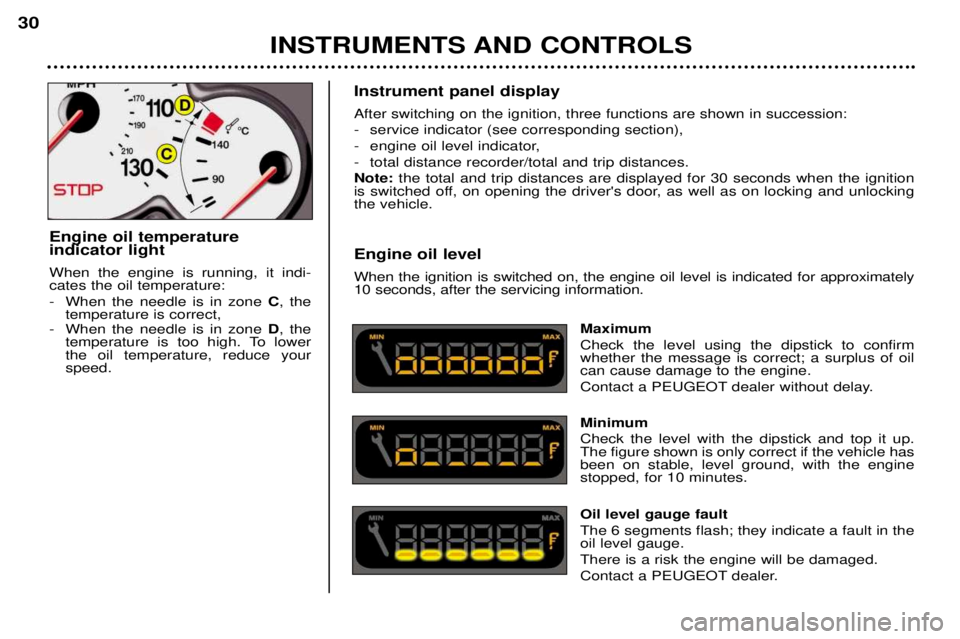
is switched off, on opening the driver's door, as well as on locking and unlocking the vehicle. Engine oil level When the ignition is switched on, the engine oil level is indicated for approximately 10 seconds, after the servicing information.
Maximum Check the level using the dipstick to confirm whether the message is correct; a surplus of oilcan cause damage to the engine.
Contact a PEUGEOT dealer without delay. Minimum Check the level with the dipstick and top it up. The figure shown is only correct if the vehicle hasbeen on stable, level ground, with the enginestopped, for 10 minutes. Oil level gauge fault The 6 segments flash; they indicate a fault in the oil level gauge. There is a risk the engine will be damaged.
Contact a PEUGEOT dealer.
Engine oil temperature indicator light When the engine is running, it indi- cates the oil temperature:
- When the needle is in zone
C, the
temperature is correct,
- When the needle is in zone D, the
temperature is too high. To lower the oil temperature, reduce yourspeed.
Page 28 of 123
INSTRUMENTS AND CONTROLS
30
Instrument panel display After switching on the ignition, three functions are shown in succession:
- service indicator (see corresponding section),
- engine oil level indicator,
- total distance recorder/total and trip distances.Note:
the total and trip distances are displayed for 30 seconds when the ignition
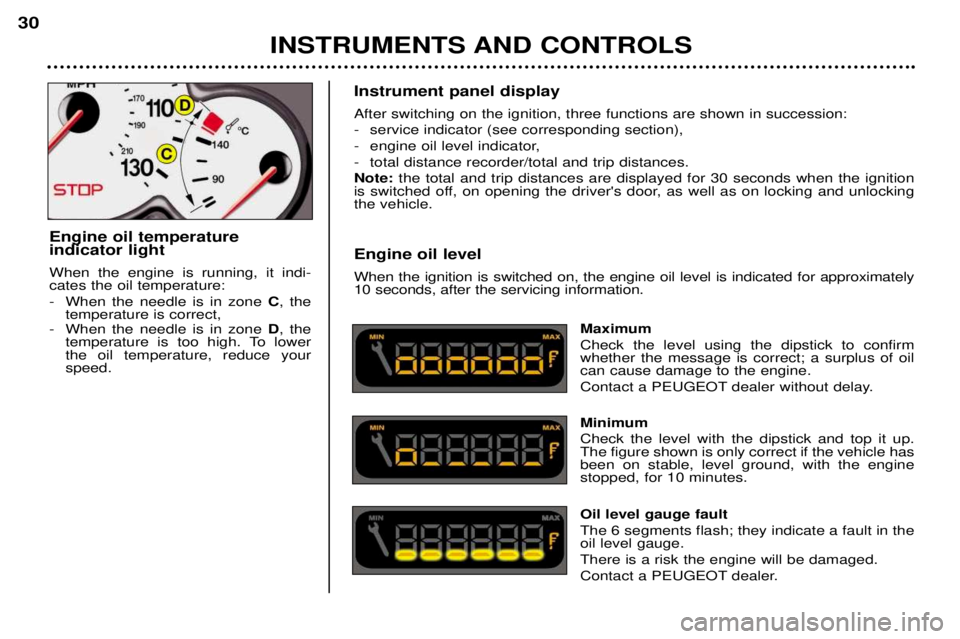
is switched off, on opening the driver's door, as well as on locking and unlocking the vehicle. Engine oil level When the ignition is switched on, the engine oil level is indicated for approximately 10 seconds, after the servicing information.
Maximum Check the level using the dipstick to confirm whether the message is correct; a surplus of oilcan cause damage to the engine.
Contact a PEUGEOT dealer without delay. Minimum Check the level with the dipstick and top it up. The figure shown is only correct if the vehicle hasbeen on stable, level ground, with the enginestopped, for 10 minutes. Oil level gauge fault The 6 segments flash; they indicate a fault in the oil level gauge. There is a risk the engine will be damaged.
Contact a PEUGEOT dealer.
Engine oil temperature indicator light When the engine is running, it indi- cates the oil temperature:
- When the needle is in zone
C, the
temperature is correct,
- When the needle is in zone D, the
temperature is too high. To lower the oil temperature, reduce yourspeed.
Page 39 of 123

YOUR 206 CC IN DETAIL41
PTY function: This allows you to listen to stations broadcasting a specific type of programme (news, culture, sport, rock etc.). With FMselected, press the "TA "button for two seconds to switch this function on or off.
To search for a PTYprogramme:
- select the PTYfunction,
- briefly press button Lor Nto scroll down the list of the various types of programmes offered.
- when the programme of your choice is displayed, keep button Lor Npressed for two seconds
to carry out an automatic search (after an automatic search the PTYfunction is switched off).
In PTY mode the different types of programmes can be stored in memory. To do this, press the
preselection buttons "1"to "6" for two seconds.
Briefly press the corresponding button to recall the type of programme stored in the memory.
EON system
This connects stations which are part of the same network. It enables the broadcasting of traffic information or a PTY
programme by a station that is part of the same network as the station to which you are listening. This service is available when you have selected the TAtraffic information programme or the PTYfunction.
Page 42 of 123
YOUR 206 CC IN DETAIL
44
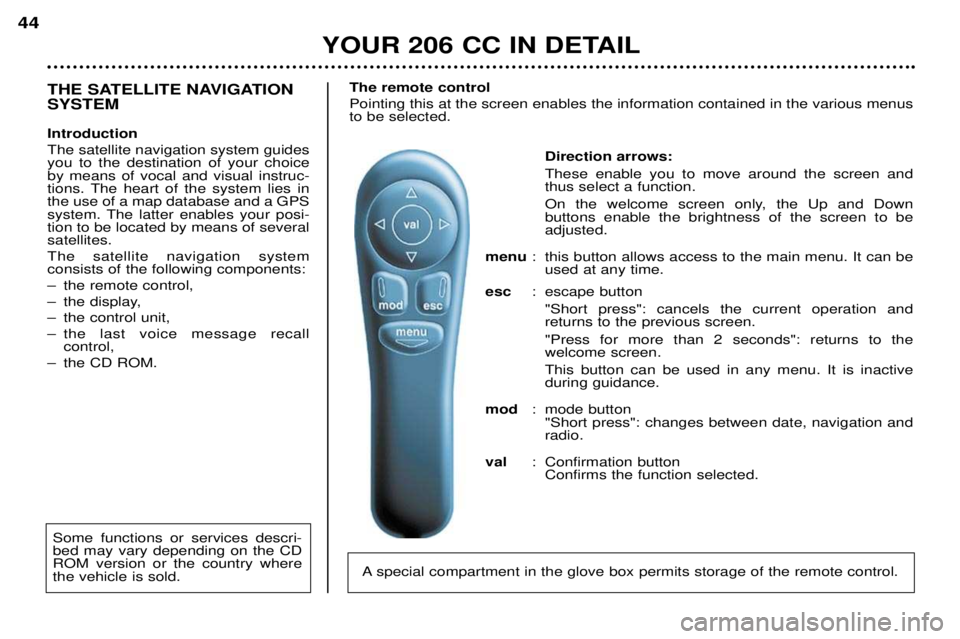
Direction arrows: These enable you to move around the screen and thus select a function.
On the welcome screen only, the Up and Down buttons enable the brightness of the screen to beadjusted.
menu : this button allows access to the main menu. It can be
used at any time.
esc : escape button
"Short press": cancels the current operation andreturns to the previous screen. "Press for more than 2 seconds": returns to the welcome screen. This button can be used in any menu. It is inactive during guidance.
mod : mode button
"Short press": changes between date, navigation andradio.
val : Confirmation button
Confirms the function selected.
THE SATELLITE NAVIGATION SYSTEM Introduction The satellite navigation system guides you to the destination of your choiceby means of vocal and visual instruc-
tions. The heart of the system lies inthe use of a map database and a GPS
system. The latter enables your posi-tion to be located by means of severalsatellites. The satellite navigation system consists of the following components:
Ð the remote control,
Ð the display,
Ð the control unit,
Ð the last voice message recall control,
Ð the CD ROM. The remote controlPointing this at the screen enables the information contained in the various menus to be selected.
A special compartment in the glove box permits storage of the remote control.
Some functions or services descri- bed may vary depending on the CDROM version or the country wherethe vehicle is sold.
Page 45 of 123
YOUR 206 CC IN DETAIL47
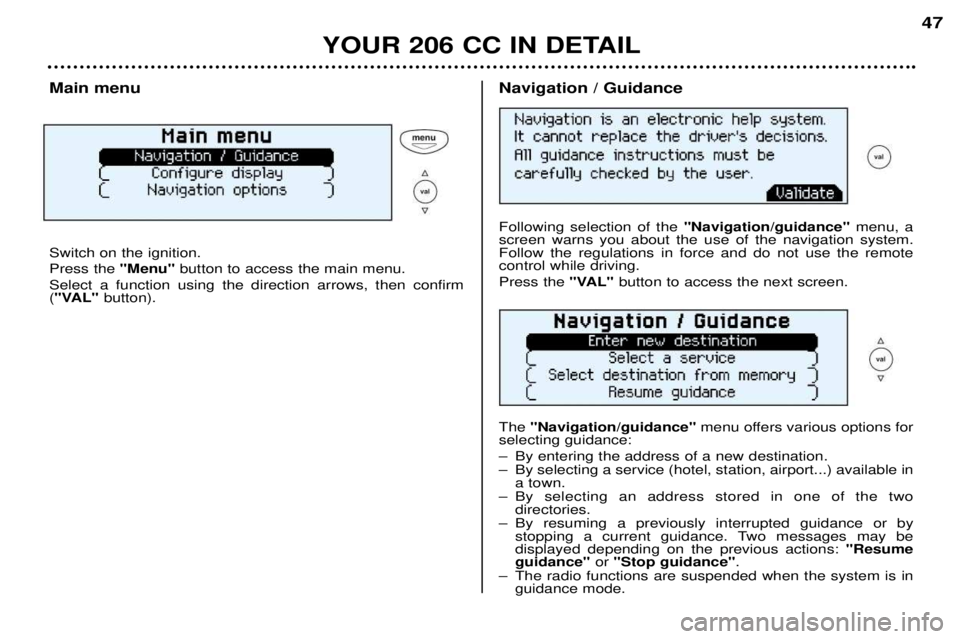
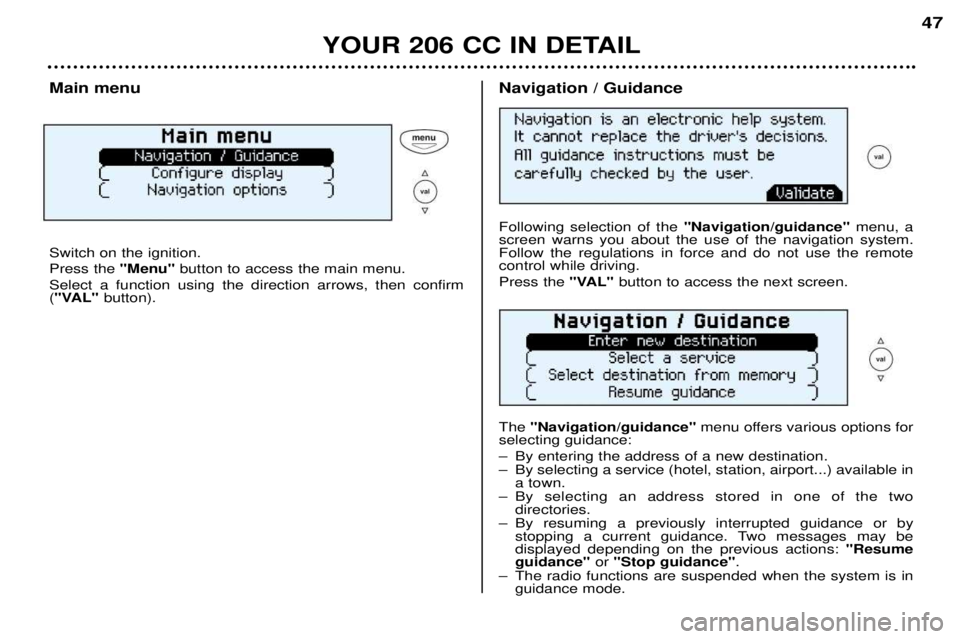
Main menu Switch on the ignition. Press the
"Menu"button to access the main menu.
Select a function using the direction arrows, then confirm ( "VAL" button).Navigation / Guidance Following selection of the "Navigation/guidance"menu, a
screen warns you about the use of the navigation system. Follow the regulations in force and do not use the remotecontrol while driving. Press the "VAL" button to access the next screen.
The "Navigation/guidance" menu offers various options for
selecting guidance:
Ð By entering the address of a new destination.
Ð By selecting a service (hotel, station, airport...) available in a town.
Ð By selecting an address stored in one of the two directories.
Ð By resuming a previously interrupted guidance or by stopping a current guidance. Two messages may be displayed depending on the previous actions: "Resume
guidance" or "Stop guidance" .
Ð The radio functions are suspended when the system is in guidance mode.
Page 46 of 123
YOUR 206 CC IN DETAIL47
Main menu Switch on the ignition. Press the
"Menu"button to access the main menu.
Select a function using the direction arrows, then confirm ( "VAL" button).Navigation / Guidance Following selection of the "Navigation/guidance"menu, a
screen warns you about the use of the navigation system. Follow the regulations in force and do not use the remotecontrol while driving. Press the "VAL" button to access the next screen.
The "Navigation/guidance" menu offers various options for
selecting guidance:
Ð By entering the address of a new destination.
Ð By selecting a service (hotel, station, airport...) available in a town.
Ð By selecting an address stored in one of the two directories.
Ð By resuming a previously interrupted guidance or by stopping a current guidance. Two messages may be displayed depending on the previous actions: "Resume
guidance" or "Stop guidance" .
Ð The radio functions are suspended when the system is in guidance mode.
Page 49 of 123
YOUR 206 CC IN DETAIL
50
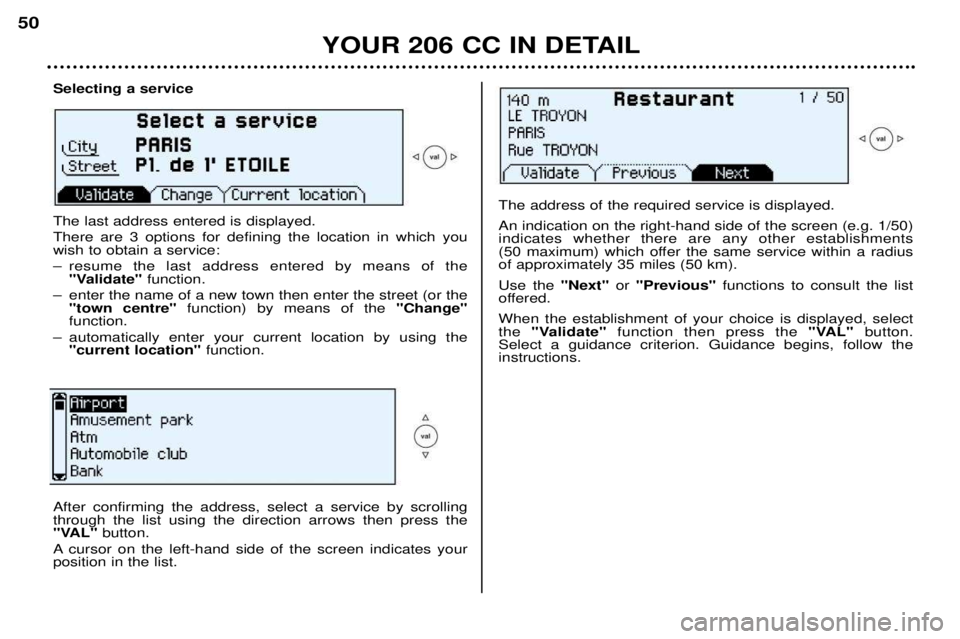
Selecting a service The last address entered is displayed. There are 3 options for defining the location in which you wish to obtain a service:
Ð resume the last address entered by means of the
"Validate" function.
Ð enter the name of a new town then enter the street (or the "town centre" function) by means of the "Change"
function.
Ð automatically enter your current location by using the "current location" function.
The address of the required service is displayed. An indication on the right-hand side of the screen (e.g. 1/50) indicates whether there are any other establishments
(50 maximum) which offer the same service within a radiusof approximately 35 miles (50 km). Use the "Next"or "Previous" functions to consult the list
offered.When the establishment of your choice is displayed, select the "Validate" function then press the "VAL"button.
Select a guidance criterion. Guidance begins, follow the instructions.
After confirming the address, select a service by scrolling through the list using the direction arrows then press the
"VAL" button.
A cursor on the left-hand side of the screen indicates yourposition in the list.
Page 96 of 123

PRACTICAL ASPECTS OF YOUR VEHICLE
94
Power steering reservoir
Open the reservoir, with the engine
cold. The level should always beabove the MINI mark, close to theMAXI mark.
Windscreen wash reservoir For best quality cleaning and for your
safety, we recommend that you use pro-
ducts approved by PEUGEOT (capacity2.8 litres). Battery
At the start of winter, have your batte-
ry checked by a PEUGEOT dealer. Air filter Regular replacement of the filter element is essential. If you drive in very dustyconditions, change it twice as often. Brake pads Brake pad wear depends on the style of driving, in particular for vehicleswhich are used in town, for short jour-neys. It may be necessary to checkthe thickness of the pads even bet-ween services. Manual gearbox This does not need an oil change. Check the level according to the manufacturer'sservicing schedule. Autoadaptive automatic gearbox This does not need an oil change: have
the level checked by a PEUGEOT dea-ler according to the manufacturer's ser-vicing schedule.Only use products approved
by PEUGEOT.
To ensure best performance from components as impor-
tant as the power steering and the bra-king system, PEUGEOT selects andoffers quite specific products.