service PEUGEOT 206 CC 2002 User Guide
[x] Cancel search | Manufacturer: PEUGEOT, Model Year: 2002, Model line: 206 CC, Model: PEUGEOT 206 CC 2002Pages: 128, PDF Size: 1.73 MB
Page 27 of 128
INSTRUMENTS AND CONTROLS
30
Instrument panel display After switching on the ignition, three functions are shown in succession:
Ð service indicator (see corresponding section),
Ð engine oil level indicator,Ð total distance recorder/total and trip distances.Note:
the total and trip distances are displayed for 30 seconds when the ignition
is switched off, on opening the driver's door, as well as on locking and unlocking the vehicle. Engine oil level When the ignition is switched on, the engine oil level is indicated for approximately 10 seconds, after the servicing information.
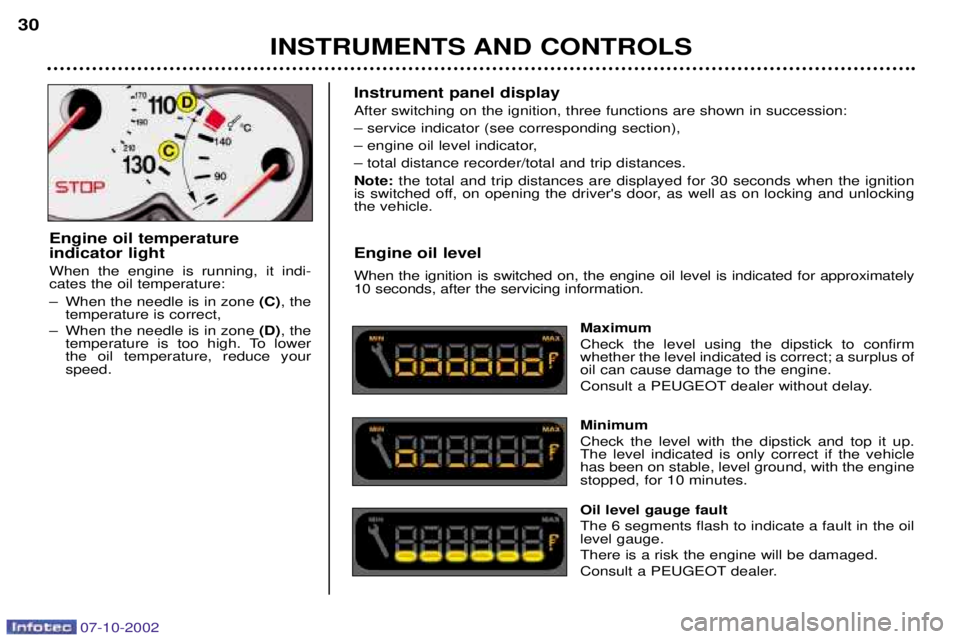
Maximum Check the level using the dipstick to confirm whether the level indicated is correct; a surplus ofoil can cause damage to the engine.
Consult a PEUGEOT dealer without delay. Minimum Check the level with the dipstick and top it up. The level indicated is only correct if the vehiclehas been on stable, level ground, with the enginestopped, for 10 minutes. Oil level gauge fault The 6 segments flash to indicate a fault in the oil level gauge. There is a risk the engine will be damaged.
Consult a PEUGEOT dealer.
Engine oil temperature indicator light When the engine is running, it indi- cates the oil temperature:
Ð When the needle is in zone
(C), the
temperature is correct,
Ð When the needle is in zone (D), the
temperature is too high. To lower the oil temperature, reduce yourspeed.
07-10-2002
Page 28 of 128
INSTRUMENTS AND CONTROLS
30
Instrument panel display After switching on the ignition, three functions are shown in succession:
Ð service indicator (see corresponding section),
Ð engine oil level indicator,Ð total distance recorder/total and trip distances.Note:
the total and trip distances are displayed for 30 seconds when the ignition
is switched off, on opening the driver's door, as well as on locking and unlocking the vehicle. Engine oil level When the ignition is switched on, the engine oil level is indicated for approximately 10 seconds, after the servicing information.
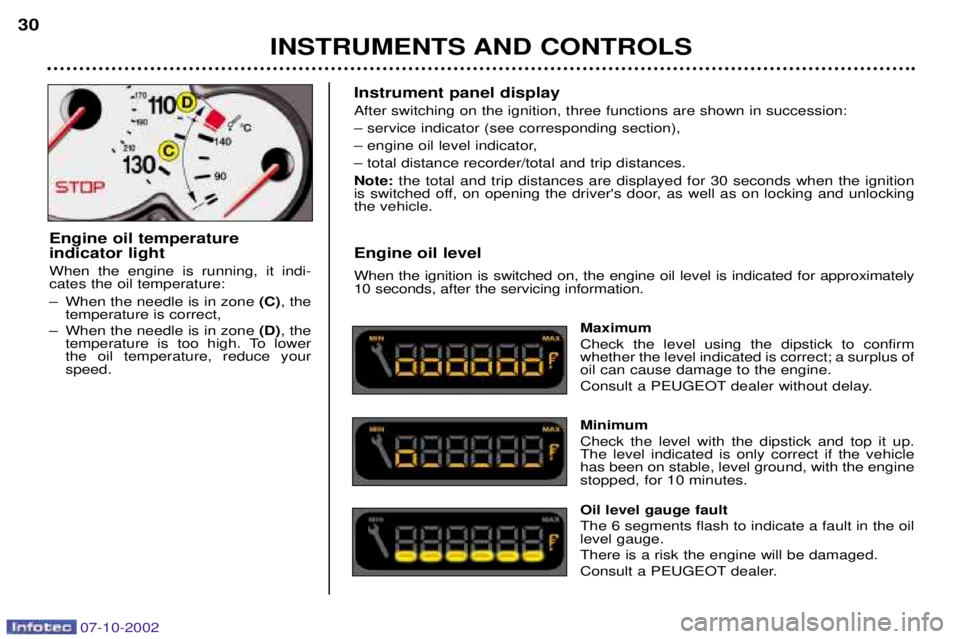
Maximum Check the level using the dipstick to confirm whether the level indicated is correct; a surplus ofoil can cause damage to the engine.
Consult a PEUGEOT dealer without delay. Minimum Check the level with the dipstick and top it up. The level indicated is only correct if the vehiclehas been on stable, level ground, with the enginestopped, for 10 minutes. Oil level gauge fault The 6 segments flash to indicate a fault in the oil level gauge. There is a risk the engine will be damaged.
Consult a PEUGEOT dealer.
Engine oil temperature indicator light When the engine is running, it indi- cates the oil temperature:
Ð When the needle is in zone
(C), the
temperature is correct,
Ð When the needle is in zone (D), the
temperature is too high. To lower the oil temperature, reduce yourspeed.
07-10-2002
Page 39 of 128

YOUR 206 CC IN DETAIL41
PTY function: This allows you to listen to stations broadcasting a specific type of programme (news, culture, sport, rock etc.). With FMselected, press the "TA"button for two seconds to switch this function on or off.
To search for a PTYprogramme:
Ð select the PTYfunction,
Ð briefly press button Jor Lto scroll down the list of the various types of programmes offered.
Ð when the programme of your choice is displayed, keep button Jor Lpressed for two seconds to
carry out an automatic search (after an automatic search the PTYfunction is switched off).
In PTY mode the different types of programmes can be stored in memory. To do this, press the preselection buttons "1"to "6"
for two seconds. Briefly press the corresponding button to recall the type of programme stored in the memory.
EON system
This connects stations which are part of the same network. It enables the broadcasting of traffic information or a PTY
programme by a station that is part of the same network as the station to which you are listening. This service is available when you have selected the TAtraffic information programme or the PTYfunction.
07-10-2002
Page 42 of 128
YOUR 206 CC IN DETAIL
44
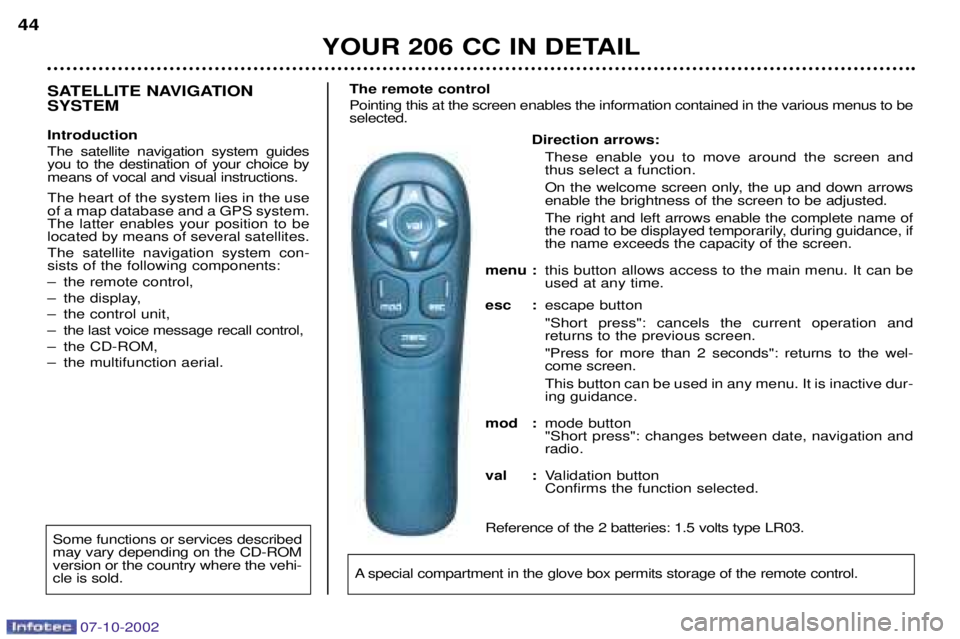
Direction arrows:
These enable you to move around the screen and thus select a function.
On the welcome screen only, the up and down arrows enable the brightness of the screen to be adjusted. The right and left arrows enable the complete name of
the road to be displayed temporarily, during guidance, ifthe name exceeds the capacity of the screen.
menu : this button allows access to the main menu. It can beused at any time.
esc : escape button "Short press": cancels the current operation and returns to the previous screen. "Press for more than 2 seconds": returns to the wel- come screen. This button can be used in any menu. It is inactive dur- ing guidance.
mod : mode button"Short press": changes between date, navigation andradio.
val : Validation buttonConfirms the function selected.
Reference of the 2 batteries: 1.5 volts type LR03.
SATELLITE NAVIGATION SYSTEM Introduction The satellite navigation system guides you to the destination of your choice bymeans of vocal and visual instructions. The heart of the system lies in the use of a map database and a GPS system.The latter enables your position to belocated by means of several satellites. The satellite navigation system con- sists of the following components:
Ð the remote control,
Ð the display,
Ð the control unit,
Ð the last voice message recall control,
Ð the CD-ROM,
Ð the multifunction aerial. The remote control Pointing this at the screen enables the information contained in the various menus to be selected.
A special compartment in the glove box permits storage of the remote control.
Some functions or services described may vary depending on the CD-ROMversion or the country where the vehi-cle is sold.
07-10-2002
Page 45 of 128
07-10-2002
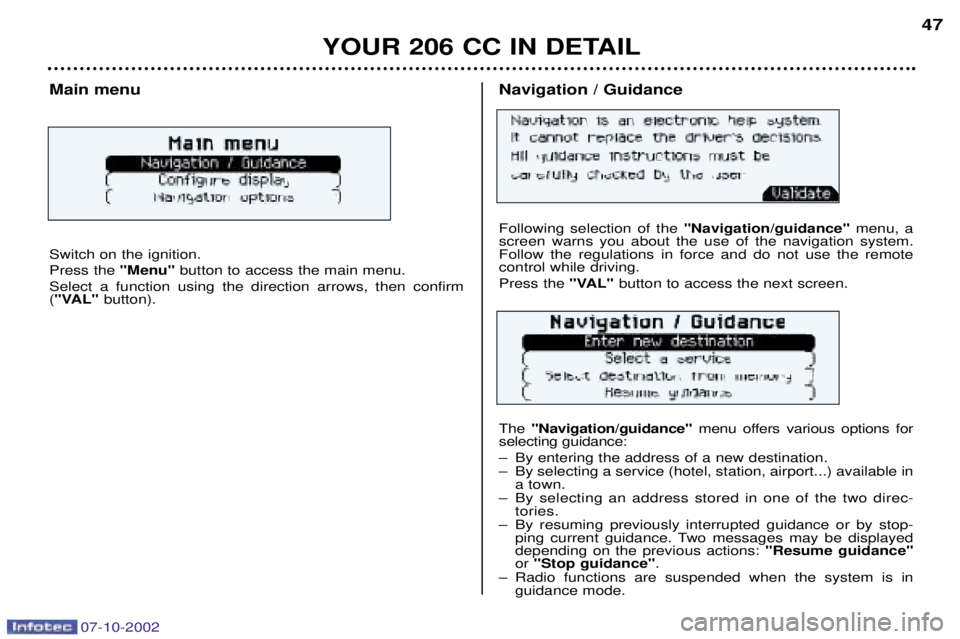
Navigation / Guidance Following selection of the"Navigation/guidance"menu, a
screen warns you about the use of the navigation system. Follow the regulations in force and do not use the remotecontrol while driving. Press the "VAL" button to access the next screen.
The "Navigation/guidance" menu offers various options for
selecting guidance:
Ð By entering the address of a new destination.
Ð By selecting a service (hotel, station, airport...) available in a town.
Ð By selecting an address stored in one of the two direc- tories.
Ð By resuming previously interrupted guidance or by stop- ping current guidance. Two messages may be displayed depending on the previous actions: "Resume guidance"
or "Stop guidance" .
Ð Radio functions are suspended when the system is in guidance mode.Main menu Switch on the ignition. Press the "Menu"button to access the main menu.
Select a function using the direction arrows, then confirm ( "VAL" button).
YOUR 206 CC IN DETAIL 47
Page 46 of 128
07-10-2002
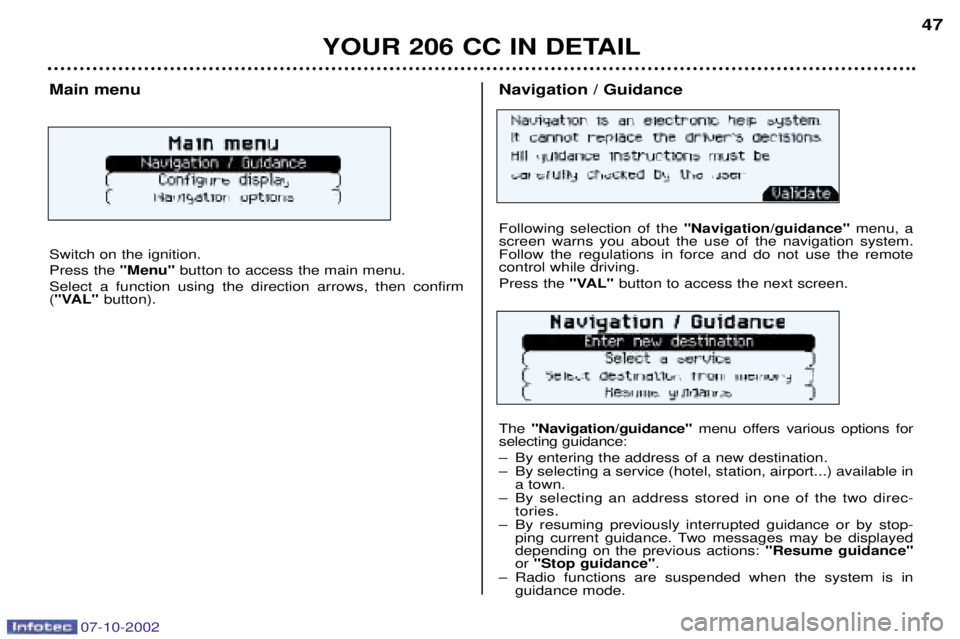
Navigation / Guidance Following selection of the"Navigation/guidance"menu, a
screen warns you about the use of the navigation system. Follow the regulations in force and do not use the remotecontrol while driving. Press the "VAL" button to access the next screen.
The "Navigation/guidance" menu offers various options for
selecting guidance:
Ð By entering the address of a new destination.
Ð By selecting a service (hotel, station, airport...) available in a town.
Ð By selecting an address stored in one of the two direc- tories.
Ð By resuming previously interrupted guidance or by stop- ping current guidance. Two messages may be displayed depending on the previous actions: "Resume guidance"
or "Stop guidance" .
Ð Radio functions are suspended when the system is in guidance mode.Main menu Switch on the ignition. Press the "Menu"button to access the main menu.
Select a function using the direction arrows, then confirm ( "VAL" button).
YOUR 206 CC IN DETAIL 47
Page 49 of 128
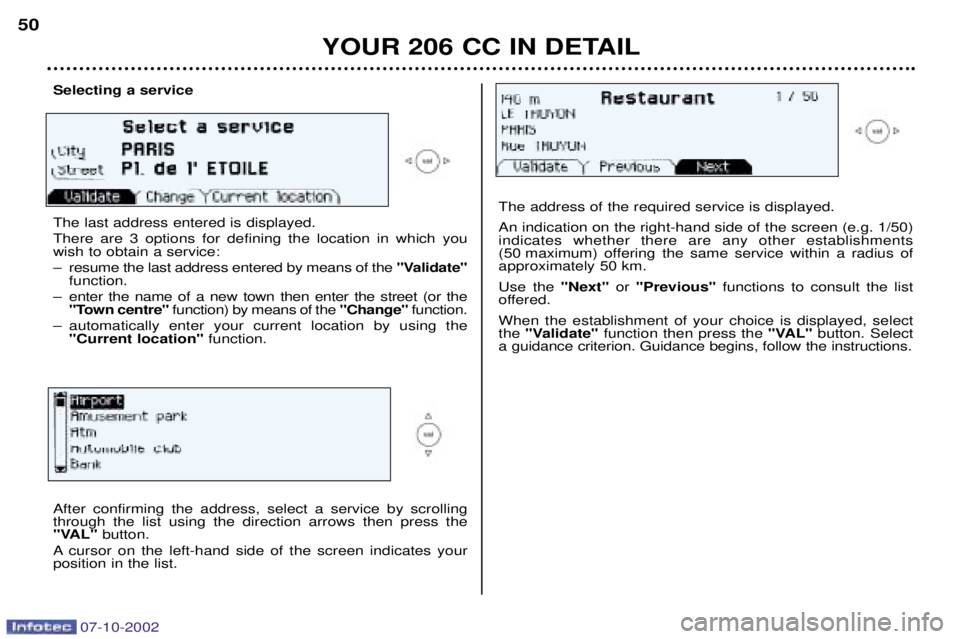
After confirming the address, select a service by scrolling through the list using the direction arrows then press the
"VAL"button.
A cursor on the left-hand side of the screen indicates yourposition in the list.
Selecting a service The last address entered is displayed. There are 3 options for defining the location in which you wish to obtain a service:
Ð resume the last address entered by means of the "Validate"
function.
Ð enter the name of a new town then enter the street (or the "Town centre" function) by means of the "Change"function.
Ð automatically enter your current location by using the "Current location" function.
YOUR 206 CC IN DETAIL
50
The address of the required service is displayed. An indication on the right-hand side of the screen (e.g. 1/50) indicates whether there are any other establishments
(50 maximum) offering the same service within a radius ofapproximately 50 km. Use the
"Next"or "Previous" functions to consult the list
offered.When the establishment of your choice is displayed, select the "Validate" function then press the "VAL"button. Select
a guidance criterion. Guidance begins, follow the instructions.
07-10-2002
Page 102 of 128

07-10-2002
PRACTICAL INFORMATION
96
Power steering reservoir
Open the reservoir, with the engine
cold. The level should always beabove the MINI mark, close to theMAXI mark.
Windscreen wash reservoir For best quality cleaning and for your
safety, we recommend that you useproducts approved by PEUGEOT(capacity 2.8 litres). Battery
At the start of winter, have your battery
checked by a PEUGEOT dealer. Air filter Regular replacement of the filter ele- ment is essential. If you drive in verydusty conditions, change it twice asoften. Brake pads Brake pad wear depends on the style of driving, in particular for vehicleswhich are used in town, for short jour-neys. It may be necessary to checkthe thickness of the pads evenbetween services. Manual gearbox This does not need an oil change: have the level checked by a PEU-
GEOT dealer according to the manu-facturer's servicing schedule. Autoadaptive automatic gearbox This does not need an oil change: have the level checked by a PEU-
GEOT dealer according to the manu-facturer's servicing schedule.Only use products appro-
ved by PEUGEOT.
To ensure best perfor-mance from components
as important as the power steeringand the braking system, PEUGEOTselects and offers quite specificproducts.