ECO mode Peugeot 206 Dag 2003 User Guide
[x] Cancel search | Manufacturer: PEUGEOT, Model Year: 2003, Model line: 206 Dag, Model: Peugeot 206 Dag 2003Pages: 168, PDF Size: 2.1 MB
Page 55 of 168
26-05-2003
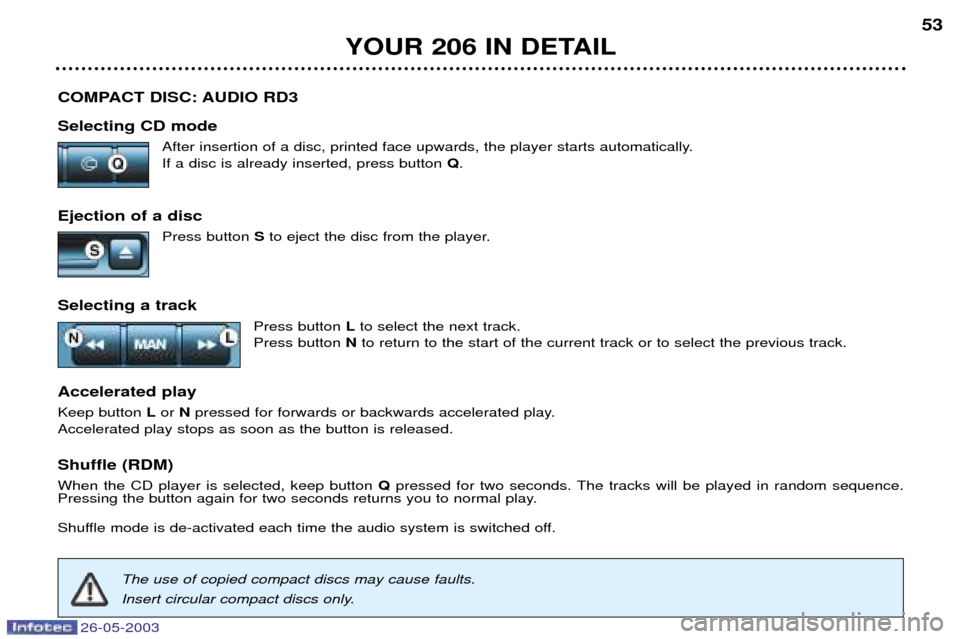
COMPACT DISC: AUDIO RD3 Selecting CD modeAfter insertion of a disc, printed face upwards, the player starts automatically. If a disc is already inserted, press button Q.
Ejection of a disc Press button Sto eject the disc from the player.
Selecting a track Press button Lto select the next track.
Press button Nto return to the start of the current track or to select the previous track.
Accelerated play Keep button Lor Npressed for forwards or backwards accelerated play.
Accelerated play stops as soon as the button is released. Shuffle (RDM) When the CD player is selected, keep button Qpressed for two seconds. The tracks will be played in random sequence.
Pressing the button again for two seconds returns you to normal play.
Shuffle mode is de-activated each time the audio system is switched off.
YOUR 206 IN DETAIL 53
The use of copied compact discs may cause faults.
Insert circular compact discs only.
Page 57 of 168
26-05-2003
YOUR 206 IN DETAIL
56
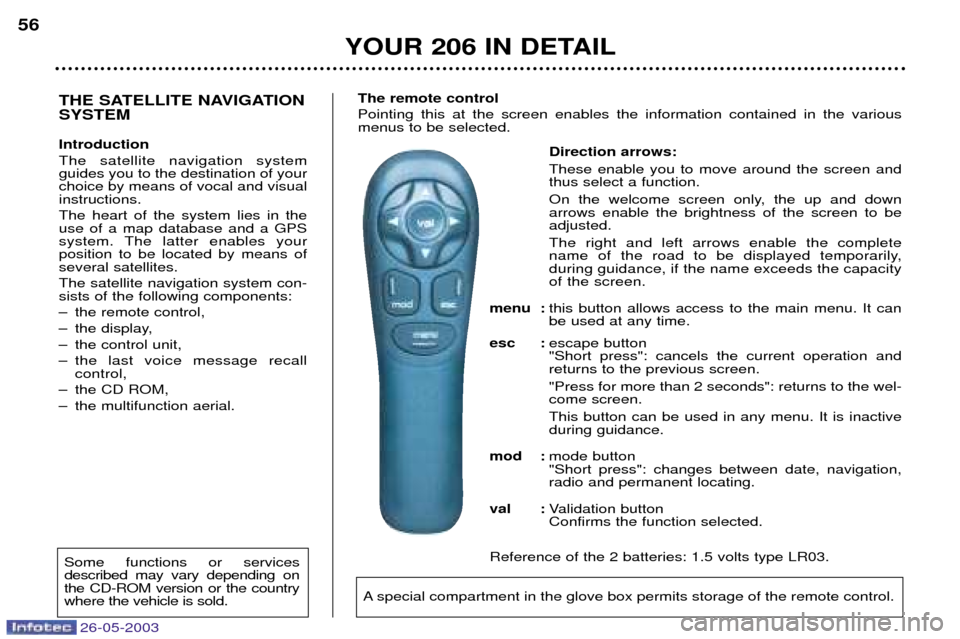
Direction arrows: These enable you to move around the screen and thus select a function.
On the welcome screen only, the up and down arrows enable the brightness of the screen to beadjusted. The right and left arrows enable the complete
name of the road to be displayed temporarily,during guidance, if the name exceeds the capacityof the screen.
menu : this button allows access to the main menu. It canbe used at any time.
esc : escape button"Short press": cancels the current operation andreturns to the previous screen. "Press for more than 2 seconds": returns to the wel- come screen. This button can be used in any menu. It is inactive during guidance.
mod : mode button"Short press": changes between date, navigation,radio and permanent locating.
val : Validation buttonConfirms the function selected.
Reference of the 2 batteries: 1.5 volts type LR03.
THE SATELLITE NAVIGATION SYSTEM Introduction The satellite navigation system guides you to the destination of yourchoice by means of vocal and visualinstructions. The heart of the system lies in the use of a map database and a GPS
system. The latter enables yourposition to be located by means ofseveral satellites. The satellite navigation system con- sists of the following components:
Ð the remote control,
Ð the display,
Ð the control unit,
Ð the last voice message recall control,
Ð the CD ROM,
Ð the multifunction aerial. The remote control Pointing this at the screen enables the information contained in the various menus to be selected.
A special compartment in the glove box permits storage of the remote control.
Some functions or services described may vary depending onthe CD-ROM version or the countrywhere the vehicle is sold.
Page 60 of 168
26-05-2003
YOUR 206 IN DETAIL59
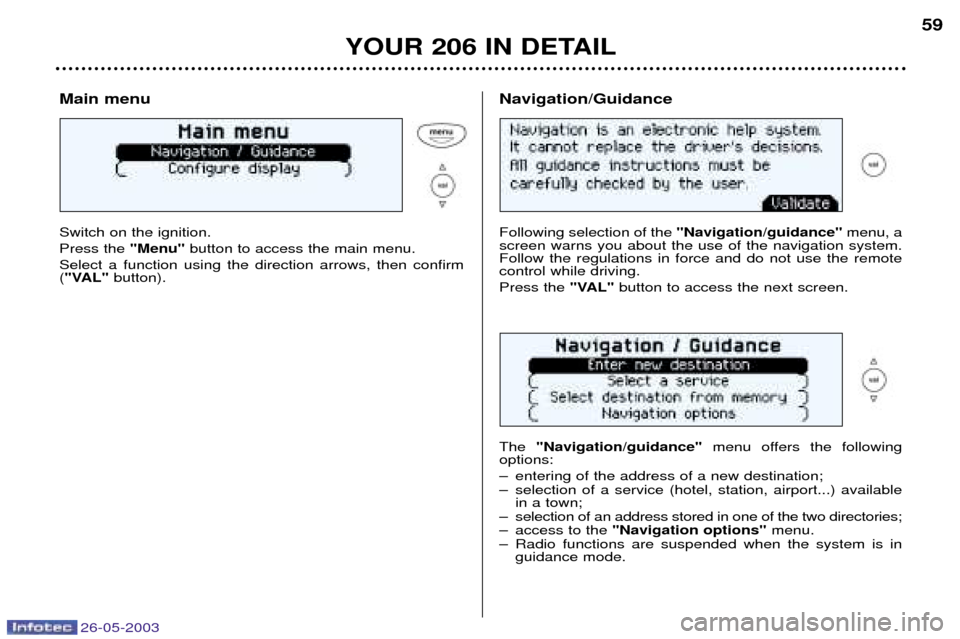
Main menu Switch on the ignition. Press the
"Menu"button to access the main menu.
Select a function using the direction arrows, then confirm ( "VAL" button).
Following selection of the "Navigation/guidance"menu, a
screen warns you about the use of the navigation system. Follow the regulations in force and do not use the remotecontrol while driving. Press the "VAL"button to access the next screen.
The "Navigation/guidance" menu offers the following
options:
Ð entering of the address of a new destination;
Ð selection of a service (hotel, station, airport...) available in a town;
Ð selection of an address stored in one of the two directories;
Ð access to the "Navigation options" menu.
Ð Radio functions are suspended when the system is in guidance mode.
Navigation/Guidance
Page 74 of 168
26-05-2003
YOUR 206 IN DETAIL73
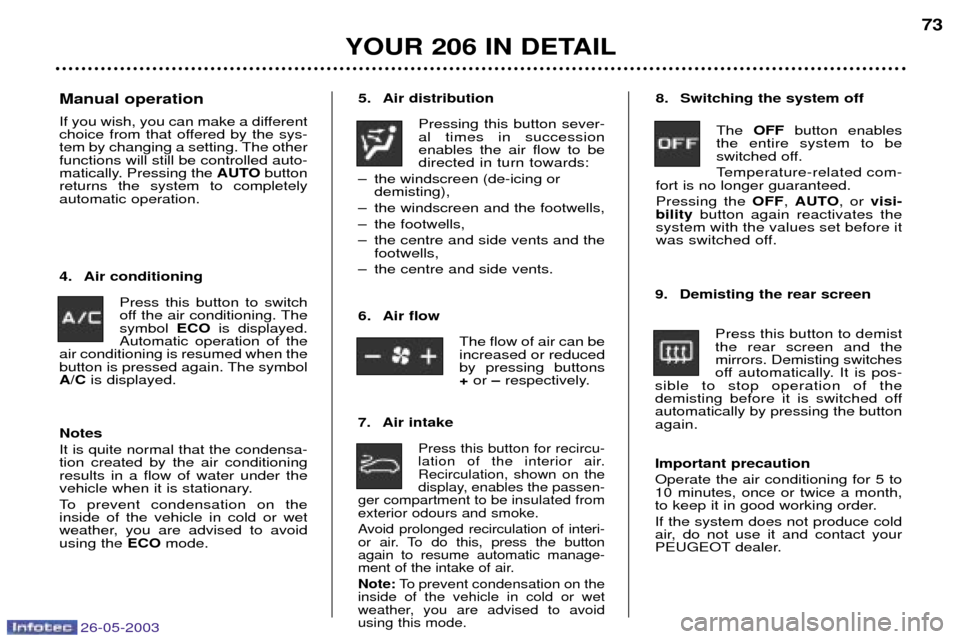
5. Air distribution
Pressing this button sever- al times in successionenables the air flow to bedirected in turn towards:
Ð the windscreen (de-icing or demisting),
Ð the windscreen and the footwells,
Ð the footwells,
Ð the centre and side vents and the footwells,
Ð the centre and side vents.
7. Air intake
Press this button for recircu-
lation of the interior air.Recirculation, shown on the
display, enables the passen-
ger compartment to be insulated fromexterior odours and smoke.
Avoid prolonged recirculation of interi-
or air. To do this, press the buttonagain to resume automatic manage-
ment of the intake of air. Note: To prevent condensation on the
inside of the vehicle in cold or wet
weather, you are advised to avoidusing this mode.
4. Air conditioning
Press this button to switch
off the air conditioning. Thesymbol ECOis displayed.
Automatic operation of the
air conditioning is resumed when the
button is pressed again. The symbolA/C is displayed. 8. Switching the system off
The OFF button enables
the entire system to be
switched off.
Temperature-related com-
fort is no longer guaranteed.Pressing the OFF, AUTO , or visi-
bility button again reactivates the
system with the values set before it
was switched off.
9. Demisting the rear screen Press this button to demistthe rear screen and themirrors. Demisting switches
off automatically. It is pos-
sible to stop operation of the
demisting before it is switched offautomatically by pressing the buttonagain. Important precaution Operate the air conditioning for 5 to 10 minutes, once or twice a month,
to keep it in good working order. If the system does not produce cold
air, do not use it and contact your
PEUGEOT dealer.
Manual operation
If you wish, you can make a different
choice from that offered by the sys-
tem by changing a setting. The otherfunctions will still be controlled auto-
matically. Pressing the
AUTObutton
returns the system to completelyautomatic operation.
6. Air flowThe flow of air can beincreased or reducedby pressing buttons+or Ðrespectively.
Notes It is quite normal that the condensa- tion created by the air conditioningresults in a flow of water under the
vehicle when it is stationary.
To prevent condensation on the inside of the vehicle in cold or wet
weather, you are advised to avoidusing the ECOmode.
Page 85 of 168
26-05-2003
YOUR 206 IN DETAIL83
Never leave one or more children alone and unsu-pervised in a vehicle. Never leave a child or an
animal in a vehicle which is exposed to the sun and has thewindows closed.
To protect your young children fromthe sun, fit blinds on the rear windows.
Never leave the keys within reachof children inside the vehicle. Disarm the passenger air bag when installing a "rearwardsfacing" child seat on the frontpassenger seat. Otherwise, thechild would risk being killed orseriously injured were the airbag to inflate. Observe strictly the recommenda- tions for assembling and securingthe child seat as shown in thechild seat instructions.
To prevent the doors from opening
accidentally, use the child lock*. Also, do not open the rear win- dows more than a third*.
* According to model.
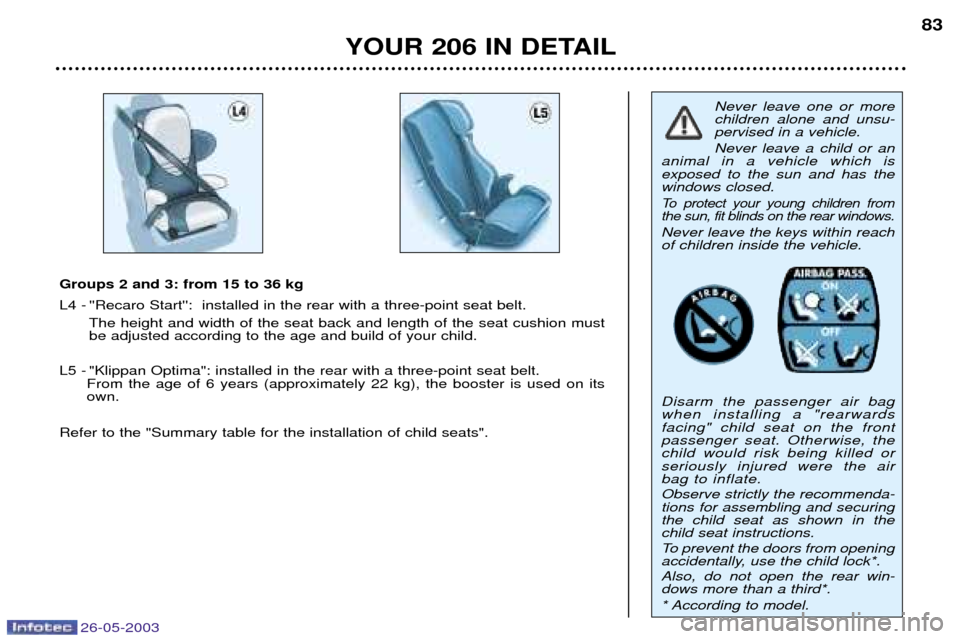
Groups 2 and 3: from 15 to 36 kg
L4 -''Recaro Start'': installed in the rear with a three-point seat belt.
The height and width of the seat back and length of the seat cushion must be adjusted according to the age and build of your child.
L5 -"Klippan Optima": installed in the rear with a three-point seat belt.
From the age of 6 years (approximately 22 kg), the booster is used on its own.
Refer to the "Summary table for the installation of child seats".
Page 101 of 168
26-05-2003
YOUR 206 IN DETAIL95
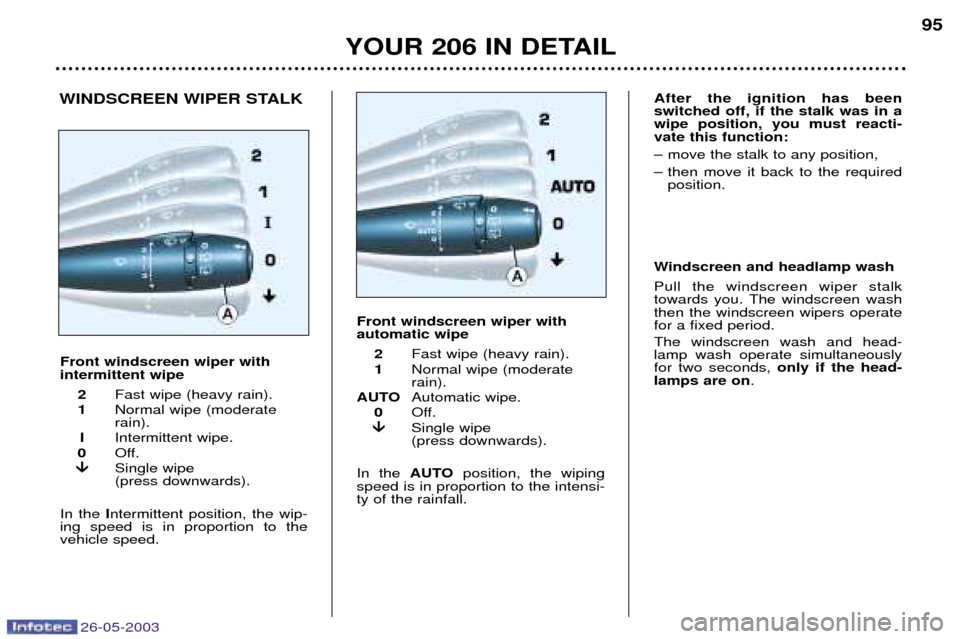
Front windscreen wiper with intermittent wipe 2 Fast wipe (heavy rain).
1 Normal wipe (moderaterain).
I Intermittent wipe.
0 Off.
Single wipe (press downwards).
In the Intermittent position, the wip-
ing speed is in proportion to thevehicle speed.
Windscreen and headlamp wash Pull the windscreen wiper stalk
towards you. The windscreen washthen the windscreen wipers operatefor a fixed period. The windscreen wash and head- lamp wash operate simultaneouslyfor two seconds, only if the head-
lamps are on .
WINDSCREEN WIPER STALK
Front windscreen wiper with automatic wipe2 Fast wipe (heavy rain).
1 Normal wipe (moderaterain).
AUTO Automatic wipe.
0 Off.
Single wipe (press downwards).
In the AUTOposition, the wiping
speed is in proportion to the intensi-ty of the rainfall.After the ignition has been switched off, if the stalk was in awipe position, you must reacti-vate this function:
Ð move the stalk to any position,
Ð then move it back to the required position.
Page 116 of 168

26-05-2003
YOUR 206 IN DETAIL
111
Operating programmes
You have a choice of three operating programmes:
Ð Autoadaptive (normal)
Ð Sport
Ð SnowOne press on button Aor Bwill
select Sport or Snow respectively. The selection is displayed on theinstrument panel. Pressing the but-ton a second time will return to theautoadaptive (normal) programme. Autoadaptive programme (normal)Gear changes are carried out on the basis of various parameters, suchas:
Ð driving style,
Ð road characteristics,
Ð vehicle load.The gearbox selects the most suit- able programme from those in thememory for the current driving con-ditions. Sport programme The Sport programme automatically favours more dynamic driving. Snow Programme In position
D, the Snow programme
provides smooth driving suited to slippery roads in order to improve
traction and stability. Starting is in2nd gear and changing down is at
low engine speeds. Special operating features
Ð During prolonged braking, the gearbox changes down automati-
cally, so as to provide efficientengine braking.
Ð If you take your foot off the accel- erator suddenly (when you aretaken by surprise, for example),the gearbox will not change up, so
as to improve safety.
Ð When the engine is cold, the gear- box automatically selects a spe-cial programme that enables theengine to reach its ideal tempera-ture more quickly in order todecrease pollution.
Kickdown For immediate maximum accelera-
tion without touching the gear lever,press the accelerator pedal down as
far as it will go. The gearbox willchange down automatically or stayin the gear selected, up to maximumengine speed.Any disruption of the sys- tem is signalled by thesimultaneous flashing ofthe Sport and Snow
lights on the instrument panel. Insuch a case, the gearbox will oper-
ate in downgrade mode. You mayfeel a substantial knock whenreverse is selected from Pto Ror
N to R(without any risk of damage
to the gearbox). Do not exceed 60 mph (100km/h).Contact a PEUGEOT dealer with-
out delay. When the engine is idling with the
car in gear, the car will move evenwithout you accelerating. Do not accelerate while a gear is being selected, when the vehicle is
stationary.
When stationary, have your foot on the brake pedal when selecting a
gear. Do not accelerate in gear with the brakes on. If work needs to be done with the engine running, apply the hand-brake and select position P.
Do not change down to brake onslippery roads. Never select position Nwhen the
vehicle is moving.Never engage Por Runless the
vehicle is stationary.Do not leave children inside the vehicle unsupervised when theengine is running.
Page 153 of 168
PRACTICAL INFORMATION
140
BATTERY
To charge the battery using a battery charger:
Ð Disconnect the battery,
Ð Follow the instructions for use given by the battery charger manufacturer,
Ð Reconnect starting with the negative (Ð) terminal,
Ð Check that the terminals and connectors are clean. If they are covered withsulphate (white or greenish deposit), disconnect them and clean them.
To start the vehicle from another battery:
Ð Connect the red cable to the positive (+) terminals of the two batteries,
Ð Connect one end of the green or black cable to the negative (Ð) terminal of the slave battery,
Ð Connect the other end of the green or black cable to an earth point on the bro- ken down vehicle as far as possible from the battery,
Operate the starter, let the engine run.
Wait for the engine to return to idle, then disconnect the cables.
Ð Before disconnecting the battery, you must wait for 2 minutes after switching off the ignition.
Ð Never disconnect a terminal when the engine is running.
Ð Never charge a battery without first disconnecting the terminals.
Ð Close the windows and sunroof before disconnecting the battery. If they do not operate normally following reconnection of the battery, they must be reintialised (see sections "Electric windows - Safety auto-reverse" and"Sunroof - Safety auto-reverse".
Ð After every reconnection of the battery, switch on the ignition and wait 1 minute before starting to allow the electronic systems to be initialised. Ifslight difficulties are experienced after this, please contact a PEUGEOT
dealer.
It is advisable to disconnect the battery if the vehicle is not to be used for a period of more than one month.
ECONOMY MODE FUNCTION After the engine has stopped, with the key in the accessories position,
certain functions (windscreen wiper,electric windows, courtesy lights,audio equipment etc.) can only beused for thirty minutes, to prevent
discharging the battery.
Once the thirty minutes are over, the message "Economy mode active"
appears on the multifunction displayand the active functions are put on
standby.
A flat battery will prevent the engine from starting.
26-05-2003
Page 162 of 168
TECHNICAL DATA149
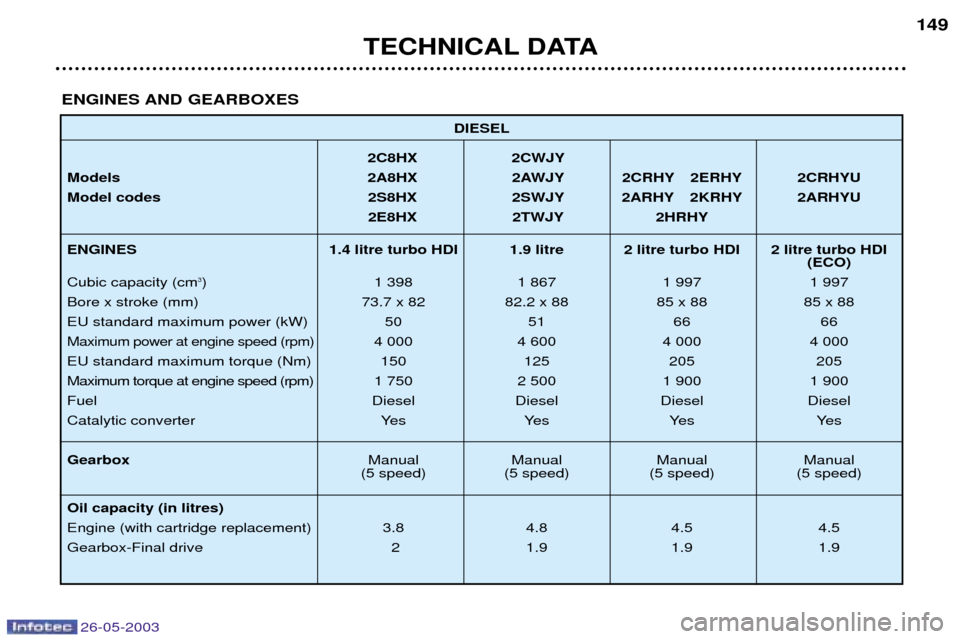
DIESEL
2C8HX 2CWJY
Models 2A8HX 2AWJY 2CRHY 2ERHY 2CRHYU
Model codes 2S8HX 2SWJY 2ARHY 2KRHY 2ARHYU 2E8HX 2TWJY 2HRHY
ENGINES 1.4 litre turbo HDI 1.9 litre 2 litre turbo HDI 2 litre turbo HDI (ECO)
Cubic capacity (cm
3) 1 398 1 867 1 997 1 997
Bore x stroke (mm) 73.7 x 82 82.2 x 88 85 x 88 85 x 88
EU standard maximum power (kW) 50 51 66 66
Maximum power at engine speed (rpm)4 000 4 600 4 000 4 000
EU standard maximum torque (Nm) 150 125 205 205
Maximum torque at engine speed (rpm) 1 750 2 500 1 900 1 900Fuel Diesel Diesel Diesel Diesel
Catalytic converter Yes Yes Yes Yes Gearbox Manual Manual Manual Manual
(5 speed) (5 speed) (5 speed) (5 speed)
Oil capacity (in litres)
Engine (with cartridge replacement) 3.8 4.8 4.5 4.5
Gearbox-Final drive 2 1.9 1.9 1.9
ENGINES AND GEARBOXES
26-05-2003
Page 163 of 168
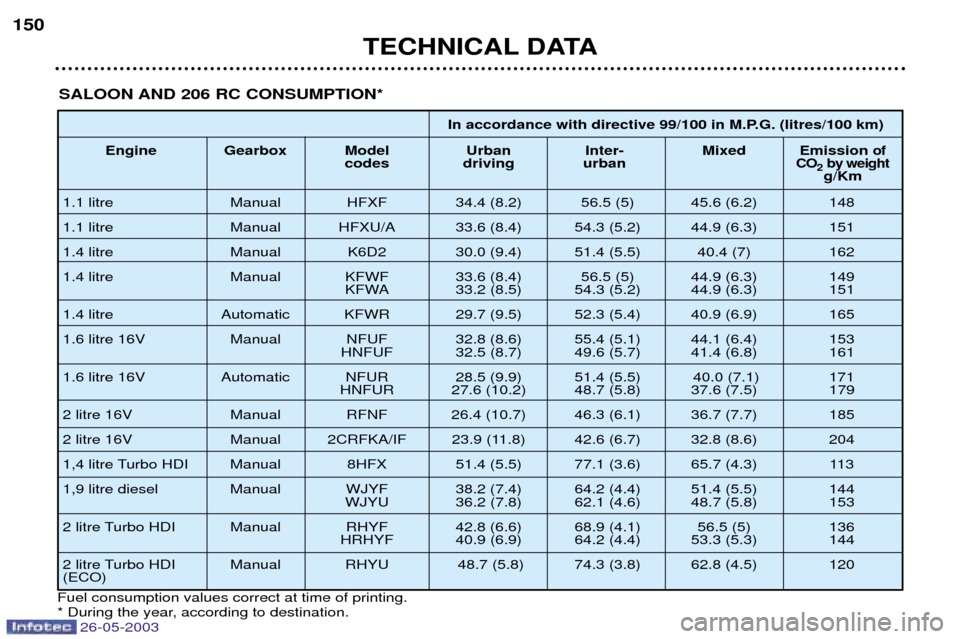
In accordance with directive 99/100 in M.P.G. (litres/100 km)
Engine Gearbox Model Urban Inter- Mixed Emission
ofcodes driving urbanCO2by weightg/Km
1.1 litre Manual HFXF 34.4 (8.2) 56.5 (5) 45.6 (6.2) 148
1.1 litre Manual HFXU/A 33.6 (8.4) 54.3 (5.2) 44.9 (6.3) 151
1.4 litre Manual K6D2 30.0 (9.4) 51.4 (5.5) 40.4 (7) 162
1.4 litre Manual KFWF 33.6 (8.4) 56.5 (5) 44.9 (6.3) 149 KFWA 33.2 (8.5) 54.3 (5.2) 44.9 (6.3) 151
1.4 litre Automatic KFWR 29.7 (9.5) 52.3 (5.4) 40.9 (6.9) 165
1.6 litre 16V Manual NFUF 32.8 (8.6) 55.4 (5.1) 44.1 (6.4) 153 HNFUF 32.5 (8.7) 49.6 (5.7) 41.4 (6.8) 161
1.6 litre 16V Automatic NFUR 28.5 (9.9) 51.4 (5.5) 40.0 (7.1) 171 HNFUR 27.6 (10.2) 48.7 (5.8) 37.6 (7.5) 179
2 litre 16V Manual RFNF 26.4 (10.7) 46.3 (6.1) 36.7 (7.7) 185
2 litre 16V Manual 2CRFKA/IF 23.9 (11.8) 42.6 (6.7) 32.8 (8.6) 204
1,4 litre Turbo HDI Manual 8HFX 51.4 (5.5) 77.1 (3.6) 65.7 (4.3) 113
1,9 litre diesel Manual WJYF 38.2 (7.4) 64.2 (4.4) 51.4 (5.5) 144 WJYU 36.2 (7.8) 62.1 (4.6) 48.7 (5.8) 153
2 litre Turbo HDI Manual RHYF 42.8 (6.6) 68.9 (4.1) 56.5 (5) 136 HRHYF 40.9 (6.9) 64.2 (4.4) 53.3 (5.3) 144
2 litre Turbo HDI Manual RHYU 48.7 (5.8) 74.3 (3.8) 62.8 (4.5) 120 (ECO)
TECHNICAL DATA
150
SALOON AND 206 RC CONSUMPTION*
Fuel consumption values correct at time of printing.
* During the year, according to destination.
26-05-2003