trip computer Peugeot 207 Dag 2007.5 Owner's Manual
[x] Cancel search | Manufacturer: PEUGEOT, Model Year: 2007.5, Model line: 207 Dag, Model: Peugeot 207 Dag 2007.5Pages: 223, PDF Size: 9.01 MB
Page 24 of 223
27
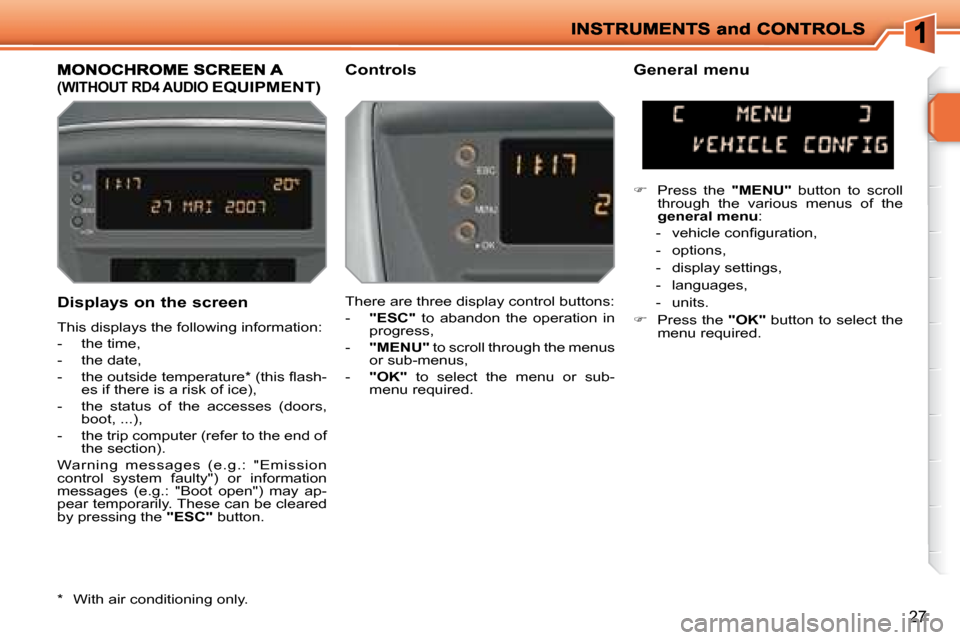
Displays on the screen
This displays the following information:
- the time,
- the date,
- the outside temperature * (this l ash-es if there is a risk of ice),
- the status of the accesses (doors, boot, ...),
- the trip computer (refer to the end of the section).
Warning messages (e.g.: "Emission
control system faulty") or information
messages (e.g.: "Boot open") may ap-
pear temporarily. These can be cleared
by pressing the "ESC" button.
(WITHOUT RD4 AUDIO EQUIPMENT)
Controls General menu
There are three display control buttons:
- "ESC" to abandon the operation in
progress,
- "MENU" to scroll through the menus
or sub-menus,
- "OK" to select the menu or sub-
menu required.
Press the "MENU" button to scroll
through the various menus of the
general menu :
- vehicle coni guration,
- options,
- display settings,
- languages,
- units.
Press the "OK" button to select the
menu required.
* With air conditioning only.
Page 26 of 223
29
MONOCHROME SCREEN A Controls
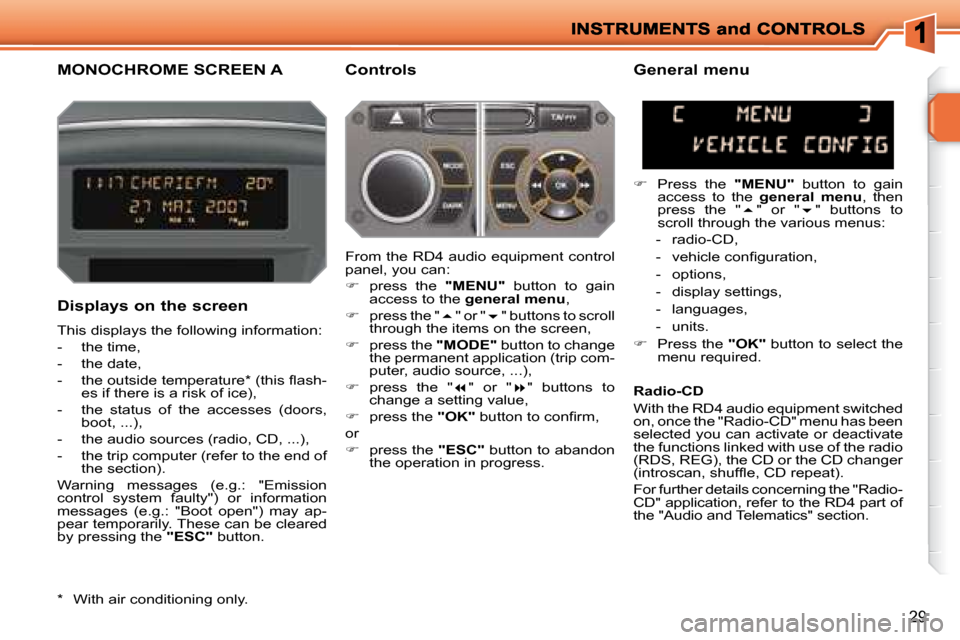
Displays on the screen
This displays the following information:
- the time,
- the date,
- the outside temperature * (this l ash- es if there is a risk of ice),
- the status of the accesses (doors, boot, ...),
- the audio sources (radio, CD, ...),
- the trip computer (refer to the end of the section).
Warning messages (e.g.: "Emission
control system faulty") or information
messages (e.g.: "Boot open") may ap-
pear temporarily. These can be cleared
by pressing the "ESC" button.
General menu
Press the "MENU" button to gain
access to the general menu , then
press the " " or " " buttons to
scroll through the various menus:
- radio-CD,
- vehicle coni guration,
- options,
- display settings,
- languages,
- units.
Press the "OK" button to select the
menu required.
From the RD4 audio equipment control
panel, you can:
press the "MENU" button to gain
access to the general menu ,
press the " " or " " buttons to scroll
through the items on the screen,
press the "MODE" button to change
the permanent application (trip com-
puter, audio source, ...),
press the " " or " " buttons to
change a setting value,
press the "OK" button to coni rm,
or
press the "ESC" button to abandon
the operation in progress. Radio-CD
With the RD4 audio equipment switched
on, once the "Radio-CD" menu has been
selected you can activate or deactivate
the functions linked with use of the radio
(RDS, REG), the CD or the CD changer
(introscan, shufl e, CD repeat).
For further details concerning the "Radio-
CD" application, refer to the RD4 part of
the "Audio and Telematics" section.
* With air conditioning only.
Page 28 of 223
31
MONOCHROME SCREEN C General menu
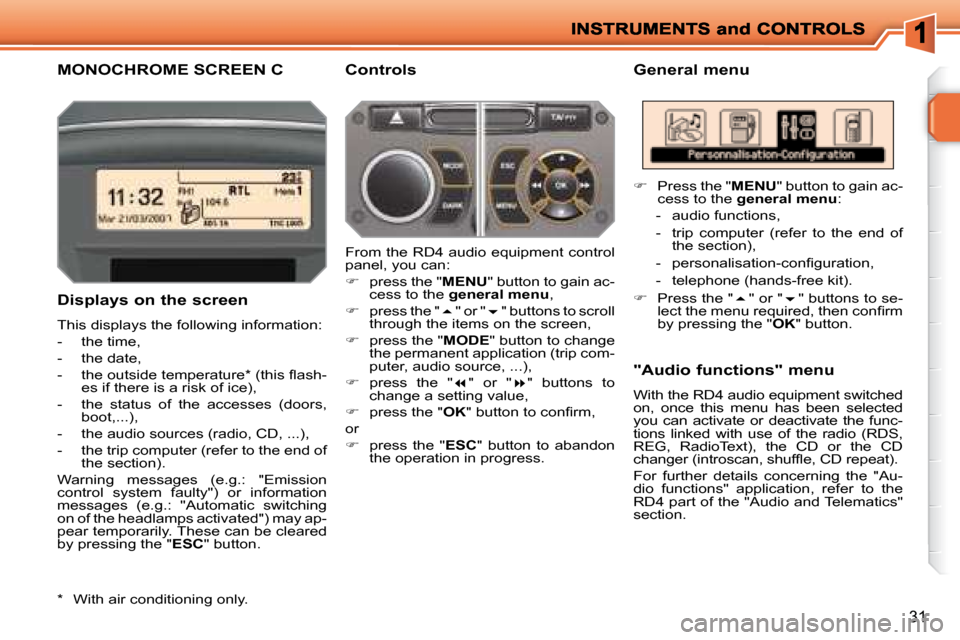
Displays on the screen
This displays the following information:
- the time,
- the date,
- the outside temperature * (this l ash- es if there is a risk of ice),
- the status of the accesses (doors, boot,...),
- the audio sources (radio, CD, ...),
- the trip computer (refer to the end of the section).
Warning messages (e.g.: "Emission
control system faulty") or information
messages (e.g.: "Automatic switching
on of the headlamps activated") may ap-
pear temporarily. These can be cleared
by pressing the " ESC " button. "Audio functions" menu
With the RD4 audio equipment switched
on, once this menu has been selected
you can activate or deactivate the func-
tions linked with use of the radio (RDS,
REG, RadioText), the CD or the CD
changer (introscan, shufl e, CD repeat).
For further details concerning the "Au-
dio functions" application, refer to the
RD4 part of the "Audio and Telematics"
section. Controls
From the RD4 audio equipment control
panel, you can:
press the " MENU " button to gain ac-
cess to the general menu ,
press the " " or " " buttons to scroll
through the items on the screen,
press the " MODE " button to change
the permanent application (trip com-
puter, audio source, ...),
press the " " or " " buttons to
change a setting value,
press the " OK " button to coni rm,
or
press the " ESC" button to abandon
the operation in progress.
Press the " MENU " button to gain ac-
cess to the general menu :
- audio functions,
- trip computer (refer to the end of the section),
- personalisation-coni guration,
- telephone (hands-free kit).
Press the " " or " " buttons to se-
lect the menu required, then coni rm
by pressing the " OK " button.
* With air conditioning only.
Page 29 of 223
32
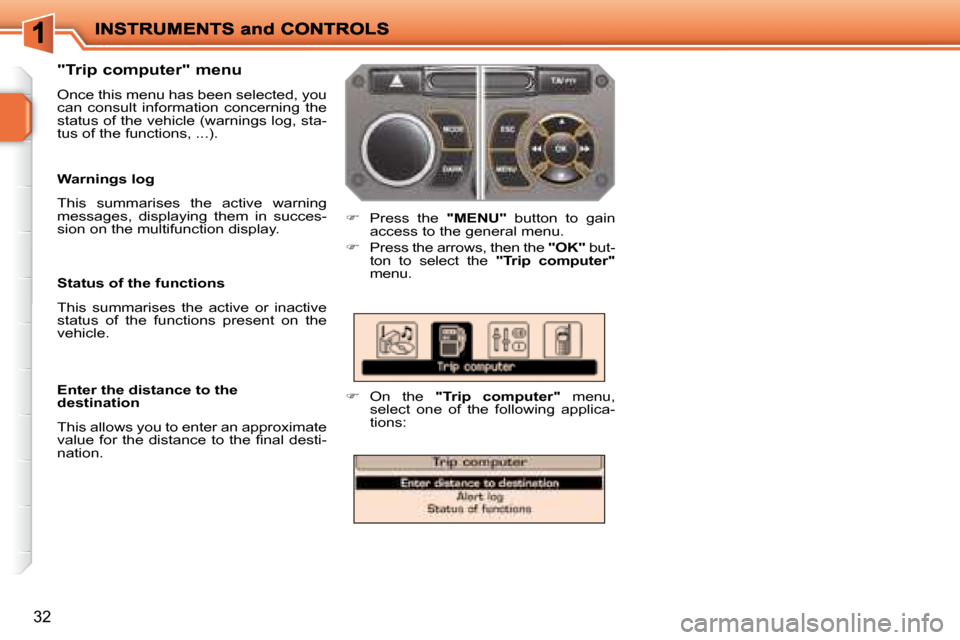
Press the "MENU" button to gain
access to the general menu.
Press the arrows, then the "OK" but-
ton to select the "Trip computer"
menu.
On the "Trip computer" menu,
select one of the following applica-
tions:
Status of the functions
This summarises the active or inactive
status of the functions present on the
vehicle.
Enter the distance to the
destination
This allows you to enter an approximate
value for the distance to the i nal desti-
nation.
Warnings log
This summarises the active warning
messages, displaying them in succes-
sion on the multifunction display.
"Trip computer" menu
Once this menu has been selected, you
can consult information concerning the
status of the vehicle (warnings log, sta-
tus of the functions, ...).
Page 35 of 223
38
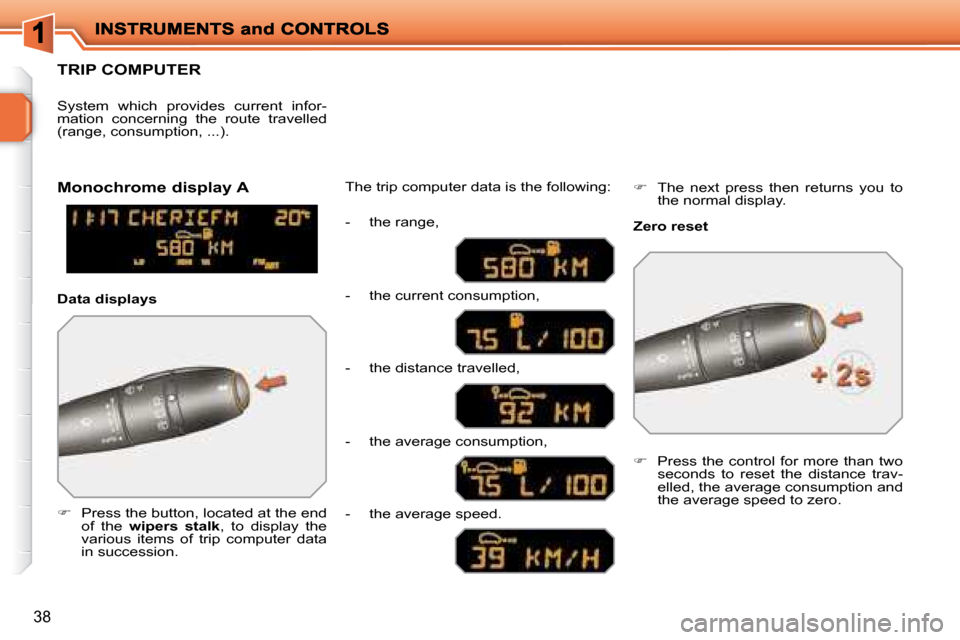
TRIP COMPUTER
Press the button, located at the end
of the wipers stalk , to display the
various items of trip computer data
in succession. The trip computer data is the following:
System which provides current infor-
mation concerning the route travelled
(range, consumption, ...).
Press the control for more than two
seconds to reset the distance trav-
elled, the average consumption and
the average speed to zero.
Monochrome display A
Zero reset
Data displays - the range,
- the current consumption,
- the distance travelled,
- the average consumption,
- the average speed.
The next press then returns you to
the normal display.
Page 36 of 223
!
i
i
40
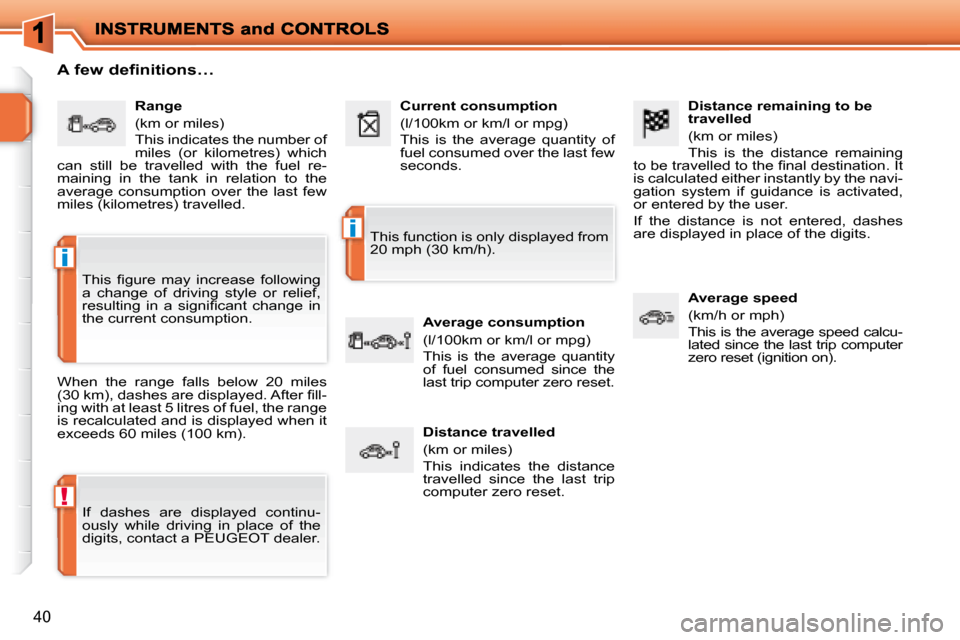
Distance remaining to be
travelled
(km or miles)
This is the distance remaining
to be travelled to the i nal destination. It
is calculated either instantly by the navi-
gation system if guidance is activated,
or entered by the user.
If the distance is not entered, dashes
are displayed in place of the digits.
Average speed
(km/h or mph)
This is the average speed calcu-
lated since the last trip computer
zero reset (ignition on).
Range
(km or miles)
This indicates the number of
miles (or kilometres) which
can still be travelled with the fuel re-
maining in the tank in relation to the
average consumption over the last few
miles (kilometres) travelled. Current consumption
(l/100km or km/l or mpg)
This is the average quantity of
fuel consumed over the last few
seconds.
Average consumption
(l/100km or km/l or mpg)
This is the average quantity
of fuel consumed since the
last trip computer zero reset.
Distance travelled
(km or miles)
This indicates the distance
travelled since the last trip
computer zero reset.
A few definitions…
When the range falls below 20 miles
(30 km), dashes are displayed. After i ll-
ing with at least 5 litres of fuel, the range
is recalculated and is displayed when it
exceeds 60 miles (100 km).
If dashes are displayed continu-
ously while driving in place of the
digits, contact a PEUGEOT dealer. This function is only displayed from
20 mph (30 km/h).
This i gure may increase following
a change of driving style or relief,
resulting in a signii cant change in
the current consumption.
Page 38 of 223
!
i
i
40
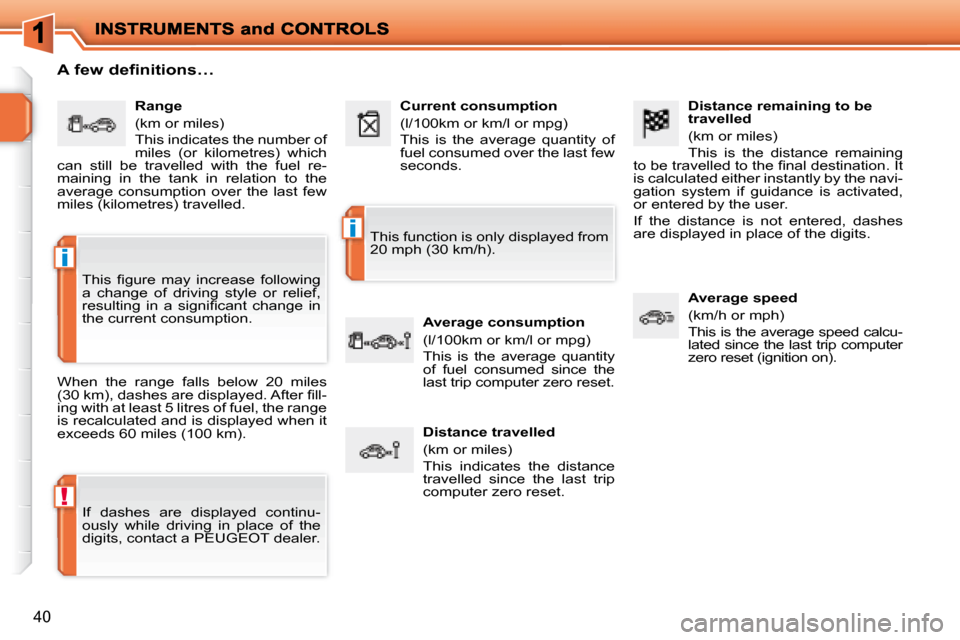
Distance remaining to be
travelled
(km or miles)
This is the distance remaining
to be travelled to the i nal destination. It
is calculated either instantly by the navi-
gation system if guidance is activated,
or entered by the user.
If the distance is not entered, dashes
are displayed in place of the digits.
Average speed
(km/h or mph)
This is the average speed calcu-
lated since the last trip computer
zero reset (ignition on).
Range
(km or miles)
This indicates the number of
miles (or kilometres) which
can still be travelled with the fuel re-
maining in the tank in relation to the
average consumption over the last few
miles (kilometres) travelled. Current consumption
(l/100km or km/l or mpg)
This is the average quantity of
fuel consumed over the last few
seconds.
Average consumption
(l/100km or km/l or mpg)
This is the average quantity
of fuel consumed since the
last trip computer zero reset.
Distance travelled
(km or miles)
This indicates the distance
travelled since the last trip
computer zero reset.
A few definitions…
When the range falls below 20 miles
(30 km), dashes are displayed. After i ll-
ing with at least 5 litres of fuel, the range
is recalculated and is displayed when it
exceeds 60 miles (100 km).
If dashes are displayed continu-
ously while driving in place of the
digits, contact a PEUGEOT dealer. This function is only displayed from
20 mph (30 km/h).
This i gure may increase following
a change of driving style or relief,
resulting in a signii cant change in
the current consumption.
Page 204 of 223

191
MENUESCLIST
MENU
2
1
Press the end of the lights stalk to start the voic
e
recognition.
Say the words one by one and wait for the audible
conirmation signal between each word.
The list which follows is exhaustive.
To display the list of available voice commands, pr
ess
the end of the lights stalk to start the voice reco gnition,
then say HELP or WHAT CAN I SAY.
For the same operation, press and
hold the MENU button and select the
function VOICE COMMANDS LIST.
VOICE COMMANDS LIST LEVEL 1
display
call
changer
guide to
trafic info
CD player/jukebox
navigation
radio
SMS/message
telephone
LEVEL 2
audio
guidance
navigation
trip computer
telephone
description
disc number
previous/next disc
random play
list
track number
previous/next track
repeat
scan
description
display
read
random play
list
track number
previous/next track
directory (MP3 CD)
scan
stop/resume
directory
show
zoom out/in
autostore
list
memory
previous/next
display
read
voice mailbox
last number
voice message service
directoryLEVEL 3
1 … 20
1 ... 20
previous/next
repeat
destination
description
vehicle
1 … 6
descriptionVOICE COMMANDS
DISPLAYING THE LIST AND USING THEM
Page 215 of 223
199
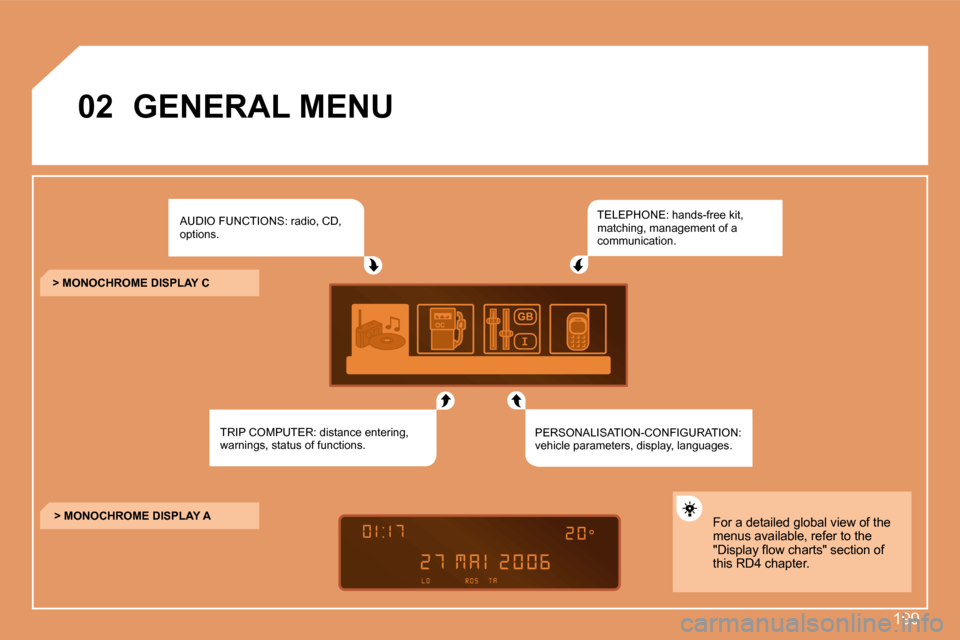
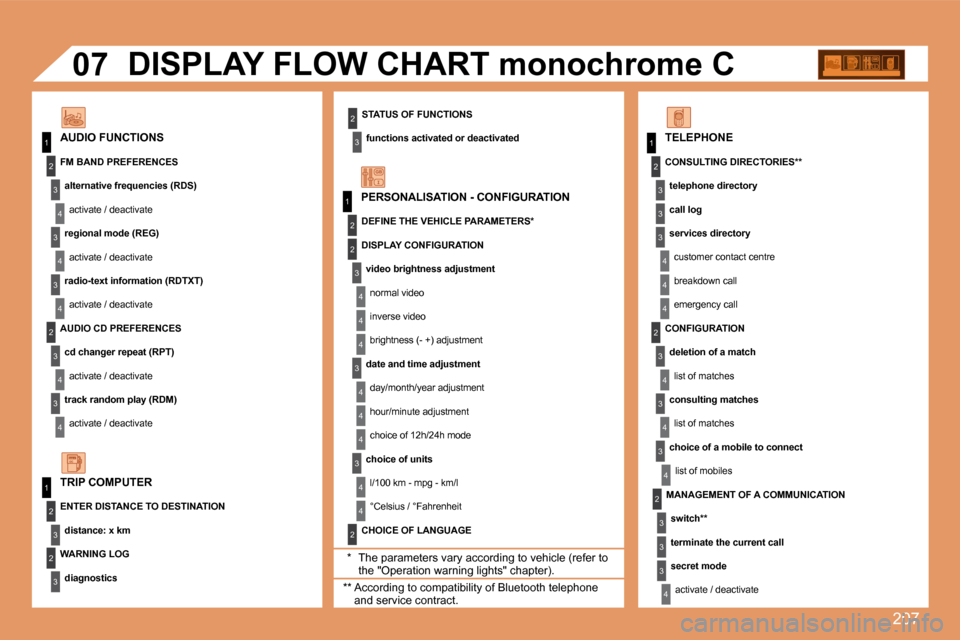
02GENERAL MENU
AUDIO FUNCTIONS: radio, CD,
options.
TRIP COMPUTER: distance entering,
warnings, status of functions. TELEPHONE: hands-free kit,
matching, management of a
communication.
PERSONALISATION-CONFIGURATION:
vehicle parameters, display, languages.
> MONOCHROME DISPLAY C
> MONOCHROME DISPLAY A For a detailed global view of the
menus available, refer to the
"Display low charts" section of
this RD4 chapter.
Page 223 of 223
207
1
1
2
3
4
3
4
3
4
2
3
4
3
4
2
3
4
2
4
4
3
4
4
4
3
4
4
1
2
3
2
3
3
2
2
1
2
3
3
3
4
4
4
2
3
4
3
4
3
4
2
3
3
3
4
07
STATUS OF FUNCTIONSfunctions activated or deactivated
AUDIO FUNCTIONS DISPLAY FLOW CHART monochrome C
* The parameters vary according to vehicle (refer to the "Operation warning lights" chapter).
WARNING LOG
diagnostics
TRIP COMPUTER
FM BAND PREFERENCES
alternative frequencies (RDS)activate / deactivate
regional mode (REG)
activate / deactivate
radio-text information (RDTXT) activate / deactivate
AUDIO CD PREFERENCES cd changer repeat (RPT)activate / deactivate
track random play (RDM) activate / deactivate
ENTER DISTANCE TO DESTINATION distance: x km PERSONALISATION - CONFIGURATION
DEFINE THE VEHICLE PARAMETERS*
CHOICE OF LANGUAGE TELEPHONE
CONSULTING DIRECTORIES** telephone directory
call log
services directorycustomer contact centre
breakdown call
emergency call
DISPLAY CONFIGURATION
video brightness adjustmentnormal video
inverse video
brightness (- +) adjustment
date and time adjustment day/month/year adjustment
hour/minute adjustment
choice of 12h/24h mode
choice of units l/100 km - mpg - km/l
°Celsius / °Fahrenheit
** According to compatibility of Bluetooth telephone and service contract. MANAGEMENT OF A COMMUNICATION
switch**
terminate the current call
secret modeactivate / deactivate
CONFIGURATION
deletion of a matchlist of matches
consulting matches list of matches
choice of a mobile to connect list of mobiles