Radio Peugeot 207 Dag 2009 User Guide
[x] Cancel search | Manufacturer: PEUGEOT, Model Year: 2009, Model line: 207 Dag, Model: Peugeot 207 Dag 2009Pages: 267, PDF Size: 20.02 MB
Page 223 of 267
228
1
5
10
01
2
346
13
11
9
1415
781216
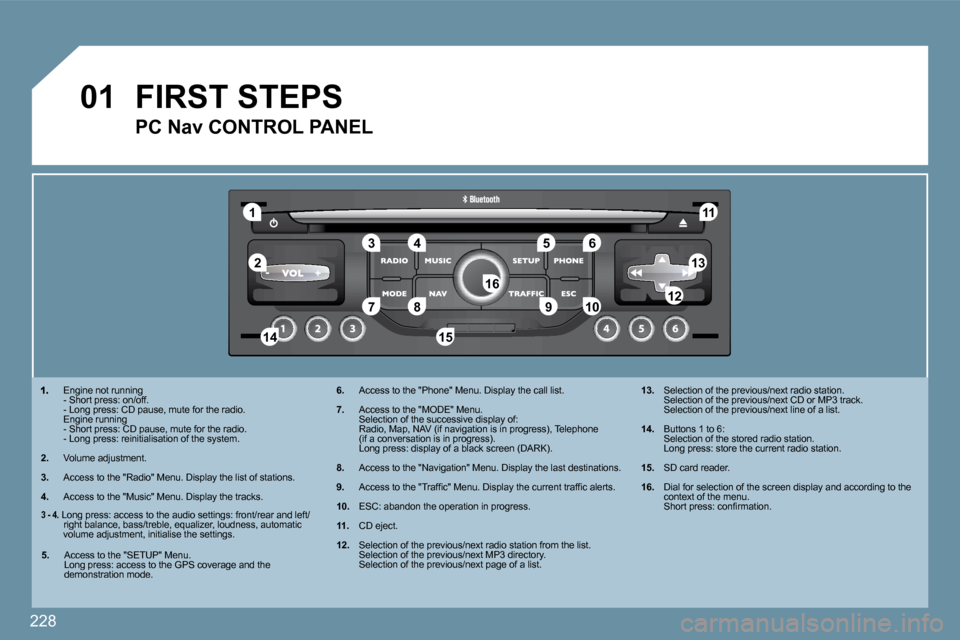
Engine not running - Short press: on/off. - Long press: CD pause, mute for the radio. Engine running - Short press: CD pause, mute for the radio. - Long press: reinitialisation of the system.
2. Volume adjustment.
3. Access to the "Radio" Menu. Display the list of st
ations.
4. Access to the "Music" Menu. Display the tracks.
6. Access to the "Phone" Menu. Display the call list.
7. Access to the "MODE" Menu. Selection of the successive display of: Radio, Map, NAV (if navigation is in progress), Te lephone (if a conversation is in progress). Long press: display of a black screen (DARK).
8. Access to the "Navigation" Menu. Display the last destinations.
9. Access to the "Traffi c" Menu. Display the current traffi c alerts.
10. ESC: abandon the operation in progress.
11. CD eject.
12. Selection of the previous/next radio station from the list. Selection of the previous/next MP3 directory. Selection of the previous/next page of a list.
13. Selection of the previous/next radio station. Selection of the previous/next CD or MP3 track. Selection of the previous/next line of a list.
14. Buttons 1 to 6: Selection of the stored radio station. Long press: store the current radio station.
15. SD card reader.
16. Dial for selection of the screen display and accor ding to the context of the menu. Short press: confi rmation.
FIRST STEPS
PC Nav CONTROL PANEL
3 - 4. Long press: access to the audio settings: front/rear and left/right balance, bass/treble, equalizer, loudness, au tomatic volume adjustment, initialise the settings.
5. Access to the "SETUP" Menu. Long press: access to the GPS coverage and the demonstration mode.
Page 224 of 267
229
02 GENERAL OPERATION
For a detailed global view of the menus available, refer to section 10.
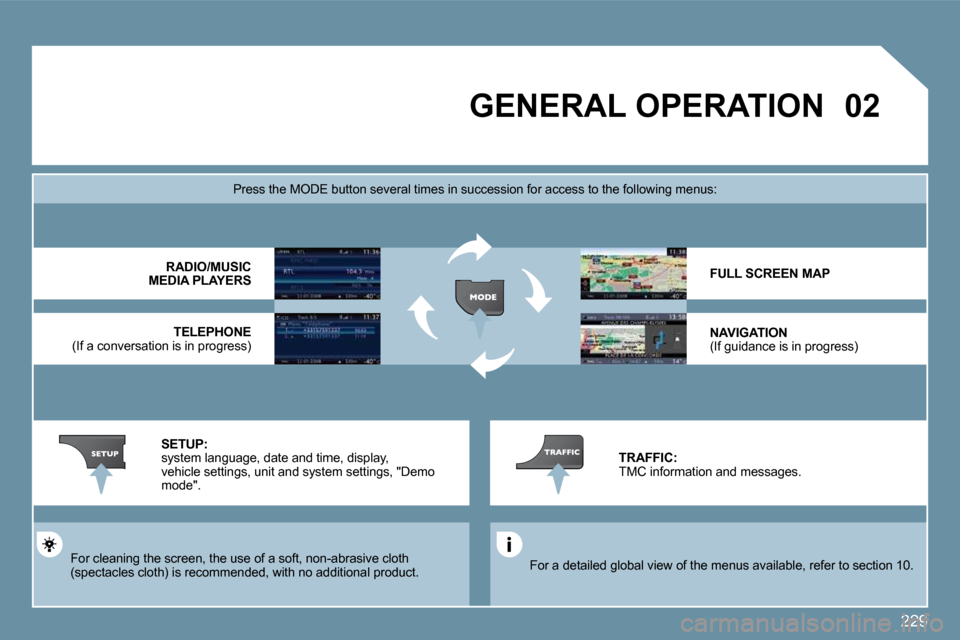
Press the MODE button several times in succession for access to the following menus:
For cleaning the screen, the use of a soft, non-abrasive cloth (spectacles cloth) is recommended, with no addition al product.
RADIO /MUSIC MEDIA PLAYERS
TELEPHONE (If a conversation is in progress)
FULL SCREEN MAP
NAVIGATION (If guidance is in progress)
SETUP: system language, date and time, display, vehicle settings, unit and system settings, "Demo mode".
TRAFFIC: TMC information and messages.
Page 225 of 267
230
02
1
2
3
3
2
1
1
1
3
2
1
1
1
1
1
1
1
1
1
1
2
2
2
2
1
1
2
1
2
2
2
2
2
2
2
1
1
1
1
1
1
GENERAL OPERATION
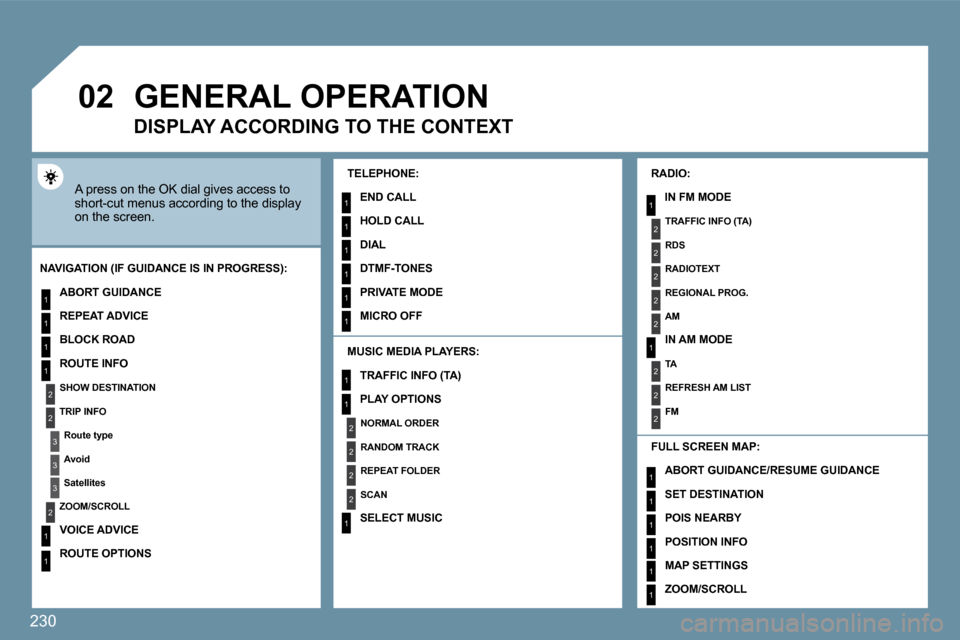
A press on the OK dial gives access to short-cut menus according to the display on the screen.
MUSIC MEDIA PLAYERS:
NAVIGATION (IF GUIDANCE IS IN PROGRESS):
ABORT GUIDANCE
REPEAT ADVICE
BLOCK ROAD
ROUTE INFO
SHOW DESTINATION
TRIP INFO
Route type
Avoid
Satellites
ZOOM/SCROLL
VOICE ADVICE
ROUTE OPTIONS
RADIO:
IN FM MODE
TRAFFIC INFO (TA)
RDS
RADIOTEXT
REGIONAL PROG.
AM
IN AM MODE
TA
REFRESH AM LIST
FM
FULL SCREEN MAP:
DISPLAY ACCORDING TO THE CONTEXT
TRAFFIC INFO (TA)
PLAY OPTIONS
NORMAL ORDER
RANDOM TRACK
REPEAT FOLDER
SCAN
SELECT MUSIC
TELEPHONE:
END CALL
HOLD CALL
DIAL
DTMF-TONES
PRIVATE MODE
MICRO OFF
ABORT GUIDANCE /RESUME GUIDANCE
SET DESTINATION
POIS NEARBY
POSITION INFO
MAP SETTINGS
ZOOM/SCROLL
Page 234 of 267
239
05
3
2
1
1
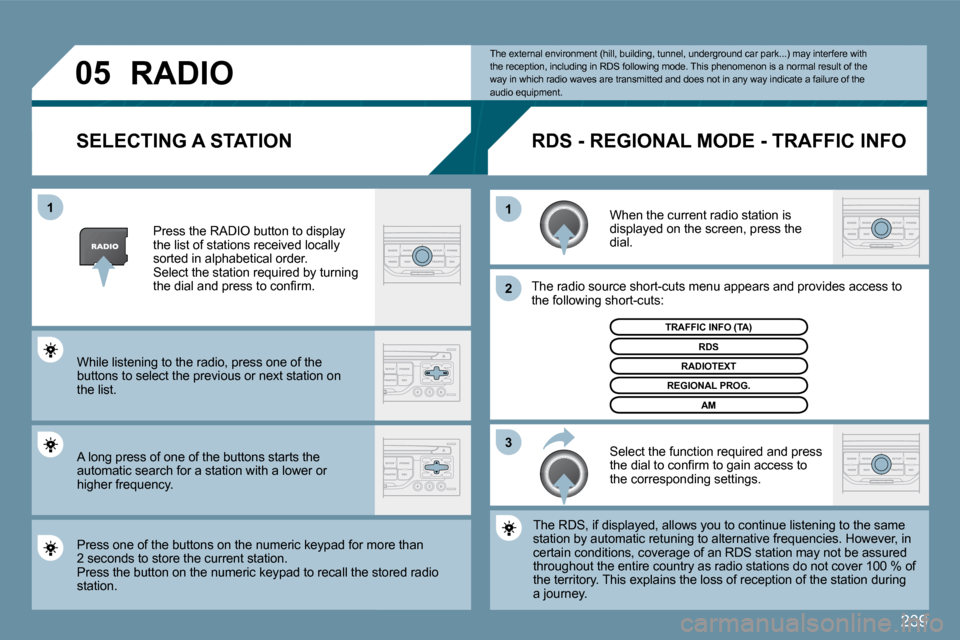
SELECTING A STATION
When the current radio station is displayed on the screen, press the dial.
The radio source short-cuts menu appears and provi
desovides access to the following short-cuts:
Select the function required and press the dial to confi rm to gain access to the corresponding settings.
TRAFFIC INFO (TA)
The RDS, if displayed, allows you to continue listening to the same The RDS, if displayed, allows you to continue listening to the same station by automatic retuning to alternative freque ncies.ncies. However, in certain conditions, coverage of an RDS station may not be assured certain conditions, coverage of an RDS station may not be assured throughout the entire country as radio stations do not conot cover 100 % of the territory. This explains the loss of reception of the stathe station during a journey.
The external environment (hill, building, tunnel, underground car park...) may interfere with the reception, including in RDS following mode. Thi s phenomenon is a normal result of the way in which radio waves are transmitted and does n ot in any way indicate a failure of the audio equipment.
RDS - REGIONAL MODE - TRAFFIC INFO
Press the RADIO button to display the list of stations received locally sorted in alphabetical order. Select the station required by turning the dial and press to confi rm.
While listening to the radio, press one of the buttons to select the previous or next station on the list.
Press one of the buttons on the numeric keypad for moor more than 2 seconds to store the current station. Press the button on the numeric keypad to recall the stothe stored radio station.
RDS
RADIOTEXT
REGIONAL PROG.
AM
RADIO
A long press of one of the buttons starts the automatic search for a station with a lower or higher frequency.
Page 245 of 267
250
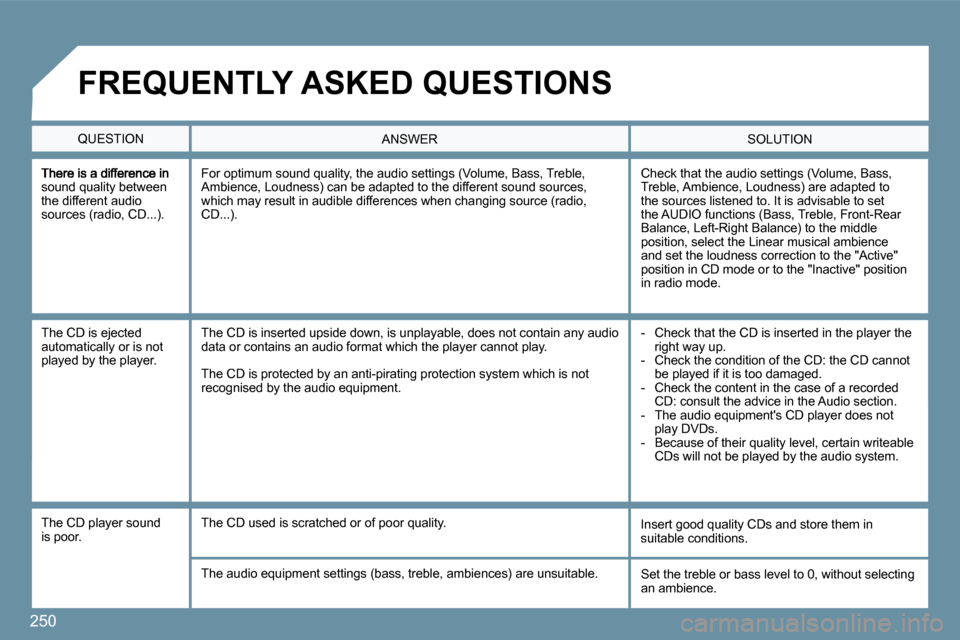
sound quality between the different audio sources (radio, CD...).
Check that the audio settings (Volume, Bass, Treble, Ambience, Loudness) are adapted to the sources listened to. It is advisable to set the AUDIO functions (Bass, Treble, Front-Rear Balance, Left-Right Balance) to the middle position, select the Linear musical ambience and set the loudness correction to the "Active" position in CD mode or to the "Inactive" position in radio mode.
For optimum sound quality, the audio settings (Volume, Bass, Treble, Ambience, Loudness) can be adapted to the different sound sources, which may result in audible differences when changing source (radio, CD...).
The CD is ejected automatically or is not played by the player.
- Check that the CD is inserted in the player the right way up. - Check the condition of the CD: the CD cannot be played if it is too damaged. - Check the content in the case of a recorded CD: consult the advice in the Audio section. - The audio equipment's CD player does not play DVDs. - Because of their quality level, certain writeable CDs will not be played by the audio system.
The CD is inserted upside down, is unplayable, doe s not contain any audio data or contains an audio format which the player cannot play.
The CD is protected by an anti-pirating protection system which is not recognised by the audio equipment.
The CD player sound is poor. Insert good quality CDs and store them in suitable conditions. The CD used is scratched or of poor quality.
The audio equipment settings (bass, treble, ambien ces) are unsuitable. Set the treble or bass level to 0, without selecting an ambience.
QUESTION SOLUTION ANSWER
FREQUENTLY ASKED QUESTIONS
Page 246 of 267
251
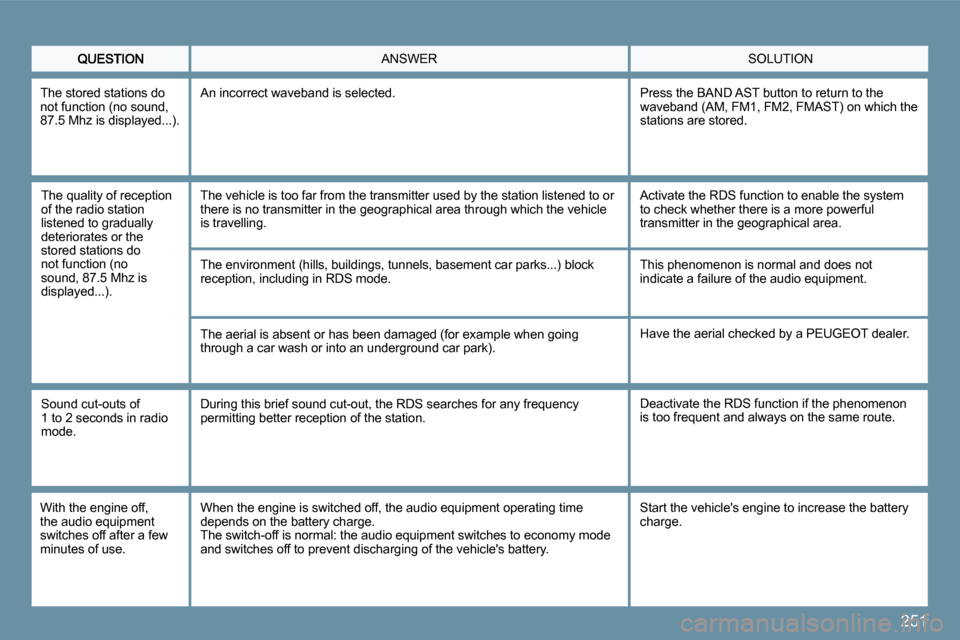
SOLUTION ANSWER
The quality of reception of the radio station listened to gradually deteriorates or the stored stations do not function (no sound, 87.5 Mhz is displayed...).
The vehicle is too far from the transmitter used by the station listened to or there is no transmitter in the geographical area th rough which the vehicle is travelling.
The environment (hills, buildings, tunnels, baseme nt car parks...) block reception, including in RDS mode.
The aerial is absent or has been damaged (for exam ple when going through a car wash or into an underground car park).
Activate the RDS function to enable the system to check whether there is a more powerful transmitter in the geographical area.
This phenomenon is normal and does not indicate a failure of the audio equipment.
Have the aerial checked by a PEUGEOT dealer.
Sound cut-outs of 1 to 2 seconds in radio mode.
During this brief sound cut-out, the RDS searches for any frequency permitting better reception of the station. Deactivate the RDS function if the phenomenon is too frequent and always on the same route.
With the engine off, the audio equipment switches off after a few minutes of use.
When the engine is switched off, the audio equipme nt operating time depends on the battery charge. The switch-off is normal: the audio equipment switches to economy mode and switches off to prevent discharging of the vehicle's battery.
Start the vehicle's engine to increase the battery charge.
The stored stations do not function (no sound, 87.5 Mhz is displayed...).
An incorrect waveband is selected. Press the BAND AST button to return to the waveband (AM, FM1, FM2, FMAST) on which the stations are stored.
Page 249 of 267
254
1
22
10101111
131314141515
33445566778899
1212
01 FIRST STEPS
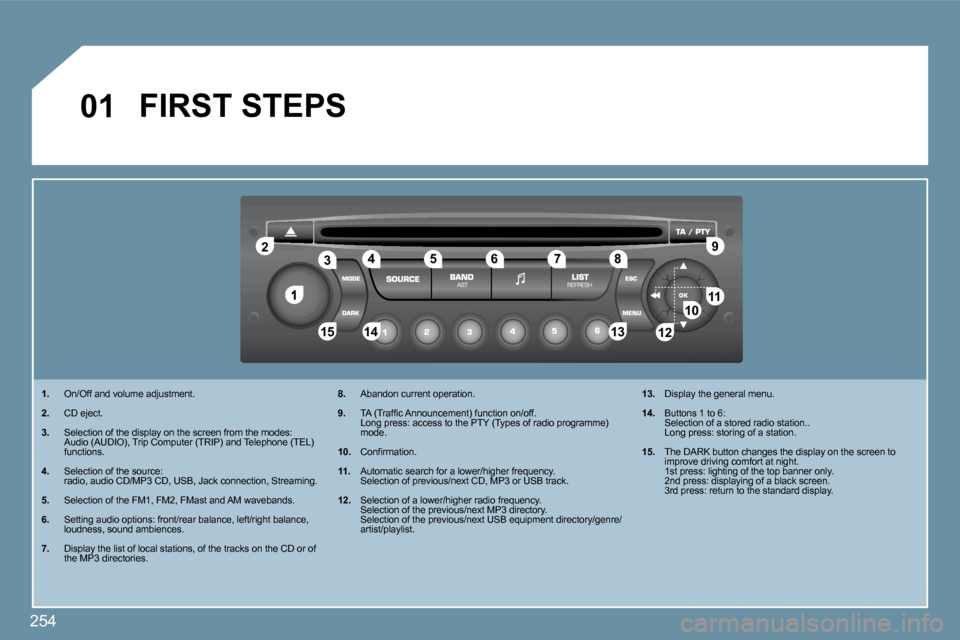
1. On/Off and volume adjustment.
2. CD eject.
3. Selection of the display on the screen from the modes: Audio (AUDIO), Trip Computer (TRIP) and Telephone (TEL) functions.
4. Selection of the source: radio, audio CD/MP3 CD, USB, Jack connection, Streaming.
5. Selection of the FM1, FM2, FMast and AM wavebands.
6. Setting audio options: front/rear balance, left/right balance, loudness, sound ambiences.
7. Display the list of local stations, of the tracks on the CD or of the MP3 directories.
8. Abandon current operation.
9. TA (Traffi c Announcement) function on/off. Long press: access to the PTY (Types of radio prog ramme) mode.
10. Confi rmation.
11. Automatic search for a lower/higher frequency. Selection of previous/next CD, MP3 or USB track.
12. Selection of a lower/higher radio frequency. Selection of the previous/next MP3 directory. Selection of the previous/next USB equipment direc tory/genre/artist/playlist.
13. Display the general menu.
14. Buttons 1 to 6: Selection of a stored radio station.. Long press: storing of a station.
15. The DARK button changes the display on the screen to improve driving comfort at night. 1st press: lighting of the top banner only. 2nd press: displaying of a black screen. 3rd press: return to the standard display.
Page 251 of 267
256
22
33
44
11
22
44
33
11
03 AUDIO
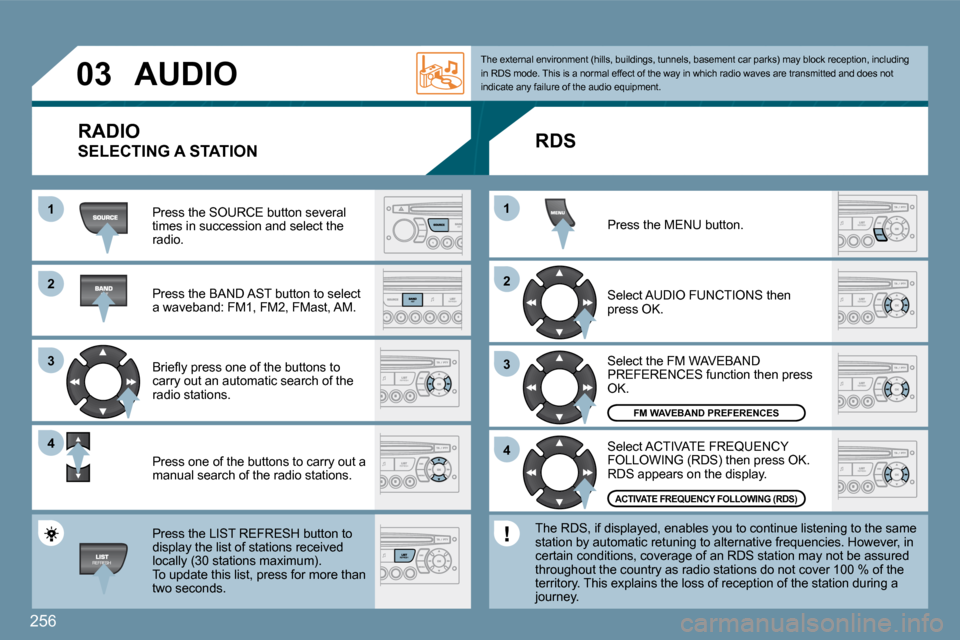
Press the SOURCE button several times in succession and select the radio.
Press the BAND AST button to select a waveband: FM1, FM2, FMast, AM.
Briefl y press one of the buttons to carry out an automatic search of the radio stations.
Press one of the buttons to carry out a manual search of the radio stations.
Press the LIST REFRESH button to display the list of stations received locally (30 stations maximum). To update this list, press for more than
two seconds.
Select ACTIVATE FREQUENCY FOLLOWING (RDS) then press OK. RDS appears on the display.
Select the FM WAVEBAND PREFERENCES function then press OK.
Select AUDIO FUNCTIONS then press OK.
Press the MENU button.
FM WAVEBAND PREFERENCES
ACTIVATE FREQUENCY FOLLOWING (RDS)
The external environment (hills, buildings, tunnel
s, basement car parks) may block reception, includi ng in RDS mode. This is a normal effect of the way in which radio waves are transmitted and does not indicate any failure of the audio equipment.
RDS
The RDS, if displayed, enables you to continue lis tening to the same station by automatic retuning to alternative frequencies. However, in certain conditions, coverage of an RDS station may not be assured throughout the country as radio stations do not cover 100 % of the territory. This explains the loss of reception of the station during a journey.
RADIO
SELECTING A STATION
Page 258 of 267
263
11
22
11
11
22
33
22
YES
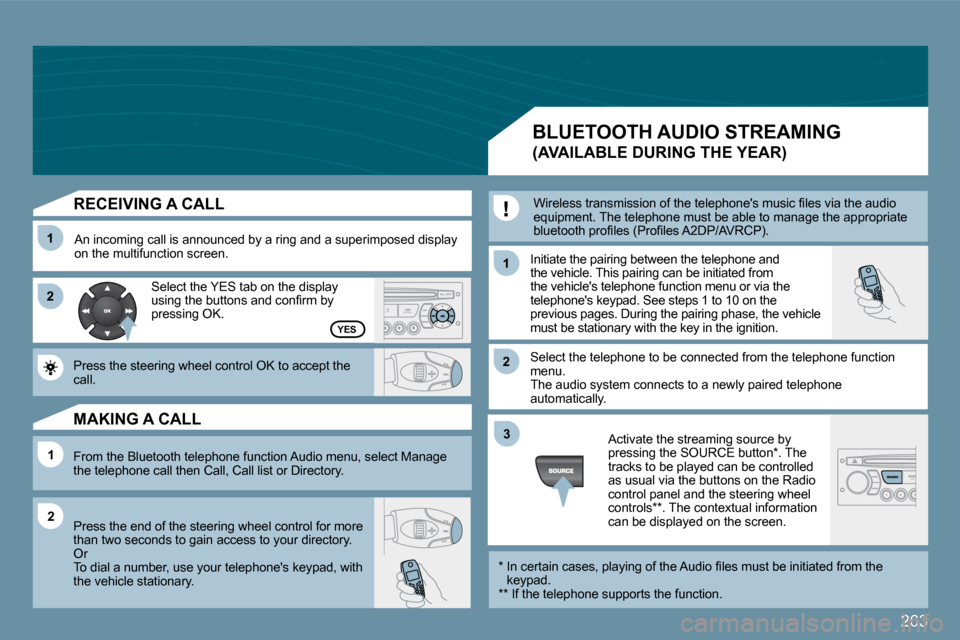
RECEIVING A CALL
An incoming call is announced by a ring and a superimposed display on the multifunction screen. Initiate the pairing between the telephone and the vehicle. This pairing can be initiated from the vehicle's telephone function menu or via the telephone's keypad. See steps 1 to 10 on the previous pages. During the pairing phase, the vehicle must be stationary with the key in the ignition.
Select the telephone to be connected from the tele phone function menu. The audio system connects to a newly paired teleph one automatically.
Select the YES tab on the display using the buttons and confi rm by pressing OK.
Press the steering wheel control OK to accept the call.
From the Bluetooth telephone function Audio menu, select Manage the telephone call then Call, Call list or Directory.
Press the end of the steering wheel control for mo re than two seconds to gain access to your directory. Or To dial a number, use your telephone's keypad, wit h the vehicle stationary.
MAKING A CALL
BLUETOOTH AUDIO STREAMING
(AVAILABLE DURING THE YEAR)
Wireless transmission of the telephone's music fi les via the audio equipment. The telephone must be able to manage the appropriate bluetooth profi les (Profi les A2DP/AVRCP).
* In certain cases, playing of the Audio fi les must be initiated from the keypad. ** If the telephone supports the function.
Activate the streaming source by pressing the SOURCE button * . The tracks to be played can be controlled as usual via the buttons on the Radio control panel and the steering wheel controls ** . The contextual information can be displayed on the screen.
Page 261 of 267
266
1
2
2
2
2
1
2
2
1
2
3
3
1
2
2
2
2
2
2
1
2
2
2
2
2
2
2
2
1
2
2
123
23
1
1
1
1
1
1
1
1
1
1
1
1
1
1
1
08
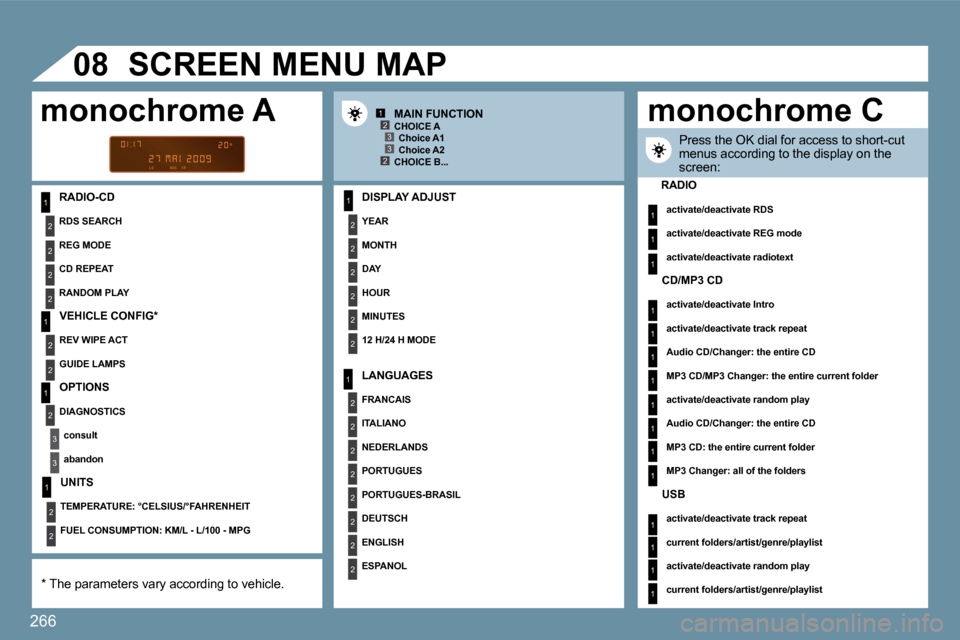
RADIO-CD DISPLAY ADJUST
YEAR
MONTH
DAY
HOUR
MINUTES
12 H/24 H MODE
SCREEN MENU MAP
MAIN FUNCTION
* The parameters vary according to vehicle.
CHOICE A Choice A1 Choice A2 CHOICE B...
LANGUAGES
FRANCAIS
ITALIANO
NEDERLANDS
PORTUGUES
PORTUGUES-BRASIL
DEUTSCH
ENGLISH
ESPANOL
Press the OK dial for access to short-cut menus according to the display on the screen:
monochrome A monochrome C
RADIO
activate/deactivate RDS
activate/deactivate REG mode
activate/deactivate radiotext
RDS SEARCH
REG MODE
CD REPEAT
RANDOM PLAY
VEHICLE CONFIG *
REV WIPE ACT
GUIDE LAMPS
OPTIONS
DIAGNOSTICS
consult
abandon
UNITS
TEMPERATURE: °CELSIUS/°FAHRENHEIT
FUEL CONSUMPTION: KM/L - L/100 - MPG
CD/MP3 CD
activate/deactivate Intro
activate/deactivate track repeat
Audio CD/Changer: the entire CD
MP3 CD/MP3 Changer: the entire current folder
activate/deactivate random play
Audio CD/Changer: the entire CD
MP3 CD: the entire current folder
MP3 Changer: all of the folders
USB
activate/deactivate track repeat
current folders/artist/genre/playlist
activate/deactivate random play
current folders/artist/genre/playlist