keyless entry PEUGEOT 208 2021 User Guide
[x] Cancel search | Manufacturer: PEUGEOT, Model Year: 2021, Model line: 208, Model: PEUGEOT 208 2021Pages: 276, PDF Size: 8.02 MB
Page 55 of 276
53
Ease of use and comfort
3With the Keyless Entry and Starting system, the
charger’s operation may be briefly disrupted
when a door is opened or the ignition is switched
off.
Charging
► Open the flap to access the charging area.
► With the charging area clear , place a device
in its centre.
The system is not designed to charge multiple devices simultaneously.
Do not leave any metal objects (coins,
keys, vehicle remote control, etc.) in the
charging area while a device is being
charged, due to the risk of overheating or
interrupting the charging process.
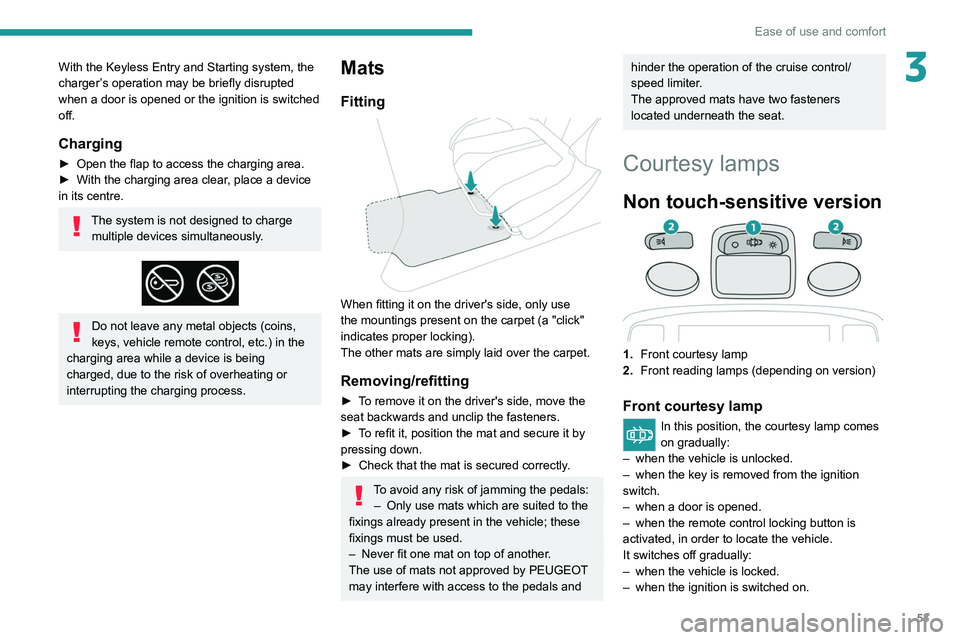
Mats
Fitting
When fitting it on the driver's side, only use
the mountings present on the carpet (a "click"
indicates proper locking).
The other mats are simply laid over the carpet.
Removing/refitting
► To remove it on the driver's side, move the
seat backwards and unclip the fasteners.
►
T
o refit it, position the mat and secure it by
pressing down.
►
Check that the mat is secured correctly
.
To avoid any risk of jamming the pedals:– Only use mats which are suited to the
fixings already present in the vehicle; these
fixings must be used.
–
Never fit one mat on top of another
.
The use of mats not approved by PEUGEOT
may interfere with access to the pedals and
hinder the operation of the cruise control/
speed limiter.
The approved mats have two fasteners
located underneath the seat.
Courtesy lamps
Non touch-sensitive version
1. Front courtesy lamp
2. Front reading lamps (depending on version)
Front courtesy lamp
In this position, the courtesy lamp comes
on gradually:
–
when the vehicle is unlocked.
–
when the key is removed from the ignition
switch.
–
when a door is opened.
–
when the remote control locking button is
activated, in order to locate the vehicle.
It switches off gradually:
–
when the vehicle is locked.
–
when the ignition is switched on.
Page 89 of 276
87
Driving
6Switching off the engine
► Immobilise the vehicle.
► With the engine at idle, turn the key to
position 1
.
►
Remove the key from the ignition switch.
►
T
o lock the steering column, turn the steering
wheel until it locks.
To facilitate unlocking of the steering column, it is recommended that the
wheels be returned to the straight ahead
position before switching off the engine.
Never switch off the ignition before the
complete immobilisation of the vehicle.
With the engine off, the braking and steering
assistance systems are also cut off - risk of
loss of control of the vehicle!
Check that the parking brake is correctly
applied, particularly on sloping ground.
When leaving the vehicle, keep the key in
your possession and lock the vehicle.
Energy economy mode
After the engine has stopped (position 1. Stop),
for a maximum combined duration of 30 minutes,
you can still use functions such as the audio and
telematics system, courtesy lamps or dipped
beam headlamps.
For more information on Energy
economy mode, refer to the
corresponding section.
Key left in
When the driver's door is opened, a
message is displayed, accompanied by an
audible signal, if the key has been left in the
ignition switch in position 1.
If the key has been left in the ignition switch
in position 2, the ignition will be switched off
automatically after one hour.
To switch the ignition back on, turn the key to
position 1, then back to position 2.
Starting/Switching off the
engine with Keyless Entry
and Starting
The electronic key must be present in the
passenger compartment.
The electronic key is also detected in the
boot.
If the electronic key is not detected, a
message is displayed.
Move the electronic key so that the engine
can be started or switched off.
If there is still a problem, refer to the "Key
not detected - Back-up starting or Back-up
switch-off" section.
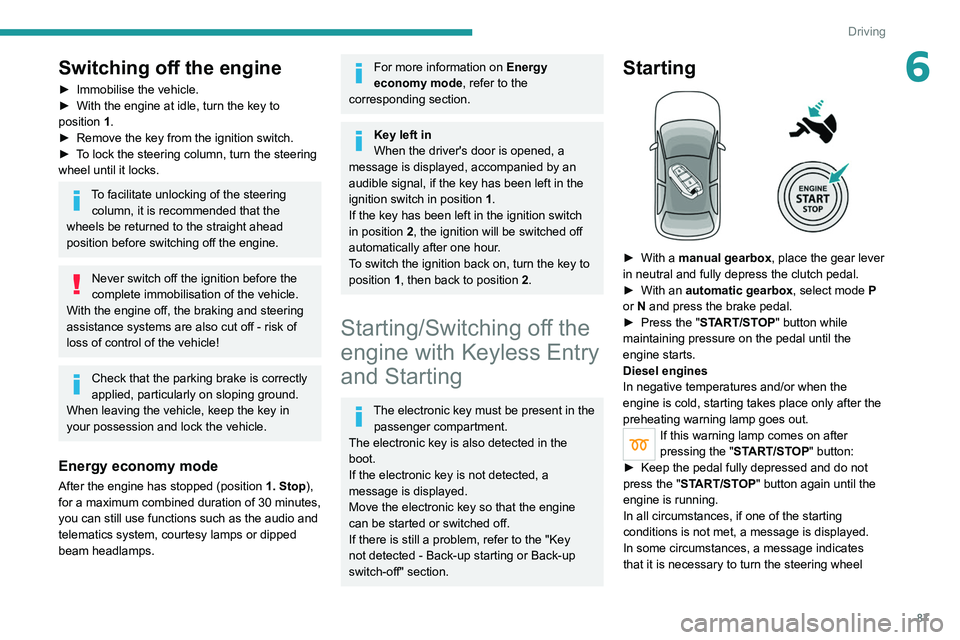
Starting
► With a manual gearbox, place the gear lever
in neutral and fully depress the clutch pedal.
►
With an
automatic gearbox, select mode P
or
N and press the brake pedal.
►
Press the "
START/STOP" button while
maintaining pressure on the pedal until the
engine starts.
Diesel engines
In negative temperatures and/or when the
engine is cold, starting takes place only after the
preheating warning lamp goes out.
If this warning lamp comes on after
pressing the " START/STOP" button:
►
Keep the pedal fully depressed and do not
press the "
START/STOP" button again until the
engine is running.
In all circumstances, if one of the starting
conditions is not met, a message is displayed.
In some circumstances, a message indicates
that it is necessary to turn the steering wheel
Page 141 of 276
139
Practical information
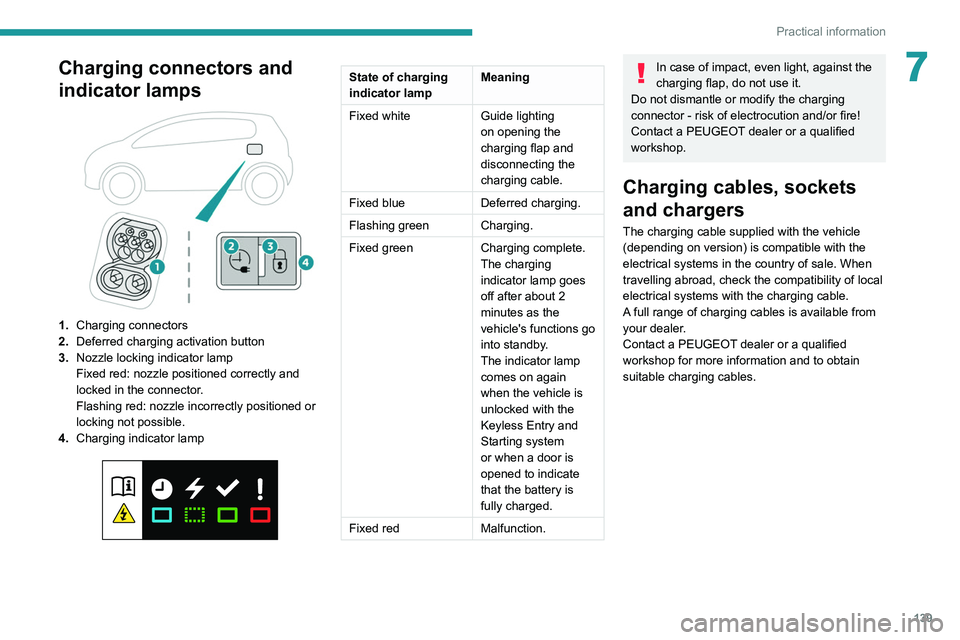
7Charging connectors and
indicator lamps
1.Charging connectors
2. Deferred charging activation button
3. Nozzle locking indicator lamp
Fixed red: nozzle positioned correctly and
locked in the connector.
Flashing red: nozzle incorrectly positioned or
locking not possible.
4. Charging indicator lamp
State of charging
indicator lamp Meaning
Fixed white Guide lighting
on opening the
charging flap and
disconnecting the
charging cable.
Fixed blue Deferred charging.
Flashing green Charging.
Fixed green Charging complete.
The charging
indicator lamp goes
off after about 2
minutes as the
vehicle's functions go
into standby.
The indicator lamp
comes on again
when the vehicle is
unlocked with the
Keyless Entry and
Starting system
or when a door is
opened to indicate
that the battery is
fully charged.
Fixed red Malfunction.In case of impact, even light, against the
charging flap, do not use it.
Do not dismantle or modify the charging
connector - risk of electrocution and/or fire!
Contact a PEUGEOT dealer or a qualified
workshop.
Charging cables, sockets
and chargers
The charging cable supplied with the vehicle
(depending on version) is compatible with the
electrical systems in the country of sale. When
travelling abroad, check the compatibility of local
electrical systems with the charging cable.
A full range of charging cables is available from
your dealer.
Contact a PEUGEOT dealer or a qualified
workshop for more information and to obtain
suitable charging cables.
Page 162 of 276
160
Practical information
Free-wheeling
In certain situations, it is necessary to put the
vehicle into free-wheeling mode (e.g. towing, on
a rolling road, automatic car wash (Wash mode),
rail or sea transport).
The procedure varies according to the type of
gearbox and parking brake.
With manual or EAT6
automatic gearbox and
electric parking brake
/
To release them
► With the engine running and while depressing
the brake pedal, move the gear selector to the
neutral position.
► While depressing the brake pedal, switch off
the ignition.
► Release the brake pedal, then switch on the
ignition again.
► While depressing the brake pedal, press the
control to release the parking brake.
► Release the brake pedal, then switch off the
ignition.
Reverting to normal operation
► While depressing the brake pedal, restart the
engine.
Precautions for use
AdBlue® is a urea-based solution. This fluid is
non-flammable, colourless and odourless (when
kept in a cool place).
In the event of contact with the skin, wash the
affected area with soap and running water. In the
event of contact with the eyes, immediately rinse
the eyes with large amounts of water or with an
eye wash solution for at least 15 minutes. Seek
medical attention if you feel a persistent burning
sensation or irritation.
If swallowed, immediately wash out the mouth
with clean water and then drink plenty of water.
In certain conditions (high temperature, for
example), the risk of release of ammonia cannot
be excluded: do not inhale the fluid. Ammonia
vapours have an irritant effect on mucous
membranes (eyes, nose and throat).
Store AdBlue® out of the reach of
children, in its original container.
Procedure
Before starting the top-up procedure, ensure that
the vehicle is parked on a flat and level surface.
In wintry conditions, ensure that the temperature
of the vehicle is above -11°C. Otherwise the
AdBlue
® may be frozen and so cannot be poured
into the tank. Park the vehicle in a warmer area
for a few hours to allow the top-up to be carried
out.
Never pour the AdBlue® into the Diesel
fuel tank.
If any AdBlue® is splashed, or if there are
any spillages on the bodywork, rinse
immediately with cold water or wipe with a
damp cloth.
If the fluid has crystallised, clean it off using a
sponge and hot water.
Important: in the event of a top-up after
a breakdown because of a lack of
AdBlue, it is essential to wait around 5
minutes before switching on the ignition,
without opening the driver’s door,
unlocking the vehicle, inserting the key
into the ignition switch, or bringing the
key for the "Keyless Entry and Starting"
system into the passenger compartment.
Switch on the ignition, then wait for 10
seconds before starting the engine.
►
Switch off the ignition and remove the key
from the switch to switch off the engine.
or
►
With Keyless Entry and Starting, press the
"
START/STOP" button to switch off the engine.
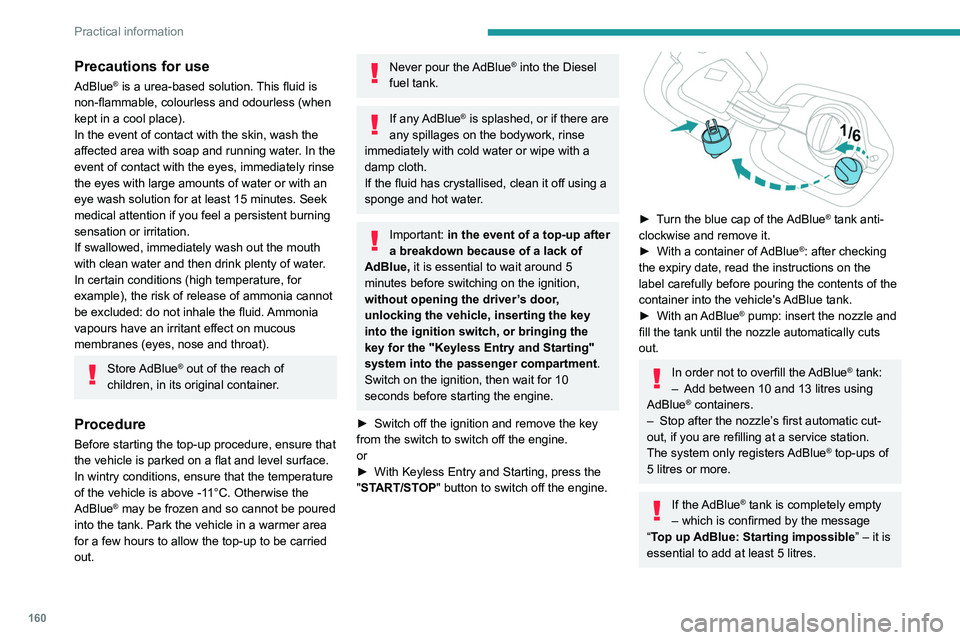
► Turn the blue cap of the AdBlue® tank anti-
clockwise and remove it.
►
With a container of
AdBlue
®: after checking
the expiry date, read the instructions on the
label carefully before pouring the contents of the
container into the vehicle's AdBlue tank.
►
With an
AdBlue® pump: insert the nozzle and
fill the tank until the nozzle automatically cuts
out.
In order not to overfill the AdBlue® tank:
–
Add between 10 and 13 litres using
AdBlue® containers.
–
Stop after the nozzle’ s first automatic cut-
out, if you are refilling at a service station.
The system only registers AdBlue
® top-ups of
5
litres or more.
If the AdBlue® tank is completely empty
– which is confirmed by the message
“Top up
AdBlue: Starting impossible ” – it is
essential to add at least 5 litres.
Page 163 of 276
161
Practical information
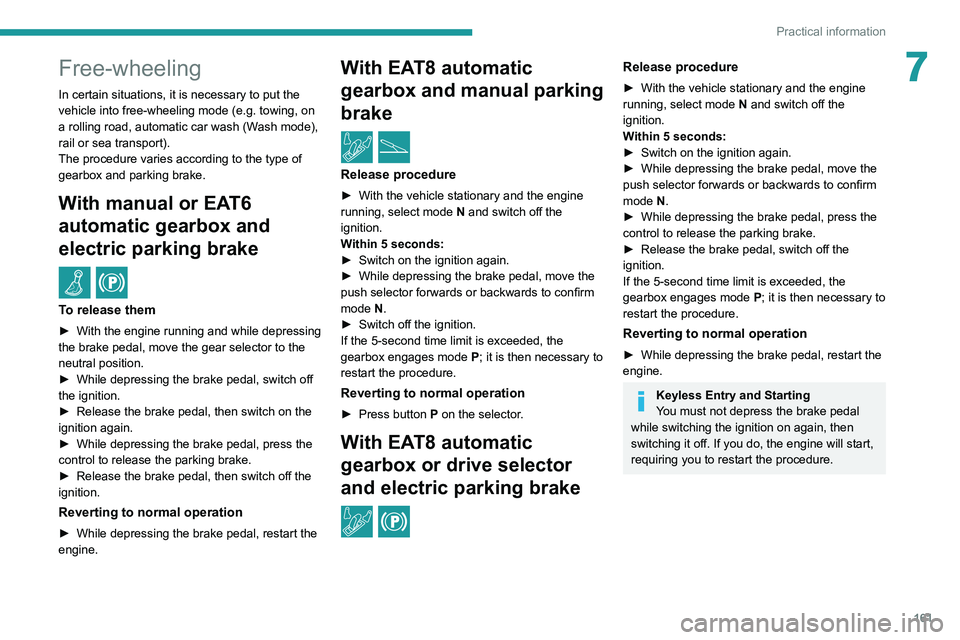
7Free-wheeling
In certain situations, it is necessary to put the
vehicle into free-wheeling mode (e.g. towing, on
a rolling road, automatic car wash (Wash mode),
rail or sea transport).
The procedure varies according to the type of
gearbox and parking brake.
With manual or EAT6
automatic gearbox and
electric parking brake
/
To release them
► With the engine running and while depressing
the brake pedal, move the gear selector to the
neutral position.
►
While depressing the brake pedal, switch off
the ignition.
►
Release the brake pedal, then switch on the
ignition again.
►
While depressing the brake pedal, press the
control to release the parking brake.
►
Release the brake pedal, then switch off the
ignition.
Reverting to normal operation
► While depressing the brake pedal, restart the
engine.
With EAT8 automatic
gearbox and manual parking
brake
/
Release procedure
► With the vehicle stationary and the engine
running, select mode N and switch off the
ignition.
Within 5
seconds:
►
Switch on the ignition again.
►
While depressing the brake pedal, move the
push selector forwards or backwards to confirm
mode
N.
►
Switch off the ignition.
If the 5-second time limit is exceeded, the
gearbox engages mode P
; it is then necessary to
restart the procedure.
Reverting to normal operation
► Press button P on the selector.
With EAT8 automatic
gearbox or drive selector
and electric parking brake
/
Release procedure
► With the vehicle stationary and the engine
running, select mode N and switch off the
ignition.
Within 5
seconds:
►
Switch on the ignition again.
►
While depressing the brake pedal, move the
push selector forwards or backwards to confirm
mode
N.
►
While depressing the brake pedal, press the
control to release the parking brake.
►
Release the brake pedal, switch off the
ignition.
If the 5-second time limit is exceeded, the
gearbox engages mode P
; it is then necessary to
restart the procedure.
Reverting to normal operation
► While depressing the brake pedal, restart the
engine.
Keyless Entry and Starting
You must not depress the brake pedal
while switching the ignition on again, then
switching it off. If you do, the engine will start,
requiring you to restart the procedure.
Page 242 of 276
240
Alphabetical index
Key, electronic 32–33
Keyless Entry and Starting
32–33, 87–88
Key not recognised
88–89
Key with remote control
30, 85–86
Kit, hands-free
192–193, 204, 226
Kit, puncture repair
165
Kit, temporary puncture repair
164–166, 168
L
Labels 6
Labels, identification
186
Lamp, boot
55
Lamps, parking
58
Lamps, rear
173
Lams with Full LED technology
59
Lane assist
111, 115–117
Lane departure warning active
119
Leather (care)
162
LEDs - Light-emitting diodes
58, 172
Level, AdBlue®
157
Level, brake fluid
156
Level, Diesel additive
157
Level, engine coolant
20, 156
Level, engine oil
19, 155
Levels and checks
154–156
Level, screenwash fluid
62, 156
Light-emitting diodes - LEDs
58, 172
Lighting dimmer
23
Lighting, exterior
57, 60
Lighting, guide-me home
31, 60
Lighting, interior
53–54
Lighting, mood 54
Lighting, welcome
60
Loading
150
Load reduction mode
153
Locating your vehicle
31
Locking
31, 33
Locking from the inside
34
Locking the doors
34
Low fuel level
136
Lumbar
42
M
Mains socket (domestic network) 139
Maintenance (advice)
55, 138, 162
Maintenance, routine
104, 157–159
Manoeuvring aids (recommendations)
103
Map reading lamps
53
Markings, identification
186
Massage function
42
Mat
53, 104
Menu
203
Menu, main
27
Menus (audio)
188–189, 198–199, 210–211
Menu short cuts
27
Messages
228
Messages, quick
228
Minimum traction battery charge level
(Electric)
22
Mirror, rear view
44
Mirrors, door
43–44, 50, 122
Mirror, vanity
52
Misfuel prevention 137
Mobile application
28, 51, 145
Motor, electric
88, 155, 185
Mountings, ISOFIX
78
N
Navigation 215–217
Navigation, connected
218–220
O
Obstacle detection 127
Oil change
155
Oil consumption
155
OIl, engine
155
On-board tools
55, 164–166
Opening the bonnet
153–154
Opening the boot
32, 37
Opening the doors
32, 37
Opening the panoramic sunroof blind
54
Opening the windows
30
P
Pads, brake 158
Paint
162, 186
Paint colour code
186
Panoramic glass sunroof
54–55
Parcel shelf, rear
55
Page 243 of 276
241
Alphabetical index
Park Assist 131
Parking brake
89, 158
Parking brake, electric
89–91, 158
Parking sensors, audible and visual
127
Parking sensors, front
128
Parking sensors, rear
127
Passenger compartment temperature pre-
conditioning (Electric)
28, 51
Pedestrian horn (Electric)
66, 85
Personalisation
11
Plates, identification
186
Player, Apple®
191, 202, 225
Player, USB
191, 201, 224
Port, USB
52, 191, 201, 203, 220, 224
Power
22
Power indicator (Electric)
8, 22
Pressures, tyres
158, 166, 168, 186
Pre-tensioning seat belts
71
Priming pump
164
Priming the fuel system
164
Profiles
206, 229
Protecting children
72, 74–81
Proximity Keyless Entry & Start
32
Public fast charging station
139, 144
Puncture
166, 168
R
Radar (warnings) 103
Radio
189–191, 199–200, 223
Radio, digital (Digital Audio Broadcasting -
DAB)
190, 201, 224
Range, AdBlue® 20, 157
RDS
190, 200, 223
Reading lamps
53–54
Rear screen, demisting
50
Recharging the battery
176–177
Recharging the traction battery
(Electric)
137, 140, 143, 145–146
Recirculation, air
49
Recovery
178–180
Recovery of the vehicle
178–179
Reduction of electrical load
153
Regeneration of the particle filter
157
Regenerative braking (deceleration
by engine braking)
97–98
Reinitialisation of the under-inflation
detection system
103
Reinitialising the remote control
36
Reminder, key in ignition
87
Reminder, lighting on
57
Remote control
30–34
Remotely operable functions
(Electric)
28, 51, 145
Removing a wheel
169–170
Removing the mat
53
Replacing bulbs
171–173
Replacing fuses
175
Replacing the air filter
157
Replacing the oil filter
157
Replacing the passenger compartment
filter
157
Reservoir, screenwash
156
Reset trip
24
Rev counter
10Reversing camera 104, 129–130
Reversing lamps
174
Roof bars
150
Running out of fuel (Diesel)
164
S
Safety, children 72, 74–81
Saturation of the particle filter (Diesel)
157
Screen menu map
203
Screens, very cold conditions
151
Screenwash
62
Screenwash, front
62
Screenwash, rear
62
SCR (Selective Catalytic Reduction)
21, 159
Seat angle
42
Seat belts
70–71, 76
Seat belts, rear
70
Seat, rear bench
45
Seats, electric
42
Seats, front
41–42
Seats, heated
43
Seats, rear
45–46, 75
Selector, gear
94–97
Sensors (warnings)
104
Serial number, vehicle
186
Service indicator
19, 23
Servicing
19, 157–159
Settings, equipment
27
Settings, system
194, 206, 229
Shield, snow
151
Sidelamps
58, 172, 174