display PEUGEOT 3008 2010 Manual PDF
[x] Cancel search | Manufacturer: PEUGEOT, Model Year: 2010, Model line: 3008, Model: PEUGEOT 3008 2010Pages: 315, PDF Size: 23.05 MB
Page 247 of 315
222
05
2
1
3
2
1
TRAFFIC INFORMATION
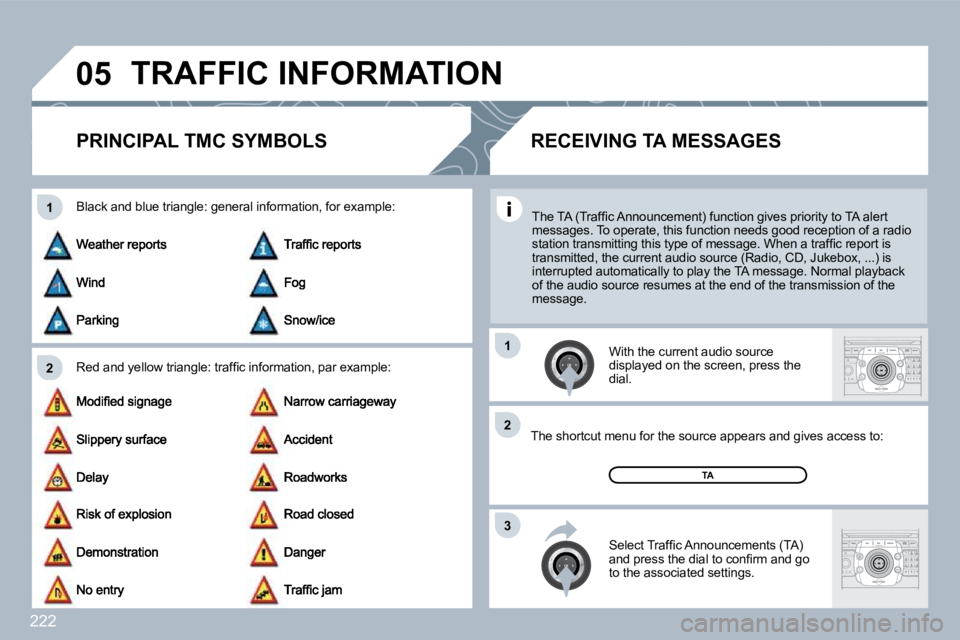
PRINCIPAL TMC SYMBOLS
Red and yellow triangle: traffi c information, par
example:
Black and blue triangle: general information, for example:
With the current audio source displayed on the screen, press the dial.
The shortcut menu for the source appears and give s access to: The shortcut menu for the source appears and gives access to:
Select Traffi c Announcements (TA) and press the dial to confi rm and go to the associated settings.
TA
The TA (Traffi c Announcement) function gives priority to TA alert messages. To operate, this function needs good rece ption of a radio station transmitting this type of message. When a traffi c report is transmitted, the current audio source (Radio, CD, J ukebox, ...) is interrupted automatically to play the TA message. N ormal playback of the audio source resumes at the end of the transmission of the message.
RECEIVING TA MESSAGES
Page 248 of 315
223
RADIO
11
2
3
06
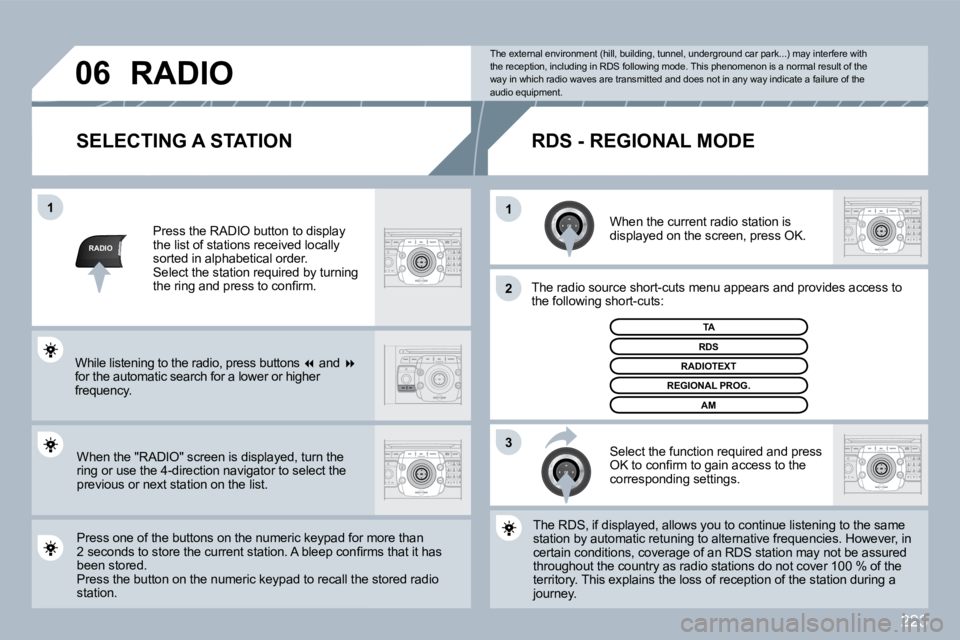
SELECTING A STATION
When the current radio station is displayed on the screen, press OK.
The radio source short-cuts menu appears and providesovides access to the following short-cuts:
Select the function required and press OK to confi rm to gain access to the corresponding settings.
TA
The RDS, if displayed, allows you to continue listening tning to the same station by automatic retuning to alternative freque ncies.ncies. However, in certain conditions, coverage of an RDS station may not y not be assured throughout the country as radio stations do not cover 10ver 100 % of the territory. This explains the loss of reception of the stationstation during a journey.
The external environment (hill, building, tunnel, underground car park...) may interfere with the reception, including in RDS following mode. Thi s phenomenon is a normal result of the way in which radio waves are transmitted and does n ot in any way indicate a failure of the audio equipment.
RDS - REGIONAL MODE
Press the RADIO button to display the list of stations received locally sorted in alphabetical order. Select the station required by turning the ring and press to confi rm.
Press one of the buttons on the numeric keypad fo r moor more than 2 seconds to store the current station. A bleep confi rms that it has 2 seconds to store the current station. A bleep confi rms that it has been stored. Press the button on the numeric keypad to recall the stothe stored radio station.
RDS
RADIOTEXT
REGIONAL PROG.
AM
RADIO
When the "RADIO" screen is displayed, turn the ring or use the 4-direction navigator to select the previous or next station on the list.
While listening to the radio, press buttons and for the automatic search for a lower or higher frequency.
Page 250 of 315
225
4
5
6
2
7
3
1
MEDIA
07
2
ABC 3
DEF
5
JKL
4
GHI 6
MNO
8
TUV
7
PQRS 9
WXYZ
0
* #
1
RADIO MEDIA
NAV ESC TRAFFIC
SETUP
ADDRBOOK
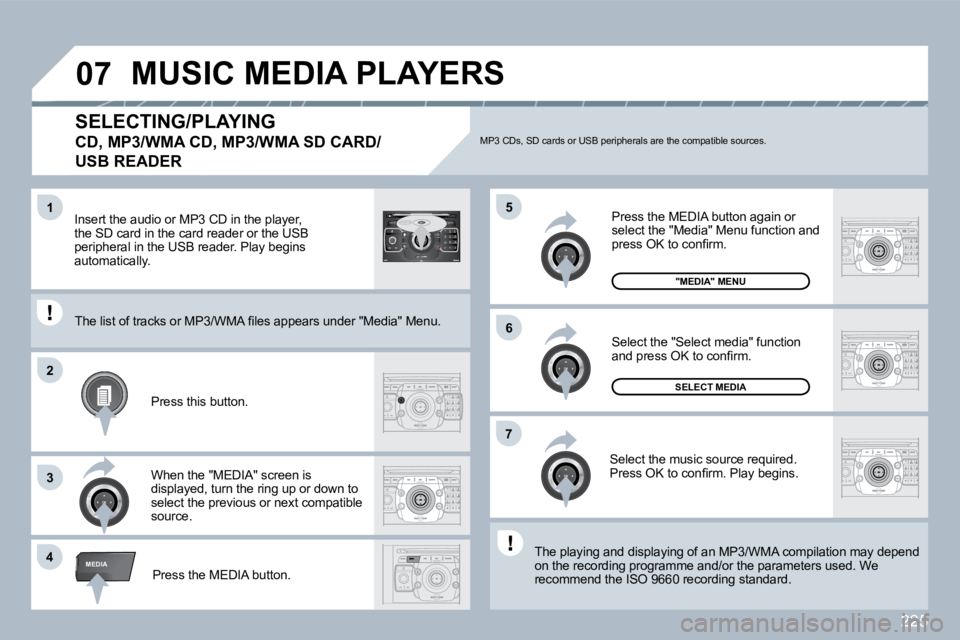
SELECTING/PLAYING
CD, MP3/WMA CD, MP3/WMA SD CARD/
USB READER
The playing and displaying of an MP3/WMA compilati
on may depend The playing and displaying of an MP3/WMA compilation may depend on the recording programme and/or the parameters us ed. We on the recording programme and/or the parameters used. We recommend the ISO 9660 recording standard. Press the MEDIA button.
Select the "Select media" function and press OK to confi rm.
Press this button.
Select the music source required. Press OK to confi rm. Play begins.
SELECT MEDIA
Press the MEDIA button again or select the "Media" Menu function and press OK to confi rm.
When the "MEDIA" screen is displayed, turn the ring up or down to select the previous or next compatible source.
"MEDIA" MENU
The list of tracks or MP3/WMA fi les appears under "Media" Menu. The list of tracks or MP3/WMA fi les appears under "Media" Menu.
Insert the audio or MP3 CD in the player, the SD card in the card reader or the USB peripheral in the USB reader. Play begins automatically.
MP3 CDs, SD cards or USB peripherals are the compatible sources.
MUSIC MEDIA PLAYERS
Page 253 of 315
228
1
3
4
22
3
MEDIA
1
MEDIA
07
2
ABC 3
DEF
5
JKL
4
GHI 6
MNO
8
TUV
7
PQRS 9
WXYZ
0
* #
1
RADIO MEDIA
NAV ESC TRAFFIC
SETUP
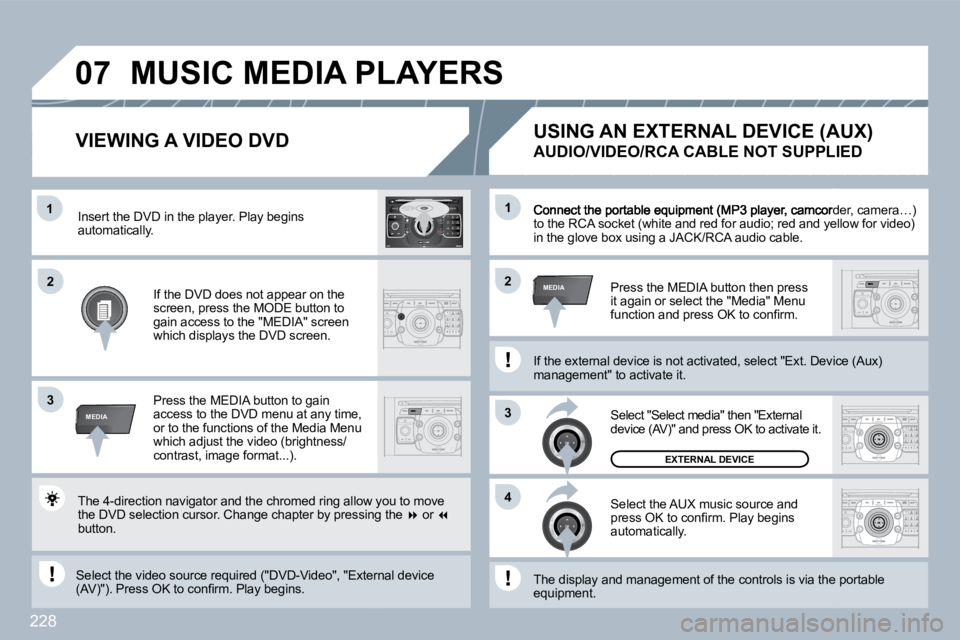
ADDRBOOK Connect the portable equipment (MP3 player, camco
rder, camera…) to the RCA socket (white and red for audio; red and yellow for video) to the RCA socket (white and red for audio; red and yellow for video) in the glove box using a JACK/RCA audio cable.
Press the MEDIA button then press it again or select the "Media" Menu function and press OK to confi rm.
Select the AUX music source and press OK to confi rm. Play begins automatically.
Select "Select media" then "External device (AV)" and press OK to activate it.
EXTERNAL DEVICE
The display and management of the controls is via the pa the portable equipment.
USING AN EXTERNAL DEVICE (AUX)
AUDIO/VIDEO/RCA CABLE NOT SUPPLIED
If the external device is not activated, select "Ext. Device (Aux) If the external device is not activated, select "Ext. Device (Aux) management" to activate it.
VIEWING A VIDEO DVD
Select the video source required ("DVD-Video", "E xternxternal device (AV)"). Press OK to confi rm. Play begins.
Press the MEDIA button to gain access to the DVD menu at any time, or to the functions of the Media Menu which adjust the video (brightness/contrast, image format...).
If the DVD does not appear on the screen, press the MODE button to gain access to the "MEDIA" screen which displays the DVD screen.
Insert the DVD in the player. Play begins automatically.
The 4-direction navigator and the chromed ring allow you to move the DVD selection cursor. Change chapter by pressin g the or button.
MUSIC MEDIA PLAYERS
Page 255 of 315
230
08
1
3
5
4
2
1
* The services available via the telephone depend on the network, the SIM card and the compatibili ty of the Bluetooth equipment used. Refer to your telephone's manual and your operator to check which services you have access to. A list of mobile telephones which offer the best range of services is available from dealers.
USING THE TELEPHONE
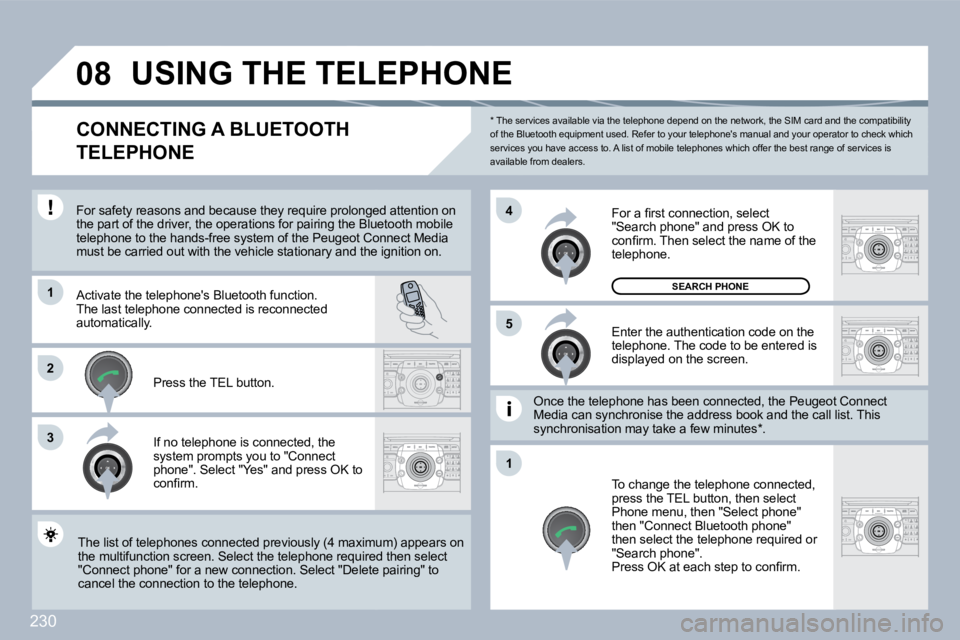
CONNECTING A BLUETOOTH
TELEPHONE
For safety reasons and because they require prolo ngedonged attention on the part of the driver, the operations for pairing the Blue Bluetooth mobile telephone to the hands-free system of the Peugeot C onot Connect Media must be carried out with the vehicle stationary and the id the ignition on.
Activate the telephone's Bluetooth function. The last telephone connected is reconnected automatically.
If no telephone is connected, the system prompts you to "Connect phone". Select "Yes" and press OK to confi rm.
Enter the authentication code on the telephone. The code to be entered is displayed on the screen.
To change the telephone connected, press the TEL button, then select Phone menu, then "Select phone" then "Connect Bluetooth phone" then select the telephone required or "Search phone". Press OK at each step to confi rm.
Once the telephone has been connected, the Peugeo t Cgeot Connect Media can synchronise the address book and the call lis call list. This synchronisation may take a few minutes * .
The list of telephones connected previously (4 maximum) appears on The list of telephones connected previously (4 maximum) appears on the multifunction screen. Select the telephone requ ired uired then select "Connect phone" for a new connection. Select "Delet e pelete pairing" to cancel the connection to the telephone.
Press the TEL button.
For a fi rst connection, select "Search phone" and press OK to confi rm. Then select the name of the telephone.
SEARCH PHONE
Page 257 of 315
232
3
11
2
3
2
08
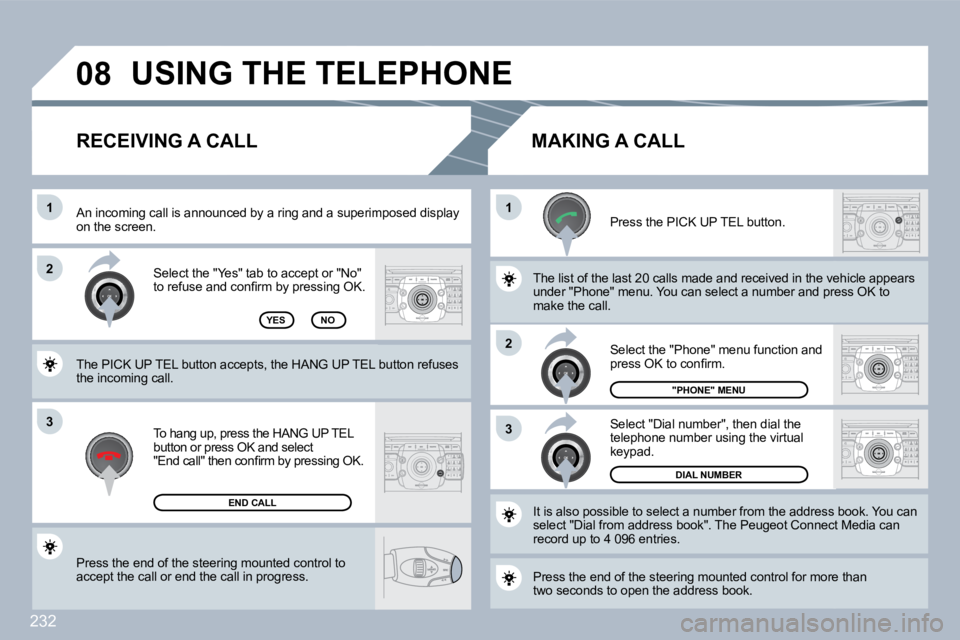
Press the end of the steering mounted control to accept the call or end the call in progress.
Select the "Yes" tab to accept or "No" to refuse and confi rm by pressing OK.
RECEIVING A CALL MAKING A CALL
An incoming call is announced by a ring and a superimpperimposed display on the screen.
To hang up, press the HANG UP TEL button or press OK and select "End call" then confi rm by pressing OK.
END CALL
Press the PICK UP TEL button.
Press the end of the steering mounted control for more more than two seconds to open the address book.
It is also possible to select a number from the address bress book. You can select "Dial from address book". The Peugeot Connec t Mnect Media can record up to 4 096 entries.
Select "Dial number", then dial the telephone number using the virtual keypad.
Select the "Phone" menu function and press OK to confi rm.
DIAL NUMBER
"PHONE" MENU
The list of the last 20 calls made and received in the vehhe vehicle appears under "Phone" menu. You can select a number and pre sd press OK to make the call. YESNO
The PICK UP TEL button accepts, the HANG UP TEL bu tton refuses the incoming call.
USING THE TELEPHONE
Page 262 of 315
237
SETUP
1
2
3
4
3
4
2
3
3
3
3
2
3
4
4
4
4
2
4
3
2
4
4
3
4
4
3
3
3
4
4
4
4
4
4
4
4
3
4
4
5
5
5
4
5
5
3
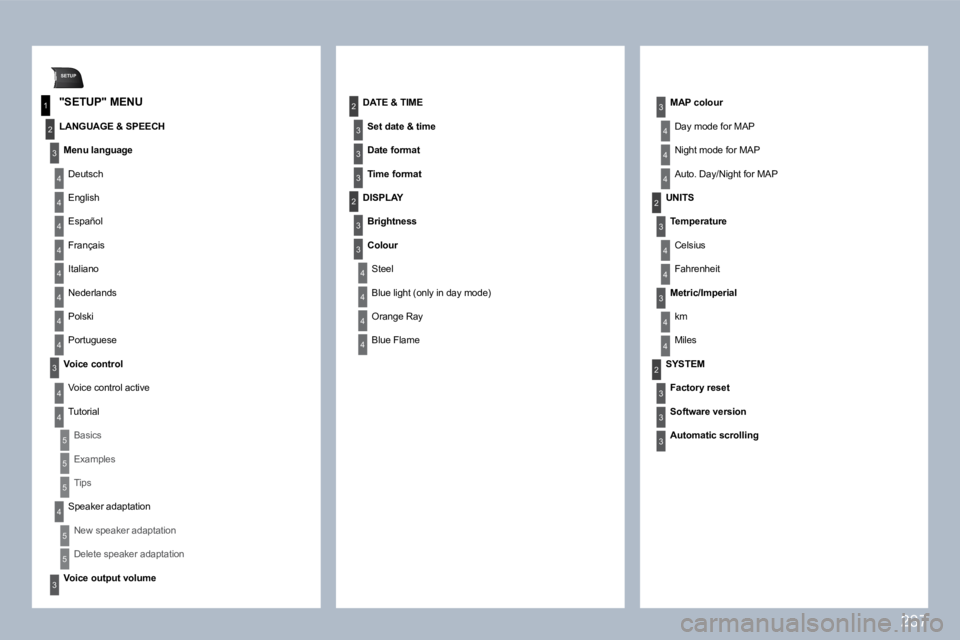
"SETUP" MENU
LANGUAGE & SPEECH
Menu language
Deutsch
English
Español
Français
Italiano
Nederlands
Polski
Portuguese
Voice control
Voice control active
Tutorial
Basics
Examples
Tips
Speaker adaptation
New speaker adaptation
Delete speaker adaptation
Voice output volume
DATE & TIME
Set date & time
Date format
Time format
DISPLAY
Brightness
Colour
Steel
Blue light (only in day mode)
Orange Ray
Blue Flame
MAP colour
Day mode for MAP
Night mode for MAP
Auto. Day/Night for MAP
UNITS
Temperature
Celsius
Fahrenheit
Metric/Imperial
km
Miles
SYSTEM
Factory reset
Software version
Automatic scrolling
Page 265 of 315
240
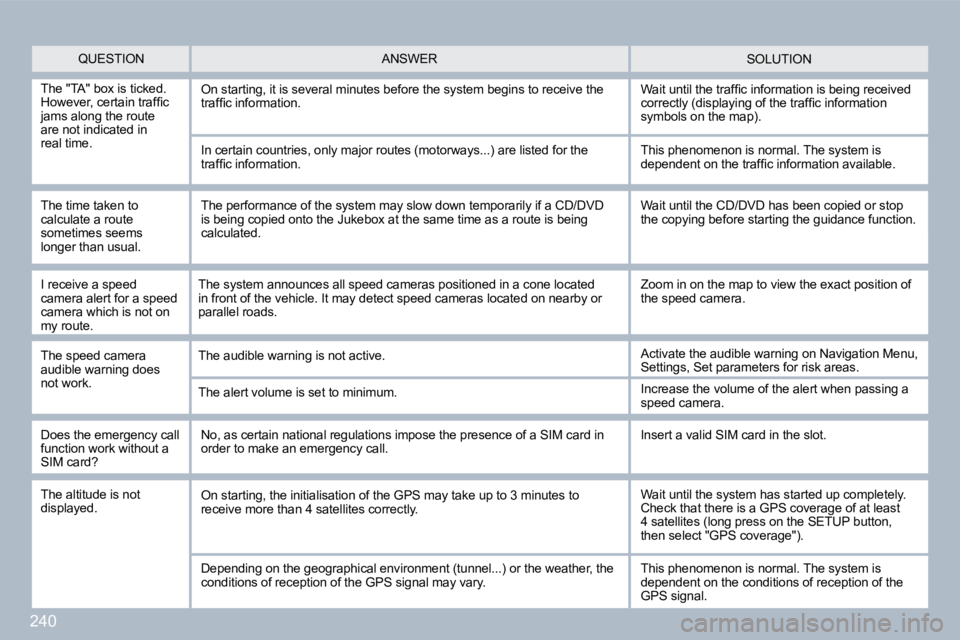
QUESTION SOLUTION ANSWER
The "TA" box is ticked. However, certain traffi c jams along the route are not indicated in real time.
On starting, it is several minutes before the system begins to receive the traffi c information. Wait until the traffi c information is being received correctly (displaying of the traffi c information symbols on the map).
In certain countries, only major routes (motorways ...) are listed for the traffi c information.
The time taken to calculate a route sometimes seems longer than usual.
This phenomenon is normal. The system is dependent on the traffi c information available.
The performance of the system may slow down tempor arily if a CD/DVD is being copied onto the Jukebox at the same time as a route is being calculated.
Wait until the CD/DVD has been copied or stop the copying before starting the guidance function.
Does the emergency call function work without a SIM card?
No, as certain national regulations impose the pre sence of a SIM card in order to make an emergency call. Insert a valid SIM card in the slot.
The altitude is not displayed. On starting, the initialisation of the GPS may take up to 3 minutes to receive more than 4 satellites correctly. Wait until the system has started up completely. Check that there is a GPS coverage of at least 4 satellites (long press on the SETUP button, then select "GPS coverage").
Depending on the geographical environment (tunnel. ..) or the weather, the conditions of reception of the GPS signal may vary. This phenomenon is normal. The system is dependent on the conditions of reception of the GPS signal.
I receive a speed camera alert for a speed camera which is not on my route.
The speed camera audible warning does not work.
The system announces all speed cameras positioned in a cone located in front of the vehicle. It may detect speed cameras located on nearby or parallel roads.
The audible warning is not active.
The alert volume is set to minimum.
Zoom in on the map to view the exact position of the speed camera.
Activate the audible warning on Navigation Menu, Settings, Set parameters for risk areas.
Increase the volume of the alert when passing a speed camera.
Page 267 of 315
242
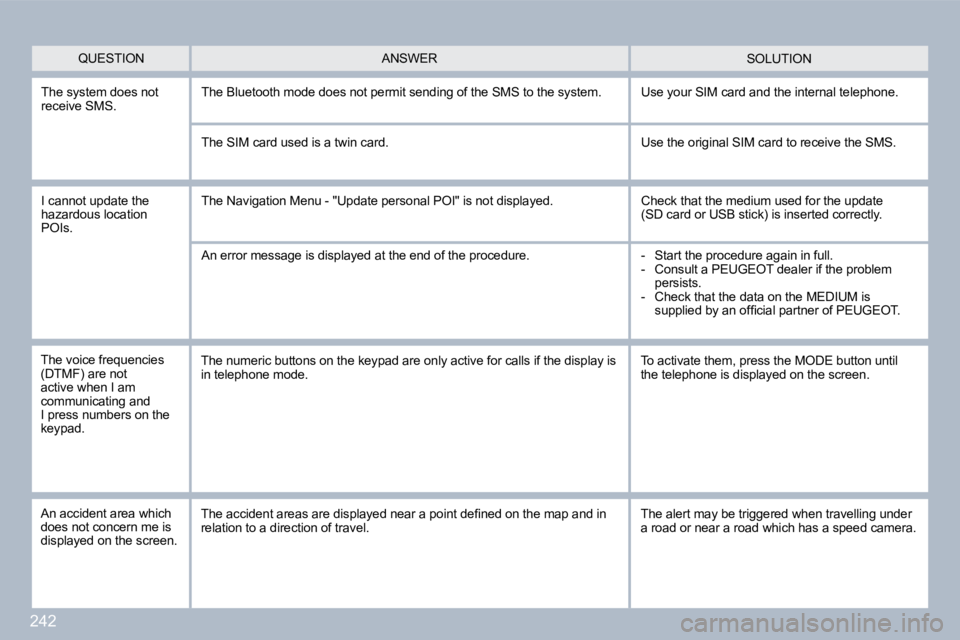
The system does not receive SMS. The Bluetooth mode does not permit sending of the SMS to the system. Use your SIM card and the internal telephone.
The SIM card used is a twin card. Use the original SIM card to receive the SMS.
I cannot update the hazardous location POIs.
The Navigation Menu - "Update personal POI" is not displayed. Check that the medium used for the update (SD card or USB stick) is inserted correctly.
An error message is displayed at the end of the procedure. - Start the procedure again in full. - Consult a PEUGEOT dealer if the problem persists. - Check that the data on the MEDIUM is supplied by an offi cial partner of PEUGEOT.
QUESTION SOLUTION ANSWER
The voice frequencies (DTMF) are not active when I am communicating and I press numbers on the keypad.
The numeric buttons on the keypad are only active for calls if the display is in telephone mode. To activate them, press the MODE button until the telephone is displayed on the screen.
An accident area which does not concern me is displayed on the screen.
The accident areas are displayed near a point defi ned on the map and in relation to a direction of travel. The alert may be triggered when travelling under a road or near a road which has a speed camera.
Page 269 of 315
244
01
11
55
1010
22
334466
1313
1111
99
14141515
778812121616
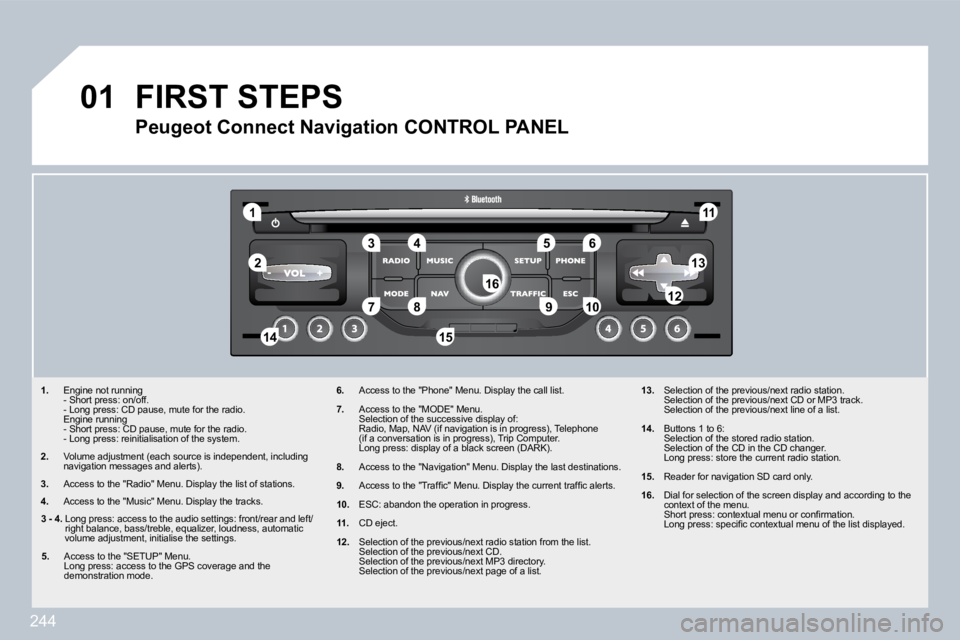
1. Engine not running - Short press: on/off. - Long press: CD pause, mute for the radio. Engine running - Short press: CD pause, mute for the radio. - Long press: reinitialisation of the system.
2. Volume adjustment (each source is independent, including navigation messages and alerts).
3. Access to the "Radio" Menu. Display the list of stations.
4. Access to the "Music" Menu. Display the tracks.
6. Access to the "Phone" Menu. Display the call list .
7. Access to the "MODE" Menu. Selection of the successive display of: Radio, Map, NAV (if navigation is in progress), Te lephone (if a conversation is in progress), Trip Computer. Long press: display of a black screen (DARK).
8. Access to the "Navigation" Menu. Display the last destinations.
9. Access to the "Traffi c" Menu. Display the current traffi c alerts.
10. ESC: abandon the operation in progress.
11. CD eject.
12. Selection of the previous/next radio station from the list. Selection of the previous/next CD. Selection of the previous/next MP3 directory. Selection of the previous/next page of a list.
13. Selection of the previous/next radio station. Selection of the previous/next CD or MP3 track. Selection of the previous/next line of a list.
14. Buttons 1 to 6: Selection of the stored radio station. Selection of the CD in the CD changer. Long press: store the current radio station.
15. Reader for navigation SD card only.
16. Dial for selection of the screen display and acco rding to the context of the menu. Short press: contextual menu or confi rmation. Long press: specifi c contextual menu of the list d isplayed.
FIRST STEPS
Peugeot Connect Navigation CONTROL PANEL
3 - 4. Long press: access to the audio settings: front/rear and left/right balance, bass/treble, equalizer, loudness, au tomatic volume adjustment, initialise the settings.
5. Access to the "SETUP" Menu. Long press: access to the GPS coverage and the demonstration mode.