steering PEUGEOT 3008 2016 Owner's Manual
[x] Cancel search | Manufacturer: PEUGEOT, Model Year: 2016, Model line: 3008, Model: PEUGEOT 3008 2016Pages: 344, PDF Size: 12.23 MB
Page 189 of 344
187
3008_en_Chap09_verifications_ed01-2015
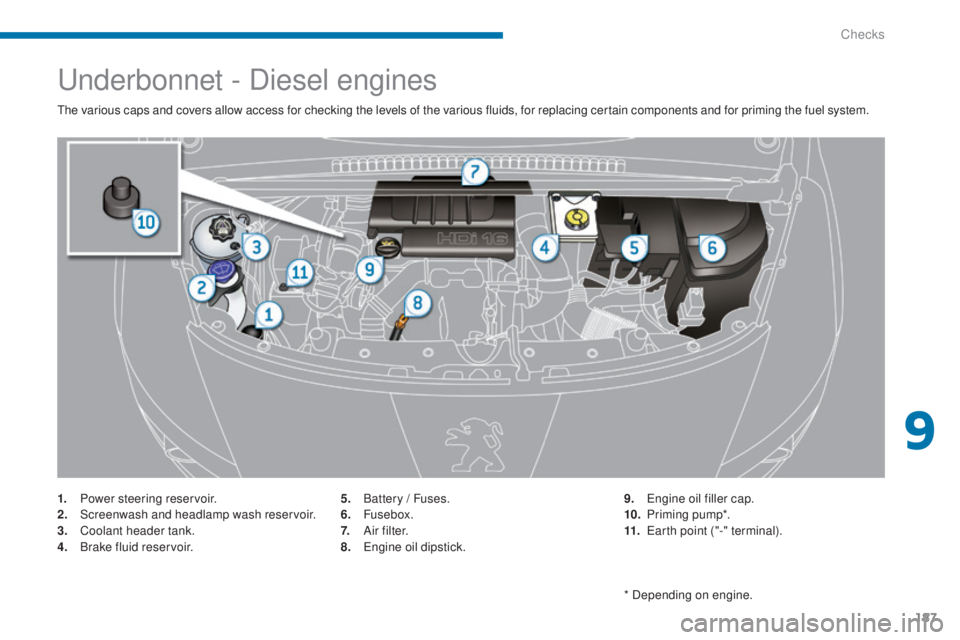
Underbonnet - Diesel engines
The various caps and covers allow access for checking the levels of the various fluids, for replacing certain components and for priming the fuel system.
1.
P
ower steering reservoir.
2.
S
creenwash and headlamp wash reservoir.
3.
C
oolant header tank.
4.
B
rake fluid reservoir. 5.
B
attery / Fuses.
6.
Fusebox.
7.
A
i r f i l t e r.
8.
E
ngine oil dipstick.9.
E
ngine oil filler cap.
10.
P
riming pump*.
11.
E
arth point ("-" terminal).
* Depending on engine.
9
Checks
Page 191 of 344
189
3008_en_Chap09_verifications_ed01-2015
Power steering fluid level
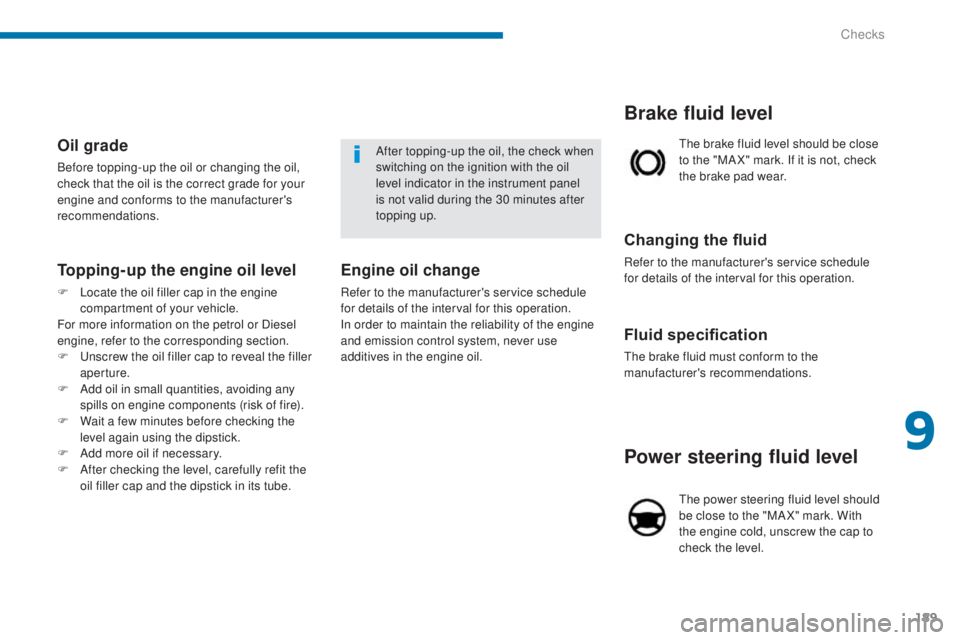
The power steering fluid level should
be close to the "MA X" mark. With
the engine cold, unscrew the cap to
check the level.
Fluid specification
The brake fluid must conform to the
manufacturer's recommendations.
Changing the fluid
Refer to the manufacturer's service schedule
for details of the interval for this operation.The brake fluid level should be close
to the "MA X" mark. If it is not, check
the brake pad wear.
Brake fluid level
After topping-up the oil, the check when
switching on the ignition with the oil
level indicator in the instrument panel
is not valid during the 30 minutes after
topping up.Oil grade
Before topping-up the oil or changing the oil,
check that the oil is the correct grade for your
engine and conforms to the manufacturer's
recommendations.
Engine oil change
Refer to the manufacturer's service schedule
for details of the interval for this operation.
In order to maintain the reliability of the engine
and emission control system, never use
additives in the engine oil.
Topping-up the engine oil level
F Locate the oil filler cap in the engine
compartment of your vehicle.
For more information on the petrol or Diesel
engine, refer to the corresponding section.
F
U
nscrew the oil filler cap to reveal the filler
aperture.
F
A
dd oil in small quantities, avoiding any
spills on engine components (risk of fire).
F
W
ait a few minutes before checking the
level again using the dipstick.
F
A
dd more oil if necessary.
F
A
fter checking the level, carefully refit the
oil filler cap and the dipstick in its tube.
9
Checks
Page 206 of 344
204
3008_en_Chap10_infos-pratiques_ed01-2015
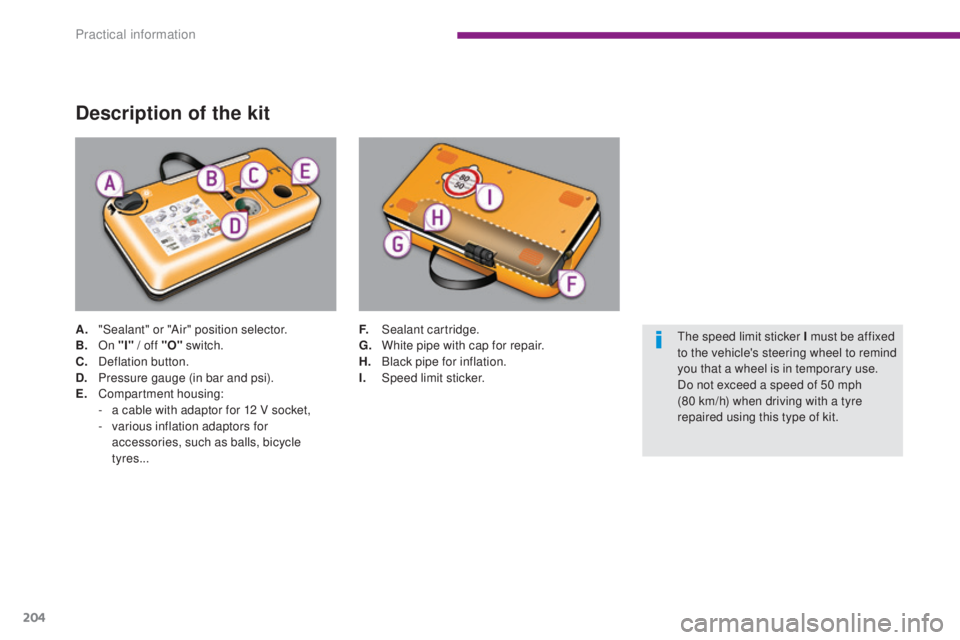
Description of the kit
A. "Sealant" or "Air" position selector.
B. On "I"
/ off "O" switch.
C.
D
eflation button.
D.
P
ressure gauge (in bar and psi).
E.
C
ompartment housing:
-
a c
able with adaptor for 12 V socket,
-
v
arious inflation adaptors for
accessories, such as balls, bicycle
tyres... F. S
ealant cartridge.
G. W hite pipe with cap for repair.
H.
B
lack pipe for inflation.
I.
Spe
ed limit sticker.The speed limit sticker I must be affixed
to the vehicle's steering wheel to remind
you that a wheel is in temporary use.
Do not exceed a speed of 50 mph
(80
km/h) when driving with a tyre
repaired using this type of kit.
Practical information
Page 225 of 344
223
3008_en_Chap10_infos-pratiques_ed01-2015
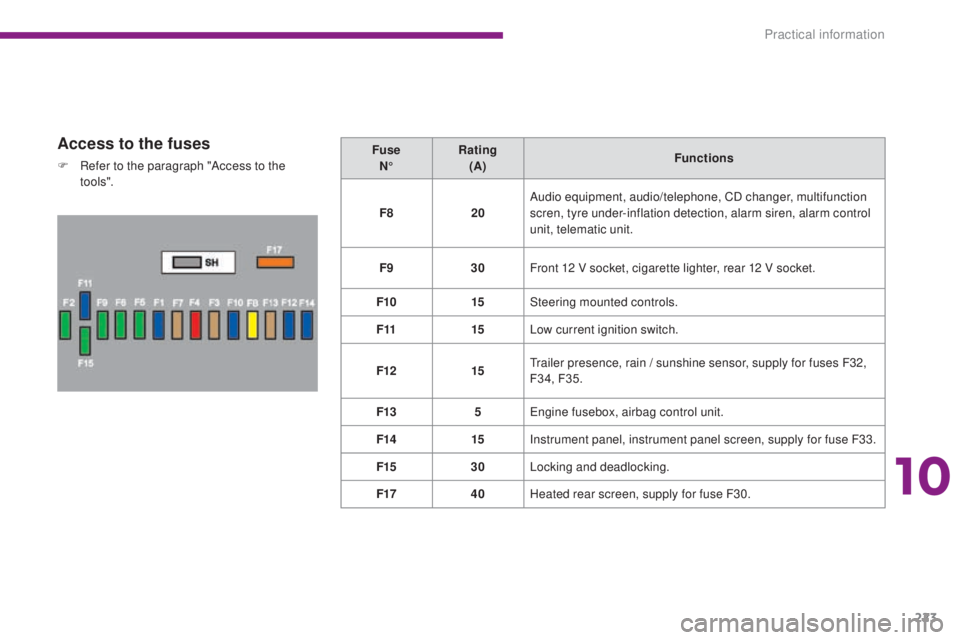
Access to the fuses
F Refer to the paragraph "Access to the to o ls". Fuse
N° Rating
(A) Functions
F8 20Audio equipment, audio/telephone, CD changer, multifunction
scren, tyre under-inflation detection, alarm siren, alarm control
unit, telematic unit.
F9 30Front 12 V socket, cigarette lighter, rear 12 V socket.
F10 15Steering mounted controls.
F11 15Low current ignition switch.
F12 15Trailer presence, rain
/ sunshine sensor, supply for fuses F32,
F34, F35.
F13 5Engine fusebox, airbag control unit.
F14 15Instrument panel, instrument panel screen, supply for fuse F33.
F15 30Locking and deadlocking.
F17 40Heated rear screen, supply for fuse F30.
10
Practical information
Page 227 of 344
225
3008_en_Chap10_infos-pratiques_ed01-2015
Engine compartment fuses
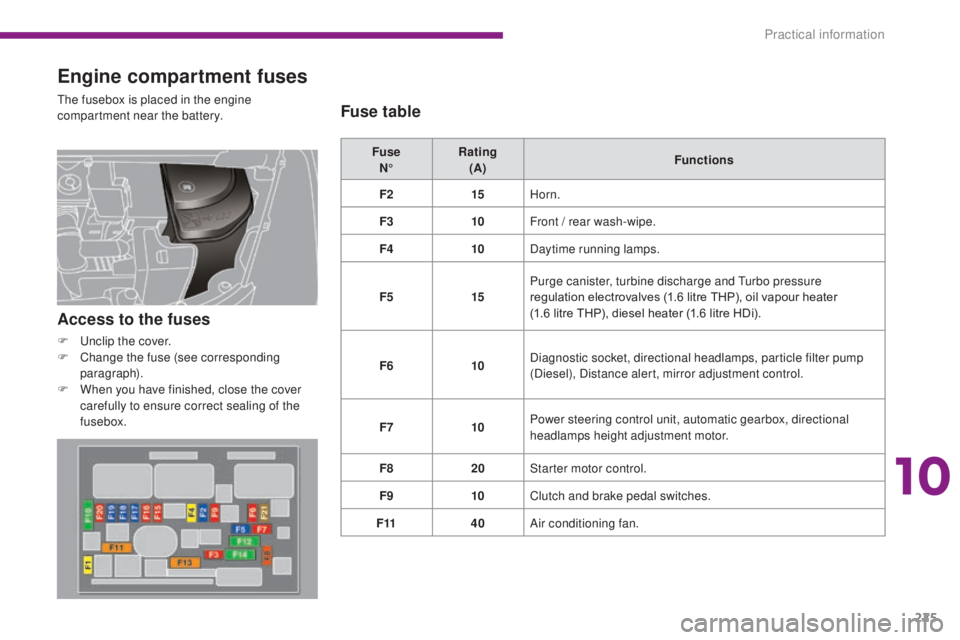
The fusebox is placed in the engine
compartment near the battery.Fuse N° Rating
(A) Functions
F2 15Horn.
F3 10Front
/ rear wash-wipe.
F4 10Daytime running lamps.
F5 15Purge canister, turbine discharge and Turbo pressure
regulation electrovalves (1.6 litre THP), oil vapour heater
(1.6 litre THP), diesel heater (1.6 litre HDi).
F6 10Diagnostic socket, directional headlamps, particle filter pump
(Diesel), Distance alert, mirror adjustment control.
F7 10Power steering control unit, automatic gearbox, directional
headlamps height adjustment motor.
F8 20Starter motor control.
F9 10Clutch and brake pedal switches.
F11 40Air conditioning fan.
Access to the fuses
F Unclip the cover.
F
C hange the fuse (see corresponding
paragraph).
F
W
hen you have finished, close the cover
carefully to ensure correct sealing of the
fusebox.
Fuse table
10
Practical information
Page 235 of 344
233
3008_en_Chap10_infos-pratiques_ed01-2015
Towing your vehicle
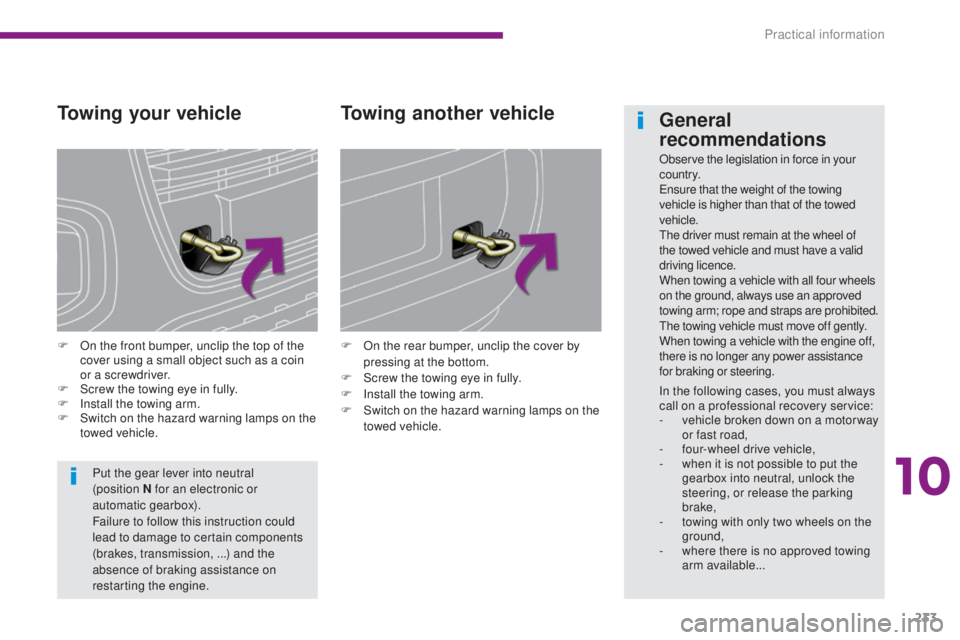
F On the front bumper, unclip the top of the cover using a small object such as a coin
or a screwdriver.
F
S
crew the towing eye in fully.
F
I
nstall the towing arm.
F
S
witch on the hazard warning lamps on the
towed vehicle. F
O n the rear bumper, unclip the cover by
pressing at the bottom.
F
S
crew the towing eye in fully.
F
I
nstall the towing arm.
F
S
witch on the hazard warning lamps on the
towed vehicle.
Towing another vehicle
Put the gear lever into neutral
(position N for an electronic or
automatic gearbox).
Failure to follow this instruction could
lead to damage to certain components
(brakes, transmission, ...) and the
absence of braking assistance on
restarting the engine.
General
recommendations
Observe the legislation in force in your
c o unt r y.
Ensure that the weight of the towing
vehicle is higher than that of the towed
vehicle.
The driver must remain at the wheel of
the towed vehicle and must have a valid
driving licence.
When towing a vehicle with all four wheels
on the ground, always use an approved
towing arm; rope and straps are prohibited.
The towing vehicle must move off gently.
When towing a vehicle with the engine off,
there is no longer any power assistance
for braking or steering.
In the following cases, you must always
call on a professional recovery service:
-
v
ehicle broken down on a motor way
or fast road,
-
f
our-wheel drive vehicle,
-
w
hen it is not possible to put the
gearbox into neutral, unlock the
steering, or release the parking
brake,
-
t
owing with only two wheels on the
ground,
-
w
here there is no approved towing
arm available...
10
Practical information
Page 257 of 344
255
3008_en_Chap12b_RT6-2-8_ed01-2015
The system is protected in such a way that it will only
operate in your vehicle.
PEUGEOT Connect Navigation (RT6)
01 First steps - Control panel
As a safety measure, the driver must only carry out
operations which require prolonged attention while the
vehicle is stationary.
When the engine is switched off and to prevent
discharging of the battery, the system switches off
following the activation of the energy economy mode.
CONTENTS
02
Steering mounted
controls
03
General operation
04
Navigation
- Guidance
05
T
raffic information
06
Using
the telephone
07
Radio
08
Music media players
09
Audio
settings
10
Configuration
11
Screen menu
maps p.
p.
p.
p.
p.
p.
p.
p.
p.
p.
p.
256
258
259
261
274
277
287
292
298
299
300
GPS navigation system
Multimedia audio system
Bluetooth
® telephone
Frequently asked questions p.
304
Page 260 of 344
02
258
3008_en_Chap12b_RT6-2-8_ed01-2015
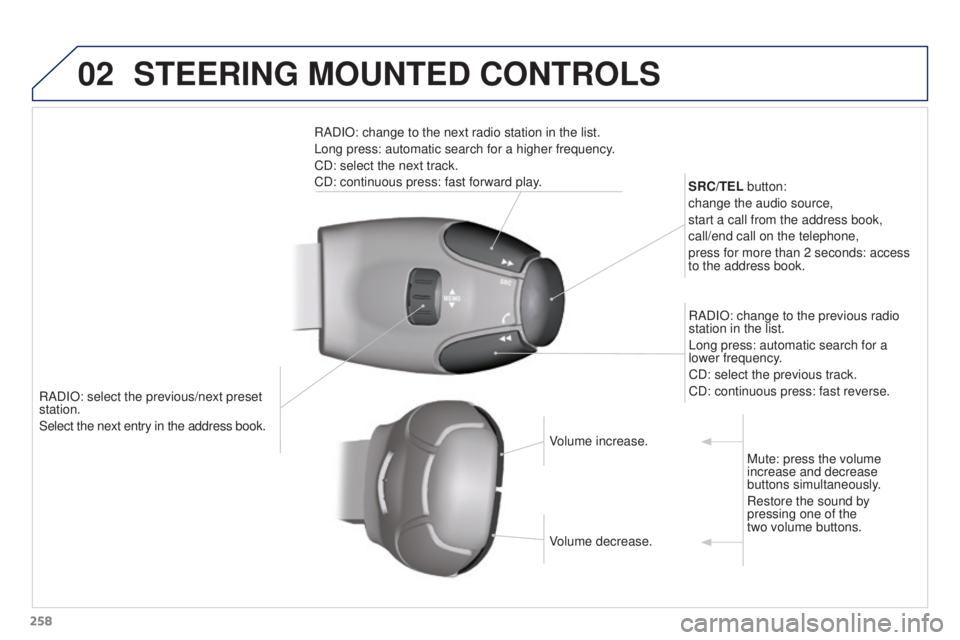
RADIO: select the previous/next preset
station.
Select the next entry in the address book.SRC/TEL button:
change the audio source,
start a call from the address book,
call/end call on the telephone,
press for more than 2 seconds: access
to the address book.
RADIO: change to the previous radio
station in the list.
Long press: automatic search for a
lower frequency.
CD: select the previous track.
CD: continuous press: fast reverse.
RADIO: change to the next radio station in the list.
Long press: automatic search for a higher frequency.
CD: select the next track.
CD: continuous press: fast forward play.
Volume increase.
Volume decrease.Mute: press the volume
increase and decrease
buttons simultaneously.
Restore the sound by
pressing one of the
two volume buttons.
STEERING MOUNTED CONTROLS
Page 284 of 344
06
282
3008_en_Chap12b_RT6-2-8_ed01-2015
USING THE TELEPHONE
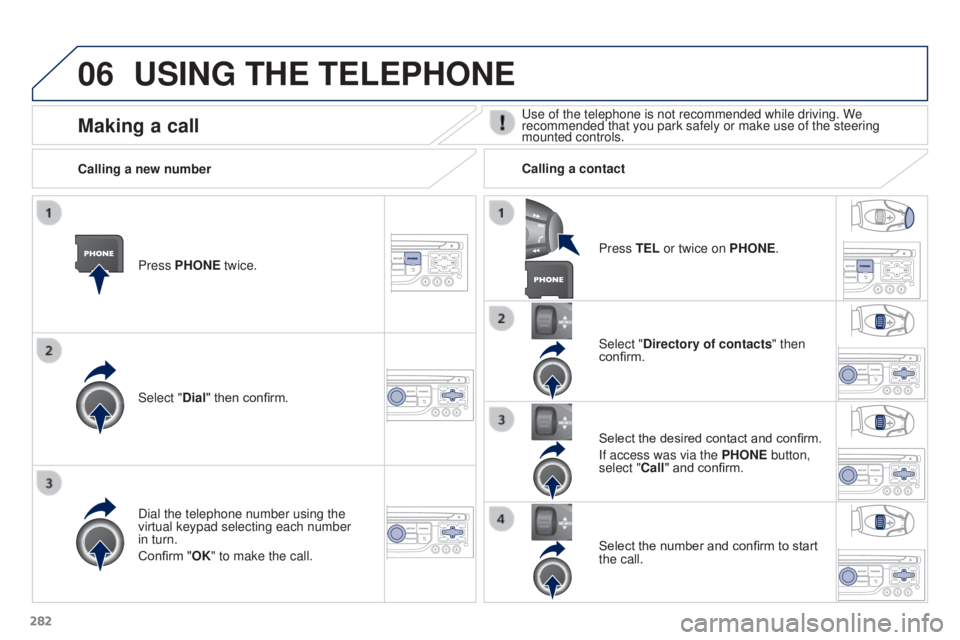
Press PHONE twice.
Select "Dial" then confirm.Select "Directory of contacts" then
confirm.
Dial the telephone number using the
virtual keypad selecting each number
in turn.
Confirm "OK" to make the call. Press TEL or twice on PHONE.
Calling a new number
Calling a contact
Select the desired contact and confirm.
If access was via the PHONE button,
select "Call" and confirm.
Select the number and confirm to start
the call.
Making a callUse of the telephone is not recommended while driving. We
recommended that you park safely or make use of the steering
mounted controls.
Page 285 of 344
06
283
3008_en_Chap12b_RT6-2-8_ed01-2015
USING THE TELEPHONE
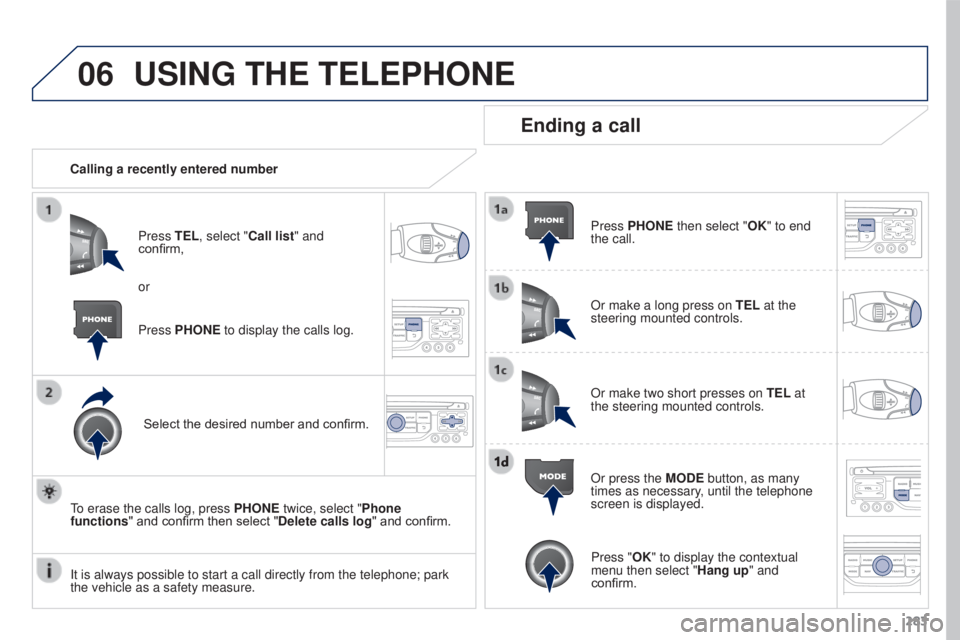
Calling a recently entered numberPress TEL, select "Call list" and
confirm,
Select the desired number and confirm.
To erase the calls log, press PHONE twice, select "Phone
functions" and confirm then select "Delete calls log" and confirm.
Ending a call
Press PHONE then select "OK" to end
the call.
Or make a long press on TEL at the
steering mounted controls.
Or make two short presses on TEL at
the steering mounted controls.
Or press the MODE button, as many
times as necessary, until the telephone
screen is displayed.
Press PHONE to display the calls log. or
Press "OK" to display the contextual
menu then select "Hang up" and
confirm.
It is always possible to start a call directly from the telephone; park \
the vehicle as a safety measure.