key PEUGEOT 3008 2017 Workshop Manual
[x] Cancel search | Manufacturer: PEUGEOT, Model Year: 2017, Model line: 3008, Model: PEUGEOT 3008 2017Pages: 566, PDF Size: 16.05 MB
Page 308 of 566
306
3008-2_en_Chap07_infos-pratiques_ed01-2016
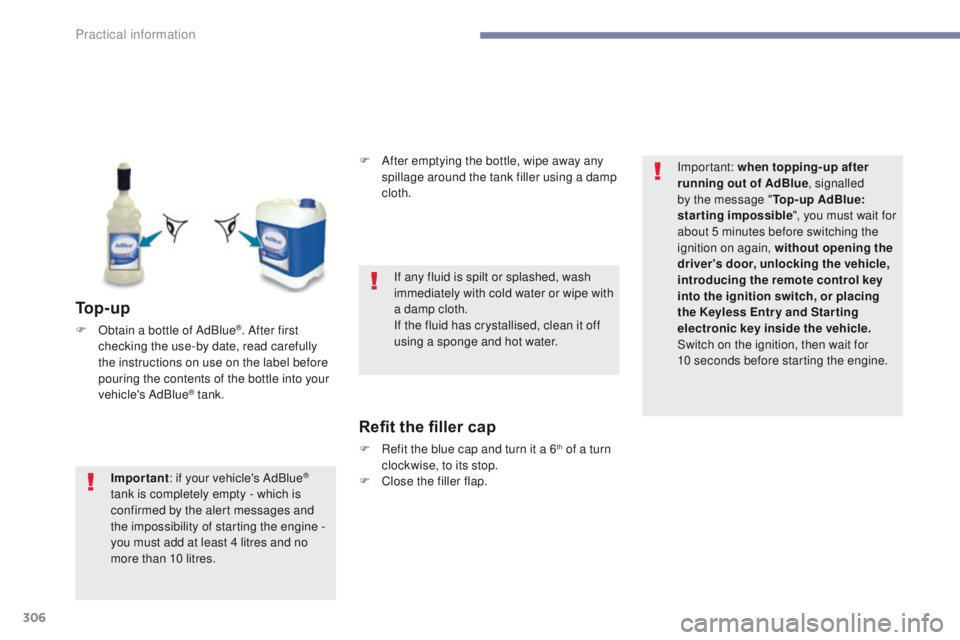
To p - u p
F Obtain a bottle of AdBlue®. After first
checking the use-by date, read carefully
the instructions on use on the label before
pouring the contents of the bottle into your
vehicle's AdBlue
® tank. F
A
fter emptying the bottle, wipe away any
spillage around the tank filler using a damp
cloth.
Refit the filler cap
F Refit the blue cap and turn it a 6th of a turn
clockwise, to its stop.
F
C
lose the filler flap.
Important
: if your vehicle's AdBlue
®
tank is completely empty - which is
confirmed by the alert messages and
the impossibility of starting the engine
-
you must add at least 4 litres and no
more than 10 litres. If any fluid is spilt or splashed, wash
immediately with cold water or wipe with
a damp cloth.
If the fluid has crystallised, clean it off
using a sponge and hot water.
Important: when topping-up after
running out of AdBlue
, signalled
by the message " Top-up AdBlue:
starting impossible ", you must wait for
about 5 minutes before switching the
ignition on again, without opening the
driver's door, unlocking the vehicle,
introducing the remote control key
into the ignition switch, or placing
the Keyless Entr y and Star ting
electronic key inside the vehicle.
Switch on the ignition, then wait for
10
seconds before starting the engine.
Practical information
Page 337 of 566
335
3008-2_en_Chap08_en cas-de-panne_ed01-2016
Disconnecting the battery
The Stop & Start system may not be
operational during the trip following the
first engine start.
In this case, the system will only be
available again after a continuous
period of immobilisation of the vehicle,
a period which depends on the ambient
temperature and the state of charge of
the battery (up to about 8 hours).
In order to maintain an adequate state of charge
for starting the engine, it is recommended that
the battery be disconnected if the vehicle is
taken out of service for a long period.
Before disconnecting the battery:
F
c
lose all openings (doors, tailgate, windows,
sunroof),
F
s
witch off all electrical consumers (audio
system, wipers, lighting, ...),
F
s
witch off the ignition and wait for
four
minutes.
At the battery, it is only necessary to disconnect
the (+) terminal.
Following reconnection of the
battery
After reconnecting the battery, switch on the
ignition and wait 1 minute before starting to
allow initialisation of the electronic systems.
However, if minor problems persist following
this operation, contact a PEUGEOT dealer or a
qualified workshop.
Referring to the corresponding section, you
must yourself initialise or reset certain systems,
such as:
-
t
he remote control or electronic key
(depending on version),
-
t
he sunroof and its electric blind,
-
t
he electric windows,
-
t
he date and time,
-
t
he radio preset stations.
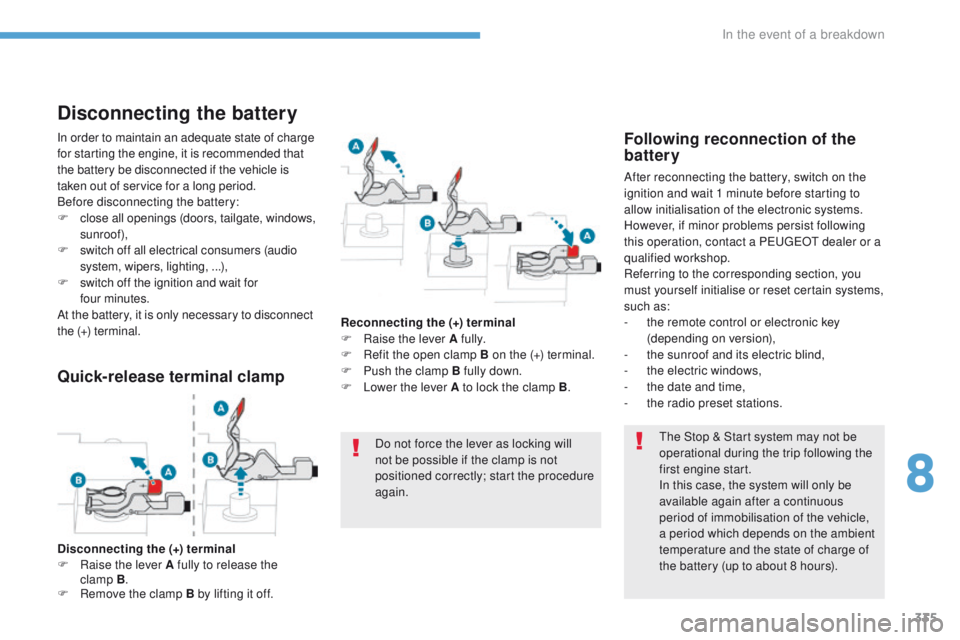
Quick-release terminal clamp
Disconnecting the (+) terminal
F Ra ise the lever A fully to release the
clamp
B.
F
R
emove the clamp B by lifting it off. Reconnecting the (+) terminal
F
Ra
ise the lever A fully.
F
R
efit the open clamp B on the (+) terminal.
F
P
ush the clamp B fully down.
F
L
ower the lever A to lock the clamp B
.
Do not force the lever as locking will
not be possible if the clamp is not
positioned correctly; start the procedure
again.
8
In the event of a breakdown
Page 350 of 566
348
3008-2_en_Chap11_index-alpha_ed01-2016
Headlamps, automatic dipping ...............17, 149
Headlamps, automatic illumination
.................................. 141, 146 , 147
Headlamps, dipped beam
................17, 323-325
Headlamps, halogen
..................................... 324
Headlamps, main beam
................... 17,
323-325
Head restraints, front
...................................... 93
Head restraints, rear
..................................... 13 0
Heating
.................................... 10, 104 , 10 6 , 108
Hi-Fi system
.................................................. 12 2
Hill Assist Descent Control
.................................................. 20,
166
Hill start assist
............................................... 2
16
Horn ............................................................... 157Inflating tyres
..........................................
10, 345
Inflating tyres and accessories (using the kit)
..........................312
Instrument panel
..................... 12,
13, 40 , 42, 43
Intelligent Traction Control
........................................................ 16
1
ISOFIX
..........................................................187
Isofix mountings
...............................
.............18 6
i- Cockpit amplify function
................................. 98, 102 , 125, 217
Ignition
................
................................... 19 9, 201
Immobiliser, electronic
............................63, 197
Indicator, AdBlue
®
range
....................................................... 30, 37
Indicator, coolant temperature
.................................................. 32
Indicator, engine oil level
.................................................... 36, 40
Indicator lamps, operation
........................................... 17, 19 , 21
Indicator lamps, status
............................................................ 19
Indicators, direction
.............................. 14 4, 324 Jack
........
.......................................................
310
Jump starting
..............................
..................
333
I
J
Key ..................................................... 54, 63 , 64
Key, electronic ..................................... 58, 60-62
Keyless Entry and Starting
......................58, 61- 63 , 197, 200
Key not recognised
....................................... 202
Key with remote control
......................................................... 19
7
Kit, temporary puncture repair
................................................... 309, 312
K
Fuel .......................................................... 10, 283
Fuel consumption ............................................ 10
Fu
el tank ................................................ 281, 282
Fuses
............................................................. 331
Gauge, fuel .................................................... 281
Gearbox, automatic
....... 10,
2 11, 216 , 217, 219 , 302 , 332
Gearbox, manual
....10, 210 , 216 , 217, 219 , 302
Gear lever
..............................
.........................10
Gear lever, automatic gearbox
................
....................................... 2 11
Gear lever, manual gearbox
................
....................................... 210
Gear shift indicator
....................................... 218
Glove box
...................................................... 120
Grab handles
................................................ 11
9
G
Hands-free access ..........................................78
H ands-free tailgate ............................. 76,
78, 79
Hazard warning lamps
..........................157, 307
Headlamp adjustment
...................................145
H
Alphabetical index
Page 352 of 566
350
3008-2_en_Chap11_index-alpha_ed01-2016
Range, AdBlue .................................... 30, 37 , 38
Rear screen, demisting .................................118
Recharging the battery
................................. 33
4
Reduction of electrical load
..........................290
Regeneration of the particle filter
.......................................... 301
Reinitialisation of the under-inflation detection system
.................................224 , 225
Reinitialising the remote control
........................................................... 67
R
eminder, key in ignition ...............................19 9
Remote control
........................ 5
4-56, 60, 62, 63
Removing a wheel
........................................ 319
Removing the mat
......................................... 127
Replacing bulbs
........................... 323, 328 , 330
Replacing fuses
..............................
..............331
Replacing the air filter
...................................301
Replacing the oil filter
................................... 3
01
Replacing the passenger compartment filter
...................................... 301
Reservoir, screenwash
................................. 29
9
Resetting the service indicator
.......................35
Resetting the trip recorder
..............................41
Reset trip
......................................................... 43
R
ev counter
..................................................... 12
Reversing lamps
........................................... 328
Roof bars
....................................................... 2
93
Running out of fuel (Diesel)
..........................3
08 Table of weights
....................................339,
342
Table position
..................................................92
Tables of engines
.................................338, 340
Tailgate
................
............................................75
Ta n k , f u e l
...............................................281, 282
Technical data
...............................338-340, 342
Telephone
.....................................................12 2
Temperature, coolant
......................................32
Third brake lamp
...........................................330
Three flashes (direction indicators)
...................................14 4
T
Starting using another
battery ................................................ 2
02, 333
Stay, bonnet
.................................................. 294
Steering wheel, adjustment
.................................................... 99
S
topping the vehicle
.....................197, 200 , 2 11
Stop & Start
........................ 18, 21 , 44 , 105 , 11 6,
219 , 281 , 294 , 301, 335
Storage
.......................... 11 9, 120 , 124, 13 4 , 13 5
Storage box
................................................... 13
9
Storage compartments
................................. 11
9
Storage wells
........................................ 13 5, 13 9
Storing driving positions
.................................96
Stowing rings
................................................ 13 5
Sunroof, panoramic
........................................ 84
Sun visor
....................................................... 120
Switching off the engine
............................... 19
7
Synchronising the remote control
........................................................... 67
S
aturation of the particle
filter (Diesel)
............................................... 301
Scented air freshener
........................... 12
5 , 126
Screen, monochrome
..................................... 45
Screens, very cold conditions
.................................................. 291
Screenwash, front
......................................... 153
Screenwash, rear
.......................................... 153
SCR (Selective Catalytic Reduction)
............................................ 31,
303
SCR system
............................................ 31, 303
Seat belts
....................................... 1
6 8 -171 , 183
Seat belts, rear
...................................... 169, 170
Seats, electric
................................................. 96
Seats, front
...............................
................. 90, 96
Seats, heated
.................................................. 97
Seats, rear
..................................................... 13 0
Selector, gear
................................................ 2 11
Serial number, vehicle
.................................. 3
45
Service indicator
....................................... 33, 40
Servicing
...............................
.................... 10, 33
Settings, equipment
........................... 45, 48 , 50
Sidelamps
.................... 143, 14 4 , 323 , 324, 328
Side repeater
..............................
.................. 327
Ski flap
..............................
............................ 13 4
Snow chains
......................................... 2
23 , 292
Snow screen
................................................. 291
Socket, 12V
................................................... 314
Socket, 12 V accessory
........ 12
0 , 13 3 , 13 6 , 314
Socket, 230 V
...............................
................. 13 3
Speakers
....................................................... 12 2
Speed limiter
................................ 226, 229 , 231
Speed limit recognition
................................. 227
Speedometer
.................................................. 12
Spotlamps, side
.................................... 148, 327
Stability control (ESC)................... 160, 163 , 16 4
Starting the vehicle
....................... 197, 200 , 2 11
R
Safety, children ..................... 17 3, 17 7 , 178 , 182 ,
18 4 , 18 6 -188 , 19 0
S
Alphabetical index
Page 386 of 566
26
1
1
8
Audio and Telematics
Transversal-Peugeot_en_Chap01_NAC-2-2-0_ed01-2016
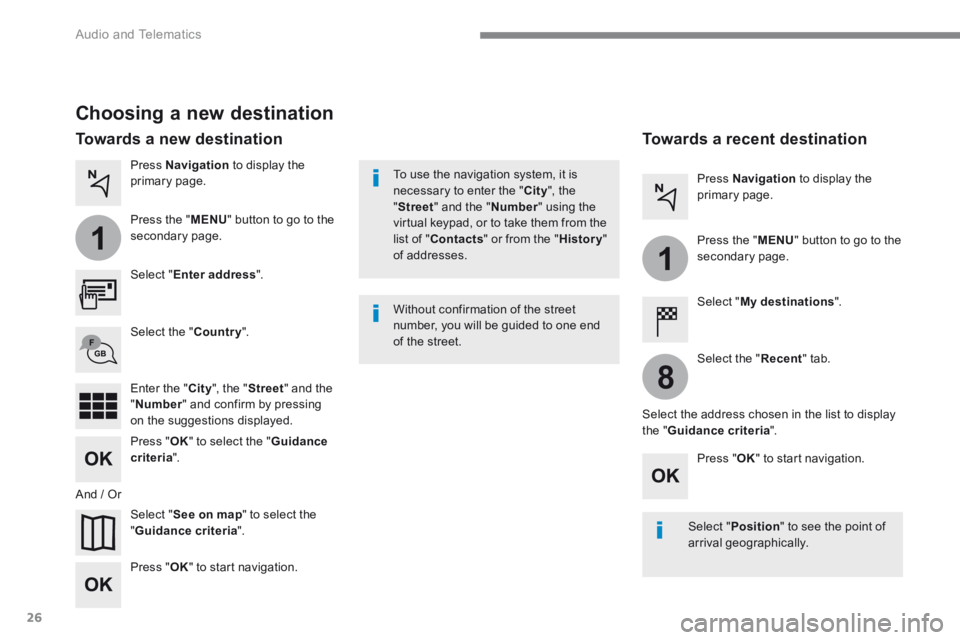
Choosing a new destination
Select " Enter address ".
Select " See on map " to select the " Guidance criteria ".
Select the " Country ".
Press " OK " to select the " Guidance criteria ".
Press " OK " to start navigation.
Press " OK " to start navigation.
And / Or
Press Navigation to display the primary page.
Press the " MENU " button to go to the
secondary page.
Towards a new destination Towards a recent destination
Select " My destinations ".
Press Navigation to display the primary page.
Press the " MENU " button to go to the secondary page.
Enter the " City ", the " Street " and the " Number " and confirm by pressing on the suggestions displayed.
Select the " Recent " tab.
Select the address chosen in the list to display the " Guidance criteria ".
To use the navigation system, it is necessary to enter the " City ", the " Street " and the " Number " using the virtual keypad, or to take them from the list of " Contacts " or from the " History " of addresses.
Without confirmation of the street number, you will be guided to one end of the street.
Select " Position " to see the point of arrival geographically.
Page 388 of 566
28
Audio and Telematics
Transversal-Peugeot_en_Chap01_NAC-2-2-0_ed01-2016
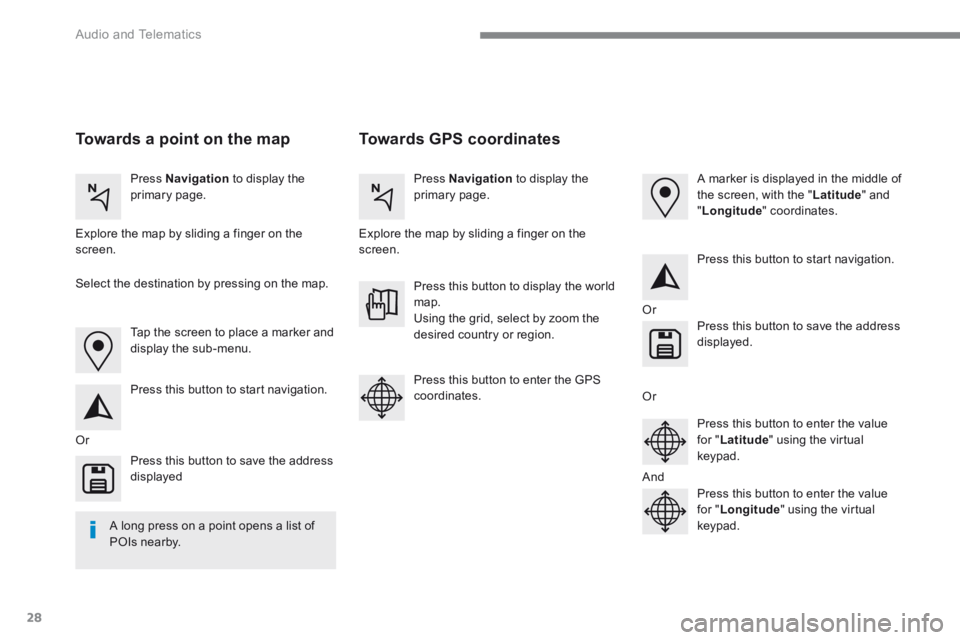
Towards GPS coordinates Towards a point on the map
Press Navigation to display the primary page. Press Navigation to display the primary page.
Explore the map by sliding a finger on the screen. Explore the map by sliding a finger on the screen.
Tap the screen to place a marker and display the sub-menu.
Or
Or
Or
And
Select the destination by pressing on the map.
Press this button to start navigation.
Press this button to start navigation.
Press this button to display the world map. Using the grid, select by zoom the desired country or region.
Press this button to save the address displayed
Press this button to save the address displayed.
Press this button to enter the GPS coordinates.
Press this button to enter the value for " Latitude " using the virtual keypad.
Press this button to enter the value for " Longitude " using the virtual keypad.
A marker is displayed in the middle of the screen, with the " Latitude " and " Longitude " coordinates.
A long press on a point opens a list of
POIs nearby.
Page 399 of 566
39
.
1
Audio and Telematics
Transversal-Peugeot_en_Chap01_NAC-2-2-0_ed01-2016
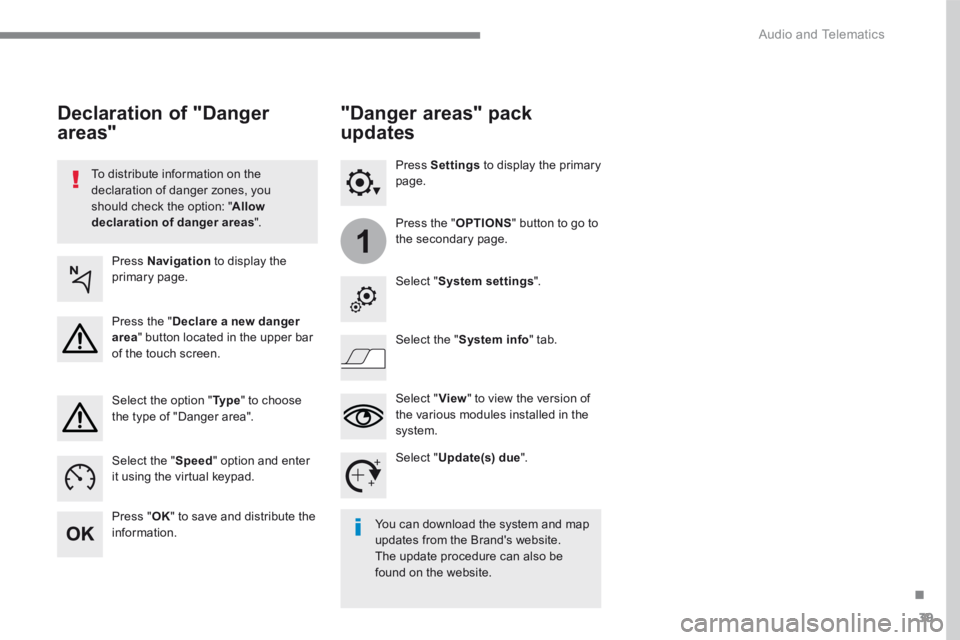
To distribute information on the declaration of danger zones, you should check the option: " Allow declaration of danger areas ".
Declaration of "Danger
areas"
Press Navigation to display the primary page.
Press the " Declare a new danger area " button located in the upper bar of the touch screen.
Select the option " Ty p e " to choose the type of "Danger area".
Select the " Speed " option and enter it using the virtual keypad.
Press " OK " to save and distribute the information. You can download the system and map updates from the Brand's website. The update procedure can also be found on the website.
"Danger areas" pack
updates
Press Settings to display the primary page.
Press the " OPTIONS " button to go to the secondary page.
Select " System settings ".
Select " View " to view the version of the various modules installed in the system.
Select " Update(s) due ".
Select the " System info " tab.
Page 415 of 566
55
.
11
1
20
21
Audio and Telematics
Transversal-Peugeot_en_Chap01_NAC-2-2-0_ed01-2016
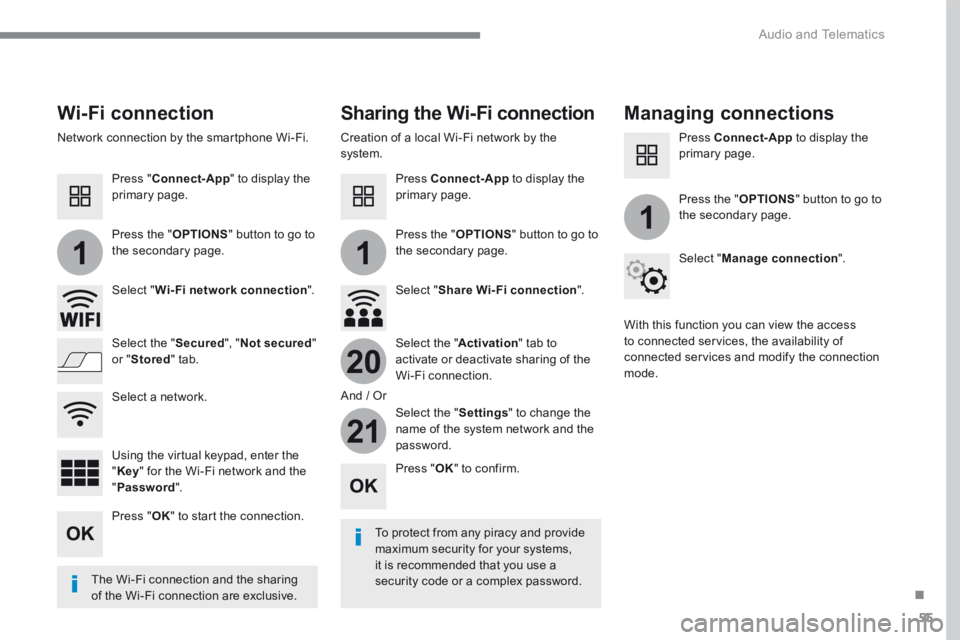
Wi-Fi connection Sharing the Wi-Fi connection Managing connections
To protect from any piracy and provide maximum security for your systems, it is recommended that you use a security code or a complex password. The Wi-Fi connection and the sharing
of the Wi-Fi connection are exclusive.
Press " OK " to confirm.
Press " OK " to start the connection.
Press " Connect-App " to display the primary page.
Network connection by the smartphone Wi-Fi. Creation of a local Wi-Fi network by the system.
Press Connect-App to display the primary page.
Press Connect-App to display the primary page.
Press the " OPTIONS " button to go to the secondary page. Press the " OPTIONS " button to go to the secondary page.
Press the " OPTIONS " button to go to the secondary page.
Select " Wi-Fi network connection ". Select " Share Wi-Fi connection ".
Select " Manage connection ".
And / Or
Select the " Secured ", " Not secured " or " Stored " tab. Select the " Activation " tab to activate or deactivate sharing of the Wi-Fi connection.
Select the " Settings " to change the name of the system network and the password.
With this function you can view the access to connected services, the availability of connected services and modify the connection mode.
Using the virtual keypad, enter the " Key " for the Wi-Fi network and the " Password ".
Select a network.
Page 423 of 566
63
.
1
2
2
2
Audio and Telematics
Transversal-Peugeot_en_Chap01_NAC-2-2-0_ed01-2016
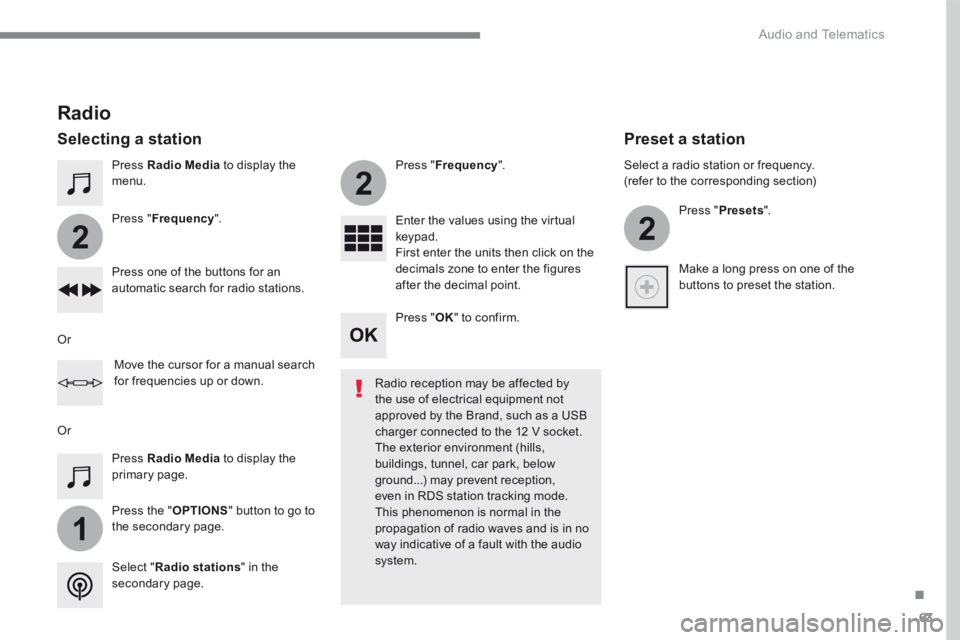
Press Radio Media to display the menu.
Press the " OPTIONS " button to go to the secondary page.
Press " Frequency ".
Press " Frequency ".
Enter the values using the virtual keypad. First enter the units then click on the decimals zone to enter the figures after the decimal point. Press one of the buttons for an automatic search for radio stations.
Press Radio Media to display the primary page.
Radio
Selecting a station
Radio reception may be affected by the use of electrical equipment not approved by the Brand, such as a USB
charger connected to the 12 V socket. The exterior environment (hills, buildings, tunnel, car park, below ground...) may prevent reception, even in RDS station tracking mode. This phenomenon is normal in the propagation of radio waves and is in no way indicative of a fault with the audio system. Select " Radio stations " in the secondary page.
Or
Or
Move the cursor for a manual search for frequencies up or down.
Select a radio station or frequency. (refer to the corresponding section)
Press " Presets ".
Make a long press on one of the buttons to preset the station.
Preset a station
Press " OK " to confirm.
Page 437 of 566

77
.
2
3
Audio and Telematics
Transversal-Peugeot_en_Chap01_NAC-2-2-0_ed01-2016
on the steering mounted button.
Using the telephone is not recommended while driving. Park the vehicle. Make the call using the steering
mounted controls.
Making a call
Calling a new number
Press Telephone to display the primary page.
Enter the phone number using the digital keypad.
Press " Call " to start the call.
Calling a contact
Press Telephone to display the primary page.
Or make a long press
on the steering mounted TEL button.
Select " Contact ".
Select the desired contact from the list offered.
Select " Call ".
Calling a recently used number
Press Telephone to display the primary page.
Make a long press
Select " Calls ".
Select the desired contact from the list offered.
It is always possible to make a call directly from the telephone; as a safety measure, first park the vehicle.
Or