Telephone PEUGEOT 3008 2018 Owners Manual
[x] Cancel search | Manufacturer: PEUGEOT, Model Year: 2018, Model line: 3008, Model: PEUGEOT 3008 2018Pages: 360, PDF Size: 12.38 MB
Page 41 of 360
39
- visual parking sensor information,
- a udio source being listened to,
-
t
elephone or hands-free kit information,
-
s
ettings menus for the screen and the
vehicle equipment.
Controls
From the audio system control panel, press:
F t he "MENU " button to access the main
menu ,
F
t
he "5" or " 6" buttons to scroll through the
items in the screen,
F
t
he "7" or " 8" buttons to change a setting
value,
F
t
he "OK" button to confirm,
or
F
t
he "Back" button to abandon the operation
in progress.
Main menu
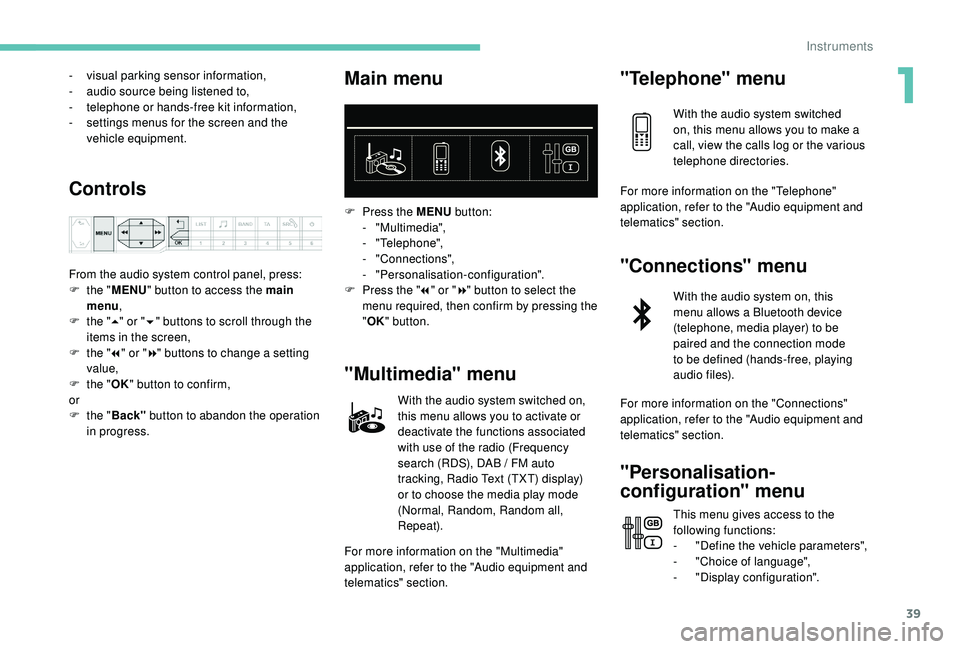
F Press the MENU button:
- "Multimedia",
-
"Telephone",
-
"Connections",
-
"Personalisation-configuration".
F
P
ress the " 7" or " 8" button to select the
menu required, then confirm by pressing the
" OK " button.
"Multimedia" menu
With the audio system switched on,
this menu allows you to activate or
deactivate the functions associated
with use of the radio (Frequency
search (RDS), DAB
/ FM auto
tracking, Radio Text (TXT) display)
or to choose the media play mode
(Normal, Random, Random all,
Repeat).
For more information on the "Multimedia"
application, refer to the "Audio equipment and
telematics" section.
"Telephone" menu
With the audio system switched
on, this menu allows you to make a
call, view the calls log or the various
telephone directories.
For more information on the "Telephone"
application, refer to the "Audio equipment and
telematics" section.
"Connections" menu
With the audio system on, this
menu allows a Bluetooth device
(telephone, media player) to be
paired and the connection mode
to be defined (hands-free, playing
audio files).
For more information on the "Connections"
application, refer to the "Audio equipment and
telematics" section.
"Personalisation-
configuration" menu
This menu gives access to the
following functions:
-
"
Define the vehicle parameters",
-
"
Choice of language",
-
"
Display configuration".
1
Instruments
Page 42 of 360
40
Touch screen
Define the vehicle parameters
This menu allows the activation or deactivation
of the following equipment, depending on
version:
-
"
Access to the vehicle" :
•
"
Remote control action".
For more information on the Remote control
and driver door selective unlocking in
particular, refer to the "Access" section.
-
"
Comfort" :
•
"
Rear wipe in reverse gear".
For more information on the Wipers ,
refer to the "Lighting and visibility"
section.
•
"
Parking assistance".
For more information on Parking
assistance , refer to the "Driving"
section.
•
"
Fatigue Detection System".
For more information on the Fatigue
detection system , refer to the "Driving"
section.
-
"
Driving assistance" :
•
"
Auto. emergency braking".
For more information on the Active
Safety Brake , refer to the "Driving"
section.
•
"
Speed recommendation".
For more information on Speed limit
recognition , refer to the "Driving"
section. •
"
Tyre inflation".
For more information on Under-
inflation detection and reinitialisation in
particular, refer to the "Driving" section.
Choice of language
This menu allows selection of the language
used by the screen and the instrument panel.
Display configuration
This menu gives access to the following
settings:
-
"
Choice of units",
-
"
Date and time adjustment",
-
"
Display parameters",
-
"Brightness".
Adjusting the date and time
F
P
ress the " 7" or " 8" button to display the
"Display configuration" menu, then press
OK.
F
P
ress the " 5" or " 6" button to select the
"Date and time adjustment" button, then
press OK.
F
P
ress the " 7" or " 8" button to select the
setting to modify. Confirm by pressing OK,
then modify the setting and confirm again to
save the modification.
F
A
djust the settings one by one, confirming
with the OK button. F
P
ress the "
5" or " 6" button, then the OK
button to select the OK box and confirm or
the Back button to cancel.
As a safety measure, the driver must only
carry out operations that require sustained
attention when stationary.
This system gives access to:
-
t
he permanent display of the time and
the exterior temperature (a blue symbol
appears when there is a risk of ice),
-
t
he heating/air conditioning controls,
-
m
enus for adjusting settings for vehicle
functions and systems,
-
a
udio system and telephone controls and
the display of associated information,
-
t
he display of visual parking aids (visual
parking sensor information, Park Assist,
e t c .),
-
I
nternet ser vices and the display of
associated information.
and, depending on equipment, allows:
-
a
ccess to the navigation system controls
and the display of associated information.
Instruments
Page 44 of 360
42
Upper bar
Certain information is always displayed in the
upper bar of the touch screen:
-
T
ime and exterior temperature (a blue
warning lamp appears when there is a risk
of i c e).
-
R
epeat of the air conditioning information,
and direct access to the corresponding
menu.
-
S
ummary of information from the Radio
Media , Telephone menus and navigation
instructions*.
-
Notifications.
-
A
ccess to the Settings for the touch screen
and the digital instrument panel (date/time,
languages, units, etc.).
*
D
epending on equipment
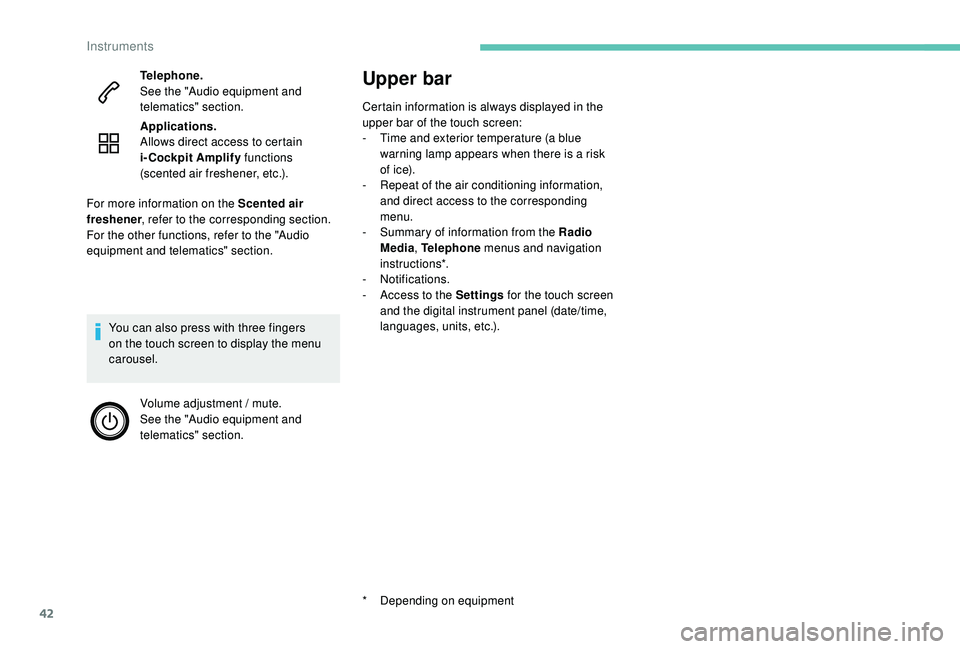
Telephone.
See the "Audio equipment and
telematics" section.
Applications.
Allows direct access to certain
i-Cockpit Amplify
functions
(scented air freshener, etc.).
You can also press with three fingers
on the touch screen to display the menu
carousel. Volume adjustment / mute.
See the "Audio equipment and
telematics" section.
For more information on the Scented air
freshener
, refer to the corresponding section.
For the other functions, refer to the "Audio
equipment and telematics" section.
Instruments
Page 56 of 360
54
Do not throw away the remote control
batteries, they contain metals which are
harmful to the environment.
Take them to an approved collection
point.
Back-up procedures
Complete unlocking /
locking of the vehicle with
the key
These procedures should be used in the
following cases:
-
r
emote control cell battery flat,
-
r
emote control fault,
-
v
ehicle in an area subject to strong
electromagnetic interference.
In the first case, you can also replace the
remote control cell battery.
Refer to the corresponding section.
In the second case, you can also reinitialise
the remote control.
Refer to the corresponding section.
Lost keys, remote control, electronic key
Visit a PEUGEOT dealer with the vehicle's
registration certificate, your personal
identification documents and if possible,
the label bearing the key code.
The PEUGEOT dealer will be able to
retrieve the key code and the transponder
code required to order a new key.
Electrical interference
The
K
eyless Entry and Starting electronic key
may not operate if close to certain electronic
devices: telephone, laptop computer, strong
magnetic fields, etc.
Remote control
The high frequency remote control is a
sensitive system; do not operate it while
it is in your pocket as there is a possibility
that it may unlock the vehicle, without you
being aware of it.
Do not repeatedly press the buttons of
your remote control out of range and out of
sight of your vehicle. You may stop it from
working and the remote control would have
to be reinitialised.
The remote control does not operate when
the key is in the ignition, even when the
ignition is switched off.
Locking the vehicle
Driving with the doors locked may make
access to the passenger compartment by
the emergency ser vices more difficult in an
emergency.
As a safety precaution (with children on
board), remove the key from the ignition or
take the electronic key when you leave the
vehicle, even for a short time. Anti-theft protection
Do not make any modifications to the
electronic engine immobiliser system; this
could cause malfunctions.
For vehicles with an ignition switch, do not
forget to remove the key and turn the steering
to engage the steering lock.
When purchasing a second-hand vehicle
Have the key codes memorised by a
PEUGEOT dealer, to ensure that the keys in
your possession are the only ones which can
start the vehicle.
Access
Page 99 of 360
97
4.Storage compar tment below the
steering wheel
5. Illuminated glove box
6. Door pockets
7. Scented air freshener
8. USB por t
9. Front 12
V accessor y socket (120 W)
10. Storage compartment or CD player or
Wireless charger
11. Storage compartment
12 . Cup holder
13. Front armrest with storage
compartment
14 . Rear 12
V accessor y socket (120 W)
15. Storage compartment
16. 230
V socket
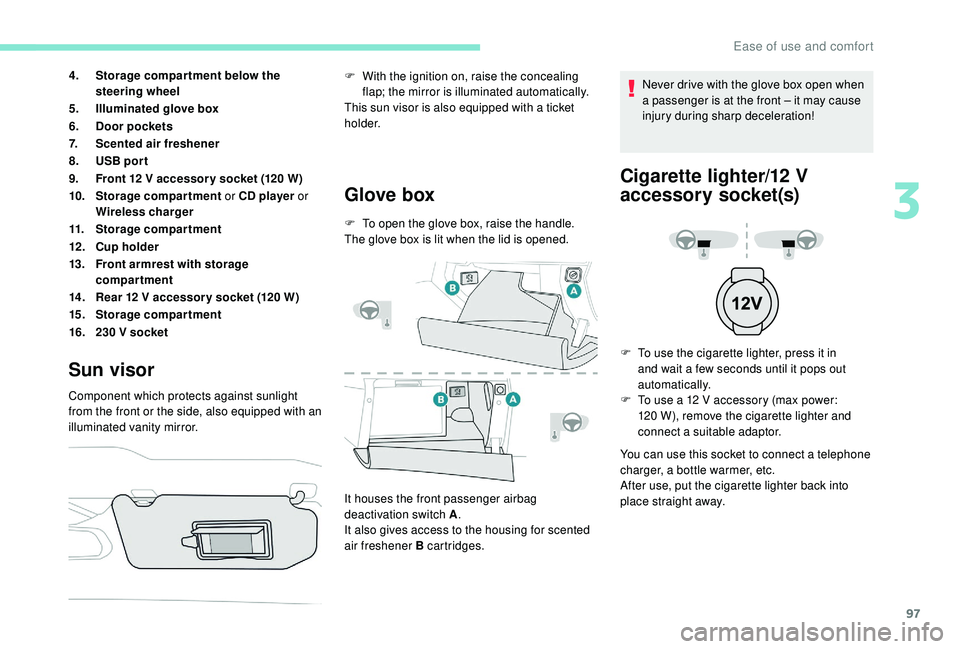
Sun visor
Component which protects against sunlight
from the front or the side, also equipped with an
illuminated vanity mirror.
Glove box
F To open the glove box, raise the handle.
The glove box is lit when the lid is opened.
It houses the front passenger airbag
deactivation switch A .
It also gives access to the housing for scented
air freshener B cartridges. F
W
ith the ignition on, raise the concealing
flap; the mirror is illuminated automatically.
This sun visor is also equipped with a ticket
h o l d e r. Never drive with the glove box open when
a passenger is at the front – it may cause
injury during sharp deceleration!
Cigarette lighter/12 V
a ccessory socket(s)
F To use the cigarette lighter, press it in
and wait a few seconds until it pops out
automatically.
F
T
o use a 12 V accessory (max power:
120
W), remove the cigarette lighter and
connect a suitable adaptor.
You can use this socket to connect a telephone
charger, a bottle warmer, etc.
After use, put the cigarette lighter
back into
place straight away.
3
Ease of use and comfort
Page 106 of 360
104
- illuminated bezels for the front cup holders,
- a l ight source for each of the front door
pockets,
-
i
lluminated rails along the panoramic
sunroof blind.
The ambient lighting switches off automatically
when the sidelamps are switched off. The interior ambient lighting can
be activated or deactivated and its
brightness adjusted in the Vehicle /
Driving menu of the touch screen.
The interior ambient lighting is also
managed by the i- Cockpit Amplify
function.
For more information on the
i-Cockpit Amplify function , refer
to the corresponding section.Rear fittings
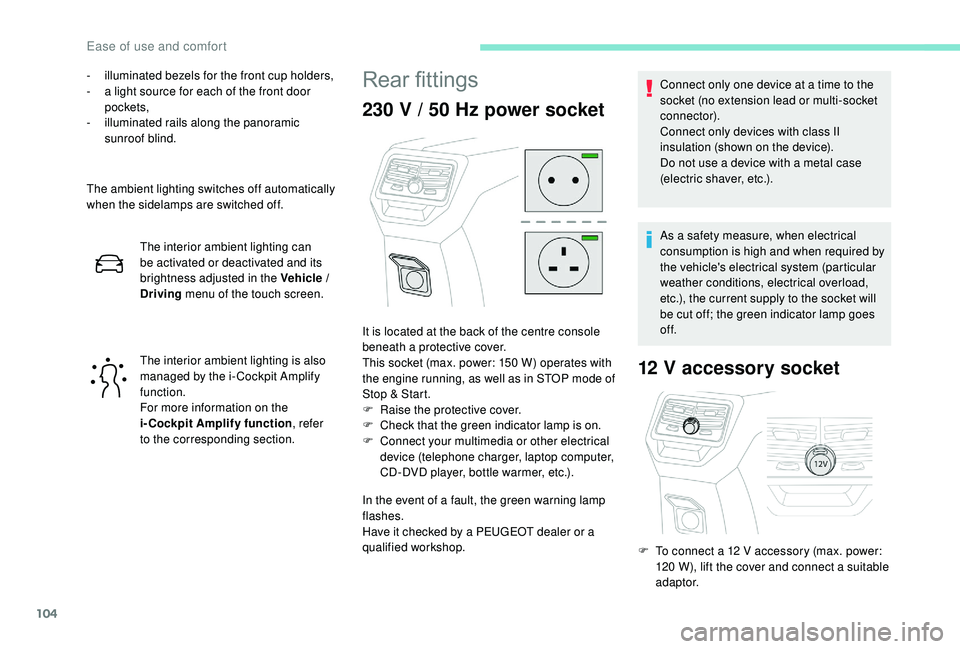
230 V / 50 Hz power socket
In the event of a fault, the green warning lamp
flashes.
Have it checked by a PEUGEOT dealer or a
qualified workshop.
12 V accessory socket
It is located at the back of the centre console
beneath a protective cover.
This socket (max. power: 150
W) operates with
the engine running, as well as in STOP mode of
Stop & Start.
F
Ra
ise the protective cover.
F
C
heck that the green indicator lamp is on.
F
C
onnect your multimedia or other electrical
device (telephone charger, laptop computer,
CD-DVD player, bottle warmer, etc.). Connect only one device at a time to the
socket (no extension lead or multi-socket
connector).
Connect only devices with class II
insulation (shown on the device).
Do not use a device with a metal case
(electric shaver, etc.).
As a safety measure, when electrical
consumption is high and when required by
the vehicle's electrical system (particular
weather conditions, electrical overload,
etc.), the current supply to the socket will
be cut off; the green indicator lamp goes
of f.
F
T
o connect a 12 V accessory (max. power:
120
W), lift the cover and connect a suitable
adaptor.
Ease of use and comfort
Page 225 of 360
223
Maintenance
Correct operation is only possible if the towball
and its carrier are kept clean.
Before cleaning the vehicle with a high-
pressure jet wash, the towball must be removed
and the protective plug fitted to the carrier.Apply the label provided to a clearly visible
area, close to the carrier or in the boot.
Go to a PEUGEOT dealer or a qualified
workshop for any work on the towbar
system.
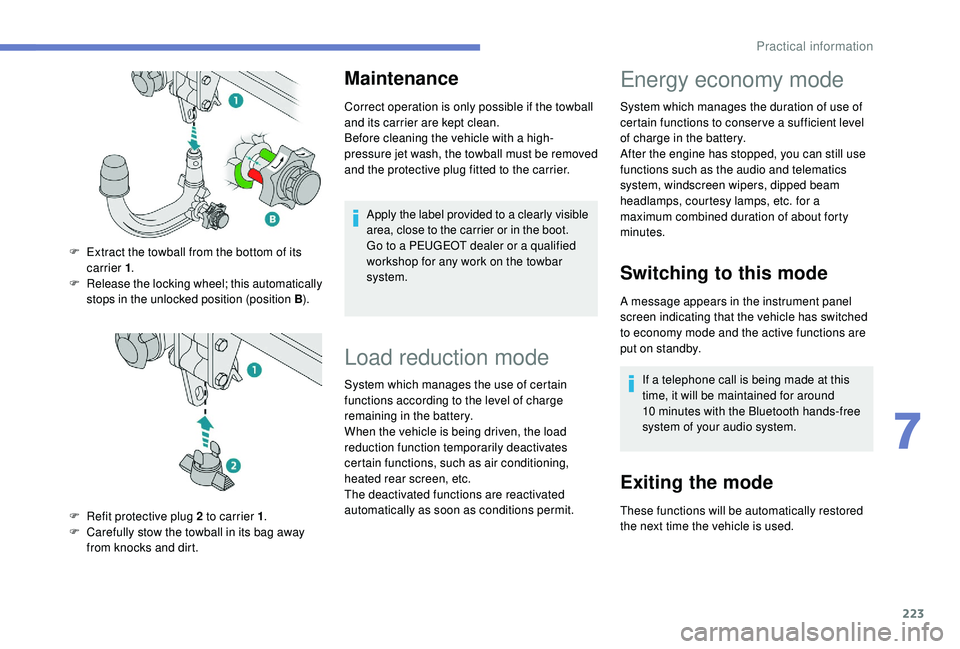
F
E
xtract the towball from the bottom of its
carrier 1 .
F
R
elease the locking wheel; this automatically
stops in the unlocked position (position B ).
F
R
efit protective plug 2 to carrier 1 .
F
C
arefully stow the towball in its bag away
from knocks and dirt.
Load reduction mode
System which manages the use of certain
functions according to the level of charge
remaining in the battery.
When the vehicle is being driven, the load
reduction function temporarily deactivates
certain functions, such as air conditioning,
heated rear screen, etc.
The deactivated functions are reactivated
automatically as soon as conditions permit.
Energy economy mode
System which manages the duration of use of
certain functions to conser ve a sufficient level
of charge in the battery.
After the engine has stopped, you can still use
functions such as the audio and telematics
system,
windscreen wipers, dipped beam
headlamps,
courtesy lamps, etc. for a
maximum combined duration of about forty
minutes.
Switching to this mode
A message appears in the instrument panel
screen indicating that the vehicle has switched
to economy mode and the active functions are
put on standby.
If a telephone call is being made at this
time, it will be maintained for around
10
minutes with the Bluetooth hands-free
system of your audio system.
Exiting the mode
These functions will be automatically restored
the next time the vehicle is used.
7
Practical information
Page 273 of 360
1
PEUGEOT Connect Nav
GPS satellite navigation –
A pplications – Multimedia
audio system
– Bluetooth
®
telephone
Contents
First steps
2
S
teering mounted controls
3
M
enus
3
V
oice commands
5
N
avigation
1
1
Connected navigation
1
3
Applications
1
6
Radio
21
D
AB radio (Digital Audio Broadcasting)
2
2
Media
23
T
elephone
2
5
Settings
2
9
Frequently asked questions
3
2The different functions and settings
described vary according to the version
and configuration of your vehicle.
As a safety measure and because it
requires sustained attention by the
driver, the pairing of a Bluetooth mobile
telephone with the Bluetooth hands-free
system of your audio system must be
done with the vehicle stationary
and the
ignition on.
The system is protected in such a way
that it will only operate in your vehicle.
The display of the message Energy
Economy Mode signals that a change to
standby is imminent.
The link below gives access to OSS
(Open Source Software) codes for the
system.
https://www.groupe-psa.com/fr/oss/
https://www.groupe-psa.com/en/oss/
.
PEUGEOT Connect Nav
Page 275 of 360
3
21,518,5
12:1323 °C
In the "Settings" menu you can create
a profile for just one person or a group
of people with common points, with the
possibility of entering a multitude of
settings (radio presets, audio settings,
navigation history, contact favourites,
etc.); these settings are taken into
account automatically.
In very hot conditions, the volume may
be limited to protect the system. It may go
into standby (screen and sound off) for at
least 5
minutes.
The return to normal takes place after
the temperature in the passenger
compartment drops.
Steering mounted controls
Depending on model
Voice commands :
This control is located on the
steering wheel or at the end of the
lighting control stalk (depending on
model).
Short press, system voice
commands.
Long press, smartphone voice
commands via the system. or
Increase volume.
or Mute / Restore the sound.
Or
Mute by pressing the volume
increase and decrease buttons
simultaneously.
Restore the sound by pressing one
of the two volume buttons.
or Decrease volume.
or Media
(short press): change the
multimedia source.
Telephone (short press): start
telephone call.
Call in progress (short press):
access telephone menu.
Telephone (long press): reject an
incoming call, end call; when no call
is in progress, access telephone
menu. or
Radio
(rotate): automatic search for
the previous / next station.
Media (rotate): previous / next track,
move in a list.
Short press : confirm a selection; if
nothing selected, access to presets.
Radio : display the list of stations.
Media : display the list of tracks.
Radio (press and hold): update the
list of stations received.
Menus
Depending on model / Depending on version
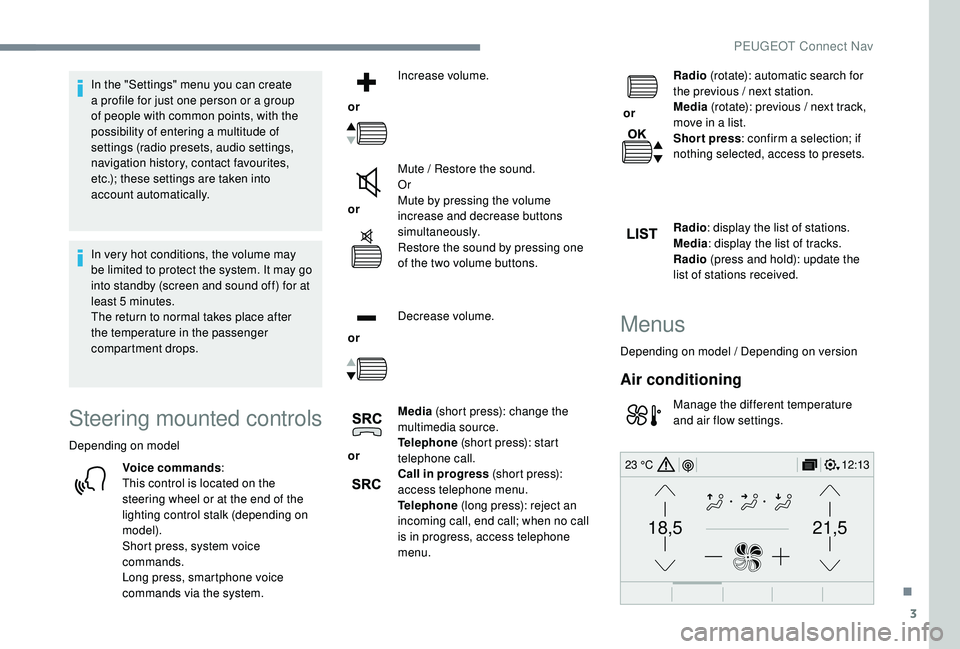
Air conditioning
Manage the different temperature
and air flow settings.
.
PEUGEOT Connect Nav
Page 276 of 360
4
12:13
18,5 21,5
23 °C
FM/87.5 MHz
87.5MHz
12:13
18,5 21,5
23 °C
12:13
18,5 21,5
23 °C
12:13
18,5 21,5
23 °C
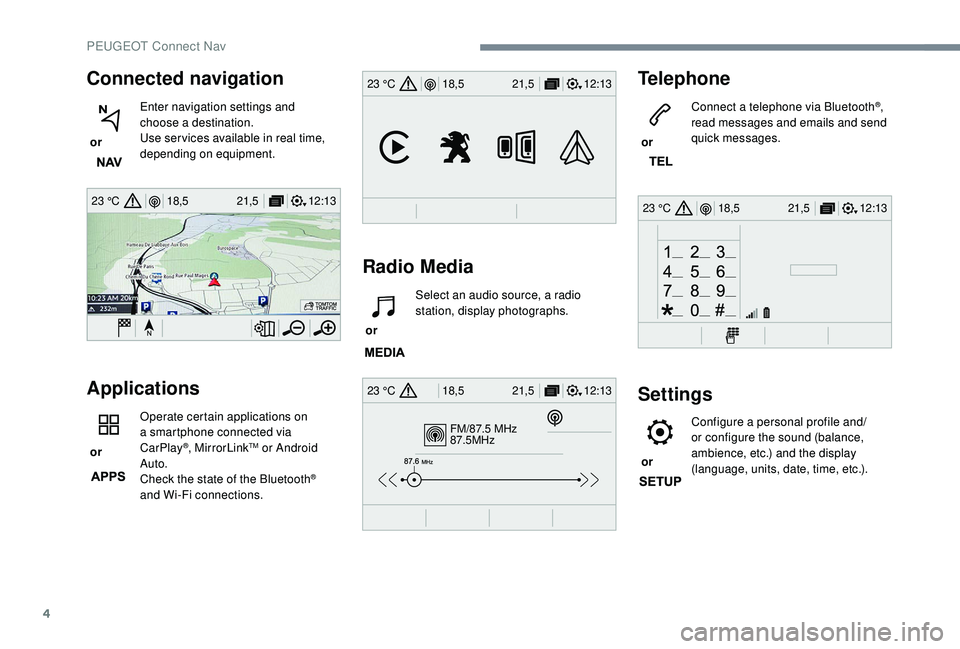
Connected navigation
or Enter navigation settings and
choose a destination.
Use ser vices available in real time,
depending on equipment.
Applications
or Operate certain applications on
a smartphone connected via
CarPlay®, MirrorLinkTM or Android
Auto.
Check the state of the Bluetooth
®
and Wi-Fi connections.
Radio Media Telephone
or
Connect a telephone via Bluetooth
®,
read messages and emails and send
quick messages.
Settings
or Configure a personal profile and/
or configure the sound (balance,
ambience, etc.) and the display
(language, units, date, time, etc.).
or
Select an audio source, a radio
station, display photographs.
PEUGEOT Connect Nav