AUX PEUGEOT 3008 2020 User Guide
[x] Cancel search | Manufacturer: PEUGEOT, Model Year: 2020, Model line: 3008, Model: PEUGEOT 3008 2020Pages: 308, PDF Size: 10.1 MB
Page 276 of 308
274
PEUGEOT Connect Nav
Access to email messages depends on the compatibility between the
smartphone and the onboard system.
Settings
Audio settings
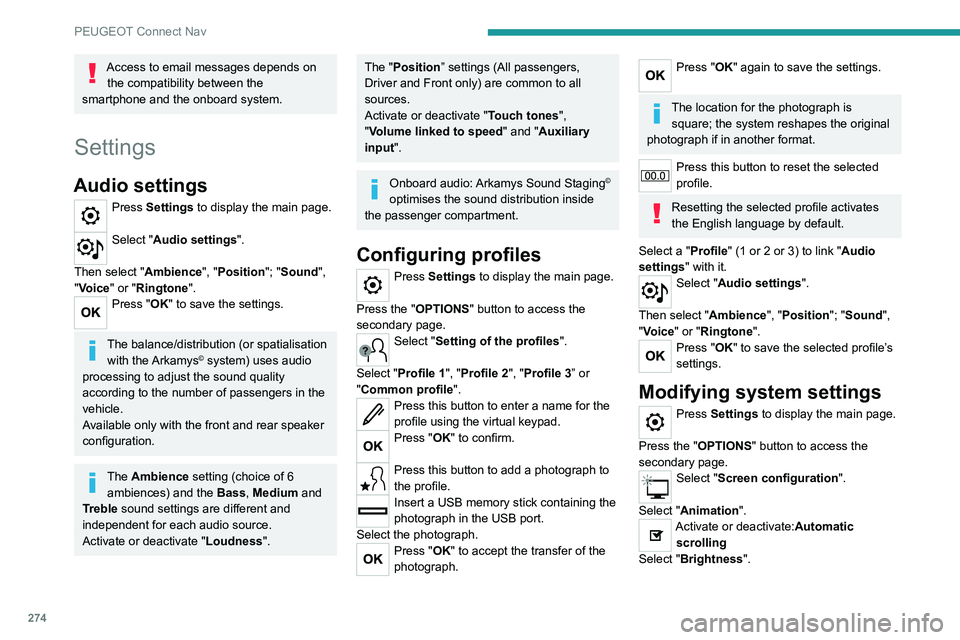
Press Settings to display the main page.
Select "Audio settings".
Then select "Ambience", "Position"; "Sound ",
"Voice" or "Ringtone ".
Press "OK" to save the settings.
The balance/distribution (or spatialisation
with the Arkamys© system) uses audio
processing to adjust the sound quality
according to the number of passengers in the
vehicle.
Available only with the front and rear speaker
configuration.
The Ambience setting (choice of 6 ambiences) and the Bass, Medium and
Treble sound settings are different and
independent for each audio source.
Activate or deactivate "Loudness".
The "Position ” settings (All passengers,
Driver and Front only) are common to all
sources.
Activate or deactivate "Touch tones ",
"Volume linked to speed " and "Auxiliary
input ".
Onboard audio: Arkamys Sound Staging©
optimises the sound distribution inside
the passenger compartment.
Configuring profiles
Press Settings to display the main page.
Press the "OPTIONS " button to access the
secondary page.
Select "Setting of the profiles".
Select "Profile 1", "Profile 2", "Profile 3” or
"Common profile ".
Press this button to enter a name for the
profile using the virtual keypad.
Press "OK" to confirm.
Press this button to add a photograph to
the profile.
Insert a USB memory stick containing the
photograph in the USB port.
Select the photograph.
Press "OK" to accept the transfer of the
photograph.
Press "OK" again to save the settings.
The location for the photograph is square; the system reshapes the original
photograph if in another format.
Press this button to reset the selected
profile.
Resetting the selected profile activates
the English language by default.
Select a "Profile" (1 or 2 or 3) to link "Audio
settings" with it.
Select "Audio settings".
Then select "Ambience", "Position"; "Sound ",
"Voice" or "Ringtone ".
Press "OK" to save the selected profile’s
settings.
Modifying system settings
Press Settings to display the main page.
Press the "OPTIONS " button to access the
secondary page.
Select "Screen configuration".
Select "Animation".
Activate or deactivate:Automatic scrolling
Select "Brightness".
Move the slider to adjust the brightness of
the screen and/or the instrument panel.
Press Settings to display the main page.
Press the "OPTIONS " button to access the
secondary page.
Select "System settings".
Select "Units" to change the units of distance,
fuel consumption and temperature.
Select "Factory settings" to restore the initial
settings.
Resetting the system to "Factory
settings" activates English and degrees
Fahrenheit and deactivates summer time.
Select "System info" to display the versions of
the various modules installed in the system.
Selecting the language
Press Settings to display the main page.
Press the "OPTIONS " button to access the
secondary page.
Select "Languages" to change the
language.
Setting the date
Press Settings to display the main page.
Press the "OPTIONS " button to access the
secondary page.
Page 286 of 308
284
Alphabetical index
Remote control 28–32
Remote functions
26–27, 65, 172–173
Removing a wheel
199–200
Removing the mat
69
Replacing bulbs
201–202, 204–205
Replacing fuses
205–206
Replacing the air filter
183
Replacing the oil filter
183
Replacing the passenger compartment
filter
183
Reservoir, screenwash
182
Resetting the trip recorder
21
Reset trip
22
Rev counter
9
Reversing camera
131, 157–159
Reversing lamps
204
Roof bars
176–177
Running out of fuel (Diesel)
190
S
Safety, children 98, 100–103,
105, 107, 110–111
Saturation of the particle filter (Diesel)
183
Screen menu map
247
Screen, monochrome
23–24
Screen, multifunction (with audio system)
229
Screens, very cold conditions
178
Screenwash
84
Screenwash, front
84
Screenwash, rear
84
SCR (Selective Catalytic Reduction)
19, 185
Seat belts 94–97, 102
Seat belts, rear
95–96
Seat, rear bench
50–51
Seats, additional
55–57
Seats, electric
47–48
Seats, front
45, 47–48
Seats, heated
48
Seats, rear
50–57, 101
Selector, gear
121–124
Sensors (warnings)
131
Serial number, vehicle
227
Service indicator
17, 20
Servicing
17, 183, 184
Settings, equipment
23–25, 27
Settings, system
250, 274
Sidelamps
79, 202, 204
Ski flap
71
Smartphone
26–27, 65, 172–173
Snow chains
129, 177–178
Snow screen
178
Socket, 12 V accessory
66, 70, 77
Socket, 230 V
70
Socket, auxiliary
233, 246, 270
Socket, Jack
233, 270
Speakers
67
Speed limiter
132, 134–136
Speed limit recognition
132–133
Speedometer
9, 132
Sport mode
127
Spotlamps, side
81
Stability control (ESC)
90–92
Starting a Diesel engine
166
Starting the engine
114, 116Starting the vehicle 114–116, 121–124
Starting using another battery
117, 210
State of charge, battery
26, 168
Station, radio
230, 243–244, 268–269
Stay, bonnet
180
Steering mounted controls,
audio
229, 241, 255
Steering wheel, adjustment
49
Stickers, customising ~ Stickers,
expressive
188
Stopping the vehicle
114–117, 121–124
Stop & Start
23, 59, 64, 127–129,
166, 179, 183, 213
Storage
66, 68, 71–72
Storage box
76
Storage boxes
72
Storage compartments
66
Storage wells
76
Storing driving positions
47–48
Sunroof, panoramic
42–43
Sunshine sensor
58
Sun visor
66
Suspension
184
Switching off the engine
11 4
Synchronising the remote control
34
T
Table position 46
Tables, aircraft
71
Tables of engines
225
Tables of fuses
206, 208–209