brake PEUGEOT 3008 2020 Owner's Guide
[x] Cancel search | Manufacturer: PEUGEOT, Model Year: 2020, Model line: 3008, Model: PEUGEOT 3008 2020Pages: 308, PDF Size: 10.1 MB
Page 131 of 308
129
Driving
6Restarting the engine (START mode)
The engine automatically restarts as soon as the
driver indicates the intention of moving off again.
–
W
ith a manual gearbox: with the clutch pedal
fully depressed.
–
W
ith an automatic gearbox:
•
With the selector in position D
or M: with the
brake pedal released.
•
With the selector in position N
and the brake
pedal released: with the selector at D or M.
•
With the selector in position P
and the brake
pedal depressed: with the selector at R, N,
D or M.
Special cases
The engine will restart automatically if all
conditions for operation are met again and in the
following cases.
–
V
ehicle speed exceeds 16 mph (25 km/h) on
2.0 BlueHDi versions with automatic gearbox in
mode D, or 2 mph (3 km/h) on other versions.
–
The electric parking brake is being applied.
In these cases, this indicator lamp flashes
for a few seconds, then goes off.
Malfunctions
In the event of a malfunction, this warning
lamp flashes for a few moments, then
remains on, accompanied by an onscreen
message.
Have the vehicle checked by a PEUGEOT
dealer or a qualified workshop.
The vehicle stalls in STOP mode
All of the instrument panel warning lamps come
on if there is a fault.
►
Switch off the ignition then start the engine
again with the key or the " ST
ART/STOP" button.
The Stop & Start system requires a 12 V
battery of specific technology and
specification.
All work concerning the battery must be
carried out only by a PEUGEOT
dealer or a
qualified workshop.
Under-inflation detection
This system automatically checks the pressures of the tyres while driving.
It compares the information given by the wheel
speed sensors with reference values, which
must be reinitialised every time the tyre
pressures are adjusted or a wheel changed.
The system triggers an alert as soon as it
detects a drop in the inflation pressure of one or
more tyres.
Under-inflation detection does not
replace the need for vigilance on the part
of the driver.
This system does not avoid the need to
regularly check the tyre pressures (including
the spare wheel), especially before a long
journey.
Driving with under-inflated tyres, particularly
in adverse conditions (heavy load, high
speed, long journey):
–
worsens road-holding.
–
lengthens braking distances.
–
causes premature wear of the tyres.
–
increases energy consumption.
The inflation pressures defined for the vehicle can be found on the tyre pressure
label.
For more information on the Identification
markings, refer to the corresponding section.
Checking tyre pressures
This check should be done when the
tyres are "cold" (vehicle stopped for 1 hour or
after a journey of less than 6 miles (10
km) at
moderate speeds).
Otherwise, add 0.3 bar to the pressures
shown on the label.
Snow chains
The system does not have to be
reinitialised after fitting or removing snow
chains.
Under-inflation alert
This is signalled by the fixed illumination of this warning lamp, accompanied by an
Page 138 of 308
136
Driving
Exceeding the programmed speed
setting
You can temporarily exceed the speed
setting by pressing the accelerator pedal (the
programmed speed flashes).
To return to the speed setting, release the
accelerator pedal (when the set speed is
reached again, the displayed speed stops
flashing).
Operating limits
Never use the system in the following
situations:
– In an urban area with the risk of
pedestrians crossing the road.
– In heavy traffic (except versions with the
Stop & Go function).
– On winding or steep roads.
– On slippery or flooded roads.
– In poor weather conditions.
– Driving on a speed circuit.
– Driving on a rolling road.
– When using snow chains, non-slip covers
or studded tyres.
Cruise control
Refer to the General recommendations on the
use of driving and manoeuvring aids and to
Cruise control - particular recommendations.
This system automatically keeps the vehicle’s speed at the cruise value
► Press and hold button 2 or 3 to change the
value in steps of + or - 5 mph (8 km/h).
To change the limit speed setting using memorised speeds, via the touch screen:
►
Press button
5 to display the memorised
speed settings.
►
Press the touch screen button for the desired
speed setting.
The selection screen closes after a few
moments.
This setting becomes the new limit speed.
T
o modify the cruise speed setting based on the
speed suggested by the Speed Limit Recognition
and Recommendation, as shown on the
instrument panel:
►
Press button
5 once; a message is displayed
to confirm the memorisation request.
►
Press button
5 again to save the suggested
speed.
The speed is immediately shown on the
instrument panel as the new speed setting.
Temporarily exceeding the
speed setting
► Press the accelerator pedal down fully .
The speed limiter is deactivated temporarily and
the displayed speed setting flashes.
► Release the accelerator pedal to return to
below the programmed speed.
When the limit speed is exceeded but this is not
due to action by the driver (in case of a steep
slope, for example), an audible signal triggers
immediately
.
On a steep descent or in the event of
sharp acceleration, the speed limiter will
not be able to prevent the vehicle from
exceeding the speed setting.
Brake if necessary to control the speed of
your vehicle.
Once the speed of the vehicle returns to the
programmed setting, the speed limiter functions
again: the display of the speed setting becomes
fixed again.
Switching off
► Turn the thumbwheel 1 to the "OFF" position:
the display of information on the speed limiter
disappears.
Malfunction
Dashes are displayed (flashing, initially, then
fixed) in the event of a speed limiter malfunction.
Have the system checked by a PEUGEOT
dealer or a qualified workshop.
Cruise control - particular
recommendations
For the safety of everyone, only use the
cruise control where the driving
conditions allow running at a constant speed
and keeping an adequate safety distance.
Remain vigilant when the cruise control is
activated. If you hold one of the speed setting
modification buttons, a very rapid change in
the speed of your vehicle may occur.
When descending a steep hill , the cruise
control system cannot prevent the vehicle
from exceeding the set speed. Brake if
necessary to control the speed of your
vehicle.
On steep climbs or when towing, the set
speed may not be reached or maintained.
Page 140 of 308
138
Driving
Drive Assist Plus
Only available on versions with electric
automatic gearbox (Hybrid).
This system automatically adjusts the speed and
corrects the trajectory, using the Adaptive Cruise
Control with Stop & Go function in conjunction
with the Lane Positioning Assist.
These two functions must be activated and in
operation.
This system is especially suitable for driving on
motorways and main roads.
For more information on Adaptive Cruise
Control and Lane Positioning Assist, refer to
the corresponding sections.
The system assists the driver by acting on the steering, acceleration and braking,
within the limits of the laws of physics and the
capabilities of the vehicle. Certain road
infrastructure elements or vehicles present on
the road may not be properly seen or may be
poorly interpreted by the camera and radar,
resulting in an unexpected change in
direction, a lack of steering correction and/or
inappropriate management of acceleration or
braking.
Adaptive Cruise Control
Refer to the General recommendations on the
use of driving and manoeuvring aids and to
Cruise control - particular recommendations.
9. Speed suggested by the Speed Limit
recognition and recommendation system
(depending on version)
Switching on/pausing
► Turn thumbwheel 1 to the "CRUISE" position
to select cruise control mode; the function is
paused.
► Press button 2 or 3 to activate cruise control
and save a speed setting when the vehicle has
reached the desired speed; the vehicle’s current
speed is saved as the speed setting.
►
Release the accelerator pedal.
► Pressing button 4 temporarily pauses the
function.
►
Pressing button 4
again restores operation of
the cruise control (ON).
Operation of the cruise control can also
be paused temporarily:
–
by pressing the brake pedal.
–
automatically
, if the electronic stability
control (ESC) system is triggered.
Changing the cruise speed
setting
The cruise control must be active.
To change the cruise speed setting, based on
the vehicle’s current speed:
►
In +/-
1 mph (1.6 km/h) steps, briefly press
button
2 or 3 as often as necessary.
►
Continuously
, in steps of +/- 5 mph (8 km/h),
press and hold button
2
or 3.
Pressing and holding button 2 or
3 results in a rapid change in the speed
of your vehicle.
As a precaution, we recommend setting a cruise speed similar to the vehicle’s
current speed, to avoid any sudden
acceleration or deceleration.
To change the cruise speed setting using memorised speed settings and from the touch
screen:
►
Press button
5 to display the memorised
speed settings.
►
Press the touch screen button for the desired
speed setting. The selection screen closes after a few
moments.
This setting becomes the new cruise speed.
T
o modify the cruise speed setting using the
speed suggested by the Speed Limit Recognition
and Recommendation shown on the instrument
panel:
►
Press button
5 once; a message is displayed
to confirm the memorisation request.
►
Press button
5 again to save the suggested
speed.
The speed is immediately shown on the
instrument panel as the new speed setting.
Switching off
► Turn the thumbwheel 1 to the "OFF" position:
the cruise control information disappears from
the screen.
Malfunction
Dashes are displayed (flashing, initially, then
fixed) in the event of a cruise control system
malfunction.
Have the system checked by a PEUGEOT
dealer or a qualified workshop.
Page 141 of 308
139
Driving
6Drive Assist Plus
Only available on versions with electric
automatic gearbox (Hybrid).
This system automatically adjusts the speed and
corrects the trajectory, using the Adaptive Cruise
Control with Stop & Go function in conjunction
with the Lane Positioning Assist.
These two functions must be activated and in
operation.
This system is especially suitable for driving on
motorways and main roads.
For more information on Adaptive Cruise
Control and Lane Positioning Assist, refer to
the corresponding sections.
The system assists the driver by acting on the steering, acceleration and braking,
within the limits of the laws of physics and the
capabilities of the vehicle. Certain road
infrastructure elements or vehicles present on
the road may not be properly seen or may be
poorly interpreted by the camera and radar,
resulting in an unexpected change in
direction, a lack of steering correction and/or
inappropriate management of acceleration or
braking.
Adaptive Cruise Control
Refer to the General recommendations on the
use of driving and manoeuvring aids and to
Cruise control - particular recommendations.
This system automatically maintains the speed
of your vehicle at a value which you set (speed
setting), while keeping a safe distance from the
vehicle in front (target vehicle), and which has
been set beforehand by the driver. The system
automatically manages the acceleration and
deceleration of the vehicle.
With the Stop function , the system manages
the braking until the vehicle comes to a complete
stop.
With the Stop
& Go function, the system
manages the braking until the vehicle comes to a
complete stop and the restarting of the vehicle.
The brake lamps come on if the vehicle is slowed down by the system.
It can be dangerous to drive if the brake
lamps are not in perfect working order.
To do so, it has a camera located at the top of
the windscreen and a radar located in the front
bumper.
Primarily designed for driving on main
roads and motorways, this system only
works with moving vehicles driving in the
same direction as your vehicle.
If the driver operates a direction indicator
to overtake a slower vehicle, the cruise
control allows the vehicle to temporarily
approach the vehicle in front to assist the
overtaking manoeuvre, without ever
exceeding the speed setting.
Some vehicles present on the road may
not be properly seen or may be poorly
interpreted by the camera and/or radar (e.g. a
lorry), which may lead to a poor assessment
of the distances and lead to the vehicle
inappropriately accelerating or braking.
Steering mounted control
1. ON (CRUISE position) / OFF (position0)
2. Activation of cruise control at the current
speed / decrease speed setting
3. Activation of cruise control at the current
speed / increase speed setting
Page 142 of 308
140
Driving
To prevent sudden acceleration or deceleration of the vehicle, select a
speed setting relatively close to the vehicle's
current speed.
Changing the inter-vehicle distance
► Press 6 to display the distance setting
thresholds ("Distant", "Normal" or "Close"), then
press again to select a threshold.
After a few seconds, the option is accepted and
will be memorised when the ignition is switched
off.
Temporarily exceeding the speed setting
► Fully depress the accelerator pedal. Distance
monitoring and cruise control are deactivated
while acceleration is maintained. "Cruise control
suspended" is displayed.
Deactivating the system
► Turn the thumbwheel 1 upwards to the OFF
position.
Displays in the instrument
panel
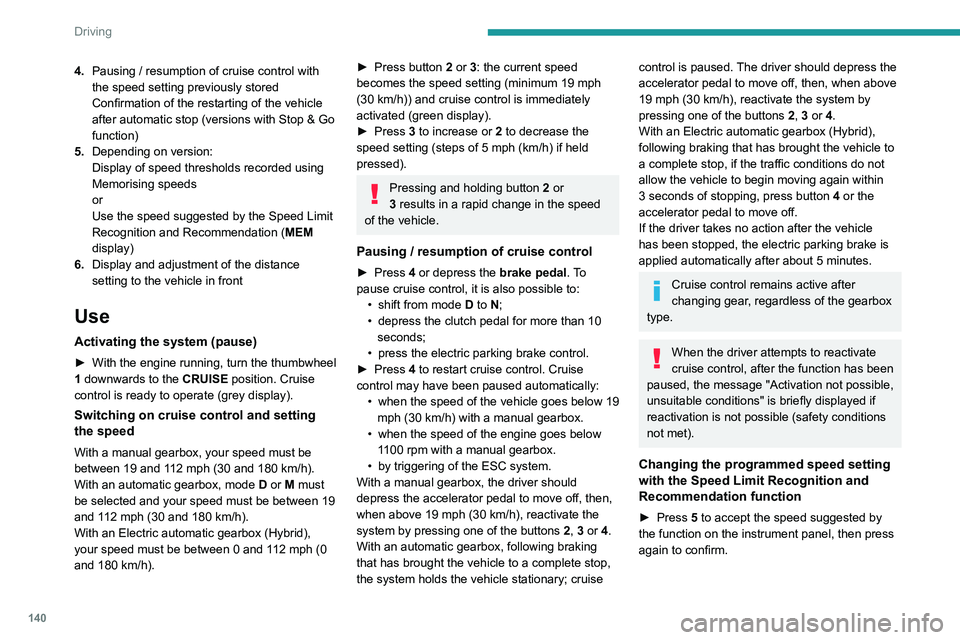
The following information can be seen in the
instrument panel in "DRIVING" display mode.
4. Pausing / resumption of cruise control with
the speed setting previously stored
Confirmation of the restarting of the vehicle
after automatic stop (versions with Stop & Go
function)
5. Depending on version:
Display of speed thresholds recorded using
Memorising speeds
or
Use the speed suggested by the Speed Limit
Recognition and Recommendation ( MEM
display)
6. Display and adjustment of the distance
setting to the vehicle in front
Use
Activating the system (pause)
► With the engine running, turn the thumbwheel
1 downwards to the CRUISE position. Cruise
control is ready to operate (grey display).
Switching on cruise control and setting
the speed
With a manual gearbox, your speed must be
between 19 and 112 mph (30 and 180 km/h).
With an automatic gearbox, mode
D
or M must
be selected and your speed must be between 19
and 112
mph (30 and 180 km/h).
With an Electric automatic gearbox (Hybrid),
your speed must be between 0 and 112 mph (0
and 180 km/h).
► Press button 2 or 3: the current speed
becomes the speed setting (minimum 19 mph
(30
km/h)) and cruise control is immediately
activated (green display).
►
Press
3 to increase or 2 to decrease the
speed setting (steps of 5
mph (km/h) if held
pressed).
Pressing and holding button 2 or
3 results in a rapid change in the speed
of the vehicle.
Pausing / resumption of cruise control
► Press 4 or depress the brake pedal. To
pause cruise control, it is also possible to: •
shift from mode
D to N;
•
depress the clutch pedal for more than 10
seconds;
•
press the electric parking brake control.
►
Press
4 to restart cruise control. Cruise
control may have been paused automatically: •
when
the speed of the vehicle goes below 19
mph (30
km/h) with a manual gearbox.
•
when the speed of the engine goes below
1
100 rpm with a manual gearbox.
•
by triggering of the ESC system.
With a manual gearbox, the driver should
depress the accelerator pedal to move off, then,
when above 19 mph (30
km/h), reactivate the
system by pressing one of the buttons 2, 3 or 4.
With an automatic gearbox, following braking
that has brought the vehicle to a complete stop,
the system holds the vehicle stationary; cruise
control is paused. The driver should depress the
accelerator pedal to move off, then, when above
19 mph (30
km/h), reactivate the system by
pressing one of the buttons 2, 3 or 4.
With an Electric automatic gearbox (Hybrid),
following braking that has brought the vehicle to
a complete stop, if the traffic conditions do not
allow the vehicle to begin moving again within
3 seconds of stopping, press button 4 or the
accelerator pedal to move off.
If the driver takes no action after the vehicle
has been stopped, the electric parking brake is
applied automatically after about 5 minutes.
Cruise control remains active after
changing gear, regardless of the gearbox
type.
When the driver attempts to reactivate
cruise control, after the function has been
paused, the message "Activation not possible,
unsuitable conditions" is briefly displayed if
reactivation is not possible (safety conditions
not met).
Changing the programmed speed setting
with the Speed Limit Recognition and
Recommendation function
► Press 5 to accept the speed suggested by
the function on the instrument panel, then press
again to confirm.
Page 143 of 308
141
Driving
6To prevent sudden acceleration or deceleration of the vehicle, select a
speed setting relatively close to the vehicle's
current speed.
Changing the inter-vehicle distance
► Press 6 to display the distance setting
thresholds ("Distant", "Normal" or "Close"), then
press again to select a threshold.
After a few seconds, the option is accepted and
will be memorised when the ignition is switched
off.
Temporarily exceeding the speed setting
► Fully depress the accelerator pedal. Distance
monitoring and cruise control are deactivated
while acceleration is maintained. "Cruise control
suspended" is displayed.
Deactivating the system
► Turn the thumbwheel 1 upwards to the OFF
position.
Displays in the instrument
panel
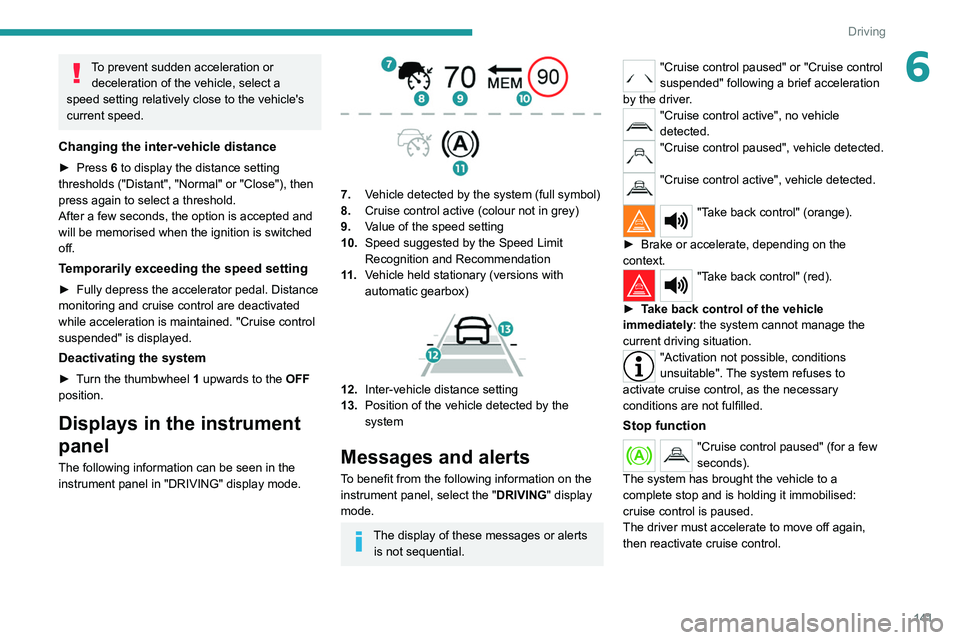
The following information can be seen in the
instrument panel in "DRIVING" display mode.
7. Vehicle detected by the system (full symbol)
8. Cruise control active (colour not in grey)
9. Value of the speed setting
10. Speed suggested by the Speed Limit
Recognition and Recommendation
11 . Vehicle held stationary (versions with
automatic gearbox)
12.Inter-vehicle distance setting
13. Position of the vehicle detected by the
system
Messages and alerts
To benefit from the following information on the
instrument panel, select the " DRIVING" display
mode.
The display of these messages or alerts is not sequential.
"Cruise control paused" or "Cruise control
suspended" following a brief acceleration
by the driver.
"Cruise control active", no vehicle
detected.
"Cruise control paused", vehicle detected.
"Cruise control active", vehicle detected.
"Take back control" (orange).
►
Brake or accelerate, depending on the
context.
"Take back control" (red).
►
T
ake back control of the vehicle
immediately: the system cannot manage the
current driving situation.
"Activation not possible, conditions
unsuitable". The system refuses to
activate cruise control, as the necessary
conditions are not fulfilled.
Stop function
"Cruise control paused" (for a few
seconds).
The system has brought the vehicle to a
complete stop and is holding it immobilised:
cruise control is paused.
The driver must accelerate to move off again,
then reactivate cruise control.
Page 144 of 308
142
Driving
Malfunction
If the cruise control malfunctions,
dashes are displayed instead of
the cruise control speed setting.
If this warning lamp comes on,
accompanied by an alert message and an
audible signal, this confirms the malfunction.
Have the system checked by a PEUGEOT
dealer or a qualified workshop.
Lane positioning assist
Refer to the General recommendations on the
use of driving and manoeuvring aids .
Only available on versions with electric
automatic gearbox (Hybrid).
Using a camera located at the top of the
windscreen, the system identifies lane markings
and steers the vehicle inside this lane, keeping it
in the lateral position chosen by the driver.
This function is primarily suitable for driving on
motorways and main roads.
Conditions for operation
– Adaptive Cruise Control active.
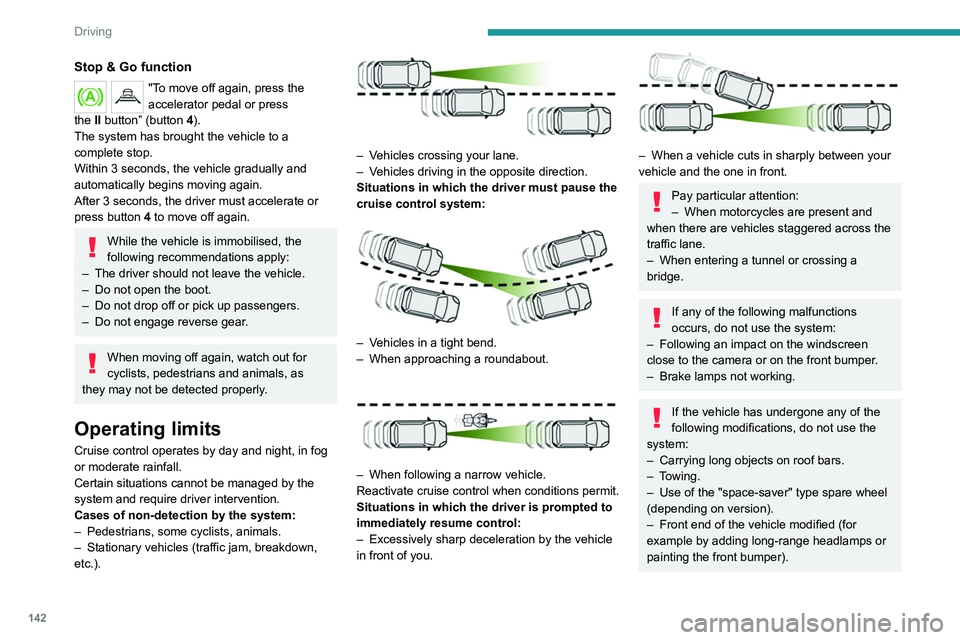
Stop & Go function
"To move off again, press the
accelerator pedal or press
the
II
button” (button 4).
The system has brought the vehicle to a
complete stop.
Within 3 seconds, the vehicle gradually and
automatically begins moving again.
After 3 seconds, the driver must accelerate or
press button 4 to move off again.
While the vehicle is immobilised, the
following recommendations apply:
–
The driver should not leave the vehicle.
–
Do not open the boot.
–
Do not drop off or pick up passengers.
–
Do not engage reverse gear
.
When moving off again, watch out for
cyclists, pedestrians and animals, as
they may not be detected properly.
Operating limits
Cruise control operates by day and night, in fog
or moderate rainfall.
Certain situations cannot be managed by the
system and require driver intervention.
Cases of non-detection by the system:
–
Pedestrians, some cyclists, animals.
–
Stationary vehicles (traffic jam, breakdown,
etc.).
– Vehicles crossing your lane.
– V ehicles driving in the opposite direction.
Situations in which the driver must pause the
cruise control system:
– Vehicles in a tight bend.
– When approaching a roundabout.
– When following a narrow vehicle.
Reactivate cruise control when conditions permit.
Situations in which the driver is prompted to
immediately resume control:
–
Excessively sharp deceleration by the vehicle
in front of you.
– When a vehicle cuts in sharply between your
vehicle and the one in front.
Pay particular attention:
– When motorcycles are present and
when there are vehicles staggered across the
traffic lane.
–
When entering a tunnel or crossing a
bridge.
If any of the following malfunctions
occurs, do not use the system:
–
Following an impact on the windscreen
close to the camera or on the front bumper
.
–
Brake lamps not working.
If the vehicle has undergone any of the
following modifications, do not use the
system:
–
Carrying long objects on roof bars.
–
Towing.
–
Use of the "space-saver" type spare wheel
(depending on version).
–
Front end of the vehicle modified (for
example by adding long-range headlamps or
painting the front bumper).
Page 146 of 308
144
Driving
Pausing/Suspending the
system
The driver must act promptly if they believe that the traffic conditions or the
state of the road surface require their
intervention, by moving the steering wheel to
temporarily suspend system operation. Any
action on the brake pedal that results in cruise
control being paused will also cause the
system to be paused.
If the system detects that the driver is not
holding the wheel firmly enough, it
triggers a series of gradual alerts and then
deactivates itself if there is no response from
the driver.
If the function is suspended due to the
prolonged release of the force holding
the steering wheel, you must reactivate it by
pressing the button again.
Automatic pause
– Triggering of the ESC.
– Prolonged failure to detect one of the lane limit
markings. In this case, the
Active lane departure
warning function can take over, and the system will reactivate itself once the operating conditions
are met again.
In response to action by the driver:
suspension
– Activation of the direction indicators.
– T ravelling outside the lane limits.
–
T
oo tight a grip on the steering wheel or
dynamic action on the steering wheel.
–
Action on the brake pedal (resulting in a pause
until cruise control is reactivated) or accelerator
pedal (suspension for as long as the pedal is
depressed).
–
Pausing of the cruise control.
–
Deactivation of the DSC/ASR systems.
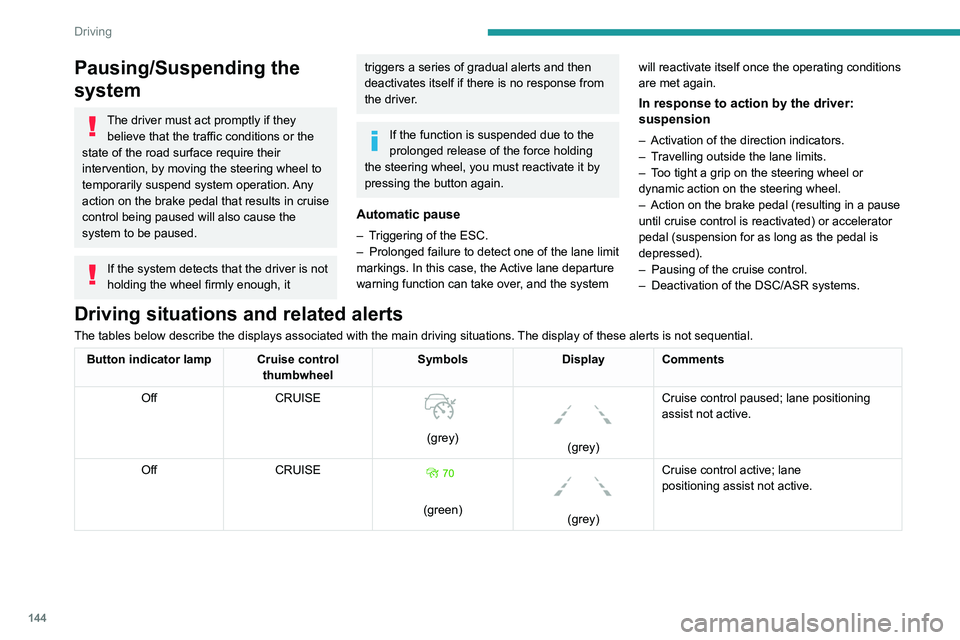
Driving situations and related alerts
The tables below describe the displays associated with the main driving \
situations. The display of these alerts is not sequential.
Button indicator lamp Cruise control thumbwheelSymbols
Display Comments
Off CRUISE
(grey)
(grey)Cruise control paused; lane positioning
assist not active.
Off CRUISE
(green)
(grey)Cruise control active; lane
positioning
assist not active.
Page 148 of 308
146
Driving
The vehicle has a camera located at the top of
the windscreen and, depending on version, a
radar located in the front bumper.
This system does not avoid the need for vigilance on the part of the driver.
This system is designed to assist the driver
and improve road safety.
It is the driver's responsibility to continuously
monitor the state of the traffic, observing the
driving regulations.
As soon as the system detects a potential obstacle, it prepares the braking
circuit in case automatic braking is needed.
This may cause a slight noise and a slight
sensation of deceleration.
Deactivation / Activation
By default, the system is automatically activated
at every engine start.
Messages Driving situations
"Hold the steering wheel" Actual or imminent loss of lane positioning
assist.
"Retake control" Simultaneous loss of cruise control and lane positioning
assist.
Operating limits
The Lane Keeping Assist system may issue an alert when the vehicle is
travelling in a long straight lane on a smooth
road surface even if the driver is holding the
steering wheel properly.
The system may fail to operate or may produce
unsuitable corrections to the steering in the
following situations:
–
Poor visibility (insufficient road lighting,
snowfall, rain, fog).
–
Dazzle (headlamps of an oncoming vehicle,
low sun, reflections on a wet road surface,
leaving a tunnel, alternating light and shade).
–
Windscreen area in front of the camera being
dirty
, misted up, frost-covered, snow-covered,
damaged or masked by a sticker.
–
Lane markings eroded, partially hidden (snow
,
mud) or multiple (roadworks, surface joints).
–
T
ravelling in a tight bend.
–
Winding roads.
–
Presence of a tarmac joint on the road.
The system must not be activated in the following situations:
–
Driving with a "space-saver" type spare
wheel.
–
When towing, especially with an
unconnected or unapproved trailer
.
–
Poor weather conditions.
–
Driving on slippery road surfaces (risk of
aquaplaning, snow
, ice).
–
Driving on racing circuits.
–
Driving on a rolling road.
Malfunction
A system malfunction is indicated by the Service warning lamp
coming on and this (orange) symbol,
accompanied by an alert message and an
audible signal.
Have the system checked by a PEUGEOT
dealer or a qualified workshop.
Active Safety Brake with Distance Alert and
Intelligent emergency
braking assistance
Refer to the General recommendations on the
use of driving and manoeuvring aids .
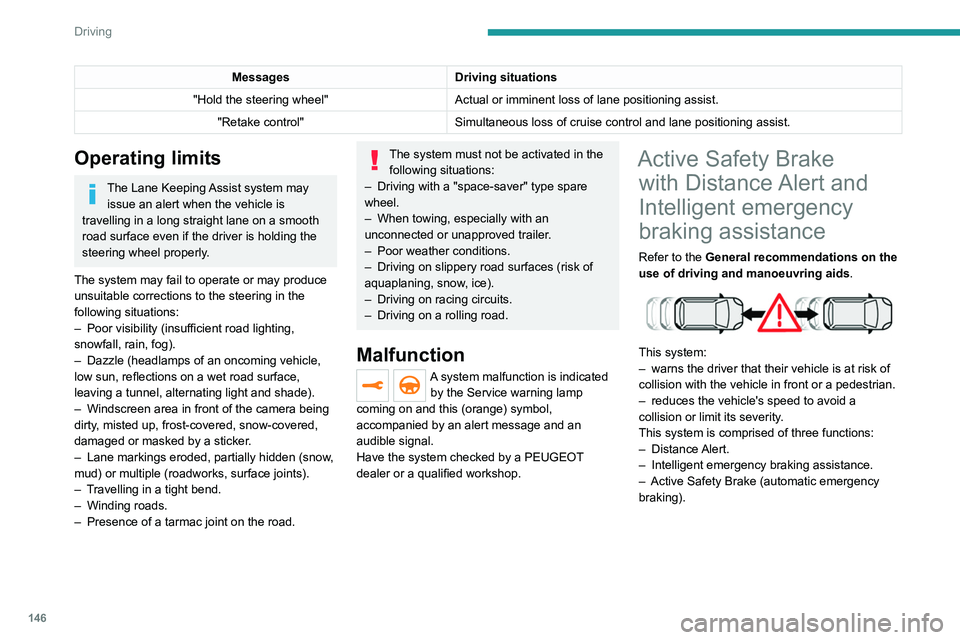
This system:
–
warns the driver that their vehicle is at risk of
collision with the vehicle in front or a pedestrian.
–
reduces the vehicle's speed to avoid a
collision or limit its severity
.
This system is comprised of three functions:
–
Distance Alert.
–
Intelligent emergency braking assistance.
–
Active Safety Brake (automatic emergency
braking).
Page 149 of 308
147
Driving
6
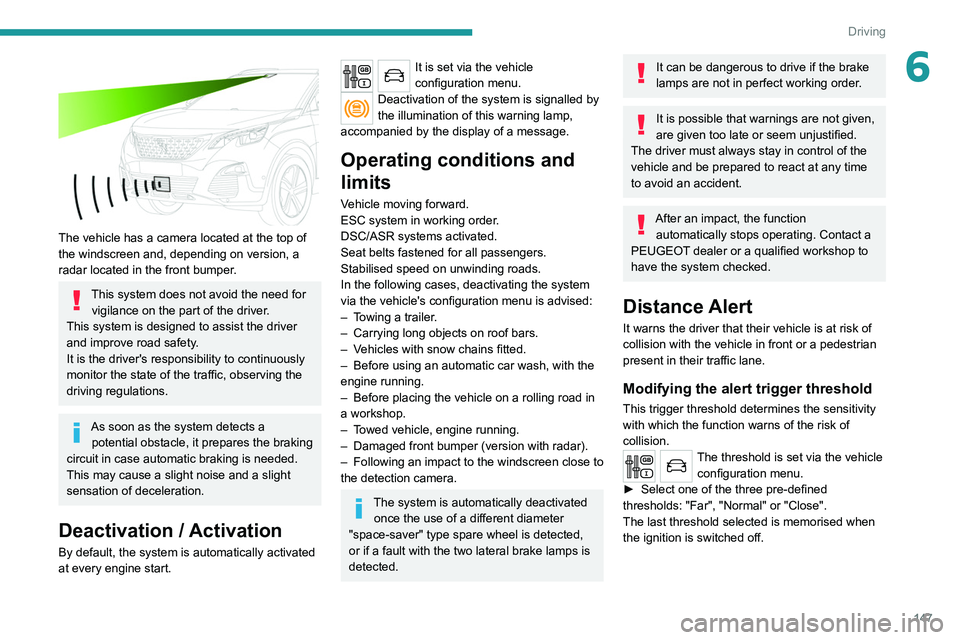
The vehicle has a camera located at the top of
the windscreen and, depending on version, a
radar located in the front bumper.
This system does not avoid the need for vigilance on the part of the driver.
This system is designed to assist the driver
and improve road safety.
It is the driver's responsibility to continuously
monitor the state of the traffic, observing the
driving regulations.
As soon as the system detects a potential obstacle, it prepares the braking
circuit in case automatic braking is needed.
This may cause a slight noise and a slight
sensation of deceleration.
Deactivation / Activation
By default, the system is automatically activated
at every engine start.
It is set via the vehicle
configuration menu.
Deactivation of the system is signalled by
the illumination of this warning lamp,
accompanied by the display of a message.
Operating conditions and
limits
Vehicle moving forward.
ESC system in working order.
DSC/ASR systems activated.
Seat belts fastened for all passengers.
Stabilised speed on unwinding roads.
In the following cases, deactivating the system
via the vehicle's configuration menu is advised:
–
T
owing a trailer.
–
Carrying long objects on roof bars.
–
V
ehicles with snow chains fitted.
–
Before using an automatic car wash, with the
engine running.
–
Before placing the vehicle on a rolling road in
a workshop.
–
T
owed vehicle, engine running.
–
Damaged front bumper (version with radar).
–
Following
an impact to the windscreen close to
the detection camera.
The system is automatically deactivated once the use of a different diameter
"space-saver" type spare wheel is detected,
or if a fault with the two lateral brake lamps is
detected.
It can be dangerous to drive if the brake
lamps are not in perfect working order.
It is possible that warnings are not given,
are given too late or seem unjustified.
The driver must always stay in control of the
vehicle and be prepared to react at any time
to avoid an accident.
After an impact, the function automatically stops operating. Contact a
PEUGEOT dealer or a qualified workshop to
have the system checked.
Distance Alert
It warns the driver that their vehicle is at risk of
collision with the vehicle in front or a pedestrian
present in their traffic lane.
Modifying the alert trigger threshold
This trigger threshold determines the sensitivity
with which the function warns of the risk of
collision.
The threshold is set via the vehicle configuration menu.
►
Select one of the three pre-defined
thresholds: "Far", "Normal" or "Close".
The last threshold selected is memorised when
the ignition is switched off.