display PEUGEOT 3008 DAG 2009 User Guide
[x] Cancel search | Manufacturer: PEUGEOT, Model Year: 2009, Model line: 3008 DAG, Model: PEUGEOT 3008 DAG 2009Pages: 290, PDF Size: 20.63 MB
Page 17 of 290
39
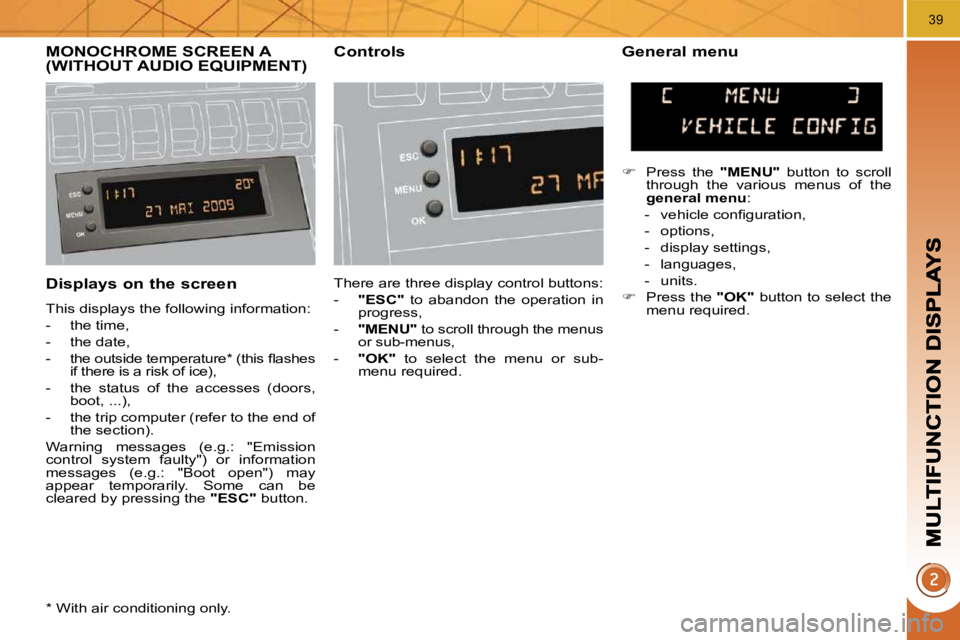
Displays on the screen
This displays the following information:
- the time,
- the date,
- the outside temperature * (this fl ashes if there is a risk of ice),
- the status of the accesses (doors, boot, ...),
- the trip computer (refer to the end of the section).
Warning messages (e.g.: "Emission
control system faulty") or information
messages (e.g.: "Boot open") may
appear temporarily. Some can be
cleared by pressing the "ESC" button.
MONOCHROME SCREEN A (WITHOUT AUDIO EQUIPMENT) Controls General menu
There are three display control buttons:
- "ESC" to abandon the operation in
progress,
- "MENU" to scroll through the menus
or sub-menus,
- "OK" to select the menu or sub-
menu required.
Press the "MENU" button to scroll
through the various menus of the
general menu :
- vehicle confi guration,
- options,
- display settings,
- languages,
- units.
Press the "OK" button to select the
menu required.
* With air conditioning only.
Page 18 of 290
40
Vehicle confi guration Options
Once the "Options" menu has been
selected, you can start diagnostics of
the status of the equipment (active, not
active, faulty).
Languages
Once the "Languages" menu has been
selected, you can change the language
used by the display (Français, Italiano,
Nederlands, Portugues, Portugues-Brasil,
Türkçe, Deutsch, English, Espanol).
Display settings
Once the "Display settings" menu has
been selected, you can gain access to
the following settings:
- year,
- month,
- day,
- hour,
- minutes,
- 12 or 24 hour mode. Units
Once the "Units" menu has been se-
lected, you can change the units of the
following parameters:
- temperature (°C or °F),
- fuel consumption (l/100 km, mpg or
km/l).
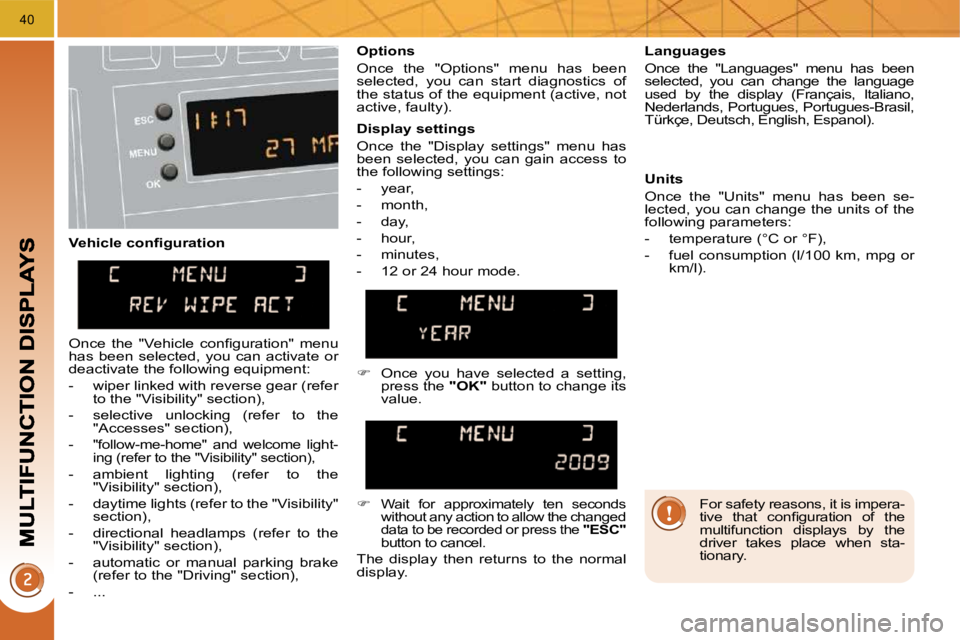
Once you have selected a setting,
press the "OK" button to change its
value.
Wait for approximately ten seconds
without any action to allow the changed
data to be recorded or press the "ESC" button to cancel.
The display then returns to the normal
display.
Once the "Vehicle confi guration" menu
has been selected, you can activate or
deactivate the following equipment:
- wiper linked with reverse gear (refer
to the "Visibility" section),
- selective unlocking (refer to the "Accesses" section),
-
"follow-me-home" and welcome light-
ing (refer to the "Visibility" section),
- ambient lighting (refer to the "Visibility" section),
- daytime lights (refer to the "Visibility" section),
- directional headlamps (refer to the "Visibility" section),
- automatic or manual parking brake (refer to the "Driving" section),
- ... For safety reasons, it is impera-
tive that confi guration of the
multifunction displays by the
driver takes place when sta-
tionary.
Page 19 of 290
41
MONOCHROME SCREEN A (WITH AUDIO EQUIPMENT) Controls
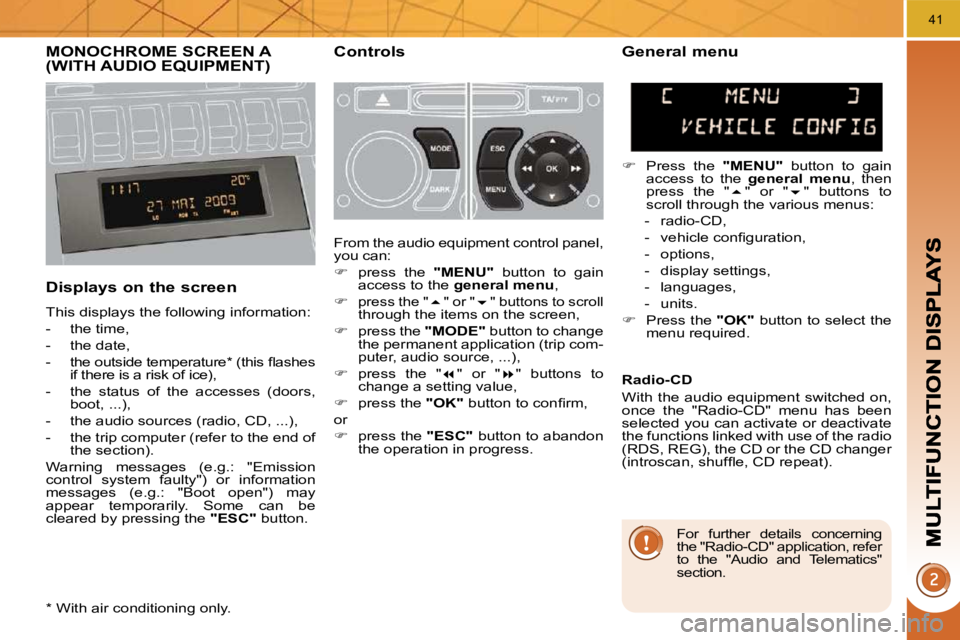
Displays on the screen
This displays the following information:
- the time,
- the date,
- the outside temperature * (this fl ashes if there is a risk of ice),
- the status of the accesses (doors, boot, ...),
- the audio sources (radio, CD, ...),
- the trip computer (refer to the end of the section).
Warning messages (e.g.: "Emission
control system faulty") or information
messages (e.g.: "Boot open") may
appear temporarily. Some can be
cleared by pressing the "ESC" button.
General menu
Press the "MENU" button to gain
access to the general menu , then
press the " " or " " buttons to
scroll through the various menus:
- radio-CD,
- vehicle confi guration,
- options,
- display settings,
- languages,
- units.
Press the "OK" button to select the
menu required.
From the audio equipment control panel,
you can:
press the "MENU" button to gain
access to the general menu ,
press the " " or " " buttons to scroll
through the items on the screen,
press the "MODE" button to change
the permanent application (trip com-
puter, audio source, ...),
press the " " or " " buttons to
change a setting value,
press the "OK" button to confi rm,
or
press the "ESC" button to abandon
the operation in progress. Radio-CD
With the audio equipment switched on,
once the "Radio-CD" menu has been
selected you can activate or deactivate
the functions linked with use of the radio
(RDS, REG), the CD or the CD changer
(introscan, shuffl e, CD repeat).
* With air conditioning only.
For further details concerning
the "Radio-CD" application, refer
to the "Audio and Telematics"
section.
Page 20 of 290
42
For safety reasons, it is impera-
tive that confi guration of the mul-
tifunction displays by the driver
takes place when stationary.
Display settings
Once the "Display settings" menu has
been selected, you can gain access to
the following settings:
- year,
- month,
- day,
- hour,
- minutes,
- 12 or 24 hour mode.
Languages
Once the "Languages" menu has been
selected, you can change the language
used by the display (Français, Italiano,
Nederlands, Portugues, Portugues-Brasil,
Türkçe, Deutsch, English, Espanol).
Units
Once the "Units" menu has been selected,
you can change the units of the following
parameters:
- temperature (°C or °F),
- fuel consumption (l/100 km, mpg or
km/l).
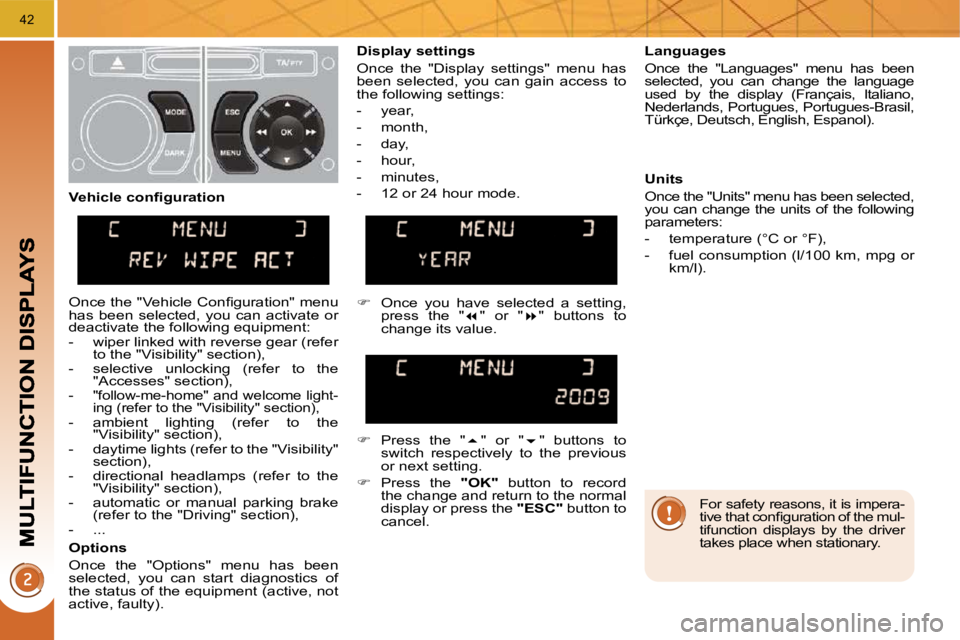
Once you have selected a setting,
press the " " or " " buttons to
change its value.
Press the " " or " " buttons to
switch respectively to the previous
or next setting.
Press the "OK" button to record
the change and return to the normal
display or press the "ESC" button to
cancel.
Vehicle confi guration
Once the "Vehicle Confi guration" menu
has been selected, you can activate or
deactivate the following equipment:
- wiper linked with reverse gear (refer
to the "Visibility" section),
- selective unlocking (refer to the "Accesses" section),
-
"follow-me-home" and welcome light-
ing (refer to the "Visibility" section),
- ambient lighting (refer to the "Visibility" section),
- daytime lights (refer to the "Visibility" section),
- directional headlamps (refer to the "Visibility" section),
- automatic or manual parking brake (refer to the "Driving" section),
- ...
Options
Once the "Options" menu has been
selected, you can start diagnostics of
the status of the equipment (active, not
active, faulty).
Page 21 of 290
43
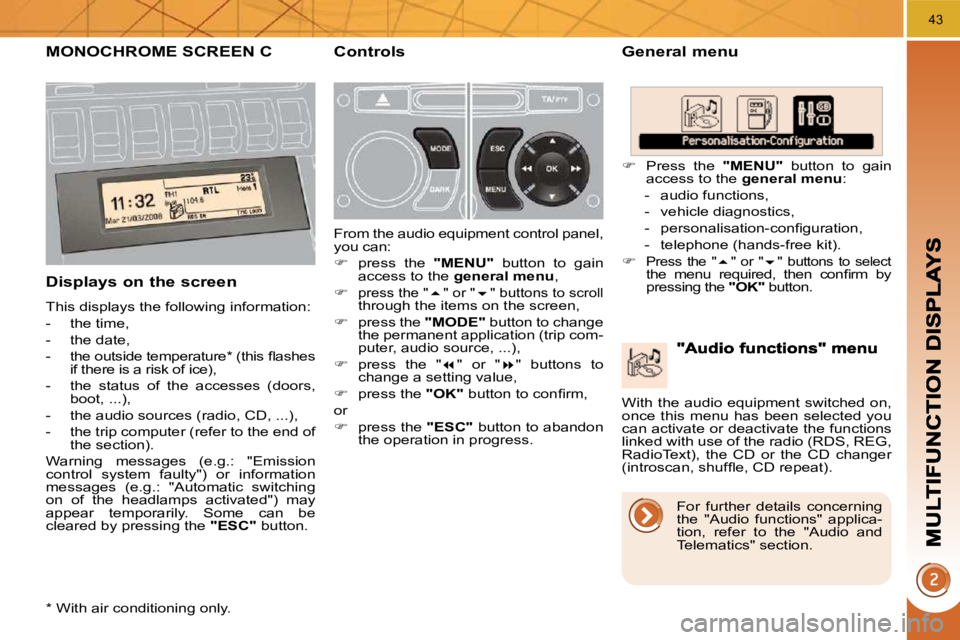
MONOCHROME SCREEN C General menu
Displays on the screen
This displays the following information:
- the time,
- the date,
- the outside temperature * (this fl ashes if there is a risk of ice),
- the status of the accesses (doors, boot, ...),
- the audio sources (radio, CD, ...),
- the trip computer (refer to the end of the section).
Warning messages (e.g.: "Emission
control system faulty") or information
messages (e.g.: "Automatic switching
on of the headlamps activated") may
appear temporarily. Some can be
cleared by pressing the "ESC" button.
Controls
From the audio equipment control panel,
you can:
press the "MENU" button to gain
access to the general menu ,
press the " " or " " buttons to scroll
through the items on the screen,
press the "MODE" button to change
the permanent application (trip com-
puter, audio source, ...),
press the " " or " " buttons to
change a setting value,
press the "OK" button to confi rm,
or
press the "ESC" button to abandon
the operation in progress.
Press the "MENU" button to gain
access to the general menu :
- audio functions,
- vehicle diagnostics,
- personalisation-confi guration,
- telephone (hands-free kit).
Press the " " or " " buttons to select the menu required, then confi rm by
pressing the "OK" button.
* With air conditioning only. With the audio equipment switched on,
once this menu has been selected you
can activate or deactivate the functions
linked with use of the radio (RDS, REG,
RadioText), the CD or the CD changer
(introscan, shuffl e, CD repeat).
For further details concerning
the "Audio functions" applica-
tion, refer to the "Audio and
Telematics" section.
Page 22 of 290
44
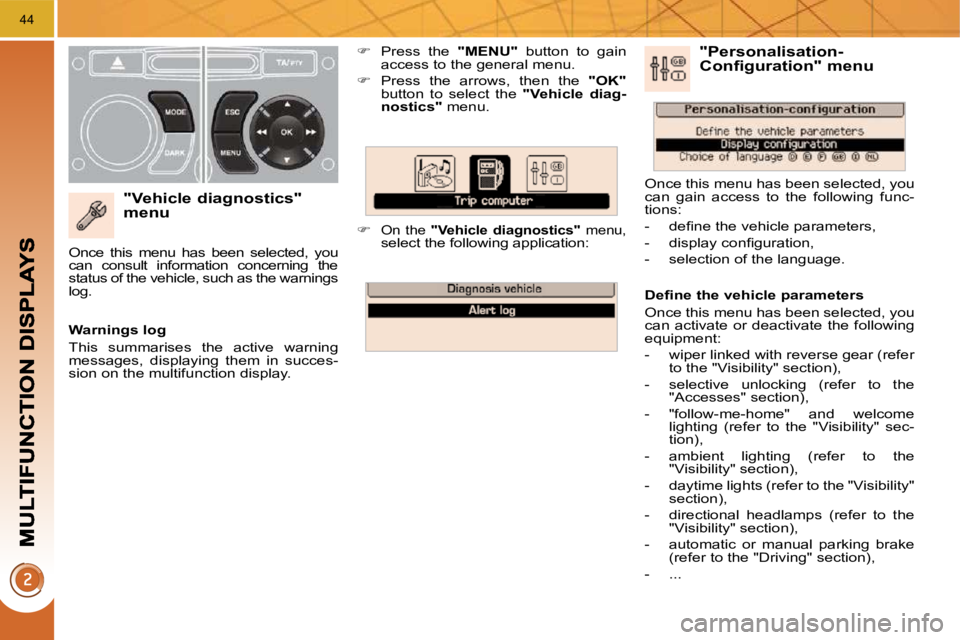
"Vehicle diagnostics" menu
Press the "MENU" button to gain
access to the general menu.
Press the arrows, then the "OK"
button to select the " Vehicle diag-
nostics
" menu.
On the " Vehicle diagnostics
" menu, select the following application:
Warnings log
This summarises the active warning
messages, displaying them in succes-
sion on the multifunction display.
Once this menu has been selected, you
can consult information concerning the
status of the vehicle, such as the warnings
log.
Defi ne the vehicle parameters
Once this menu has been selected, you
can activate or deactivate the following
equipment:
- wiper linked with reverse gear (refer
to the "Visibility" section),
- selective unlocking (refer to the "Accesses" section),
- "follow-me-home" and welcome lighting (refer to the "Visibility" sec-
tion),
- ambient lighting (refer to the "Visibility" section),
- daytime lights (refer to the "Visibility" section),
- directional headlamps (refer to the "Visibility" section),
- automatic or manual parking brake (refer to the "Driving" section),
- ...
"Personalisation-Configuration" menu
Once this menu has been selected, you
can gain access to the following func-
tions:
- defi ne the vehicle parameters,
- display confi guration,
- selection of the language.
Page 23 of 290
45
Display confi guration
Once this menu has been selected, you
can gain access to the following set-
tings:
- brightness-video setting,
- date and time setting,
- selection of the units.
Selection of the language
Once this menu has been selected,
you can change the language used by
the display (Deutsch, English, Espanol,
Français, Italiano, Nederlands, Portugues,
Portugues-Brasil, Türkçe).
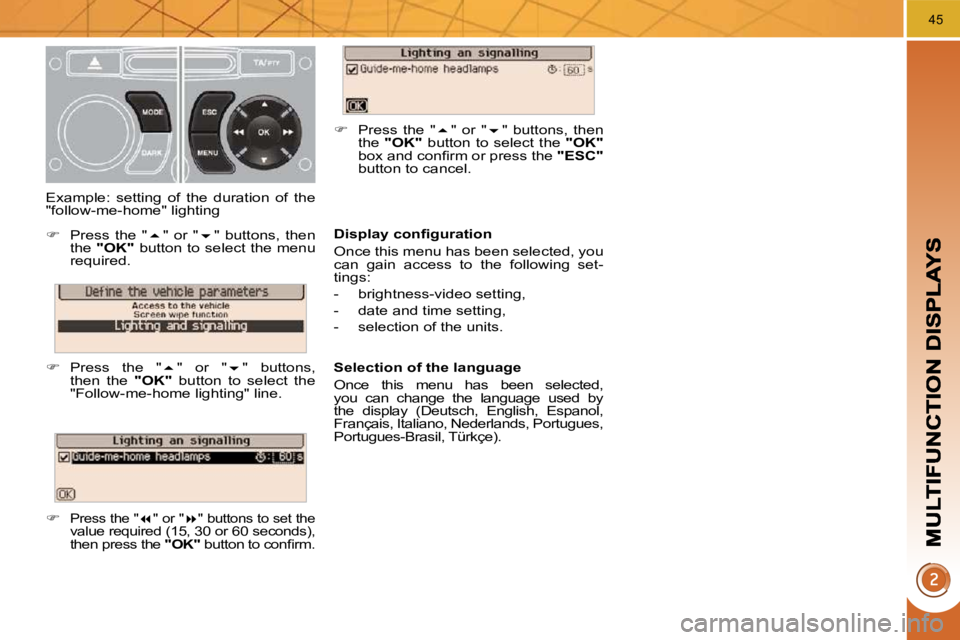
Example: setting of the duration of the
"follow-me-home" lighting
Press the " " or " " buttons, then
the "OK" button to select the menu
required.
Press the " " or " " buttons,
then the "OK" button to select the
"Follow-me-home lighting" line.
Press the " " or " " buttons to set the
value required (15, 30 or 60 seconds),
then press the "OK" button to confi rm.
Press the " " or " " buttons, then
the "OK" button to select the "OK"
box and confi rm or press the "ESC"
button to cancel.
Page 24 of 290
46
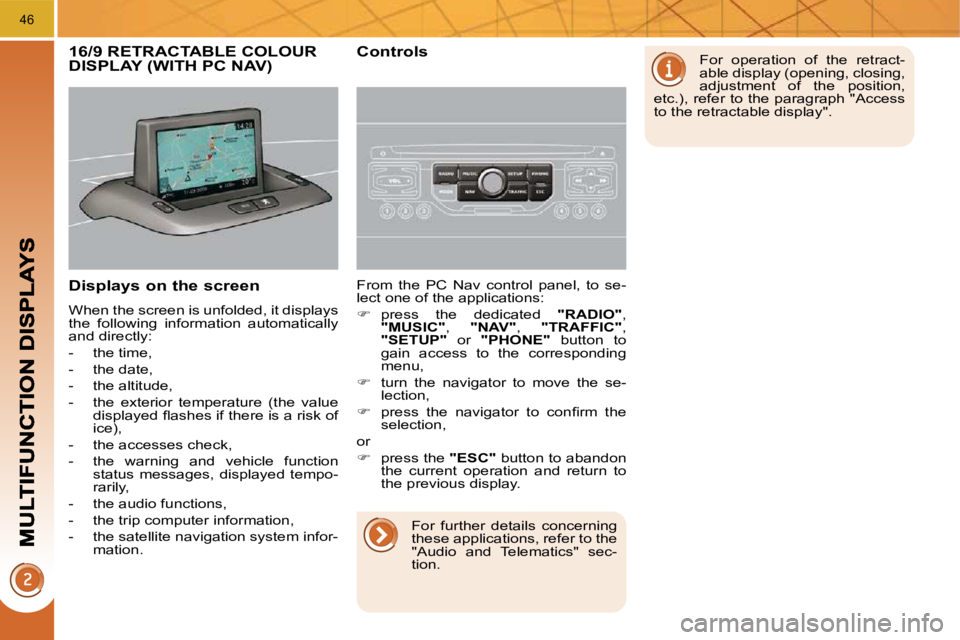
Displays on the screen
When the screen is unfolded, it displays
the following information automatically
and directly:
- the time,
- the date,
- the altitude,
- the exterior temperature (the value displayed fl ashes if there is a risk of
ice),
- the accesses check,
- the warning and vehicle function status messages, displayed tempo-
rarily,
- the audio functions,
- the trip computer information,
- the satellite navigation system infor- mation. From the PC Nav control panel, to se-
lect one of the applications:
press the dedicated "RADIO" ,
"MUSIC" , "NAV" , "TRAFFIC" ,
"SETUP" or "PHONE" button to
gain access to the corresponding
menu,
turn the navigator to move the se-
lection,
press the navigator to confi rm the
selection,
or
press the "ESC" button to abandon
the current operation and return to
the previous display.
16/9 RETRACTABLE COLOUR DISPLAY (WITH PC NAV) Controls For operation of the retract-
able display (opening, closing,
adjustment of the position,
etc.), refer to the paragraph "Access
to the retractable display".
For further details concerning
these applications, refer to the
"Audio and Telematics" sec-
tion.
Page 25 of 290
47
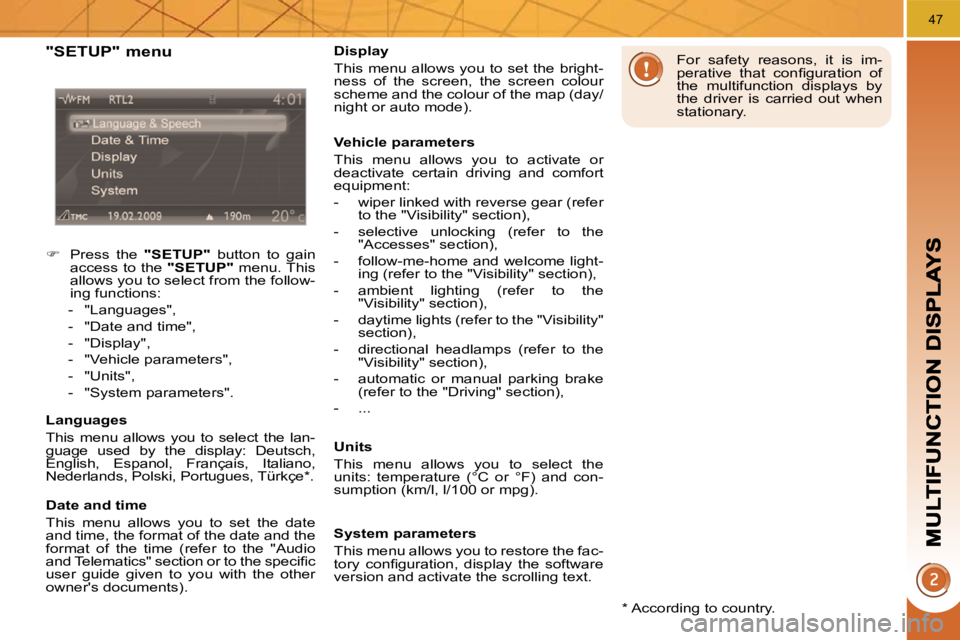
"SETUP" menu
Press the "SETUP" button to gain
access to the "SETUP" menu. This
allows you to select from the follow-
ing functions:
- "Languages",
- "Date and time",
- "Display",
- "Vehicle parameters",
- "Units",
- "System parameters".
Languages
This menu allows you to select the lan-
guage used by the display: Deutsch,
English, Espanol, Français, Italiano,
Nederlands, Polski, Portugues, Türkçe * .
Date and time
This menu allows you to set the date
and time, the format of the date and the
format of the time (refer to the "Audio
and Telematics" section or to the specifi c
user guide given to you with the other
owner's documents). * According to country.
Display
This menu allows you to set the bright-
ness of the screen, the screen colour
scheme and the colour of the map (day/
night or auto mode).
Vehicle parameters
This menu allows you to activate or
deactivate certain driving and comfort
equipment:
- wiper linked with reverse gear (refer
to the "Visibility" section),
- selective unlocking (refer to the "Accesses" section),
- follow-me-home and welcome light- ing (refer to the "Visibility" section),
- ambient lighting (refer to the "Visibility" section),
- daytime lights (refer to the "Visibility" section),
- directional headlamps (refer to the "Visibility" section),
- automatic or manual parking brake (refer to the "Driving" section),
- ...
Units
This menu allows you to select the
units: temperature (°C or °F) and con-
sumption (km/l, l/100 or mpg). For safety reasons, it is im-
perative that confi guration of
the multifunction displays by
the driver is carried out when
stationary.
System parameters
This menu allows you to restore the fac-
tory confi guration, display the software
version and activate the scrolling text.
Page 26 of 290
48
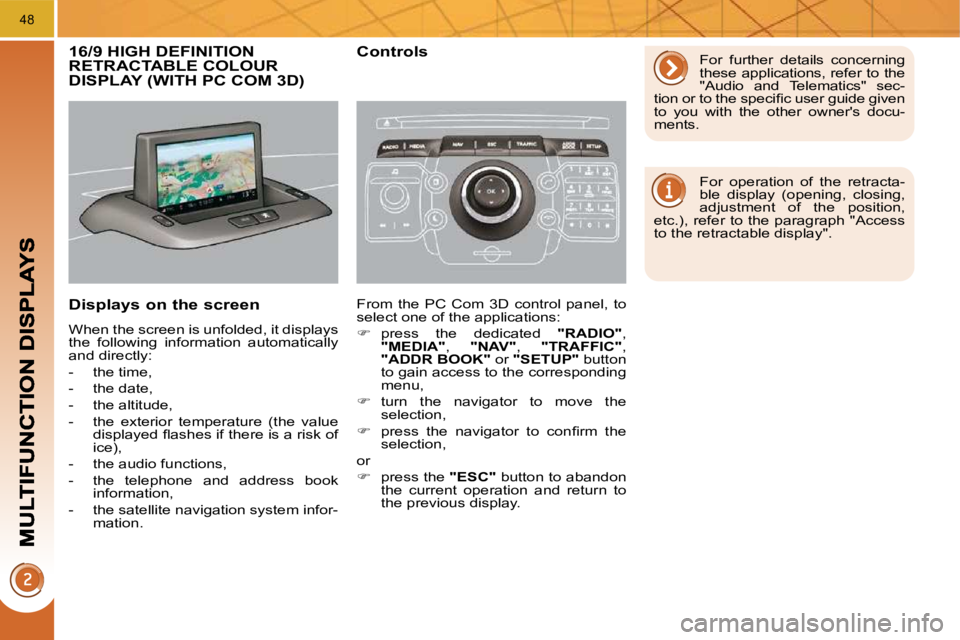
16/9 HIGH DEFINITION RETRACTABLE COLOUR DISPLAY (WITH PC COM 3D)
Displays on the screen
When the screen is unfolded, it displays
the following information automatically
and directly:
- the time,
- the date,
- the altitude,
- the exterior temperature (the value displayed fl ashes if there is a risk of
ice),
- the audio functions,
- the telephone and address book information,
- the satellite navigation system infor- mation.
Controls
From the PC Com 3D control panel, to
select one of the applications:
press the dedicated "RADIO" ,
"MEDIA" , "NAV" , "TRAFFIC" ,
"ADDR BOOK" or "SETUP" button
to gain access to the corresponding
menu,
turn the navigator to move the
selection,
press the navigator to confi rm the
selection,
or
press the "ESC" button to abandon
the current operation and return to
the previous display. For further details concerning
these applications, refer to the
"Audio and Telematics" sec-
tion or to the specifi c user guide given
to you with the other owner's docu-
ments.
For operation of the retracta-
ble display (opening, closing,
adjustment of the position,
etc.), refer to the paragraph "Access
to the retractable display".