CD player Peugeot 3008 Dag 2010.5 User Guide
[x] Cancel search | Manufacturer: PEUGEOT, Model Year: 2010.5, Model line: 3008 Dag, Model: Peugeot 3008 Dag 2010.5Pages: 324, PDF Size: 22.01 MB
Page 254 of 324
233
07
2
ABC 3
DEF
5
JKL
4
GHI 6
MNO8
TUV
7
PQRS 9
WXYZ0
* #
1
RADIO MEDIA
NAV ESC TRAFFIC
SETUP
ADDR
BOOK
1
4
5
6
2
ABC 3
DEF
5
JKL
4
GHI 6
MNO8
TUV
7
PQRS 9
WXYZ0
* #
1
RADIO MEDIA
NAV ESC TRAFFIC
SETUP
ADDR
BOOK
2
ABC 3
DEF
5
JKL
4
GHI 6
MNO8
TUV
7
PQRS 9
WXYZ0
* #
1
RADIO MEDIA
NAV ESC TRAFFIC
SETUP
ADDR
BOOK
32
ABC 3
DEF
5
JKL
4
GHI 6
MNO8
TUV
7
PQRS 9
WXYZ0
* #
1
RADIO MEDIA
NAV ESC TRAFFIC
SETUP
ADDR
BOOK
RADIO
NAV ESC TRAFFICMEDIAMEDIA
2
ABC 3
DEF
5
JKL
4
GHI 6
MNO8
TUV
7
PQRS 9
WXYZ0
* #
1
RADIO MEDIA
NAV ESC TRAFFIC
SETUP
ADDR
BOOK
2
ABC 3
DEF
5
JKL
4
GHI 6
MNO
8
TUV
7
PQRS 9
WXYZ
0
* #
1
RADIO MEDIA
NAV ESC TRAFFIC
SETUP
ADDR BOOK
2
7
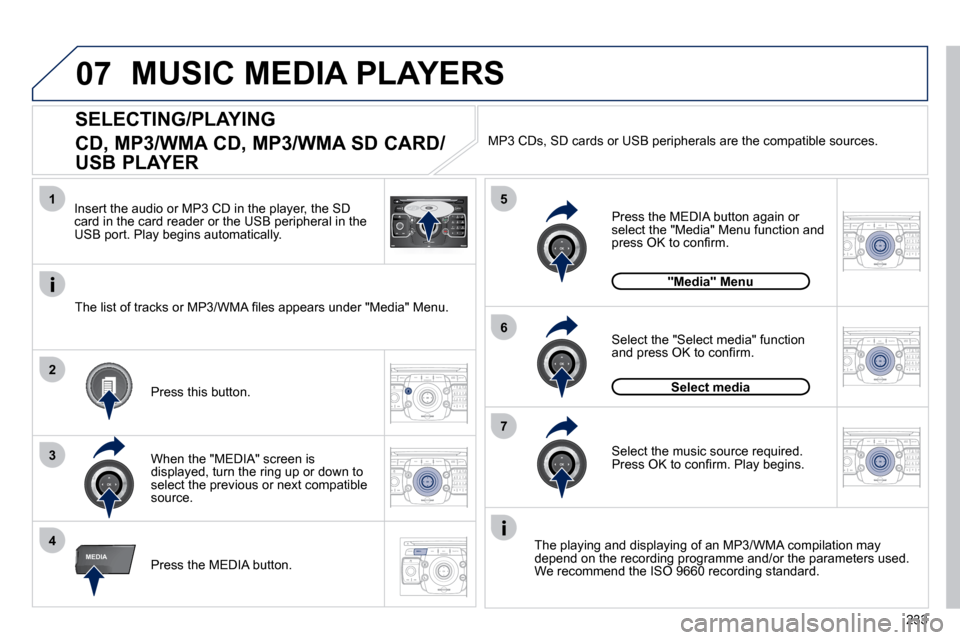
SELECTING/PLAYING
CD, MP3/WMA CD, MP3/WMA SD CARD/
USB PLAYER
The playing and displaying of an MP3/WMA compilation may depend on the recording programme and/or the parameters used. We recommend the ISO 9660 recording standard. Press the MEDIA button.
Select the "Select media" function and press OK to confi rm.
Press this button.
Select the music source required. Press OK to confi rm. Play begins.
Select media
Press the MEDIA button again or select the "Media" Menu function and press OK to confi rm.
When the "MEDIA" screen is displayed, turn the ring up or down to select the previous or next compatible source.
"Media" Menu
The list of tracks or MP3/WMA fi les appears under "Media" Menu.
Insert the audio or MP3 CD in the player, the SD card in the card reader or the USB peripheral in the USB port. Play begins automatically.
MP3 CDs, SD cards or USB peripherals are the compatible sources.
MUSIC MEDIA PLAYERS
Page 255 of 324

234
07
3
42
ABC 3
DEF
5
JKL
4
GHI 6
MNO8
TUV
7
PQRS 9
WXYZ0
* #
1
RADIO MEDIA
NAV ESC TRAFFIC
SETUP
ADDR
BOOK
2
ABC 3
DEF
5
JKL
4
GHI 6
MNO8
TUV
7
PQRS 9
WXYZ0
* #
1
RADIO MEDIA
NAV ESC TRAFFIC
SETUP
ADDR
BOOK
2
ABC 3
DEF
5
JKL
4
GHI 6
MNO8
TUV
7
PQRS 9
WXYZ0
* #
1
RADIO MEDIA
NAV ESC TRAFFIC
SETUP
ADDR
BOOK
2
ABC 3
DEF
5
JKL
4
GHI 6
MNO8
TUV
7
PQRS 9
WXYZ0
* #
1
RADIO MEDIA
NAV ESC TRAFFIC
SETUP
ADDR
BOOK
2
2
ABC 3
DEF
5
JKL
4
GHI 6
MNO8
TUV
7
PQRS 9
WXYZ0
* #
1
RADIO MEDIA
NAV ESC TRAFFIC
SETUP
ADDR
BOOK
5
7
8
6
9
RADIO
NAV ESC TRAFFICMEDIAMEDIA
2
ABC 3
DEF
5
JKL
4
GHI 6
MNO
8
TUV
7
PQRS 9
WXYZ
0
* #
1
RADIO MEDIA
NAV ESC TRAFFIC
SETUP
ADDR BOOKRADIO
NAV ESC TRAFFICMEDIA
2
ABC 3
DEF
5
JKL
4
GHI 6
MNO8
TUV
7
PQRS 9
WXYZ0
* #
1
RADIO MEDIA
NAV ESC TRAFFIC
SETUP
ADDR
BOOK
2
ABC 3
DEF
5
JKL
4
GHI 6
MNO8
TUV
7
PQRS 9
WXYZ0
* #
1
RADIO MEDIA
NAV ESC TRAFFIC
SETUP
ADDR
BOOK
Select "Jukebox management" then "Add fi les" and press OK at each step to confi rm.
Press the MEDIA button. Press the MEDIA button again or select Media Menu and press OK to confi rm.
Insert an audio/MP3 CD, a USB memory stick or an SD card.
JUKEBOX
Add fi les
Check that the active MEDIA source is that of the medium used (CD, USB or SD card).
Select "Add fi les from MP3-Disc" for example and press OK to validate.
Select the tracks required then "Rip selection" or select all of the tracks using "Rip all".
Select "[New folder]" to create a new folder or select an existing folder (created previously).
Add fi les from MP3-Disc
[New folder][New folder]
"Do you want to change the names of the tracks that will be ripped?": select "Yes" to change them or "No".
To copy an MP3 CD, then select "Real time ripping", "Fast ripping"/"High quality (192 kbit/sec)" or "Standard quality (128 kbit/sec)" then select "Start ripping".
Confi rm the warning message by pressing "OK" to start the copy.
OK
YesNo
When copying is in progress, switching off the ignition wil
l interrupt the process but it will resume directly when the ignition is switche d on again.
MUSIC MEDIA PLAYERS
COPYING A CD, A USB MEMORY STICK OR AN SD CARD ONTO THE HARD DISK
Page 256 of 324
235
07
1
4
1
2
2
ABC 3
DEF
5
JKL
4
GHI 6
MNO8
TUV
7
PQRS 9
WXYZ0
* #
1
RADIO MEDIA
NAV ESC TRAFFIC
SETUP
ADDR
BOOK
3
2
ABC 3
DEF
5
JKL
4
GHI 6
MNO8
TUV
7
PQRS 9
WXYZ0
* #
1
RADIO MEDIA
NAV ESC TRAFFIC
SETUP
ADDR
BOOK
RADIO
NAV ESC TRAFFICMEDIAMEDIA
2
ABC 3
DEF
5
JKL
4
GHI 6
MNO8
TUV
7
PQRS 9
WXYZ0
* #
1
RADIO MEDIA
NAV ESC TRAFFIC
SETUP
ADDR
BOOK3
5
2
ABC 3
DEF
5
JKL
4
GHI 6
MNO8
TUV
7
PQRS 9
WXYZ0
* #
1
RADIO MEDIA
NAV ESC TRAFFIC
SETUP
ADDR
BOOK
2
ABC 3
DEF
5
JKL
4
GHI 6
MNO8
TUV
7
PQRS 9
WXYZ0
* #
1
RADIO MEDIA
NAV ESC TRAFFIC
SETUP
ADDR
BOOK
RADIO
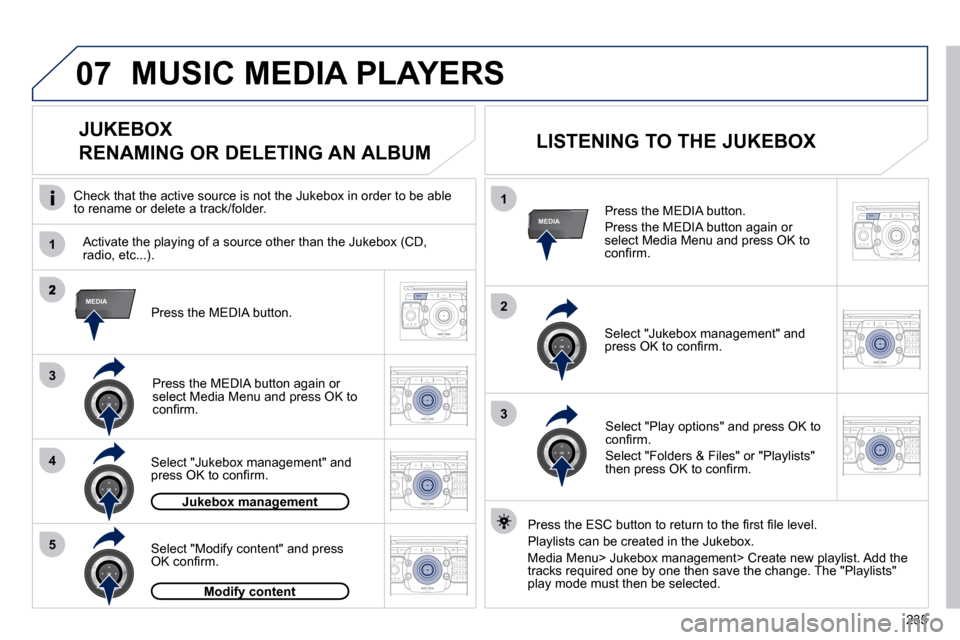
NAV ESC TRAFFICMEDIAMEDIA Press the MEDIA button.
Press the MEDIA button again or select Media Menu and press OK to confi rm.
Select "Jukebox management" and press OK to confi rm.
Select "Play options" and press OK to confi rm.
Select "Folders & Files" or "Playlists" then press OK to confi rm.
LISTENING TO THE JUKEBOX
Jukebox managementJukebox management
Press the MEDIA button.
Press the MEDIA button again or select Media Menu and press OK to confi rm.
Select "Jukebox management" and press OK to confi rm.
JUKEBOX
RENAMING OR DELETING AN ALBUM
Activate the playing of a source other than the Jukebox (CD, radio, etc...).
Check that the active source is not the Jukebox in order to be
able to rename or delete a track/folder.
MUSIC MEDIA PLAYERS
Select "Modify content" and press OK confi rm.
Press the ESC button to return to the fi rst fi le level.
Playlists can be created in the Jukebox.
Media Menu> Jukebox management> Create new playlist. Add the tracks required one by one then save the change. The "Playlists" play mode must then be selected. Modify contentModify content
Page 257 of 324
236
07
2
ABC 3
DEF
5
JKL
4
GHI 6
MNO8
TUV
7
PQRS 9
WXYZ0
* #
1
RADIO MEDIA
NAV ESC TRAFFIC
SETUP
ADDR
BOOK
1
3RADIO
NAV ESC TRAFFICMEDIAMEDIA
2
ABC 3
DEF
5
JKL
4
GHI 6
MNO
8
TUV
7
PQRS 9
WXYZ
0
* #
1
RADIO MEDIA
NAV ESC TRAFFIC
SETUP
ADDR BOOK
2
1
3
4
2RADIO
NAV ESC TRAFFICMEDIAMEDIA
2
ABC 3
DEF
5
JKL
4
GHI 6
MNO8
TUV
7
PQRS 9
WXYZ0
* #
1
RADIO MEDIA
NAV ESC TRAFFIC
SETUP
ADDR
BOOK
2
ABC 3
DEF
5
JKL
4
GHI 6
MNO8
TUV
7
PQRS 9
WXYZ0
* #
1
RADIO MEDIA
NAV ESC TRAFFIC
SETUP
ADDR
BOOK
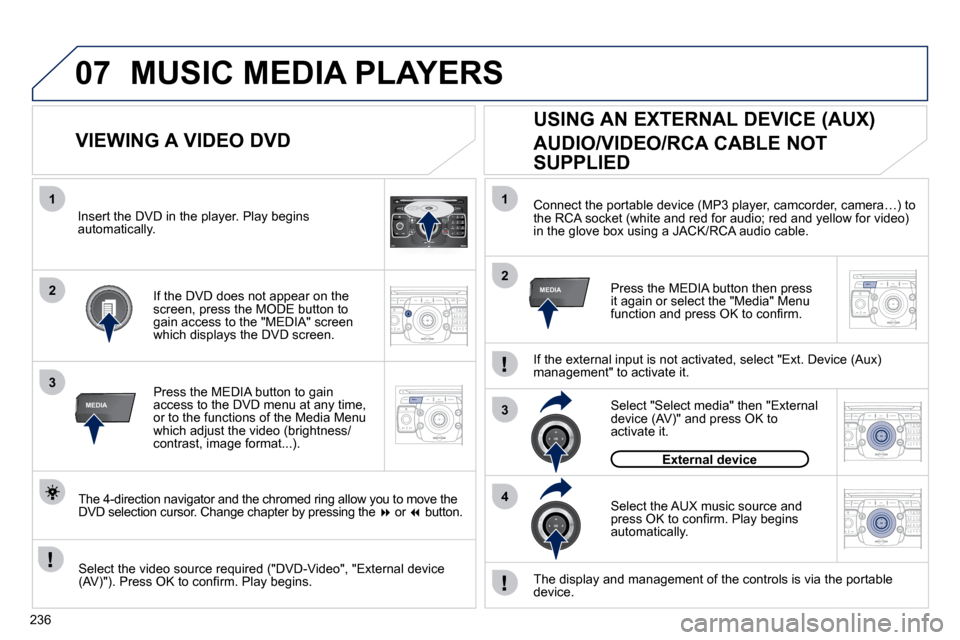
Connect the portable device (MP3 player, camcorder, camera…) to the RCA socket (white and red for audio; red and yellow for
video) in the glove box using a JACK/RCA audio cable.
Press the MEDIA button then press it again or select the "Media" Menu function and press OK to confi rm.
Select the AUX music source and press OK to confi rm. Play begins automatically.
Select "Select media" then "External device (AV)" and press OK to activate it.
External device
The display and management of the controls is via the portab le device.
USING AN EXTERNAL DEVICE (AUX)
AUDIO/VIDEO/RCA CABLE NOT
SUPPLIED
If the external input is not activated, select "Ext. Device (Aux) management" to activate it.
VIEWING A VIDEO DVD
Select the video source required ("DVD-Video", "External device (AV)"). Press OK to confi rm. Play begins.
Press the MEDIA button to gain access to the DVD menu at any time, or to the functions of the Media Menu which adjust the video (brightness/contrast, image format...).
If the DVD does not appear on the screen, press the MODE button to gain access to the "MEDIA" screen which displays the DVD screen.
Insert the DVD in the player. Play begins automatically.
The 4-direction navigator and the chromed ring allow you to move the DVD selection cursor. Change chapter by pressing th e or button.
MUSIC MEDIA PLAYERS
Page 268 of 324
247
FREQUENTLY ASKED QUESTIONS
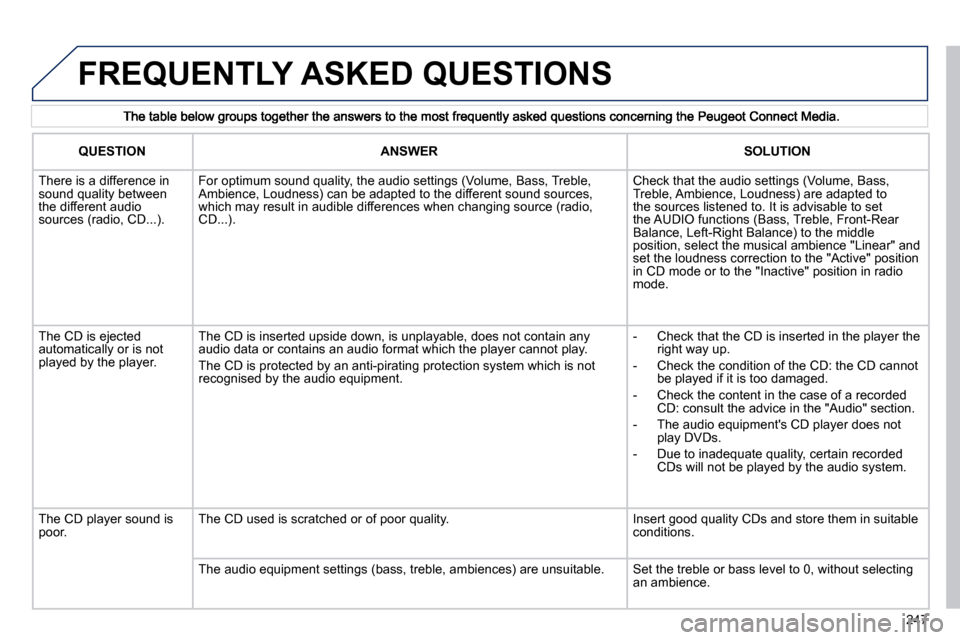
QUESTIONANSWERSOLUTION
There is a difference in sound quality between the different audio sources (radio, CD...).
For optimum sound quality, the audio settings (Volume, Bass, Treble, Ambience, Loudness) can be adapted to the different sound sou rces, which may result in audible differences when changing source (rad io, CD...).
Check that the audio settings (Volume, Bass, Treble, Ambience, Loudness) are adapted to the sources listened to. It is advisable to set the AUDIO functions (Bass, Treble, Front-Rear Balance, Left-Right Balance) to the middle position, select the musical ambience "Linear" and set the loudness correction to the "Active" position in CD mode or to the "Inactive" position in radio mode.
The CD is ejected automatically or is not played by the player.
The CD is inserted upside down, is unplayable, does not contain any audio data or contains an audio format which the player cann ot play.
The CD is protected by an anti-pirating protection system which is not recognised by the audio equipment.
- Check that the CD is inserted in the player the right way up.
- Check the condition of the CD: the CD cannot be played if it is too damaged.
- Check the content in the case of a recorded CD: consult the advice in the "Audio" section.
- The audio equipment's CD player does not play DVDs.
- Due to inadequate quality, certain recorded CDs will not be played by the audio system.
The CD player sound is poor. The CD used is scratched or of poor quality. Insert good quality CDs and store them in suitable conditions.
The audio equipment settings (bass, treble, ambiences) are unsu itable. Set the treble or bass level to 0, without selecting an ambience.
Page 273 of 324
253
way that it will only operate in your vehicle. If it is to be installed in another vehicle, contact a PEUGEOT dealer for confi guration of the system.
Certain functions described in this handbook will become available during the year.
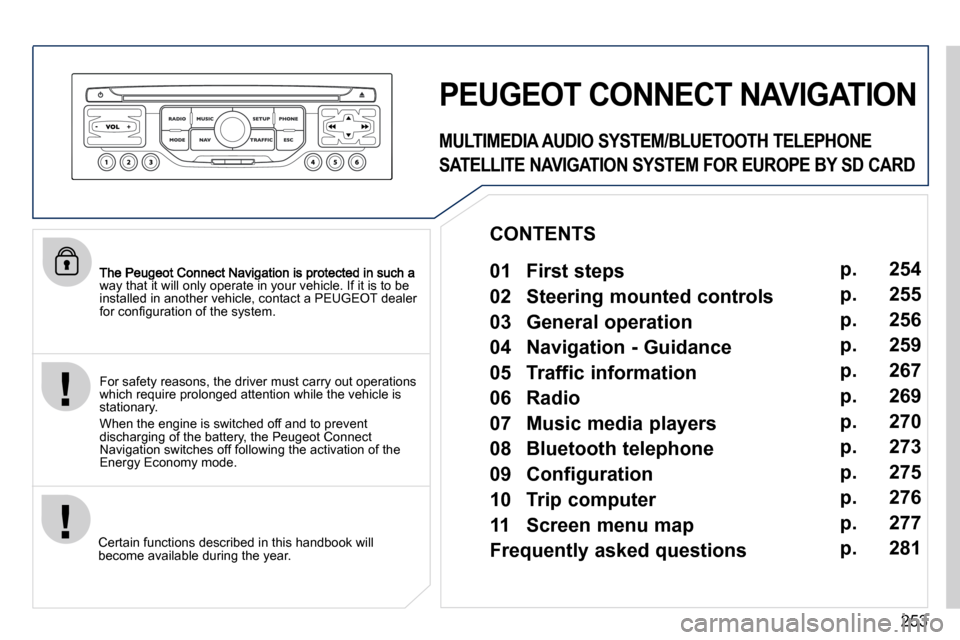
PEUGEOT CONNECT NAVIGATION
For safety reasons, the driver must carry out operations which require prolonged attention while the vehicle is stationary.
When the engine is switched off and to prevent discharging of the battery, the Peugeot Connect Navigation switches off following the activation of the Energy Economy mode.
MULTIMEDIA AUDIO SYSTEM/BLUETOOTH TELEPHONE
SATELLITE NAVIGATION SYSTEM FOR EUROPE BY SD CARD
01 First steps
CONTENTS
02 Steering mounted controls
03 General operation
04 Navigation - Guidance
05 Traffic information
06 Radio
07 Music media players
08 Bluetooth telephone
09 Configuration
10 Trip computer p.
p.
p.
p.
p.
p.
p.
p.
p.
p.
11 Screen menu map
Frequently asked questions p.
p. 254
255
256
259
267
269
270
273
275
276
277
281
Page 276 of 324
256
03 GENERAL OPERATION
For a detailed global view of the menus available, refer to the "Screen menu map" section.
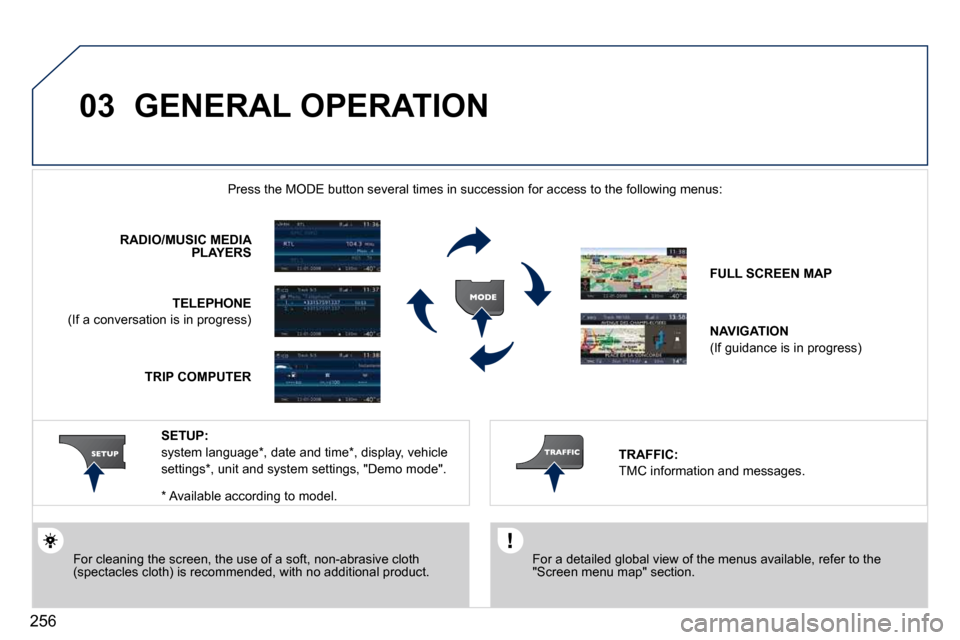
Press the MODE button several times in succession for access to the foll owing menus:
For cleaning the screen, the use of a soft, non-abrasive cloth (spectacles cloth) is recommended, with no additional product.
RADIO/MUSIC MEDIAPLAYERS
TELEPHONE
(If a conversation is in progress)
FULL SCREEN MAP
NAVIGATION
(If guidance is in progress)
SETUP:
system language * , date and time * , display, vehicle
settings * , unit and system settings, "Demo mode". TRAFFIC:
TMC information and messages.
* Available according to model.
TRIP COMPUTER
Page 278 of 324
258
03 GENERAL OPERATION
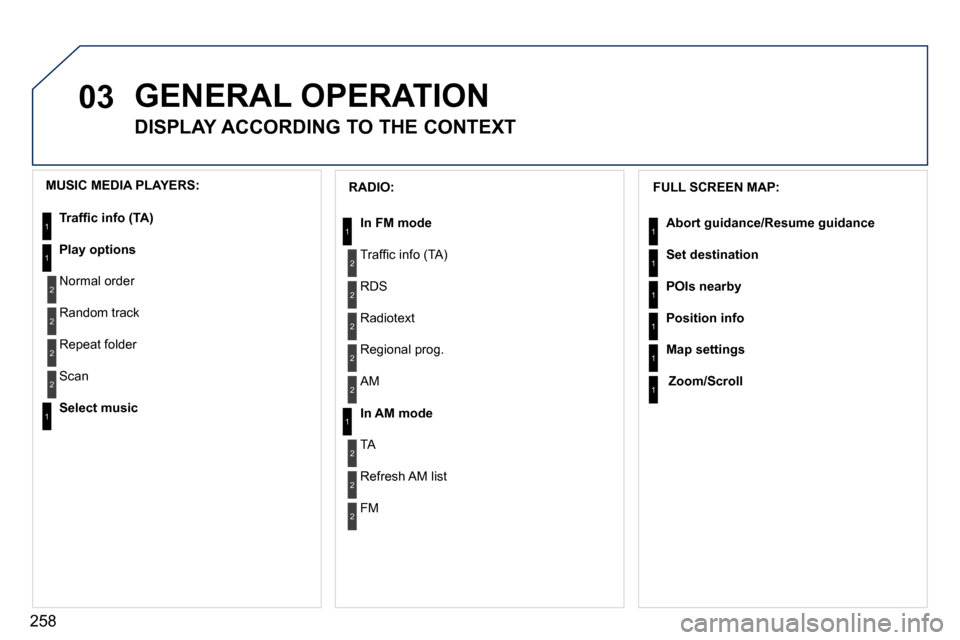
DISPLAY ACCORDING TO THE CONTEXT
FULL SCREEN MAP:
Abort guidance/Resume guidance
Set destination
POIs nearby
Position info
Map settings
Zoom/Scroll
1
1
1
1
1
1
RADIO:
In FM mode
Traffi c info (TA)
RDS
Radiotext
Regional prog.
In AM mode
AM
TA
Refresh AM list
FM
1
2
1
2
2
2
2
2
2
2
MUSIC MEDIA PLAYERS:
Traffi c info (TA)
Play options
Normal order
Random track
Repeat folder
Select music
Scan
1
1
2
2
2
2
1
Page 290 of 324
270
07 MUSIC MEDIA PLAYERS
CD, MP3/WMA CD
INFORMATION AND ADVICE
In order to be able to play a recorded CDR or CDRW, when recording it is preferable to select the ISO 9660 level 1, 2 or Joliet standard.
If the disc is recorded in another format it may not be played correctly.
It is recommended that the same recording standard is always used for an individual disc, with as low a speed as possible (4x maximum) for optimum sound quality.
In the particular case of a multi-session CD, the Joliet standard is recommended.
The PEUGEOT Connect Navigation will only play audio fi les with the extension ".mp3" with a speed of between 8 Kbps an d 320 Kbps and the extension ".wma" with a speed of between 5 Kbps and 384 Kbps.
It also supports the VBR (Variable Bit Rate) mode.
No other type of fi le (.mp4, .m3u...) can be played.
The MP3 format, an abbreviation of MPEG 1, 2 & 2.5 Audio Laye r 3 and the WMA format, an abbreviation of Windows Media Audio and the property of Microsoft, are audio compression standards which permit the recording of several tens of music fi les on a single disc.
It is advisable to restrict fi le names to 20 characters, without using special characters (e.g.: " " ?; ù) to avoid any play or display problems.
Page 291 of 324
271
07
3
2
1
6
4
5
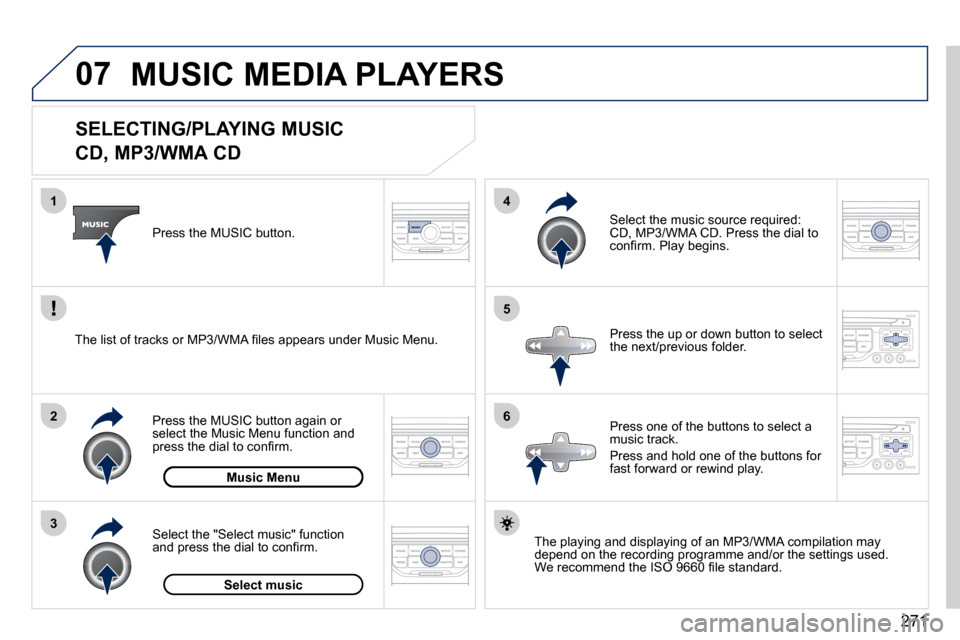
SELECTING/PLAYING MUSIC
CD, MP3/WMA CD
The playing and displaying of an MP3/WMA compilation may depend on the recording programme and/or the settings used. We recommend the ISO 9660 fi le standard.
Press the MUSIC button.
Select the "Select music" function and press the dial to confi rm.
Press the up or down button to select the next/previous folder.
Select the music source required: CD, MP3/WMA CD. Press the dial to confi rm. Play begins.
Select music
Press the MUSIC button again or select the Music Menu function and press the dial to confi rm.
Press one of the buttons to select a music track.
Press and hold one of the buttons for fast forward or rewind play. Music Menu
The list of tracks or MP3/WMA fi les appears under Music Menu.
MUSIC MEDIA PLAYERS