check Peugeot 301 2017 Workshop Manual
[x] Cancel search | Manufacturer: PEUGEOT, Model Year: 2017, Model line: 301, Model: Peugeot 301 2017Pages: 306, PDF Size: 9.87 MB
Page 220 of 306
218
Accessories .................................................... 70
AdBlue® ............................................ 20, 132-13 4
Additive, AdBlue .............................................. 27
Adjusting head restraints
................................ 47
Adjusting seat
................................................. 46
Adjusting the date
........................................... 31
Adjusting the height of the steering wheel
.....50
Adjusting the time
...................................... 31- 32
Advice on care and maintenance
.........140, 142
Advice on driving
.......................................... 101
Airbags
...............................
................18, 83 , 90
Airbags, curtain
............................................... 86
Airbags, front ....................................... 83-84, 86
Airbags, lateral
.......................................... 85-86
Air conditioning, automatic
.............................59
Air conditioning, electronic (with display screen)
............................... 54-56
Air conditioning, manual
................................. 59
A
ir conditioning, manual
(without display screen)
..........................52-53
Alarm
......................................................... 39-40
Anti-lock braking system (ABS)
................17, 77
Anti-theft
....................................................... 102
Armrest
................
............................................ 60
Armrest, front
.................................................. 61
Ashtray
...............
............................................. 60
Ashtray, portable
............................................. 60
ASR
........
.................................................... 18 -19
Assistance call
...............................
............72-73
Assistance, emergency braking
.....................77
Audible warning
.............................................. 71
A
udio streaming (Bluetooth)
.................192, 195 Capacity, fuel tank
........................................129
Cap, fuel filler
...............................
.................129
CD
.................................................................188
CD, MP3
.................................................188 -189
Central locking
.......................................... 3
6 -37
Changing a bulb
............. 16
1, 162-163 , 165, 166
Changing a fuse
............................. 16
7-169, 171
Changing a wheel
.................................. 15
4 -15 6
Changing a wiper blade
.......................... 68,
13 8
Changing the remote control battery
..............37
Charactristics (engine)
..................................179
Checking the levels
................................143 -145
AB
C
Battery ...................................... 14, 146 , 172-176
Battery, charging ........................................... 174
Battery, remote control
..............................37- 3 8
Blanking screen (snow shield)
......................13 9
BlueHDi
....................................... 21, 25 , 27, 132
Bluetooth (hands-free)
.................................. 19
3
Bonnet
........................................................... 141
Boot
........................................................... 15, 43
Boot (opening)
...............................
..................36
Brake discs
.................................................... 147
Brake fluid
....................................................... 13
Brake lamps
...............................
...................165
Brakes
........................................................... 147
Braking
...............
............................................. 13
Braking assistance system
.............................77
Bulbs (changing)
................................... 161, 165
D
Date (setting) ................................................... 31
Daytime running lamps ...................................66
Deactivating the passenger airbag
.....83-84 , 90
Defrosting
............................................ 52-53, 58
Defrosting, front
.............................................. 57
Checking tyre pressures
(using the kit)
...............................
14 9 -15 0, 152
Checks
...........................................
142, 146 -147
Checks, routine
......................................
146 -147
Child lock
...........................................
94, 9 9 -10 0
Children
...............................................
94, 98-99
Children (safety)
............................................
10 0
Child seats
.......................
8
2
, 87- 8 9 , 93-94 , 96
Child seats, conventional
................................
93
Child seats, ISOFIX ...................................
97- 9 9
Cigar lighter
.....................................................
62
Cleaning (advice)
..........................................
140
Clock
...............................................................
31
Closing the boot ..................................
36 -37, 43
Closing the doors
......................................
36 -37
Control, electric windows
................................
45
Control, emergency boot release
...................
44
Control, heated seats
......................................
48
Control stalk, lighting
......................................
23
Control stalk, wipers
.......................................
68
C
ourtesy lamps ...............................................
69
Cruise control
.........................................
12 2-124
Cup holder .......................................................
60
Alphabetical index
Page 222 of 306
220
Key .................................................................. 22
Key with remote control ....................3
6-38, 102
Kit, hands-free
.............................................. 19
3
Kit, temporary puncture repair
....... 1
4 9 -15 0, 152 Maintenance (advice)
....................................
14
0
Map reading lamps
......................................... 69
M
arkings, identification
.................................
183
Mat
..................................................................
63
Menu, main
................................................... 18
6
Mirror, rear view ..............................................
51
Mirrors, door .............................................. 5 0 - 51
Mirror, vanity
...................................................
60
Misfuel prevention
.........................................
13 0
Mountings, Isofix
.......................................
97, 99
MP3 CD ..................................................
188 -189K
J
L
M
N
O
Labels, identification ..................................... 183
Lamps, front .................................................. 161
Level, brake fluid
........................................... 14 4
Level, Diesel additive
.................................... 145
Level, engine coolant
.................................... 145
Level, engine oil
..................................... 143 -14 4
Levels and checks
..............................
...142-145
Level, screenwash fluid
................................14
5
Lighting, guide-me home
................................66
Lighting, interior
...............................
...............69
Loading
......................................................... 140
Load reduction mode
.................................... 137
Locating your vehicle
...................................... 37
Low fuel level
.......................................... 16,
129Number plate lamps
......................................
166
OIl, engine
...............................
...................13 -14
Opening the bonnet
......................................141
Opening the boot
......................................36, 43
Opening the doors
....................................36, 41
Jack
...............................
.........................
15 4 -15 6
Jump starting
................................................
173 Pads, brake
...................................................
147
Paint colour code ..........................................
183
Parking brake
..................................
13, 105 , 147
Parking sensors, rear .................................... 125
Player, MP3 CD
...............................
.......
188 -189
Port, USB ................................................
62, 19 0
Power steering
...............................
.................
19
Pre-heater, Diesel
...........................................
16
Pressures, tyres
....................................
153, 183
Pre-tensioning seat belts
................................
82
Priming the fuel system ................................
148
Protecting children
.......
83-84 , 87- 8 9 , 94, 98-99
Puncture
.........................................
14 9 -15 0, 152
P
RRadio ............................................................. 18 6
Range, AdBlue ................................................ 27
Rear screen, demisting
...................................58
Recharging the battery
.................................174
Reduction of electrical load
..........................137
Regeneration of the particle filter
.................146
Reinitialisation of the under- inflation detection system
.............................75
Reinitialising the remote control
..................... 37
R
eminder, key in ignition
...............................10
4
Reminder, lighting on
...................................... 65
R
emote control
.......................................... 36-38
Removing a wheel
.........................157, 15 9 -16 0
Removing the mat
........................................... 63
Replacing bulbs
.................................... 16
1, 165
Alphabetical index
Page 236 of 306
4
FM/87.5 MHz
87.5MHz
12:13
18,5 21,5
23 °C
12:13
18,5 21,5
23 °C
12:13
18,5 21,5
23 °C
21,518,5
12:1323 °C
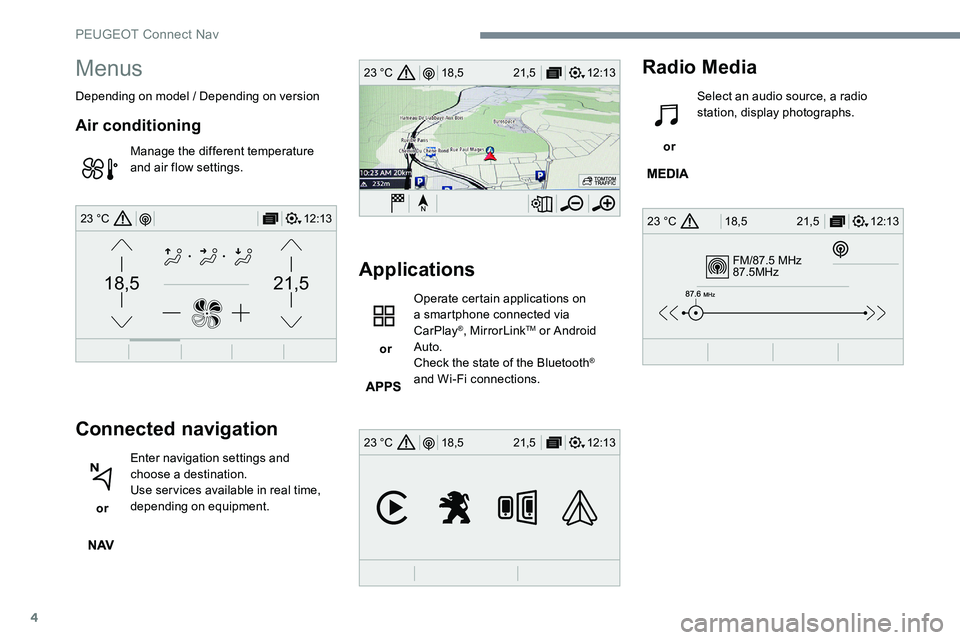
Menus
Depending on model / Depending on version
Air conditioning
Manage the different temperature
and air flow settings.
Connected navigation
or Enter navigation settings and
choose a destination.
Use services available in real time,
depending on equipment.
Applications
or Operate certain applications on
a smartphone connected via
CarPlay
®, MirrorLinkTM or Android
Auto.
Check the state of the Bluetooth
®
and Wi-Fi connections.
Radio Media
or Select an audio source, a radio
station, display photographs.
PEUGEOT Connect Nav
Page 242 of 306
10
Voice commandsHelp messages
Call contact <...> * To make a phone call, say "call" followed by
the contact name, for example: "call David
Miller". You can also include the phone type, for
example: "Call David Miller at home". To make
a call by number, say "dial" followed by the
phone number, for example: "dial 07776 835
417". You can check your voicemail by saying
"call voicemail". To send a text, say "send quick
message to Bill Carter" followed by the name
of the quick message you'd like to send. For
example, "send quick message to David Miller",
"I’ll be late". To display the list of contacts or
calls, say "display contacts" or "display calls".
For more information on SMS, say "help with
tex t ing".
Dial <...>*
Display contacts*
Display calls
*
Call (message box | voicemail) *
"Text message" voice
commands
* This function is available only if the
telephone connected to the system supports
downloading of contacts and recent calls
and if the download has been done. If a telephone is connected to the system,
these voice commands can be issued
from any main screen page after pressing
the "Telephone" button on the steering
wheel, as long as there is no telephone
call in progress.
If there is no telephone connected by
Bluetooth, a voice message says : "Please
first connect a telephone" and the voice
session will be closed.
PEUGEOT Connect Nav
Page 249 of 306
17
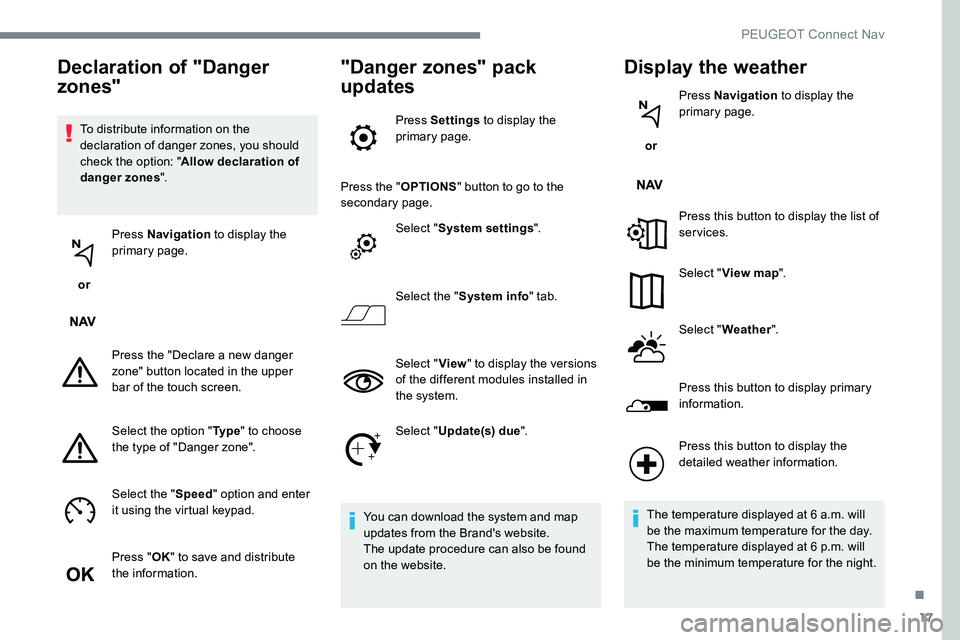
To distribute information on the
declaration of danger zones, you should
check the option: "Allow declaration of
danger zones ".
or Press Navigation
to display the
primary page.
Press the "Declare a new danger
zone" button located in the upper
bar of the touch screen.
Select the option " Ty p e" to choose
the type of "Danger zone".
Select the " Speed" option and enter
it using the virtual keypad.
Press " OK" to save and distribute
the information.
"Danger zones" pack
updates
Press Settings to display the
primary page.
Press the " OPTIONS" button to go to the
secondary page.
Select "System settings ".
Select the " System info " tab.
Select " View" to display the versions
of the different modules installed in
the system.
Select " Update(s) due ".
You can download the system and map
updates from the Brand's website.
The update procedure can also be found
on the website.
Display the weather
or Press Navigation
to display the
primary page.
Press this button to display the list of
services.
Select " View map ".
Select " Weather ".
Press this button to display primary
information.
Declaration of "Danger
zones"
Press this button to display the
detailed weather information.
The temperature displayed at 6 a.m. will
be the maximum temperature for the day.
The temperature displayed at 6 p.m. will
be the minimum temperature for the night.
.
PEUGEOT Connect Nav
Page 258 of 306

26
Activate / Deactivate "Station
follow ".
Press " OK".
If "DAB-FM auto tracking" is activated,
there is a difference of a few seconds
when the system switches to "FM"
analogue radio with sometimes a variation
in volume.
Once the digital signal quality is restored,
the system automatically changes back
to " DA B ".
If the "DAB" station being listened to is
not available on "FM" (" DAB- FM" option
greyed out), or "DAB/FM auto tracking " is
not activated, the sound will cut out while
the digital signal is too weak.Media
Por t USB
Insert the USB memory stick in the USB port or
connect the USB device to the USB port using
a suitable cable (not supplied).
To protect the system, do not use a USB
hub.
The system builds playlists (in temporary
memory), an operation which can take from
a few seconds to several minutes at the first
connection.
Reduce the number of non-music files and the
number of folders to reduce the waiting time.
The playlists are updated every time the
ignition is switched off or a USB memory stick
is connected. The lists are memorised: if they
are not modified, the subsequent loading time
will be shorter.
Auxiliary socket (AUX)
(depending on model / depending on
equipment)
This source is only available if "Auxiliary input"
has been checked in the audio settings.
Connect the portable device (MP3 player…) to
the auxiliary jack socket using an audio cable
(not supplied).
First adjust the volume on your portable device
(to a high level). Then adjust the volume of your
audio system.
Display and management of the controls are
via the portable device.
CD player
(depending on model / depending on
equipment)
Insert the CD in the player.
PEUGEOT Connect Nav
Page 261 of 306
29
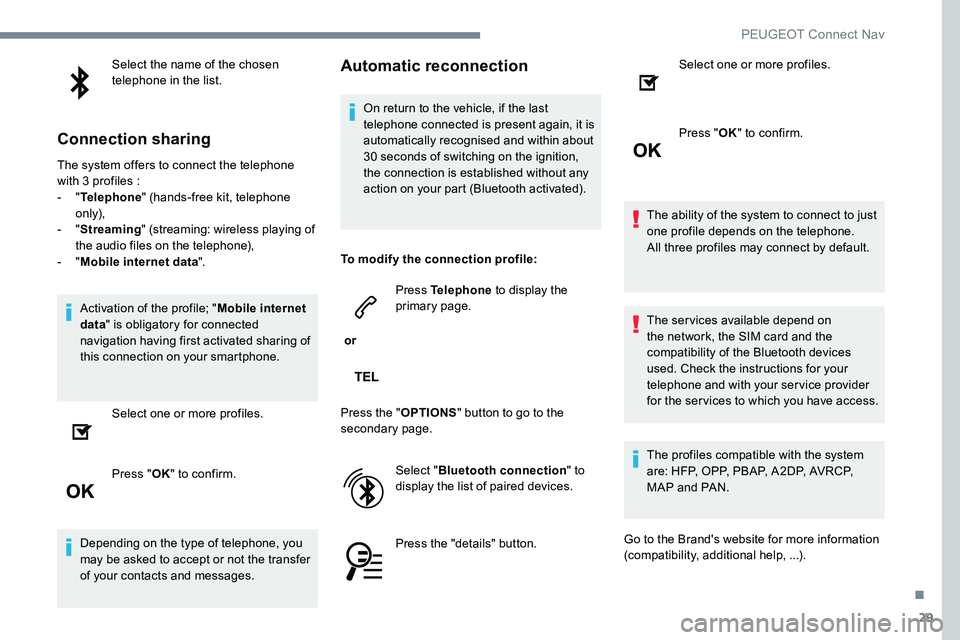
Select the name of the chosen
telephone in the list.
Connection sharing
The system offers to connect the telephone
with 3 profiles :
- "Telephone " (hands-free kit, telephone
only),
-
"Streaming " (streaming: wireless playing of
the audio files on the telephone),
-
"Mobile internet data ".
Activation of the profile; " Mobile internet
data " is obligatory for connected
navigation having first activated sharing of
this connection on your smartphone.
Select one or more profiles.
Press " OK" to confirm.
Depending on the type of telephone, you
may be asked to accept or not the transfer
of your contacts and messages.
Automatic reconnection
On return to the vehicle, if the last
telephone connected is present again, it is
automatically recognised and within about
30 seconds of switching on the ignition,
the connection is established without any
action on your part (Bluetooth activated).
To modify the connection profile:
or Press Telephone
to display the
primary page.
Press the " OPTIONS" button to go to the
secondary page.
Select "Bluetooth connection " to
display the list of paired devices.
Press the "details" button. Select one or more profiles.
Press "
OK" to confirm.
The ability of the system to connect to just
one profile depends on the telephone.
All three profiles may connect by default.
The services available depend on
the network, the SIM card and the
compatibility of the Bluetooth devices
used. Check the instructions for your
telephone and with your service provider
for the services to which you have access.
The profiles compatible with the system
are: HFP, OPP, PBAP, A2DP, AVRCP,
MAP and PAN.
Go to the Brand's website for more information
(compatibility, additional help, ...).
.
PEUGEOT Connect Nav
Page 264 of 306
32
Managing messages
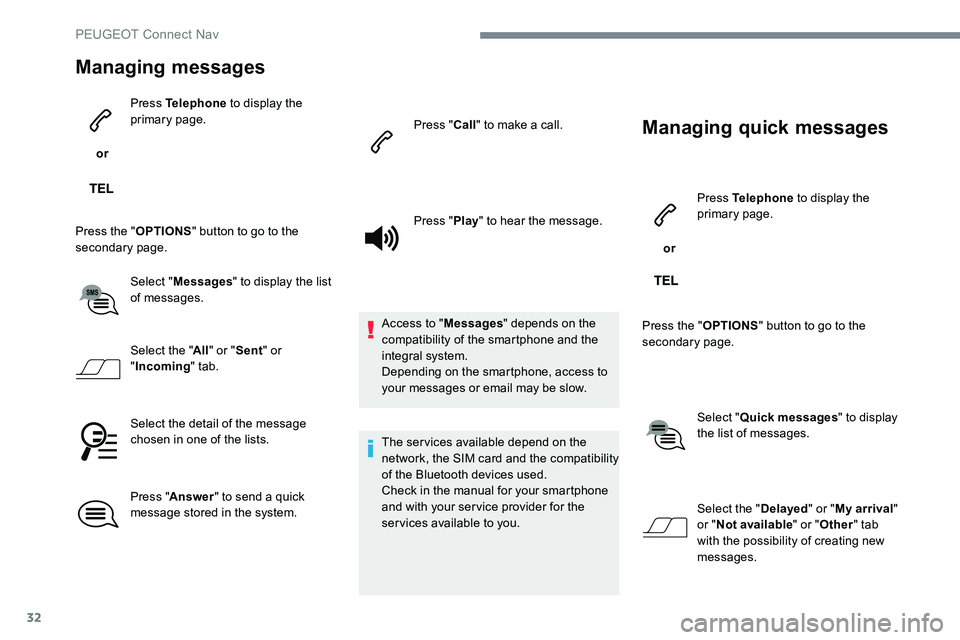
or Press Telephone
to display the
primary page.
Press the " OPTIONS" button to go to the
secondary page.
Select "Messages " to display the list
of messages.
Select the " All" or " Sent " or
" Incoming " tab.
Select the detail of the message
chosen in one of the lists.
Press " Answer " to send a quick
message stored in the system. Press "
Call" to make a call.
Press " Play" to hear the message.
Access to " Messages" depends on the
compatibility of the smartphone and the
integral system.
Depending on the smartphone, access to
your messages or email may be slow.
The services available depend on the
network, the SIM card and the compatibility
of the Bluetooth devices used.
Check in the manual for your smartphone
and with your service provider for the
services available to you.
Managing quick messages
or Press Telephone
to display the
primary page.
Press the " OPTIONS" button to go to the
secondary page.
Select "Quick messages " to display
the list of messages.
Select the " Delayed" or "My arrival "
or " Not available " or "Other " tab
with the possibility of creating new
messages.
PEUGEOT Connect Nav
Page 270 of 306
38
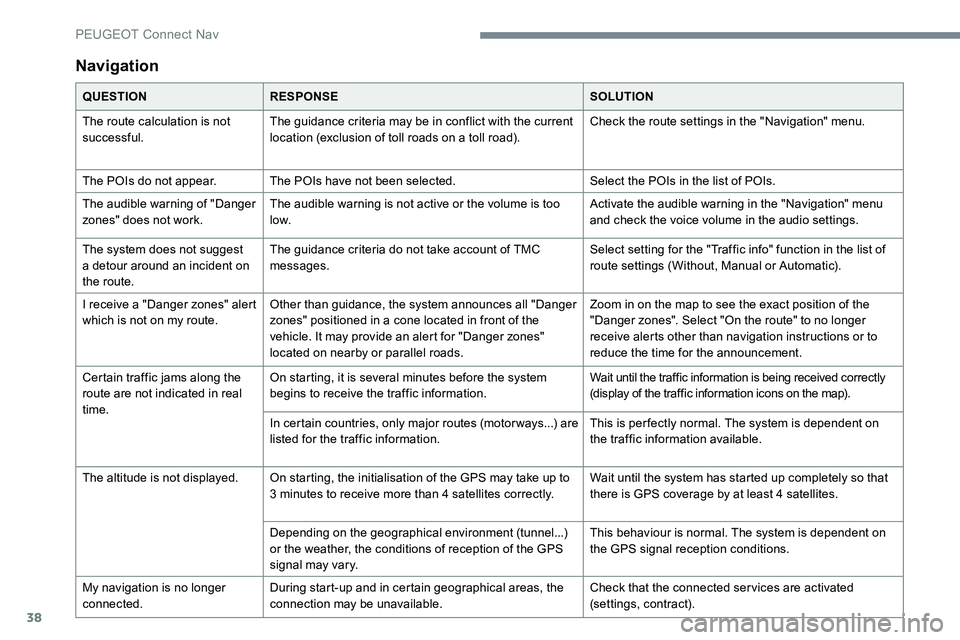
Navigation
QUESTIONRESPONSE SOLUTION
The route calculation is not
successful. The guidance criteria may be in conflict with the current
location (exclusion of toll roads on a toll road). Check the route settings in the "Navigation" menu.
The POIs do not appear. The POIs have not been selected. Select the POIs in the list of POIs.
The audible warning of "Danger
zones" does not work. The audible warning is not active or the volume is too
low. Activate the audible warning in the "Navigation" menu
and check the voice volume in the audio settings.
The system does not suggest
a detour around an incident on
the route. The guidance criteria do not take account of TMC
messages.
Select setting for the "Traffic info" function in the list of
route settings (Without, Manual or Automatic).
I receive a "Danger zones" alert
which is not on my route. Other than guidance, the system announces all "Danger
zones" positioned in a cone located in front of the
vehicle. It may provide an alert for "Danger zones"
located on nearby or parallel roads. Zoom in on the map to see the exact position of the
"Danger zones". Select "On the route" to no longer
receive alerts other than navigation instructions or to
reduce the time for the announcement.
Certain traffic jams along the
route are not indicated in real
time. On starting, it is several minutes before the system
begins to receive the traffic information.
Wait until the traffic information is being received correctly
(display of the traffic information icons on the map).
In certain countries, only major routes (motor ways...) are
listed for the traffic information. This is per fectly normal. The system is dependent on
the traffic information available.
The altitude is not displayed. On starting, the initialisation of the GPS may take up to 3 minutes to receive more than 4 satellites correctly. Wait until the system has started up completely so that
there is GPS coverage by at least 4 satellites.
Depending on the geographical environment (tunnel...)
or the weather, the conditions of reception of the GPS
signal may vary. This behaviour is normal. The system is dependent on
the GPS signal reception conditions.
My navigation is no longer
connected. During start-up and in certain geographical areas, the
connection may be unavailable. Check that the connected services are activated
(settings, contract).
PEUGEOT Connect Nav
Page 271 of 306
39
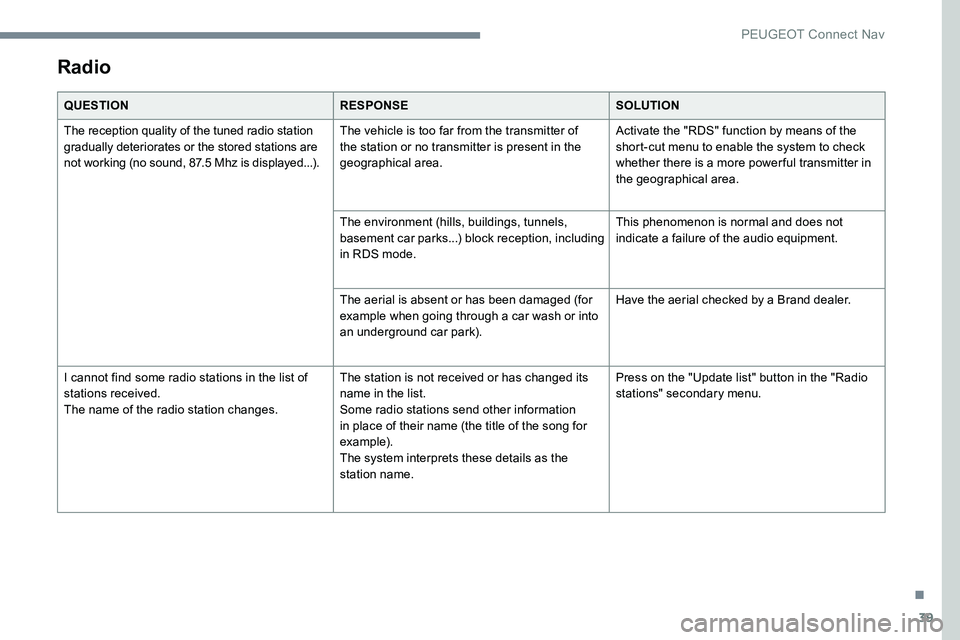
Radio
QUESTIONRESPONSESOLUTION
The reception quality of the tuned radio station
gradually deteriorates or the stored stations are
not working (no sound, 87.5 Mhz is displayed...). The vehicle is too far from the transmitter of
the station or no transmitter is present in the
geographical area.Activate the "RDS" function by means of the
short-cut menu to enable the system to check
whether there is a more power ful transmitter in
the geographical area.
The environment (hills, buildings, tunnels,
basement car parks...) block reception, including
in RDS mode. This phenomenon is normal and does not
indicate a failure of the audio equipment.
The aerial is absent or has been damaged (for
example when going through a car wash or into
an underground car park). Have the aerial checked by a Brand dealer.
I cannot find some radio stations in the list of
stations received.
The name of the radio station changes. The station is not received or has changed its
name in the list.
Some radio stations send other information
in place of their name (the title of the song for
example).
The system interprets these details as the
station name.Press on the "Update list" button in the "Radio
stations" secondary menu.
.
PEUGEOT Connect Nav