service PEUGEOT 307 CC DAG 2007 User Guide
[x] Cancel search | Manufacturer: PEUGEOT, Model Year: 2007, Model line: 307 CC DAG, Model: PEUGEOT 307 CC DAG 2007Pages: 184, PDF Size: 7.23 MB
Page 143 of 184
124
S
O S
SOURCE
MODE BAND ESC
2
abc
5
jkl
8
tuv 3
def
6
mno
9
wxyz
1 4
ghi
7
pqrs
0 # MENU LIST
TA
PTY
DARK
2
1
5
3 4
89 10 15
11 17 18
12 16
14
7
6
13
01
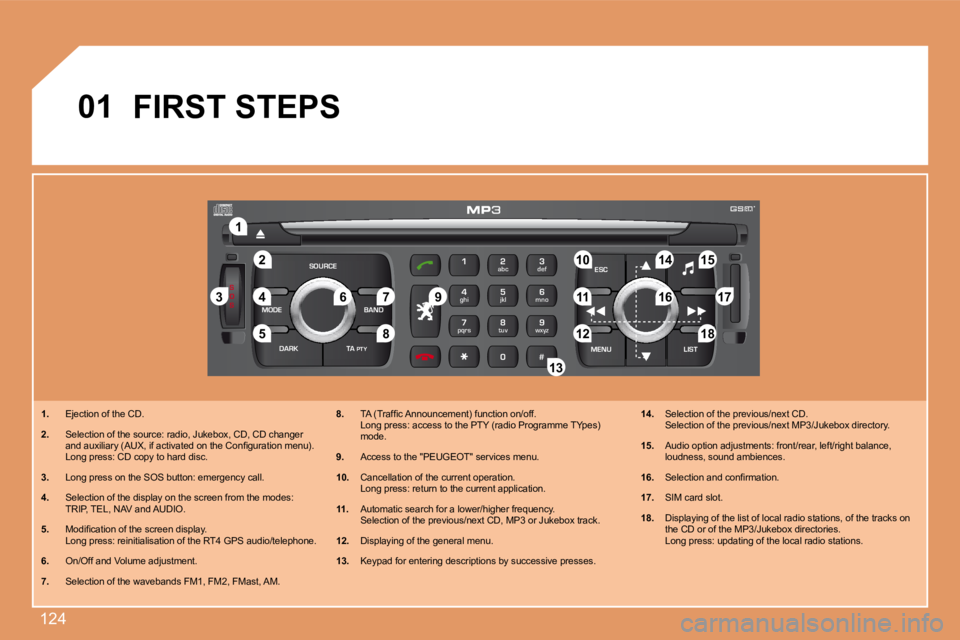
1. Ejection of the CD.
2. Selection of the source: radio, Jukebox, CD, CD ch anger
and auxiliary (AUX, if activated on the Coniguratio n menu).
Long press: CD copy to hard disc.
3. Long press on the SOS button: emergency call.
4. Selection of the display on the screen from the mo des:
TRIP, TEL, NAV and AUDIO.
5. Modiication of the screen display.
Long press: reinitialisation of the RT4 GPS audio /telephone.
6. On/Off and Volume adjustment.
7. Selection of the wavebands FM1, FM2, FMast, AM. 8.
TA (Trafic Announcement) function on/off.
Long press: access to the PTY (radio Programme TY pes)
mode.
9. Access to the "PEUGEOT" services menu.
10. Cancellation of the current operation.
Long press: return to the current application.
11. Automatic search for a lower/higher frequency.
Selection of the previous/next CD, MP3 or Jukebox track.
12. Displaying of the general menu.
13. Keypad for entering descriptions by successive pre sses.14.
Selection of the previous/next CD.
Selection of the previous/next MP3/Jukebox director y.
15. Audio option adjustments: front/rear, left/right b alance,
loudness, sound ambiences.
16. Selection and conirmation.
17. SIM card slot.
18. Displaying of the list of local radio stations, of the tracks on
the CD or of the MP3/Jukebox directories.
Long press: updating of the local radio stations.
FIRST STEPS
Page 149 of 184
130
ESCLIST
MENU
ESC
MENU LIST
ESC
MENU LIST
MENU
6
8 1
2
3
4
ESC
MENU LIST
ESC
MENU LIST
S
O S SOURCE
MODE BAND TPT
A Y
DARK
ESC
MENU LIST
7ESC
MENU LIST
03
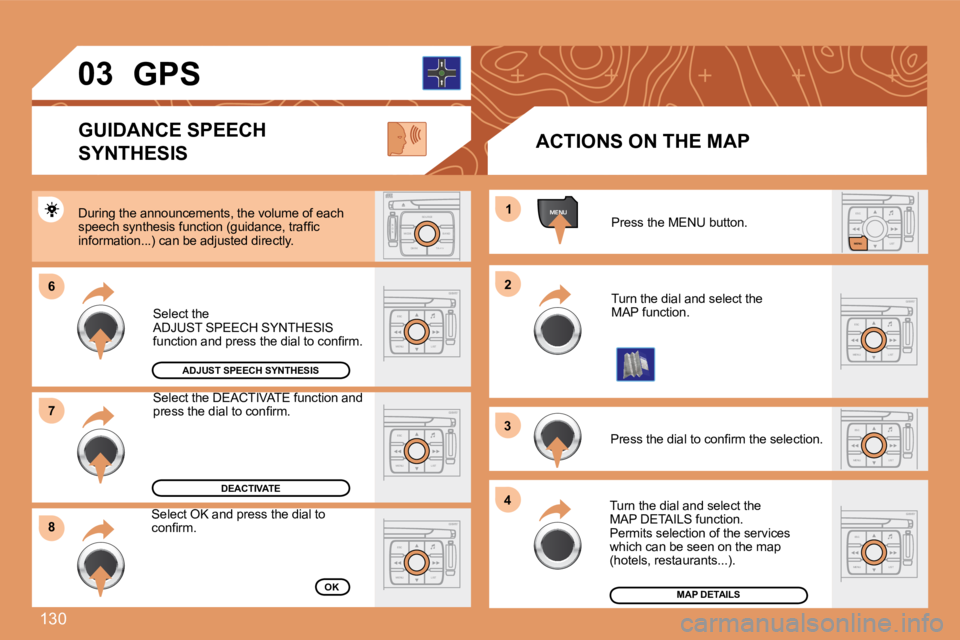
Press the MENU button.
Turn the dial and select the
MAP function.
Press the dial to conirm the selection.
Turn the dial and select the
MAP DETAILS function.
Permits selection of the services
which can be seen on the map
(hotels, restaurants...).
ACTIONS ON THE MAP
MAP DETAILS
During the announcements, the volume of each
speech synthesis function (guidance, trafic
information...) can be adjusted directly.
GUIDANCE SPEECH
SYNTHESIS
Select the
ADJUST SPEECH SYNTHESIS
function and press the dial to conirm.
GPS
ADJUST SPEECH SYNTHESIS
DEACTIVATE
Select the DEACTIVATE function and
press the dial to conirm.
OK
Select OK and press the dial to
conirm.
Page 163 of 184
144
S
O
SS
O SSOURCE
MODE BAND T
PTA YDARK
2abc5jkl8tuv
3def6mno9wxyz
1 4ghir7pq s0 #
ESC
MENU LIST
ESC
MENU LIST
EMERGENCY CALL
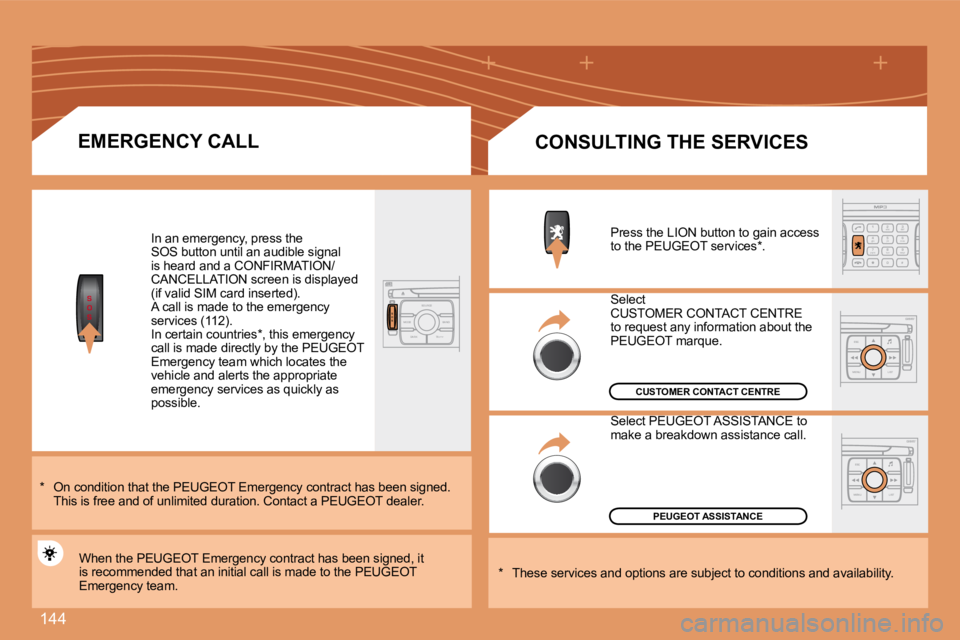
In an emergency, press the
SOS button until an audible signal
is heard and a CONFIRMATION/
CANCELLATION screen is displayed
(if valid SIM card inserted).
A call is made to the emergency
services (112).
In certain countries*, this emergency
call is made directly by the PEUGEOT
Emergency team which locates the
vehicle and alerts the appropriate
emergency services as quickly as
possible.
PEUGEOT ASSISTANCE
CUSTOMER CONTACT CENTRE
When the PEUGEOT Emergency contract has been signed , it
is recommended that an initial call is made to the PEUGEOT
Emergency team.
CONSULTING THE SERVICES
Press the LION button to gain access
to the PEUGEOT services*.
Select
CUSTOMER CONTACT CENTRE
to request any information about the
PEUGEOT marque.
Select PEUGEOT ASSISTANCE to
make a breakdown assistance call.
* These services and options are subject to conditi ons and availability.
* On condition that the PEUGEOT Emergency contract
has been signed.
This is free and of unlimited duration. Contact a P EUGEOT dealer.
Page 165 of 184
146
MENUESCLIST
MENU
2
1
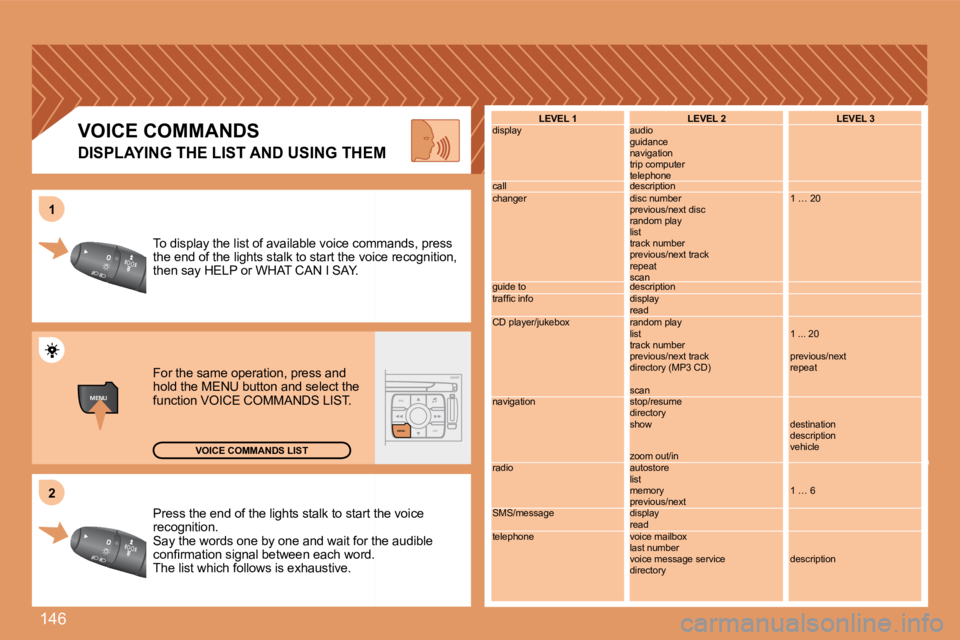
Press the end of the lights stalk to start the voic
e
recognition.
Say the words one by one and wait for the audible
conirmation signal between each word.
The list which follows is exhaustive.
To display the list of available voice commands, pr
ess
the end of the lights stalk to start the voice reco gnition,
then say HELP or WHAT CAN I SAY.
For the same operation, press and
hold the MENU button and select the
function VOICE COMMANDS LIST.
VOICE COMMANDS LIST
LEVEL 1
display
call
changer
guide to
trafic info
CD player/jukebox
navigation
radio
SMS/message
telephone LEVEL 2
audio
guidance
navigation
trip computer
telephone
description
disc number
previous/next disc
random play
list
track number
previous/next track
repeat
scan
description
display
read
random play
list
track number
previous/next track
directory (MP3 CD)
scan
stop/resume
directory
show
zoom out/in
autostore
list
memory
previous/next
display
read
voice mailbox
last number
voice message service
directoryLEVEL 3
1 … 20
1 ... 20
previous/next
repeat
destination
description
vehicle
1 … 6
descriptionVOICE COMMANDS
DISPLAYING THE LIST AND USING THEM
Page 168 of 184
149
4
4
4
4
4
4
4
4
3
4
4
4
4
3
3
4
4
1
2
3
4
4
4
3
4
4
4
4
4
1
2
3
3
3
3
3
3
3
3
2
3
2
2
3
3
3
3
22
4
4
2
4
4
3
3
4
4
4
3
3
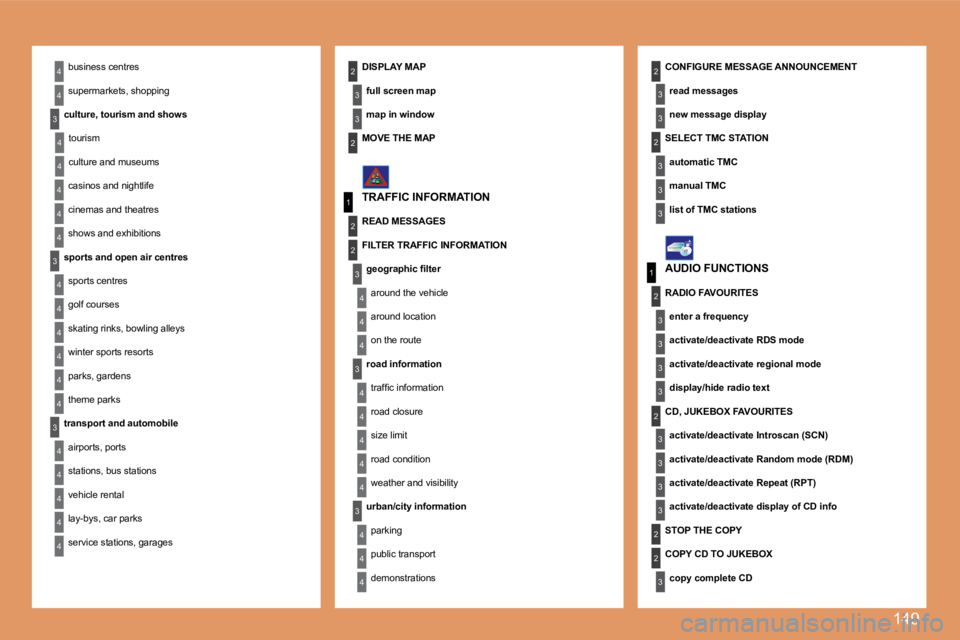
22business centres
supermarkets, shopping
culture, tourism and shows tourism
culture and museums
casinos and nightlife
cinemas and theatres
shows and exhibitions
sports and open air centres sports centres
golf courses
skating rinks, bowling alleys
winter sports resorts
parks, gardens
theme parks
transport and automobile airports, ports
stations, bus stations
vehicle rental
lay-bys, car parks
service stations, garages DISPLAY MAP
full screen map
map in window CONFIGURE MESSAGE ANNOUNCEMENT
read messages
new message display
TRAFFIC INFORMATION AUDIO FUNCTIONS
MOVE THE MAP
READ MESSAGES
FILTER TRAFFIC INFORMATION
geographic ilter around the vehicle
around location
on the route
road information trafic information
road closure
size limit
road condition
weather and visibility
urban/city information parking
public transport
demonstrations SELECT TMC STATION
automatic TMC
manual TMC
list of TMC stations
RADIO FAVOURITES enter a frequency
activate/deactivate RDS mode
activate/deactivate regional mode
display/hide radio text
CD, JUKEBOX FAVOURITES activate/deactivate Introscan (SCN)
activate/deactivate Random mode (RDM)
activate/deactivate Repeat (RPT)
activate/deactivate display of CD info
STOP THE COPY
COPY CD TO JUKEBOX copy complete CD
Page 170 of 184
151
1
2
3
3
3
3
2
3
3
4
4
1
3
2
3
1
2
3
3
2
2
2
1
2
2
2
1
1
1
MENU
4
3
2
2
3
3
6text message ring
call diversion to mailbox n°
delete calls log* The parameters vary according to vehicle (refer to the "Multifunction displays" chapter).
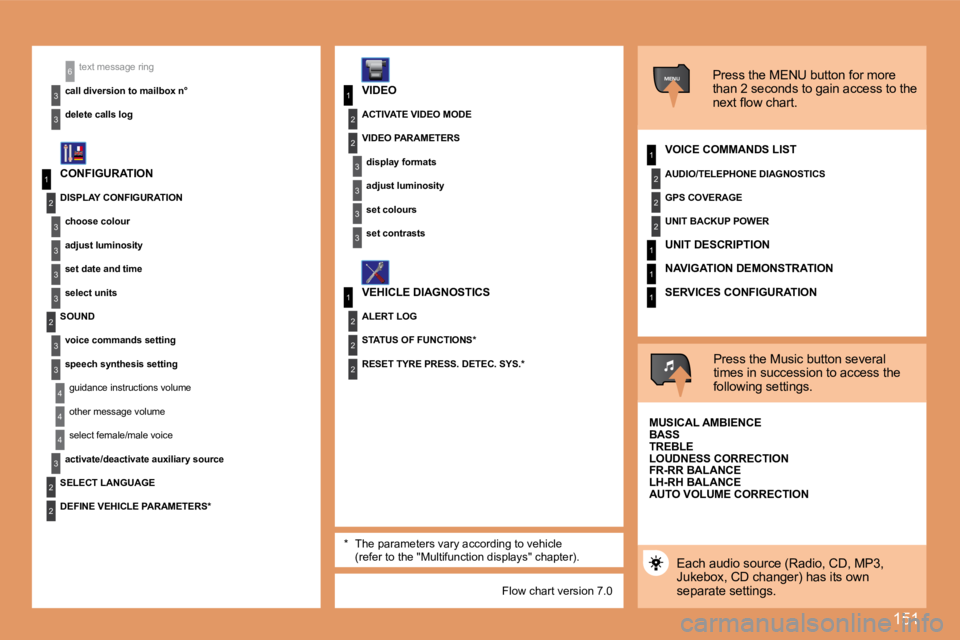
CONFIGURATION
VIDEO
VEHICLE DIAGNOSTICS Press the MENU button for more
than 2 seconds to gain access to the
next low chart.
VOICE COMMANDS LIST
Press the Music button several
times in succession to access the
following settings.
AUTO VOLUME CORRECTION
SELECT LANGUAGE
Each audio source (Radio, CD, MP3,
Jukebox, CD changer) has its own
separate settings.
DISPLAY CONFIGURATION
choose colour
adjust luminosity
set date and time
select units
SOUND voice commands setting
speech synthesis settingguidance instructions volume
other message volume
select female/male voice
activate/deactivate auxiliary source
DEFINE VEHICLE PARAMETERS* RESET TYRE PRESS. DETEC. SYS.*
ACTIVATE VIDEO MODE
VIDEO PARAMETERS
display formats
adjust luminosity
set colours
set contrasts
ALERT LOG
STATUS OF FUNCTIONS* AUDIO/TELEPHONE DIAGNOSTICS
GPS COVERAGE
UNIT BACKUP POWER
UNIT DESCRIPTION
NAVIGATION DEMONSTRATION
SERVICES CONFIGURATION
MUSICAL AMBIENCE
BASS
TREBLE
LOUDNESS CORRECTION
FR-RR BALANCE
LH-RH BALANCE
Flow chart version 7.0
Page 180 of 184
158
1
2
31
2
4
1
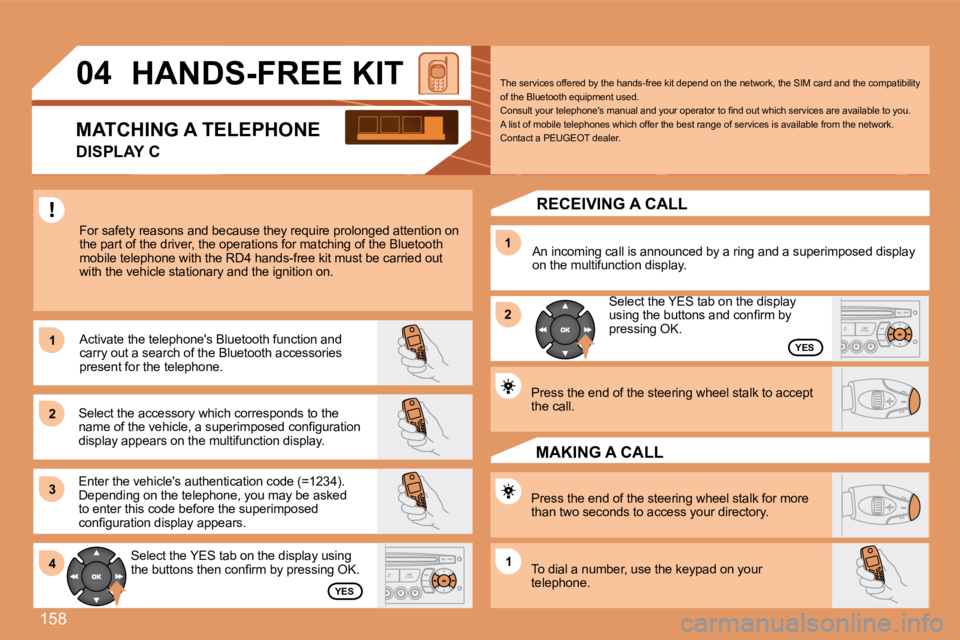
04 HANDS-FREE KIT
For safety reasons and because they require prolong ed attention on
the part of the driver, the operations for matching of the Bluetooth
mobile telephone with the RD4 hands-free kit must b e carried out
with the vehicle stationary and the ignition on.
Select the accessory which corresponds to the
name of the vehicle, a superimposed coniguration
display appears on the multifunction display. Activate the telephone's Bluetooth function and
carry out a search of the Bluetooth accessories
present for the telephone.
Select the YES tab on the display using
the buttons then conirm by pressing OK.
Enter the vehicle's authentication code (=1234).
Depending on the telephone, you may be asked
to enter this code before the superimposed
coniguration display appears.
YES
YES
The services offered by the hands-free kit depend o
n the network, the SIM card and the compatibility
of the Bluetooth equipment used.
Consult your telephone's manual and your operator t o ind out which services are available to you.
A list of mobile telephones which offer the best ra nge of services is available from the network.
Contact a PEUGEOT dealer.
RECEIVING A CALL
An incoming call is announced by a ring and a super imposed display
on the multifunction display.
Select the YES tab on the display
using the buttons and conirm by
pressing OK.
Press the end of the steering wheel stalk to accept
the call.
Press the end of the steering wheel stalk for more
than two seconds to access your directory.
To dial a number, use the keypad on your
telephone. MAKING A CALL
MATCHING A TELEPHONE
DISPLAY C
Page 184 of 184
162
1
1
2
3
4
3
4
3
4
2
3
4
3
4
2
3
4
2
4
4
3
4
4
4
3
4
4
1
2
3
2
3
3
2
2
1
2
3
3
3
4
4
4
2
3
4
3
4
3
4
2
3
3
3
4
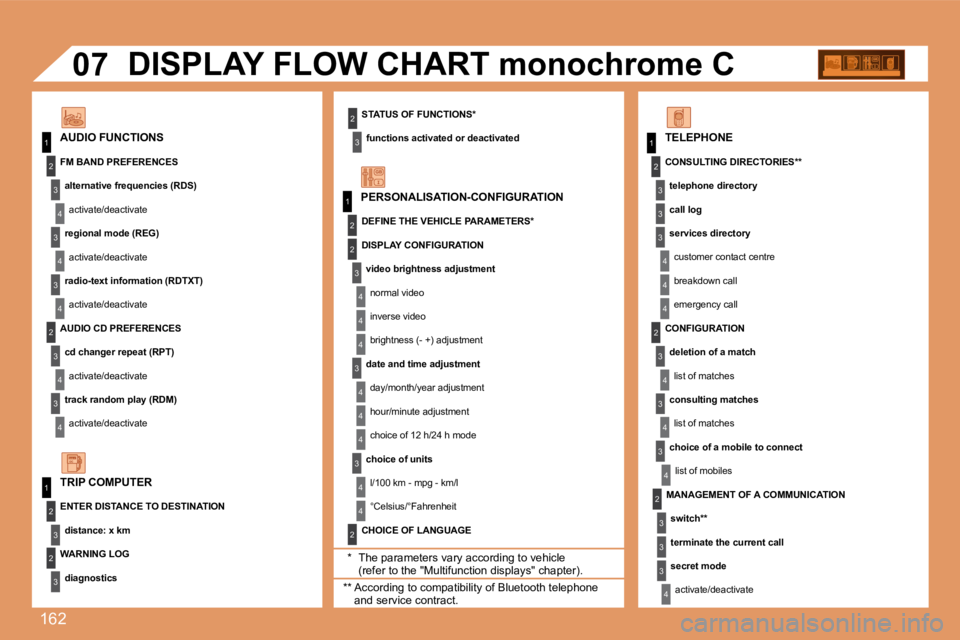
07
STATUS OF FUNCTIONS*functions activated or deactivated
AUDIO FUNCTIONS DISPLAY FLOW CHART monochrome C
* The parameters vary according to vehicle (refer to the "Multifunction displays" chapter).
WARNING LOG
diagnostics
TRIP COMPUTER
FM BAND PREFERENCES
alternative frequencies (RDS)activate/deactivate
regional mode (REG) activate/deactivate
radio-text information (RDTXT) activate/deactivate
AUDIO CD PREFERENCES cd changer repeat (RPT)activate/deactivate
track random play (RDM) activate/deactivate
ENTER DISTANCE TO DESTINATION distance: x km PERSONALISATION-CONFIGURATION
DEFINE THE VEHICLE PARAMETERS*
CHOICE OF LANGUAGE TELEPHONE
CONSULTING DIRECTORIES** telephone directory
call log
services directorycustomer contact centre
breakdown call
emergency call
DISPLAY CONFIGURATION
video brightness adjustmentnormal video
inverse video
brightness (- +) adjustment
date and time adjustment day/month/year adjustment
hour/minute adjustment
choice of 12 h/24 h mode
choice of units l/100 km - mpg - km/l
°Celsius/°Fahrenheit
** According to compatibility of Bluetooth telephone and service contract. MANAGEMENT OF A COMMUNICATION
switch**
terminate the current call
secret modeactivate/deactivate
CONFIGURATION
deletion of a matchlist of matches
consulting matches list of matches
choice of a mobile to connect list of mobiles