display PEUGEOT 307 CC DAG 2007 Owner's Guide
[x] Cancel search | Manufacturer: PEUGEOT, Model Year: 2007, Model line: 307 CC DAG, Model: PEUGEOT 307 CC DAG 2007Pages: 184, PDF Size: 7.23 MB
Page 172 of 184
164
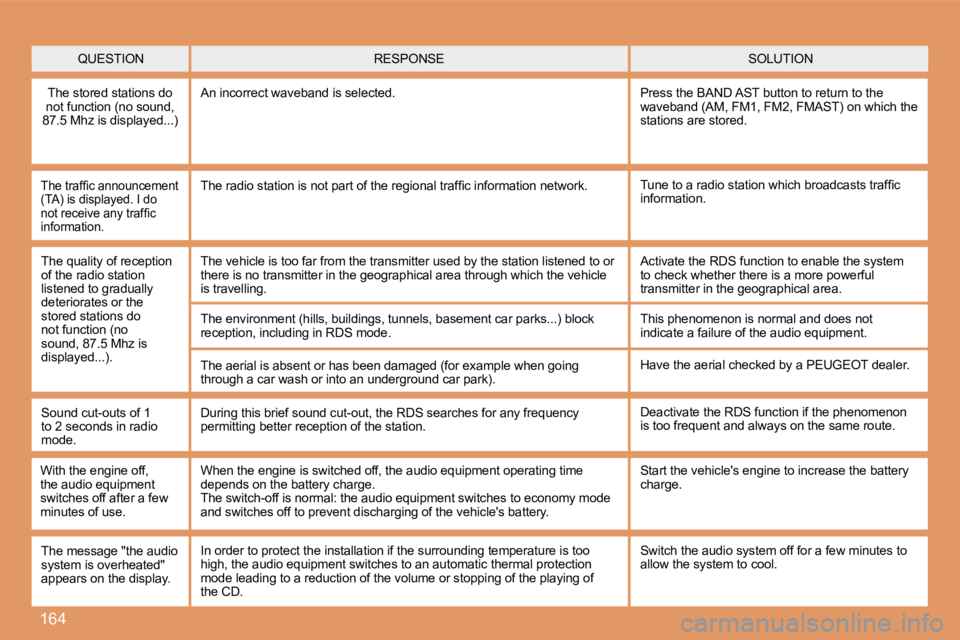
QUESTIONSOLUTION
RESPONSE
The stored stations do
not function (no sound,
87.5 Mhz is displayed...) An incorrect waveband is selected.
Press the BAND AST button to return to the
waveband (AM, FM1, FM2, FMAST) on which the
stations are stored.
The trafic announcement
(TA) is displayed. I do
not receive any trafic
information.Tune to a radio station which broadcasts trafic
information.
The radio station is not part of the regional trafi
c information network.
The quality of reception
of the radio station
listened to gradually
deteriorates or the
stored stations do
not function (no
sound, 87.5 Mhz is
displayed...). The vehicle is too far from the transmitter used by
the station listened to or
there is no transmitter in the geographical area th rough which the vehicle
is travelling.
The environment (hills, buildings, tunnels, basemen t car parks...) block
reception, including in RDS mode.
The aerial is absent or has been damaged (for examp le when going
through a car wash or into an underground car park) .Activate the RDS function to enable the system
to check whether there is a more powerful
transmitter in the geographical area.
This phenomenon is normal and does not
indicate a failure of the audio equipment.
Have the aerial checked by a PEUGEOT dealer.
Sound cut-outs of 1
to 2 seconds in radio
mode. During this brief sound cut-out, the RDS searches f
or any frequency
permitting better reception of the station. Deactivate the RDS function if the phenomenon
is too frequent and always on the same route.
With the engine off,
the audio equipment
switches off after a few
minutes of use. When the engine is switched off, the audio equipmen
t operating time
depends on the battery charge.
The switch-off is normal: the audio equipment switc hes to economy mode
and switches off to prevent discharging of the vehi cle's battery.Start the vehicle's engine to increase the battery
charge.
The message "the audio
system is overheated"
appears on the display. Switch the audio system off for a few minutes to
allow the system to cool.
In order to protect the installation if the surroun
ding temperature is too
high, the audio equipment switches to an automatic thermal protection
mode leading to a reduction of the volume or stoppi ng of the playing of
the CD.
Page 173 of 184
165
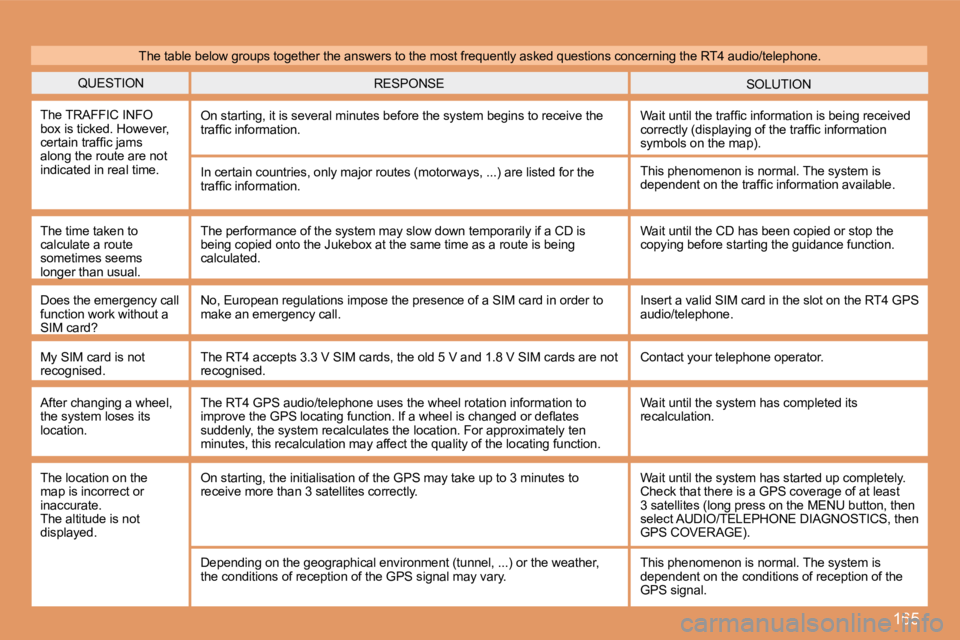
QUESTIONSOLUTION
RESPONSE
The TRAFFIC INFO
box is ticked. However,
certain trafic jams
along the route are not
indicated in real time. On starting, it is several minutes before the syste
m begins to receive the
trafic information. Wait until the trafic information is being received
correctly (displaying of the trafic information
symbols on the map).
In certain countries, only major routes (motorways, ...) are listed for the
trafic information.
The time taken to
calculate a route
sometimes seems
longer than usual. This phenomenon is normal. The system is
dependent on the trafic information available.
The performance of the system may slow down tempora rily if a CD is
being copied onto the Jukebox at the same time as a route is being
calculated. Wait until the CD has been copied or stop the
copying before starting the guidance function.
Does the emergency call
function work without a
SIM card? No, European regulations impose the presence of a S
IM card in order to
make an emergency call. Insert a valid SIM card in the slot on the RT4 GPS
audio/telephone.
My SIM card is not
recognised. The RT4 accepts 3.3 V SIM cards, the old 5 V and 1.
8 V SIM cards are not
recognised. Contact your telephone operator.
After changing a wheel,
the system loses its
location. The RT4 GPS audio/telephone uses the wheel rotation
information to
improve the GPS locating function. If a wheel is ch anged or delates
suddenly, the system recalculates the location. For approximately ten
minutes, this recalculation may affect the quality of the locating function.Wait until the system has completed its
recalculation.
The table below groups together the answers to the
most frequently asked questions concerning the RT4 audio/telephone.
The location on the
map is incorrect or
inaccurate.
The altitude is not
displayed. On starting, the initialisation of the GPS may take
up to 3 minutes to
receive more than 3 satellites correctly. Wait until the system has started up completely.
Check that there is a GPS coverage of at least
3 satellites (long press on the MENU button, then
select AUDIO/TELEPHONE DIAGNOSTICS, then
GPS COVERAGE).
Depending on the geographical environment (tunnel, ...) or the weather,
the conditions of reception of the GPS signal may v ary.This phenomenon is normal. The system is
dependent on the conditions of reception of the
GPS signal.
Page 175 of 184
153
1
2
1011
12
13
14
15
3 4 5 6 7 8 9
1201
FIRST STEPS
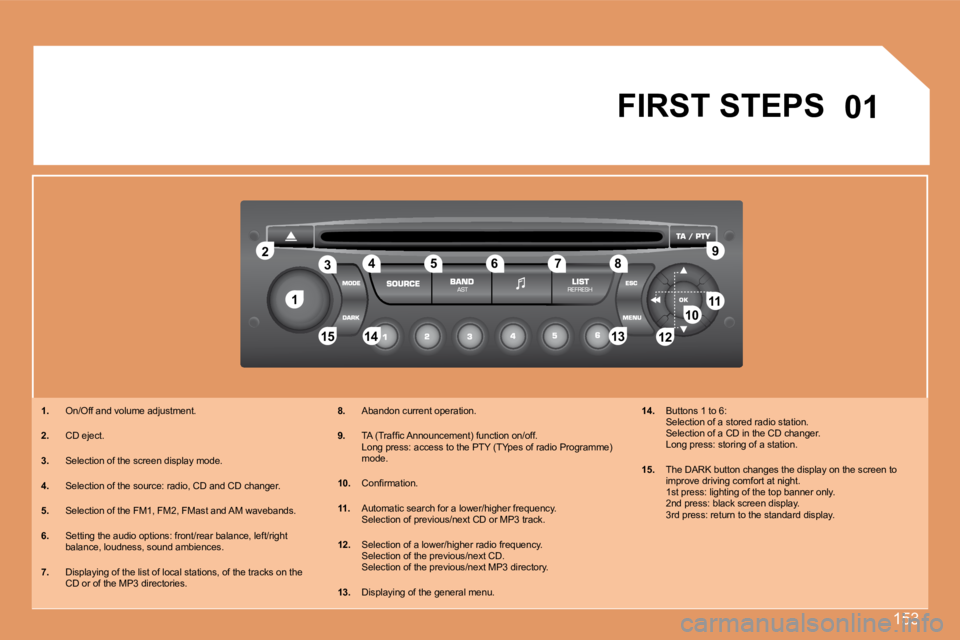
1. On/Off and volume adjustment.
2. CD eject.
3. Selection of the screen display mode.
4. Selection of the source: radio, CD and CD changer.
5. Selection of the FM1, FM2, FMast and AM wavebands.
6. Setting the audio options: front/rear balance, lef t/right
balance, loudness, sound ambiences.
7. Displaying of the list of local stations, of the t racks on the
CD or of the MP3 directories. 8.
Abandon current operation.
9. TA (Trafic Announcement) function on/off.
Long press: access to the PTY (TYpes of radio Progr amme)
mode.
10. Conirmation.
11. Automatic search for a lower/higher frequency.
Selection of previous/next CD or MP3 track.
12. Selection of a lower/higher radio frequency.
Selection of the previous/next CD.
Selection of the previous/next MP3 directory.
13. Displaying of the general menu. 14.
Buttons 1 to 6:
Selection of a stored radio station.
Selection of a CD in the CD changer.
Long press: storing of a station.
15. The DARK button changes the display on the screen to
improve driving comfort at night.
1st press: lighting of the top banner only.
2nd press: black screen display.
3rd press: return to the standard display.
Page 176 of 184
154
02GENERAL MENU
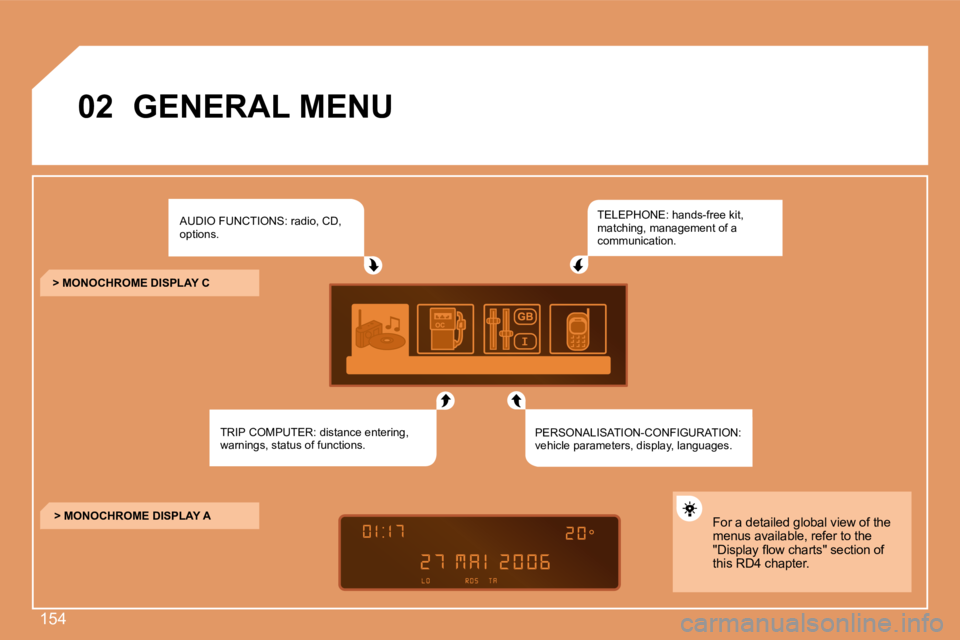
AUDIO FUNCTIONS: radio, CD,
options.
TRIP COMPUTER: distance entering,
warnings, status of functions. TELEPHONE: hands-free kit,
matching, management of a
communication.
PERSONALISATION-CONFIGURATION:
vehicle parameters, display, languages.
> MONOCHROME DISPLAY C
> MONOCHROME DISPLAY A For a detailed global view of the
menus available, refer to the
"Display low charts" section of
this RD4 chapter.
Page 177 of 184
155
1
2
3
4
2
4
3
1
03
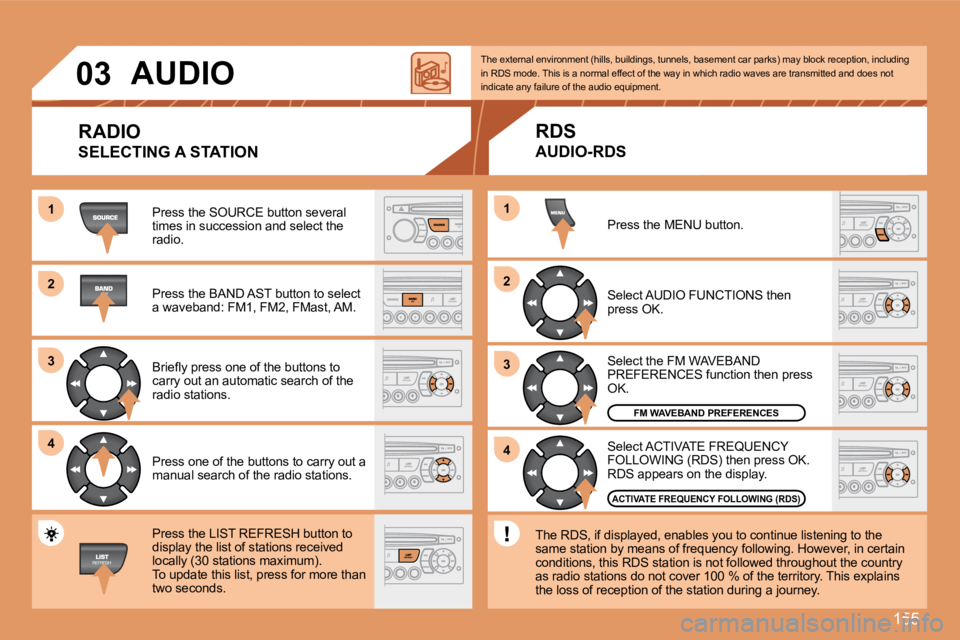
AUDIO
RADIO
SELECTING A STATION
Press the SOURCE button several
times in succession and select the
radio.
Press the BAND AST button to select
a waveband: FM1, FM2, FMast, AM.
Briely press one of the buttons to
carry out an automatic search of the
radio stations.
Press one of the buttons to carry out a
manual search of the radio stations.
Press the LIST REFRESH button to
display the list of stations received
locally (30 stations maximum).
To update this list, press for more than
two seconds. Select ACTIVATE FREQUENCY
FOLLOWING (RDS) then press OK.
RDS appears on the display.
Select the FM WAVEBAND
PREFERENCES function then press
OK.
Select AUDIO FUNCTIONS then
press OK.
Press the MENU button.
FM WAVEBAND PREFERENCES
ACTIVATE FREQUENCY FOLLOWING (RDS)
The external environment (hills, buildings, tunnels
, basement car parks) may block reception, includin g
in RDS mode. This is a normal effect of the way in which radio waves are transmitted and does not
indicate any failure of the audio equipment.
RDS
AUDIO-RDS
The RDS, if displayed, enables you to continue list ening to the
same station by means of frequency following. Howev er, in certain
conditions, this RDS station is not followed throug hout the country
as radio stations do not cover 100 % of the territo ry. This explains
the loss of reception of the station during a journ ey.
Page 178 of 184
156
1
2
3
12
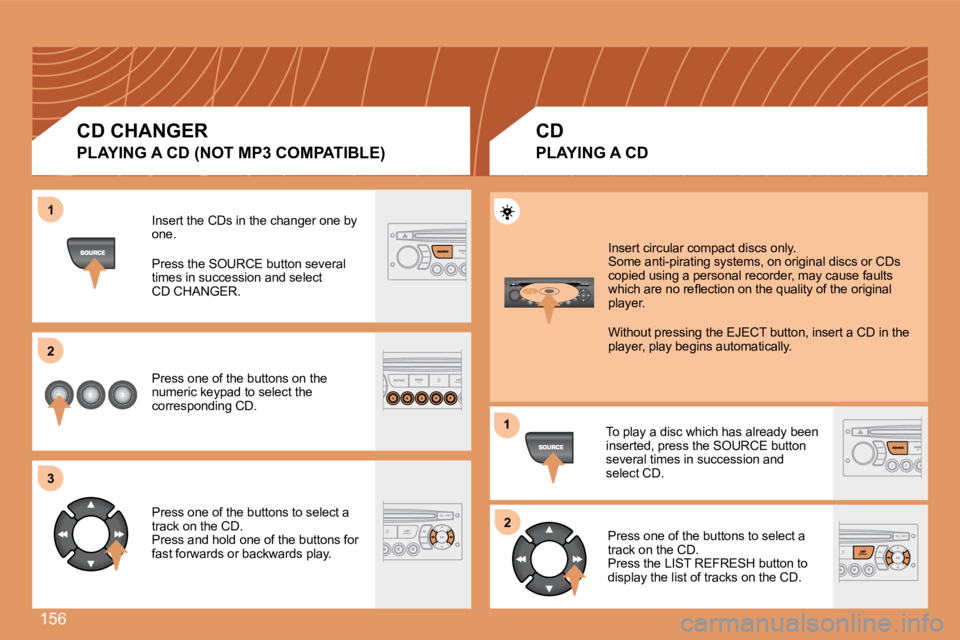
Insert the CDs in the changer one by
one.
Press the SOURCE button several
times in succession and select
CD CHANGER.
Press one of the buttons on the
numeric keypad to select the
corresponding CD.
Press one of the buttons to select a
track on the CD.
Press and hold one of the buttons for
fast forwards or backwards play. Insert circular compact discs only.
Some anti-pirating systems, on original discs or CD
s
copied using a personal recorder, may cause faults
which are no relection on the quality of the origin al
player.
Without pressing the EJECT button, insert a CD in t he
player, play begins automatically.
To play a disc which has already been
inserted, press the SOURCE button
several times in succession and
select CD. Press one of the buttons to select a
track on the CD.
Press the LIST REFRESH button to
display the list of tracks on the CD.
CD CHANGER
PLAYING A CD (NOT MP3 COMPATIBLE)
CD
PLAYING A CD
Page 179 of 184
157
1
2
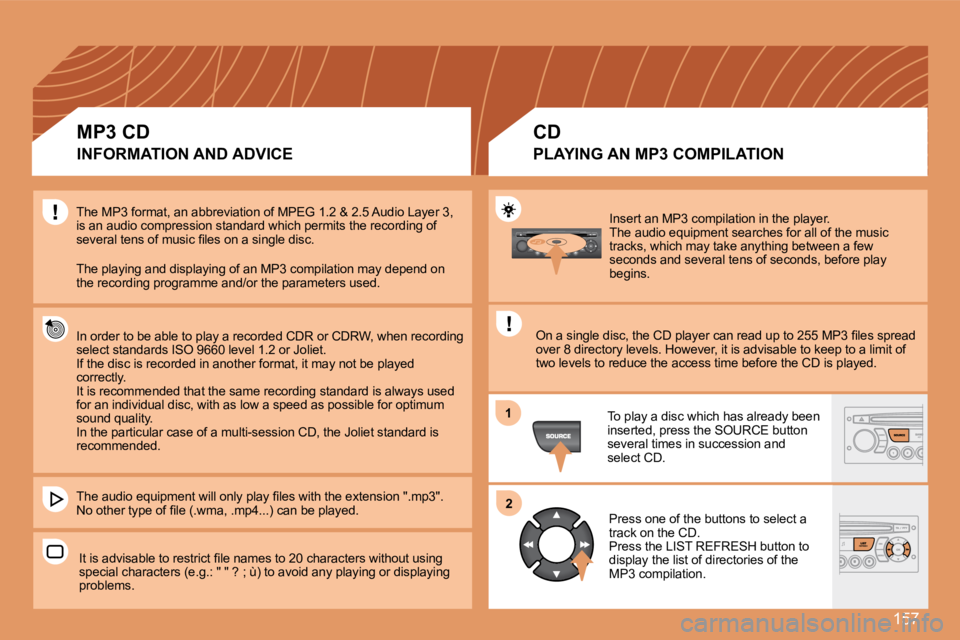
Insert an MP3 compilation in the player.
The audio equipment searches for all of the music
tracks, which may take anything between a few
seconds and several tens of seconds, before play
begins.
On a single disc, the CD player can read up to 255 MP3 iles spread
over 8 directory levels. However, it is advisable t o keep to a limit of
two levels to reduce the access time before the CD is played.
The MP3 format, an abbreviation of MPEG 1.2 & 2.5 A
udio Layer 3,
is an audio compression standard which permits the recording of
several tens of music iles on a single disc.
The playing and displaying of an MP3 compilation ma y depend on
the recording programme and/or the parameters used.
In order to be able to play a recorded CDR or CDRW, when recording
select standards ISO 9660 level 1.2 or Joliet.
If the disc is recorded in another format, it may n ot be played
correctly.
It is recommended that the same recording standard is always used
for an individual disc, with as low a speed as poss ible for optimum
sound quality.
In the particular case of a multi-session CD, the J oliet standard is
recommended.
The audio equipment will only play iles with the ex tension ".mp3".
No other type of ile (.wma, .mp4...) can be played.
It is advisable to restrict ile names to 20 charact ers without using
special characters (e.g.: " " ? ; ù) to avoid any p laying or displaying
problems. To play a disc which has already been
inserted, press the SOURCE button
several times in succession and
select CD.
Press one of the buttons to select a
track on the CD.
Press the LIST REFRESH button to
display the list of directories of the
MP3 compilation.
MP3 CD
INFORMATION AND ADVICE
CD
PLAYING AN MP3 COMPILATION
Page 180 of 184
158
1
2
31
2
4
1
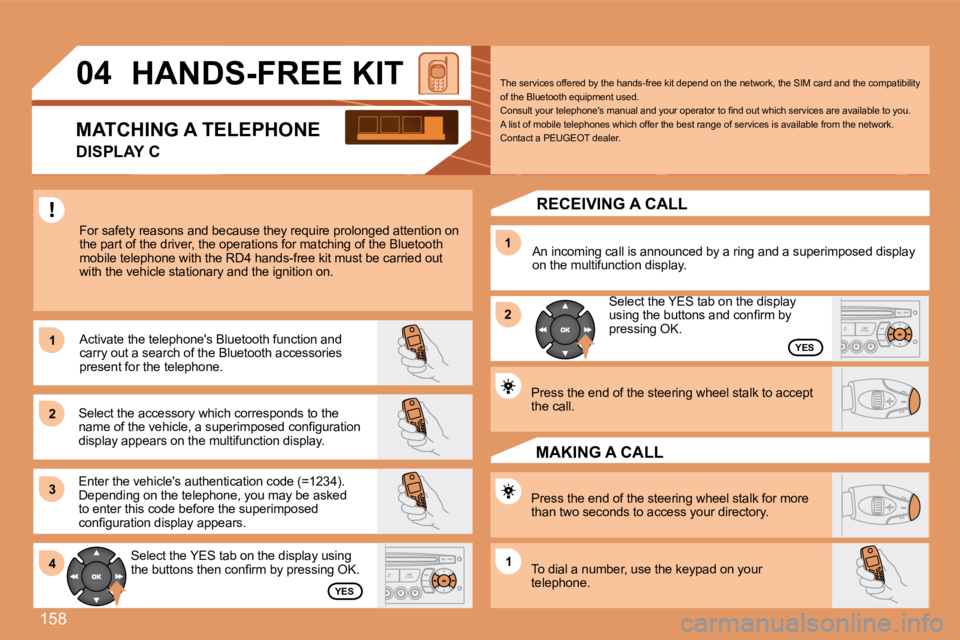
04 HANDS-FREE KIT
For safety reasons and because they require prolong ed attention on
the part of the driver, the operations for matching of the Bluetooth
mobile telephone with the RD4 hands-free kit must b e carried out
with the vehicle stationary and the ignition on.
Select the accessory which corresponds to the
name of the vehicle, a superimposed coniguration
display appears on the multifunction display. Activate the telephone's Bluetooth function and
carry out a search of the Bluetooth accessories
present for the telephone.
Select the YES tab on the display using
the buttons then conirm by pressing OK.
Enter the vehicle's authentication code (=1234).
Depending on the telephone, you may be asked
to enter this code before the superimposed
coniguration display appears.
YES
YES
The services offered by the hands-free kit depend o
n the network, the SIM card and the compatibility
of the Bluetooth equipment used.
Consult your telephone's manual and your operator t o ind out which services are available to you.
A list of mobile telephones which offer the best ra nge of services is available from the network.
Contact a PEUGEOT dealer.
RECEIVING A CALL
An incoming call is announced by a ring and a super imposed display
on the multifunction display.
Select the YES tab on the display
using the buttons and conirm by
pressing OK.
Press the end of the steering wheel stalk to accept
the call.
Press the end of the steering wheel stalk for more
than two seconds to access your directory.
To dial a number, use the keypad on your
telephone. MAKING A CALL
MATCHING A TELEPHONE
DISPLAY C
Page 182 of 184
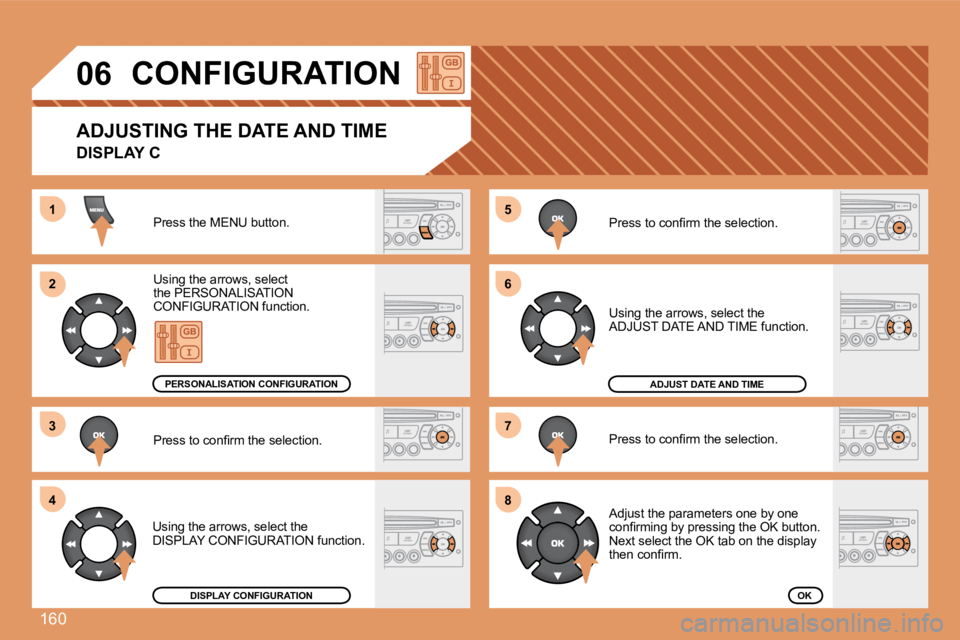
160
5
6
7
81
2
3
4
06CONFIGURATION
Press the MENU button.
Using the arrows, select
the PERSONALISATION
CONFIGURATION function.
Press to conirm the selection.
Using the arrows, select the
DISPLAY CONFIGURATION function. Press to conirm the selection.
Press to conirm the selection.
Using the arrows, select the
ADJUST DATE AND TIME function.
Adjust the parameters one by one
conirming by pressing the OK button.
Next select the OK tab on the display
then conirm.
DISPLAY CONFIGURATION
ADJUST DATE AND TIME
OK
PERSONALISATION CONFIGURATION
ADJUSTING THE DATE AND TIME
DISPLAY C
Page 183 of 184
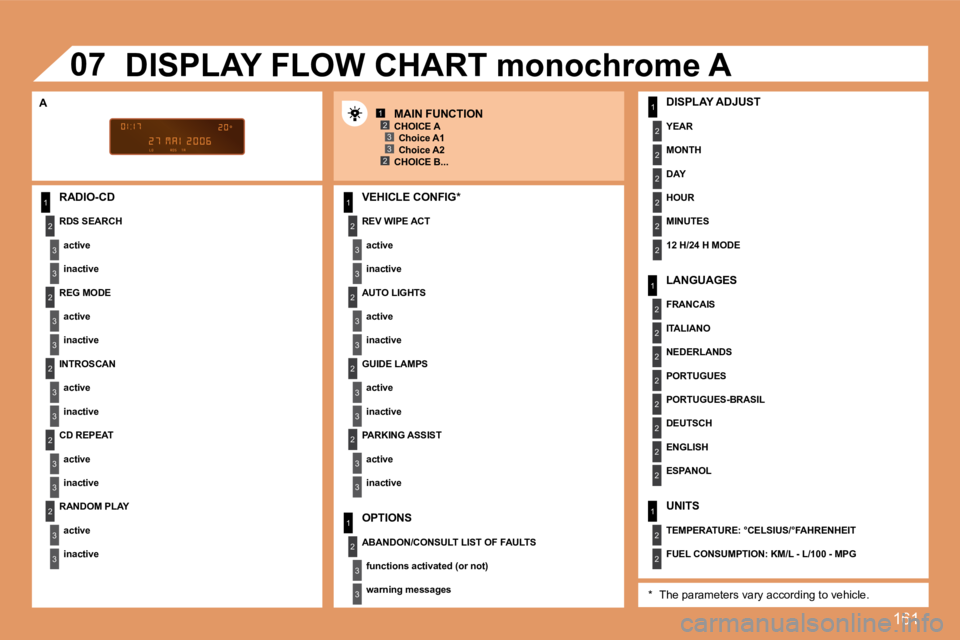
161
1
2
3
3
2
3
3
2
3
3
2
3
3
2
3
3
1
2
3
3
2
3
3
1
2
3
3
1
2
2
2
2
2
2
1
2
2
2
2
2
2
2
2
1
2
2
123
23
2
3
3
2
3
3
07
RADIO-CD REV WIPE ACTactive
inactive
UNITS
TEMPERATURE: °CELSIUS/°FAHRENHEIT
FUEL CONSUMPTION: KM/L - L/100 - MPG
ABANDON/CONSULT LIST OF FAULTS
functions activated (or not)
warning messages LANGUAGES
FRANCAIS
ITALIANO
NEDERLANDS
PORTUGUES
PORTUGUES-BRASIL
DEUTSCH
ENGLISH
ESPANOL DISPLAY ADJUST
YEAR
MONTH
DAY
HOUR
MINUTES
12 H/24 H MODE
DISPLAY FLOW CHART monochrome A
MAIN FUNCTION
A
* The parameters vary according to vehicle.
REG MODE
active
inactive
RDS SEARCH
active
inactive CHOICE A
Choice A1
Choice A2
CHOICE B...
INTROSCAN active
inactive
CD REPEAT
active
inactive AUTO LIGHTS
active
inactive
GUIDE LAMPS active
inactive
PARKING ASSIST
active
inactive
OPTIONS
VEHICLE CONFIG*
RANDOM PLAY active
inactive