light PEUGEOT 308 2010 User Guide
[x] Cancel search | Manufacturer: PEUGEOT, Model Year: 2010, Model line: 308, Model: PEUGEOT 308 2010Pages: 315, PDF Size: 23.05 MB
Page 25 of 315
27
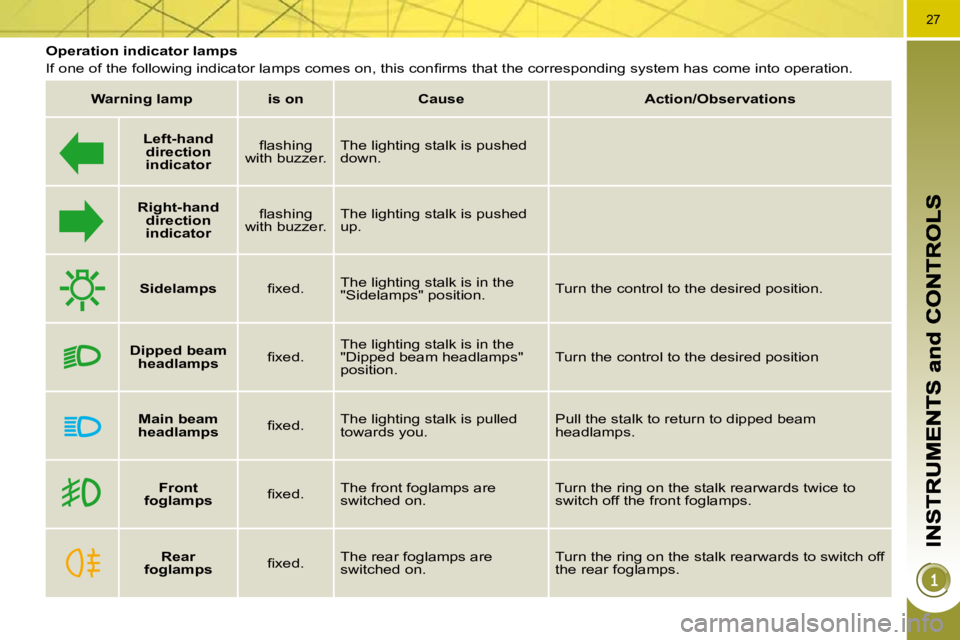
Operation indicator lamps
If one of the following indicator lamps comes on, this confi rms that the corresponding system has come into operation.
Warning lamp is on Cause Action/Observations
Left-hand
direction
indicato
r fl ashing
with buzzer. The lighting stalk is pushed
down.
Right-hand
direction
indicator fl ashing
with buzzer. The lighting stalk is pushed
up.
Sidelamps fi xed. The lighting stalk is in the
"Sidelamps" position. Turn the control to the desired position.
Dipped beam
headlamps fi xed. The lighting stalk is in the
"Dipped beam headlamps"
position. Turn the control to the desired position
Main beam
headlamps fi xed. The lighting stalk is pulled
towards you. Pull the stalk to return to dipped beam
headlamps.
Front
foglamps fi xed. The front foglamps are
switched on. Turn the ring on the stalk rearwards twice to
switch off the front foglamps.
Rear
foglamps fi xed. The rear foglamps are
switched on. Turn the ring on the stalk rearwards to switch off
the rear foglamps.
Page 32 of 315
34
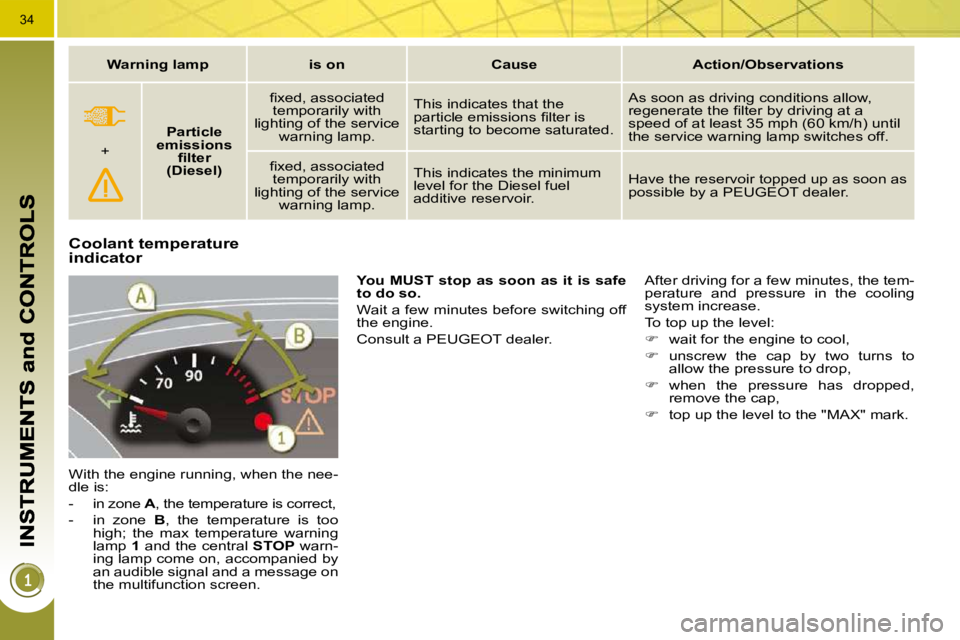
Coolant temperature indicator
With the engine running, when the nee-
dle is:
- in zone A , the temperature is correct,
- in zone B , the temperature is too
high; the max temperature warning
lamp 1 and the central STOP warn-
ing lamp come on, accompanied by
an audible signal and a message on
the multifunction screen.
You MUST stop as soon as it is safe
to do so.
Wait a few minutes before switching off
the engine.
Consult a PEUGEOT dealer. After driving for a few minutes, the tem-
perature and pressure in the cooling
system increase.
To top up the level:
wait for the engine to cool,
unscrew the cap by two turns to
allow the pressure to drop,
when the pressure has dropped,
remove the cap,
top up the level to the "MAX" mark.
Warning lamp is on Cause Action/Observations
+
Particle
emissions fi lter
(Diesel) fi xed, associated
temporarily with
lighting of the service warning lamp. This indicates that the
particle emissions fi lter is
starting to become saturated. As soon as driving conditions allow,
regenerate the fi lter by driving at a
speed of at least 35 mph (60 km/h) until
the service warning lamp switches off.
fi xed, associated temporarily with
lighting of the service warning lamp. This indicates the minimum
level for the Diesel fuel
additive reservoir.
Have the reservoir topped up as soon as
possible by a PEUGEOT dealer.
Page 33 of 315
34
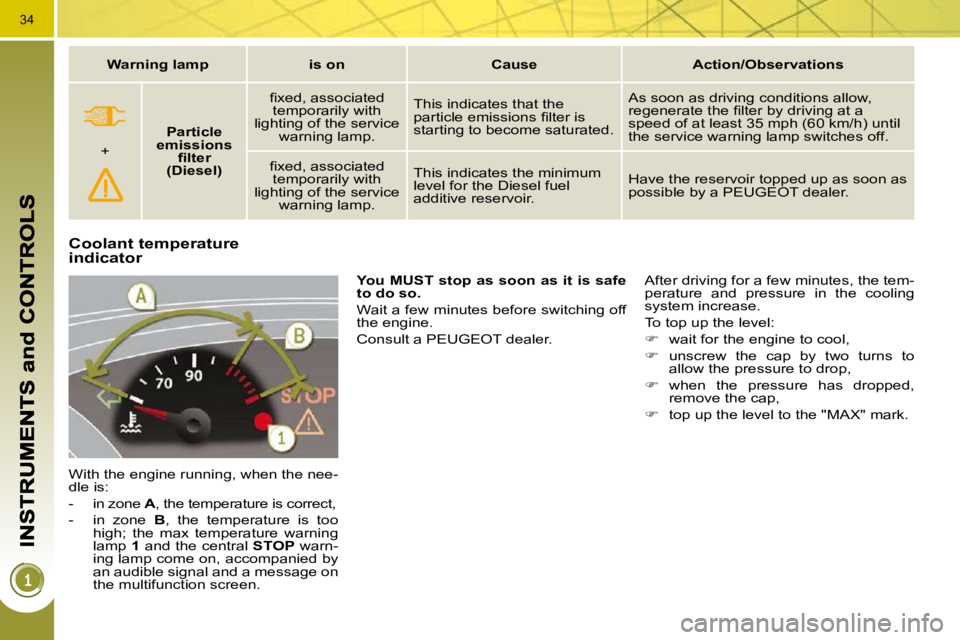
Coolant temperature indicator
With the engine running, when the nee-
dle is:
- in zone A , the temperature is correct,
- in zone B , the temperature is too
high; the max temperature warning
lamp 1 and the central STOP warn-
ing lamp come on, accompanied by
an audible signal and a message on
the multifunction screen.
You MUST stop as soon as it is safe
to do so.
Wait a few minutes before switching off
the engine.
Consult a PEUGEOT dealer. After driving for a few minutes, the tem-
perature and pressure in the cooling
system increase.
To top up the level:
wait for the engine to cool,
unscrew the cap by two turns to
allow the pressure to drop,
when the pressure has dropped,
remove the cap,
top up the level to the "MAX" mark.
Warning lamp is on Cause Action/Observations
+
Particle
emissions fi lter
(Diesel) fi xed, associated
temporarily with
lighting of the service warning lamp. This indicates that the
particle emissions fi lter is
starting to become saturated. As soon as driving conditions allow,
regenerate the fi lter by driving at a
speed of at least 35 mph (60 km/h) until
the service warning lamp switches off.
fi xed, associated temporarily with
lighting of the service warning lamp. This indicates the minimum
level for the Diesel fuel
additive reservoir.
Have the reservoir topped up as soon as
possible by a PEUGEOT dealer.
Page 37 of 315
38
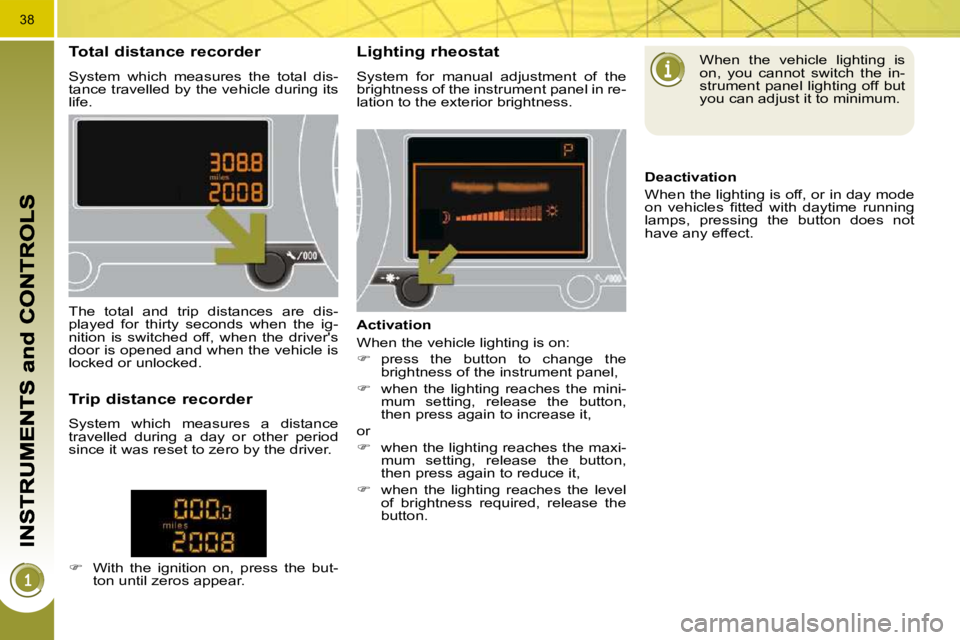
Total distance recorder
System which measures the total dis-
tance travelled by the vehicle during its
life.
Lighting rheostat
System for manual adjustment of the
brightness of the instrument panel in re-
lation to the exterior brightness.
The total and trip distances are dis-
played for thirty seconds when the ig-
nition is switched off, when the driver's
door is opened and when the vehicle is
locked or unlocked.
Trip distance recorder
System which measures a distance
travelled during a day or other period
since it was reset to zero by the driver.
With the ignition on, press the but-
ton until zeros appear. Activation
When the vehicle lighting is on:
press the button to change the
brightness of the instrument panel,
when the lighting reaches the mini-
mum setting, release the button,
then press again to increase it,
or
when the lighting reaches the maxi-
mum setting, release the button,
then press again to reduce it,
when the lighting reaches the level
of brightness required, release the
button. When the vehicle lighting is
on, you cannot switch the in-
strument panel lighting off but
you can adjust it to minimum.
Deactivation
When the lighting is off, or in day mode
on vehicles fi tted with daytime running
lamps, pressing the button does not
have any effect.
Page 39 of 315
40
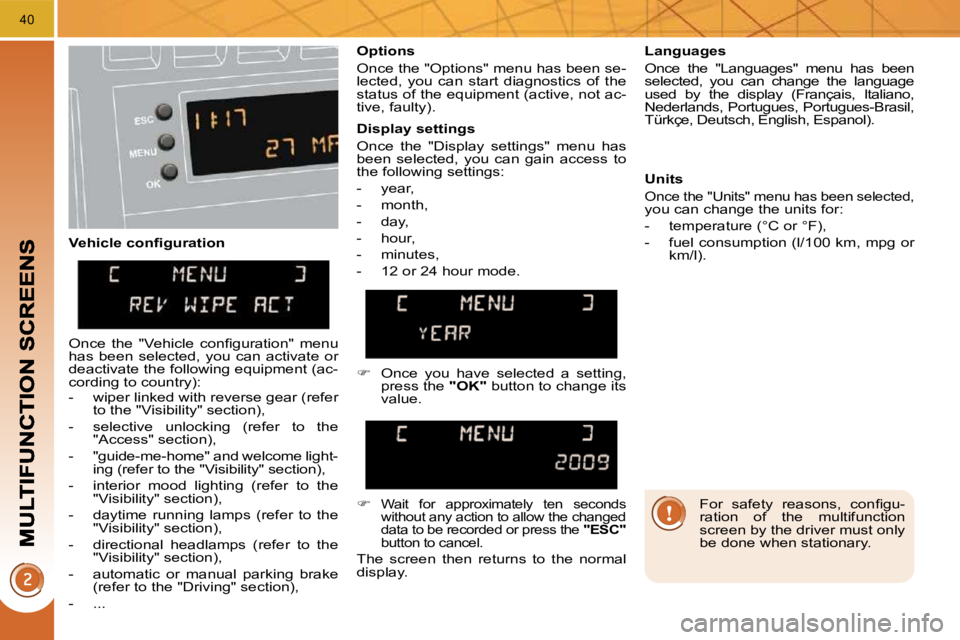
Vehicle confi guration Options
Once the "Options" menu has been se-
lected, you can start diagnostics of the
status of the equipment (active, not ac-
tive, faulty).
Languages
Once the "Languages" menu has been
selected, you can change the language
used by the display (Français, Italiano,
Nederlands, Portugues, Portugues-Brasil,
Türkçe, Deutsch, English, Espanol).
Display settings
Once the "Display settings" menu has
been selected, you can gain access to
the following settings:
- year,
- month,
- day,
- hour,
- minutes,
- 12 or 24 hour mode. Units
Once the "Units" menu has been selected,
you can change the units for:
- temperature (°C or °F),
- fuel consumption (l/100 km, mpg or km/l).
Once you have selected a setting,
press the "OK" button to change its
value.
Wait for approximately ten seconds
without any action to allow the changed
data to be recorded or press the "ESC"
button to cancel.
The screen then returns to the normal
display.
Once the "Vehicle confi guration" menu
has been selected, you can activate or
deactivate the following equipment (ac-
cording to country):
- wiper linked with reverse gear (refer to the "Visibility" section),
- selective unlocking (refer to the "Access" section),
- "guide-me-home" and welcome light- ing (refer to the "Visibility" section),
- interior mood lighting (refer to the "Visibility" section),
- daytime running lamps (refer to the "Visibility" section),
- directional headlamps (refer to the "Visibility" section),
- automatic or manual parking brake (refer to the "Driving" section),
- ... For safety reasons, confi gu-
ration of the multifunction
screen by the driver must only
be done when stationary.
Page 41 of 315
42
For safety reasons, confi gu-
ration of the multifunction
screen by the driver must only
be done when stationary.
Display settings
Once the "Display settings" menu has
been selected, you can gain access to
the following settings:
- year,
- month,
- day,
- hour,
- minutes,
- 12 or 24 hour mode.
Languages
Once the "Languages" menu has been
selected, you can change the language
used by the display (Français, Italiano,
Nederlands, Portugues, Portugues-Brasil,
Türkçe, Deutsch, English, Espanol).
Units
Once the "Units" menu has been se-
lected, you can change the units of the
following parameters:
- temperature (°C or °F),
- fuel consumption (l/100 km, mpg or
km/l).
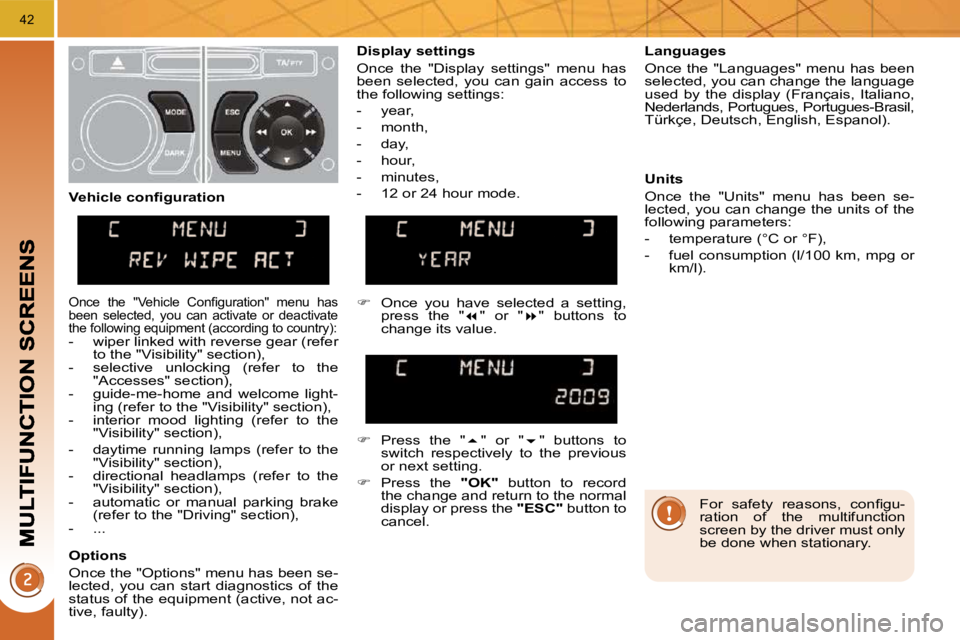
Once you have selected a setting,
press the " " or " " buttons to
change its value.
Press the " " or " " buttons to
switch respectively to the previous
or next setting.
Press the "OK" button to record
the change and return to the normal
display or press the "ESC" button to
cancel.
Vehicle confi guration
Once the "Vehicle Confi guration" menu has
been selected, you can activate or deactivate
the following equipment (according to country):
- wiper linked with reverse gear (refer
to the "Visibility" section),
- selective unlocking (refer to the "Accesses" section),
- guide-me-home and welcome light- ing (refer to the "Visibility" section),
- interior mood lighting (refer to the "Visibility" section),
- daytime running lamps (refer to the "Visibility" section),
- directional headlamps (refer to the "Visibility" section),
- automatic or manual parking brake (refer to the "Driving" section),
- ...
Options
Once the "Options" menu has been se-
lected, you can start diagnostics of the
status of the equipment (active, not ac-
tive, faulty).
Page 42 of 315
43
MONOCHROME SCREEN C (WITH PEUGEOT CONNECT SOUND) Main menu
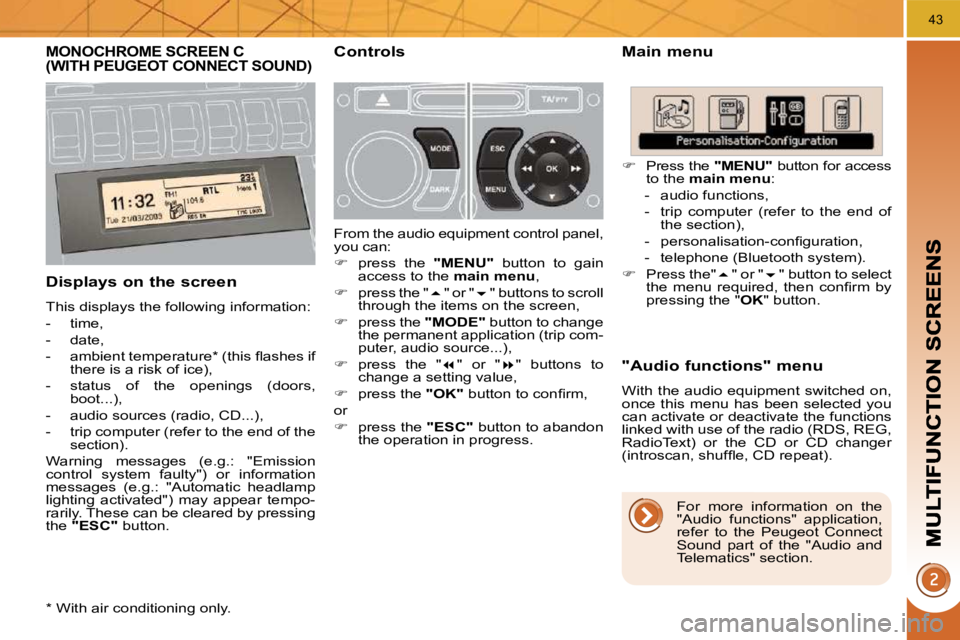
Displays on the screen
This displays the following information:
- time,
- date,
- ambient temperature * (this fl ashes if there is a risk of ice),
- status of the openings (doors, boot...),
- audio sources (radio, CD...),
- trip computer (refer to the end of the section).
Warning messages (e.g.: "Emission
control system faulty") or information
messages (e.g.: "Automatic headlamp
lighting activated") may appear tempo-
rarily. These can be cleared by pressing
the "
ESC " button.
"Audio functions" menu
With the audio equipment switched on,
once this menu has been selected you
can activate or deactivate the functions
linked with use of the radio (RDS, REG,
RadioText) or the CD or CD changer
(introscan, shuffl e, CD repeat).
Controls
From the audio equipment control panel,
you can:
press the " MENU
" button to gain
access to the main
menu ,
press the " " or " " buttons to scroll
through the items on the screen,
press the "
MODE
" button to change
the permanent application (trip com-
puter, audio source...),
press the " " or " " buttons to
change a setting value,
press the "
OK " button to confi rm,
or
press the "
ESC " button to abandon
the operation in progress.
Press the "MENU" button for access
to the main
menu :
- audio functions,
- trip computer (refer to the end of the section),
- personalisation-confi guration,
- telephone (Bluetooth system).
Press the" " or " " button to select
the menu required, then confi rm by
pressing the " OK " button.
* With air conditioning only. For more information on the
"Audio functions" application,
refer to the Peugeot Connect
Sound part of the "Audio and
Telematics" section.
Page 43 of 315
44
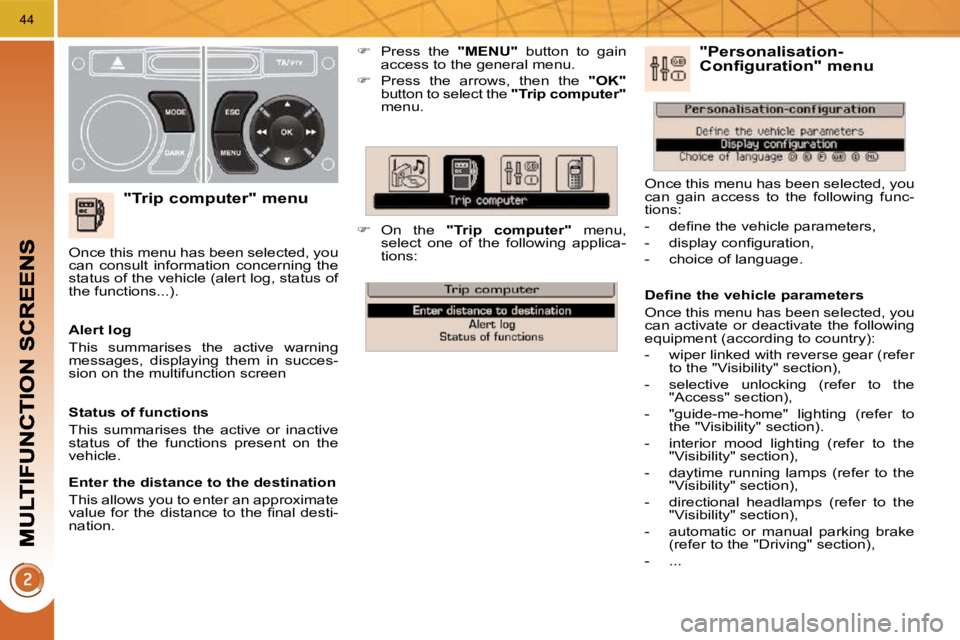
"Trip computer" menu
Press the "MENU" button to gain
access to the general menu.
Press the arrows, then the "OK"
button to select the "Trip computer"
menu.
On the "Trip computer" menu,
select one of the following applica-
tions:
Alert log
This summarises the active warning
messages, displaying them in succes-
sion on the multifunction screen
Once this menu has been selected, you
can consult information concerning the
status of the vehicle (alert log, status of
the functions...).
Defi ne the vehicle parameters
Once this menu has been selected, you
can activate or deactivate the following
equipment (according to country):
- wiper linked with reverse gear (refer
to the "Visibility" section),
- selective unlocking (refer to the "Access" section),
- "guide-me-home" lighting (refer to the "Visibility" section).
- interior mood lighting (refer to the "Visibility" section),
- daytime running lamps (refer to the "Visibility" section),
- directional headlamps (refer to the "Visibility" section),
- automatic or manual parking brake (refer to the "Driving" section),
- ... "Personalisation-Configuration" menu
Once this menu has been selected, you
can gain access to the following func-
tions:
- defi ne the vehicle parameters,
- display confi guration,
- choice of language.
Status of functions
This summarises the active or inactive
status of the functions present on the
vehicle.
Enter the distance to the destination
This allows you to enter an approximate
value for the distance to the fi nal desti-
nation.
Page 44 of 315
45
Display confi guration
Once this menu has been selected, you
can gain access to the following set-
tings:
- brightness-video setting,
- date and time setting,
- selection of the units.
Choice of language
Once this menu has been selected,
you can change the screen display
language (Deutsch, English, Espanol,
Français, Italiano, Nederlands, Portugues,
Portugues-Brasil, Türkçe * ).
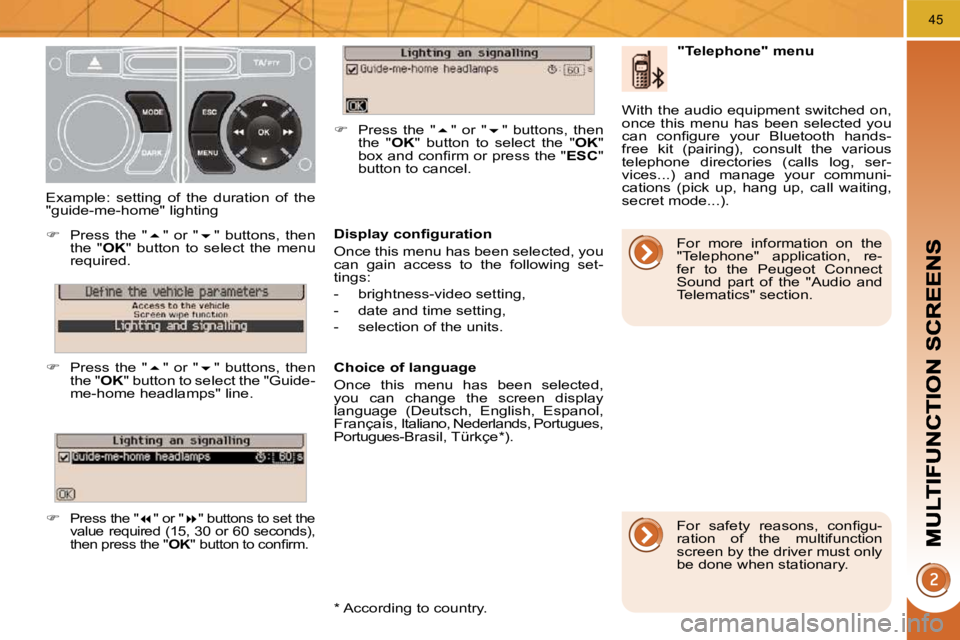
Example: setting of the duration of the
"guide-me-home" lighting
Press the " " or " " buttons, then
the " OK " button to select the menu
required.
Press the " " or " " buttons, then
the " OK " button to select the "Guide-
me-home headlamps" line.
Press the " " or " " buttons to set the
value required (15, 30 or 60 seconds),
then press the
"
OK " button to confi rm.
Press the " " or " " buttons, then
the " OK " button to select the " OK "
box and confi rm or press the " ESC "
button to cancel.
"Telephone" menu
With the audio equipment switched on,
once this menu has been selected you
can confi gure your Bluetooth hands-
free kit (pairing), consult the various
telephone directories (calls log, ser-
vices...) and manage your communi-
cations (pick up, hang up, call waiting,
secret mode...).
* According to country. For safety reasons, confi gu-
ration of the multifunction
screen by the driver must only
be done when stationary.
For more information on the
"Telephone" application, re-
fer to the Peugeot Connect
Sound part of the "Audio and
Telematics" section.
Page 46 of 315
47
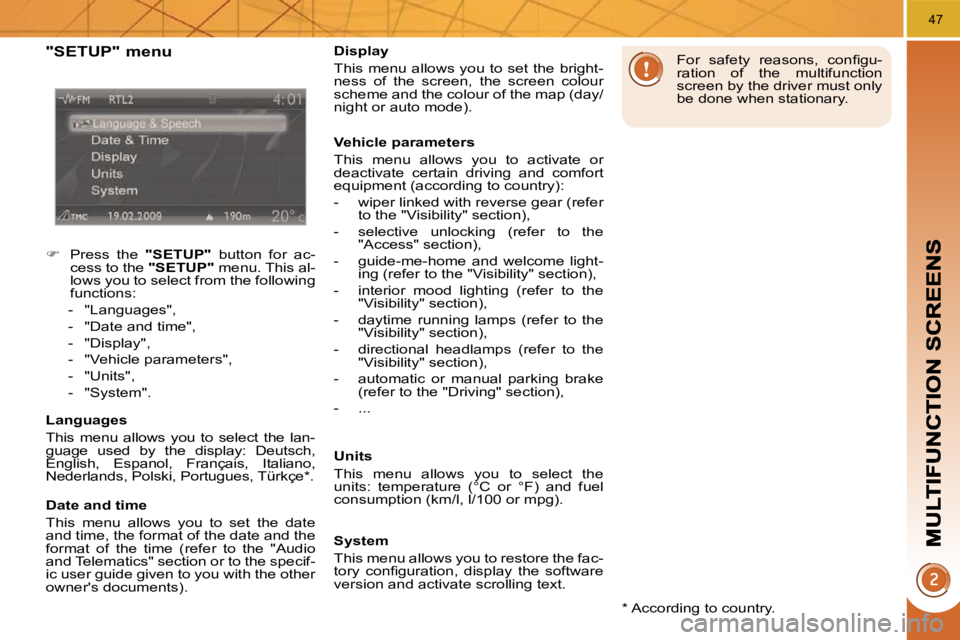
"SETUP" menu
Press the "SETUP" button for ac-
cess to the "SETUP" menu. This al-
lows you to select from the following
functions:
- "Languages",
- "Date and time",
- "Display",
- "Vehicle parameters",
- "Units",
- "System".
Languages
This menu allows you to select the lan-
guage used by the display: Deutsch,
English, Espanol, Français, Italiano,
Nederlands, Polski, Portugues, Türkçe * .
Date and time
This menu allows you to set the date
and time, the format of the date and the
format of the time (refer to the "Audio
and Telematics" section or to the specif-
ic user guide given to you with the other
owner's documents). * According to country.
Display
This menu allows you to set the bright-
ness of the screen, the screen colour
scheme and the colour of the map (day/
night or auto mode).
Vehicle parameters
This menu allows you to activate or
deactivate certain driving and comfort
equipment (according to country):
- wiper linked with reverse gear (refer
to the "Visibility" section),
- selective unlocking (refer to the "Access" section),
- guide-me-home and welcome light- ing (refer to the "Visibility" section),
- interior mood lighting (refer to the "Visibility" section),
- daytime running lamps (refer to the "Visibility" section),
- directional headlamps (refer to the "Visibility" section),
- automatic or manual parking brake (refer to the "Driving" section),
- ...
Units
This menu allows you to select the
units: temperature (°C or °F) and fuel
consumption (km/l, l/100 or mpg). For safety reasons, confi gu-
ration of the multifunction
screen by the driver must only
be done when stationary.
System
This menu allows you to restore the fac-
tory confi guration, display the software
version and activate scrolling text.