lock PEUGEOT 308 2010 Service Manual
[x] Cancel search | Manufacturer: PEUGEOT, Model Year: 2010, Model line: 308, Model: PEUGEOT 308 2010Pages: 315, PDF Size: 23.05 MB
Page 146 of 315
126
The driver must ensure that
passengers use the seat belts
correctly and that they are all
restrained securely before setting off.
Wherever you are seated in the
vehicle, always fasten your seat belt,
even for short journeys.
Do not invert the seat belt buckles as
they will not fulfi l their role fully.
The seat belts are fi tted with an in-
ertia reel permitting automatic adjust-
ment of the length of the strap to your
size. The seat belt is stored automat-
ically when not in use.
Before and after use, ensure that the
seat belt is reeled in correctly.
The lower part of the strap must be
positioned as low as possible on the
pelvis.
The upper part must be positioned in
the hollow of the shoulder.
The inertia reels are fi tted with an au-
tomatic locking device which comes
into operation in the event of a colli-
sion, emergency braking or if the ve-
hicle rolls over. You can release the
device by pulling fi rmly on the strap
and releasing it so that it re-winds
slightly. In order to be effective, a seat belt
must:
- be tightened as close to the body
as possible,
- be pulled in front of you with a smooth movement, checking that
it does not twist,
-
be used to restrain only one person,
-
not bear any trace of cuts or fraying,
- not be converted or modifi ed to avoid affecting its performance.
In accordance with current safety
regulations, all repairs and checks
must be carried out by a PEUGEOT
dealer who guarantees that the work
is carried out correctly.
Have your seat belts checked regu-
larly by a PEUGEOT dealer and par-
ticularly if the straps show signs of
damage.
Clean the seat belt straps with soapy
water or a textile cleaning product,
sold by PEUGEOT dealers.
After folding or moving a seat or rear
bench seat, ensure that the seat belt
is positioned and reeled in correctly. Recommendations for children
Use a suitable child seat if the pas-
senger is less than 12 years old or
shorter than one and a half metres.
Never use the same seat belt to se-
cure more than one person.
Never allow a child to travel on your lap.
In the event of an impact
Depending on the nature and se-
riousness of the impacts , the pre-
tensioning device may be triggered
before and independently of the air-
bags. Triggering of the pre-tensioners
is accompanied by a slight discharge
of harmless smoke and a noise, due
to the activation of the pyrotechnic
cartridge incorporated in the system.
In all cases, the airbag warning lamp
comes on.
Following an impact, have the seat
belts system checked, and if neces-
sary replaced, by a PEUGEOT dealer.
Page 156 of 315
135
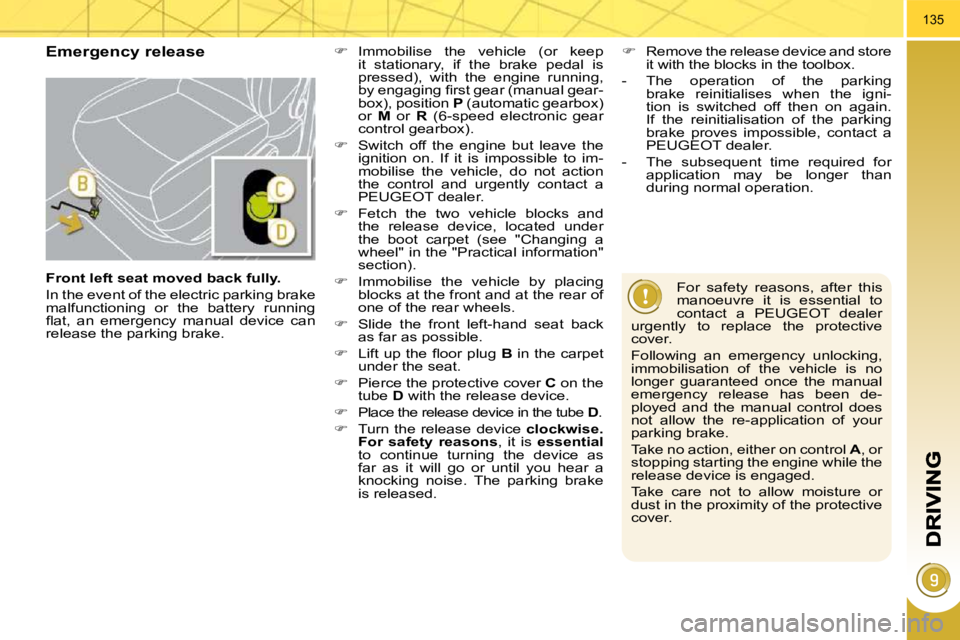
Emergency release
For safety reasons, after this
manoeuvre it is essential to
contact a PEUGEOT dealer
urgently to replace the protective
cover.
Following an emergency unlocking,
immobilisation of the vehicle is no
longer guaranteed once the manual
emergency release has been de-
ployed and the manual control does
not allow the re-application of your
parking brake.
Take no action, either on control A , or
stopping starting the engine while the
release device is engaged.
Take care not to allow moisture or
dust in the proximity of the protective
cover.
Immobilise the vehicle (or keep
it stationary, if the brake pedal is
pressed), with the engine running,
by engaging fi rst gear (manual gear-
box), position P (automatic gearbox)
or M or R (6-speed electronic gear
control gearbox).
Switch off the engine but leave the
ignition on. If it is impossible to im-
mobilise the vehicle, do not action
the control and urgently contact a
PEUGEOT dealer.
Fetch the two vehicle blocks and
the release device, located under
the boot carpet (see "Changing a
wheel" in the "Practical information"
section).
Immobilise the vehicle by placing
blocks at the front and at the rear of
one of the rear wheels.
Slide the front left-hand seat back
as far as possible.
Lift up the fl oor plug B in the carpet
under the seat.
Pierce the protective cover C on the
tube D with the release device.
Place the release device in the tube D .
Turn the release device clockwise.
For safety reasons , it is essential
to continue turning the device as
far as it will go or until you hear a
knocking noise. The parking brake
is released.
Remove the release device and store
it with the blocks in the toolbox.
- The operation of the parking brake reinitialises when the igni-
tion is switched off then on again.
If the reinitialisation of the parking
brake proves impossible, contact a
PEUGEOT dealer.
- The subsequent time required for application may be longer than
during normal operation.
Front left seat moved back fully.
In the event of the electric parking brake
malfunctioning or the battery running
fl at, an emergency manual device can
release the parking brake.
Page 161 of 315
135
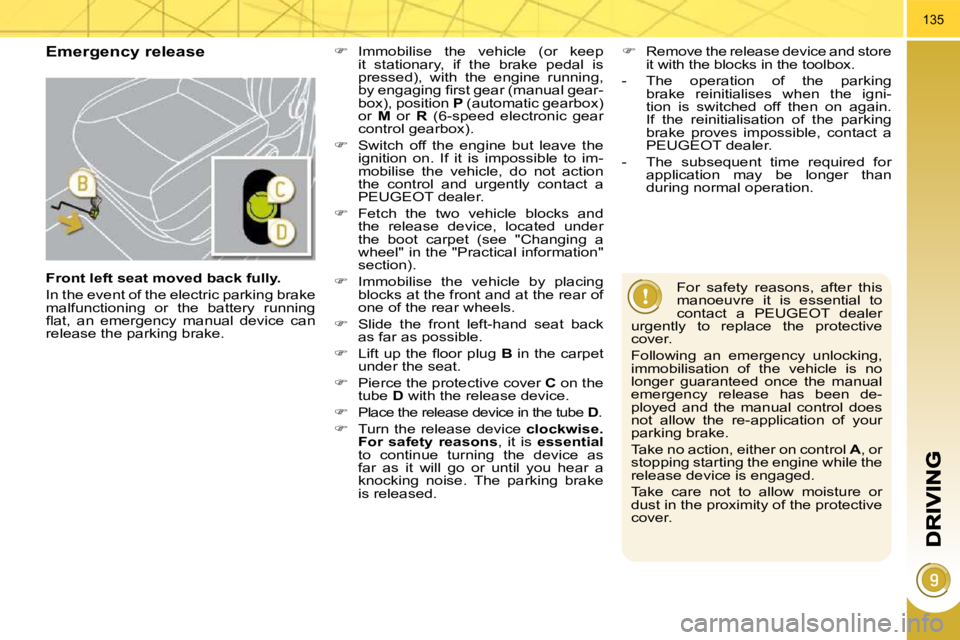
Emergency release
For safety reasons, after this
manoeuvre it is essential to
contact a PEUGEOT dealer
urgently to replace the protective
cover.
Following an emergency unlocking,
immobilisation of the vehicle is no
longer guaranteed once the manual
emergency release has been de-
ployed and the manual control does
not allow the re-application of your
parking brake.
Take no action, either on control A , or
stopping starting the engine while the
release device is engaged.
Take care not to allow moisture or
dust in the proximity of the protective
cover.
Immobilise the vehicle (or keep
it stationary, if the brake pedal is
pressed), with the engine running,
by engaging fi rst gear (manual gear-
box), position P (automatic gearbox)
or M or R (6-speed electronic gear
control gearbox).
Switch off the engine but leave the
ignition on. If it is impossible to im-
mobilise the vehicle, do not action
the control and urgently contact a
PEUGEOT dealer.
Fetch the two vehicle blocks and
the release device, located under
the boot carpet (see "Changing a
wheel" in the "Practical information"
section).
Immobilise the vehicle by placing
blocks at the front and at the rear of
one of the rear wheels.
Slide the front left-hand seat back
as far as possible.
Lift up the fl oor plug B in the carpet
under the seat.
Pierce the protective cover C on the
tube D with the release device.
Place the release device in the tube D .
Turn the release device clockwise.
For safety reasons , it is essential
to continue turning the device as
far as it will go or until you hear a
knocking noise. The parking brake
is released.
Remove the release device and store
it with the blocks in the toolbox.
- The operation of the parking brake reinitialises when the igni-
tion is switched off then on again.
If the reinitialisation of the parking
brake proves impossible, contact a
PEUGEOT dealer.
- The subsequent time required for application may be longer than
during normal operation.
Front left seat moved back fully.
In the event of the electric parking brake
malfunctioning or the battery running
fl at, an emergency manual device can
release the parking brake.
Page 164 of 315
140
In certain extreme weather
conditions (rain and/or snow,
bright sunshine, ...) the head-
up display may not be legible or may
suffer temporary interference.
Certain glasses (sunglasses, specta-
cles or polarised lenses) may hamper
reading of the information.
To clean the transparent strip, which
is made of organic glass, use a clean,
soft cloth (such as a spectacles cloth
or microfi bre cloth). Do not use a dry
or abrasive cloth or detergent or sol-
vent products as these could scratch
the strip or damage the anti-refl ec-
tion coating. We recommend that adjust-
ments are only made using
these buttons when the vehi-
cle is stationary.
When stationary or while driving, no
objects should be placed around the
transparent strip (or on its cover) to
avoid blocking the strip output and
preventing its correct operation.
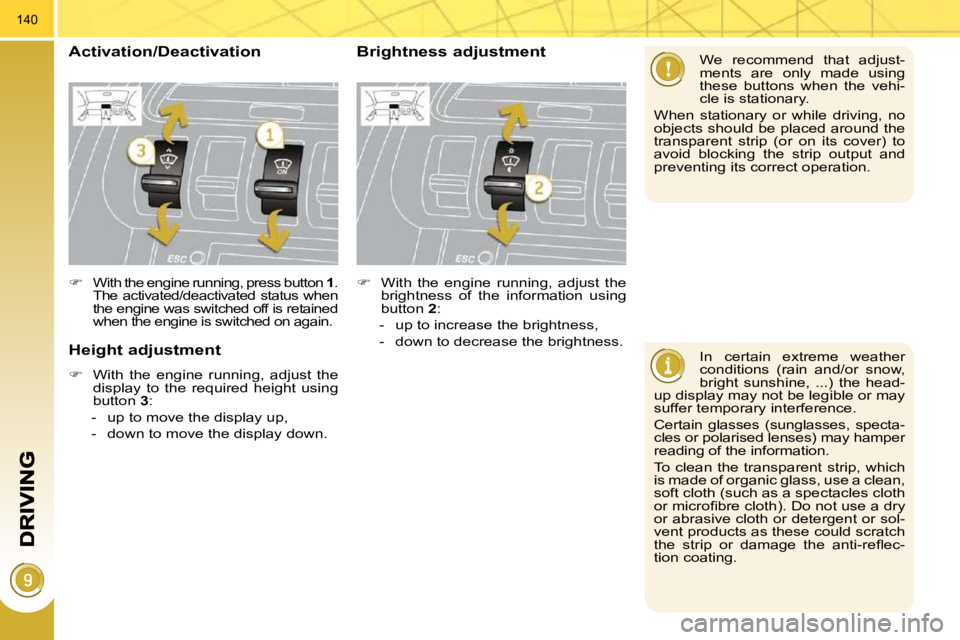
With the engine running, press button 1 .
The activated/deactivated status when
the engine was switched off is retained
when the engine is switched on again.
Height adjustment
With the engine running, adjust the
display to the required height using
button 3 :
- up to move the display up,
- down to move the display down.
Activation/Deactivation Brightness adjustment
With the engine running, adjust the
brightness of the information using
button 2 :
- up to increase the brightness,
- down to decrease the brightness.
Page 178 of 315
154
Stopping the vehicle
Before switching off the engine, you
can engage position P or N to place the
gearbox in neutral.
In both cases, apply the parking brake
to immobilise the vehicle, unless it is
programmed to automatic mode.
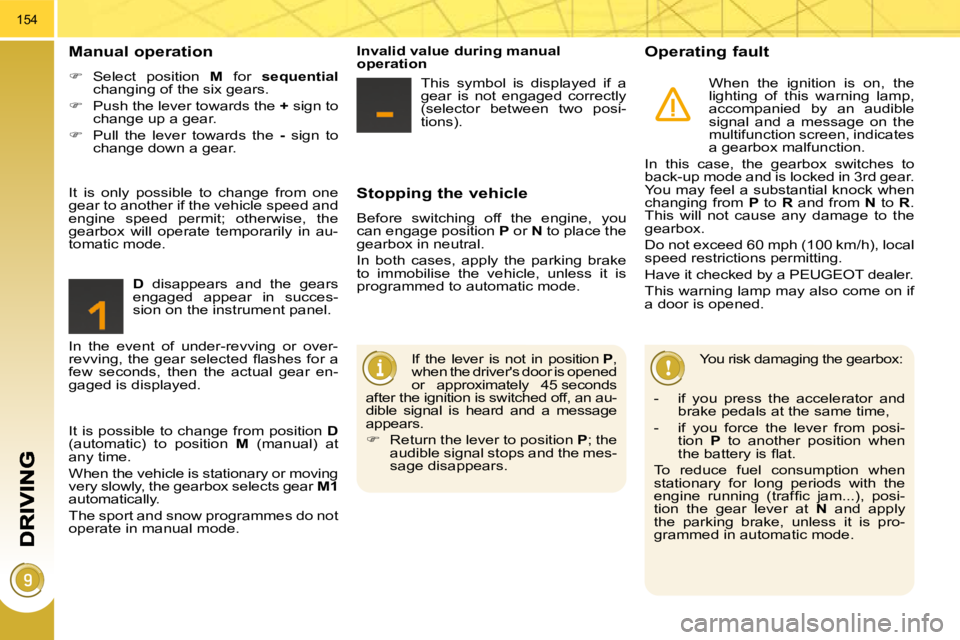
Operating fault
When the ignition is on, the
lighting of this warning lamp,
accompanied by an audible
signal and a message on the
multifunction screen, indicates
a gearbox malfunction.
In this case, the gearbox switches to
back-up mode and is locked in 3rd gear.
You may feel a substantial knock when
changing from P to R and from N to R .
This will not cause any damage to the
gearbox.
Do not exceed 60 mph (100 km/h), local
speed restrictions permitting.
Have it checked by a PEUGEOT dealer.
This warning lamp may also come on if
a door is opened.
You risk damaging the gearbox:
- if you press the accelerator and brake pedals at the same time,
- if you force the lever from posi- tion P to another position when
the battery is fl at.
To reduce fuel consumption when
stationary for long periods with the
engine running (traffi c jam...), posi-
tion the gear lever at N and apply
the parking brake, unless it is pro-
grammed in automatic mode.
Manual operation
Select position M for sequential
changing of the six gears.
Push the lever towards the + sign to
change up a gear.
Pull the lever towards the - sign to
change down a gear.
D disappears and the gears
engaged appear in succes-
sion on the instrument panel.
If the lever is not in position P ,
when the driver's door is opened
or approximately 45 seconds
after the ignition is switched off, an au-
dible signal is heard and a message
appears.
Return the lever to position P ; the
audible signal stops and the mes-
sage disappears.
It is only possible to change from one
gear to another if the vehicle speed and
engine speed permit; otherwise, the
gearbox will operate temporarily in au-
tomatic mode.
Invalid value during manual
operation
This symbol is displayed if a
gear is not engaged correctly
(selector between two posi-
tions).
It is possible to change from position D
(automatic) to position M (manual) at
any time.
When the vehicle is stationary or moving
very slowly, the gearbox selects gear M1
automatically.
The sport and snow programmes do not
operate in manual mode.
In the event of under-revving or over-
revving, the gear selected fl ashes for a
few seconds, then the actual gear en-
gaged is displayed.
Page 179 of 315
155
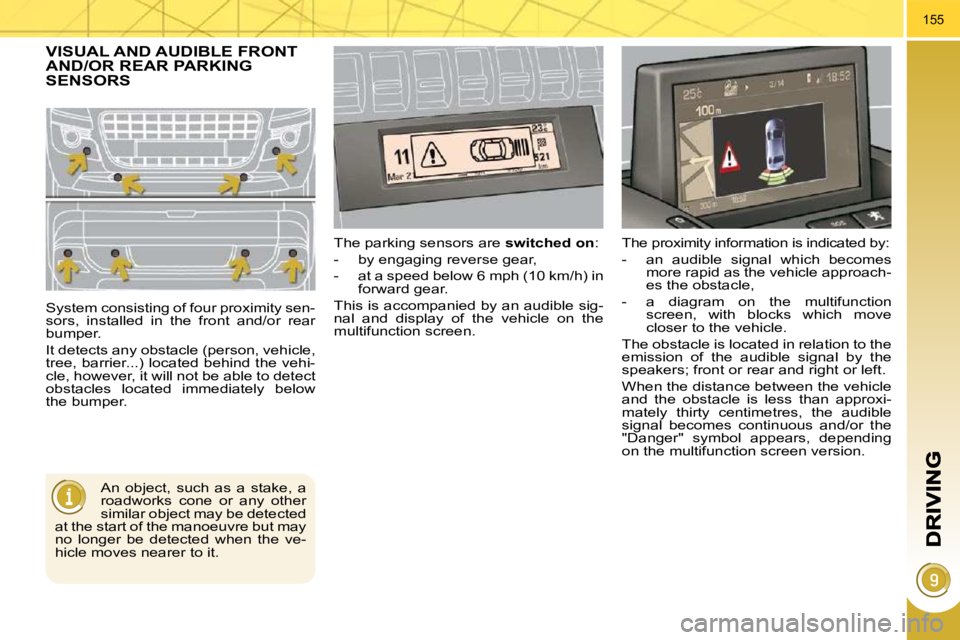
VISUAL AND AUDIBLE FRONT AND/OR REAR PARKING SENSORS
System consisting of four proximity sen-
sors, installed in the front and/or rear
bumper.
It detects any obstacle (person, vehicle,
tree, barrier...) located behind the vehi-
cle, however, it will not be able to detect
obstacles located immediately below
the bumper. The parking sensors are
switched on :
- by engaging reverse gear,
- at a speed below 6 mph (10 km/h) in forward gear.
This is accompanied by an audible sig-
nal and display of the vehicle on the
multifunction screen.
An object, such as a stake, a
roadworks cone or any other
similar object may be detected
at the start of the manoeuvre but may
no longer be detected when the ve-
hicle moves nearer to it. The proximity information is indicated by:
- an audible signal which becomes
more rapid as the vehicle approach-
es the obstacle,
- a diagram on the multifunction screen, with blocks which move
closer to the vehicle.
The obstacle is located in relation to the
emission of the audible signal by the
speakers; front or rear and right or left.
When the distance between the vehicle
and the obstacle is less than approxi-
mately thirty centimetres, the audible
signal becomes continuous and/or the
"Danger" symbol appears, depending
on the multifunction screen version.
Page 212 of 315
PRACTICAL INFORMATION
187
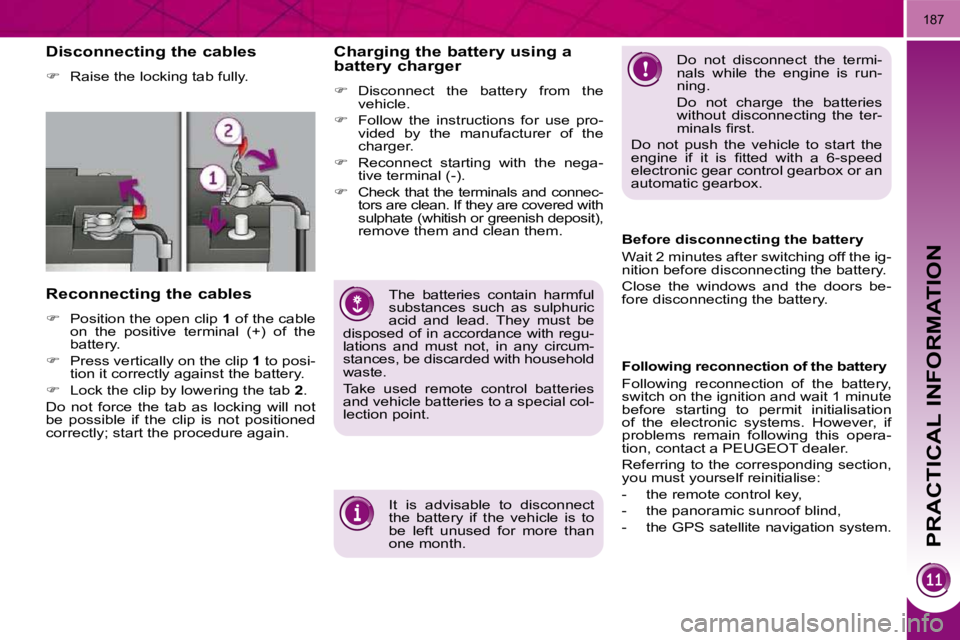
Disconnecting the cables
Raise the locking tab fully.
Reconnecting the cables
Position the open clip 1 of the cable
on the positive terminal (+) of the
battery.
Press vertically on the clip 1 to posi-
tion it correctly against the battery.
Lock the clip by lowering the tab 2 .
Do not force the tab as locking will not
be possible if the clip is not positioned
correctly; start the procedure again. Do not disconnect the termi-
nals while the engine is run-
ning.
Do not charge the batteries
without disconnecting the ter-
minals fi rst.
Do not push the vehicle to start the
engine if it is fi tted with a 6-speed
electronic gear control gearbox or an
automatic gearbox.
The batteries contain harmful
substances such as sulphuric
acid and lead. They must be
disposed of in accordance with regu-
lations and must not, in any circum-
stances, be discarded with household
waste.
Take used remote control batteries
and vehicle batteries to a special col-
lection point.
Charging the battery using a
battery charger
Disconnect the battery from the
vehicle.
Follow the instructions for use pro-
vided by the manufacturer of the
charger.
Reconnect starting with the nega-
tive terminal (-).
Check that the terminals and connec-
tors are clean. If they are covered with
sulphate (whitish or greenish deposit),
remove them and clean them.
It is advisable to disconnect
the battery if the vehicle is to
be left unused for more than
one month. Before disconnecting the battery
Wait 2 minutes after switching off the ig-
nition before disconnecting the battery.
Close the windows and the doors be-
fore disconnecting the battery.
Following reconnection of the battery
Following reconnection of the battery,
switch on the ignition and wait 1 minute
before starting to permit initialisation
of the electronic systems. However, if
problems remain following this opera-
tion, contact a PEUGEOT dealer.
Referring to the corresponding section,
you must yourself reinitialise:
- the remote control key,
- the panoramic sunroof blind,
- the GPS satellite navigation system.
Page 235 of 315
210
03
1
2
3
3
2
1
1
1
3
2
1
1
1
1
1
1
1
1
1
1
2
2
1
1
2
1
2
2
2
2
2
2
2
2
2
2
2
2
2
2
3
2
2
2
2
2
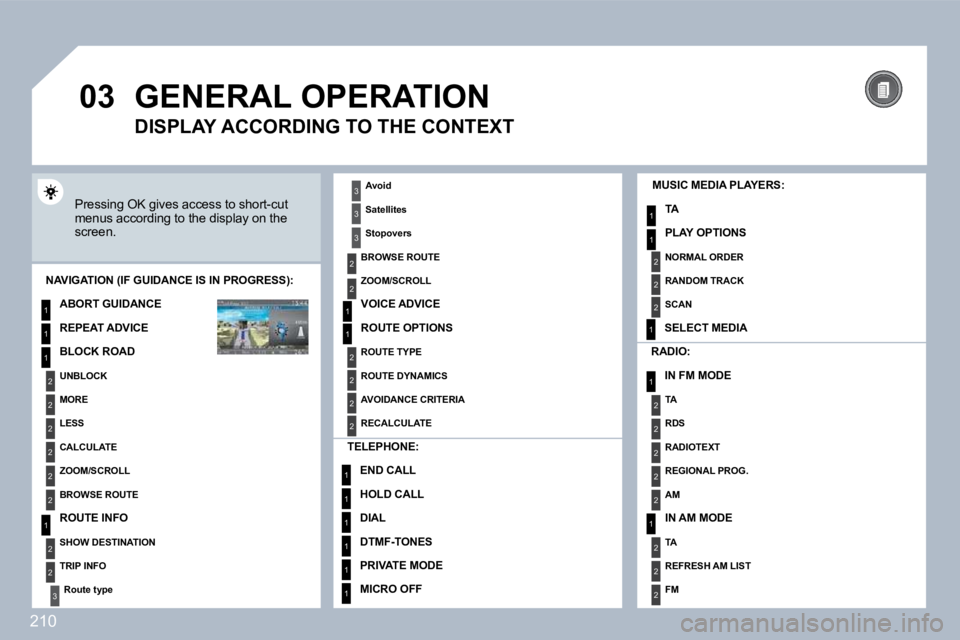
GENERAL OPERATION
Pressing OK gives access to short-cut menus according to the display on the screen.
MUSIC MEDIA PLAYERS:
TA
PLAY OPTIONS
NAVIGATION (IF GUIDANCE IS IN PROGRESS):
ABORT GUIDANCE
REPEAT ADVICE
BLOCK ROAD
UNBLOCK
MORE
LESS
CALCULATE
ZOOM/SCROLL
BROWSE ROUTE
ROUTE INFO
SHOW DESTINATION
TRIP INFO
Route type
RADIO:
IN FM MODE
TA
RDS
RADIOTEXT
REGIONAL PROG.
AM
IN AM MODE
TA
REFRESH AM LIST
FM
TELEPHONE:
END CALL
HOLD CALL
DIAL
DTMF-TONES
PRIVATE MODE
MICRO OFF
DISPLAY ACCORDING TO THE CONTEXT
Avoid
Satellites
Stopovers
BROWSE ROUTE
ZOOM/SCROLL
VOICE ADVICE
ROUTE OPTIONS
ROUTE TYPE
ROUTE DYNAMICS
AVOIDANCE CRITERIA
RECALCULATE
NORMAL ORDER
RANDOM TRACK
SCAN
SELECT MEDIA