navigation PEUGEOT 308 2010 Owners Manual
[x] Cancel search | Manufacturer: PEUGEOT, Model Year: 2010, Model line: 308, Model: PEUGEOT 308 2010Pages: 315, PDF Size: 23.05 MB
Page 5 of 315
8
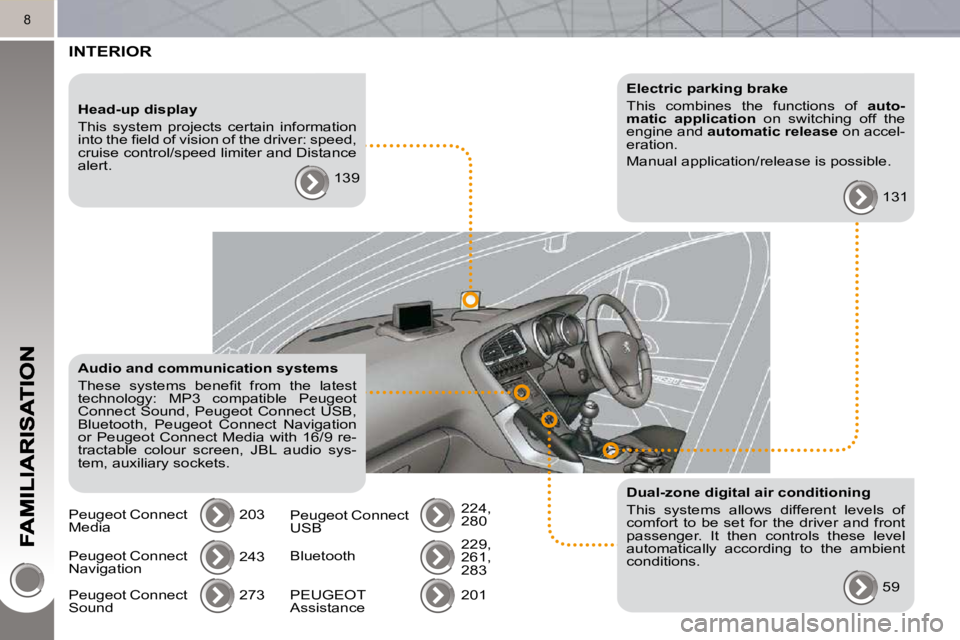
INTERIOR
Electric parking brake
This combines the functions of auto-
matic application on switching off the
engine and automatic release on accel-
eration.
Manual application/release is possible.
131
Audio and communication systems
These systems benefi t from the latest
technology: MP3 compatible Peugeot
Connect Sound, Peugeot Connect USB,
Bluetooth, Peugeot Connect Navigation
or Peugeot Connect Media with 16/9 re-
tractable colour screen, JBL audio sys-
tem, auxiliary sockets. 203
Head-up display
This system projects certain information
into the fi eld of vision of the driver: speed,
cruise control/speed limiter and Distance
alert.
139
Dual-zone digital air conditioning
This systems allows different levels of
comfort to be set for the driver and front
passenger. It then controls these level
automatically according to the ambient
conditions. 59
Peugeot Connect
Navigation
243
273
Peugeot Connect
Sound
Peugeot Connect
Media
Peugeot Connect
USB 224,
280
Bluetooth 229,
261,
283
201
PEUGEOT
Assistance
Page 22 of 315
25
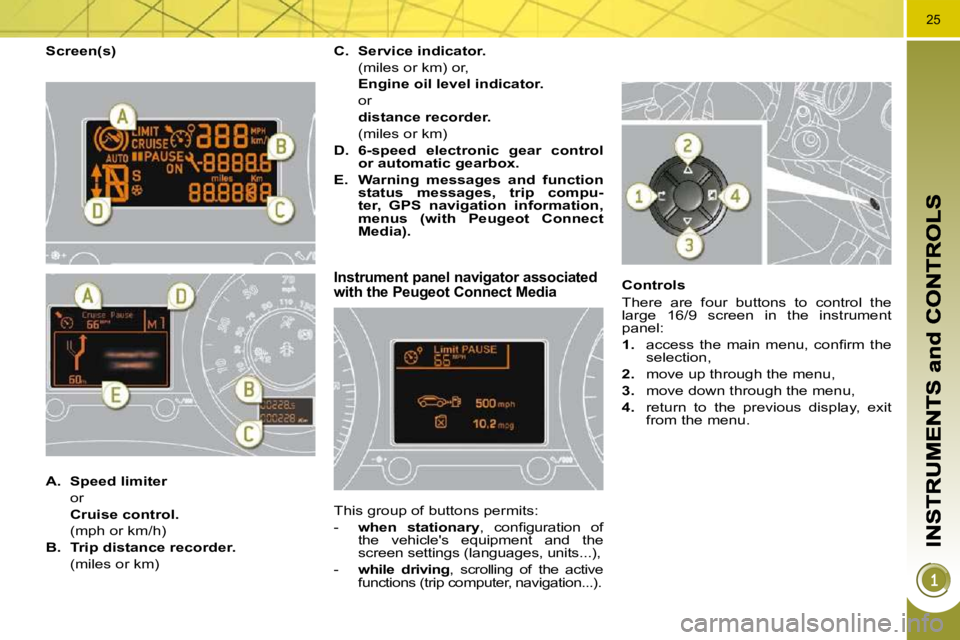
Screen(s)
Instrument panel navigator associated with the Peugeot Connect Media
This group of buttons permits:
- when stationary , confi guration of
the vehicle's equipment and the
screen settings (languages, units...),
- while driving , scrolling of the active
functions (trip computer, navigation...). Controls
There are four buttons to control the
large 16/9 screen in the instrument
panel:
1. access the main menu, confi rm the
selection,
2. move up through the menu,
3. move down through the menu,
4. return to the previous display, exit
from the menu.
A. Speed limiter
or
Cruise control.
(mph or km/h)
B. Trip distance recorder.
(miles or km)
C. Service indicator.
(miles or km) or,
Engine oil level indicator.
or
distance recorder.
(miles or km)
D. 6-speed electronic gear control
or automatic gearbox.
E. Warning messages and function
status messages, trip compu-
ter, GPS navigation information,
menus (with
Peugeot Connect
Media
).
Page 45 of 315
46
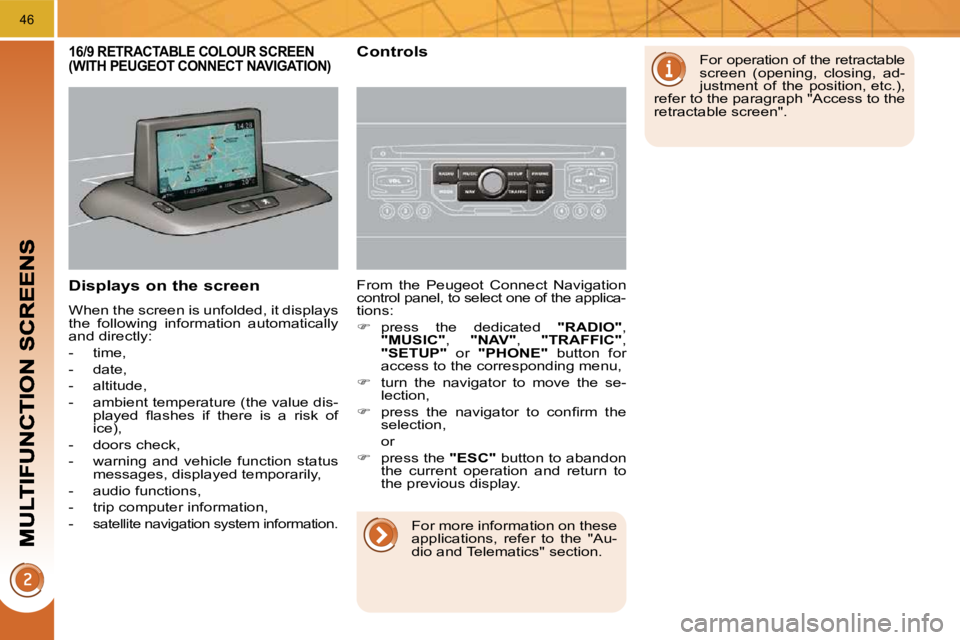
Displays on the screen
When the screen is unfolded, it displays
the following information automatically
and directly:
- time,
- date,
- altitude,
- ambient temperature (the value dis-played fl ashes if there is a risk of
ice),
- doors check,
- warning and vehicle function status messages, displayed temporarily,
- audio functions,
- trip computer information,
-
satellite navigation system information.
From the Peugeot Connect Navigation
control panel, to select one of the applica-
tions:
press the dedicated "RADIO" ,
"MUSIC" , "NAV" , "TRAFFIC" ,
"SETUP" or "PHONE" button for
access to the corresponding menu,
turn the navigator to move the se-
lection,
press the navigator to confi rm the
selection,
or
press the "ESC" button to abandon
the current operation and return to
the previous display.
16/9 RETRACTABLE COLOUR SCREEN (WITH PEUGEOT CONNECT NAVIGATION) Controls For operation of the retractable
screen (opening, closing, ad-
justment of the position, etc.),
refer to the paragraph "Access to the
retractable screen".
For more information on these
applications, refer to the "Au-
dio and Telematics" section.
Page 47 of 315
48
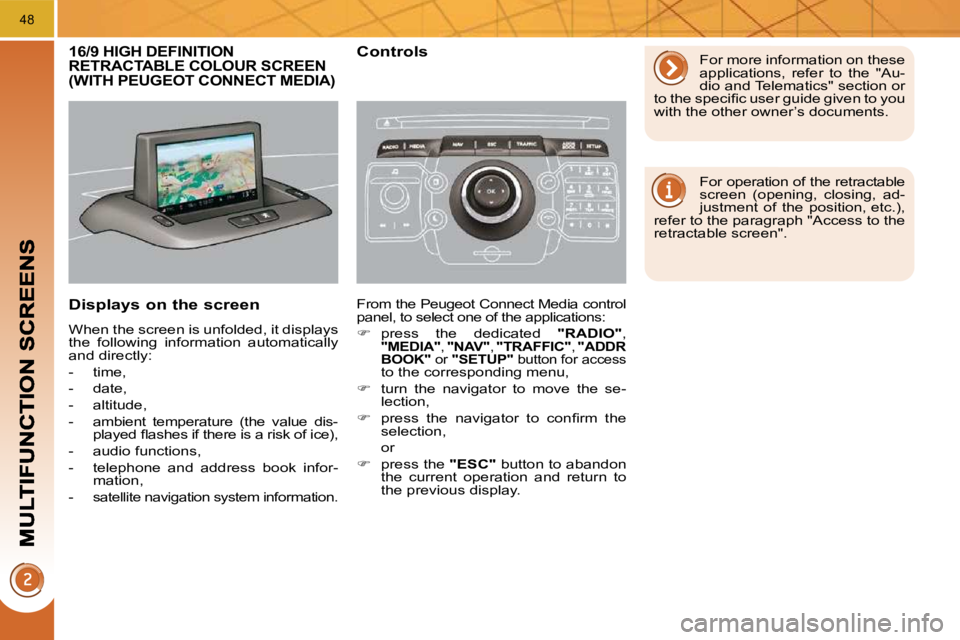
16/9 HIGH DEFINITION RETRACTABLE COLOUR SCREEN (WITH PEUGEOT CONNECT MEDIA)
Displays on the screen
When the screen is unfolded, it displays
the following information automatically
and directly:
- time,
- date,
- altitude,
- ambient temperature (the value dis-played fl ashes if there is a risk of ice),
- audio functions,
- telephone and address book infor- mation,
-
satellite navigation system information.
Controls
From the Peugeot Connect Media control
panel, to select one of the applications:
press the dedicated "RADIO" ,
"MEDIA" , "NAV" , "TRAFFIC" , "ADDR
BOOK" or "SETUP" button for access
to the corresponding menu,
turn the navigator to move the se-
lection,
press the navigator to confi rm the
selection,
or
press the "ESC" button to abandon
the current operation and return to
the previous display. For more information on these
applications, refer to the "Au-
dio and Telematics" section or
to the specifi c user guide given to you
with the other owner’s documents.
For operation of the retractable
screen (opening, closing, ad-
justment of the position, etc.),
refer to the paragraph "Access to the
retractable screen".
Page 231 of 315
206
02
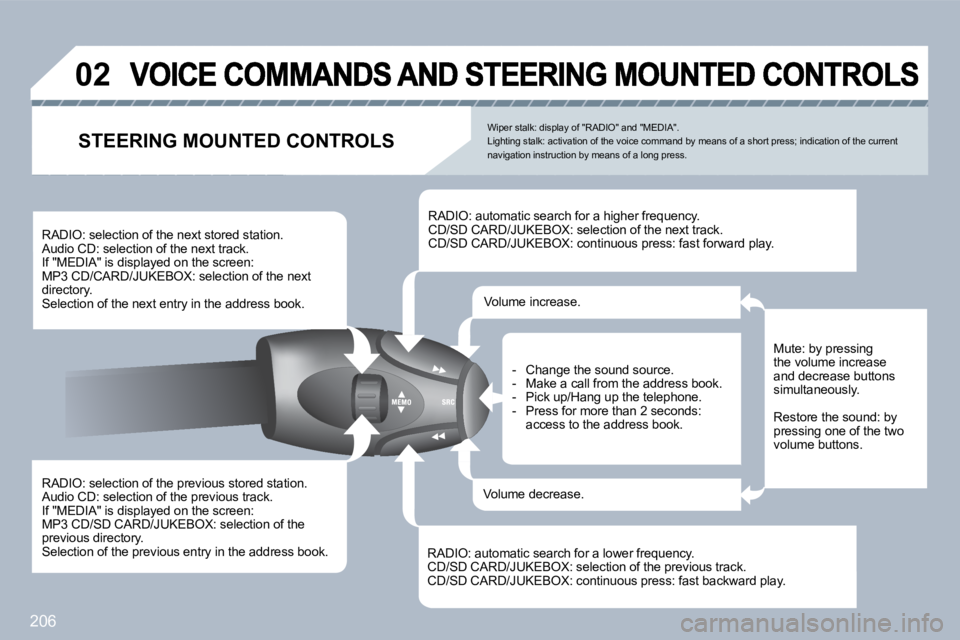
RADIO: selection of the previous stored station. Audio CD: selection of the previous track. If "MEDIA" is displayed on the screen: MP3 CD/SD CARD/JUKEBOX: selection of the previous directory. Selection of the previous entry in the address book.
RADIO: selection of the next stored station. Audio CD: selection of the next track. If "MEDIA" is displayed on the screen: MP3 CD/CARD/JUKEBOX: selection of the next directory. Selection of the next entry in the address book.
RADIO: automatic search for a higher frequency. CD/SD CARD/JUKEBOX: selection of the next track. CD/SD CARD/JUKEBOX: continuous press: fast forward play.
RADIO: automatic search for a lower frequency. CD/SD CARD/JUKEBOX: selection of the previous track. CD/SD CARD/JUKEBOX: continuous press: fast backwar d play.
- Change the sound source. - Make a call from the address book. - Pick up/Hang up the telephone. - Press for more than 2 seconds: access to the address book.
Volume increase.
Volume decrease.
STEERING MOUNTED CONTROLS
Mute: by pressing the volume increase and decrease buttons simultaneously.
Restore the sound: by pressing one of the two volume buttons.
Wiper stalk: display of "RADIO" and "MEDIA". Lighting stalk: activation of the voice command by means of a short press; indication of the current navigation instruction by means of a long press.
Page 232 of 315
207
TU
PQRS
0
*
11
SETUP
22
02
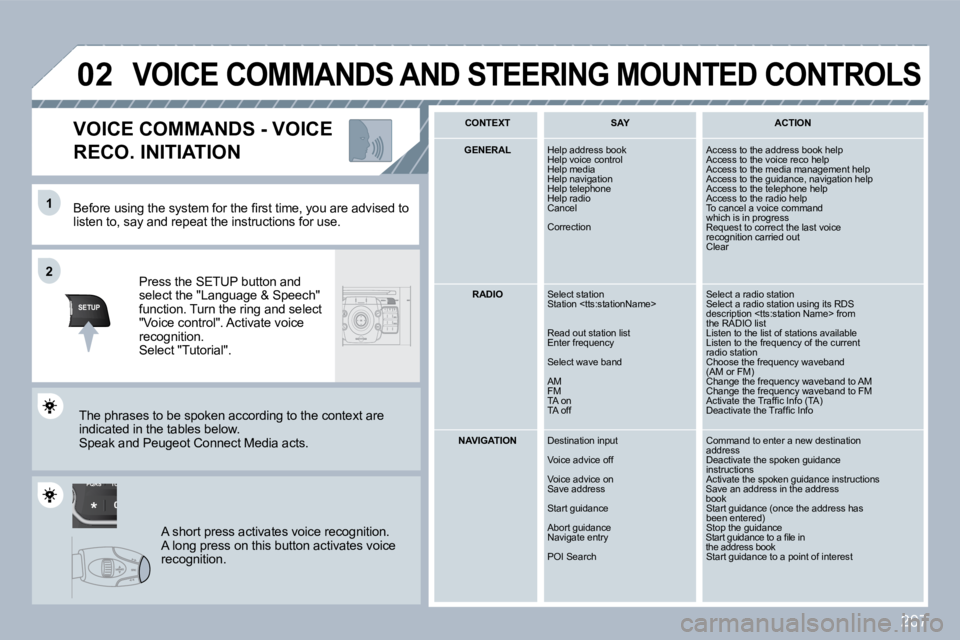
Before using the system for the fi rst time, you a re advised to listen to, say and repeat the instructions for use.
Press the SETUP button and select the "Language & Speech" function. Turn the ring and select "Voice control". Activate voice recognition. Select "Tutorial".
VOICE COMMANDS - VOICE
RECO. INITIATION
The phrases to be spoken according to the context are indicated in the tables below. Speak and Peugeot Connect Media acts.
A short press activates voice recognition. A long press on this button activates voice recognition.
CONTEXT SAY ACTION
GENERAL Help address book Help voice control Help media Help navigation Help telephone Help radio Cancel
Correction
Access to the address book help Access to the voice reco help Access to the media management help Access to the guidance, navigation help Access to the telephone help Access to the radio help To cancel a voice commandwhich is in progress Request to correct the last voicerecognition carried out Clear
RADIO Select station Station
Read out station list Enter frequency
Select wave band
AM FM TA on TA off
Select a radio station Select a radio station using its RDSdescription
NAVIGATION Destination input
Voice advice off
Voice advice on Save address
Start guidance
Abort guidance Navigate entry
POI Search
Command to enter a new destinationaddress Deactivate the spoken guidanceinstructions Activate the spoken guidance instructions Save an address in the address book Start guidance (once the address hasbeen entered) Stop the guidance Start guidance to a fi le in the address book Start guidance to a point of interest
VOICE COMMANDS AND STEERING MOUNTED CONTROLS
Page 238 of 315
213
NAV
04
1
2
3
6
5
4
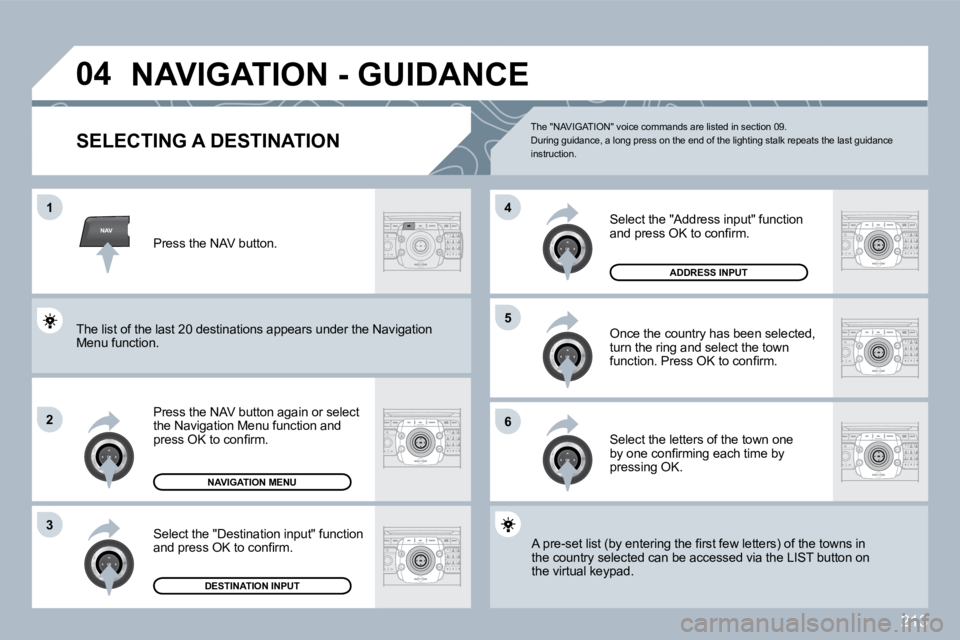
NAVIGATION - GUIDANCE
SELECTING A DESTINATION
Press the NAV button again or select the Navigation Menu function and press OK to confi rm.
Select the "Destination input" function and press OK to confi rm.
Press the NAV button.
Select the letters of the town one by one confi rming each time by pressing OK.
Once the country has been selected, turn the ring and select the town function. Press OK to confi rm.
NAVIGATION MENU
DESTINATION INPUT
A pre-set list (by entering the fi rst few letters) of the towns in A pre-set list (by entering the fi rst few letters) of the towns in the country selected can be accessed via the LIST b utto button on the virtual keypad.
Select the "Address input" function and press OK to confi rm.
ADDRESS INPUT
The list of the last 20 destinations appears under the Nathe Navigation Menu function.
The "NAVIGATION" voice commands are listed in section 09. During guidance, a long press on the end of the lighting stalk repeats the last guidance instruction.
Page 240 of 315
215
NAV
04
5
6
7
1
2
3
4
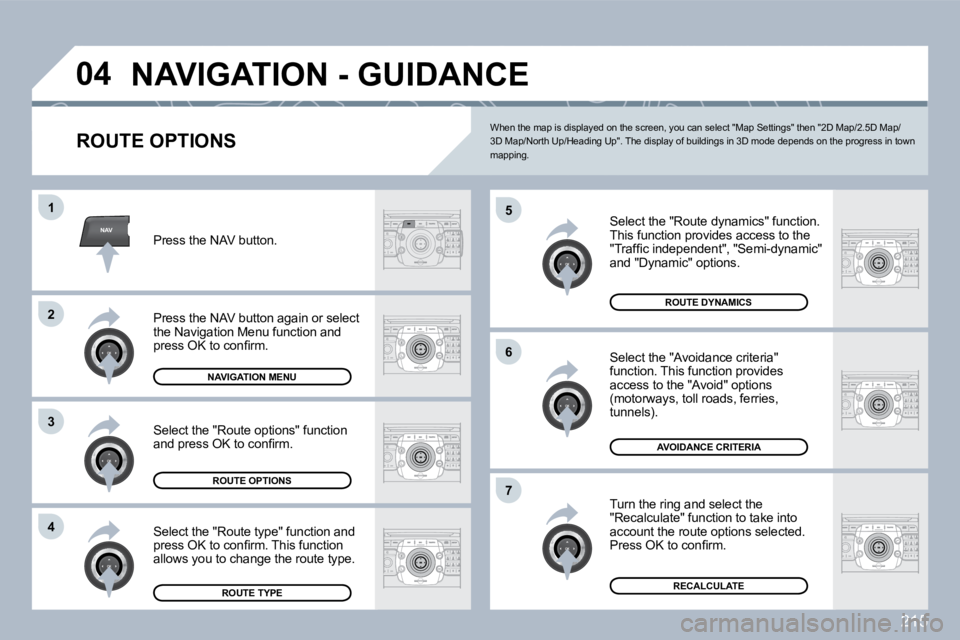
NAVIGATION - GUIDANCE
ROUTE OPTIONS
Select the "Route dynamics" function. This function provides access to the "Traffi c independent", "Semi-dynamic" and "Dynamic" options.
Select the "Avoidance criteria" function. This function provides access to the "Avoid" options (motorways, toll roads, ferries, tunnels).
Turn the ring and select the "Recalculate" function to take into account the route options selected. Press OK to confi rm.
Press the NAV button.
Press the NAV button again or select the Navigation Menu function and press OK to confi rm.
Select the "Route type" function and press OK to confi rm. This function allows you to change the route type.
Select the "Route options" function and press OK to confi rm.
NAVIGATION MENU
ROUTE OPTIONS
ROUTE TYPE
ROUTE DYNAMICS
AVOIDANCE CRITERIA
RECALCULATE
When the map is displayed on the screen, you can select "Map Settings" then "2D Map/2.5D Map/3D Map/North Up/Heading Up". The display of buildin gs in 3D mode depends on the progress in town mapping.
Page 241 of 315
216
NAV
5
6
7
1
2
3
4
8
04
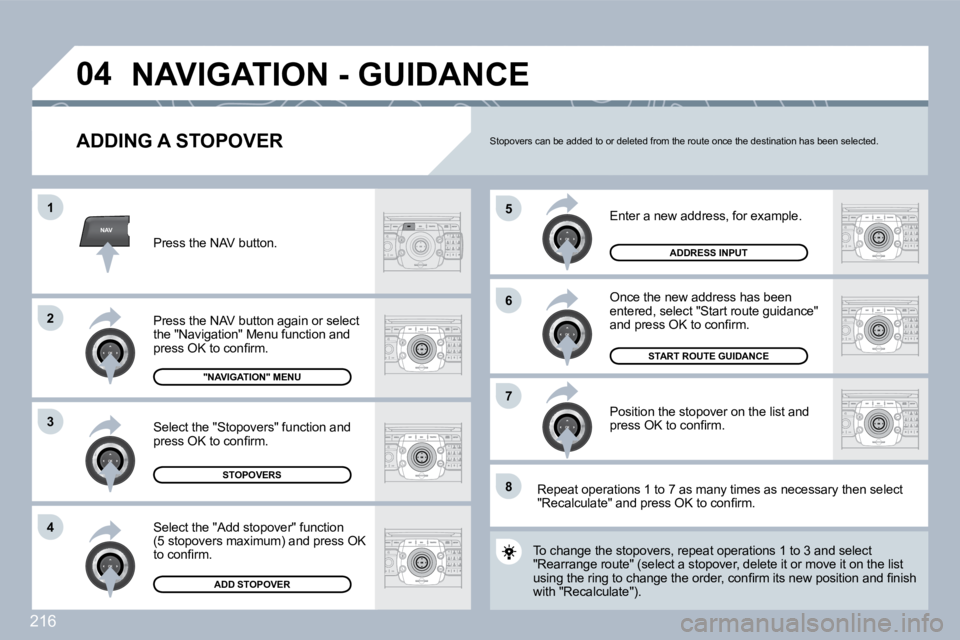
ADDING A STOPOVER
Enter a new address, for example.
Once the new address has been entered, select "Start route guidance" and press OK to confi rm.
Position the stopover on the list and press OK to confi rm.
Press the NAV button.
Press the NAV button again or select the "Navigation" Menu function and press OK to confi rm.
Select the "Add stopover" function (5 stopovers maximum) and press OK to confi rm.
Select the "Stopovers" function and press OK to confi rm.
"NAVIGATION" MENU
ADDRESS INPUT
ADD STOPOVER
STOPOVERS
START ROUTE GUIDANCE
To change the stopovers, repeat operations 1 to 3 and s and select "Rearrange route" (select a stopover, delete it or move iove it on the list using the ring to change the order, confi rm its new position and fi nish using the ring to change the order, confi rm its new position and fi nish with "Recalculate").
Stopovers can be added to or deleted from the route once the destination has been selected.
Repeat operations 1 to 7 as many times as necessar y then select "Recalculate" and press OK to confi rm.
NAVIGATION - GUIDANCE
Page 242 of 315
217
NAV
04
1
2
3
4
7
85
6
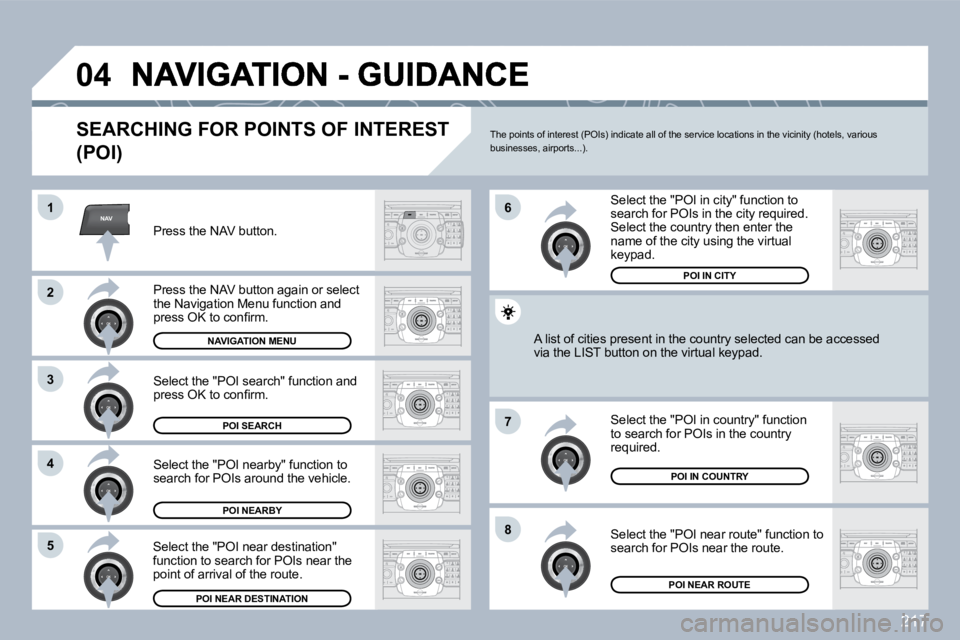
SEARCHING FOR POINTS OF INTEREST
(POI)
Press the NAV button.
Press the NAV button again or select the Navigation Menu function and press OK to confi rm.
Select the "POI nearby" function to search for POIs around the vehicle.
Select the "POI search" function and press OK to confi rm.
NAVIGATION MENU
POI SEARCH
POI NEARBY
Select the "POI in city" function to search for POIs in the city required. Select the country then enter the name of the city using the virtual keypad.
Select the "POI near route" function to search for POIs near the route.
Select the "POI in country" function to search for POIs in the country required.
Select the "POI near destination" function to search for POIs near the point of arrival of the route.
POI NEAR DESTINATION
POI IN COUNTRY
POI NEAR ROUTE
A list of cities present in the country selected can be accbe accessed via the LIST button on the virtual keypad.
POI IN CITY
The points of interest (POIs) indicate all of the service locations in the vicinity (hotels, various businesses, airports...).