phone PEUGEOT 308 2011 User Guide
[x] Cancel search | Manufacturer: PEUGEOT, Model Year: 2011, Model line: 308, Model: PEUGEOT 308 2011Pages: 328, PDF Size: 62.67 MB
Page 217 of 328
215
2ABC3DEF5JKL4GHI6MNO8TUV7PQRS9WXYZ0*#
1RADIO MEDIANAV ESC TRAFFIC
SETUPADDR
BOOK
2ABC3DEF5JKL4GHI6MNO8TUV7PQRS9WXYZ0*#
1RADIO MEDIANAV ESC TRAFFIC
SETUPADDR
BOOK
EMERGENCY OR ASSISTANCE CALL USING
PEUGEOT CONNECT MEDIA
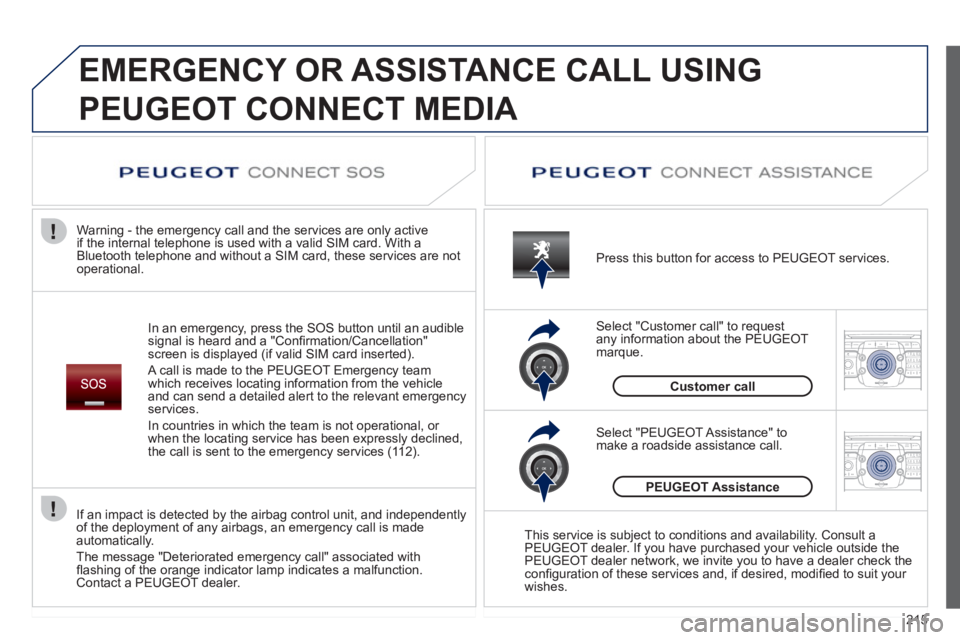
In an emergency, press the SOS button until an audible
signal is heard and a "Confi rmation/Cancellation"
screen is displayed (if valid SIM card inserted).
A call is made to the PEUGEOT Emergency team
which receives locating information from the vehicle
and can send a detailed alert to the relevant emergency
services.
In countries in which the team is not operational, or
when the locating service has been expressly declined,
the call is sent to the emergency services (112).
Warning - the emergency call and the services are only active
if the internal telephone is used with a valid SIM card. With a
Bluetooth telephone and without a SIM card, these services are not
operational.
Press this button for access to PEUGEOT services.
Customer call
Select "Customer call" to request
any information about the PEUGEOT
marque.
Select "PEUGEOT Assistance" to
make a roadside assistance call.
PEUGEOT Assistance
This service is subject to conditions and availability. Consult a
PEUGEOT dealer. If you have purchased your vehicle outside the
PEUGEOT dealer network, we invite you to have a dealer check the
confi guration of these services and, if desired, modifi ed to suit your
wishes.
If an impact is detected by the airbag control unit, and independently
of the deployment of any airbags, an emergency call is made
automatically.
The message "Deteriorated emergency call" associated with
fl ashing of the orange indicator lamp indicates a malfunction.
Contact a PEUGEOT dealer.
Page 219 of 328
217
2ABC3DEF5JKL4GHI6MNO8TUV7PQRS9WXYZ0*#
1
RADIO MEDIANAV ESC TRAFFIC
SETUPADDR
BOOK
The Peugeot Connect Media is protected in such a
way that it will only operate in your vehicle. If it is to be
installed in another vehicle, contact a PEUGEOT dealer
for confi guration of the system.
Certain functions described in this handbook will
become available during the course of the year.
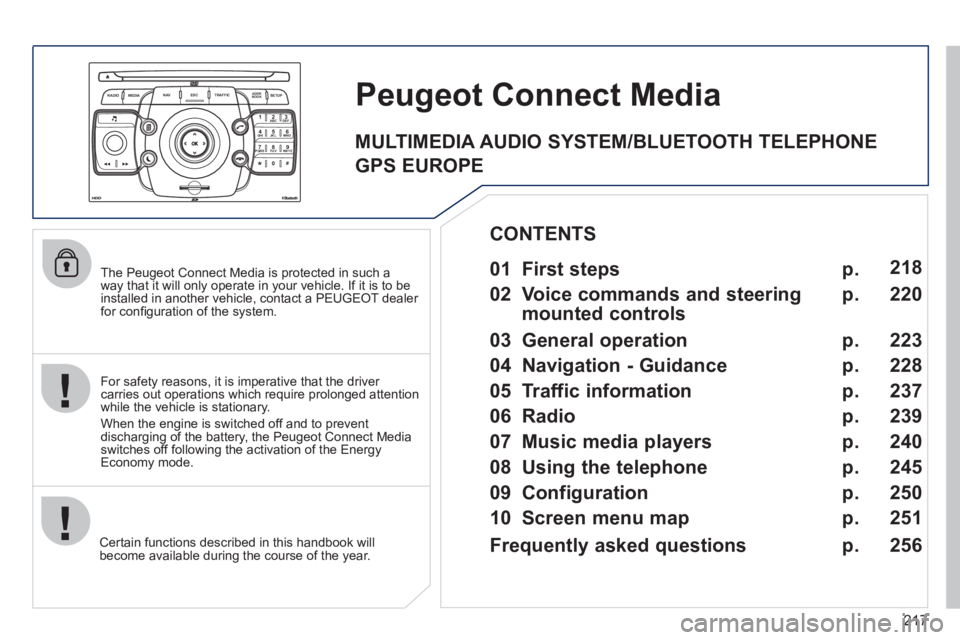
Peugeot Connect Media
For safety reasons, it is imperative that the driver
carries out operations which require prolonged attention
while the vehicle is stationary.
When the engine is switched off and to prevent
discharging of the battery, the Peugeot Connect Media
switches off following the activation of the Energy
Economy mode.
01 First steps
02 Voice commands and steering
mounted controls
03 General operation
04 Navigation - Guidance
05 Traffic information
06 Radio
07 Music media players
08 Using the telephone
09 Configuration
10 Screen menu map p.
p.
p.
p.
p.
p.
p.
p.
p.
p. 218
220
223
228
237
239
240
245
250
251
CONTENTS
Frequently asked questions p.
256
MULTIMEDIA AUDIO SYSTEM/BLUETOOTH TELEPHONE
GPS EUROPE
Page 221 of 328
219
01 FIRST STEPS
Peugeot Connect Media Navigation (NG4 3D) NAVIGATOR
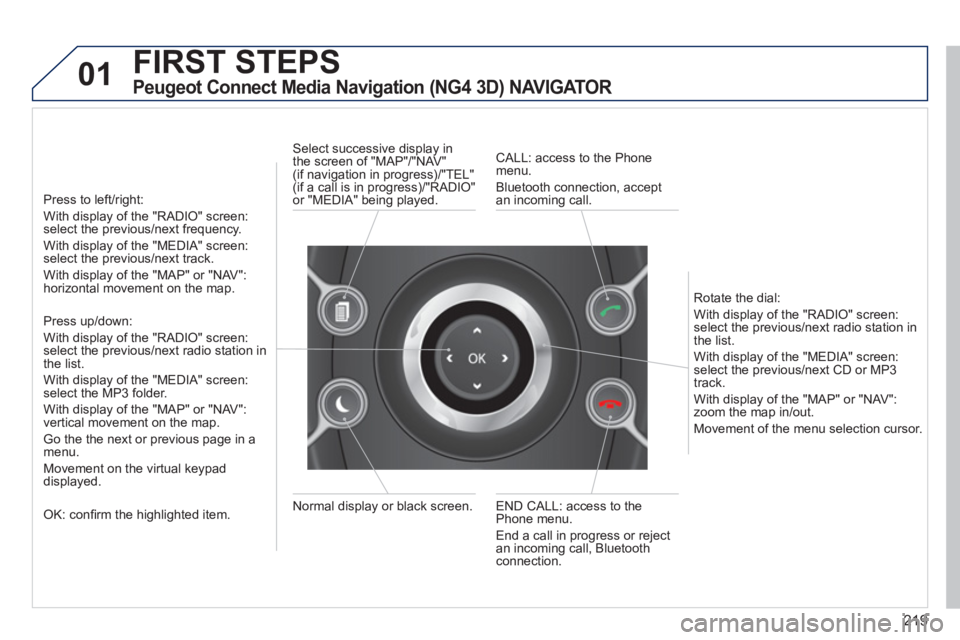
Press to left/right:
With display of the "RADIO" screen:
select the previous/next frequency.
With display of the "MEDIA" screen:
select the previous/next track.
With display of the "MAP" or "NAV":
horizontal movement on the map.
Press up/down:
With display of the "RADIO" screen:
select the previous/next radio station in
the list.
With display of the "MEDIA" screen:
select the MP3 folder.
With display of the "MAP" or "NAV":
vertical movement on the map.
Go the the next or previous page in a
menu.
Movement on the virtual keypad
displayed.
OK: confi rm the highlighted item.
END CALL: access to the
Phone menu.
End a call in progress or reject
an incoming call, Bluetooth
connection.
Normal display or black screen.
Select successive display in
the screen of "MAP"/"NAV"
(if navigation in progress)/"TEL"
(if a call is in progress)/"RADIO"
or "MEDIA" being played.
CALL: access to the Phone
menu.
Bluetooth connection, accept
an incoming call.
Rotate the dial:
With display of the "RADIO" screen:
select the previous/next radio station in
the list.
With display of the "MEDIA" screen:
select the previous/next CD or MP3
track.
With display of the "MAP" or "NAV":
zoom the map in/out.
Movement of the menu selection cursor.
Page 222 of 328
220
02
2
1
SETUP2ABC3DEF5JKL4GHI6MNO8TUV7PQRS9WXYZ0*#
1NAV ESC TRAFFICADDR
BOOKSETUP
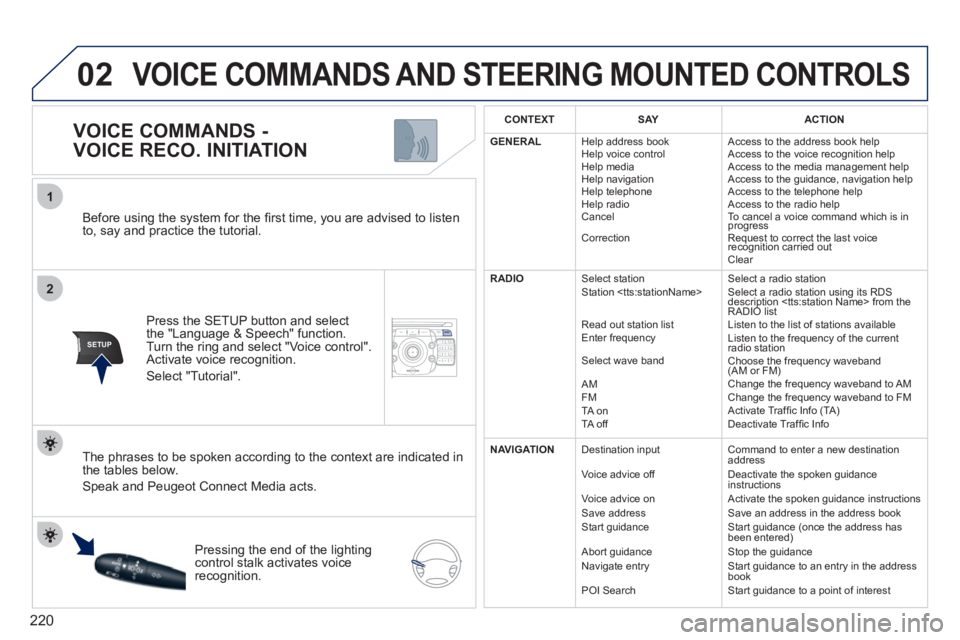
Before using the system for the fi rst time, you are advised to listen
to, say and practice the tutorial.
Press the SETUP button and select
the "Language & Speech" function.
Turn the ring and select "Voice control".
Activate voice recognition.
Select "Tutorial".
VOICE COMMANDS -
VOICE RECO. INITIATION
The phrases to be spoken according to the context are indicated in
the tables below.
Speak and Peugeot Connect Media acts.
Pressing the end of the lighting
control stalk activates voice
recognition.
CONTEXT
SAY
ACTION
GENERAL
Help address book
Help voice control
Help media
Help navigation
Help telephone
Help radio
Cancel
Correction Access to the address book help
Access to the voice recognition help
Access to the media management help
Access to the guidance, navigation help
Access to the telephone help
Access to the radio help
To cancel a voice command which is in
progress
Request to correct the last voice
recognition carried out
Clear
RADIO
Select station
Station
Read out station list
Enter frequency
Select wave band
AM
FM
TA on
TA off Select a radio station
Select a radio station using its RDS
description
RADIO list
Listen to the list of stations available
Listen to the frequency of the current
radio station
Choose the frequency waveband
(AM or FM)
Change the frequency waveband to AM
Change the frequency waveband to FM
Activate Traffi c Info (TA)
Deactivate Traffi c Info
NAVIGATION
Destination input
Voice advice off
Voice advice on
Save address
Start guidance
Abort guidance
Navigate entry
POI Search Command to enter a new destination
address
Deactivate the spoken guidance
instructions
Activate the spoken guidance instructions
Save an address in the address book
Start guidance (once the address has
been entered)
Stop the guidance
Start guidance to an entry in the address
book
Start guidance to a point of interest
VOICE COMMANDS AND STEERING MOUNTED CONTROLS
Page 223 of 328
221
02
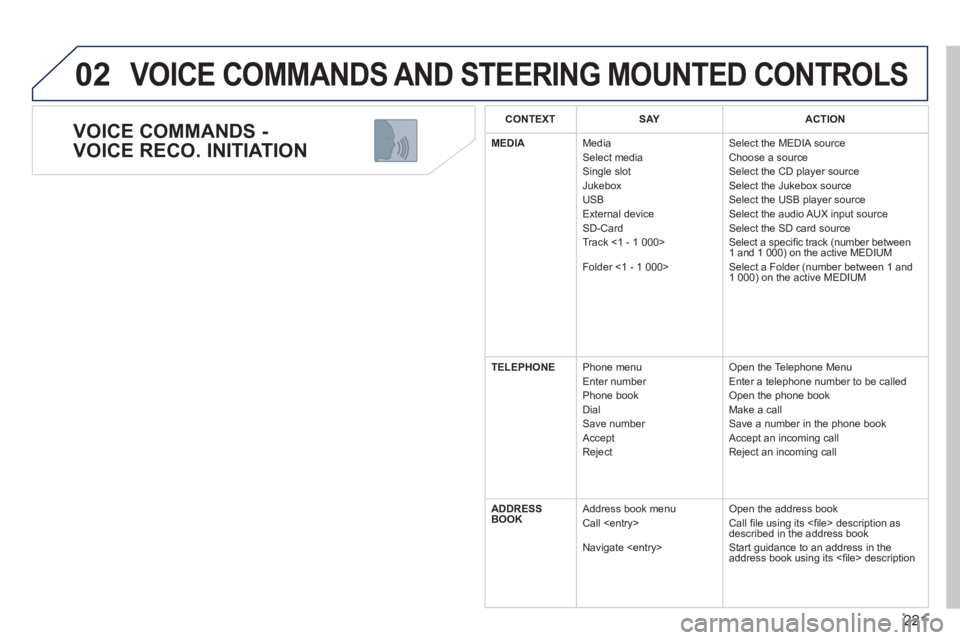
VOICE COMMANDS -
VOICE RECO. INITIATION
VOICE COMMANDS AND STEERING MOUNTED CONTROLS
CONTEXT
SAY
ACTION
MEDIA
Media
Select media
Single slot
Jukebox
USB
External device
SD-Card
Track <1 - 1 000>
Folder <1 - 1 000> Select the MEDIA source
Choose a source
Select the CD player source
Select the Jukebox source
Select the USB player source
Select the audio AUX input source
Select the SD card source
Select a specifi c track (number between
1 and 1 000) on the active MEDIUM
Select a Folder (number between 1 and
1 000) on the active MEDIUM
TELEPHONE
Phone menu
Enter number
Phone book
Dial
Save number
Accept
Reject Open the Telephone Menu
Enter a telephone number to be called
Open the phone book
Make a call
Save a number in the phone book
Accept an incoming call
Reject an incoming call
ADDRESS
BOOK
Address book menu
Call
Navigate
Call fi le using its <fi le> description as
described in the address book
Start guidance to an address in the
address book using its <fi
le> description
Page 224 of 328
222
02 VOICE COMMANDS AND STEERING MOUNTED CONTROLS
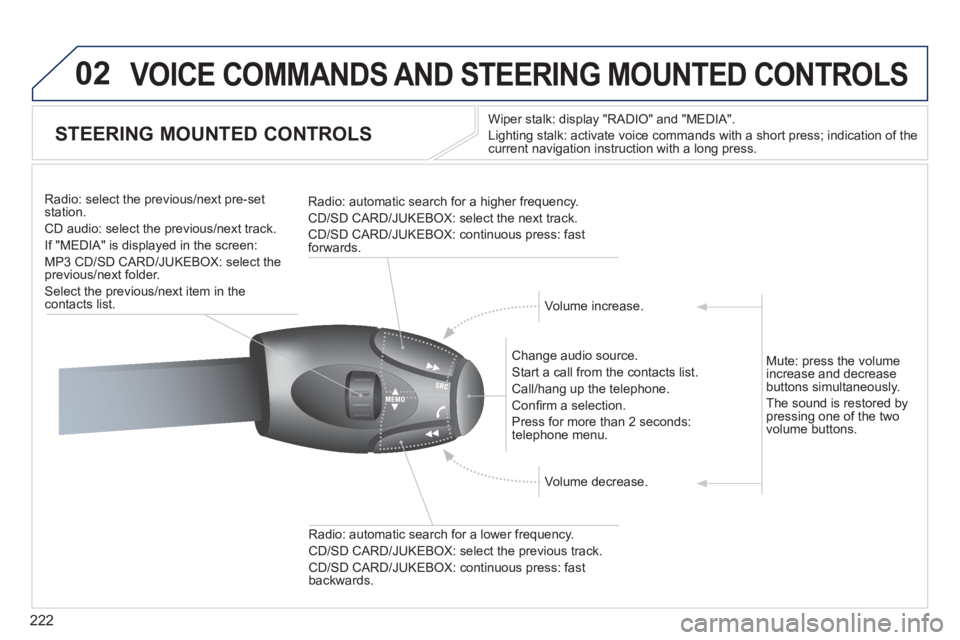
STEERING MOUNTED CONTROLS
Wiper stalk: display "RADIO" and "MEDIA".
Lighting stalk: activate voice commands with a short press; indication of the
current navigation instruction with a long press.
Change audio source.
Start a call from the contacts list.
Call/hang up the telephone.
Confi rm a selection.
Press for more than 2 seconds:
telephone menu.
Radio: automatic search for a lower frequency.
CD/SD CARD/JUKEBOX: select the previous track.
CD/SD CARD/JUKEBOX: continuous press: fast
backwards.
Radio: select the previous/next pre-set
station.
CD audio: select the previous/next track .
If "MEDIA" is displayed in the screen:
MP3 CD/SD CARD/JUKEBOX: select the
previous/next folder.
Select the previous/next item in the
contacts list.
Radio: automatic search for a higher frequency.
CD/SD CARD/JUKEBOX: select the next track.
CD/SD CARD/JUKEBOX: continuous press: fast
forwards.
Volume increase.
Volume decrease.
Mute: press the volume
increase and decrease
buttons simultaneously.
The sound is restored by
pressing one of the two
volume buttons.
Page 225 of 328
223
03
SETUP
TRAFFIC
MEDIA
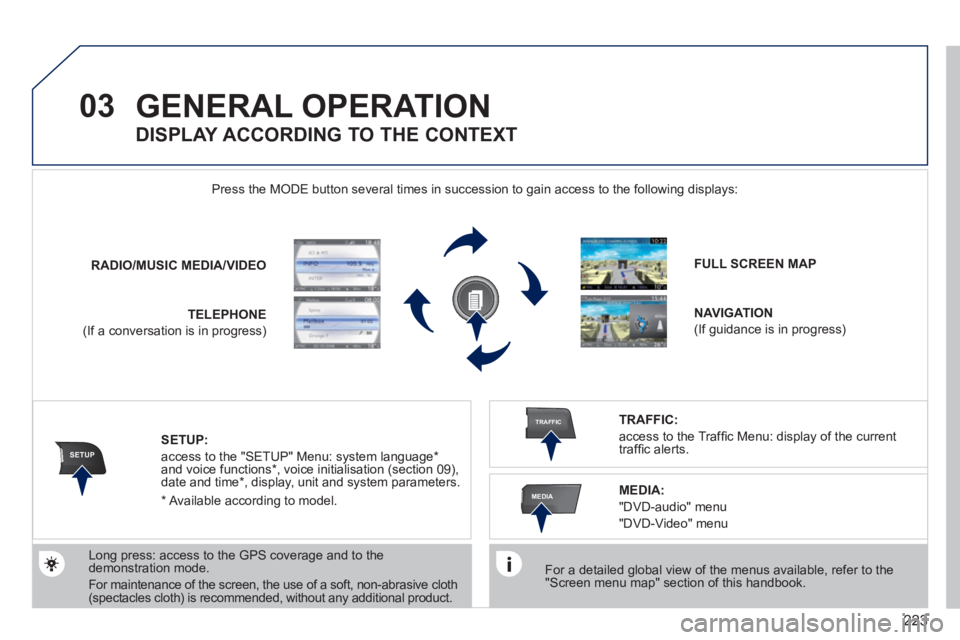
GENERAL OPERATION
For a detailed global view of the menus available, refer to the
"Screen menu map" section of this handbook.
Press the MODE button several times in succession to gain access to the following displays:
Long press: access to the GPS coverage and to the
demonstration mode.
For maintenance of the screen, the use of a soft, non-abrasive cloth
(spectacles cloth) is recommended, without any additional product.
RADIO
/
MUSIC
MEDIA/VIDEO
TELEPHONE
(If a conversation is in progress)
FULL SCREEN MAP
NAVIGATION
(If guidance is in progress)
SETUP:
access to the "SETUP" Menu: system language *
and voice functions * , voice initialisation (section 09),
date and time * , display, unit and system parameters.
TRAFFIC:
access to the Traffi c Menu: display of the current
traffi c alerts.
DISPLAY ACCORDING TO THE CONTEXT
MEDIA:
"DVD-audio" menu
"DVD-Video" menu
*
Available according to model.
Page 226 of 328
224
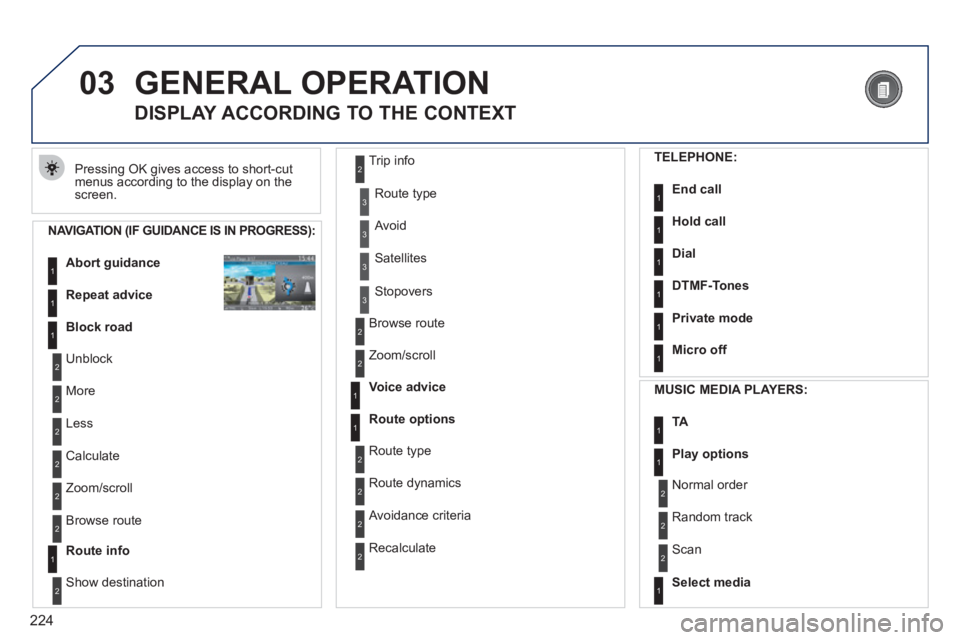
03 GENERAL OPERATION
Pressing OK gives access to short-cut
menus according to the display on the
screen.
DISPLAY ACCORDING TO THE CONTEXT
NAVIGATION (IF GUIDANCE IS IN PROGRESS):
Abort guidance
1
1
1
Repeat advice
Block road
2
2
Unblock
More
2
Less
3
3
Route type
Avoid
3
Satellites
2
2
Calculate
Zoom/scroll
2
Browse route
1
Route info
2
2
Show destination Trip info
3
Stopovers
2
2
Browse route
Zoom/scroll
1
1
Voice advice
Route options
2
2
Route type
Route dynamics
2
Avoidance criteria
2
Recalculate
TELEPHONE:
End call
1
1
1
1
Hold call
Dial
DTMF-Tones
1
Private mode
1
Micro off
MUSIC MEDIA PLAYERS:
TA
1
1
Play options
1
Select media
2
2
Normal order
Random track
2
Scan
Page 247 of 328
245
08
1
2
2ABC3DEF5JKL4GHI6MNO8TUV7PQRS9WXYZ0*#
1RADIO MEDIANAV ESC TRAFFIC
SETUPADDR
BOOK
2ABC3DEF5JKL4GHI6MNO8TUV7PQRS9WXYZ0*#
1RADIO MEDIANAV ESC TRAFFIC
SETUPADDR
BOOK
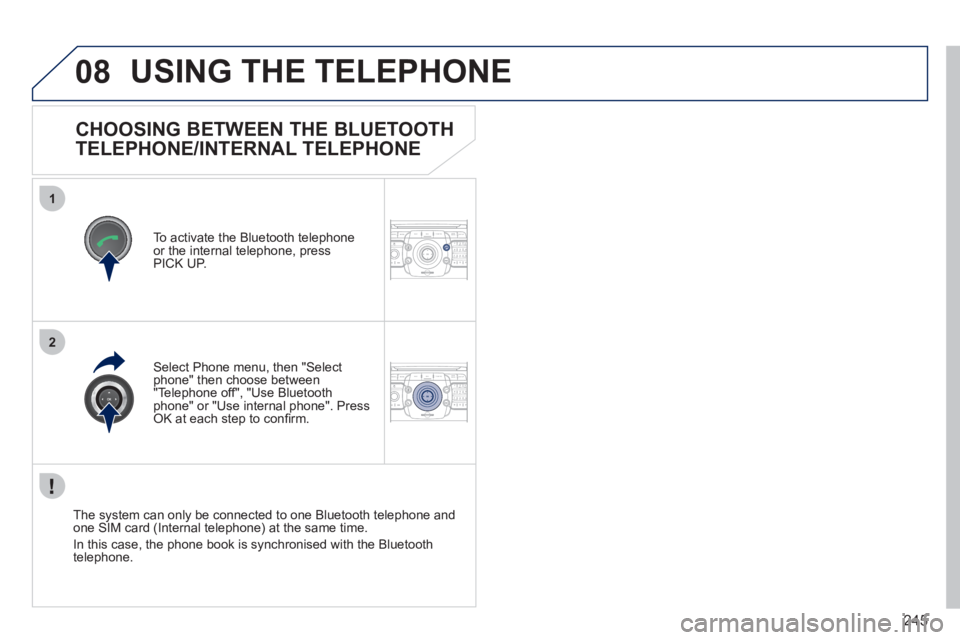
CHOOSING BETWEEN THE BLUETOOTH
TELEPHONE/INTERNAL TELEPHONE
To activate the Bluetooth telephone
or the internal telephone, press
PICK UP.
USING THE TELEPHONE
Select Phone menu, then "Select
phone" then choose between
"Telephone off", "Use Bluetooth
phone" or "Use internal phone". Press
OK at each step to confi rm.
The system can only be connected to one Bluetooth telephone and
one SIM card (Internal telephone) at the same time.
In this case, the phone book is synchronised with the Bluetooth
telephone.
Page 248 of 328
246
08
1
4
5
3
2
2ABC3DEF5JKL4GHI6MNO8TUV7PQRS9WXYZ0*#
1RADIO MEDIANAV ESC TRAFFIC
SETUPADDR
BOOK
2ABC3DEF5JKL4GHI6MNO8TUV7PQRS9WXYZ0*#
1RADIO MEDIANAV ESC TRAFFIC
SETUPADDR
BOOK
2ABC3DEF5JKL4GHI6MNO8TUV7PQRS9WXYZ0*#
1RADIO MEDIANAV ESC TRAFFIC
SETUPADDR
BOOK
2ABC3DEF5JKL4GHI6MNO8TUV7PQRS9WXYZ0*#
1RADIO MEDIANAV ESC TRAFFIC
SETUPADDR
BOOK
2ABC3DEF5JKL4GHI6MNO8TUV7PQRS9WXYZ0*#
1RADIO MEDIANAV ESC TRAFFIC
SETUPADDR
BOOK2ABC3DEF5JKL4GHI6MNO8TUV7PQRS9WXYZ0*#
1RADIO MEDIANAV ESC TRAFFIC
SETUPADDR
BOOK
*
The services available via the telephone depend on the network, the SIM
card and the compatibility of the Bluetooth equipment used. Refer to your
telephone's manual and your operator to check which services you have
access to.
USING THE TELEPHONE
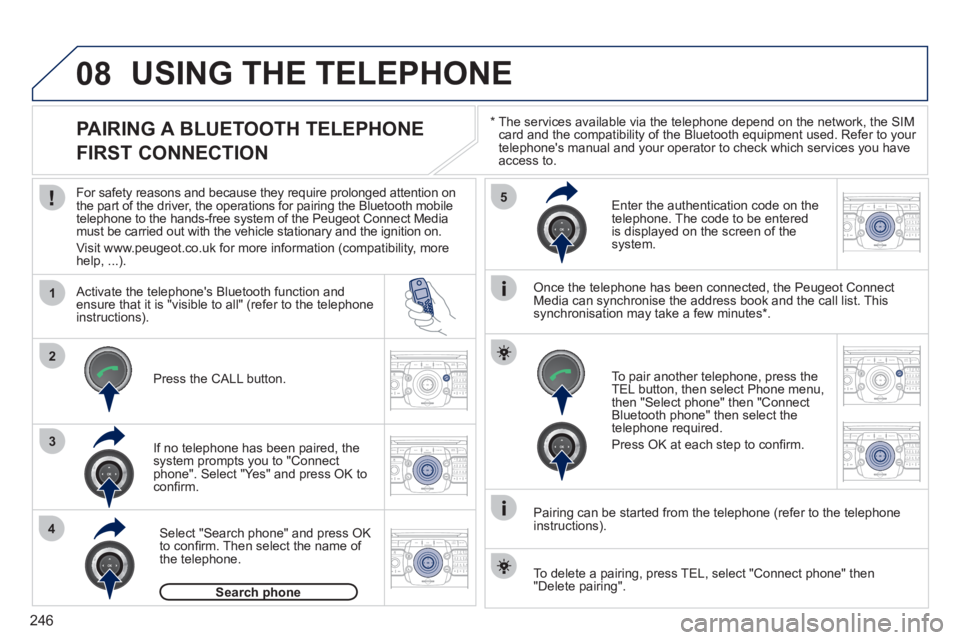
PAIRING A BLUETOOTH TELEPHONE
FIRST CONNECTION
For safety reasons and because they require prolonged attention on
the part of the driver, the operations for pairing the Bluetooth mobile
telephone to the hands-free system of the Peugeot Connect Media
must be carried out with the vehicle stationary and the ignition on.
Visit www.peugeot.co.uk for more information (compatibility, more
help, ...).
Activate the telephone's Bluetooth function and
ensure that it is "visible to all" (refer to the telephone
instructions).
If no telephone has been paired, the
system prompts you to "Connect
phone". Select "Yes" and press OK to
confi rm.
Enter the authentication code on the
telephone. The code to be entered
is displayed on the screen of the
system.
To pair another telephone, press the
TEL button, then select Phone menu,
then "Select phone" then "Connect
Bluetooth phone" then select the
telephone required.
Press OK at each step to confi rm.
Once the telephone has been connected, the Peugeot Connect
Media can synchronise the address book and the call list. This
synchronisation may take a few minutes * .
Pairing can be started from the telephone (refer to the telephone
instructions).
Press the CALL button.
Select "Search phone" and press OK
to confi rm. Then select the name of
the telephone.
Search phone
To delete a pairing, press TEL, select "Connect phone" then
"Delete pairing".