service PEUGEOT 308 2011 Owner's Manual
[x] Cancel search | Manufacturer: PEUGEOT, Model Year: 2011, Model line: 308, Model: PEUGEOT 308 2011Pages: 328, PDF Size: 62.67 MB
Page 237 of 328
235
04
13
4
2
5
NAV2ABC3DEF5JKL4GHI6MNO8TUV7PQRS9WXYZ0*#
1RADIO MEDIANAV ESC TRAFFIC
SETUPADDR
BOOK
2ABC3DEF5JKL4GHI6MNO8TUV7PQRS9WXYZ0*#
1RADIO MEDIANAV ESC TRAFFIC
SETUPADDR
BOOK
NAVIGATION - GUIDANCE
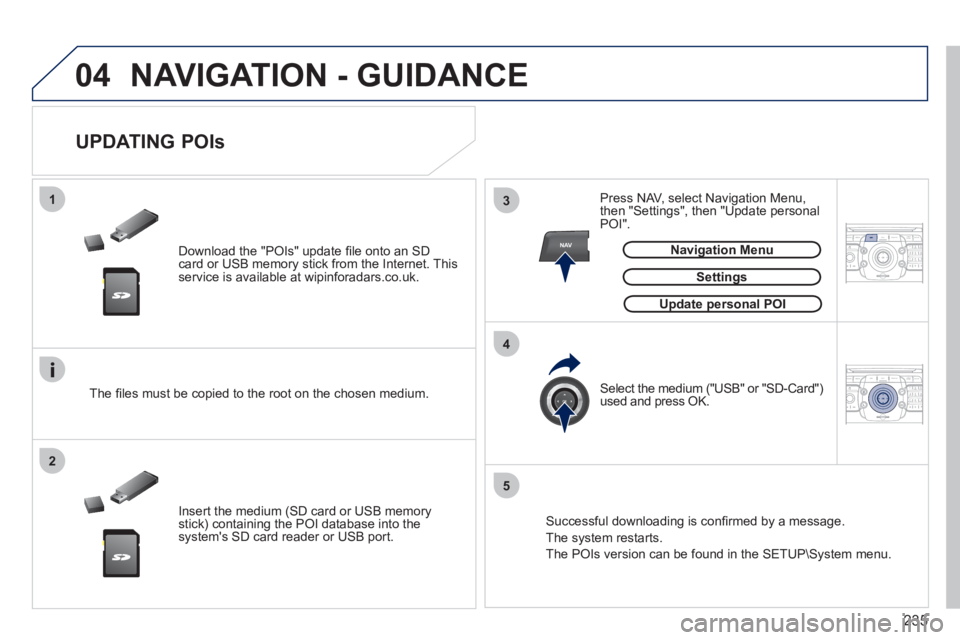
Download the "POIs" update fi le onto an SD
card or USB memory stick from the Internet. This
service is available at wipinforadars.co.uk.
UPDATING POIs
Settings
The fi les must be copied to the root on the chosen medium.
Insert the medium (SD card or USB memory
stick) containing the POI database into the
system's SD card reader or USB port.
Select the medium ("USB" or "SD-Card")
used and press OK.
Press NAV, select Navigation Menu,
then "Settings", then "Update personal
POI".
Successful downloading is confi rmed by a message.
The system restarts.
The POIs version can be found in the SETUP\System menu.
Update personal POI
Navigation Menu
Page 248 of 328
246
08
1
4
5
3
2
2ABC3DEF5JKL4GHI6MNO8TUV7PQRS9WXYZ0*#
1RADIO MEDIANAV ESC TRAFFIC
SETUPADDR
BOOK
2ABC3DEF5JKL4GHI6MNO8TUV7PQRS9WXYZ0*#
1RADIO MEDIANAV ESC TRAFFIC
SETUPADDR
BOOK
2ABC3DEF5JKL4GHI6MNO8TUV7PQRS9WXYZ0*#
1RADIO MEDIANAV ESC TRAFFIC
SETUPADDR
BOOK
2ABC3DEF5JKL4GHI6MNO8TUV7PQRS9WXYZ0*#
1RADIO MEDIANAV ESC TRAFFIC
SETUPADDR
BOOK
2ABC3DEF5JKL4GHI6MNO8TUV7PQRS9WXYZ0*#
1RADIO MEDIANAV ESC TRAFFIC
SETUPADDR
BOOK2ABC3DEF5JKL4GHI6MNO8TUV7PQRS9WXYZ0*#
1RADIO MEDIANAV ESC TRAFFIC
SETUPADDR
BOOK
*
The services available via the telephone depend on the network, the SIM
card and the compatibility of the Bluetooth equipment used. Refer to your
telephone's manual and your operator to check which services you have
access to.
USING THE TELEPHONE
PAIRING A BLUETOOTH TELEPHONE
FIRST CONNECTION
For safety reasons and because they require prolonged attention on
the part of the driver, the operations for pairing the Bluetooth mobile
telephone to the hands-free system of the Peugeot Connect Media
must be carried out with the vehicle stationary and the ignition on.
Visit www.peugeot.co.uk for more information (compatibility, more
help, ...).
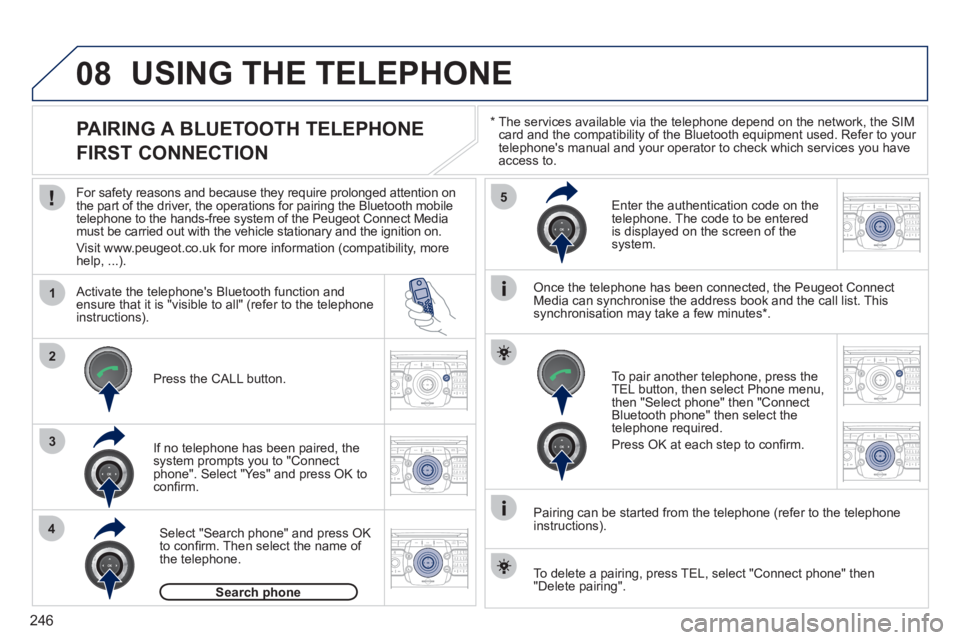
Activate the telephone's Bluetooth function and
ensure that it is "visible to all" (refer to the telephone
instructions).
If no telephone has been paired, the
system prompts you to "Connect
phone". Select "Yes" and press OK to
confi rm.
Enter the authentication code on the
telephone. The code to be entered
is displayed on the screen of the
system.
To pair another telephone, press the
TEL button, then select Phone menu,
then "Select phone" then "Connect
Bluetooth phone" then select the
telephone required.
Press OK at each step to confi rm.
Once the telephone has been connected, the Peugeot Connect
Media can synchronise the address book and the call list. This
synchronisation may take a few minutes * .
Pairing can be started from the telephone (refer to the telephone
instructions).
Press the CALL button.
Select "Search phone" and press OK
to confi rm. Then select the name of
the telephone.
Search phone
To delete a pairing, press TEL, select "Connect phone" then
"Delete pairing".
Page 249 of 328
247
08
1
2
2ABC3DEF5JKL4GHI6MNO8TUV7PQRS9WXYZ0*#
1RADIO MEDIANAV ESC TRAFFIC
SETUPADDR
BOOK
*
The services available via the telephone depend on the network, the
SIM card and the compatibility of the Bluetooth equipment used. Refer to
your telephone's manual and your operator to check which services you
have access to. A list of mobile telephones which offer the best range of
services is available from dealers.
USING THE TELEPHONE
CONNECTING A BLUETOOTH
TELEPHONE
For safety reasons and because they require prolonged attention
on the part of the driver, the operations for pairing the Bluetooth
mobile telephone to the hands-free system of the Peugeot Connect
Media must be carried out with the vehicle stationary and the
ignition on.
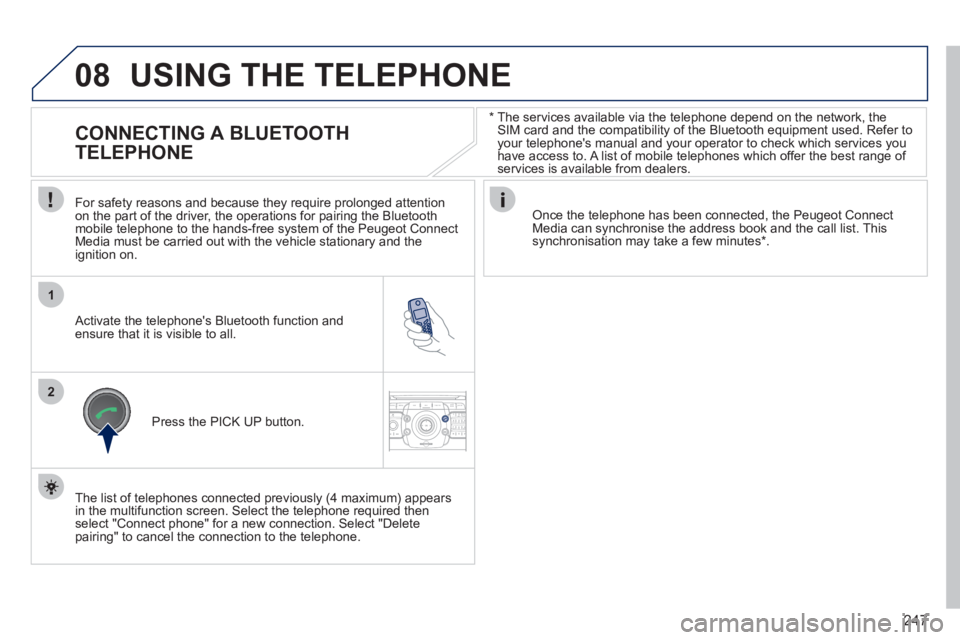
Activate the telephone's Bluetooth function and
ensure that it is visible to all.
Once the telephone has been connected, the Peugeot Connect
Media can synchronise the address book and the call list. This
synchronisation may take a few minutes * .
Press the PICK UP button.
The list of telephones connected previously (4 maximum) appears
in the multifunction screen. Select the telephone required then
select "Connect phone" for a new connection. Select "Delete
pairing" to cancel the connection to the telephone.
Page 250 of 328
248
08
14
5
2ABC3DEF5JKL4GHI6MNO8TUV7PQRS9WXYZ0*#
1
3
2
2ABC3DEF5JKL4GHI6MNO8TUV7PQRS9WXYZ0*#
1RADIO MEDIANAV ESC TRAFFIC
SETUPADDR
BOOK
2ABC3DEF5JKL4GHI6MNO8TUV7PQRS9WXYZ0*#
1NAV ESC TRAFFICADDR
BOOKSETUP2ABC3DEF5JKL4GHI6MNO8TUV7PQRS9WXYZ0*#
1
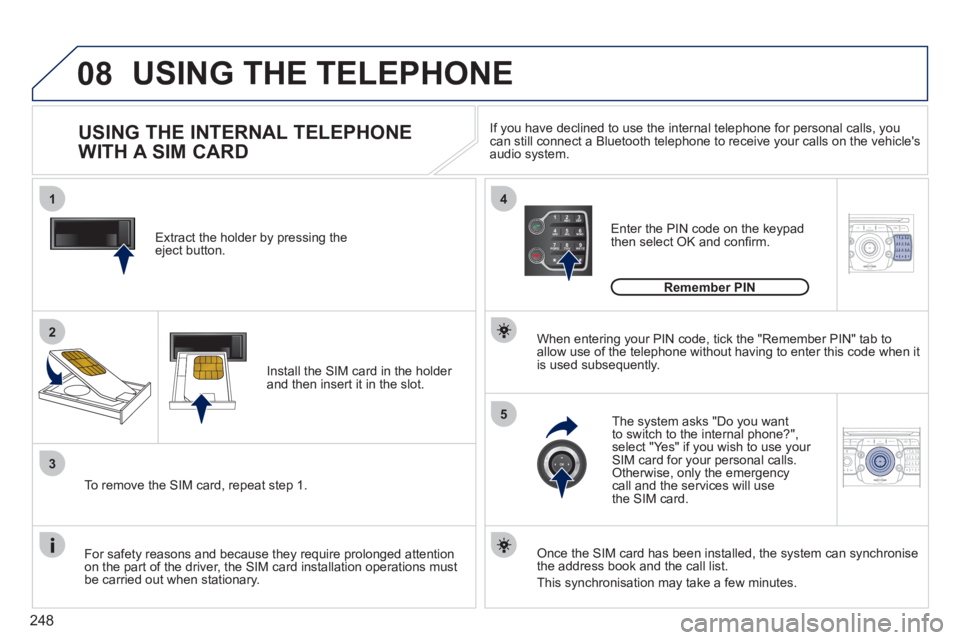
Extract the holder by pressing the
eject button.
Install the SIM card in the holder
and then insert it in the slot.
To remove the SIM card, repeat step 1.
For safety reasons and because they require prolonged attention
on the part of the driver, the SIM card installation operations must
be carried out when stationary.
Enter the PIN code on the keypad
then select OK and confi rm.
The system asks "Do you want
to switch to the internal phone?",
select "Yes" if you wish to use your
SIM card for your personal calls.
Otherwise, only the emergency
call and the services will use
the SIM card.
Remember PIN
When entering your PIN code, tick the "Remember PIN" tab to
allow use of the telephone without having to enter this code when it
is used subsequently.
USING THE INTERNAL TELEPHONE
WITH A SIM CARD
USING THE TELEPHONE
Once the SIM card has been installed, the system can synchronise
the address book and the call list.
This synchronisation may take a few minutes.
If you have declined to use the internal telephone for personal calls, you
can still connect a Bluetooth telephone to receive your calls on the vehicle's
audio system.
Page 255 of 328
253
ADDR
BOOK
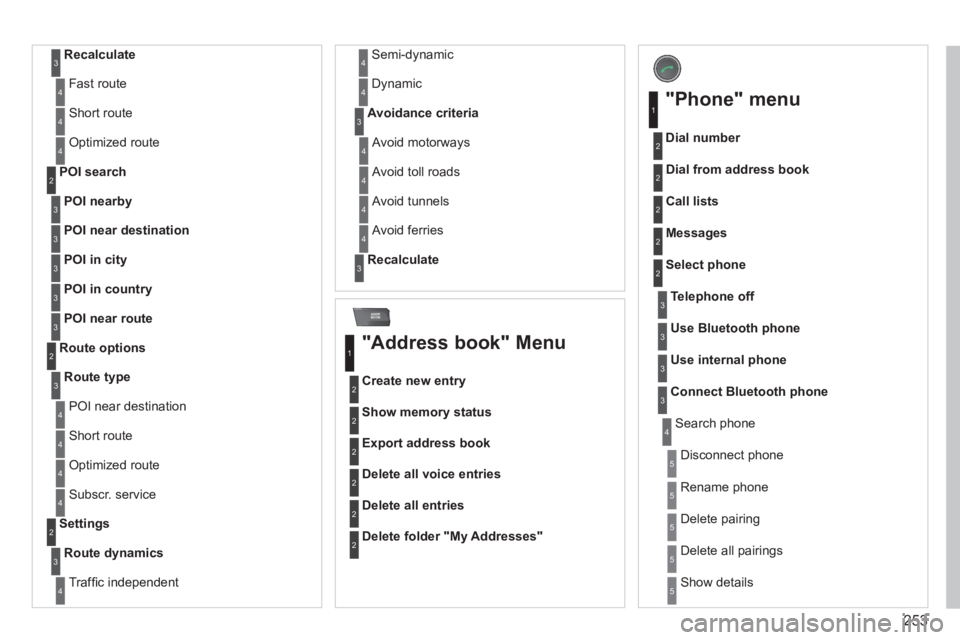
Recalculate
3
Fast route 4
Short route 4
Optimized route 4
POI nearby
POI search
2
3
POI near destination
3
POI in city
3
POI in country
3
POI near route
3
Route type
Route options
2
3
POI near destination 4
Short route 4
Optimized route 4
Subscr. service 4
Route dynamics
Settings
2
3
Traffi c independent 4
Semi-dynamic 4
Dynamic 4
Avoidance criteria
3
Avoid motorways 4
Avoid toll roads 4
Avoid tunnels 4
Avoid ferries 4
Recalculate
3
"Address book" Menu
Create new entry
1
2
Show memory status 2
Export address book 2
Delete all voice entries 2
Delete all entries 2
Delete folder "My Addresses"
2
"Phone" menu
Dial number
1
2
Dial from address book 2
Call lists 2
Messages 2
Select phone 2
Search phone 4
Telephone off
3
Use Bluetooth phone
3
Use internal phone
3
Connect Bluetooth phone
3
Disconnect phone 5
Rename phone 5
Delete pairing 5
Delete all pairings 5
Show details 5
Page 274 of 328
272
04
8
6
7
4
3
5
2
1
NAVIGATION - GUIDANCE
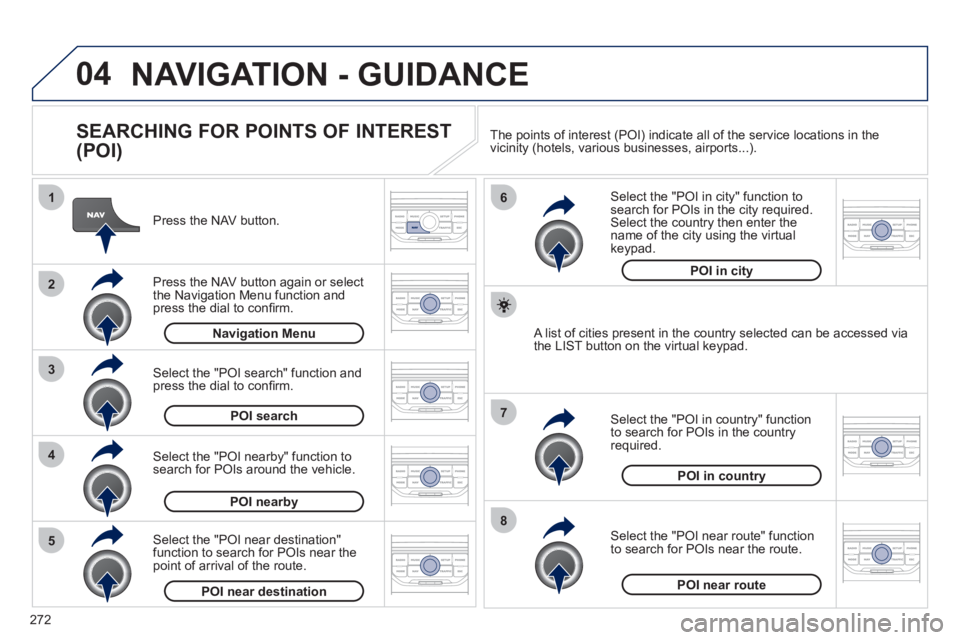
SEARCHING FOR POINTS OF INTEREST
(POI)
Press the NAV button.
Press the NAV button again or select
the Navigation Menu function and
press the dial to confi rm.
Select the "POI nearby" function to
search for POIs around the vehicle.
Select the "POI search" function and
press the dial to confi rm.
Navigation Menu
POI search
POI nearby
Select the "POI in city" function to
search for POIs in the city required.
Select the country then enter the
name of the city using the virtual
keypad.
Select the "POI near route" function
to search for POIs near the route.
Select the "POI in country" function
to search for POIs in the country
required.
Select the "POI near destination"
function to search for POIs near the
point of arrival of the route.
POI near destination
POI near route
POI in country
POI in city
A list of cities present in the country selected can be accessed via
the LIST button on the virtual keypad. The points of interest (POI) indicate all of the service locations in the
vicinity (hotels, various businesses, airports...).
Page 275 of 328
273
04 NAVIGATION - GUIDANCE
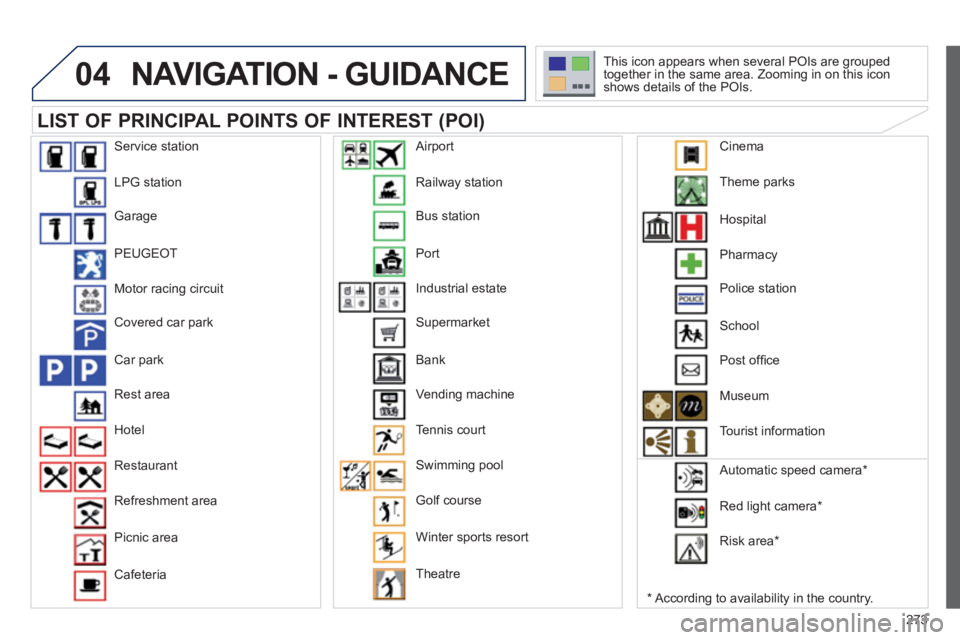
LIST OF PRINCIPAL POINTS OF INTEREST (POI)
*
According to availability in the country. This icon appears when several POIs are grouped
together in the same area. Zooming in on this icon
shows details of the POIs.
Service station
LPG station
Garage
PEUGEOT
Motor racing circuit
Covered car park
Car park
Rest area
Hotel
Restaurant
Refreshment area
Picnic area
Cafeteria Railway station
Bus station
Port
Industrial estate
Supermarket
Bank
Vending machine
Tennis court
Swimming pool
Golf course
Winter sports resort
Theatre
Airport
Theme parks
Hospital
Pharmacy
Police station
School
Post offi ce
Museum
Tourist information
Automatic speed camera *
Red light camera *
Risk area *
Cinema
Page 283 of 328
281
08
1
2
3
4
BLUETOOTH TELEPHONE
*
The services available depend on the network, the SIM card and the
compatibility of the Bluetooth telephone used. Check the telephone
manual and with your network provider for details of the services
available to you.
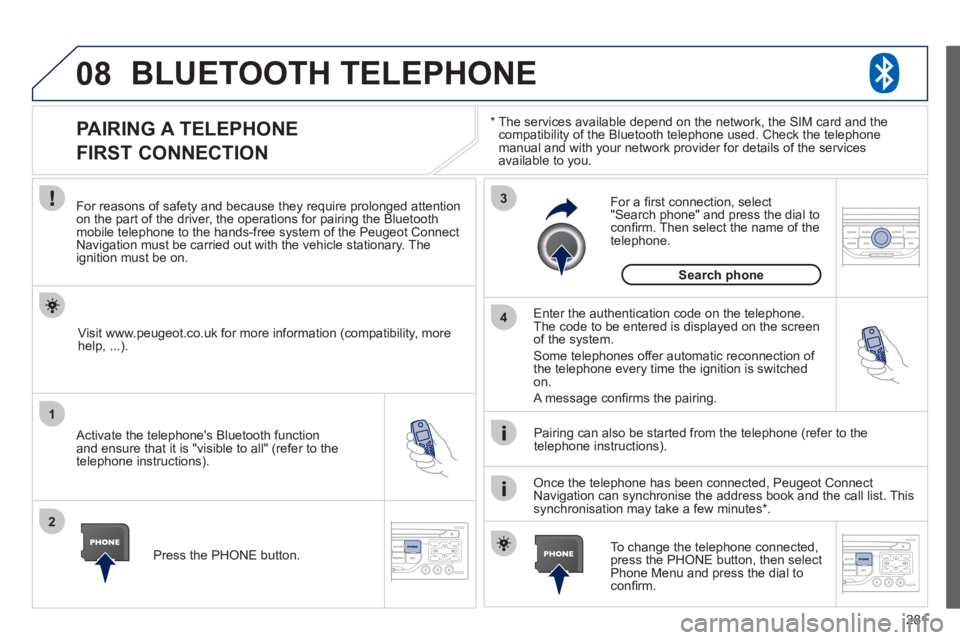
PAIRING A TELEPHONE
FIRST CONNECTION
For reasons of safety and because they require prolonged attention
on the part of the driver, the operations for pairing the Bluetooth
mobile telephone to the hands-free system of the Peugeot Connect
Navigation must be carried out with the vehicle stationary. The
ignition must be on.
Activate the telephone's Bluetooth function
and ensure that it is "visible to all" (refer to the
telephone instructions).
Enter the authentication code on the telephone.
The code to be entered is displayed on the screen
of the system.
Some telephones offer automatic reconnection of
the telephone every time the ignition is switched
on.
A message confi rms the pairing.
To change the telephone connected,
press the PHONE button, then select
Phone Menu and press the dial to
confi rm.
Once the telephone has been connected, Peugeot Connect
Navigation can synchronise the address book and the call list. This
synchronisation may take a few minutes * .
Pairing can also be started from the telephone (refer to the
telephone instructions).
Visit www.peugeot.co.uk for more information (compatibility, more
help, ...).
Press the PHONE button.
For a fi rst connection, select
"Search phone" and press the dial to
confi rm. Then select the name of the
telephone.
Search phone
Page 284 of 328
282
08
1
2
2
1
*
The services available depend on the network, the SIM card and the
compatibility of the Bluetooth telephone used. Check the telephone
manual and with your network provider for details of the services
available to you.
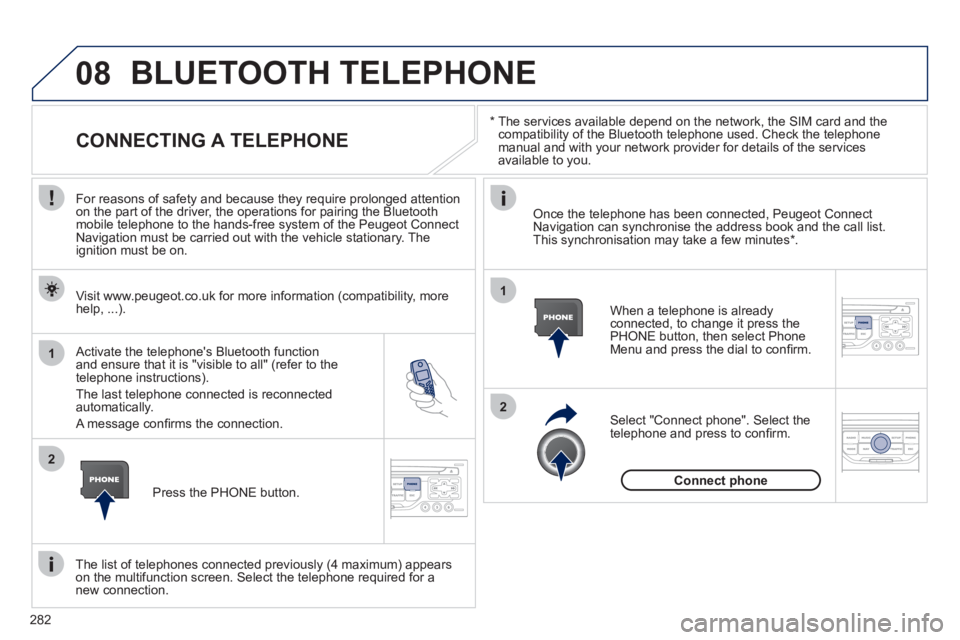
BLUETOOTH TELEPHONE
CONNECTING A TELEPHONE
For reasons of safety and because they require prolonged attention
on the part of the driver, the operations for pairing the Bluetooth
mobile telephone to the hands-free system of the Peugeot Connect
Navigation must be carried out with the vehicle stationary. The
ignition must be on.
Activate the telephone's Bluetooth function
and ensure that it is "visible to all" (refer to the
telephone instructions).
The last telephone connected is reconnected
automatically.
A message confi rms the connection.
When a telephone is already
connected, to change it press the
PHONE button, then select Phone
Menu and press the dial to confi rm.
Once the telephone has been connected, Peugeot Connect
Navigation can synchronise the address book and the call list.
This synchronisation may take a few minutes * .
The list of telephones connected previously (4 maximum) appears
on the multifunction screen. Select the telephone required for a
new connection.
Visit www.peugeot.co.uk for more information (compatibility, more
help, ...).
Press the PHONE button.
Select "Connect phone". Select the
telephone and press to confi rm.
Connect phone
Page 305 of 328
303
06
1
2
3
4
5
6
7
8
9
MENU
OK
BLUETOOTH
For safety reasons and because they require prolonged attention
on the part of the driver, the operations for pairing of the Bluetooth
mobile telephone with the Bluetooth hands-free system of your
audio equipment must be carried out with the vehicle stationary
and the ignition on.
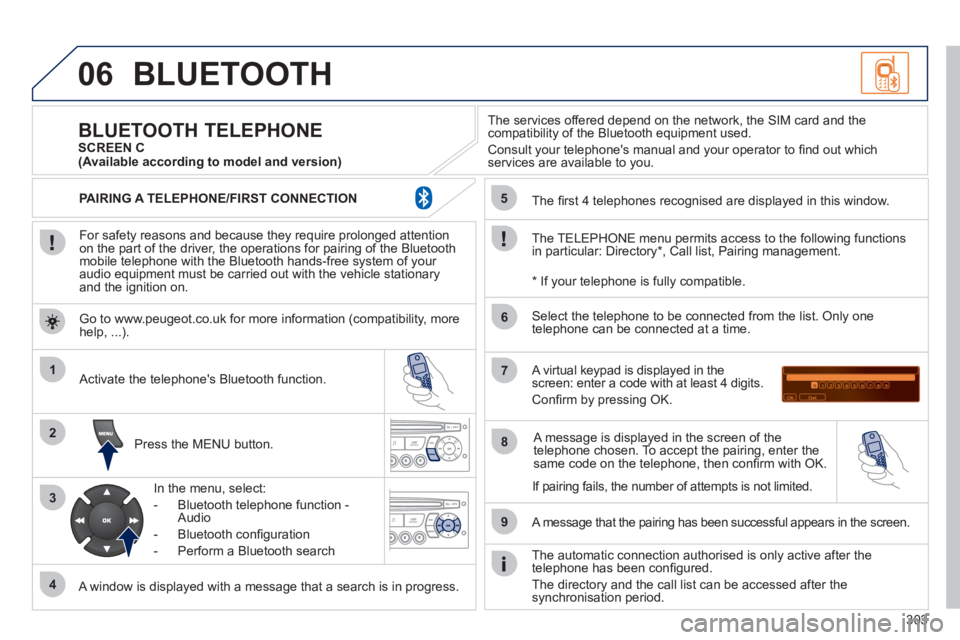
Press the MENU button.
A window is displayed with a message that a search is in progress.
Activate the telephone's Bluetooth function.
In the menu, select:
- Bluetooth telephone function -
Audio
- Bluetooth confi guration
- Perform a Bluetooth search
The services offered depend on the network, the SIM card and the
compatibility of the Bluetooth equipment used.
Consult your telephone's manual and your operator to fi nd out which
services are available to you.
BLUETOOTH TELEPHONE
SCREEN C
The TELEPHONE menu permits access to the following functions
in particular: Directory * , Call list, Pairing management.
The fi rst 4 telephones recognised are displayed in this window.
A virtual keypad is displayed in the
screen: enter a code with at least 4 digits.
Confi rm by pressing OK.
A message that the pairing has been successful appears in the screen.
Select the telephone to be connected from the list. Only one
telephone can be connected at a time.
A message is displayed in the screen of the
telephone chosen. To accept the pairing, enter the
same code on the telephone, then confi rm with OK.
The automatic connection authorised is only active after the
telephone has been confi gured.
The directory and the call list can be accessed after the
synchronisation period.
(Available according to model and version)
*
If your telephone is fully compatible.
If pairing fails, the number of attempts is not limited. Go to www.peugeot.co.uk for more information (compatibility, more
help, ...).
PAIRING A TELEPHONE/FIRST CONNECTION